Didier Stevens

Tuesday 26 December 2017

Cracking Encrypted PDFs – Part 1

Filed under: Encryption,Forensics,Hacking,PDF — Didier Stevens @ 17:15

In this series of blog posts, I’ll explain how I decrypted the encrypted PDFs shared by John August (John wanted to know how easy it is to crack encrypted PDFs, and started a challenge).

Here is how I decrypted the “easy” PDF (encryption_test).

From John’s blog post, I know the password is random and short. So first, let’s check out how the PDF is encrypted.

pdfid.py confirms the PDF is encrypted (name /Encrypt):

pdf-parser.py can tell us more:

The encryption info is in object 26:

From this I can conclude that the standard encryption filter was used. This encryption method uses a 40-bit key (usually indicated by a dictionary entry: /Length 40, but this is missing here).

PDFs can be encrypted for confidentiality (requiring a so-called user password /U) or for DRM (using a so-called owner password /O). PDFs encrypted with a user password can only be opened by providing this password. PDFs encrypted with a owner password can be opened without providing a password, but some restrictions will apply (for example, printing could be disabled).

QPDF can be used to determine if the PDF is protected with a user password or an owner password:

This output (invalid password) tells us the PDF document is encrypted with a user password.

I’ve written some blog posts about decrypting PDFs, but because we need to perform a brute-force attack here (it’s a short random password), this time I’m going to use hashcat to crack the password.

First we need to extract the hash to crack from the PDF. I’m using pdf2john.py to do this. Remark that John the Ripper (Jumbo version) is now using pdf2john.pl (a Perl program), because there were some issues with the Python program (pdf2john.py). For example, it would not properly generate a hash for 40-bit keys when the /Length name was not specified (like is the case here). However, I use a patched version of pdf2john.py that properly handles default 40-bit keys.

Here’s how we extract the hash:

This format is suitable for John the Ripper, but not for hashcat. For hashcat, just the hash is needed (field 2), and no other fields.

Let’s extract field 2 (you can use awk instead of csv-cut.py):

I’m storing the output in file “encryption_test – CONFIDENTIAL.hash”.

And now we can finally use hashcat. This is the command I’m using:

hashcat-4.0.0\hashcat64.exe --potfile-path=encryption_test.pot -m 10400 -a 3 -i "encryption_test - CONFIDENTIAL.hash" ?a?a?a?a?a?a

I’m using the following options:

  • –potfile-path=encryption_test.pot : I prefer using a dedicated pot file, but this is optional
  • -m 10400 : this hash mode is suitable to crack the password used for 40-bit PDF encryption
  • -a 3 : I perform a brute force attack (since it’s a random password)
  • ?a?a?a?a?a?a : I’m providing a mask for 6 alphanumeric characters (I want to brute-force passwords up to 6 alphanumeric characters, I’m assuming when John mentions a short password, it’s not longer than 6 characters)
  • -i : this incremental option makes that the set of generated password is not only 6 characters long, but also 1, 2, 3, 4 and 5 characters long

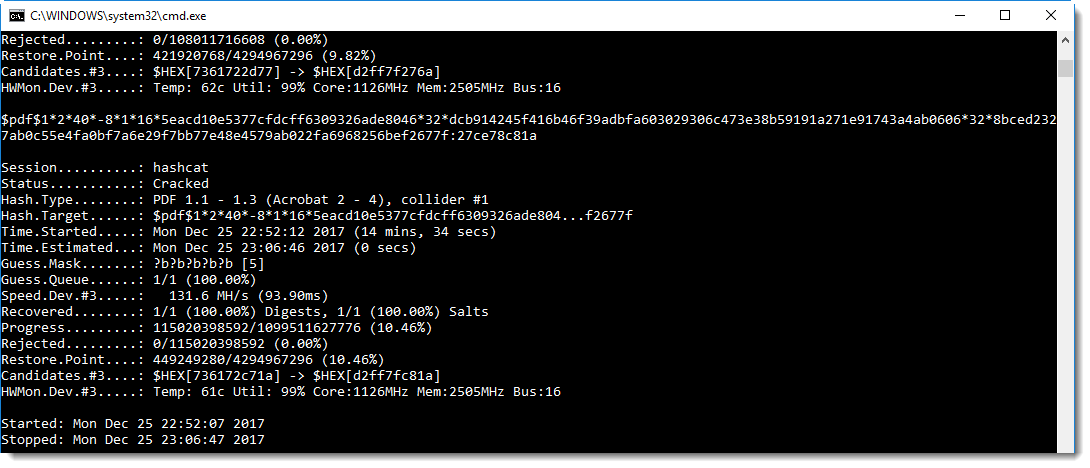
And here is the result:

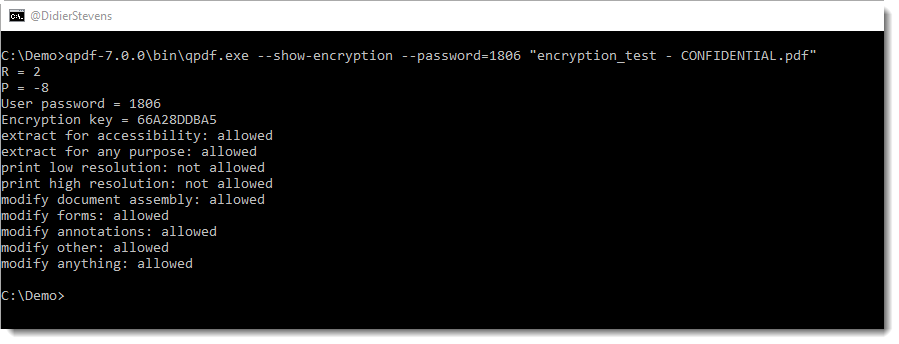
The recovered password is 1806. We can confirm this with QPDF:

Conclusion: PDFs protected with a 4 character user password using 40-bit encryption can be cracked in a couple of seconds using free, open-source tools.

FYI, I used the following GPU: GeForce GTX 980M, 2048/8192 MB allocatable, 12MCU

Update: this is the complete blog post series:

Tuesday 19 December 2017

New Tool: format-bytes.py

Filed under: My Software — Didier Stevens @ 0:00

I regularly copy bytes from my command-line tool over to 010 Editor to have this data represented by the Inspector using different formats, like this:

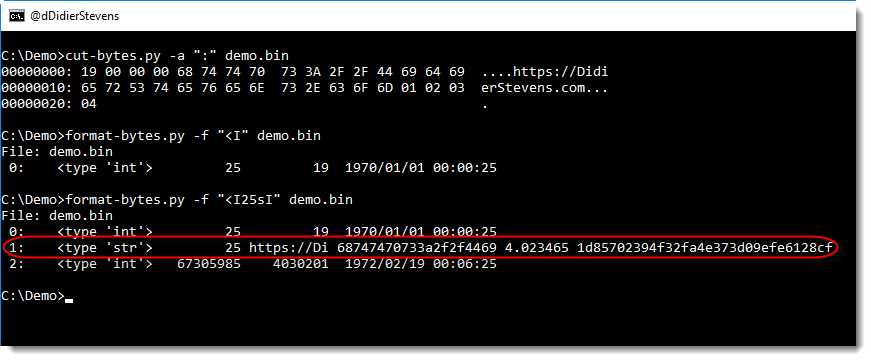
format-bytes.py is a new tool with which I try to achieve a similar result:

Using option -f, it is essentially a wrapper for the struct module. In the following example, we parse the beginning of the PE header of 2 Windows executables:

This shows us that both files have 6 sections and that notepad is from 2016 and regedit from 2017.

-f IHHI uses the struct module’s formatting to specify how to parse the bytes, and “#c#[‘PE’]:” is a cut-expression to carve the PE header out of the executables.

format-bytes_V0_0_3.zip (https)
MD5: CFE426B605DEDA6E388C1F62D2655A31
SHA256: 227C3911A0D2B9D8E524B44D5B4F80EBAABD34810A11A9189B09ADFA5D2FB67A

Monday 18 December 2017

New Tool: xmldump.py

Filed under: My Software — Didier Stevens @ 0:00

Sometimes I want to see the content of (malicious) .docx files without using MS Office. I will use my zipdump.py tool to extract the XML file with the content, and then use sed or translate.py to strip out XML tags.

But that doesn’t always yield the best results. Here is a small tool, xmldump, that will parse an XML file and output the text.

It supports 2 commands for the moment: text and wordtext.

Command text extracts the text between any XML tags.

Command wordtext extracts the text between Word paragraph XML tags (<w:p>) and prints each paragraph’s text on a separate line.


xmldump_V0_0_1.zip (https)
MD5: 23D5643E45B97D6AE641DF6CAFA79370
SHA256: A999F2297EE44FAABCA5A025DAEC7E84CB30D34C68F181357BA439EBFE38A660

Sunday 17 December 2017

New oledump Plugin: plugin_msg.py / oledump.py Version 0.0.32

Filed under: My Software — Didier Stevens @ 0:00

Outlook MSG files are also ole files.

Here is a new plugin (plugin_msg.py) for oledump that identifies streams in MSG files based on the 8-digit hexadecimal codes in the stream name.

The first 4 hexadecimal digits identify the content of stream, and the next 4 hexadecimal digits identify the type of the stream.

oledump_V0_0_32.zip (https)
MD5: 10D8995B6AF5C783B1F8AAF70B8FDB03
SHA256: 0E38BAF12B066A100F97F3362402E1999F2DE223A09491E3D44C20EA4BDBD8AB

Thursday 14 December 2017

Update: plugin_biff.py Version 0.0.2 / oledump.py Version 0.0.31

Filed under: maldoc,My Software,Update — Didier Stevens @ 0:00

This is an update to plugin_biff, the oledump plugin to parse the BIFF format (used in .xls files).

New options allow to search for opcodes (-o) and strings/bytes (-f) inside BIFF records:


oledump_V0_0_31.zip (https)
MD5: 63B2B5ECE2BC46B937D33A6494F7F6A0
SHA256: D2CF42662897642DF27C863F6C246CE70019EDF03F275354A7A505DCE27632D1

Monday 11 December 2017

New Tool: hash.py

Filed under: My Software — Didier Stevens @ 0:00

This is a new tool, it’s essentially a wrapper for the Python module hashlib: it calculates cryptographic hashes.

I needed this (block mode) for the analysis of a particular malware sample, to be explained in the next blog post.


hash_V0_0_1.zip (https)
MD5: 8ECC05DEFBD4AB494A37DE02615A8FE1
SHA256: 07A1ED7FD00FB18B616540CB108AA1D2134B07CC509E11257E4E43FFF9A185C2

Sunday 10 December 2017

Update: rtfdump.py Version 0.0.6

Filed under: My Software,Update — Didier Stevens @ 10:31

This new version of rtfdump.py adds extra information when analyzing the content of an RTF file:

  • Extra info for objects
  • Size longest contiguous hexadecimal string

rtfdump_V0_0_6.zip (https)
MD5: B4F9264F2431322F52BAAB834A5A144D
SHA256: C15918E89313D03F01BC8A3BCB68376B6E21558567BDFD81889F48196DC80986

Wednesday 6 December 2017

Overview of Content Published In November

Filed under: Announcement — Didier Stevens @ 0:00

Here is an overview of content I published in November:

Blog posts:

SANS ISC Diary entries:

Monday 27 November 2017

Update: pdfid.py Version 0.2.3

Filed under: My Software,PDF,Update — Didier Stevens @ 0:00

In this new version of pdfid.py, a new option was added: -n.

With this option, you can suppress output for names with a count of zero:

pdfid_v0_2_3.zip (https)
MD5: 65966E8BBF932D3C0830B755FDE094FE
SHA256: 9482176D173EFA6F2F33EE409B091BFA45685FC285B87F7219A4E9418B47F739

Monday 20 November 2017

Update: pcap-rename.py Version 0.0.2

Filed under: My Software,Update — Didier Stevens @ 0:00

pcap-rename.py is a program to rename pcap files with the timestamp of the first packet in the pcap file.

This new version supports big-endian pcap files.

pcap-rename_V0_0_2.zip (https)
MD5: 6EFFA5313946DEAF3363835B1D3C684E
SHA256: 3BA23CC936B49AF83306E486B0BFC9ABAF5BD0B5E3DEF81D8564BCC3810C06B9

« Previous PageNext Page »

Blog at WordPress.com.