Didier Stevens

Sunday 27 September 2009

Preventing Malicious Documents from Compromising Windows Machines

Filed under: My Software — Didier Stevens @ 13:33

Almost all shellcode I see in malicious documents (PDF, Word, Powerpoint, …) found “in the wild” does the following:

  1. download a trojan from the Internet using HTTP
  2. write the downloaded executable to SYSTEM32
  3. execute the downloaded executable

This infection method only works if the user is local admin. If the exploited program has no rights to write to SYSTEM32, the shellcode will just fail and the trojan will not infect the machine.

To protect yourself and/or your users against this type of attack (I’m not talking about targeted attacks), restrict the user rights. Windows Vista and later versions do this for you with UAC, even if you’re an administrator.

On Windows XP, you have to use a normal user account in stead of an admin account to achieve this. But running non-admin on Windows XP is not always easy. If you really need to allow admin rights on Windows XP, you can still prevent high-risk applications (like Adobe Acrobat and Microsoft Office) from having full control over the system by restricting their rights. This is done by using a restricted token for the processes of these applications.

There are 2 popular tools to launch programs with a restricted token:

Both tools create a restricted token (by removing privileges and denying groups that provide local admin rights) and then launch the target program with this restricted token.

It’s not always easy to launch a program with DropMyRights, as there are many ways a program can be launched on Windows. For example with a file-type association or from a browser. To help you configure Windows to always restrict the rights of a specific program, StripMyRights also support the “Image File Execution Options” method with the /D option. The “Image File Execution Options” is designed to allow you to launch a program automatically inside a debugger. In the “Image File Execution Options” registry key, you specify the debugger to use. But this can really be any executable.

Example: to restrict the rights of Adobe Reader, add StripMyRights to the AcroRd32.exe Image Execution path like this:

[HKEY_LOCAL_MACHINE\SOFTWARE\Microsoft\Windows NT\CurrentVersion\Image File Execution Options\acrord32.exe]
"Debugger"="StripMyRights.exe /D /L N"

This way, each time AcroRd32.exe is executed, StripMyRights executes first, creates a restricted token and then launches AcroRd32.exe with this restricted token.

20090927-001

But executing StripMyRights before executing the target application doesn’t always yield satisfactory results, sometimes it breaks the application, because of the broken process tree.

That’s why I developed an alternative, LowerMyRights.dll, to be presented in an upcoming blogpost.

Wednesday 9 September 2009

QuickPost: Arduino + Alcohol Gas Sensor + WiShield + LCD

Filed under: Arduino,Hardware,Quickpost — Didier Stevens @ 20:07

This is a little project I’m working on for Brucon:

20090909-212457

This is an Arduino with a WiFi adapter (WiShield), an LCD and a gas sensor (senses gases like ethanol).

What it does: the Arduino reads the sensor (uncalibrated for the moment), displays its value on line 1 of the LCD and also servers it on a web page (with an embedded webserver connecting to the WiFi network via the WiShield).
If the sensor read-out is 900 or more, a LED is turned on.
And I can send a message via the webserver to line 2 of the LCD.

The problem I had to solve: the LCD didn’t work when the WiShield was operating.

The cause: the WiShield library and the LCD library use some common pins.

Solution: change the pin assignment in the LCD library code (LCD4Bit.cpp):

// --------- PINS -------------------------------------
//is the RW pin of the LCD under our control?  If we're only ever going to write to the LCD, we can use one less microcontroller pin, and just tie the LCD pin to the necessary signal, high or low.
//this stops us sending signals to the RW pin if it isn't being used.
int USING_RW = false;

//RS, RW and Enable can be set to whatever you like
int RS = 1;
int RW = 11;
int Enable = 0;
//DB should be an unseparated group of pins  - because of lazy coding in pushNibble()
int DB[] = {3, 4, 5, 6};  //wire these to DB4~7 on LCD.

//--------------------------------------------------------

And don’t forget to delete LCD4Bit.o before recompiling the code. The Arduino IDE doesn’t check dependencies of libraries when compiling.

And yes, once calibrated, you should be able to use this alcohol gas sensor to prevent drunk e-mailing 😉 But you’ll need to add a sensor to verify you’re actually blowing into the alcohol gas sensor. For example a gas pressure sensor.


Quickpost info


Tuesday 1 September 2009

Link: case of the tweep abduction

Filed under: Entertainment,Uncategorized — Didier Stevens @ 20:15

I know, I love a bit of mischief 😉

Wim renamed his “old” Twitter account @domgingelom to the “new” @wimremes. And then I promptly registered @domdingelom… 😉

Did some Tweeting under an assumed name…

And then gave the “new” @domdingelom to Wim.

Thursday 27 August 2009

The Brucon WiFi Puzzle Solution

Filed under: Puzzle — Didier Stevens @ 14:16

Here’s one way to solve the Brucon WiFi Puzzle: open the capture file with Wireshark.

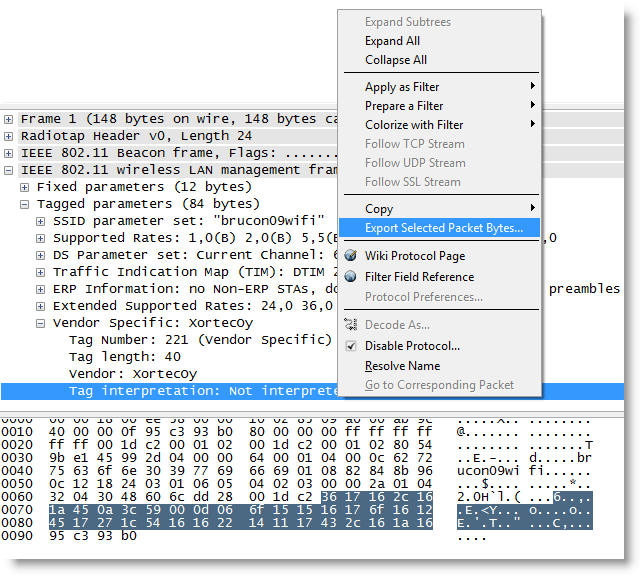
The capture file contains one beacon frame for the brucon09wifi network. If you’re a bit familiar with beacon frames, one tag will stand out: the vendor specific tag which Wireshark can’t interpret because it’s from a vendor it doesn’t know.

bruconwifipuzzle-1

The hidden data is inside the vendor specific tag. Select it and export the selected bytes:

bruconwifipuzzle-2b

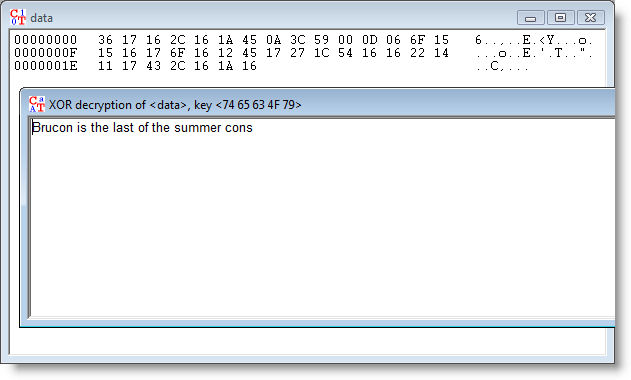
How do you decode this data? You can try all types of encoding and encryption schemes, but to prevent you from wasting time trying countless possibilities, I’ve given you a hint in the name of the vendor: XortecOy. The data is XOR-encrypted. And the key is tecOy. 😉

Open the saved bytes with Cryptool:

bruconwifipuzzle-3

And apply XOR-decryption with key tecOy:

bruconwifipuzzle-4

Et voilà!

Wednesday 26 August 2009

Yubikey, Trojans and Twitter

Filed under: Encryption,Hardware,Malware — Didier Stevens @ 11:33

Stina, Yubico’s CEO, gave me a Yubikey at RSA London last year. It’s a small keyfob simulating a USB keyboard. Each time you press the button while it’s inserted in a USB port, it generates a one-time-password.

20090825-221451

The Yubikey is a clever little two-factor authentication device.

But I’ve some issues using the Yubikey in a really secure system. As Twitter plays a role in this, and because lately Twitter started to be used by trojans as a communication channel, I decided it’s time to publish the issues I encountered together with mitigating actions.

Technical details

The OTP generated by the Yubikey is an AES-encrypted data stream. I’ve obtained the AES-key embedded in my Yubikey from Yubico and am able to decode the OTP with a simple Python program.

Insert Yubikey and start generating OTPs:

OTP: lkeuuuceeeivjgtbjcbevigeccerfufugdijuhflckrd
public_id = lkeuuuceeeiv
secret_id = ************
counter = 26
counter_session = 1
random_number = 13042
timestamp = 0x8321a8
  • public_id and secret_id identifies the Yubikey (notice that the public_id is the prefix of the OTP).
  • counter: this is a persistent register. It is increased with 1 each time the Yubikey is inserted in a USB port.
  • counter_session: this is a volatile register. It is set to 0 each time the Yubikey is inserted in a USB port, and increased with 1 for each OTP generation
  • random_number is what it says on the tin: a random number, different per OTP
  • timestamp is a volatile 32-bit register. It is set to a random value each time the Yubikey is inserted in a USB port, and is then increased with 1 by a 8Hz clock. Yubico specifies an average variation of 20% on the 8Hz clock per Yubikey. With the measurements I made, I calculate that the 8Hz clock of my key has a 32% deviation.

Validating an OTP is done by successfully decrypting the OTP. Replay attacks are mitigated by comparing the counters and timestamp with historical data.

When trying to design a website that uses the Yubikey to authenticate, I imagined the following attack and found a way to mitigate it.

Attack 1:

Assume a website that uses the Yubikey to logon (i.e. an OTP generated with your Yubikey is needed to log on to the site, possibly together with more classic credentials like a username/password combo).
Because this website has my AES key and can decrypt my OTP, my Yubikey authenticates me and I’m granted access to the site.
A web browser trojan could steal an OTP like this:

  1. I generate an OTP (OTP1) with my Yubikey
  2. The trojan intercepts and stores OTP1, doesn’t send OTP1 to the website, but makes the browser display a fake error message (404, server load too high, Yubikey error, …) prompting me to generate a second OTP
  3. I’m fooled by the fake error, and generate a second OTP (OTP2) with my Yubikey
  4. The trojan intercepts and stores OTP2, and sends OTP1 to the website
  5. The website grants me access, and the trojan stops interfering
  6. OTP2 can be used by the operators of the trojan to get access to the website, as long as I’m not first to access the website at a later time with a new OTP (OTP3). Twitter could be used as a channel to communicate the OTPs in real-time to the trojan operators.

Mitigation:

The website can detect this attack (the malicious use of OTP2) if the following algorithm is implemented:

  1. for every account, the last valid OTP is stored, together with a server-side timestamp (when it was received by the website)
  2. if a new OTP is received, the counter value of the previous OTP is compared with the counter value of the new OTP
  3. when both counters have the same value, the website knows that the OTPs were generated in the same session, and thus that it can compare timestamps.
  4. it calculates the delta of the timestamps of the OTPs, and also the delta of the server-side timestamps when it received the OTPs.
  5. if the 2 deltas differ too much (more than 20% margin), then it refuses the OTP and doesn’t grand access to the website

But now comes the second attack for which I have no mitigation, despite some help from the Yubico forum.

Attack 2:

Assume a website which uses the Yubikey OTP to 1) authenticate users and 2) validate transactions. A classic example of such a site is an online banking site. The user generates an OTP to logon, and then has to generate an OTP for each financial transaction.
A web browser trojan could insert its own transaction like this:

  1. I generate an OTP (OTP1) with my Yubikey
  2. The trojan intercepts and stores OTP1 together with a timestamp, doesn’t send OTP1 to the website, but makes the browser display a fake error message (404, server load too high, Yubikey error, …) prompting me to generate a second OTP
  3. I’m fooled by the fake error, and generate a second OTP (OTP2) with my Yubikey
  4. The trojan intercepts and stores OTP2 together with a timestamp, and sends OTP1 to the website
  5. The website grants me access
  6. After an amount of time equal to the delta between the 2 stored timestamps, the trojan starts a transaction (invisible to the user) and uses OTP2 to validate the transaction.
  7. When I start my own transactions, the trojan passes the OTPs on to the website, but delays them with the same timestamp delta to avoid post-exploitation detection.

I can’t device an algorithm to detect this fraud server-side, if the Yubikey is the only authentication and validation mechanism used. This attack would not work with a challenge-response token, because the keys generated by such a token are different for logon and transaction validation. Typically, these tokens generate one type of keys for logon, and another type of keys based on a challenge for transactions. The challenge encodes data of the transaction, so that a particular challenge can’t be used for another transaction.

One Yubico forum member suggests a type of CAPTCHA to ensure that each submitted OTP is submitted by a human (hence the CAPTCHA), but I don’t believe this is practical, as malware is able to defeat some CAPTCHAs and humans are unable to solve some CAPTCHAs.

Feel free to post a comment with your migitation suggestions, but please keep them practical ;-).

Sunday 23 August 2009

Quickpost: Ardubot Programming

Filed under: Hardware,Quickpost — Didier Stevens @ 14:15

Here’s a small post with extra details on building an Ardubot; details I didn’t find online.

The missing info is which Arduino output lines control the 2 motors. Measuring with a multimeter reveals digital outputs 3, 5, 6 and 9.

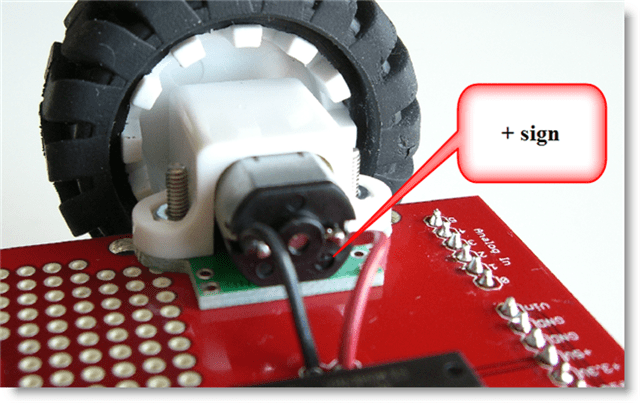
I place and solder the motors like this:

The +-sign closest to the PCB:

ardubot-motor-plus-sign

Red wire soldered to + connector, black wire soldered to – connector:

ardubot-motor-wires

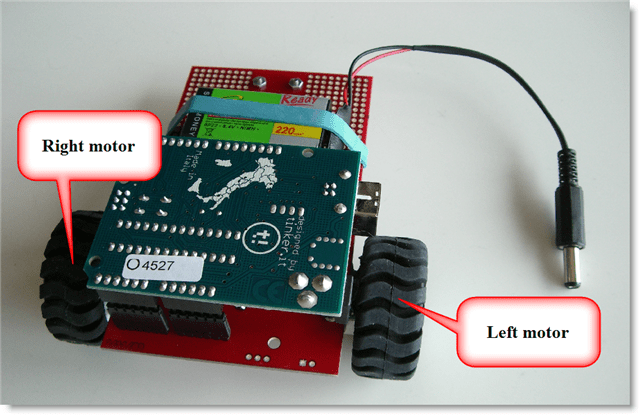
I defined left motor and right motor like this:

ardubot

And here’s the schema:

ardubot-schema

To power the left motor in a forward drive, set digital output 9 high and digital output 6 low.

To power the left motor in a reverse drive, do the oposite of a forward drive (9 low and 6 high).

To power down a motor, set both digital outputs low.

To power the right motor in a forward drive, set digital output 5 low and digital output 3 high.

To power the right motor in a reverse drive, do the oposite of a forward drive (5 high and 3 low).

Arduino code:

/*
	Ardubot motor-driving example program
	Version 0.0.1
	Source code put in public domain by Didier Stevens, no Copyright
	https://DidierStevens.com
	Use at your own risk

	History:
	2009/08/21: Start development
	2009/08/23: refactoring
*/

unsigned char PIN_HBRIDGE_1A = 9;
unsigned char PIN_HBRIDGE_2A = 6;
unsigned char PIN_HBRIDGE_3A = 5;
unsigned char PIN_HBRIDGE_4A = 3;

void MotorLeftStop()
{
  digitalWrite(PIN_HBRIDGE_1A, LOW);
  digitalWrite(PIN_HBRIDGE_2A, LOW);
}

void MotorLeftForward()
{
  digitalWrite(PIN_HBRIDGE_1A, HIGH);
  digitalWrite(PIN_HBRIDGE_2A, LOW);
}

void MotorLeftReverse()
{
  digitalWrite(PIN_HBRIDGE_1A, LOW);
  digitalWrite(PIN_HBRIDGE_2A, HIGH);
}

void MotorRightStop()
{
  digitalWrite(PIN_HBRIDGE_3A, LOW);
  digitalWrite(PIN_HBRIDGE_4A, LOW);
}

void MotorRightForward()
{
  digitalWrite(PIN_HBRIDGE_3A, LOW);
  digitalWrite(PIN_HBRIDGE_4A, HIGH);
}

void MotorRightReverse()
{
  digitalWrite(PIN_HBRIDGE_3A, HIGH);
  digitalWrite(PIN_HBRIDGE_4A, LOW);
}

void setup() {
  pinMode(PIN_HBRIDGE_1A, OUTPUT);
  pinMode(PIN_HBRIDGE_2A, OUTPUT);
  pinMode(PIN_HBRIDGE_3A, OUTPUT);
  pinMode(PIN_HBRIDGE_4A, OUTPUT);
}

void loop(){
  MotorLeftStop();
  MotorRightStop();
  delay(2000);

  MotorLeftForward();
  delay(2000);

  MotorLeftStop();
  delay(2000);

  MotorLeftReverse();
  delay(2000);

  MotorLeftStop();
  delay(2000);

  MotorRightForward();
  delay(2000);

  MotorRightStop();
  delay(2000);

  MotorRightReverse();
  delay(2000);

  MotorRightStop();
  delay(2000);

  delay(5000);
}

One tip: if you use the large wheels, get a header kit to raise the Arduino Duemilanove, otherwise the wheel will block access to the power and USB connectors:

ardubot-header-kit


Quickpost info


Friday 21 August 2009

Update: Time Lapse Photography with a Nokia Mobile

Filed under: My Software,Update — Didier Stevens @ 14:51

I’ve debugged the issues some people had with my Nokia time lapse Python script, you can find a new version here.

Tuesday 11 August 2009

Update: UserAssist Tool Version 2.4.3

Filed under: Forensics,My Software,Update — Didier Stevens @ 16:07

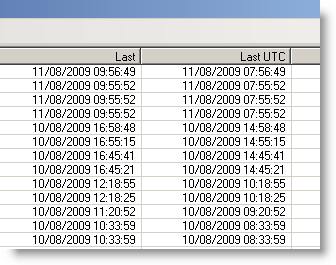
I had an interesting discussion with Hans Heins concerning the timestamp displayed by my UserAssist tool.

The first version of the UserAssist tool would only decode the UserAssist registry keys of the account under which it was running. And thus it made sense to display the timestamp in local time format, even if the entry is stored in UTC.

I added a warning about the time zones when I added registry file import functions, but this was confusing.

This new version of the UserAssist tool adds an extra column, with the timestamp in UTC:

20090811-175725

And I’ll be posting a new version to support the new UserAssist registry key format of Windows 7 and Windows 2008 R2.

Download:

UserAssist_V2_4_3.zip (https)

MD5: A5244C7F83E0DE70600E27F5D3B8AD7D

SHA256: 7E2D107BE84FBBF7E79F1BD11703401A374B5138B2F77E4FF8AFE1A3E749CCDA

Thursday 6 August 2009

Update: pdf-parser Version 0.3.5

Filed under: My Software,PDF,Update — Didier Stevens @ 0:05

After PDFiD, it’s pdf-parser’s turn to get updated.

The major change is support for /Names obfuscation through canonicalization. Now that these obfuscation techniques are found in in-the-wild samples, this feature became a necessity. For example, searching for /JavaScript when the PDF document contains /Java#53cript will also retrieve this obfuscated instance.

And if you need to see the obfuscated names like they are, use option –nocanonicalizedoutput

Support for filter ASCII85Decode has been added.

And option –hash displays the MD5 hash value of objects, making it easier to compare 2 PDF documents.

Download:

pdf-parser_V0_3_5.zip (https)

MD5: 07EA2C47766ADF248102E378C65D03F3

SHA256: 5EAD0F9BE9693EF836CF67FF2B796324ED5E7053D34BF4FA588D250A7DA2E761

Wednesday 5 August 2009

Update: PDFiD Version 0.0.8

Filed under: My Software,PDF,Update — Didier Stevens @ 12:33

PDFiD is updated.

Changes:

  • It detects Flash in PDF (/RichMedia)
  • Actions launched by Forms (/AcroForm)
  • Less stringent %PDF header checking, because I saw some samples designed to bypass pddfid
  • Updated the date format
  • New option –force:  force the scanning of a file, even if no valid %PDF header was found
  • Accepts stdin for pipes, example:  pdf-parser.py –filter –type /ObjStm flash.pdf | pdfid.py –force
    This will scan objects “hidden” in object streams (/objStm)

Download:

pdfid_v0_0_8.zip (https)

MD5: 9769FB96899F3AD15510C903A4FB29EF

SHA256: 542734C2613439851AF99B59725B1607F96A6E9396B447C5BD3AF197AABB0231

« Previous PageNext Page »

Blog at WordPress.com.