Didier Stevens

Friday 19 January 2018

Update: format-bytes.py Version 0.0.4

Filed under: My Software,Update — Didier Stevens @ 21:48

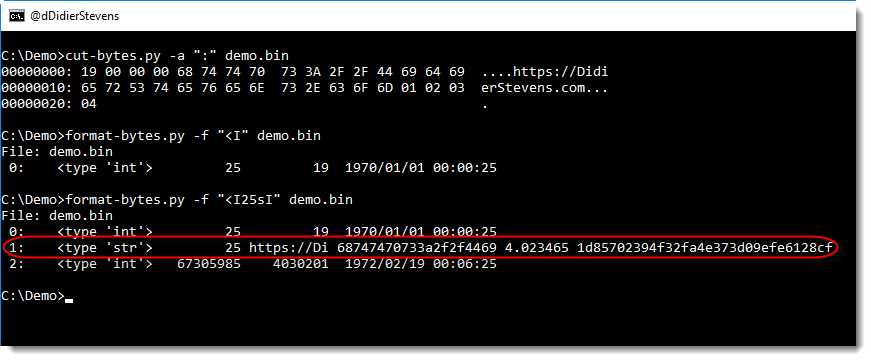
This new version of format-bytes.py display extra information when unpacking strings: string length, first 10 bytes of the string (ASCII and HEX), entropy and MD5 hash.

In this example, a small binary file starts with an integer with the string length (25 bytes), followed by the string (like a Pascal string):

format-bytes_V0_0_4.zip (https)
MD5: EBCF854E9525D470171D7D8E99F836FD
SHA256: CEE2E5B71E1BE8E5D5C934ACCD10BC0FEE2B60DFB6FDB6472F1014CEC4E509EC

Monday 15 January 2018

Update: xmldump.py Version 0.0.2

Filed under: My Software,Update — Didier Stevens @ 0:00

This new version of xmldump introduces 2 new commands to extract information from XML files: elementtext and attributes.

The following video shows how to use these commands:


xmldump_V0_0_2.zip (https)
MD5: 8ABFA4FFE259F61B7C42B2D19EADD8CB
SHA256: 0A8B94EE8C77B404A507F4BEA4C5464146F3745A1FA9017ED3DCE8D7C2D18C15

Tuesday 2 January 2018

Overview of Content Published In December

Filed under: Announcement — Didier Stevens @ 0:00

Here is an overview of content I published in December:

Blog posts:

YouTube videos:

Videoblog posts:

SANS ISC Diary entries:

Monday 1 January 2018

New Tool: What Is New?

Filed under: My Software — Didier Stevens @ 0:00

Isn’t the beginning of a new year a good moment to release a new tool called what-is-new.py? πŸ™‚

It’s actually an old tool, I started this in 2012, because it’s something I have to do often: I have a recurring list, and I need to know what items on that list are new (in a nutshell, that’s the problem I tried to solve).

For example, every week I produce a list of User Agent Strings for the requests to my web servers. With a single what-is-new.py command, I can see what User Agent Strings have never hit my servers before.

what-is-new.py takes one argument and a bunch of files. The argument is the name of the database (a Python pickle file). The input can be a single file, several files or stdin. Every line in these files that was not seen before (i.e. not in the database) will be listed by what-is-new.py

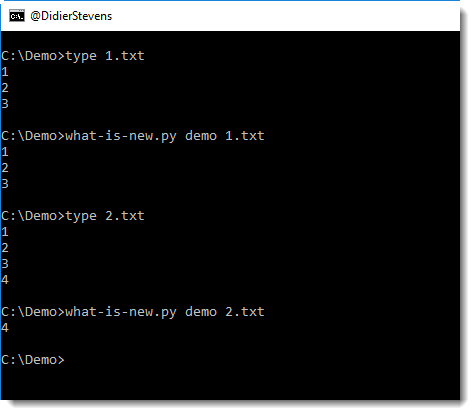
In the following example, I run 2 files through what-is-new (files 1.txt and 2.txt) with database demo. The database doesn’t exist yet, hence all lines of the first file are considered new. But with the second invocation, you can see that only line 4 is new.

The tool has several options, I invite you to take a look at the help (-h) and manual (-m).


what-is-new_V0_0_1.zip (https)
MD5: 02067A60EA2EBEE29E98CAF31CEDDF37
SHA256: A4499A230D1925C164531A68C0E8F4FE016882A44D6EDBFF9F4D7BFFA29D14A4

Friday 29 December 2017

Cracking Encrypted PDFs – Conclusion

Filed under: Encryption,Forensics,Hacking,PDF — Didier Stevens @ 0:00

TL;DR: PDFs protected with 40-bit keys can not guarantee confidentiality, even with strong passwords. When you protect your PDFs with a password, you have to encrypt your PDFs with strong passwords and use long enough keys. The PDF specification has evolved over time, and with it, the encryption options you have. There are many encryption options today, you are no longer restricted to 40-bit keys. You can use 128-bit or 256-bit keys too.

There is a trade-off too: the more advanced encryption option you use, the more recent the PDF reader must be to support the encryption option you selected. Older PDF readers are not able to handle 256-bit AES for example.

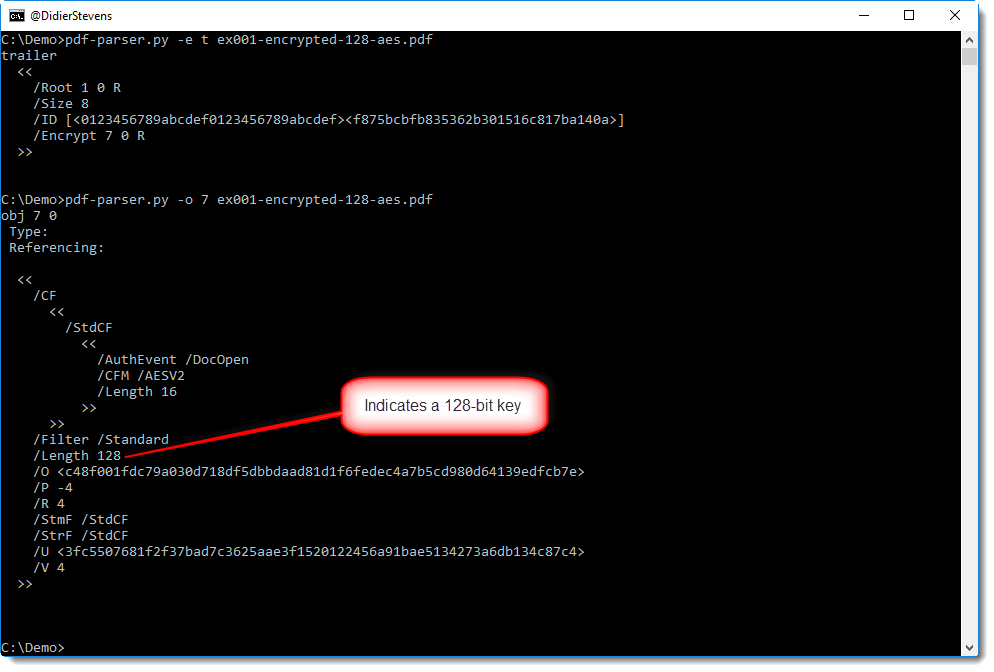
Since each application capable of creating PDFs will have different options and descriptions for encryption, I can not tell you what options to use for your particular application. There are just too many different applications and versions. But if you are not sure if you selected an encryption option that will use long enough keys, you can always check the /Encrypt dictionary of the PDF you created, for example with my pdf-parser (in this example /Length 128 tells us a 128-bit key is used):

Or you can use QPDF to encrypt an existing PDF (I’ll publish a blog post later with encryption examples for QPDF).

But don’t use 40-bit keys, unless confidentiality is not important to you:

I first showed (almost 4 years ago) how PDFs with 40-bit keys can be decrypted in minutes, using a commercial tool with rainbow tables. This video illustrates this.

Later I showed how this can be done with free, open source tools: Hashcat and John the Ripper. But although I could recover the encryption key using Hashcat, I still had to use a commercial tool to do the actual decryption with the key recovered by Hashcat.

Today, this is no longer the case: in this series of blog posts, I show how to recover the password, how to recover the key and how to decrypt with the key, all with free, open source tools.

Overview of the complete blog post series:


Thursday 28 December 2017

Cracking Encrypted PDFs – Part 3

Filed under: Encryption,Forensics,Hacking,PDF — Didier Stevens @ 0:00

I performed a brute-force attack on the password of an encrypted PDF and a brute-force attack on the key of (another) encrypted PDF, both PDFs are part of a challenge published by John August.

The encryption key is derived from the password. it’s not just based on the password only, but also on metadata. This implies that different PDFs encrypted with the same user password, will have different encryption keys.

When you recover the user password of an encrypted PDF, you can just use it with PDF readers like Adobe Reader: they will ask you for the password, you provide it and the PDF will be decrypted and rendered.

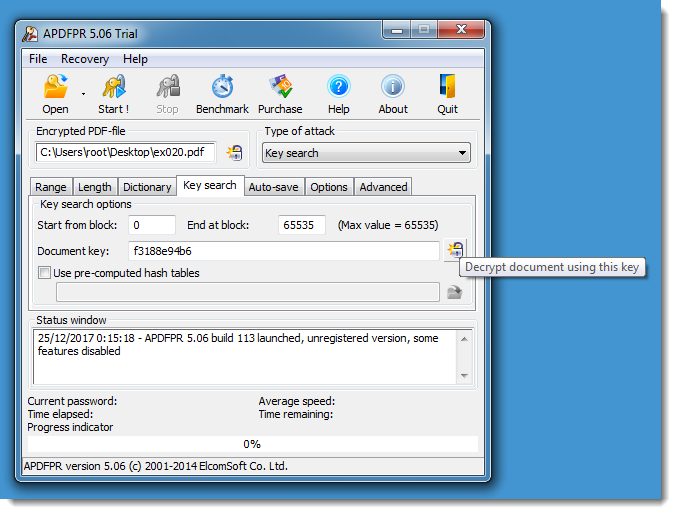
But when you recover the key of an encrypted PDF, you can not use it with PDF reader: there is no feature that will allow you to input a key in stead of a password. The only method I knew to decrypt a PDF document with its encryption key, was to use Elcomsoft’s PDF cracking tool:

Now I worked out a second method: I modified the source code of QPDF so that it will accept encryption keys too. It’s a quick and dirty hack, I did not add a new option to QPDF but I “hijacked” the –password option. If the value to the option –password starts with string “key:”, then QPDF will not derive the key from the provided password, but it will use the key provided as hexadecimal characters. Here is how I use it to decrypt the “tough” PDF:

I also made a small modification to the –show-encryption option, to display the encryption key:

Update: I had an email exchange with Jay Berkenbilt, the author of QPDF, and he will look into this patch and possibly add a new key option to QPDF.

If you are interested in my modified version of QPDF, you can find the modified source code files and Windows binaries here:

qpdf-patched.zip (https)
MD5: 57E1A5A232E12B45D0A927181A1E8C3B
SHA256: 6F17E095B38AE72F229A6662216DDCE86057D2BA1C567B07FEF78B8A93413495

Update: this is the complete blog post series:

Wednesday 27 December 2017

Cracking Encrypted PDFs – Part 2

Filed under: Encryption,Forensics,Hacking,PDF — Didier Stevens @ 0:00

After cracking the “easy” PDF of John’s challenge, I’m cracking the “tough” PDF (harder_encryption).

Using the same steps as for the “easy” PDF, I confirm the PDF is encrypted with a user password using 40-bit encryption, and I extract the hash.

Since the password is a long random password, a brute-force attack on the password like I did in the first part will take too long. That’s why I’m going to perform a brute-force attack on the key: using 40-bit encryption means that the key is just 5 bytes long, and that will take about 2 hours on my machine. The key is derived from the password.

I’m using hashcat again, but this time with hash mode 10410 in stead of 10400.
This is the command I’m using:

hashcat-4.0.0\hashcat64.exe --potfile-path=harder_encryption.pot -m 10410 -a 3 -w 3 "harder_encryption - CONFIDENTIAL.hash" ?b?b?b?b?b

I’m using the following options:

  • –potfile-path=harder_encryption.pot : I prefer using a dedicated pot file, but this is optional
  • -m 10410 : this hash mode is suitable to crack the key used for 40-bit PDF encryption
  • -a 3 : I perform a brute force attack (since it’s a key, not a password)
  • -w 3 : I’m using a workload profile that is supposed to speed up cracking on my machine
  • ?b?b?b?b?b : I’m providing a mask for 5 bytes (I want to brute-force keys that are 40 bits long, i.e. 5 bytes)

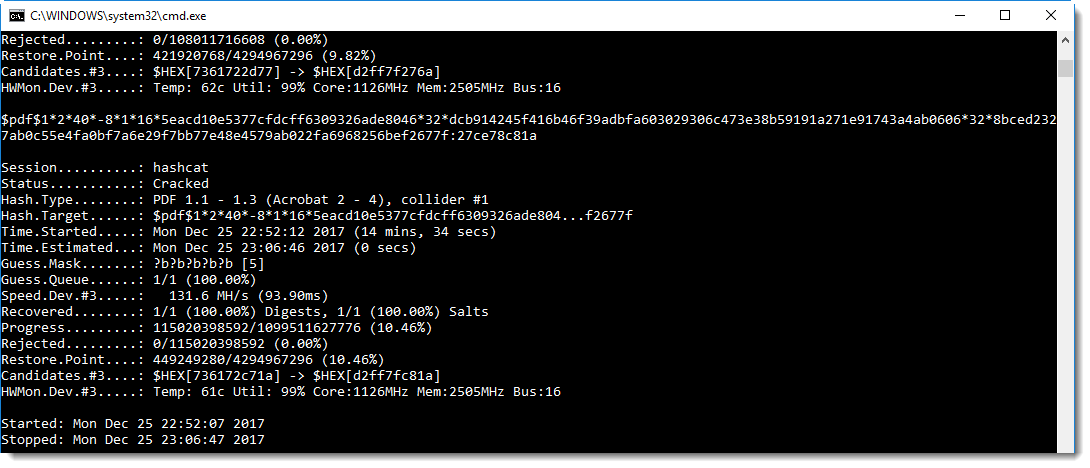
And here is the result:

The recovered key is 27ce78c81a. I was lucky, it took about 15 minutes to recover this key (again, using GPU GeForce GTX 980M, 2048/8192 MB allocatable, 12MCU). Checking the complete keyspace whould take a bit more than 2 hours.

Now, how can we decrypt a PDF with the key (in stead of the password)? I’ll explain that in the next blog post.

Want a hint? Take a look at my Tweet!

Update: this is the complete blog post series:

Tuesday 26 December 2017

Cracking Encrypted PDFs – Part 1

Filed under: Encryption,Forensics,Hacking,PDF — Didier Stevens @ 17:15

In this series of blog posts, I’ll explain how I decrypted the encrypted PDFs shared by John August (John wanted to know how easy it is to crack encrypted PDFs, and started a challenge).

Here is how I decrypted the “easy” PDF (encryption_test).

From John’s blog post, I know the password is random and short. So first, let’s check out how the PDF is encrypted.

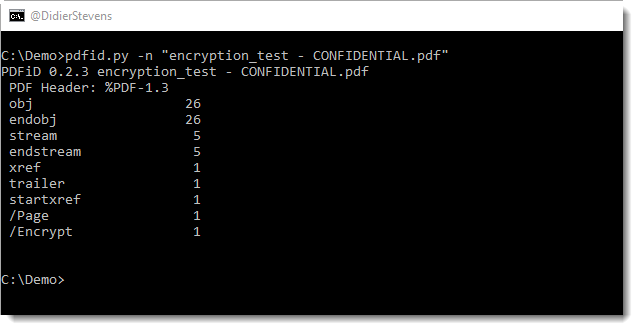
pdfid.py confirms the PDF is encrypted (name /Encrypt):
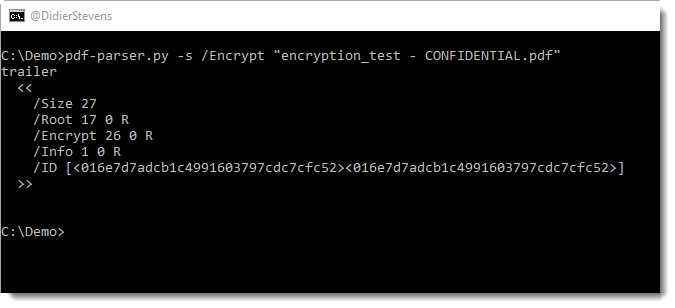
pdf-parser.py can tell us more:
The encryption info is in object 26:
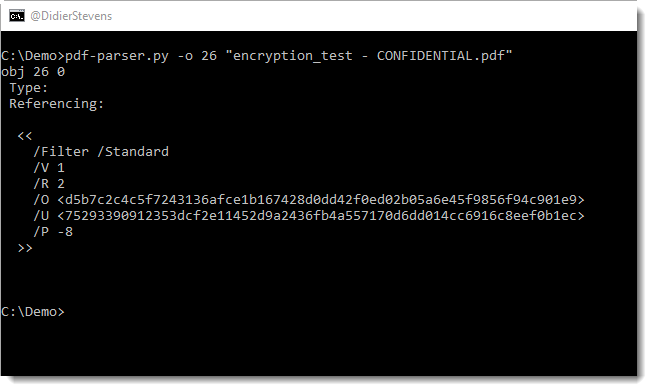
From this I can conclude that the standard encryption filter was used. This encryption method uses a 40-bit key (usually indicated by a dictionary entry: /Length 40, but this is missing here).

PDFs can be encrypted for confidentiality (requiring a so-called user password /U) or for DRM (using a so-called owner password /O). PDFs encrypted with a user password can only be opened by providing this password. PDFs encrypted with a owner password can be opened without providing a password, but some restrictions will apply (for example, printing could be disabled).

QPDF can be used to determine if the PDF is protected with a user password or an owner password:
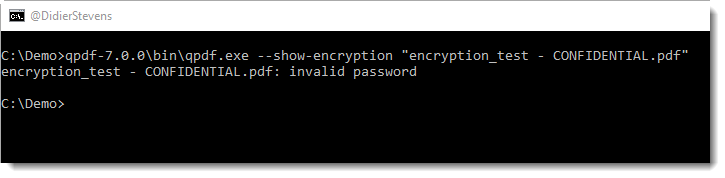
This output (invalid password) tells us the PDF document is encrypted with a user password.

I’ve written some blog posts about decrypting PDFs, but because we need to perform a brute-force attack here (it’s a short random password), this time I’m going to use hashcat to crack the password.

First we need to extract the hash to crack from the PDF. I’m using pdf2john.py to do this. Remark that John the Ripper (Jumbo version) is now using pdf2john.pl (a Perl program), because there were some issues with the Python program (pdf2john.py). For example, it would not properly generate a hash for 40-bit keys when the /Length name was not specified (like is the case here). However, I use a patched version of pdf2john.py that properly handles default 40-bit keys.

Here’s how we extract the hash:
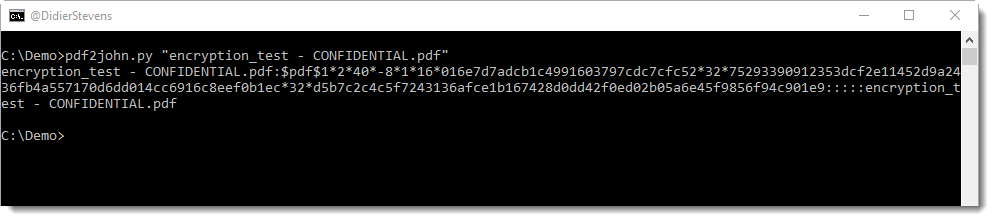
This format is suitable for John the Ripper, but not for hashcat. For hashcat, just the hash is needed (field 2), and no other fields.

Let’s extract field 2 (you can use awk instead of csv-cut.py):
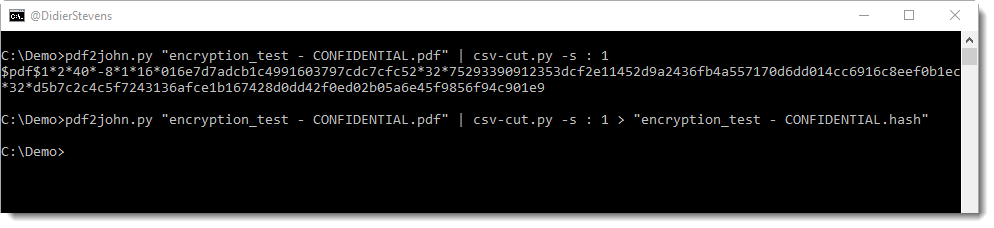
I’m storing the output in file “encryption_test – CONFIDENTIAL.hash”.

And now we can finally use hashcat. This is the command I’m using:

hashcat-4.0.0\hashcat64.exe --potfile-path=encryption_test.pot -m 10400 -a 3 -i "encryption_test - CONFIDENTIAL.hash" ?a?a?a?a?a?a

I’m using the following options:

  • –potfile-path=encryption_test.pot : I prefer using a dedicated pot file, but this is optional
  • -m 10400 : this hash mode is suitable to crack the password used for 40-bit PDF encryption
  • -a 3 : I perform a brute force attack (since it’s a random password)
  • ?a?a?a?a?a?a : I’m providing a mask for 6 alphanumeric characters (I want to brute-force passwords up to 6 alphanumeric characters, I’m assuming when John mentions a short password, it’s not longer than 6 characters)
  • -i : this incremental option makes that the set of generated password is not only 6 characters long, but also 1, 2, 3, 4 and 5 characters long

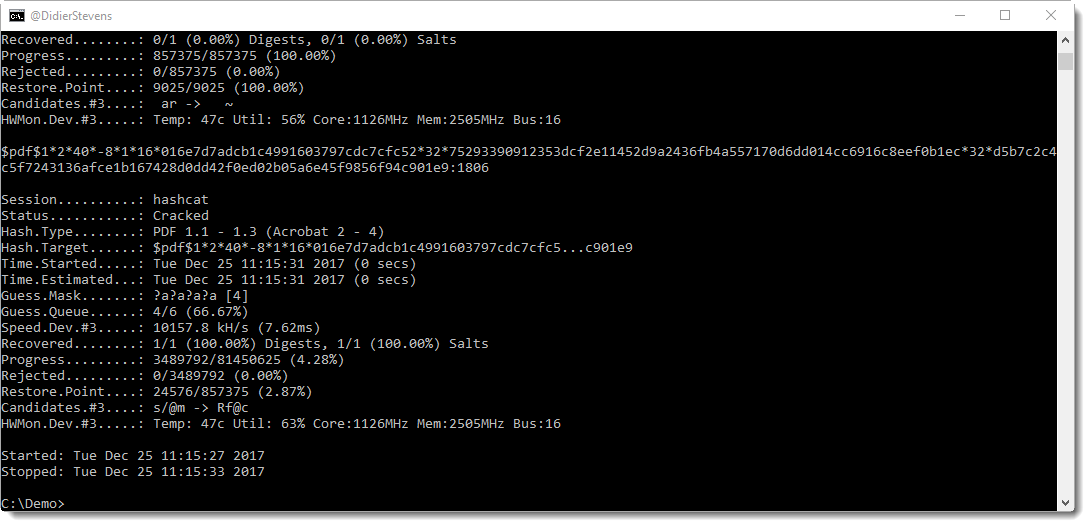
And here is the result:
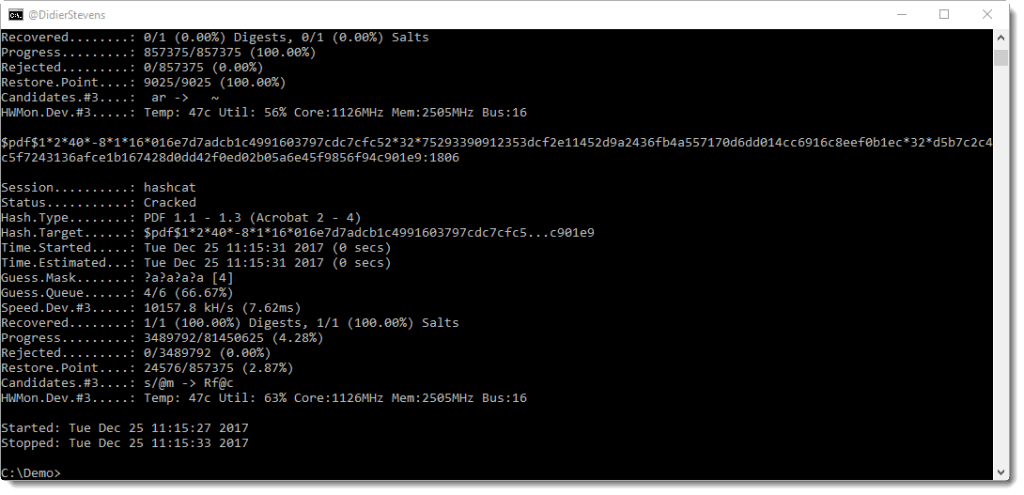
The recovered password is 1806. We can confirm this with QPDF:
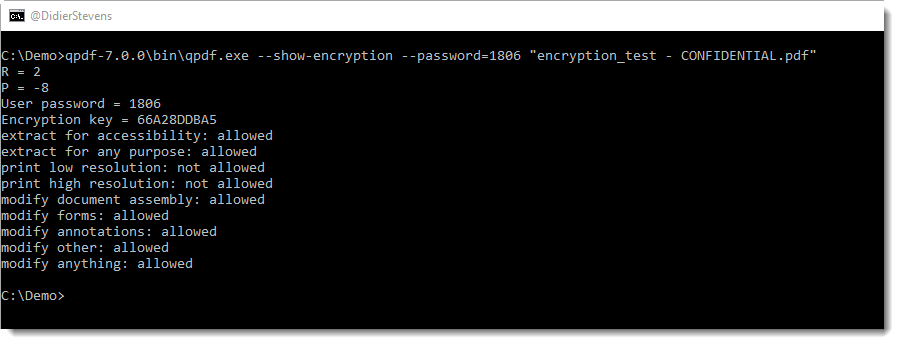
Conclusion: PDFs protected with a 4 character user password using 40-bit encryption can be cracked in a couple of seconds using free, open-source tools.

FYI, I used the following GPU: GeForce GTX 980M, 2048/8192 MB allocatable, 12MCU

Update: this is the complete blog post series:
Tuesday 19 December 2017

New Tool: format-bytes.py

Filed under: My Software — Didier Stevens @ 0:00

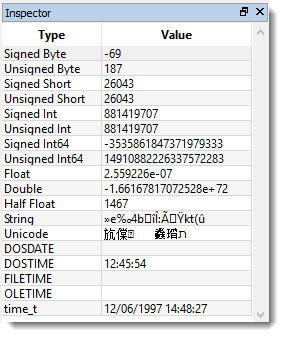
I regularly copy bytes from my command-line tool over to 010 Editor to have this data represented by the Inspector using different formats, like this:

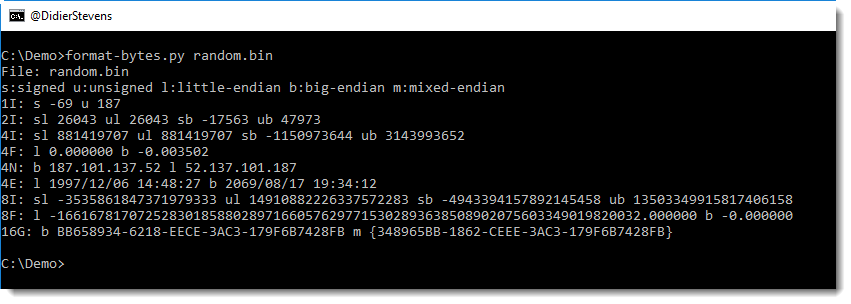
format-bytes.py is a new tool with which I try to achieve a similar result:

Using option -f, it is essentially a wrapper for the struct module. In the following example, we parse the beginning of the PE header of 2 Windows executables:

This shows us that both files have 6 sections and that notepad is from 2016 and regedit from 2017.

-f IHHI uses the struct module’s formatting to specify how to parse the bytes, and “#c#[‘PE’]:” is a cut-expression to carve the PE header out of the executables.

format-bytes_V0_0_3.zip (https)
MD5: CFE426B605DEDA6E388C1F62D2655A31
SHA256: 227C3911A0D2B9D8E524B44D5B4F80EBAABD34810A11A9189B09ADFA5D2FB67A

Monday 18 December 2017

New Tool: xmldump.py

Filed under: My Software — Didier Stevens @ 0:00

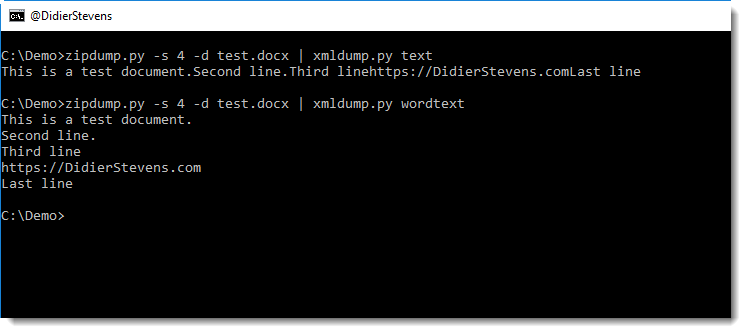
Sometimes I want to see the content of (malicious) .docx files without using MS Office. I will use my zipdump.py tool to extract the XML file with the content, and then use sed or translate.py to strip out XML tags.

But that doesn’t always yield the best results. Here is a small tool, xmldump, that will parse an XML file and output the text.

It supports 2 commands for the moment: text and wordtext.

Command text extracts the text between any XML tags.

Command wordtext extracts the text between Word paragraph XML tags (<w:p>) and prints each paragraph’s text on a separate line.


xmldump_V0_0_1.zip (https)
MD5: 23D5643E45B97D6AE641DF6CAFA79370
SHA256: A999F2297EE44FAABCA5A025DAEC7E84CB30D34C68F181357BA439EBFE38A660

« Previous PageNext Page »

Blog at WordPress.com.