Didier Stevens

Monday 21 April 2008

“Only X Out of 32 Antivirus Products Detect This!”

Filed under: Malware — Didier Stevens @ 6:47

Ever seen a title like this before? Do you know what it means? It usually means that the author didn’t actually test the malware sample on 32 Windows machines, each protected by a different AV product, but that he uploaded the sample to the free VirusTotal service and received a report.

Testing the detection of a malware with 32 AV products and submitting the malware to the VirusTotal services are two different things. Assuming that these tests are equivalent, and implicitly supposing that the results are the same, is plain wrong.

I read enough presentations and articles talking about “tested with 32 AV products” without even mentioning VirusTotal. And that is at least misleading, if not more. To me, “32 AV products” strongly suggests “tested with VirusTotal”, and not “we really tested 32 AV products”.

Julio Canto from VirusTotal was kind enough to answer a couple of questions I had about the free service they are providing.

First of all, VirusTotal uses command-line AV scanners that require no installation, this way they can run 32 different AV products on the same Windows box. These AV scanners run in sequential order when a file is submitted. An active AV product and a command-line AV product are 2 different things, with different goals, fulfilling different needs. Take McAfee for example. McAfee VirusScan Enterprise has a feature called ScriptScan that will intercept and scan each VBScript and JavaScript before it is execute by the Microsoft script engine. The command-line version of McAfee doesn’t have this feature. So if you let VirusTotal scan an heavily obfuscated script, it’s likely that the McAfee command-line scanner used by VirusTotal will not detect it. But it’s likely that McAfee VirusScan will detect it with ScriptScan, before it gets executed.

It’s the AV vendor that decides which version of his product will be used by VirusTotal and how it has to be configured. Some vendors will even provide beta versions of their product for the VirusTotal team to use. VirusTotal has a NDA with most vendors, that’s why they don’t provide the configuration details for each AV engine. Some vendors are conservative in their settings, while others will use all options (like heuristics).

VirusTotal does not executed submitted files in a sandbox, they are just scanned by the AV engines.

If you don’t get 32 results in your report, but less, it means that an AV engine timed-out (didn’t respond in the allotted time, and the process was killed) and didn’t provide a detection report. The VirusTotal service uses a cluster of 16 machines.

Although the VirusTotal service generates a lot of data that contains a wealth of statistics, they don’t usually look for trends. The company behind VirusTotal (Hispasec), is not involved in the AV world at all, but can use some of the statistics for consulting services.

VirusTotal implemented an anti-abuse system: if one source is submitting too much samples in a too short time period, subsequent request will be refused. This is done to provide all users an equal access to the service.

To finish, Julio gave me some links to similar services:

And remember, when you’re using the VirusTotal service, you’re testing your submitted sample, you’re not testing the AV products. At most, you could say you’re testing bare AV engines with a configuration that is unknown to you.

Saturday 19 April 2008

Taking the GSSP-C Exam

Filed under: Announcement,Certification — Didier Stevens @ 11:10

I’ve a blogpost over at the PaulDotCom Community Blog about my GSSP-C certification.

Wednesday 16 April 2008

Quickpost: Linux Kernel Joke

Filed under: Nonsense,Quickpost — Didier Stevens @ 9:29

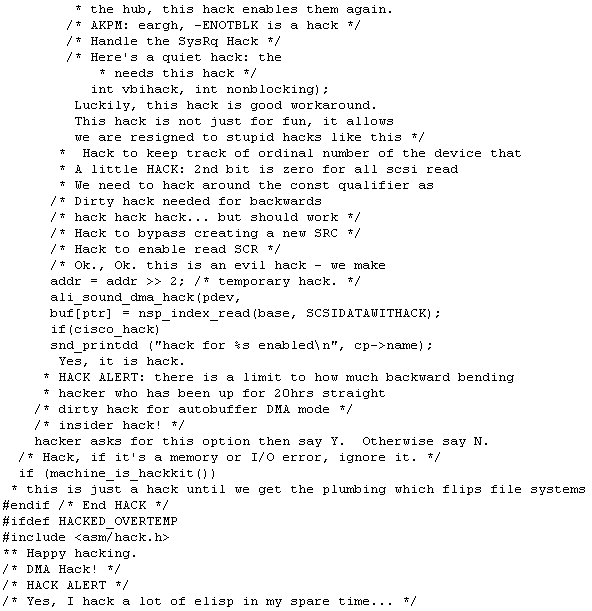
A colleague challenged me, half jokingly, to perform a code review of the Linux kernel. I took his challenge: I downloaded the latest stable kernel sources and used a state of the art static code checker (grep -hEir “hack|crack|backdoor|keygen” *).

I located a couple of backdoors:

Some cracks:

And even some keygens:

And the number of hacks was countless (1000+), here is a selection:


Quickpost info


Tuesday 15 April 2008

Update: Disitool V0.2

Filed under: My Software — Didier Stevens @ 8:25

Ero Carrera’s latest version of pefile has extra methods to handle the checksum of the PE header. My new disitool version uses these methods to correct the checksum when the signature is changed by disitool.

Wednesday 9 April 2008

Quickpost: About the Physical and Logical Structure of PDF Files

Filed under: PDF,Quickpost — Didier Stevens @ 6:57

Here is a post to explain in detail PDF polymorphism mentioned in my BH post.

This is a simple “Hello World”-PDF viewed with a text editor:

It is composed of:

  • a header
  • a list of objects
  • a cross reference table
  • a trailer

What I describe here is the physical structure of a PDF file. The header identifies that this is a PDF file (specifying the PDF file format version), the trailer points to the cross reference table (starting at byte position 642 into the file), and the cross reference table points to each object (1 to 7) in the file (byte positions 12 through 518). The objects are ordered in the file: 1, 2, 3, 4, 5, 6 and 7.

The logical structure of a PDF file is an hierarchical structure, the root object is identified in the trailer. Object 1 is the root, object 2 and 3 are children of object 1, etc…, giving this logical structure:

The physical structure of a PDF file can be transformed into another physical structure, without changing the logical structure. Here is the same file, but now the objects are ordered from 7 to 1 (I reversed the order in which the objects appear in the file):

I also had to update the cross reference table, because each object is located at a different position now. But apart from that, nothing has changed. The root is still object 1, and the tree is the same. In other words, the logical structure of the file remained unchanged, which implies that the rendering of both PDF files is identical. Objects can appear at random positions in a PDF file without impact on the logical file structure (i.e. rendering). For this simple file, with 7 objects, I have 5020 5040 (that’s 7!) possible physical structures, just by reordering the objects. And reordering objects is just one way to mutate the physical structure of a PDF file.

You can download both PDF files here.


Quickpost info


Tuesday 8 April 2008

Quickpost: Back from Black Hat Europe 2008

Filed under: Hacking,Quickpost — Didier Stevens @ 7:44

Back from Black Hat Europe 2008, my laptop has undergone another lobotomy.

Mikko from F-Secure was in my training class.

Some briefings I really liked:

  • New Viral Threats of PDF Language
    Good overview of the format of PDF files, and the inherent security issues. Good demos (like rewriting the Acrobat reader alert dialog box to mislead the user) and interesting insights (a PDF has a logical and physical structure, changing the physical structure doesn’t change the content of the document: this is polymorphism). The speaker confirmed that his exploits don’t affect Foxit reader. But the slides don’t to this justice, let’s hope they publish more details. And it was fun to see some French military lingo popping up in a BH presentation.
  • Intercepting Mobile Phone/GSM Traffic
    THC explained how they cracked GSM A5/1 encryption, FPGA style and with 2 TB of rainbow tables. Interesting tidbits: mobile operators don’t provide the strongest available encryption A5/3 (my guess as to why: cost), and the GSM status channel will carry permanent subscriber IDs, although the protocol only foresees temporary IDs.
  • Mobile Phone Spying Tools
    Tools mainly used by untrusting spouses, but I see potential uses for industrial espionage: sales man leaves company for competition, installs mobile phone spying tool on his corporate mobile phone just before handing it back.
  • DTRACE: The Reverse Engineer’s Unexpected Swiss Army Knife
    Looks really powerful and flexible, let’s hope someone is brave enough to attempt a Windows port.

And the networking was great, shout-out to Malta Info Security.


Quickpost info


Carnival of the Security Catalyst Community 2008/04/08

Filed under: Fellow Bloggers — Didier Stevens @ 7:38

The Security Catalyst Community is a free forum for IT security professionals, it’s one of the few communities where I’m an active member. One of the things I like about the SCC is that a lot of the discussions are non-technical. Let me illustrate this by highlighting some message threads (you’ll need to create an account if you want to read these):

There are no trolls in the SCC, it’s low-volume, and sometimes, someone comes with a technical puzzle that will get my eager attention. And you’ll get the opportunity to discuss with security authors, bloggers and podcasters like Rebecca, Martin and Harlan.

Monday 31 March 2008

<!– Hiding Inside Wikipedia –>

Filed under: Forensics — Didier Stevens @ 15:00

It seems that each time I attend Black Hat, I get some new steganography idea.

It’s easy to hide data inside the Wikipedia pages. But before I explain how, understand that the general principle of what I will explain applies to most sites where users can edit content. They can all be used as a covert channel, but Wikipedia has become so common that it would have passed under my radar when performing a forensic investigation. But not anymore.

You can use the Wikipedia Sandbox to experiment while avoiding the wrath of the Wiki gods.

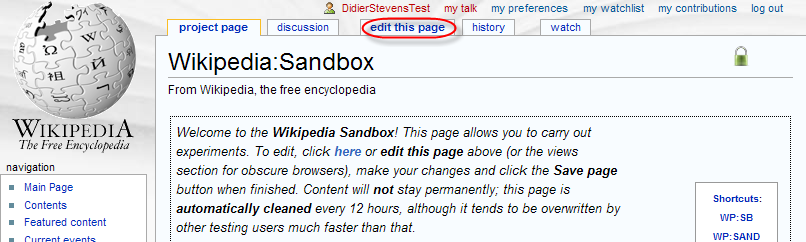
Select the edit this page tab to start editing the article:

wikipedia-0004.png

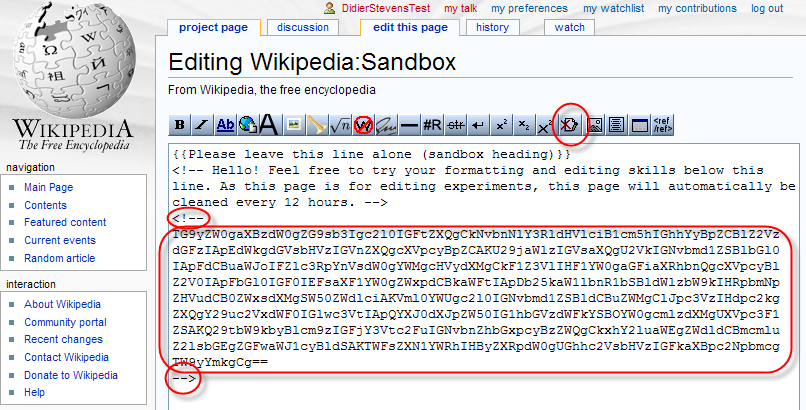
Prepare the data you want to store on Wikipedia by converting it to a base64 representation (you can ZIP and/or encrypt it before converting it to base64). Insert the base64 data as a hidden comment inside the page:

wikipedia-0005.png

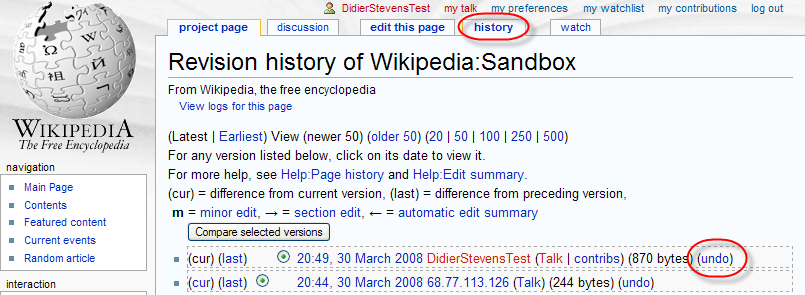
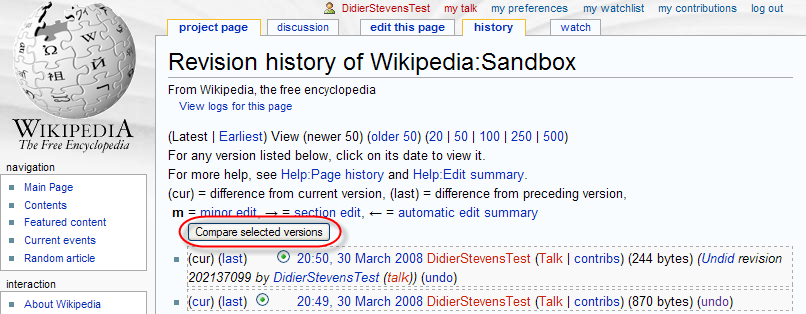
Save your changes first, and then undo your changes via the history tab:

wikipedia-0006b.png

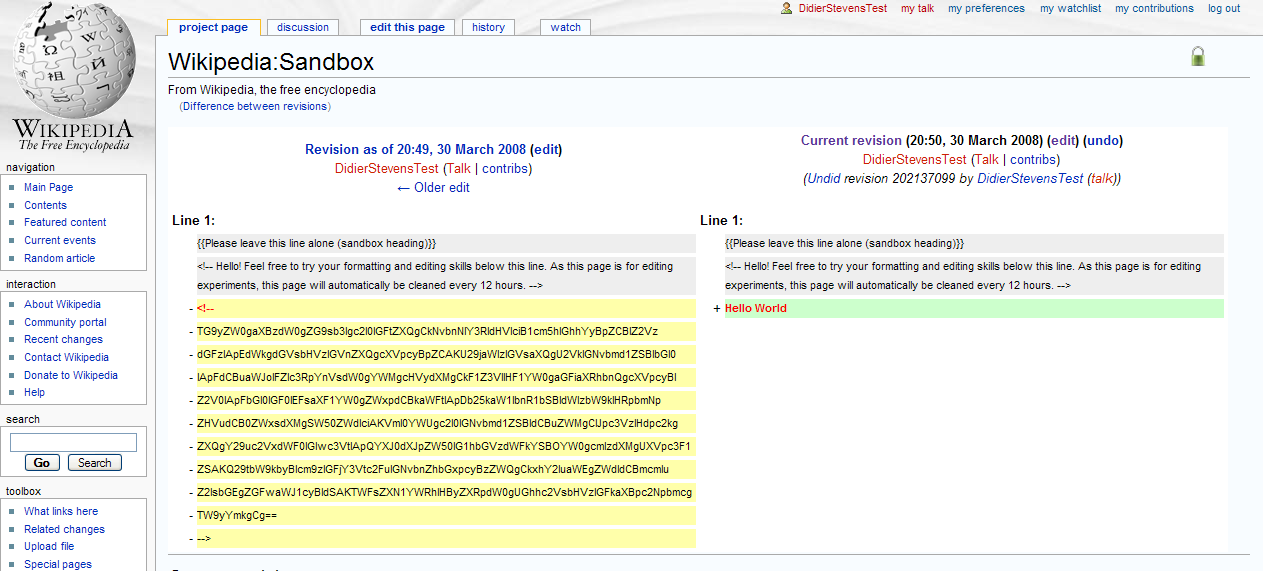
That’s it! From now on, you can retrieve your data by comparing versions:

wikipedia-0008.png

wikipedia-0009.png

So how can you detect and prevent this? Head over to the PaulDotCom Community Blog for the answer, where I’m a guest blogger.

Wednesday 19 March 2008

bpmtk: Spying on IE

Filed under: Hacking,My Software — Didier Stevens @ 11:07

I was asked if it’s possible to intercept IE’s HTTPS requests. It is, it’s not difficult, and you don’t need admin rights to do it on your own processes. In other words, a malware doesn’t even need admin rights to spy on your IE process, if said malware is also running under your user account.

We need to hook the API calls to WinINet functions, like HTTPOpenRequest. We can do this by patching the Delayed Import Address Table of executables calling WinINet functions. In our case, to spy on IE, we need to patch the DIAT of urlmon.dll. One simple way to hook these API calls, is to develop a DLL that will patch the DIAT, diverting the calls to our own functions. Our functions will just call the original functions while intercepting the data.

Here is an example for HTTPOpenRequest:

wininet1.png

HookHTTPOpenRequestA is our hook function for HTTPOpenRequest. It will just output the flags, verb and objectname parameters to the debugger, and then call the original HTTPOpenRequest function with unmodified arguments (which we saved in variable OriginalHTTPOpenRequestA). BTW, if the declaration and use of OriginalHTTPOpenRequestA looks confusing to you, read the explanation of function pointers in C.

Patching the DIAT is easy, use the PatchDIAT function that I provide with my Basic Process Manipulation Tool Kit (it’s in iat.c).

wininet2.png

PatchDIAT needs the name of the executable we want to patch (urlmon.dll), the name of the API to patch (wininet.dll), the name of the function to patch (HttpOpenRequestA), the address of our hooking function (HookHttpOpenRequestA) and a variable to store the address of the original function (OriginalHttpOpenRequestA). PatchDIAT returns S_OK when patching was successful.

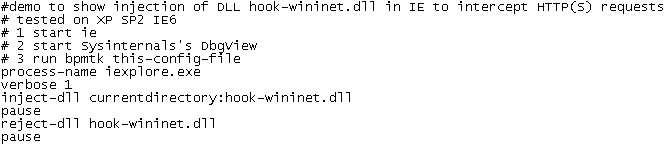
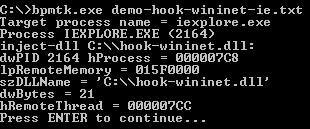
We package everything in a DLL, while hooking some other functions, like InternetReadFile (to intercept actual data), and then inject this DLL in IE with my toolkit:

wininet6.png

wininet7.png

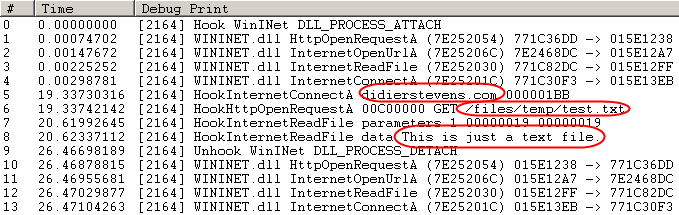
I’ve stored a test file on my server: https://DidierStevens.com/files/temp/test.txt. When you browse to this test file with the patched IE, you’ll see this in Sysinternal’s DebugView:

wininet5.png

Lines 0 to 4 indicate the patching IE was successful.

Line 5 shows IE opening a connection to didierstevens.com on port 443 (that’s 1BB in hexadecimal).

Line 6 shows the preparation of an HTTPS GET request to file /files/temp/test.txt. Flags 00C00000 indicate HTTPS and keep-alive.

Line 7 shows that the call to InternetReadFile was successful and read 25 bytes (0x19).

Line 8 shows the actual data retrieved by IE: This is just a text file.

The next lines indicate we unloaded our DLL with success (thus undoing the patch).

As you can see, we can intercept data before it is encrypted by the HTTPS connection (/files/temp/test.txt) and after it is decrypted (This is just a text file.). This works because we patch the executable before it calls API functions that handle the encryption/decryption, so we get access to the unencrypted data.

I kept my demo DLL very simple to show you the basic principles. A complete spying program would have to hook more functions and tie all the data together to present it in a user friendly way.

It’s also simple to adapt my IE spying DLL to tamper with the data. For example, it could redirect IE to another web site by changing the lpszServerName argument before it calls the original InternetConnect function.

Wednesday 12 March 2008

bpmtk: DisableAMD

Filed under: Hacking,My Software,Reverse Engineering — Didier Stevens @ 0:43

Remember my DisableAMD post? In stead of patching the EXE file, you can also use my Basic Process Manipulation Tool Kit to patch the running process.

There is a small difficulty, however. The check for the DisableCMD key is done when CMD.EXE is started, so to be successful, we have to start the program and change the DisableCMD string in memory before the check is made. Sounds impossible? Not really, the CreateProcess function allows you to create a new process with its main thread in a suspended state (this means that the program is not running). This gives you the opportunity to change the string in memory before it is used.

Use the start statement to start a new process in suspended state:

start cmd.exe

Change the string in memory:

search-and-write module:. unicode:DisableCMD unicode:DisableAMD

The main thread will be resumed after the last statement was executed (search-and-write in our example):

start-cmd-w2k8.png

The cmd.exe window in the background was launched from the start menu (showing you that cmd.exe is disabled), while the cmd.exe window in the foreground was launched with the bpmtk (showing you the bypass of the GPO).

And did you notice that this screenshot is taken on a Windows 2008 server?

Next time, I’ll show some tricks to use the bpmtk in a restricted environment, like a Terminal Server.

« Previous PageNext Page »

Blog at WordPress.com.