Didier Stevens

Friday 4 December 2009

Quickpost: New EICARgen Version

Filed under: My Software,Quickpost — Didier Stevens @ 14:58

I never expected to release a new version of EICARgen, but I’m forced to: EICARgen.exe generates just too many false positives.

The new version contains the EICAR string an XOR-encode string (key 0xFF). It has only a couple of detections. Kaspersky and VBA32 shouldn’t actually detect this. EICAR clearly specifies that the presence of the EICAR test string inside a file (like an executable) shouldn’t be detected. As to why AVG needs to detect EICAR test file droppers, I have no idea…


Quickpost info


Sunday 22 November 2009

Quickpost: SelectMyParent or Playing With the Windows Process Tree

Filed under: Forensics,My Software,Windows 7,Windows Vista — Didier Stevens @ 20:36

I read something very interesting in “Windows via C/C++” today: starting with Windows Vista, CreateProcess can start a program where you specify the parent process! This is something forensic investigators must be aware of when they analyse processes running on a Windows machine.

Normally the parent process of a new process is the process that created the new process (via CreateProcess). But when using STARTUPINFOEX with the right LPPROC_THREAD_ATTRIBUTE_LIST to create a process, you can arbitrarely specify the parent process, provided you have the rights (i.e. it’s your process or you have debug rights).

I developed a small tool to start a program while specifying its parent process: SelectMyParent. Here I use it to start notepad as a child of lsass.exe:

2 remarks about this example:

  1. to make lsass.exe a parent process, you need to use SelectMyParent with admin rights and elevate its rights (Run as administrator)
  2. the notepad process takes over the parent process’ account: NT AUTHORITY\SYSTEM

I don’t know how one can detect that a process’ parent is not the process that created it, because a process has no access to its extended startup info (only to its startup info). And it is the extended startup info that contains the attribute list with the handle to the parent process.

SelectMyParent version 0.0.0.1 is available here.


Quickpost info


Thursday 19 November 2009

Update: bpmtk with hook-createprocess.dll

Filed under: bpmtk,Hacking,My Software,PDF,Update — Didier Stevens @ 19:32

There are no real changes in this new version of bpmtk, only a new DLL (hook-createprocess.dll) was added. You can use this DLL to protect your Windows machine from getting infected by the current malicious documents found in-the-wild.

You can download bpmtk version 0.1.6.0 here.

Hook-createprocess.dll is a DLL that patches the process into which it is loaded to prevent it from creating new processes. It does this by patching the Import Address Table of kernel32.dll for ntdll.dll to hook API functions NtCreateProcessEx, NtCreateProcess and NtCreateUserProcess.
Calls to these functions are intercepted and not passed on to the original functions. Instead, a code is returned indicating that the operation was blocked. The result is that functions in kernel32 used to create new processes fail (like WinExec) and hence that the patched process can’t create new processes.
This is all it takes to block most shellcode found in malicious documents like PDF malware. Shellcode like this does the following:


Of course, since this protective measure is taken by patching the process, shellcode could undo this patching and bypass our protection. Or it could use the ntdll API and not be hindered by our patch. But actual malware found in-the-wild doesn’t do this (not talking about targeted attacks) and is thus prevented from executing the trojan it just downloaded or extracted from the PDF document.

If you want better protection, you’ll have to use something that works at the level of the kernel, like sandboxing software.

However, this patch comes with some drawbacks, because it also blocks bening new processes. For example, the update function of Adobe Acrobat requires the creation of a new process. To reenable the creation of processes, you have to unload hook-createprocess.dll (unloading removes the hooks). bpmtk has a function to unload DLLs from a process (reject).

There are a couple of trick to load this DLL with the program you want to protect. I’ll describe a generic method in an upcoming post, but now I want to explain it for a specific program.
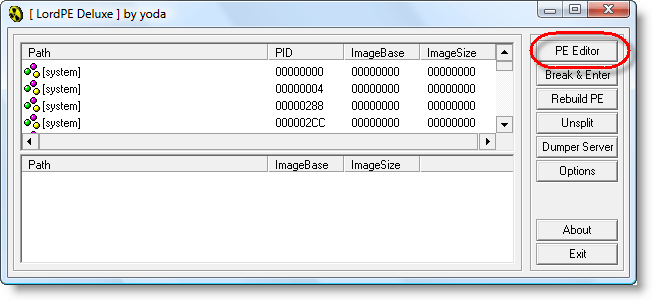
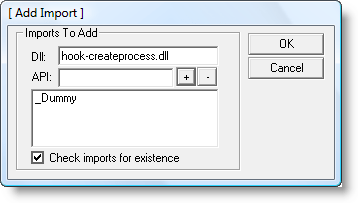
Programs have a list of DLLs they need for their execution. We will use a PE-file editor to add our hook-createprocess.dll to this list. hook-createprocess.dll exports a dummy function (_Dummy) just so you can add to the imports table of an executable. We will use LordPE to add hook-createprocess.dll with _Dummy to Adobe Reader:

Right-click the Import table:

And don’t forget to save…

Monday 9 November 2009

Quickpost: “Hiding” a PDF Document

Filed under: Entertainment,My Software,PDF,Quickpost — Didier Stevens @ 15:00

Here’s some Python code (it uses my mPDF module) to append a new PDF document to an existing PDF document to “hide” the original document. Recovering the original is trivial, you open the PDF document with a HEX-editor and delete the appended document (starting after the second %%EOF counting from the end of the file). This trick uses incremental updates.

20091107-172245

#!/usr/bin/python

__description__ = 'make-pdf-hide-original, use it to "hide" the original PDF document'
__author__ = 'Didier Stevens'
__version__ = '0.0.1'
__date__ = '2009/11/07'

"""
Source code put in public domain by Didier Stevens, no Copyright
https://DidierStevens.com
Use at your own risk

History:
 2009/11/07: start

Todo:

"""

import mPDF
import time
import zlib
import optparse

def Main():
    oParser = optparse.OptionParser(usage='usage: %prog [options] pdf-file\n' + __description__, version='%prog ' + __version__)
    oParser.add_option('-s', '--line', default='Hello World', help='The line of text to print on the screen (default Hello World')
    (options, args) = oParser.parse_args()

    if len(args) != 1:
        oParser.print_help()
        print ''
        print '  %s' % __description__
        print '  Source code put in the public domain by Didier Stevens, no Copyright'
        print '  Use at your own risk'
        print '  https://DidierStevens.com'

    else:
        pdffile = args[0]
        oPDF = mPDF.cPDF(pdffile)
        oPDF.template1()
        oPDF.stream(5, 0, 'BT /F1 24 Tf 100 700 Td (%s) Tj ET' % options.line)
        oPDF.xrefAndTrailer('1 0 R')

if __name__ == '__main__':
   Main()

Quickpost info


Monday 2 November 2009

CVE-2009-2979 Or The XML-Bombed PDF

Filed under: PDF,Vulnerabilities — Didier Stevens @ 7:15

The Extensible Metadata Platform is an Adobe standard to represent metadata with XML.

More than a year ago, I added an XML-bomb to XMP-data inside a PDF document:

20091031-194428

As this made Adobe Reader 8 & 9 crash, I reported it to Adobe. It has been fixed with the last patch cycle.

Why do I disclose the details of this vulnerability? Because XMP is not only intended to be used in PDF documents, but many other file formats. So be sure to check your software for this vulnerability.

Wednesday 21 October 2009

A Windows 7 Launch Party Trick!

Filed under: Entertainment,Forensics,My Software,Windows 7 — Didier Stevens @ 17:19

In search of a new trick for that Windows 7 Launch Party you’re invited to? 😉

Here’s one:

20091021-190621

You can download a beta version of my UserAssist tool here. Soon I’ll be posting a final version with details and source code.

Wednesday 14 October 2009

Update: WhoAmI? Version 0.1.3

Filed under: My Software,Update — Didier Stevens @ 18:00

I’ve updated my WhoAmI? Firefox add-on for Firefox version 3.5.

You can download it here or get it from the Mozilla site. I’ve nominated it to leave the Sandbox. If you use it, please post a review on the Mozilla page to help it on its way out of the the Sandbox (or keep it there if it’s too buggy).

Tuesday 13 October 2009

Update: PDFiD Version 0.0.9 to Detect Another Adobe 0Day

Filed under: My Software,PDF,Vulnerabilities — Didier Stevens @ 21:23

PDFiD is updated to detect the latest Adobe 0day, CVE-2009-3459.

I’ll provide more details in an upcoming post, just now for know that PDFiD detects a /Colors name followed by a very big number (larger than 2^24 or 16777216).

pdfid009

You can download PDFiD here.

Monday 5 October 2009

Preventing Applications From Starting (Malicious) Applications

Filed under: bpmtk,Malware,My Software,PDF,Vulnerabilities — Didier Stevens @ 0:00

Another very effective way to prevent malicious documents from infecting PCs, is to prevent vulnerable applications from starting other applications. As almost all shellcode found in malicious documents in-the-wild (again, I’m excluding targeted attacks) will ultimately start another process to execute the trojan, blocking this will prevent the trojan from executing.

This is an old idea you’ll find implemented in many sandboxes and HIPS. I added a new DLL to my basic process manipulation tool kit to prevent applications from creating a new process. Loading this DLL inside a process will prevent this process from creating a new process. I’ll explain the technique used in my DLL and how to load it in vulnerable applications in upcoming blogposts, but I want to start with showing how it prevents malicious documents from infecting a PC.

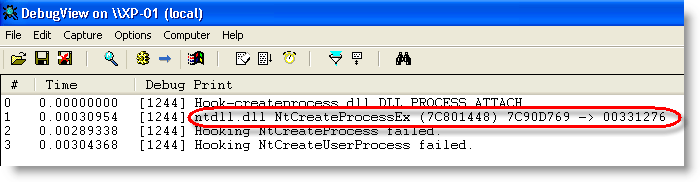
When the DLL is loaded inside a process, it will patch the Create Process API to intercept and block calls to it:
hook-createprocess-010

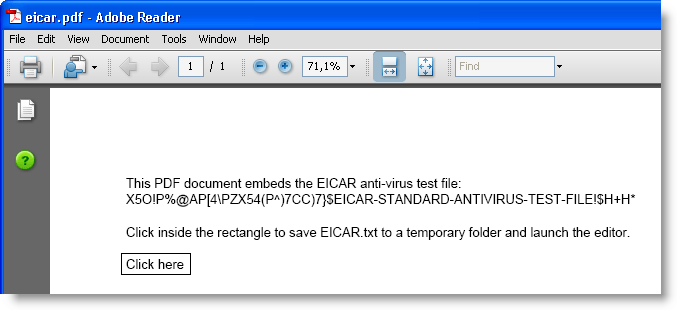
As a first test, we’ll use my eicar.pdf document.
hook-createprocess-009

Clicking the button will save the eicar.txt file to a temporary folder and launch the editor.

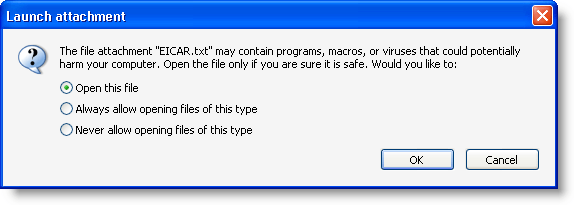
Adobe Acrobat reader will warn you when an application is to be launched:
hook-createprocess-011

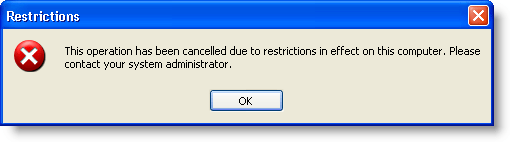
But when you accept, the editor will be prevented to execute:
hook-createprocess-012

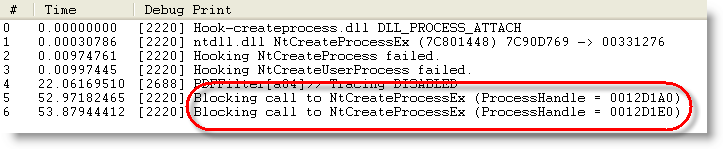
That’s because the DLL intercepted and blocked the Create Process call:

hook-createprocess-013

As a second test, let’s use a real malicious PDF document. The hooks installed by the DLL prevent it from executing the trojan:
hook-createprocess-014

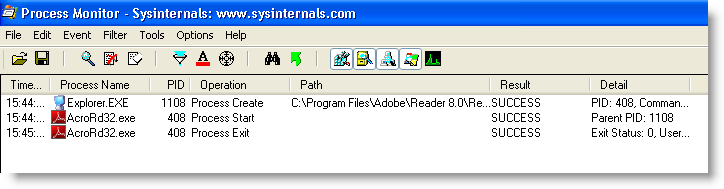
Adobe Reader starts and then just crashes, without spawning another process:
hook-createprocess-017

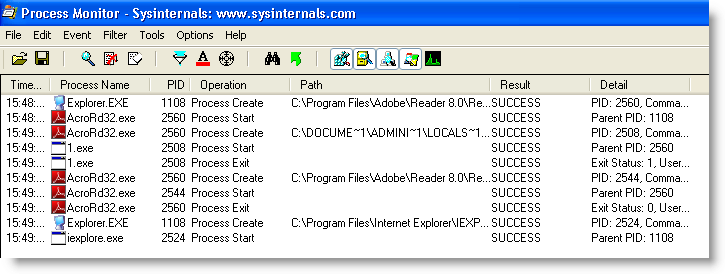
When opening the same malicious PDF, but without the protecting DLL, the machine gets trojaned (execution of 1.exe and Internet Explorer):
hook-createprocess-018

This simple way of preventing applications from launching other applications comes with some drawbacks. For example, the Check Update function in Adobe Reader will not function anymore.

When you have a sandboxing system of HIPS installed on the machines you manage, check if you can use it to prevent vulnerable applications from starting other applications. If it doesn’t provide such a feature, try the new DLL I’ll be posting in the new version of bpmtk.

Monday 28 September 2009

Quickpost: SAFER and Malicious Documents

Filed under: My Software,Quickpost — Didier Stevens @ 17:50

I wasn’t going to mention SAFER to restrict the rights of an application, because Software Restriction Policies can be bypassed. But a Tweet by Edi Strosar made me review my viewpoint. In this particular case, bypassing SRP is a non-issue, because the user is already local admin!

Software Restriction Policies allow you to force specific applications to run with a restricted token. As Michael explained it with AD GPOs, I’ll show it with local policies.

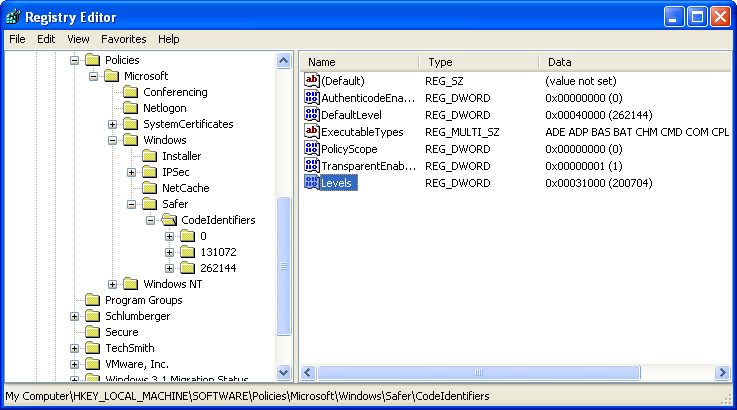
Enable SAFER policies for SRPs by adding DWORD registry key Levels (value 0x31000) to HKLM\SOFTWARE\Policies\Microsoft\Windows\Safer\CodeIdentifiers:

20090928-184852

Start the Local Security Policy administration tool and go to the Software Restriction Policies. You’ll have to create new policies if this is the first time you configure SRPs.

20090928-180154

Create a new rule in Additional Rules. We’ll identify the application to restrict by its path and name, so create a Path Rule:

20090928-185739

For the security level, select Basic User:

20090928-184938

If you have no Basic User option, you forgot to update the registry before launching the administration tool:

20090928-184657

Select the application to restrict:

20090928-185830

This rule will force Adobe Reader to run with a restricted token:

20090928-180534

Writing to SYSTEM32 is denied:

20090928-180742


Quickpost info


« Previous PageNext Page »

Blog at WordPress.com.