This is a Python 3 bug fix version for pecheck.py, a tool to analyze PE files.
pecheck-v0_7_9.zip (https)
MD5: F69709C475D513A8D2031C21EEC13284
SHA256: 99E71A9FC917BB27CDD893F14AE77F2E810A4C7BB56A6E975BB619C978B12D47
This is a Python 3 bug fix version for pecheck.py, a tool to analyze PE files.
pecheck-v0_7_9.zip (https)
MD5: F69709C475D513A8D2031C21EEC13284
SHA256: 99E71A9FC917BB27CDD893F14AE77F2E810A4C7BB56A6E975BB619C978B12D47
In this new version of hash.py, a tool to calculate hashes, I add “hash” checksum8.
Checksum8 calculates the sum of all bytes contained in the provided file(s), each byte is interpreted as an unsigned, 8-bit integer.
I recently had to validate that the path of a URL was a “valid” Meterpreter identifier. When the least significant byte of the 8-bit checksum of the path is equal to 92 (0x5C), then we have a valid URL for a Windows Meterpreter stager.
Take this URL: http://127.0.0.1/RVdP. Could this be a “Windows Meterpreter” URL? Let’s calculate the checksum of RVdP:

The 8-bit checksum of RVdP is 0x015C. The least significant byte is 0x5C, or 92: this matches URI_CHECKSUM_INITW, e.g. this could indeed be a URL used by a reverse http Meterpreter payload.
Besides this new feature, hash.py comes with other features like “pack expressions” and various bug fixes.
hash_V0_0_8.zip (https)
MD5: 03F928332874447F6198A9FDE46E3AA7
SHA256: 80C493639CA7160D1455FABA38A2A04556240326D4BA78B8207CA8FF8B09E1B2
As announced in my previous blog post, this new version of format-bytes.py adds a pack expression (#p#) and other features and (Python 3) bug fixes.
A pack expression is another “here filename”, like #h# for hexadecimal data (which now accepts spaces too).
When format-bytes.py is given a filename as argument, the content of that file is read and processed.
File arguments that start with character # have special meaning. These are not processed as actual files on disk (except when option –literalfilenames is used), but as file arguments that specify how to “generate” the file content. Generating the file content with a # file argument means that the file content is not read from disk, but generated in memory based on the characteristics provided via the file argument. For example, file argument #ABCDE specifies a file containing exactly 5 bytes: ASCII characters A, B, C, D and E.
File arguments that start with #p# are a notational convention to pack a Python expression to generate data (using Python module struct): a “pack expression”.
The string after #p# must contain 2 expressions separated by a # character, like #p#I#123456.
The first expression (I in this example) is the format string for the Python struct.pack function, and the second expression (123456 in this example) is a Python expression that needs to be packed by struct.pack.
In this example, format string I represents an unsigned, 32-bit, little-endian integer, and thus #p#I#123456 generates byte sequence 40E20100 (hexadecimal).
Remark that the Python expression is evaluated with Python’s eval function: this can be abused to achieve arbitrary code execution. Don’t use this in a situation where you have no control over arguments.
I introduced “pack expressions” because I had an IPv4 number represented as a decimal integer, and I needed the dotted quad representation. format-bytes.py will represent 4 bytes as a dotted quad, but I still had to convert a decimal integer to 4 bytes. Hence the introduction of pack expressions (#p#).
For example, number 3232235786 is IPv4 address 192.168.1.10.
Pack expression #p#>I#3232235786 converts number 3232235786 to 4 bytes: >I is the struct format specifier for a big-endian, unsigned 32-bit integer. Remark that I enclose this pack expression in double-quotes (“), as most shells will interpret character > as file redirection if not escaped.

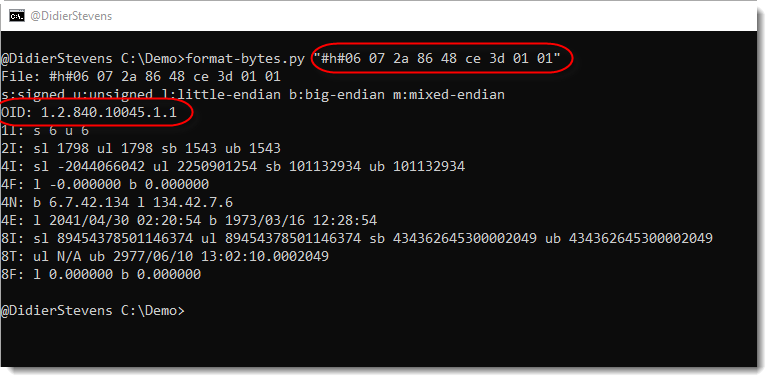
Because of CVE-2020-0601, I also introduced Object Identifier aka OID (DER) decoding. In DER encoding, an OID starts with byte 6 (excluding flags) followed by one byte indicating the length of the bytes representing the OID.
Hexadecimal sequence “06 07 2a 86 48 ce 3d 01 01” is the DER value for OID 1.2.840.10045.1.1.
I also added support for environment variable DSS_DEFAULT_HASH_ALGORITHMS to let you choose your favorite hashing algorithm, in case it is no longer MD5 🙂 .
And last, some (Python 3) bug fixes.
format-bytes_V0_0_11.zip (https)
MD5: D73D5FA410F882F03176CF5FD3E0D90A
SHA256: 34B37CA4E45E4EF0F36F5460CAD429343C0AE993297C104AA8A29C2EE4E7904F
Some bug fixes and new features (pack expression #p# and spaces allowed for #h#), to be covered in more detail in the next blog post on format-bytes.py.
cut-bytes_V0_0_11.zip (https)
MD5: 51F90BBBDE845DEC3EAB94FD30AFCF9B
SHA256: C805CBD23E09D80EB2AF39F8F940CC9188EF7F6B27197D018DA95093AC5D0932
This is a bug fix version.
pdf-parser_V0_7_4.zip (https)
MD5: 51C6925243B91931E7FCC1E39A7209CF
SHA256: FC318841952190D51EB70DAFB0666D7D19652C8839829CC0C3871BBF7E155B6A
pdfid_v0_2_7.zip (https)
MD5: F1852F238386681C2DC40752669B455B
SHA256: FE2B59FE458ECBC1F91A40095FB1536E036BDD4B7B480907AC4E387D9ADB6E60
This new version of zipdump.py, a tool to analyze ZIP files, adds option -f to scan for PK records and adds support for Python 3.
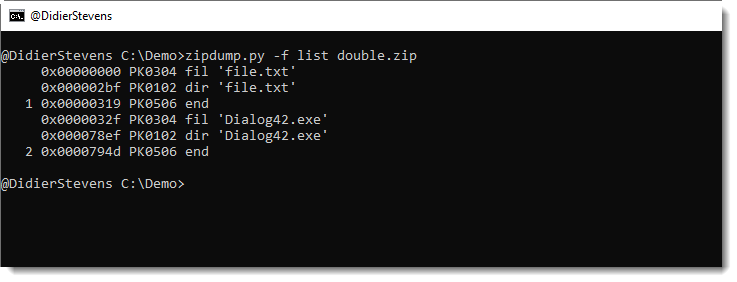
More details in an upcoming blog post.
zipdump_v0_0_16.zip (https)
MD5: 616654BDAFFDA1DDE074E6D1A41E8A42
SHA256: F3B6D52BA32D6BA3836D0919F2BBC262F043EF6E26D173DD0965735D4F3B5598
This new version of oledump adds option -f to find embedded ole files, making the analysis of .DWG files with embedded VBA macros (for example) easier.
And there is a new plugin: plugin_version_vba.py. This helps with determining the VBA version.
Here is a video showing the analysis of .DWG files with option -f:
oledump_V0_0_44.zip (https)
MD5: 2BB2CD027327FFD8857CDADC1C988133
SHA256: 1A9C951E95E2FE0FDF3A3DC8E331205BC65C617953F0E30ED3E6AC045F4DD0C0
This new version of oledump.py adds support for Python 3. Several plugins and decoders were also updated for Python 3.
There’s a new option to include storages in the overview: –storages.
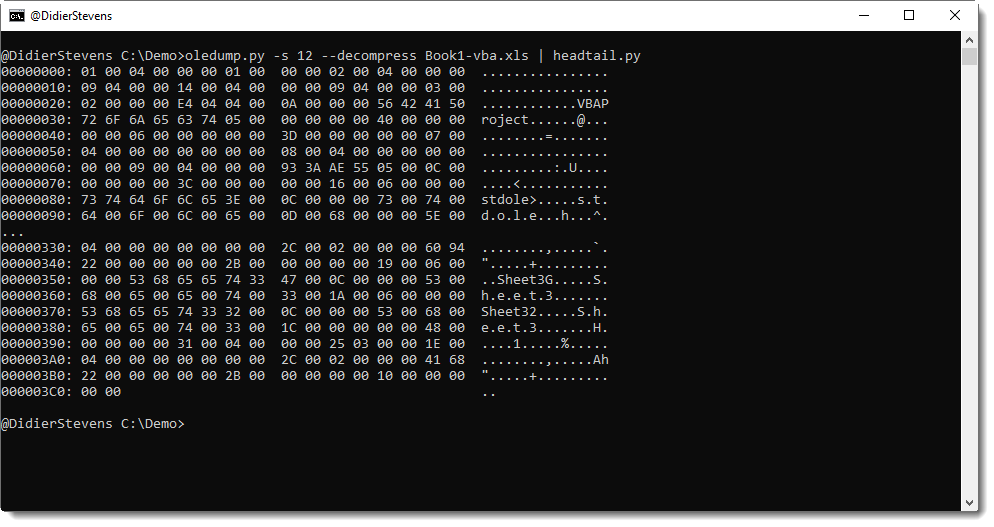
And option –decompress now does also VBA decompression (it was zlib only). This helps to decompress the dir stream of documents with VBA macros:
And I added type 1009 to plugin_msg.py: Compressed RTF.
oledump_V0_0_43.zip (https)
MD5: F98A06CED73C4FC2CA153B7E751746B5
SHA256: 4FE1DBAB822CEC2489328CE3D4D272400F23F1FAD266C9D89B49D9F83F3AA27F
This is just a bugfix version (Python 3).
numbers-to-string_v0_0_9.zip (https)
MD5: C5629F102FCF58E5CFF24472D35AFF22
SHA256: 5B1CA43EDFD7BA66CF44FB552BD7882AEB13A8765017F9F865071E187410EE63
This new version of tcp-honeypot.py, a simple TCP honeypot and listener, brings TCP_ECHO and option -f as new features.
TCP_ECHO can be used to send back any incoming data (echo). Like this:
dListeners = {4444: {THP_LOOP: 10,THP_ECHO: None,},}
TCP_ECHO also takes a function, which’s goal is to transform the incoming data and return it. Here is an example with a lambda function that converts all lowercase letters to uppercase:
dListeners = {4444: {THP_LOOP: 10,THP_ECHO: lambda x: x.upper(),},}
If persistence is required across function calls, a custom class can also be provide. This class has to implement a method with name Process (input: incoming data, output: transformed data). Consult the man page (option -m) for more details.
And option -f (format) can be used to change the output format of data.
Possible values are: repr, x, X, a, A, b, B
The default value (repr) output’s data on a single line using Python’s repr function.
a is an ASCII/HEX dump over several lines, A is an ASCII/HEX dump too, but with duplicate lines removed.
x is an HEX dump over several lines, X is an HEX dump without whitespace.
b is a BASE64 dump over several lines, B is a BASE64 without whitespace.


