Didier Stevens

Saturday 2 November 2019

Update: cut-bytes.py Version 0.0.10

Filed under: My Software,Update — Didier Stevens @ 0:00

This new version of cut-bytes.py, a tool to select a byte sequence from its input, has bug fixes (including Python 3 fixes) and 2 new options: -p –prefix and -s –suffix.

With these options, arbitrary data can be prefixed or appended to the input.

cut-bytes_V0_0_10.zip (https)
MD5: C14F60F9843F4C2A40A05A52CBE16AB8
SHA256: AD3ADBF30B09DB77B17FEF62C40CDC138516FD24B077201D126D259D1953792B

Sunday 27 October 2019

Update: pecheck.py Version 0.7.8

Filed under: My Software,Update — Didier Stevens @ 10:37

This new version of pecheck.py, a tool to analyze PE files, comes with a small update to option -l.

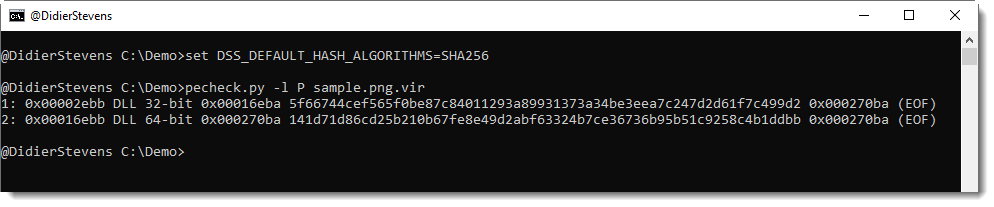
The overview of embedded PE files produced with option -l P now reports the hash of the embedded PE file without overlay:

By default, this is an MD5 hash, but can be changed to your liking using environment variable DSS_DEFAULT_HASH_ALGORITHMS, like this:

I will introduce this environment variable to my other tools with new releases.


pecheck-v0_7_8.zip (https)
MD5: 616CD9159316FC2100BE3E87C5C26B2C
SHA256: F734EFFFA17E4EE6CA64A67D18340B3347B72C4B1C7522BAF1B7D720FABA2389

Monday 30 September 2019

Update Of My PDF Tools

Filed under: maldoc,Malware,My Software,PDF,Update — Didier Stevens @ 19:16

This is an update of my PDF tools.

There are a couple of bug fixes for pdf-parser and pdfid.

And 2 new features in pdf-parser, inspired by a private training on maldoc analysis I gave last week. I often get good ideas from my students, and sometimes, even I get a good idea in class 🙂 .

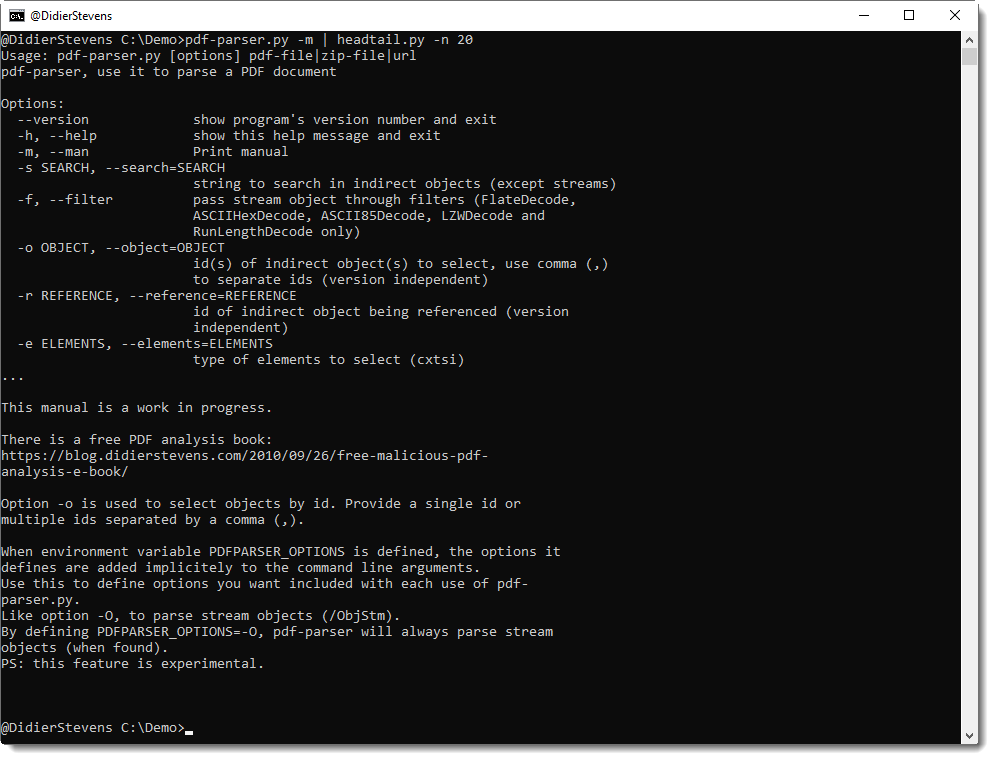
Option -o can now be used to select multiple objects: separate the indices by a comma.

There’s a new environment variable, PDFPARSER_OPTIONS, that can be used to provide extra options you want to include with each execution of pdf-parser.py. This is useful for option -O, an option to parse stream objects.

It’s actually best to always parse stream objects, i.e. always use option -O. But I decided not to make this an option that is on by default, so that the behavior of pdf-parser would remain unchanged. I consider this important for the many people that rely on a predictable behavior of pdf-parser, like teachers and students of infosec trainings where my tools are used/mentioned.

However, always including option -O is tedious and error prone. So now you can have best of both worlds, by defining an environment variable with name PDFPARSER_OPTIONS and value -O.

And finally, I started to add a man page (option -m), like I do with many of my other tools. This is a work in progress: for the moment, it points to my free PDF analysis e-book that explains the use of pdfid and pdf-parser.
pdf-parser_V0_7_3.zip (https)
MD5: 7EB1713631D255B36BC698CD2422C7EB
SHA256: D4D5AC9C26A9D8FEF65CE58A769D3F64A737860DC26606068CCDD3F04FDEA0D7

pdfid_v0_2_6.zip (https)
MD5: 9CCE332914A6C76410F04B7C35DA3155
SHA256: 95F7C91EEFB561F3F3BE9809ED339D85E7109BAA7E128EF056651EE018DBDBA0

Sunday 22 September 2019

Update: strings.py Version 0.0.4

Filed under: My Software,Update — Didier Stevens @ 8:56

This new version of strings.py comes with a new option -T to trim the strings to a given length. And also 2 bug fixes.

strings_V0_0_4.zip (https)
MD5: 8B1F5A6BEBA2BC8BDFF16B99C27050E4
SHA256: 7BBAAB0E83692288BDC35BC0FBDD6B2F8A141280E506131E2818F49BEF31D01A

Saturday 21 September 2019

Update: hex-to-bin.py Version 0.0.3

Filed under: My Software,Update — Didier Stevens @ 11:04

hex-to-bin.py is a program to convert hexadecimal dumps (text) to binary data.

This new version of hex-to-bin.py can handle different hexdump formats, like registry dumps (text files). Use option -x to handle these hexdumps.

And option -t was added if the input is a text file that is non-ASCII, like UTF16. Option -t can be used to convert the text file.

And it supports Python3, but that code is a kludge. Something I’ll have to do better later.


hex-to-bin_V0_0_3.zip (https)
MD5: 0F87942CC9EF566D4C3B5A34073D5399
SHA256: 02447247C59F530CD6559B0FB287E314AC3AB807D843729CA9CE3F16D0930CAB

Wednesday 18 September 2019

Update: pecheck.py Version 0.7.7

Filed under: My Software,Update — Didier Stevens @ 0:00

This new version of pecheck.py adds option -l to carve embedded PE files. This will be explained in detail in an upcoming blog post.

pecheck-v0_7_7.zip (https)
MD5: CEFCCC094EF9E29A539092A6ECB77EEE
SHA256: 91041D17A39C7FA4151830AF8FBD151680A04FC617CB0EADDA32D240E9AB9C03

Tuesday 17 September 2019

Update: hash.py Version 0.0.7

Filed under: My Software,Update — Didier Stevens @ 0:00

This new version supports CRC32 hashing.

hash_V0_0_7.zip (https)
MD5: 9BE8A26F2940FA2FF5C3671B7BB6DC6F
SHA256: CFA2767F0FAA792F9B75344B2F15FF40267F3EDE77D221B0134F07FDB04E515B

Saturday 14 September 2019

Update: msoffcrypto-crack.py Version 0.0.4

Filed under: My Software,Update — Didier Stevens @ 0:00

This new version of msoffcrypto-crack.py, a simple tool to crack passwords of MS Office documents, adds rules via option -r.

In this release, there is only one rule to modify candidate passwords: case toggle.

If you use option -r, all passwords in the provide list will be tested, together with their case toggle variant: Secret -> sECRET.

msoffcrypto-crack_V0_0_4.zip (https)
MD5: D3D7A0475FF1C9AAB7BE773514784465
SHA256: 4A27E0FF50863A925FEE55B8F7D16AD29C2DF5E4611F9493DAEEBA89B5F3DBA9

Tuesday 6 August 2019

Update: pdf-parser.py Version 0.7.2

Filed under: My Software,PDF,Update — Didier Stevens @ 0:00

This is a bugfix version.

pdf-parser_V0_7_2.zip (https)
MD5: 7D417F2313FF505AC96B80D80495BB78
SHA256: 3CDB98A57DAABC98382BFA361390AE3637F96852F6F078D03A7922766AE14B57

Tuesday 16 July 2019

Update: format-bytes.py Version 0.0.9

Filed under: My Software,Update — Didier Stevens @ 0:00

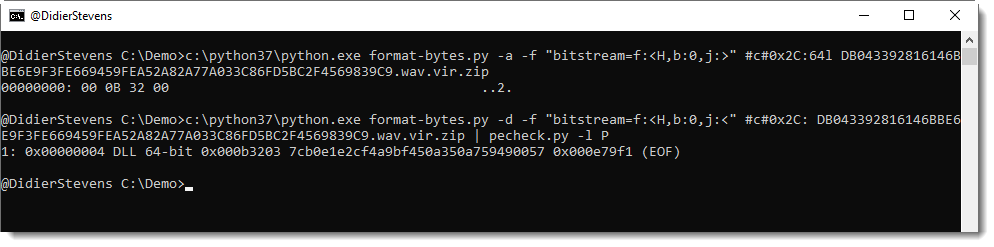
This new version of format-bytes brings support for TLV records.

Here is an example with certificates in the Windows registry:

More details will be provided in an upcoming blog post.

format-bytes_V0_0_9.zip (https)
MD5: 2F97370D12A7DBB53EB8B30AA0A40463
SHA256: 87C9F3120673C0E92C9562EC2687B60AA93DAF612CE854939E48F6E902BFBBB4

« Previous Page — Next Page »

Blog at WordPress.com.