Didier Stevens

Wednesday 13 January 2010

Quickpost: New Versions of PDFiD and pdf-parser

Filed under: My Software,PDF,Quickpost — Didier Stevens @ 21:54

A new version of PDFiD (V0.0.10): to deal with PDF samples trying to evade detection by preceding the header with some random bytes, I use less stringent conditions to identify a PDF file. If PDFiD finds keyword %PDF in the first 1024 bytes of a file, it assumes it’s a PDF file and starts analyzing it.

A new version of pdf-parser (v0.3.7):

  • added support for filters /LZWDecode and /RunLengthDecode
  • added a –dump option to extract the unfiltered data of a stream object (useful when the data is not actually compressed, but a payload)
  • testing the Python version before execution

Both can be downloaded on the PDF Tools page.


Quickpost info


Monday 11 January 2010

Adobe Reader JavaScript Blacklist Framework

Filed under: Malware,PDF,Vulnerabilities — Didier Stevens @ 1:51

The JavaScript Blacklist Framework is a security feature Adobe released with Adobe Reader and Acrobat versions 8.1.7 and 9.2.

When you’re in a case where you need to use Adobe Reader and you can’t disable JavaScript, the JavaScript Blacklist Framework can help you mitigate zero-days in JavaScript API functions by disabling the vulnerable functions.

I produced a video where I disable util.printf:

Notice that when I blacklist util.printf, the script still executes until the blacklisted function util.printf is called. At that moment, the script is cancelled and the user is warned.

On Windows, you can blacklist functions by adding them to registry value tBlackList (HKLM\SOFTWARE\Policies\Adobe\product\version\FeatureLockDown\cJavaScriptPerms\tBlackList). To blacklist more than one function, use the same registry value and separate the functions by the pipe-character (e.g. Util.printf|Collab.getIcon). Pay attention to the fact that the framework is case-sensitive (e.g. Util.printf is correct, util.printf is not correct).

The framework is impervious to bypassing with some basic obfuscation techniques found in malicious PDFs (eval(“util.printf… ; x = util.printf; x(“… ).

It’s too bad that blacklisting is limited to the JavaScript API; the functions to blacklist must be in the form <object-name>.<function-name>. Otherwise we would be able to blacklist some global functions of the JavaScript language that are often used in malicious PDF files, like unescape. According to the ECMAScript specification, unescape is a member function of the Global Object. I tried several ways to blacklist it (unescape, .unescape, this.unescape, Doc.unescape, …), but failed.

If you really want to disable unescape, you could do this by patching the JavaScript plugin EScript.api. Maybe I’ll post a method to do this in-memory with my basic process manipulation tool kit.

Adobe Reader JavaScript Blacklist Framework

Thursday 19 November 2009

Update: bpmtk with hook-createprocess.dll

Filed under: bpmtk,Hacking,My Software,PDF,Update — Didier Stevens @ 19:32

There are no real changes in this new version of bpmtk, only a new DLL (hook-createprocess.dll) was added. You can use this DLL to protect your Windows machine from getting infected by the current malicious documents found in-the-wild.

You can download bpmtk version 0.1.6.0 here.

Hook-createprocess.dll is a DLL that patches the process into which it is loaded to prevent it from creating new processes. It does this by patching the Import Address Table of kernel32.dll for ntdll.dll to hook API functions NtCreateProcessEx, NtCreateProcess and NtCreateUserProcess.
Calls to these functions are intercepted and not passed on to the original functions. Instead, a code is returned indicating that the operation was blocked. The result is that functions in kernel32 used to create new processes fail (like WinExec) and hence that the patched process can’t create new processes.
This is all it takes to block most shellcode found in malicious documents like PDF malware. Shellcode like this does the following:


Of course, since this protective measure is taken by patching the process, shellcode could undo this patching and bypass our protection. Or it could use the ntdll API and not be hindered by our patch. But actual malware found in-the-wild doesn’t do this (not talking about targeted attacks) and is thus prevented from executing the trojan it just downloaded or extracted from the PDF document.

If you want better protection, you’ll have to use something that works at the level of the kernel, like sandboxing software.

However, this patch comes with some drawbacks, because it also blocks bening new processes. For example, the update function of Adobe Acrobat requires the creation of a new process. To reenable the creation of processes, you have to unload hook-createprocess.dll (unloading removes the hooks). bpmtk has a function to unload DLLs from a process (reject).

There are a couple of trick to load this DLL with the program you want to protect. I’ll describe a generic method in an upcoming post, but now I want to explain it for a specific program.
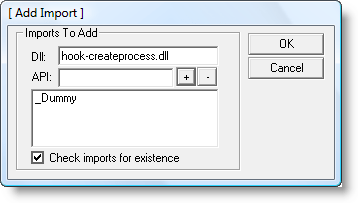
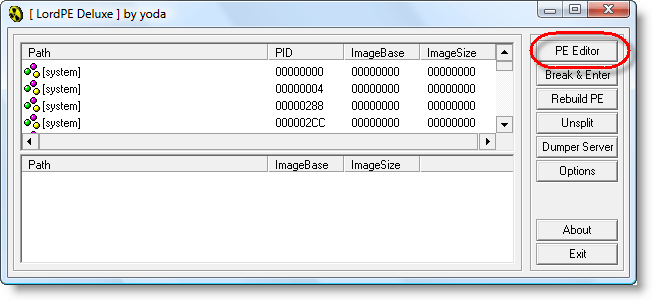
Programs have a list of DLLs they need for their execution. We will use a PE-file editor to add our hook-createprocess.dll to this list. hook-createprocess.dll exports a dummy function (_Dummy) just so you can add to the imports table of an executable. We will use LordPE to add hook-createprocess.dll with _Dummy to Adobe Reader:

Right-click the Import table:

And don’t forget to save…

Monday 9 November 2009

Quickpost: “Hiding” a PDF Document

Filed under: Entertainment,My Software,PDF,Quickpost — Didier Stevens @ 15:00

Here’s some Python code (it uses my mPDF module) to append a new PDF document to an existing PDF document to “hide” the original document. Recovering the original is trivial, you open the PDF document with a HEX-editor and delete the appended document (starting after the second %%EOF counting from the end of the file). This trick uses incremental updates.

20091107-172245

#!/usr/bin/python

__description__ = 'make-pdf-hide-original, use it to "hide" the original PDF document'
__author__ = 'Didier Stevens'
__version__ = '0.0.1'
__date__ = '2009/11/07'

"""
Source code put in public domain by Didier Stevens, no Copyright
https://DidierStevens.com
Use at your own risk

History:
 2009/11/07: start

Todo:

"""

import mPDF
import time
import zlib
import optparse

def Main():
    oParser = optparse.OptionParser(usage='usage: %prog [options] pdf-file\n' + __description__, version='%prog ' + __version__)
    oParser.add_option('-s', '--line', default='Hello World', help='The line of text to print on the screen (default Hello World')
    (options, args) = oParser.parse_args()

    if len(args) != 1:
        oParser.print_help()
        print ''
        print '  %s' % __description__
        print '  Source code put in the public domain by Didier Stevens, no Copyright'
        print '  Use at your own risk'
        print '  https://DidierStevens.com'

    else:
        pdffile = args[0]
        oPDF = mPDF.cPDF(pdffile)
        oPDF.template1()
        oPDF.stream(5, 0, 'BT /F1 24 Tf 100 700 Td (%s) Tj ET' % options.line)
        oPDF.xrefAndTrailer('1 0 R')

if __name__ == '__main__':
   Main()

Quickpost info


Monday 2 November 2009

CVE-2009-2979 Or The XML-Bombed PDF

Filed under: PDF,Vulnerabilities — Didier Stevens @ 7:15

The Extensible Metadata Platform is an Adobe standard to represent metadata with XML.

More than a year ago, I added an XML-bomb to XMP-data inside a PDF document:

20091031-194428

As this made Adobe Reader 8 & 9 crash, I reported it to Adobe. It has been fixed with the last patch cycle.

Why do I disclose the details of this vulnerability? Because XMP is not only intended to be used in PDF documents, but many other file formats. So be sure to check your software for this vulnerability.

Tuesday 13 October 2009

Update: PDFiD Version 0.0.9 to Detect Another Adobe 0Day

Filed under: My Software,PDF,Vulnerabilities — Didier Stevens @ 21:23

PDFiD is updated to detect the latest Adobe 0day, CVE-2009-3459.

I’ll provide more details in an upcoming post, just now for know that PDFiD detects a /Colors name followed by a very big number (larger than 2^24 or 16777216).

pdfid009

You can download PDFiD here.

Monday 5 October 2009

Preventing Applications From Starting (Malicious) Applications

Filed under: bpmtk,Malware,My Software,PDF,Vulnerabilities — Didier Stevens @ 0:00

Another very effective way to prevent malicious documents from infecting PCs, is to prevent vulnerable applications from starting other applications. As almost all shellcode found in malicious documents in-the-wild (again, I’m excluding targeted attacks) will ultimately start another process to execute the trojan, blocking this will prevent the trojan from executing.

This is an old idea you’ll find implemented in many sandboxes and HIPS. I added a new DLL to my basic process manipulation tool kit to prevent applications from creating a new process. Loading this DLL inside a process will prevent this process from creating a new process. I’ll explain the technique used in my DLL and how to load it in vulnerable applications in upcoming blogposts, but I want to start with showing how it prevents malicious documents from infecting a PC.

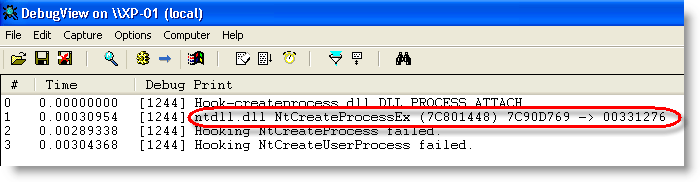
When the DLL is loaded inside a process, it will patch the Create Process API to intercept and block calls to it:
hook-createprocess-010

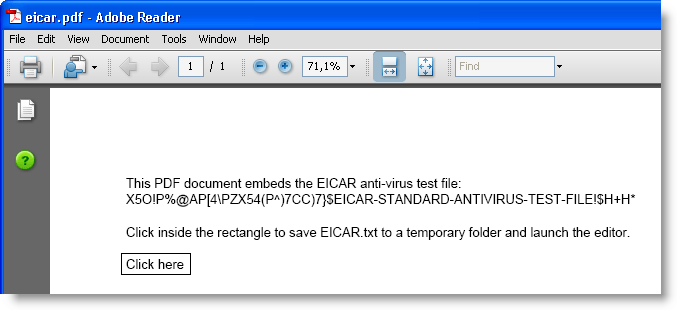
As a first test, we’ll use my eicar.pdf document.
hook-createprocess-009

Clicking the button will save the eicar.txt file to a temporary folder and launch the editor.

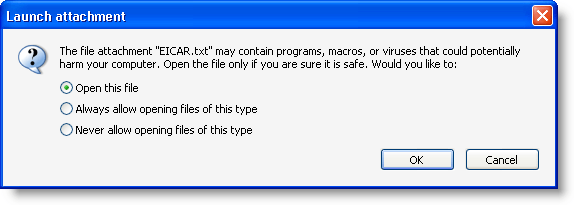
Adobe Acrobat reader will warn you when an application is to be launched:
hook-createprocess-011

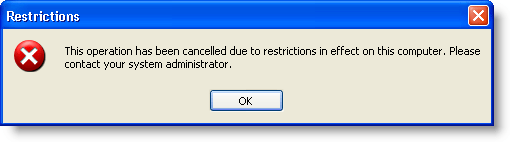
But when you accept, the editor will be prevented to execute:
hook-createprocess-012

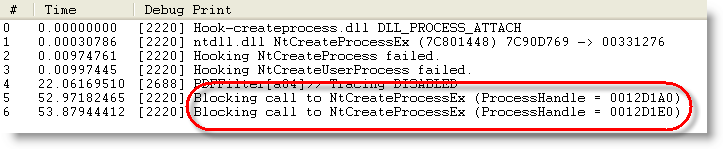
That’s because the DLL intercepted and blocked the Create Process call:

hook-createprocess-013

As a second test, let’s use a real malicious PDF document. The hooks installed by the DLL prevent it from executing the trojan:
hook-createprocess-014

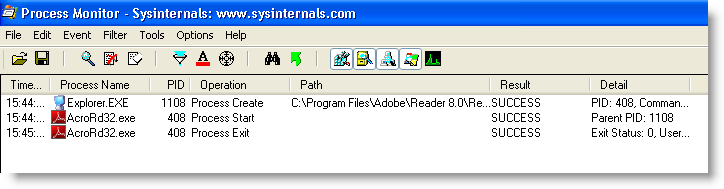
Adobe Reader starts and then just crashes, without spawning another process:
hook-createprocess-017

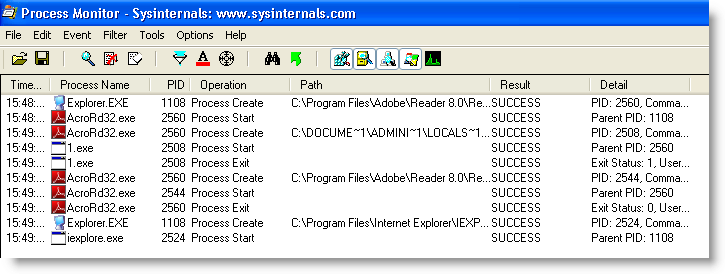
When opening the same malicious PDF, but without the protecting DLL, the machine gets trojaned (execution of 1.exe and Internet Explorer):
hook-createprocess-018

This simple way of preventing applications from launching other applications comes with some drawbacks. For example, the Check Update function in Adobe Reader will not function anymore.

When you have a sandboxing system of HIPS installed on the machines you manage, check if you can use it to prevent vulnerable applications from starting other applications. If it doesn’t provide such a feature, try the new DLL I’ll be posting in the new version of bpmtk.

Thursday 6 August 2009

Update: pdf-parser Version 0.3.5

Filed under: My Software,PDF,Update — Didier Stevens @ 0:05

After PDFiD, it’s pdf-parser’s turn to get updated.

The major change is support for /Names obfuscation through canonicalization. Now that these obfuscation techniques are found in in-the-wild samples, this feature became a necessity. For example, searching for /JavaScript when the PDF document contains /Java#53cript will also retrieve this obfuscated instance.

And if you need to see the obfuscated names like they are, use option –nocanonicalizedoutput

Support for filter ASCII85Decode has been added.

And option –hash displays the MD5 hash value of objects, making it easier to compare 2 PDF documents.

Download:

pdf-parser_V0_3_5.zip (https)

MD5: 07EA2C47766ADF248102E378C65D03F3

SHA256: 5EAD0F9BE9693EF836CF67FF2B796324ED5E7053D34BF4FA588D250A7DA2E761

Wednesday 5 August 2009

Update: PDFiD Version 0.0.8

Filed under: My Software,PDF,Update — Didier Stevens @ 12:33

PDFiD is updated.

Changes:

  • It detects Flash in PDF (/RichMedia)
  • Actions launched by Forms (/AcroForm)
  • Less stringent %PDF header checking, because I saw some samples designed to bypass pddfid
  • Updated the date format
  • New option –force:  force the scanning of a file, even if no valid %PDF header was found
  • Accepts stdin for pipes, example:  pdf-parser.py –filter –type /ObjStm flash.pdf | pdfid.py –force
    This will scan objects “hidden” in object streams (/objStm)

Download:

pdfid_v0_0_8.zip (https)

MD5: 9769FB96899F3AD15510C903A4FB29EF

SHA256: 542734C2613439851AF99B59725B1607F96A6E9396B447C5BD3AF197AABB0231

Monday 6 July 2009

Patching PDF Readers to Support Hidden Embedded Files

Filed under: Hacking,PDF — Didier Stevens @ 20:27

Today, I’m showing you how you can patch your PDF reader (Foxit or Adobe) to handle PDF documents with hidden embedded files. And for Foxit, there’s a bonus: Foxit Reader can also embed files into existing PDF documents.

In my stego PDF trick, I just replace the name /EmbeddedFiles with /Embeddedfiles in the PDF document. As the PDF language is case-sensitive, your PDF reader doesn’t recognize /Embeddedfiles, and hence doesn’t handle the embedded file. PDF readers are designed to skip features of the PDF language they don’t understand (i.e. new features of the PDF language), so that’s why you don’t get an error message from your PDF reader for /Embeddedfiles.

If you search for the string EmbeddedFiles in the binaries of your PDF reader and replace it with Embeddedfiles, it will handle PDF documents with hidden embedded files (but it will stop supporting PDF documents with visible embedded files).

Doing this for Foxit is easy, as there’s only one binary, Foxit Reader.exe. Open it with a hex editor and search for EmbeddedFiles:

20090705-121651

Replace it with Embeddedfiles and save it:

20090705-121837

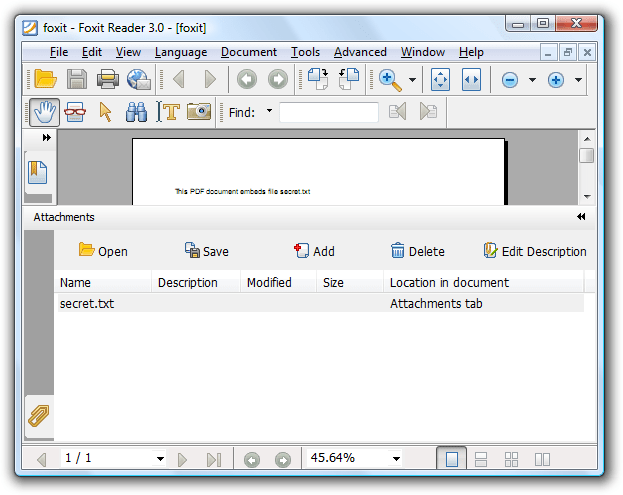
That’s it, now you use your patched Foxit Reader to reveal hidden embedded files:

20090705-122339

And have you noticed the Add button? Foxit Reader also provides support to add embedded files to existing PDF documents! So you’re not limited to using my Python program to create your own PDF documents.

For Adobe Reader, the trick is the same. Open AcroRd32.dll in a hex editor and do a search and replace (I had to patch 2 instances of of EmbeddedFiles).

« Previous PageNext Page »

Blog at WordPress.com.