Didier Stevens

Tuesday 16 February 2010

MemoryLoadLibrary: From C Program to Shellcode

Filed under: Hacking,My Software,Shellcode — Didier Stevens @ 0:40

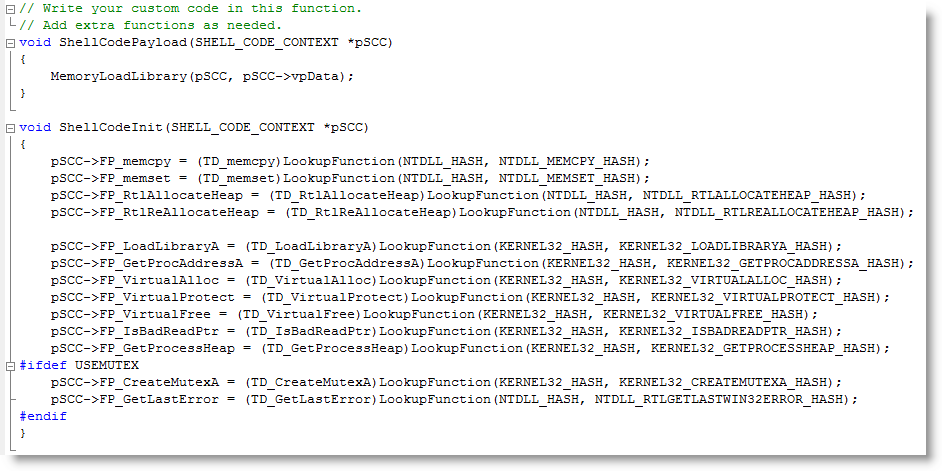
The DLL-loading shellcode I used in my cmd.xls spreadsheet was generated with a method I worked out to generate WIN32 shellcode with a C-compiler. You can find it on my new Shellcode page.

With this release, I provide you with all the tools you need to build your own version of cmd.xls:

Monday 8 February 2010

Excel with cmd.dll & regedit.dll

Filed under: Hacking,My Software — Didier Stevens @ 21:17

I modified the source code of ReactOS‘ cmd and regedit for the following trick:

Let me summarize how I did this, as this is the combined result of several techniques I blogged about before.

You can download regedit.dll here and the new version of cmd.dll with the DLL command here. The DLL command I added allows you to load a DLL with LoadLibrary or directly into memory (/m option). When loaded with LoadLibrary, the library will be unloaded with FreeLibrary unless you use option /k to keep it loaded.

The DLL command assumes that your DLLs execute via the DllMain entry-point when they get loaded.

Thursday 4 February 2010

cmd.dll

Filed under: Hacking,My Software — Didier Stevens @ 1:16

This is something I’ve wanted to do for some time: take a command interpreter and transform it from an EXE into a DLL.

Why you ask? Well, because it’s a fun challenge 😉

But also because a DLL is loaded into a process. In a restricted environment, it can be injected into a legitimate process and thus bypass the restriction mechanisms.

Metasploit’s Meterpreter is another example of a command interpreter in DLL form.

cmd.exe from Microsoft is closed source, but there is an open-source variant available from the ReactOS project.

Compiling cmd.exe from ReactOS is simple: download the source-code and the ReactOS build environment. Install it, start the build environment  and issue command make cmd. That’s all you need to do to compile cmd.exe (I used version 0.3.11).

Transforming the source code to generate a DLL in stead of an EXE is simple. You need to change 3 files.

Edit file cmd.rbuild and make these changes to the module element:

<module name="cmd" type="win32dll" installbase="system32" installname="cmd.dll" unicode="yes" crt="msvcrt">

Because I want to use this DLL in GUI-processes without console, I need to create a console. Edit file cmd.c and add AllocConsole(); to function cmd_main:

SetFileApisToOEM();
InputCodePage= 0;
OutputCodePage = 0;

AllocConsole();

hConsole = CreateFile(_T("CONOUT$"), GENERIC_READ|GENERIC_WRITE,
 FILE_SHARE_READ|FILE_SHARE_WRITE, NULL,
 OPEN_EXISTING, 0, NULL);

And because a DLL has another entry-function than an EXE, edit file main.c and replace function main with function DllMain:

#include <precomp.h>

INT WINAPI
DllMain(
 IN PVOID hInstanceDll,
 IN ULONG dwReason,
 IN PVOID reserved)
{
 switch (dwReason)
 {
 case DLL_PROCESS_ATTACH:
 cmd_main(0, NULL);
 break;

 case DLL_THREAD_ATTACH:
 break;

 case DLL_THREAD_DETACH:
 break;

 case DLL_PROCESS_DETACH:
 break;
 }

 return TRUE;
}

That’s it. Recompile with make cmd to generate cmd.dll

There are still some improvements we can make, but that’s for a later version: error messages are not displayed, exiting the shell terminates the host process, …

You can download the modified source files and compiled cmd.dll here.

This is a screenshot of cmd.dll injected inside Excel with my memory module shellcode:

Thursday 28 January 2010

Quickpost: Shellcode to Load a DLL From Memory

Filed under: Hacking,My Software,Quickpost — Didier Stevens @ 3:08

I finally took time to develop shellcode to load a DLL, not with LoadLibrary, but directly from memory. Not storing the DLL on disk prevents it from being detected by AV software; not using LoadLibrary bypasses HIPS software that monitors this system call.

My shellcode is based on Joachim’s code.

In previous posts, I showed how to load a DLL or shellcode with VBA in Excel. This is a combination of both techniques: a VBA macro loads and executes shellcode in Excel’s process space, and the shellcode loads a DLL from memory into Excel’s process memory.

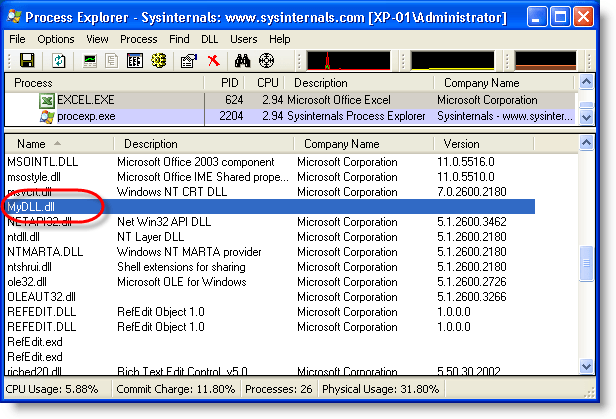
With the code of the previous post, the DLL appears in the list of loaded DLLs:

With this shellcode, it doesn’t:


Quickpost info


Thursday 21 January 2010

Quickpost: PDF Header %!PS-Adobe-N.n PDF-M.m

Filed under: My Software,PDF,Quickpost — Didier Stevens @ 11:21

@Feliam has an interesting PDF library to create PDF files with an unconventional header (the generated document doesn’t start with %PDF-…, but %PDF appears somewhere in the first 1024 bytes of the document). As this trick is likely to be taken over by malware authors, I updated PDFiD to support this.

The PDF reference document also mentions %!PS-Adobe-N.n PDF-M.m as a valid header, however, the PDF documents I and @Feliam generated with this header are not rendered by Adobe Reader (neither Foxit or Sumatra PDF).

I was told Adobe did support this header in older versions. My tests show Adobe Reader version 3, 4, 5 and 6 will render PDF documents with header %!PS-Adobe-N.n PDF-M.m. Versions 7, 8 and 9 will not. Therefor I decided not to include support for this header to PDFiD.

pdf-parser doesn’t test the header, it analyzes PDF documents regardless of the header.

Monday 18 January 2010

Update: XORSearch Version 1.6.0

Filed under: My Software,Update — Didier Stevens @ 1:26

A couple of new features:

  • searching for Unicode
  • searching for Hex code
  • printing of neighbouring bytes

Unicode support is rather simple: I consider Unicode as ASCII with 2 bytes per character, last byte always equals 0.

Usage case of hexcode search: search for embedded and encoded PE-file by searching for the PE-magic bytes MZ:

XORSearch -h malware.exe 50450000

Remember that XORSearch is not limited to win32, you can compile it on *nix too: cc -o XORSearch XORSearch.c

Download here.

Wednesday 13 January 2010

Quickpost: New Versions of PDFiD and pdf-parser

Filed under: My Software,PDF,Quickpost — Didier Stevens @ 21:54

A new version of PDFiD (V0.0.10): to deal with PDF samples trying to evade detection by preceding the header with some random bytes, I use less stringent conditions to identify a PDF file. If PDFiD finds keyword %PDF in the first 1024 bytes of a file, it assumes it’s a PDF file and starts analyzing it.

A new version of pdf-parser (v0.3.7):

  • added support for filters /LZWDecode and /RunLengthDecode
  • added a –dump option to extract the unfiltered data of a stream object (useful when the data is not actually compressed, but a payload)
  • testing the Python version before execution

Both can be downloaded on the PDF Tools page.


Quickpost info


Monday 4 January 2010

New Format for UserAssist Registry Keys

Filed under: Forensics,My Software,Windows 7 — Didier Stevens @ 15:29

With Windows 7 and Windows Server 2008 R2, the binary data format of the values stored in the UserAssist registry keys has changed.

Here’s a partial description of the new format:

  • the counter is 32-bits long, starting at byte 4 (first byte is byte 0)
  • the timestamp (64-bits) starts at byte 60
  • there is a 32-bit value that appears to be the total time an application has focus, expressed in milli-seconds (starts at byte 8 )

For more details, read my article in the new forensic magazine Into The Boxes.

Don’t forget to use the special version of my UserAssist tool on Windows 7 and Windows Server 2008 R2.

Friday 1 January 2010

The Undeletable SafeBoot Key

Filed under: Malware,My Software — Didier Stevens @ 12:53

I present you a new program to create the SafeBoot registry key with special permissions protecting it from deletion. After using this new program, you’ll be able to restore the SafeBoot registry keys with my .REG files.

Many malware deletes the SafeBoot registry key to prevent you from booting into Safe Mode. I provide a registry fix to restore these keys.

But there exists malware that goes even further and actively monitors the registry to thwart every attempt to restore the keys by deleting them as soon as they are restored. Untill now, I recommended to use a Live CD to restore the keys in such a case (this is a complex procedure). This way, the malware is not running while you restore the SafeBoot keys.

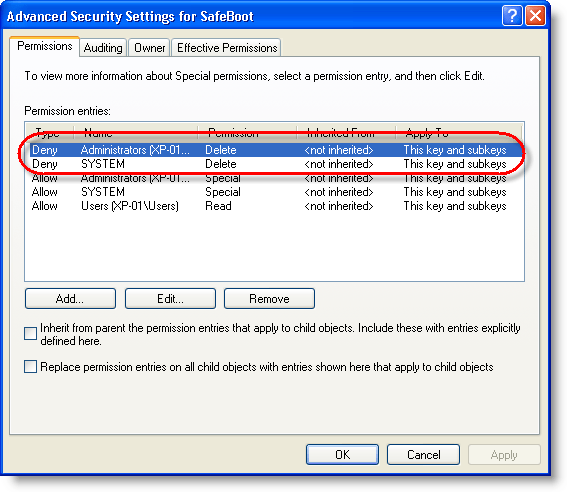
Now I developed another solution: a program to create the SafeBoot registry key with permissions to deny Administrators and System accounts to delete the key. This way, the malware can’t delete the keys because it lacks the permissions to do so.

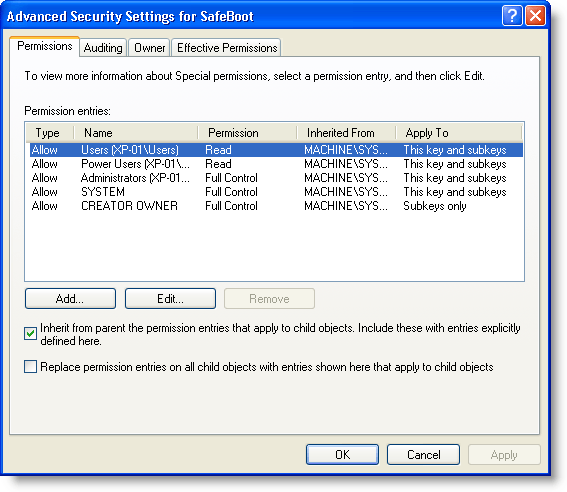
Here are the SafeBoot permissions on a default Windows XP install:

And here are the permissions of the SafeBoot key created with my new program:

I designed my program to create the SafeBoot key only when it is missing, and to set the special permissions while it is created:

My program will not set the special permissions when the key exists. If the SafeBoot keys exists and you can’t boot into Safe Mode, you’re dealing with another issue than a Safe Mode disabling malware (probably a buggy driver).

The program is a console program, but it will pause at the end so you can read its output, even when you launch it from Windows Explorer (i.e. double-click it). If you want to use it in a script and prevent the prompt from appearing, use option -n.

If the SafeBoot key exists, my program will tell this (SYSTEM\CurrentControlSet\Control\SafeBoot exists.) and it will leave the permissions unchanged. If your system is clean but you want to protect the SafeBoot keys, I recommend you change the permissions manually using RegEdit.

My program creates only registry key SYSTEM\CurrentControlSet\Control\SafeBoot, and not the subkeys. To restore the subkeys, you just need to use the appropriate .REG file.

Having read this, you might have thought that malware authors could bypass this protection by changing the permissions before deleting the keys. You’re right. I don’t deny Administrator and System accounts the permission to change the permissions, because I don’t expect there is malware in the wild that changes permissions of the SafeBoot key. I’ll deal with it when it eventually appears.

Download:

UndeletableSafebootKey_V0_0_0_1.zip (https)

MD5: 2FAC291AD547657E31B157B8581D4601

SHA256: 7A1E42A57BBF8E804491318671AE992947C82DCC9C2001E3033B45E4AEAB2DDE

Wednesday 23 December 2009

LoadDLLViaAppInit

Filed under: My Software — Didier Stevens @ 12:20

How do you load a DLL in every new process on a Windows machine? One way to do this is the AppInit_DLLs registry key (this key is frequently abused by malware). Every new process loading user32.dll, also loads the DLLs listed in AppInit_DLLs on startup.

But you can’t use this key to load hook-createprocess.dll, because it will load it in every process, and your Windows machine will stop working.

To selectively load DLLs, I developed a new DLL: LoadDLLViaAppInit.dll. Copy LoadDLLViaAppInit.dll to system32 and add it to the AppInit_DLLs registry key (HKEY_LOCAL_MACHINE\SOFTWARE\Microsoft\Windows NT\CurrentVersion\Windows). This way it gets loaded in every new process. LoadDLLViaAppInit.dll will consult config file LoadDLLViaAppInit.bl.txt in system32, this config file contains the list of processes we want to load a particular DLL into. Here’s an example:

acrord32.exe    hook-createprocess.dll
winword.exe    hook-createprocess.dll
excel.exe    hook-createprocess.dll
powerpnt.exe    hook-createprocess.dll

This config file instructs LoadDLLViaAppInit.dll to load hook-createprocess.dll into Adobe Acrobat (acrord32.exe) and Microsoft Office (Word, Excel and PowerPoint). Important remark: the separator between the executable name and the dll name must be a TAB character. For debugging purposes, LoadDLLViaAppInit.dll logs the DLLs it loads to the debug console.

If you want to prevent a DLL from being loaded (for example to allow Adobe Reader to update itself), you’ll just have to temporarily modify the config file. And be careful with this tool, a wrong configuration can render your machine unusable (for example, if you load hook-createprocess.dll into every process, Windows won’t be able to create new processes).

Be sure to allow only administrators to write to the config file, otherwise you’re opening your machine to elevation attacks.

Starting with Windows Vista, AppInit_DLLs is not enabled by default for security reasons (it’s used a lot by malware). To enable it, you’ve to set the value of LoadAppInit_DLLs to 1. But be aware that this makes your Windows Vista (and later) machine less secure, as from then on, malware will also be able to use AppInit_DLLs to autorun.

Download:

LoadDLLViaAppInit_V0_0_0_1.zip (https)

MD5: 60B93BAF4B0F973C3EC920F2F4A180E8

SHA256: 3B528A3BAF593A2740D5655CF18BC0932801D4DF1750DE8F9C8229C0FF51E8BE

« Previous PageNext Page »

Blog at WordPress.com.