Didier Stevens

Monday 8 November 2010

EnforcePermanentDEP

Filed under: My Software,Windows 7,Windows Vista — Didier Stevens @ 0:45

Like its name reveals, EnforcePermanentDEP is a DLL to switch on permanent DEP in the loading process.

When loaded inside a process, this DLL will call SetProcessDEPPolicy with argument PROCESS_DEP_ENABLE, hereby enabling DEP permanently on the loading process. After this, DEP can’t be disabled anymore for this process.

Once DEP is set, this DLL unloads itself. There is no need for this DLL to remain loaded once it has enabled DEP. This is done via the entry point DllMain function which returns FALSE for DLL_PROCESS_ATTACH, hereby making that the DLL doesn’t remain loaded inside the process.

To load this DLL inside a process, you can add it to the import table of the target process (EnforcePermanentDEP.dll exports function Dummy), use LoadDLLViaAppInit or use your own preferred injection method.

Download:

EnforcePermanentDEP_V0_0_0_1.zip (https)

MD5: B0A89B0CE8DC5BA2472B3D744D40E4A3

SHA256: 525BA6EF82BD2B0ABD30DAD0D676CE085A9FA6E0DE3E3A8A0ADD6DF050F5A635

Tuesday 26 October 2010

Update: LoadDLLViaAppInit

Filed under: My Software,Update — Didier Stevens @ 9:04

This new version of LoadDLLViaAppInit allows you to load more than one DLL inside a process. You separate the DLL names with a semi-colon (;).

For example, to load DLLs hook-createprocess.dll and EnforcePermanentDEP.dll inside process acrord32.exe, you configure this:

acrord32.exe    hook-createprocess.dll;EnforcePermanentDEP.dll

Download:

LoadDLLViaAppInit_V0_0_0_2.zip (https)

MD5: F458DAEAB1A3E68870EE0608E2A1FFFC

SHA256: 9C8BA52A68893F33E0019CC64264C24A7EEC09C5D0DAE6F43C110ACFD45E621F

Sunday 17 October 2010

setdllcharacteristics

Filed under: My Software,Windows 7,Windows Vista — Didier Stevens @ 20:39

The PE-file format specifies flags to enable DEP and ASLR. You can set these flags with a hex-editor or a PE-file editor.

Because I need to set DEP and ASLR flags in a script, I wrote a C-program to read, set or clear these flags (together with another flag to check AuthentiCode signatures, more about this later).

It’s a standard C program, you can compile it under *nix too.

The option handling is simple, you can’t combine flags into one option string. For example, to set DEP and ASLR, you issue the following command:

setdllcharacteristics +n +d program.exe

This will not work:

setdllcharacteristics +nd program.exe

Don’t forget that by changing these flags on signed executables, the signature is not valid anymore. But that shouldn’t be a problem to run the program.

Later, I’ll post tools to force DEP (and maybe ASLR) without changing the PE file.

And I also updated the PE-file format template for the 010 editor to support these 3 flags.

Download:

setdllcharacteristics_v0_0_0_1.zip (https)

MD5: F96358BF90AA4D8C6B32968B2068BFCB

SHA256: 5A9D3815F317C7C0FF7737F271CE0C60BE2CB0F4168C5EA5AD8CEF84AD718577

Monday 4 October 2010

LowerMyRights

Filed under: Malware,My Software,Vulnerabilities — Didier Stevens @ 0:30

Last year I posted about some techniques and tools to restrict the rights of applications on Windows XP when you run with admin rights. I mentioned a new tool, LowerMyRights, which I forgot to publish. So here it is.

You would use LowerMyRights.dll only if the other tools and techniques are not appropriate for your specific case. LowerMyRights is useful when you can’t create a new process with restricted rights, but when you’ve to restrict the rights of an existing process.

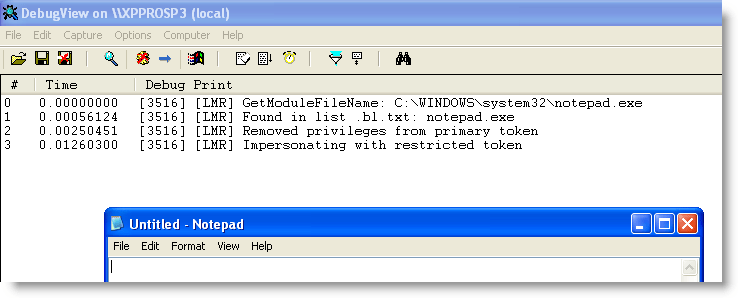
When this DLL is loaded inside an existing process, it will check a whitelist and a blacklist to decide if it has to restrict the process’ rights (it also checks if it’s running on Windows XP). If the application’s name if found in the blacklist and not in the whitelist, LowerMyRights will do its job.

First, it will remove all the privileges of the primary token, except the SEChangeNotifyPrivilege.

Second, it will create a restricted token (with ACLs denying Administrator and Power Users rights) and use this token for impersonation (it uses impersonation because Windows doesn’t allow modifications to the ACLs of a primary token).

This impersonation is also a weak point of LowerMyRights compared with the other tools: exploit code can switch back to the unrestricted primary token by calling RevertToSelf.

You can load LowerMyRights inside all processes by adding it to the AppInit_DLL registry key, but be careful, this might cripple your system as it is loaded inside every process (even at boot time), so please test first.
Or else you use LoadDLLViaAppInit, or add it to the import table like explained here.

The whitelist (lowermyrights.wl.txt) is just a text file with a list of applications to whitelist (i.e. not lower the rights). You must use full pathnames in the whitelist.
The blacklist (lowermyrights.bl.txt) is just a text file with a list of applications to blacklist (i.e. to lower the rights). You must not use full pathnames in the whitelist, but just the application’s name.
The idea I had with this different operation of the whitelist and blacklist, is that you would be able to whitelist specific applications while blacklisting copies/fakes of these applications.
An example with notepad will make this clear: by adding c:\windows\system32\notepad.exe to the whitelist and notepad.exe to the blacklist, you would be able to use the original notepad.exe with full rights, while copies of notepad (located at other locations) or other programs with the name notepad.exe would be restricted. With hindsight, I don’t think this dual list feature is useful, but I left it in anyways (the program is a year old, I used it for a year and I haven’t modified it).

Download:

LowerMyRights_V0_0_0_3.zip (https)

MD5: FF937173AB1CD2C7A9DF050D7ADF0696

SHA256: 9AA83F24031029F60862CAAE477B02DF0C0887BD6E9078A1E186FEF6DF873253

Monday 13 September 2010

RunInsideLimitedJob

Filed under: My Software — Didier Stevens @ 19:21

Here’s another tool to mitigate exploitation of vulnerable (office) applications.

I discovered Job Objects in this book. Job objects allow processes to be grouped and managed together.

An interesting aspect of job objects for securing applications is the ActiveProcessLimit property. With this, you can limit the number of processes running inside the job object. Set this limit to 1 and run an office application inside the job object, and the office application will not be able to start another program. Because once a process is assigned to a job object, all its child processes are also assigned to the job object. Processes can’t change the limits of the job object they are running in, and once a process is assigned to a job object, it can’t be removed from this job object or assigned to another job object. So once a process is assigned to a job object, it is trapped inside and constrained by the limits of the job object.

To prevent a vulnerable application from launching malware, put the vulnerable application inside a job object and limit the number of processes to 1. And the good news is that job objects were introduced with Windows 2000, so this works on Windows XP too.

RunInsideLimitedJob is a program I wrote to constrain programs with a job object. There are 2 versions: an .EXE and a .DLL.

RunInsideLimitedJob.exe takes one argument: the program you want to restrict. It creates a new job object, restricts the number of processes to 1, starts the program you passed as an argument and assigns it to the new job object. If you want to allow more than 1 process, use option -n.

While RunInsideLimitedJob.exe is for new processes, RunInsideLimitedJob.dll is for existing processes. When this DLL is loaded in a running process, it will create a new job object, restrict the number of processes to 1, and assign its host process to the new job object (assuming the host process is not yet assigned to a job object).

There are several ways to automatically load RunInsideLimitedJob.dll in your favorite office application, like my tool  LoadDLLViaAppInit or by importing RunInsideLimitedJob.dll’s dummy function as explained here.

Here I started notepad inside a restricted job object, and then tried to start calc.exe from notepad.exe (via the open file dialog box):

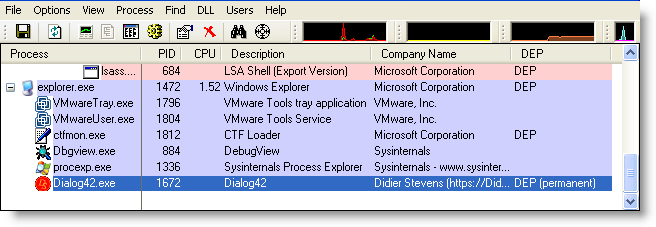
Process Explorer supports job objects. It highlights processes assigned to job objects in brown, and it adds a Job tab to the properties of these processes.

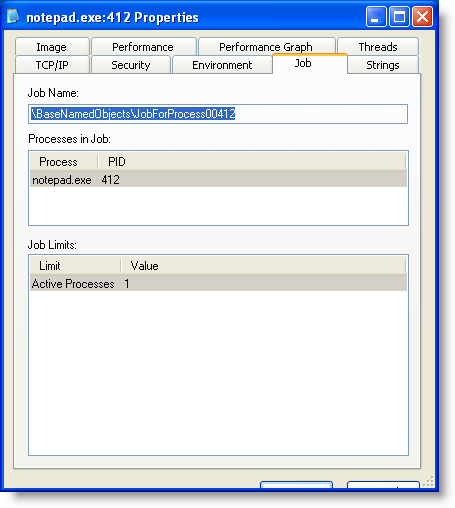
If you try this with my tool, you won’t see the process highlighted brown or the Jobs tab in Process Explorer. Process Explorer does not display the job info when the handle to the job has been closed (the screenshots above are with a modified version of my tool that doesn’t exit and leaves the job handle open). I don’t know yet if this is a bug or a feature in Process Explorer. I need to find out.

The runas command also uses job objects, and these do appear in Process Explorer.

Download:

RunInsideLimitedJob_V0_0_0_1.zip (https)

MD5: 90055BA2928D06EC7A883DEF6E7F37C6

SHA256: EF88A2963436F5893727A90413CE624B473352190E936E35EEF85E246655486D
Friday 3 September 2010

PDFTemplate

Filed under: My Software,PDF — Didier Stevens @ 10:36

I’m starting a series of posts with new PDF tools and new versions of my PDF tools as preparation to my Brucon workshop.

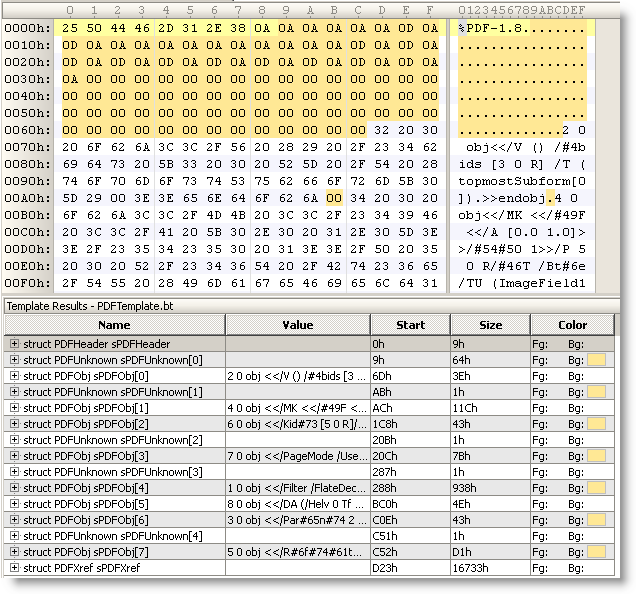
Here is a PDF template for the 010 Editor. It’s particularly useful for malformed PDF files, like this example with PDFUnknown structures:

Thursday 26 August 2010

Quickpost: Ariad & DLL Preloading

Filed under: My Software,Quickpost,Vulnerabilities — Didier Stevens @ 12:11

I’m writing this quickpost just in case you hadn’t figured this out for yourself: the techniques I described to protect machines from the .LNK vulnerability also help you mitigate the DLL preloading issue.

The .LNK vulnerability mitigation examples I gave with Ariad (no file execute) and SRP prevent loading of DLLs from untrusted locations (USB sticks, network drives, …). These will also prevent DLLs from loading from untrusted sources in the case of DLL Preloading exploits.


Quickpost info


Wednesday 18 August 2010

Quickpost: .LNK Template Update

Filed under: My Software,Quickpost,Vulnerabilities — Didier Stevens @ 10:43

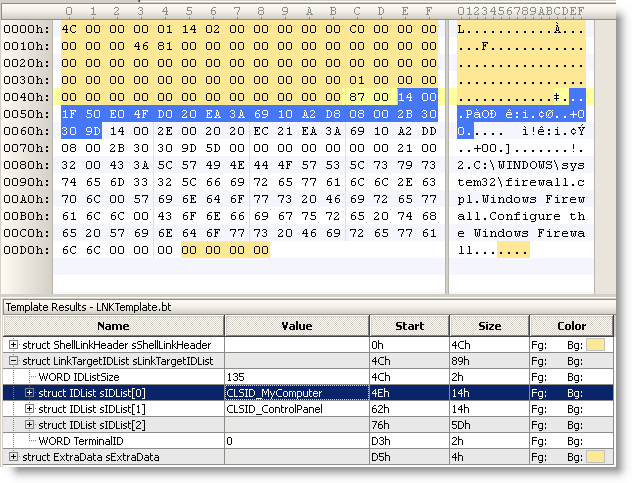
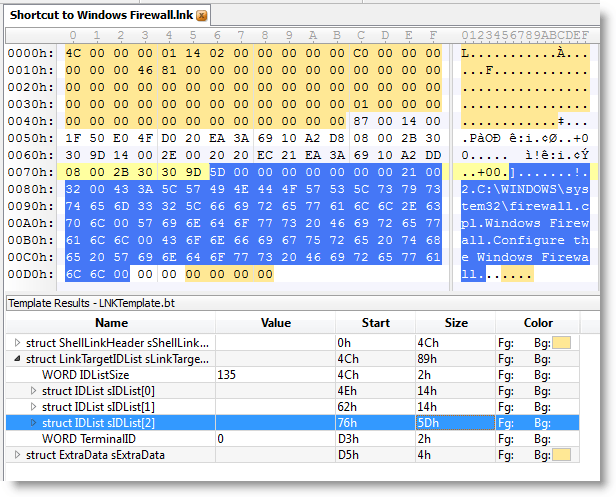
I updated my .LNK template with info I got from comments from WndSks and Forrest Gump. This new version identifies well-known Shell GUIDs:


Quickpost info


Sunday 8 August 2010

Quickpost: 2 .LNK Tools

Filed under: My Software,Quickpost,Vulnerabilities — Didier Stevens @ 10:52

Microsoft has issued an emergency patch (MS10-046) for the .LNK file vulnerability (CVE-2010-2568).

I’m releasing two small tools I developed to help me investigate this vulnerability.

First one is a 010 Editor template file for the .LNK binary file format.


Second one is a ClamAV signature file to find all .LNK shortcuts that load a DLL (malicious or benign).

To scan your drive C, issue command

clamscan.exe -d LNK-CPL-CVE-2010-2568.ndb -l scan.log -r c:\

Quickpost info


Sunday 18 July 2010

Mitigating .LNK Exploitation With Ariad

Filed under: My Software,Vulnerabilities — Didier Stevens @ 13:42

Today I tested @Ivanlef0u ‘s .LNK PoC with my latest Ariad tool.

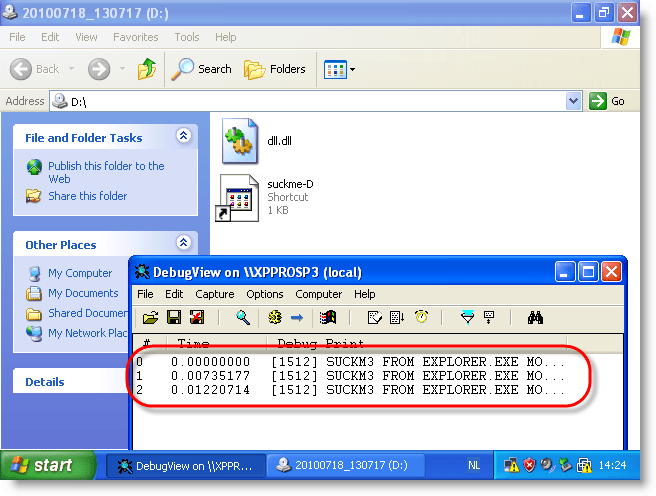
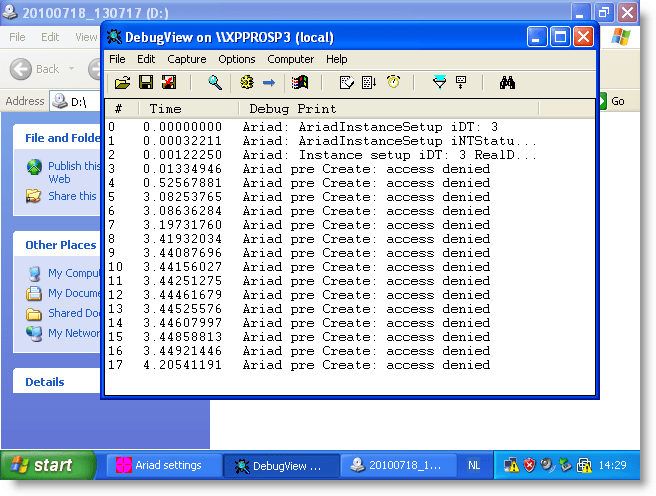
I adapted the PoC to work on a CD-ROM for drive D. When you load the CD-ROM with the PoC (I use an ISO file inside a VM) and take a look at DbgView’s output, you’ll notice that payload gets executed:

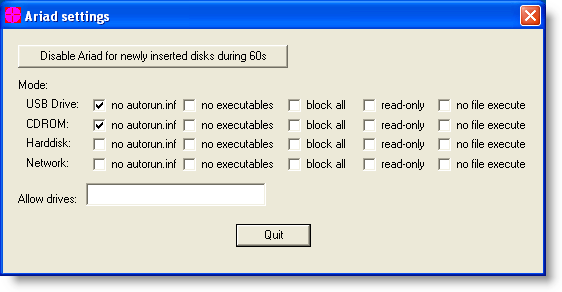
With Ariad installed on the machine in its default configuration (just block \autorun.inf), the PoC still works:

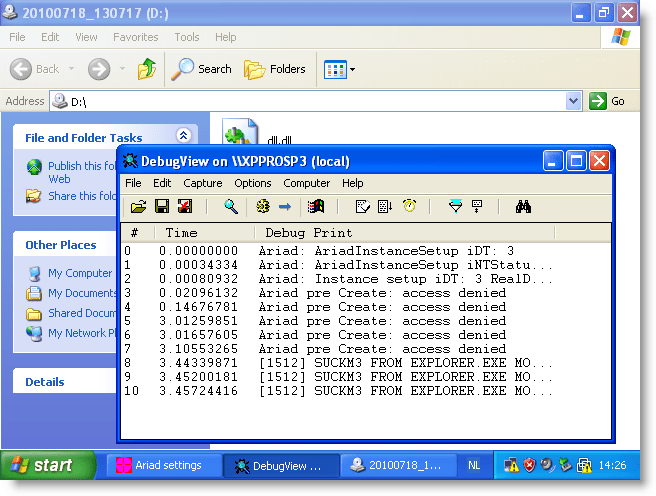
But configuring Ariad to block access to executables (this includes .LNK) prevents the PoC from executing:


Access to the .LNK file is denied, and Windows Explorer can’t start the payload.

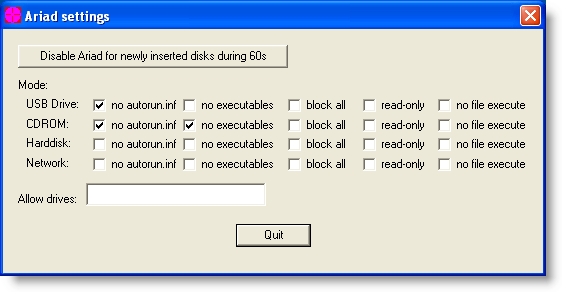
And configuring Ariad to prevent files to be mapped in memory (this is something done by Windows with executables) also prevents the PoC from executing:


This time, access to the .LNK file is not denied, but dll.dll is prevented from loading into memory, thus again preventing the payload from executing.

You can use Ariad if you want to mitigate attacks with these shortcut links until Microsoft releases a patch. As it is expected that Microsoft will not release a patch for Windows XP SP2, Ariad can offer permanent mitigation.

Be sure to read Ariad‘s documentation before using it.

« Previous Page — Next Page »

Blog at WordPress.com.