Didier Stevens

Monday 24 July 2017

New Tool: headtail.py

Filed under: My Software — Didier Stevens @ 22:22

Someone asked me what this headtail command was that I’ve used a couple of times in my blog posts, like in this screenshot:

It’s a tool that I wrote (what else ;-)) to help me create screenshots of command-line output. It’s the combination of the well-known head and tail Unix command: headtail takes a text file as input (it accepts stdin too) and outputs the first 10 lines (head) and the last 10 (tail) of its input, with a … line in between. Like with head and tail, option -n can be used to choose the number of lines.

headtail_V0_0_1.zip (https)
MD5: F5FD067F94411D22B939D753B803ACFE
SHA256: CBB66EA335299801A4D3D80A6A9BD686C56058B203ABB1BC6144B3A2E2370979

Sunday 23 July 2017

Update: python-per-line.py Version 0.0.2

Filed under: My Software,Update — Didier Stevens @ 19:48

python-per-line is a tool to apply a Python expression on each line of input.

I updated it because I had to process large credential dumps (I’ll blog about this later).

This new version can process .gz files too, and includes three new predefined Python functions: IFF, RIN and SBC.

From the man page:

IFF is a predefined Python function that implements the if Function
(IFF = IF Function). It takes three arguments: expression, valueTrue,
valueFalse. If expression is true, then valueTrue is returned,
otherwise valueFalse is returned.

RIN is a predefined Python function that uses the repr function if
needed (RIN = Repr If Needed). When a string contains characters that
need to be escaped to be used in Python source code, repr(string) is
returned, otherwise the string itself is returned.

SBC is a predefined Python function that helps with selecting a value
from lines with values and separators (Separator Based Cut = SBC). SBC
takes five arguments: data, separator, columns, column, failvalue.
data is the data we want to parse (usually line), separator is the
separator character, columns is the number of columns per line, column
is the value we want to select (cut) starting from 0, and failvalue is
the value that SBC needs to return if the function fails (for example
because there are less columns in the line than specified by the
columns value).
Here is an example. We use this file with credentials (creds.txt):
username1:password
username2
username3:pass:word
username4:

And this is the command to extract the passwords:
python-per-line.py "SBC(line, ':', 2, 1, [])" creds.txt

The result:
password
pass:word

If a line contains more separators than specified by the columns
argument, then everything past the last expected separator is
considered the last value (this includes the extra separator(s)). We
can see this with line "username3:pass:word". The password is
pass:word (not pass). SBC returns pass:word.
If a line contains less separators than specified by the columns
argument, then the failvalue is returned. [] makes python-per-line
skip an output line, that is why no output is produced for user2.

python-per-line_V0_0_2.zip (https)
MD5: AB2377D366AB33992A535AF1EE489CBD
SHA256: 045F398FBCF6DDFF4A25B38007ADDF89B3256C21C8808B58FBC96855D55E6171

Saturday 22 July 2017

oledump.py *.vir

Filed under: My Software — Didier Stevens @ 22:17

I was asked if oledump.py can “scan” multiple files: it can not, it can only analyze a single file at a time.

However, you can use it in a loop (bash, cmd, …) and call it each time with a different file. oledump.py will return 0 if there were no errors, 1 if there were, and 2 if the analyzed file contains VBA code.

My process-command.py tool can also be used to run a tool on many files. Here is an example with oledump:

process-command.py -r “oledump.py %f%” *.vir

While doing the analysis on all *.vir files in the current directory, 2 log files will be created in the current directory, one being a CSV file with the return value of the command (e.g. oledump):

0;sample1.vir
0;sample2.vir
2;sample3.vir
2;sample4.vir
0;sample5.vir
2;sample6.vir
2;sample7.vir
2;sample8.vir
0;sample9.vir
0;sample10.vir

Friday 21 July 2017

Update: emldump.py Version 0.0.10

Filed under: My Software,Update — Didier Stevens @ 22:15

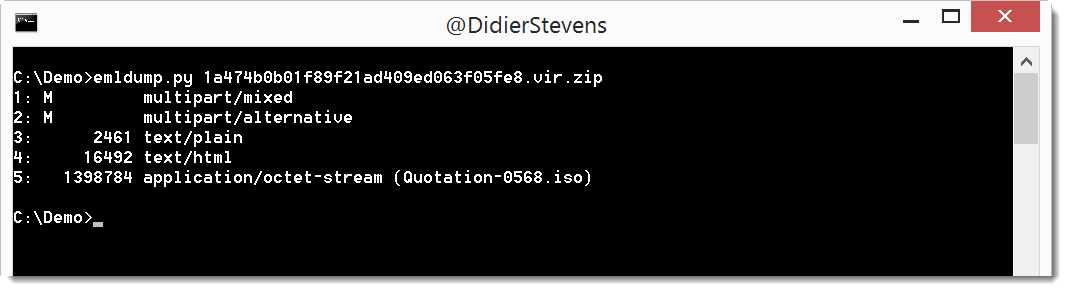
This new version outputs the filename for attachments:

emldump_V0_0_10.zip (https)
MD5: 34DBB3BCB1A2B04C45286C0583F11C07
SHA256: C5877E252DDB61B40BFFCC5403DB500E672DACFE96FAA7D1E0668246C5202DE5

Thursday 20 July 2017

Update: oledump.py Version 0.0.28

Filed under: My Software,Update — Didier Stevens @ 18:45

Like I did with zipdump, this oledump version now also supports YARA rules provided via the command-line (# and #s#).

oledump_V0_0_28.zip (https)
MD5: D89C1E0DA9A95A166EF8F36165F6A873
SHA256: 58F44B68BC997C2A7F329978E13DC50E406CCCCD2017C0375AA144712F029BFB

Wednesday 19 July 2017

Update:zipdump.py Version 0.0.11

Filed under: My Software,Update — Didier Stevens @ 22:20

Sometimes I just need to search for a string in the files of a ZIP container, and for that I need to create a small YARA rule.

With this new version, I can let zipdump generate the rule, I just need to provide the string. The value provided to option -y needs to start with #s# (s stands for string). Here is an example where I search for string HUBBLE:

zipdump_v0_0_11.zip (https)
MD5: E97E0191757230D2C7F9109B91636BF7
SHA256: 6640F971F61F7915D89388D3072854C00C81C47476A96CAC7BE6740DA348467B

Sunday 16 July 2017

Beta: format-bytes.py

Filed under: Beta,My Software — Didier Stevens @ 23:57

I needed a tool that can interpret bytes as various integers, so I came up with format-bytes.py:

I’m not happy yet with the layout of the output, that’s why it’s beta.


Tuesday 11 July 2017

Update: zipdump.py Version 0.0.10

Filed under: My Software,Update — Didier Stevens @ 19:17

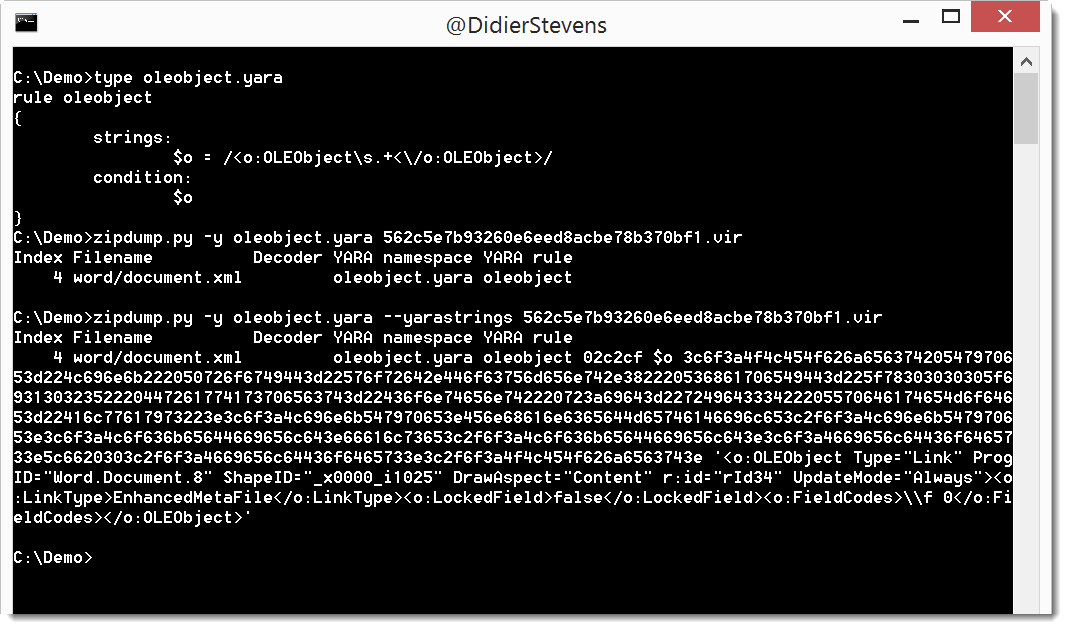
I regularly use YARA rules with my tools. Option -y starts the YARA engine, and option –yarastrings gives an overview of the matched strings, like this:

But it’s too much information when I use regular expressions in my YARA rules to match, for example, XML elements.

I added option –yarastringsraw to zipdump to view just the matched string, and nothing else:

zipdump_v0_0_10.zip (https)
MD5: 71B2483D24C4258DD34406CC433A3AF0
SHA256: 1259ABC36FDC13A2738D9C38549AB95A83D5039190ADAF44590E07AF6785BF7A

Monday 10 July 2017

Select Parent Process from VBA

Filed under: Forensics,Hacking,maldoc,Malware,My Software — Didier Stevens @ 0:00

Years ago I wrote a C program to create a new process with a chosen parent process: selectmyparent. And recently I showed what process monitor and system monitor report when you use this tool.

Starting a new process with a chosen parent process can be done from VBA too, as shown in this video (I’m not sharing the VBA code):

Wednesday 5 July 2017

Update: re-search.py Version 0.0.8

Filed under: My Software,Update — Didier Stevens @ 17:26

This new version of re-search.py introduces options –script and –execute to provide your custom Python functions.

Regular expressions can contain comments, like programming languages. This is a comment for regular expressions: (?#comment).
If you use re-search with regular expression comments, nothing special happens:
re-search.py “(?#comment)[a-z]+\.com” list.txt

However, if your regular expression comment prefixes the regular expression, and the comment starts with keyword extra=, then you can use gibberish detection, whitelist/blacklist filtering and Python function matching.

Python function matching is defined via directive P (Python). If you want to validate a string with a Python function, you use the following regular expression comment: (?#extra=P:Validate). Validate is a Python function that takes a string as argument and returns a boolean: True for a match and False if there is no match. You can provide your custom Python function(s) in a file via option –script or as a commandline argument via option –execute.

Example: Bitcoin address matching. Regular expression [13][a-km-zA-HJ-NP-Z1-9]{25,34} will match Bitcoin addresses, but also other strings that look like a Bitcoin address but are not a valid Bitcoin address. A valid Bitcoin address has a particular syntax, and a valid checksum. The regular expression can check the syntax, but not validate the checksum. Python function BTCValidate can check the checksum of a Bitcoin address. The following regular expression matches Bitcoin addresses with a valid syntax and uses Python function BTCValidate to validate the checksum:
(?#extra=P:BTCValidate)[13][a-km-zA-HJ-NP-Z1-9]{25,34}

re-search_V0_0_8.zip (https)
MD5: D4895B54268683BFBE0126D02B01A4A2
SHA256: 85919EB964FF9CF0EDE7DA64E9BCE6619480DAC71D0CB65B5EE667322B18DDBB

« Previous PageNext Page »

Blog at WordPress.com.