Didier Stevens

Monday 16 April 2018

Update: XORSelection.1sc Version 4.0

Filed under: 010 Editor,My Software,Update — Didier Stevens @ 0:00

XORSelection is a 010 Editor script I wrote some time ago, and it is included in the 010 Editor script repository. You provided it with an XOR key (ASCII or HEX), and then it will XOR-encode the file (or selection) open in 010 Editor.

I discovered it will not work properly if the hexadecimal key contains a NULL byte (0x00). This is fixed in this new version.

This new version also allows whitespace characters when an hexadecimal key is provided (hexadecimal keys start with 0x).

XORSelection_V4_0.zip (https)
MD5: 1B3DB8C8DA51224DDE7CA0E4BDAAC945
SHA256: 22E60E10BC99BD24A408C12CC674858DB6F318088CD34B7C70782833401AACF2
Monday 2 April 2018

Update: xmldump.py Version 0.0.3

Filed under: My Software,Update — Didier Stevens @ 0:00

This is a small bugfix version.

xmldump_V0_0_3.zip (https)
MD5: 70D67100DDD30F6178C3E06B7CE97329
SHA256: C0A3199EA69494962CAC6EC3BA3AD47130BE5BB3D9D7D330579856AC9C314BF0

Thursday 29 March 2018

CTRL-Z is EOF

Filed under: My Software — Didier Stevens @ 0:00

On Windows, CTRL-Z is the end-of-file character for text files.

A friend of mine had the following problem with my tools:

The “Broken pipe” error occurs because 1) zipdump.py -D is dumping the content of all files as binary data and 2) re-search.py is reading this binary data as a text file. Whenever zipdump.py outputs a CTRL-Z character, re-search.py interprets this as end-of-file, terminates, therefor the pipe is closed, and zipdump is left with a broken pipe.

To prevent this, use option -f to make re-search read its input as a binary file:

Tuesday 20 February 2018

Update: pecheck.py Version 0.7.2

Filed under: My Software,Update — Didier Stevens @ 0:00

This is a bug fix version.

pecheck-v0_7_2.zip (https)
MD5: 2A501CD2D15E1108B909B7FCEDFBDA13
SHA256: 9CACA5A41A84049FE6B0D5807A31B7FC5B1A5AC71B3FD3BE4EAC71A96BBDFB3E

Monday 19 February 2018

Update: oledump.py Version 0.0.33

Filed under: My Software,Update — Didier Stevens @ 0:00

This new version of oledump can output the content of all streams in JSON format, and has a new plugin for MSI files: plugin_msi.py.

oledump_V0_0_33.zip (https)
MD5: E5F879766B5C1C899E75E2F2A8ED9533
SHA256: 2B7C9565880F14E8A431F7819926EE801DE129458E682FAAF99FEF41AFA49934

Sunday 18 February 2018

Update: translate.py Version 2.5.3

Filed under: My Software,Update — Didier Stevens @ 0:00

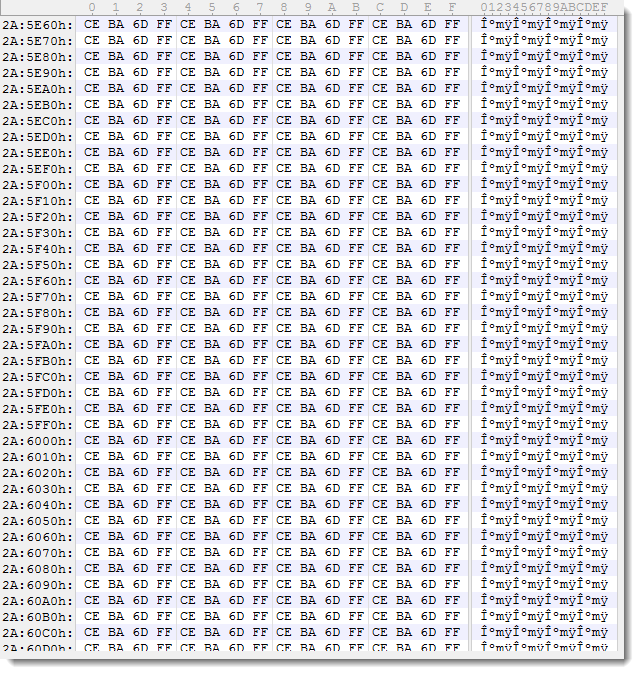
I had to be sure that every 4th byte in a file was identical:

After some thinking, I thought I could use my translate program to select every 4th byte (position % 4 == 3) and then calculate byte statistics. But actually, translate.py can use a (complex) Python expression/program to translate each byte of a file, but it can not be used to select particular bytes. So I made a small change: if the Python expression used with translate.py returns value None (in stead of a numeric value), then the result is not send to output. This way, input bytes can be dropped/deleted.

translate_v2_5_3.zip (https)
MD5: F3C01FCA74A84F1712BAF187E9FE479F
SHA256: 4CA311456EDE5A43097D4E567F225CFF2A68D47B96A261FC935F2A0F1CD4EB0F

Monday 12 February 2018

Update: pdfid.py Version 0.2.4

Filed under: My Software,Update — Didier Stevens @ 0:00

This is a bug fix version forĀ  bugs reported by different users, more details in history.

pdfid_v0_2_4.zip (https)
MD5: 36D5554BC881E7E21382ADA1305ED6F4
SHA256: C1DA287C9C06E3158F79CECF9C2E9A7773FC57FC92021F17B79DDD4B1E5DBB2A

Sunday 11 February 2018

Update: jpegdump.py Version 0.0.4

Filed under: My Software,Update — Didier Stevens @ 0:00

This new version of jpegdump adds option -e: extract jpeg images to disk.

jpegdump_V0_0_4.zip (https)
MD5: 496B6F2B0C0EEF919F7C6E20B9C1ADF6
SHA256: 5D150AE050610B6DB11FBE8B44E385A80800971AF1810F67531BB17A1373C770

Saturday 10 February 2018

Update: hash.py Version 0.0.2

Filed under: My Software,Update — Didier Stevens @ 0:00

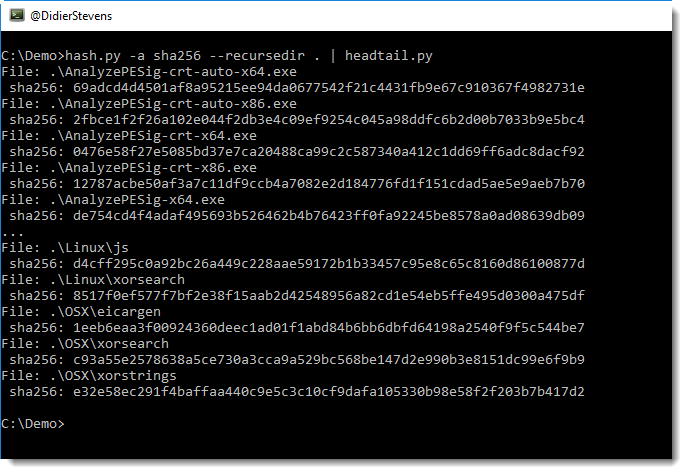
This new version of hash.py can recurse into directories by using new option –recursedir.

hash_V0_0_2.zip (https)
MD5: 7C9EF6D52793D6FFAAF4EB6FCEB934B4
SHA256: F768BCBE035ADF099C2AFA41CADB2ABD9514D54E6D361AF5610277B8A70D6B7D

Tuesday 6 February 2018

Update: python-per-line version 0.0.3

Filed under: My Software,Update — Didier Stevens @ 0:00

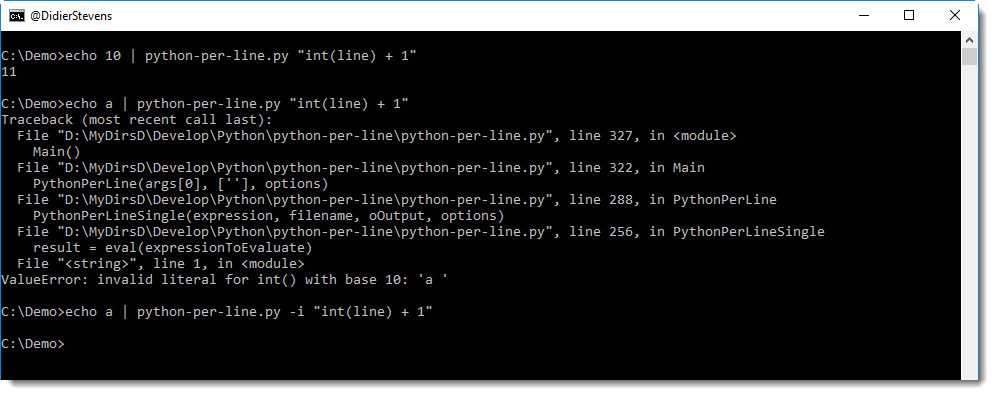
This new version of python-per-line adds option -i to ignore errors when evaluating the provided Python expression.

python-per-line_V0_0_3.zip (https)
MD5: 40B787E184EBAAD91A9104BF1BF1BF1A
SHA256: 1D7CAE95B5EA169286E4B1528D834D814A474A86240B9975385968B2BADF59AB

« Previous PageNext Page »

Blog at WordPress.com.