This too is a minor update for #e# expressions.
More details in this video:
cut-bytes_V0_0_7.zip (https)
MD5: 95CF8E5D2BC2790B25101FC2BFF769FB
SHA256: F1112C96872D15C2CD3F6AF9828C7E39F5EB115D20FB62AAD1C1357D75E3485B
This too is a minor update for #e# expressions.
More details in this video:
cut-bytes_V0_0_7.zip (https)
MD5: 95CF8E5D2BC2790B25101FC2BFF769FB
SHA256: F1112C96872D15C2CD3F6AF9828C7E39F5EB115D20FB62AAD1C1357D75E3485B
This is a minor update for #e# expressions.
More details in this video:
translate_v2_5_4.zip (https)
MD5: C07B37F7AFA0386315843E6A493721C1
SHA256: A2203C643FC8BC64A98DCA3EE1F9444BE16F5D5C2036AC0200A6BA657786C5EC
This is a small update to jpegdump.py, my tool to analyze the structure of jpeg files.
The man page (option -m) has been updated.
jpegdump_V0_0_5.zip (https)
MD5: D7157E7FDEEA4257220F60E0081EE138
SHA256: D6940A82CDECEB9D1FB27561E7B748837D666568FC857AEB6680E135D08E897C
Several of my tools, that accept more than one filename as arguments, also accept a “here file” (cfr. here documents). A here file is a text file with a list of filenames, one per line. My tools recognize a here file by prefixing the filename of the here file with character @.
Let’s take for example a text file with filename list.txt and following content:
sample-1.bin
sample-5.bin
sample-7.bin
When using this file (list.txt) in the following command:
hash.py @list.txt
hash.py will calculate the hashes of the following files: sample-1.bin, sample-5.bin and sample-7.bin.
A here file can also be provided via stdin. Just type character @ (without filename) as argument to hash.py and provide a list of files via stdin, like in this example:

I will explain this any many more features of my tools in a workshop at BruCON. During this workshop, I will provide the templates I use to create my tools.
This is BruCON’s 10th edition, and I’m happy I’ll do my 10th workshop for this anniversary edition.
hash_V0_0_4.zip (https)
MD5: 6DAC25432338BEA40B9141A791B8A958
SHA256: D66BF64B91B1BCBA5EA99EA03439A12835C5427BB1C447E6B515F94D9F468137
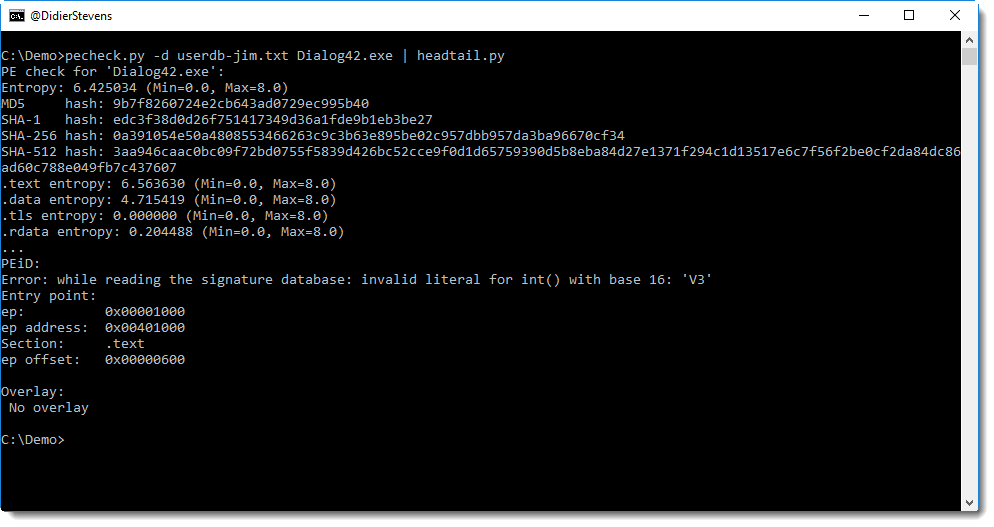
This new version handles errors in PEiD’s userdb files better.
pefile does not support the full syntax used by PEiD, hence errors might occur, like this:
pecheck-v0_7_3.zip (https)
MD5: 480C9AC4BEE09CAAFB1593E214A39832
SHA256: 359A44751BAA34450B2DA92539AB425507EBB90F8F57CF50E561CCE111809637
The article “NTLM Credentials Theft via PDF Files” explains how PDF documents can refer to a resource via UNC paths. This is done using PDF names /GoToE or /GoToR.
My tool pdfid.py can now be extended to report /GoToE and /GoToR usage in a PDF file, without having to change the source code. You just have to edit the pdfid.ini file (or create it) to include these names, like this:
[keywords]
/URI
/GoToE
/GoToR
Using pdfid configured like this on a “credential stealing PDF” gives the following result:
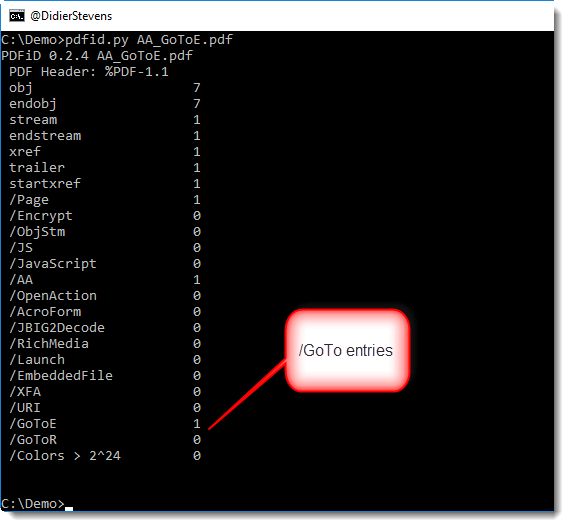
pdfid.ini has to be located in the same directory as pdfid.py. And remember that names in the PDF language are case-sensitive.
And even more encodings added to this version of base64dump.py: 0x…. little-endian (zxle) and 0x…. big endian (zxbe).
base64dump_V0_0_10.zip (https)
MD5: 6670ACD88FD384BA9172F2B98E72D0D4
SHA256: C080F2A5F60A8E9593AE789A69D233EFC86AEF9BD319C409229B3E518E15C725
I created a video to illustrate the new features of my modified SpiderMonkey version:
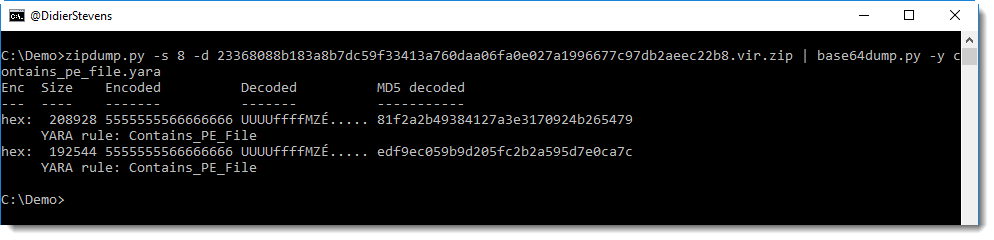
During last week’s private maldoc training, I got the idea to update base64dump with 2 extra encodings, and add YARA support.
The new encodings are “bx = backslash hexadecimal” like \x90\x90… and “ah = ampersand hexadecimal” like &H90&H90…
Support for YARA rules is identical to my other tools, like oledump.
In this example, I use a YARA rule to detect hex-encoded PE files:
base64dump_V0_0_9.zip (https)
MD5: 4CF9F57AD34CC728B05F1307219864BB
SHA256: 01264F82CEFB7B1D2DF51A8DB190840FE6C368C9C3D63566CF14CE4983F73D5A
Often when I provide training, I get new ideas. This week’s private maldoc training was no different: here’s a new version of oledump with changes inspired by this training.
When you select a stream with a prefix, like A3, you no longer have to type the prefix if it’s A (e.g. the first embedded OLE file).
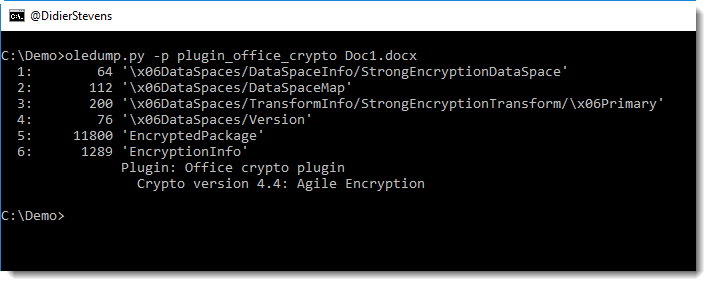
And I have a new plugin for encrypted documents (plugin_office_crypto.py), more on this in an upcoming blogpost.
oledump_V0_0_34.zip (https)
MD5: 1BE4E08DE1B1E73D5808AECE1BD09852
SHA256: 74F1B05E50D2AF8072505587438BB8959F174BAF76ED6255116E806642E6C4B0

 Didier Stevens