Didier Stevens

Tuesday 31 January 2017

Update: zipdump.py Version 0.0.5

Filed under: My Software,Update — Didier Stevens @ 0:00

A small feature in this new version: start the -E option value with # to count and group.

Example:

C:\Demo>zipdump.py -E “#%HEADASCII%;%HEADHEX%” Book1.xlsm
1: –…………..;d0cf11e0a1b11ae10000000000000000
1: <xml xmlns:v=”ur;3c786d6c20786d6c6e733a763d227572
12: <?xml version=”1;3c3f786d6c2076657273696f6e3d2231
zipdump_v0_0_5.zip (https)
MD5: 5F49895D3EA97A870ECB1E262A738A04
SHA256: E16CE5A426840D2804E5EF544CF334715F501D0892496D02B6C5000B18CE10BA

Monday 30 January 2017

Quickpost: Dropbox & Alternate Data Streams

Filed under: Forensics,Quickpost,Reverse Engineering — Didier Stevens @ 0:00

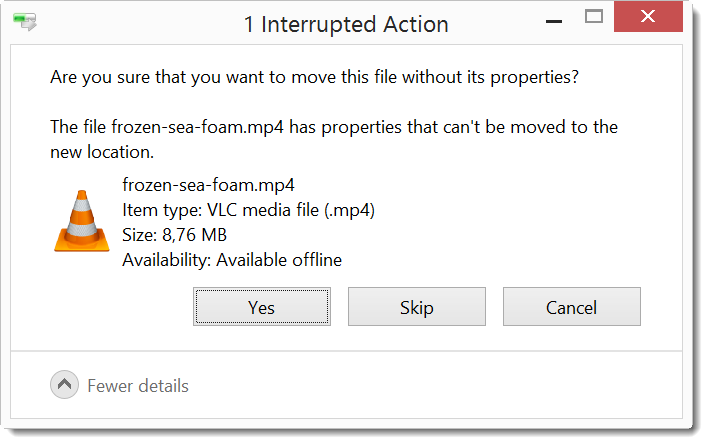
When I got this popup while moving a file from a Dropbox folder, I immediately thought Alternate Data Stream:

20170124-221042

I ran my filescanner on the file, and found an ADS with name com.dropbox.attributes:

20170128-094319

From the Magic HEX value, we can see that the content of the stream (frozen-sea-foam.mp4:com.dropbox.attributes) starts with 0x78 (and the streamsize is 83 bytes). 0x78 hints at zlib deflated data.

If you are not that familiar with magic values, you can use my file-magic tool:

20170128-224649

Trying to decompress the ADS with translate.py gives us JSON data {“dropbox_fileid_local”: {“machineid_attr”: {“data”: “aa4xliox7z5n0qewxOlT3Q==”}}}:

20170128-102645

The data field looks like BASE64, so let’s try to decode it with base64dump.py:

20170128-104110

It decodes with BASE64 to data that looks random. From the names in the JSON data, we can deduce that this is probably a machine ID.

Remark 1: as it could well be my unique machine ID, I altered the value of the ID.

Remark 2: my file-magic.py tool is beta.

Remark 3: if you wonder what the video frozen-sea-foam is, I have it on Instragram.


Quickpost info

Sunday 29 January 2017

Update: FileScanner Version 0.0.0.4

Filed under: My Software,Update — Didier Stevens @ 0:00

I released this new version of FileScanner at the end of 2015, but forgot to announce it here on my blog.

This new version also scans Alternate Data Streams.

FileScanner_V0_0_0_4.zip (https)
MD5: 4BB8F475328B9EB214E6B9405F84816E
SHA256: 5D3B1408C5D2BD17C0441D0D9D0DA565E8D690DE792971092956F4CA10D5A071

Saturday 28 January 2017

Update: byte-stats.py Version 0.0.5

Filed under: My Software,Update — Didier Stevens @ 8:37

This new version of byte-stats.py adds statistics for hexadecimal and base64 characters:

$byte-stats.py all.bin

Byte ASCII Count     Pct
0x00           1   0.39%
0x01           1   0.39%
0x02           1   0.39%
0x03           1   0.39%
0x04           1   0.39%
...
0xfb           1   0.39%
0xfc           1   0.39%
0xfd           1   0.39%
0xfe           1   0.39%
0xff           1   0.39%

Size: 256

                   File(s)
Entropy:           8.000000
Unique bytes:           256 100.00%
NULL bytes:               1   0.39%
Control bytes:           27  10.55%
Whitespace bytes:         6   2.34%
Printable bytes:         94  36.72%
High bytes:             128  50.00%
Hexadecimal bytes:       22   8.59%
BASE64 bytes:            65  25.39%

byte-stats_V0_0_5.zip (https)
MD5: B79C6DF0964C9BA676D88E2085ACF037
SHA256: B9112274BD757FB3311883B0CF179ABDEC149C421EFEB335D70AF972495A5C20

Tuesday 10 January 2017

Overview of Content Published In December

Filed under: Announcement — Didier Stevens @ 0:00

Here is an overview of content I published in December:

Blog posts:

YouTube videos:

Videoblog posts:

SANS ISC Diary entries:

NVISO Labs blog posts:

Wednesday 28 December 2016

Update: pdf-parser Version 0.6.7

Filed under: My Software,PDF,Update — Didier Stevens @ 12:03

I added option -k to search for keys in dictionaries. A usage example can be found in blog post “PDF Analysis: Back To Basics“.

pdf-parser_V0_6_7.zip (https)
MD5: D04D7DA42F3263139BC2C7E7B2621C91
SHA256: ED863DE952A5096FF4BE0825110D2726BA1BE75A7A6717AF0E6A153B843E3B78

Friday 16 December 2016

Hancitor Maldoc Videos

Filed under: maldoc,Malware — Didier Stevens @ 0:00

I produced 4 videos covering the process hollowing maldoc “Maldoc With Process Hollowing Shellcode“.


Wednesday 14 December 2016

Update: pecheck.py Version 0.6.0 – Overview Of Resources

Filed under: Malware,My Software,Update — Didier Stevens @ 0:00

This new version can produce a compact overview of all the resources in a PE file using option o: -o r.  Here is the overview of resources in an exe (malware) created with iexpress:

20161213-215750

It contains a cab file with 2 executables, which are executed after extraction (no surprise):

20161213-220001

pecheck-v0_6_0.zip (https)
MD5: D3A9C71AAF63D83884B4FEF2C2C21D03
SHA256: 08DB82F190AEEB065A65FEE0DD03D20B0CC788878C4864B537BBD1807E4D6B71

Monday 12 December 2016

Update: oledump.py Version 0.0.26

Filed under: My Software,Update — Didier Stevens @ 0:00

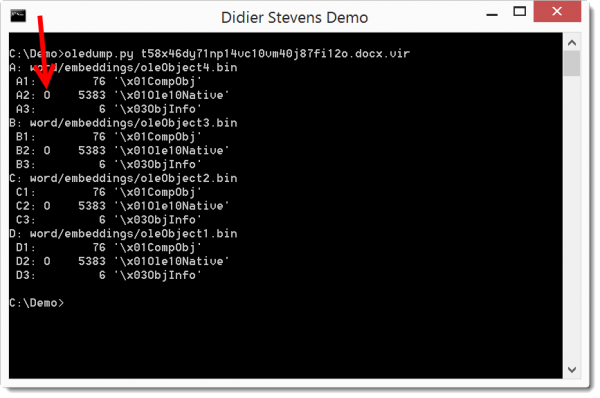
Just a small change in this version: an indicator (O) for streams containing OLE 1.0 embedded data:

20161211-203401

And plugin_http_heuristics also detects XOR-encoding starting with the second character of the key.

oledump_V0_0_26.zip (https)
MD5: 62030DEC6DBC2F69A37893FF1624F8EE
SHA256: A0DE8FD414A0B78FE8D72CAA58D8FA15159A7ABEA9842181C4C3C4EC1DE2EEC5

Friday 9 December 2016

Update: pecheck.py Version 0.5.2

Filed under: My Software,Update — Didier Stevens @ 0:00

This new version displays information about the signature (provided pyasn1 is installed), and adds option -g to extract data (pefile.get_data) from the pefile like resources.

Options -x, -a, -D and -S can be used to dump data (hex, ascii, binary and strings).

pecheck-v0_5_2.zip (https)
MD5: A4FF0507C206535FA9224F65CCD3497D
SHA256: DE4D06F00FD9EC74FD52689B711FBF10F953F14DAFACBDE214E0A4947E60D8A6

« Previous PageNext Page »

Blog at WordPress.com.