I produced 4 videos covering the process hollowing maldoc “Maldoc With Process Hollowing Shellcode“.
I produced 4 videos covering the process hollowing maldoc “Maldoc With Process Hollowing Shellcode“.
This new version can produce a compact overview of all the resources in a PE file using option o: -o r. Here is the overview of resources in an exe (malware) created with iexpress:

It contains a cab file with 2 executables, which are executed after extraction (no surprise):

pecheck-v0_6_0.zip (https)
MD5: D3A9C71AAF63D83884B4FEF2C2C21D03
SHA256: 08DB82F190AEEB065A65FEE0DD03D20B0CC788878C4864B537BBD1807E4D6B71
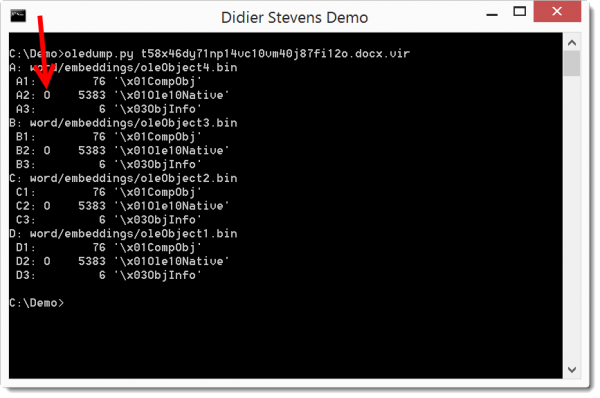
Just a small change in this version: an indicator (O) for streams containing OLE 1.0 embedded data:
And plugin_http_heuristics also detects XOR-encoding starting with the second character of the key.
oledump_V0_0_26.zip (https)
MD5: 62030DEC6DBC2F69A37893FF1624F8EE
SHA256: A0DE8FD414A0B78FE8D72CAA58D8FA15159A7ABEA9842181C4C3C4EC1DE2EEC5
This new version displays information about the signature (provided pyasn1 is installed), and adds option -g to extract data (pefile.get_data) from the pefile like resources.
Options -x, -a, -D and -S can be used to dump data (hex, ascii, binary and strings).
pecheck-v0_5_2.zip (https)
MD5: A4FF0507C206535FA9224F65CCD3497D
SHA256: DE4D06F00FD9EC74FD52689B711FBF10F953F14DAFACBDE214E0A4947E60D8A6
Here is an overview of content I published in November:
Blog posts:
YouTube videos:
Videoblog posts:
SANS ISC Diary entries:
NVISO Labs blog posts:
This new version of pdf-parser is a bugfix for /FLATEDECODE.
pdf-parser_V0_6_6.zip (https)
MD5: 47326468E1B5A1AF7BB8AD63688804D9
SHA256: 51C9B25B939B135D9949E51463F58ECEC0BEBEFB9C0EAA0B93326CBFB4D8F061
This new version of xor-kpa adds the option -x to encode/decode, and also prints the hexadecimal value of the found keys.
xor-kpa_V0_0_4.zip (https)
MD5: FCE75B6125104D8AFC56A67B65FF75C0
SHA256: 3DCCA479D4C8CAC9B248B24F799184A69D0F10403593CB002248DD35CCE60FD4
When I left my last position, my friends and colleagues with whom I’ve worked for years gave me a little challenge: a PDF with a hidden ciphertext. At first I had to use Excel to decipher the ciphertext, but later I wrote a small Python tool to help me.
The simple ciphers supported by this tool are XOR, ROT, Vigenère and subtract (I added that last one because it was used in a maldoc). You can use the man page (option -m) to learn more.
cipher-tool_V0_0_1.zip (https)
MD5: B7D44090A76F66D7194D0A0D890E2CEB
SHA256: 1E8E1F112595FC08C3C20A06D172C21DDE6375EC8651A8DE6EF57B938F3E67E8
This new version supports different encodings besides base64 (but the name remains base64dump).
The new encodings are hexadecimal (hex), \u unicode (bu) and %u unicode (pu).
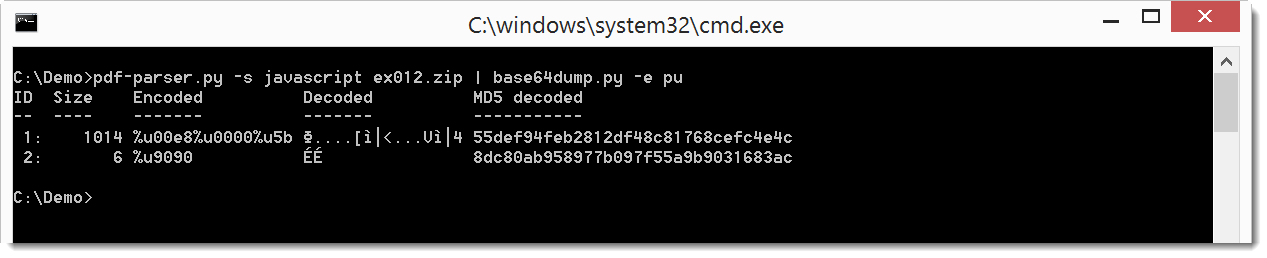
Here’s an example with escaped unicode in JavaScript (%u), namely a PDF with shellcode in JavaScript:

The shellcode, escaped with %u, can be extracted with base64dump:

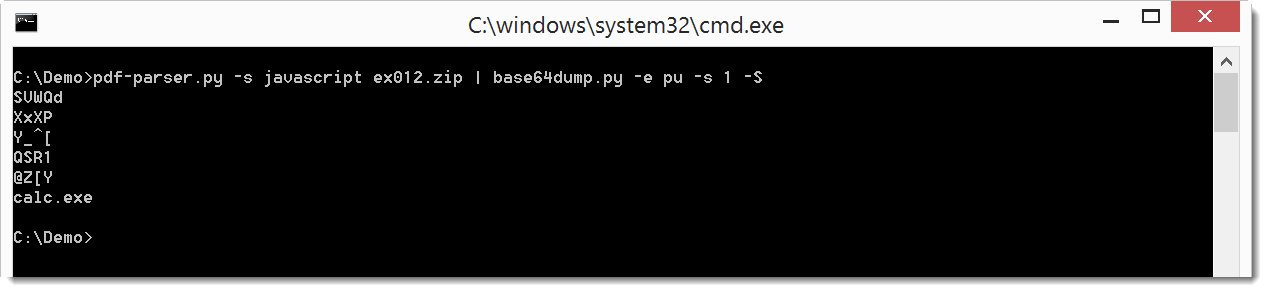
There’s also a new option to do a string dump: -S
And a last small update: this version also counts unique bytes, i.e. the number of different byte values found in the data.
base64dump_V0_0_5.zip (https)
MD5: 7AACFD3E34FEAAF41897F60FBC5279A3
SHA256: B4AB7B3A9D2947F08C6CC94F88CD825C9B2B63EE65AF7475E66BE9565EC4337A
A small update to zipdump: this version displays the ZIP comment (if present) and also counts unique bytes, i.e. the number of different byte values found in the data.
zipdump_v0_0_4.zip (https)
MD5: 64EE6575309654B6671554D0A4DA50E5
SHA256: C323C0580E95F87406A72A542A7FBF5DE39EBEF7CAFC970A7C428CA1E870F9CF

 Didier Stevens