Didier Stevens

Saturday 12 August 2017

Update: byte-stats.py Version 0.0.6

Filed under: My Software,Update — Didier Stevens @ 13:00

This new version of byte-stats.py adds option -r (–ranges). This option will print out extra information on the range of byte values (contiguous byte value sequences) found in the analyzed files.

Example for BASE64 data:

Number of ranges: 5
Fir. Last Len. Range
0x2b        1: +
0x2f 0x39  11: /0123456789
0x3d        1: =
0x41 0x5a  26: ABCDEFGHIJKLMNOPQRSTUVWXYZ
0x61 0x7a  26: abcdefghijklmnopqrstuvwxyz

In this example, 5 ranges are reported: they can be thought of as a kind of fingerprint for BASE64 data.
Each range is characterized by 4 properties:
Fir. (First) is the first byte value in the range.
Last is the last byte value in the range (this value is not displayed for ranges of a single byte).
Len. (length) is the number of unique byte values in the range.
Range is the printout of the byte values in the range (. is printed if the byte value is not printable).

byte-stats_V0_0_6.zip (https)
MD5: CA729FF05E314A9CF5C348CB4A720F13
SHA256: 11E41F51EC9911741D71C8BC3278FA22AADBD865F2BF7BE4E73E82A7736A8FA8

Tuesday 1 August 2017

Overview of Content Published In July

Filed under: Announcement — Didier Stevens @ 21:52

Here is an overview of content I published in July:

Blog posts:

YouTube videos:

Videoblog posts:

SANS ISC Diary entries:

Monday 31 July 2017

Update: translate.py Version 2.5.0

Filed under: maldoc,My Software,Update — Didier Stevens @ 20:17

I analyzed a malicious document send by a reader of the Internet Storm Center, and to decode the payload I wanted to use my tool translate.py.

But an option was lacking: I had to combine 2 byte streams to result in the decoded payload, while translate will only accept one byte stream (file, stdout, …).

I solved my problem with a small custom Python script, but then I updated translate.py to accept a second file/byte stream (option -2).

This is how I use it to decode the payload:


translate_v2_5_0.zip (https)
MD5: 768F895537F977EF858B4D82E0E4387C
SHA256: 5451BF8A58A04547BF1D328FC09EE8B5595C1247518115F439FC720A3436519F

Sunday 30 July 2017

Quickpost: Trying Out JA3

Filed under: Networking,Quickpost — Didier Stevens @ 21:19

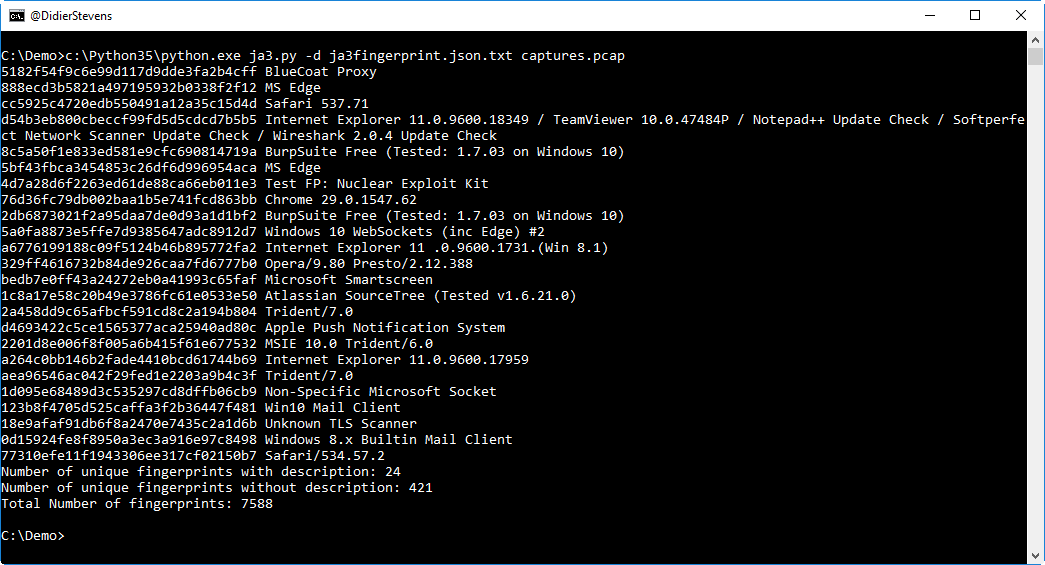
I tried out JA3 (a Python program to fingerprint TLS clients) with a 1GB pcap file from my server. It was fast (less than 1 minute), but I had to add some error handling to skip packets it would crash on.

I did not identify a lot of client HELLO packets with the JSON fingerprint database: around 5%.


Quickpost info


Saturday 29 July 2017

.ISO Files & autorun.inf

Filed under: Malware — Didier Stevens @ 21:27

I was asked if malware authors can abuse autorun.inf files in .ISO files: no, nothing will execute automatically when you open an .ISO file with autorun.inf file in Windows 8 or 10.

I have videos to illustrate this:

Friday 28 July 2017

Analyzing Password Dumps With My Tools – Part 1

Filed under: My Software — Didier Stevens @ 22:04

I’ve been tweaking some of my tools to help me analyze large password dumps, like exploit.in. And I also have done such analyses with build-in Unix tools (I refer to Unix tools because I started to use Unix in the eighties, before Windows and Linux existed), but I also must be able to do this on Windows machines, where I don’t always have the option to install “Unix-for-Windows” tools like cygwin.

When I started to process the exploit.in files with my CSV tools, I ran into some problems. The data is not very clean, for example, there are lines in the dump that are so long that Python’s csv module will error on it. Normally the format of a line is “email-address:password”, where a colon (:) is a separator between the email address and the password. But sometimes there is no separator in the line, and sometimes there is more than 1 separator. This happens when a password contains a colon (:), but the problem is that the colon (:) is not properly escaped for a CSV parser.

That’s why I made some updates to my python-per-line.py tool.

With python-per-line’s SBC function (Separator Based Cut), I can extract passwords even if the line is too long for other parsers, if there is no separator (:) or more than one separator. This is the expression I use:

SBC(line,’:’,2,1,[])

line is a Python variable, ‘:’ is the separator, 2 is the number of fields, 1 is the field that needs to be selected (index starts from 0, so 1 is the second field, i.e. the password), and [] is the value to return if there is no field with index 1. [] makes that python-per-line will not output a line (e.g. no empty line). SBC will split the line per the : separator, without taking any possible escape characters into account. It will also separate the line into maximum 2 fields, even if there is more than one : character. This is done from left to right, remaining : characters are part of the second field.

The other problem I encountered on Windows is that when I piped the output of python-per-line into count (to count passwords), the process would stop before all files were processed. It turns out that some passwords contain the CTRL-Z character (0x1A), which is the end-of-file marker, so that’s why processing stopped. I solved this problem by escaping the CTRL-Z character with a function I added to python-per-line: RIN (Repr If Needed). This is the expression I use:

RIN(SBC(line,’:’,2,1,[]),’\x1a’)

In this case, RIN will escaped its input (the first argument) with Python’s repr function if the input contains character CTRL-Z (\x1A).

python-per-line can also handle gzip compressed text files, so I was able to free up a couple of gigabytes by compressing the exploit.in text files. My count program version 0.1.0 was able to count the passwords, but it required Python 64 bit and took a long time. That’s why I added sqlite3 support to count.py as a counting method.

Here is the command I used to count the passwords and create a database:

Option -c exploit-in-passwords.db instructs count.py to use a sqlite3 database on disk with name exploit-in-passwords.db as a counting method in stead of a Python dictionary (the default counting method).

Option –ranktop 100 makes count.py output the top 100 most frequent passwords, along with their frequency. -H prints out a header, and -t prints totals.

Option -o passwords-top-100.csv makes count.py write its output to file passwords-top-100.csv, and finally, option -b makes that his output also goes to stdout.

Afterwards, I can use the database to print out other lists, like a top 20:
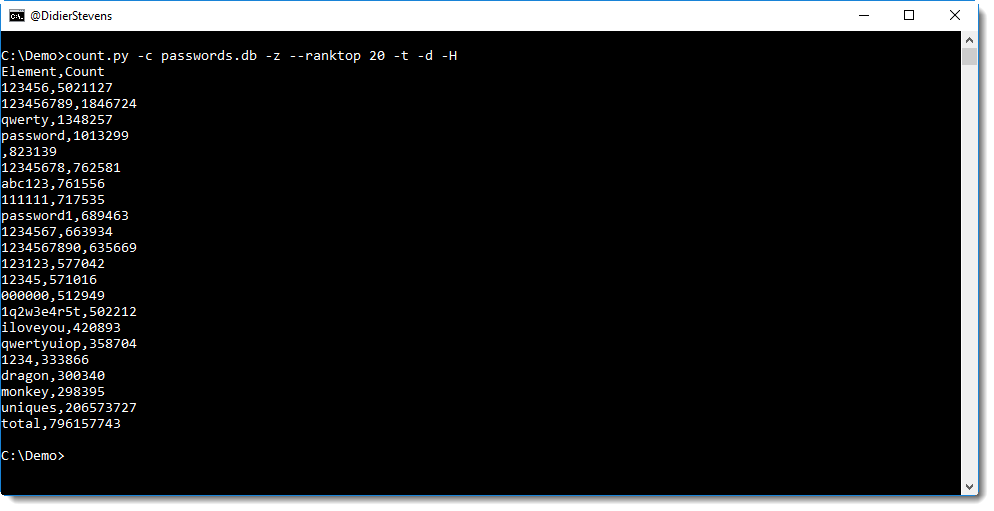
Option -z makes that count.py does not requires input files, it will just print out data from the database. Option -d sorts the output in descending order (sorted by default per count in ascending order).

From this output, I can see that 123456 is the password with the highest frequency (a bit more than 5 million times), that there are almost 800 million passwords in total and a bit more than 200 million unique passwords.

Thursday 27 July 2017

Update: count.py Version 0.2.0

Filed under: My Software,Update — Didier Stevens @ 18:49

count is a simple program: it takes text files as input and counts how many times each lines appears.

A couple of years ago, I made a video:

count.py uses a Python dictionary to count items, but that requires a lot of memory to process gigabytes of data.

This new version helps with this problem by providing a count method using a database (sqlite3). By default, a dictionary is still used. But counting with a database can be selected with option -c. With option -c you can provide the name of the database to use: if the name is :memory:, the database will be created in memory. Counting with a sqlite3 database in memory requires less memory than counting with a Python dictionary, but is slower. If the name is a filename, the database will be created on disk. This is of course way slower than in memory, but can process even larger files.


count_v0_2_0.zip (https)
MD5: ACF1982045ABEF86FCDBA87A84F5F588
SHA256: 373DDA0B2C176624998B5907261477943F677855CCECCDD42D6BEB758F8E7B79

Wednesday 26 July 2017

The Paste Command

Filed under: My Software — Didier Stevens @ 20:56

Clip is a useful command. Paste would be a useful command, unfortunately Windows has no paste command: paste would do the opposite of clip, read the clipboard and write it to stdout.

So I made my own command a couple of years ago, and yesterday I made it ready for publication.

I don’t use paste as often as clip, but sometimes I copy malware related data from my hex editor and then pipe it into my tools with paste.


Paste_V1_0_0_1.zip (https)
MD5: 2107C78DEA38EA98825BB686DB2291AD
SHA256: 329A0AA96E855219ACB99D7BC35F78CE552645F7829D1B475924F895BA614637

Tuesday 25 July 2017

The Clip Command

Filed under: Malware — Didier Stevens @ 20:17

You probably know that I like to pipe commands together when I analyze malware …

Are you familiar with Windows’ clip command? It’s a very simple command that I use often: it reads input from stdin and copies it to the Windows clipboard.

Here is an example where I use it to copy all the VBA code of a malicious Word document to the clipboard, so that I can paste it into a text editor without having to write it to disk.

Monday 24 July 2017

New Tool: headtail.py

Filed under: My Software — Didier Stevens @ 22:22

Someone asked me what this headtail command was that I’ve used a couple of times in my blog posts, like in this screenshot:

It’s a tool that I wrote (what else ;-)) to help me create screenshots of command-line output. It’s the combination of the well-known head and tail Unix command: headtail takes a text file as input (it accepts stdin too) and outputs the first 10 lines (head) and the last 10 (tail) of its input, with a … line in between. Like with head and tail, option -n can be used to choose the number of lines.

headtail_V0_0_1.zip (https)
MD5: F5FD067F94411D22B939D753B803ACFE
SHA256: CBB66EA335299801A4D3D80A6A9BD686C56058B203ABB1BC6144B3A2E2370979

« Previous PageNext Page »

Blog at WordPress.com.