Didier Stevens

Tuesday 11 July 2017

Update: zipdump.py Version 0.0.10

Filed under: My Software,Update — Didier Stevens @ 19:17

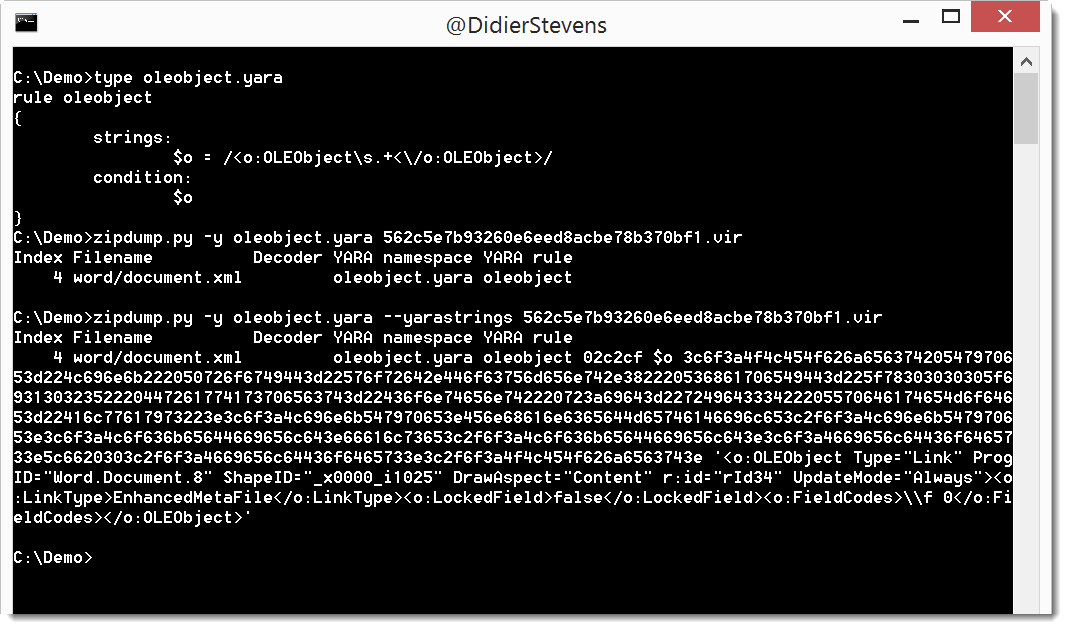
I regularly use YARA rules with my tools. Option -y starts the YARA engine, and option –yarastrings gives an overview of the matched strings, like this:

But it’s too much information when I use regular expressions in my YARA rules to match, for example, XML elements.

I added option –yarastringsraw to zipdump to view just the matched string, and nothing else:

zipdump_v0_0_10.zip (https)
MD5: 71B2483D24C4258DD34406CC433A3AF0
SHA256: 1259ABC36FDC13A2738D9C38549AB95A83D5039190ADAF44590E07AF6785BF7A

Monday 10 July 2017

Select Parent Process from VBA

Filed under: Forensics,Hacking,maldoc,Malware,My Software — Didier Stevens @ 0:00

Years ago I wrote a C program to create a new process with a chosen parent process: selectmyparent. And recently I showed what process monitor and system monitor report when you use this tool.

Starting a new process with a chosen parent process can be done from VBA too, as shown in this video (I’m not sharing the VBA code):

Sunday 9 July 2017

Video: mimikatz & minesweeper

Filed under: Entertainment,Hacking — Didier Stevens @ 16:07

@gentilkiwi‘s mimikatz has a minesweeper module with command infos. This command will show you where the mines are in minesweeper.

Saturday 8 July 2017

Video: mimikatz & !bsod

Filed under: Entertainment,Hacking — Didier Stevens @ 21:53

After the mimikatz !bsod blogpost, here’s the video:

Friday 7 July 2017

Quickpost: mimikatz !bsod

Filed under: Entertainment,Hacking,Quickpost — Didier Stevens @ 20:31

I’m going through the mimikatz source code and I’m finding all kind of gems :-).

Here is one of them, but be careful, do this only on a machine were you won’t mind losing data, because this will crash the machine.

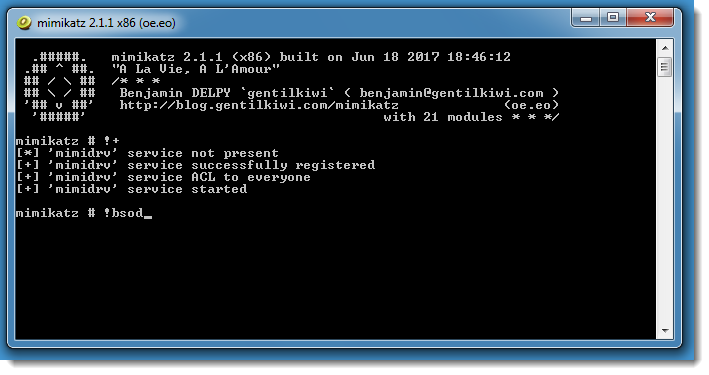
There’s a mimikatz driver command to initiate a Blue Screen of Death: !bsod

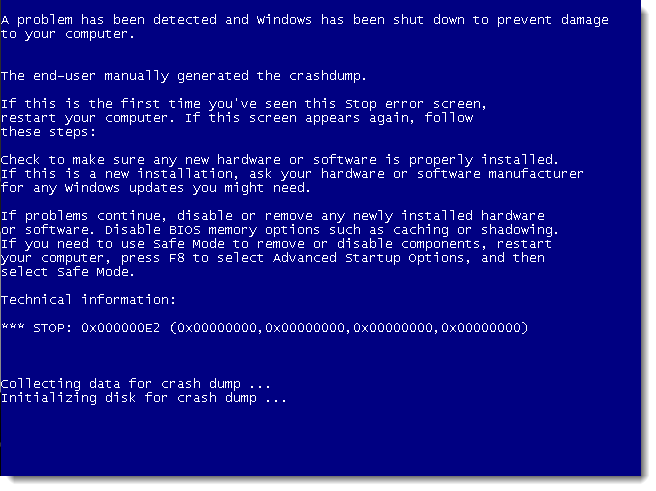
Here I’m using mimikatz as administrator on a Windows 7 machine (because I’m not a fan of the new BSOD introduced with Windows 8):

It’s a MANUALLY_INITIATED_CRASH (STOP 0x000000E2).


Quickpost info


Thursday 6 July 2017

I Will Follow (no, not talking about social media)

Filed under: maldoc,Malware — Didier Stevens @ 20:54

I can’t help feeling some kind of satisfaction when a friend uses my tools to analyze malware, and hacks his way to a solution when my tool falls short 🙂

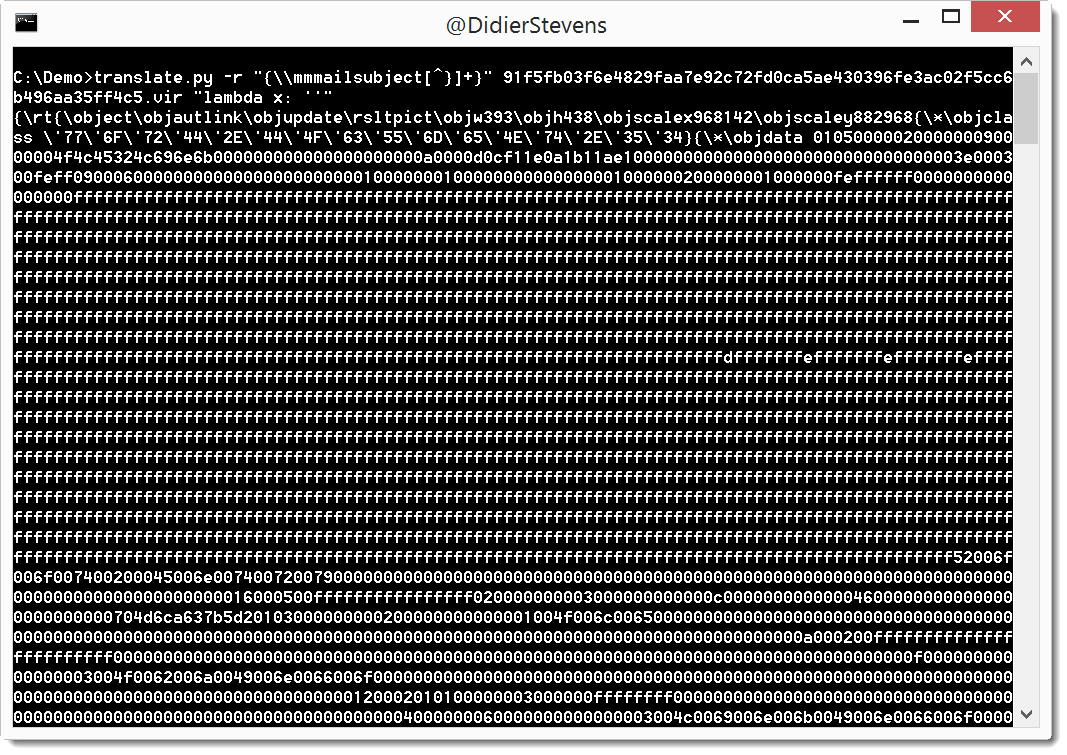
In this nice blogpost, @bluejay00 analyzes RTF malware with my rtfdump.py tool. But because of obfuscation, rtfdump.py is not able to extract the object. @bluejay00 understands this, deobfuscates the RTF sample with an editor, and is then able to get my tool to work correctly.

I’ll just show how I would have used my translate.py tool to remove the obfuscation:


Wednesday 5 July 2017

Update: re-search.py Version 0.0.8

Filed under: My Software,Update — Didier Stevens @ 17:26

This new version of re-search.py introduces options –script and –execute to provide your custom Python functions.

Regular expressions can contain comments, like programming languages. This is a comment for regular expressions: (?#comment).
If you use re-search with regular expression comments, nothing special happens:
re-search.py “(?#comment)[a-z]+\.com” list.txt

However, if your regular expression comment prefixes the regular expression, and the comment starts with keyword extra=, then you can use gibberish detection, whitelist/blacklist filtering and Python function matching.

Python function matching is defined via directive P (Python). If you want to validate a string with a Python function, you use the following regular expression comment: (?#extra=P:Validate). Validate is a Python function that takes a string as argument and returns a boolean: True for a match and False if there is no match. You can provide your custom Python function(s) in a file via option –script or as a commandline argument via option –execute.

Example: Bitcoin address matching. Regular expression [13][a-km-zA-HJ-NP-Z1-9]{25,34} will match Bitcoin addresses, but also other strings that look like a Bitcoin address but are not a valid Bitcoin address. A valid Bitcoin address has a particular syntax, and a valid checksum. The regular expression can check the syntax, but not validate the checksum. Python function BTCValidate can check the checksum of a Bitcoin address. The following regular expression matches Bitcoin addresses with a valid syntax and uses Python function BTCValidate to validate the checksum:
(?#extra=P:BTCValidate)[13][a-km-zA-HJ-NP-Z1-9]{25,34}

re-search_V0_0_8.zip (https)
MD5: D4895B54268683BFBE0126D02B01A4A2
SHA256: 85919EB964FF9CF0EDE7DA64E9BCE6619480DAC71D0CB65B5EE667322B18DDBB
Tuesday 4 July 2017

Update: pecheck.py Version 0.7.0

Filed under: My Software,Update — Didier Stevens @ 0:00

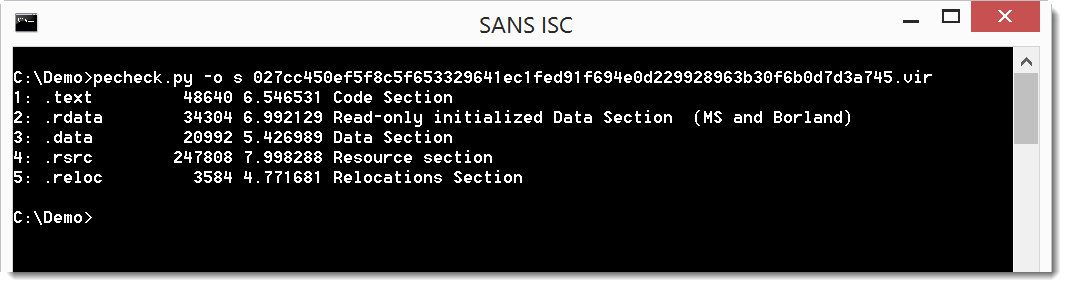
This new version of pecvheck.py adds an overview of sections. More details here.

pecheck-v0_7_0.zip (https)
MD5: 7BE550EC71BF99FC31704C2DD4ED3C8A
SHA256: 12C03369362045DF5A9AAB83002E59A4A31050EC008DF45F777C87186D611F6E

Monday 3 July 2017

Update: zipdump.py Version 0.0.9

Filed under: My Software,Update — Didier Stevens @ 0:00

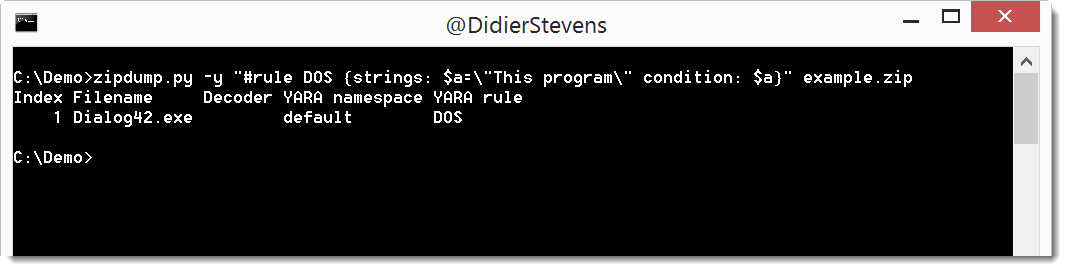
In this new version of zipdump.py, you can provide a YARA rule directly on the command line, without having to store it inside a file.

Just start the value of option -y with # and type your rule (use quotes because of spaces):

zipdump_v0_0_9.zip (https)
MD5: 2700AF663980204075107164AA12750A
SHA256: 5686F24373AF64E1F5D866C71B29A22CE97964EC563A2219681A6268CC9A1153

Sunday 2 July 2017

Update; base64dump.py Version 0.0.7

Filed under: My Software,Update — Didier Stevens @ 0:00

This new version of base64dump.py has a new option: -z. With this option, you can ignore leading null bytes (to be used for example to handle UNICODE).

You can see this option used in this video (starting 1:28):

base64dump_V0_0_7.zip (https)
MD5: D37DE7CEFDA55ADD1822EADDD84D5FFB
SHA256: 5F676DF8B36172A1D7B29F03E2B0CCB026BB9A96DF8830FDB137E65CBB59DD63

« Previous PageNext Page »

Blog at WordPress.com.