Didier Stevens

Sunday 10 May 2009

Quickpost: Disinformational Tweets

Filed under: My Software,Nonsense,Quickpost — Didier Stevens @ 12:55

This useless Python program is the result of some lazy Sunday coding. It will create random tweets based on a template file. You could use it to try to protect your privacy on Twitter by disinforming potential data miners.

Will I use it for my Twitter account? No, I don’t need a program to disinform ๐Ÿ˜‰

20090510-142457

Each time you run the program, it will post one random tweet. This tweet is generated from a templates file. Each line in the templates file is the template for a tweet. You can use variables (between curly braces, example: {location}) in the templates to increase the number of possible tweets. Variables and their values are also stored in the template file, after the template lines. Your template file must allow the program to generate at least 2 different tweets, because it generates a tweet different from the last tweet.

20090510-143740

The program requires the twitter module, itself requiring the simplejson module.

And you need to create a credentials file (disinformational-tweets.cred) with the Twitter credentials of the account for which the program has to generate random Tweets. The first line of the credentials file has to contain the username, the second line has to contain the password.

A Firefox plugin to generate these tweets would probably be more ‘useful’, but hey, it’s a lazy Sunday.

Download:

disinformational-tweets_v0_0_1.zip (https)

MD5: 36CDB584634ED299E7ACE0D64E846003

SHA256: C5FCE76443549C3A8882B799B6F7A754EF6AEE5F11F3E94FF255EE541205C17B


Quickpost info


Wednesday 6 May 2009

A Very Brief History of Foxit Reader and JavaScript

Filed under: PDF,Vulnerabilities — Didier Stevens @ 23:45

As I often read questions about Foxit Reader and JavaScript support, I decided to write down this very brief history.

Foxit Reader is a lightweight PDF reader, it consist of exactly one EXE file.

Up to Foxit Reader version 2.1, there was no built-in support for JavaScript. If you needed JavaScript, you had to install a plugin (this was actually just a DLL).

Version 2.1 came with builtin JavaScript support. No more plugin, the DLL was merged into the EXE. But the Foxit developers made a design decision with important security implications: you couldn’t disable JavaScript support. Uptil version 2.1, it was easy to disable JavaScript: don’t install the plugin. But with version 2.1, JavaScript was embedded.

Version 2.2 and 2.3 didn’t change this, that’s what prompted me to publish a hack to disable JavaScript.

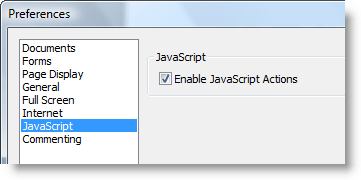
We had to wait for version 3.0 to be able to disable JavaScript:

20090507-010837

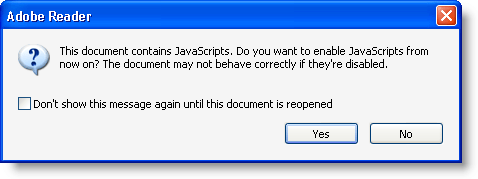
But at least, this preference was implemented as it should. Once you disable JavaScript, you get no warnings you’ve disabled JavaScript. This is unlike Adobe Reader:

20090507-013043

If you disable JavaScript in Adobe Reader, you’ll be proposed to re-enable it each time you open a PDF document with JavaScript. This is extremely confusing for the average user.

Foxit has started to provide an iFilter. I hope Foxit will never integrate this iFilter in their Foxit Reader setup program, because iFilters increase the attack surface.

Shellcode 2 VBScript

Filed under: Hacking,My Software — Didier Stevens @ 9:06

I had not posted my Python script to convert shellcode to VBScript, so here it is.

Download:

shellcode2vbscript_v0_1.zip (https)

MD5: AAB0431127C657C9A3EF67E1C73E6711

SHA256: D1CDDAFCB734EC3F35E558DECFF2EDB73DC0C394936814B602B605F09DE4A5E5

Monday 4 May 2009

Quickpost: Using Your Poken as a Lowcost LF RFID Detector

Filed under: Hardware,Quickpost,RFID — Didier Stevens @ 0:01

Here’s an alternate use for your Poken: use it to detect 125 kHz RFID readers. Its led will blink red when you bring it next to a LF RFID reader (125 kHz). It will not react with a 13.56 MHz reader; and I haven’t tested with a 134.2 kHz reader.

20090503


Quickpost info


Wednesday 29 April 2009

Quickpost: Disarming a PDF File

Filed under: My Software,PDF,Quickpost — Didier Stevens @ 16:52

This is a beta release of my new version of PDFiD tool because Adobe recommends disabling JavaScript to protect yourself against the new vulnerabilities in JavaScript functions getAnnots() and spell.customDictionaryOpen().

PDFiD version 0.0.6 has several new features which I’ll explain in a later post. Now I want to explain the disarm feature. Disarm will disable JavaScript inside the PDF document.

Command “PDFiD -d document.pdf ” will analyze the PDF document and generate a new version called document.disarmed.pdf.

In this new version, names /AA, /OpenAction, /JS and /JavaScript have their case swapped (/aa, /oPENaCTION, /jsand /jAVAsCRIPT). As the PDF language is case sentitive, these new names have no meaning and therefor the automatic actions and scripts are effectively disabled. All PDF readers I’ve used just ignore unknown names, they don’t generate and error or stop rendering the document.

This substitution trick will not work if the actions and scripts are hidden in object streams (/ObjStm) and could render a document unreadable if encryption is used.


Quickpost info


Monday 27 April 2009

Quickpost: Black Hat Europe 2009

Filed under: Hacking,Quickpost — Didier Stevens @ 5:46

Black Hat Europe 2009 is over for more than a week now, and my laptop has undergone yet another lobotomy.

My training by Saumil Shah was excellent! Highly recommended if you want to learn exploit development without reversing.

I didn’t attend a lot of briefings, the subjects were less interesting to me than past years. But I did a lot of networking, I met many interesting people. I had lunch with Moxie Marlinspike, the author of SSLStrip. He has interesting viewpoints: did you know he started to develop SSLStrip in 2002? It’s only because he was done experimenting with it that he decided to disclose! And we share a common interest in CRASS.

Thanks to everybody I met at BH, the networking was excellent! I estimate I distributed 50 of my PDF stickers ๐Ÿ˜‰ . You gave me a lot of ideas that will require even more time to develop. Like past years, I got a new stego idea but this time, I’m reserving it for Brucon‘s hacker challenge. You’ll have to wait for October for the disclosure.

This was the last Black Hat Europe in Amsterdam, next edition will be in Barcelona (Ero’s town). Did you know that regular security bloggers can get press access?

This year was also the first time I had a 2D-barcode on my badge:

bh2009-pdf417

The above picture doesn’t actually show my real barcode, but one I made for this post. My real barcode contains my business coordinates. A hint if you want to find out what’s on this one: it’s a PDF417 barcode (this PDF stands for Portable Data File, not Portable Document Format).

Tuesday 21 April 2009

PDFiD On VirusTotal

Filed under: Malware,My Software,PDF — Didier Stevens @ 16:59

I know my posts here are rather emotionless, and that’s how I prefer them for this blog.

But this time, I’m very proud and I’m not hiding it: my PDFiD tool is now running on VirusTotal!

Thanks for your work Julio!

PDFiD will give you statistics of some very basic elements of the PDF language. This helps you decide if a PDF could be malicious or not.

pdfid-virustotal

Sunday 19 April 2009

Update: XORSearch V1.4.0

Filed under: My Software,Update — Didier Stevens @ 16:43

Miles Wolbe was looking for some strings in a Dell BIOS update; it took him some time to figure out they are ROT-1 encoded.

I updated my XORSearch tool to support ROT encoding.

Tuesday 31 March 2009

PDFiD

Filed under: Malware,My Software,PDF — Didier Stevens @ 7:08

I’ve developed a new tool to triage PDF documents, PDFiD. It helps you differentiate between PDF documents that could be malicious and those that are most likely not. I’ve kept the design very simple (it’s not a parser, but a string scanner) to be fast and to avoid exploitable bugs.

VirusTotal will included it if Julio Canto is satisfied with the tests ๐Ÿ™‚ .

20090330-214223

Thursday 26 March 2009

Poken Peek

Filed under: Encryption,My Software,RFID — Didier Stevens @ 7:35

OK, after getting side-tracked by /JBIG2Decode PDFs, let’s get back on the smartcard and RFID track.

The Poken is a little USB stick you keep on your keychain. You link it to your online identities. To befriend other Poken owners, you just have to hold your Pokens together for a second, and they’ll exchange IDs through RFID. The Poken is popular in The Netherlands, not only among children, but adults too. No more need to exchange business cards.

My 2 guinea pig Pokens were delivered last week. If you want to meet them in person, come to Brucon for my workshop.

20090325-175438

When plugged into a PC, the Poken simulates a USB memory stick containing 3 files:

  • autorun.inf
  • help.txt
  • Start_Poken.html

Start_Poken.html (started by autorun.inf or by you) will navigate to the Poken website and automatically login to your Poken account. It contains a URL with the necessary data to identify you to the Poken website. Having your Poken lost or stolen is an issue (as explained in the Poken FAQ), because of the auto-login feature.

But loosing physical control over your Poken is not the only way to get your account compromised. The URL is actually the only thing needed to gain access to your account. And because this URL uses the HTTP protocol (the Poken site doesn’t support HTTPS), it’s easy to intercept on insecure networks. Insecure networks are not the only issue. Because all the data is in the URL, it will also leave a copy of the URL in different systems on a network, for example in proxy logs.

To prevent unwanted access to your account, disable auto-login for your account (it was enabled by default for my account).

20090325-180505

I was told by the Poken help-desk that they will support HTTPS in the future. But the current Pokens are hard-coded to use HTTP.

When I read the Poken FAQ stating that your data is protected by a โ€œvery advanced encryption methodโ€ (sic), I interpret that all the data is encrypted with a cipher like AES.
But this isn’t the case. Not all the data is encrypted. Your Poken ID (a 4-byte integer that uniquely identifies your Poken) is not encrypted. And neither are the IDs of the Pokens you befriend. Your personal account data entered on the Poken site is not stored on your Poken. The link between a Poken ID and an account is kept in the database of the Poken web site and is visible for its owner.

The data of a Poken is stored in the URL in file Start_Poken.html:

    URL=http://p.poken.ch/u/ABCDEFGH...

The path (ABCDEFGH…) is encoded in BASE64 (more precisely, a BASE64 variant compatible with URL encoding). I’ve identified the purpose of some of the first 96 bytes of data. It contains your Poken ID and various counters. 2 4-byte integers are changing with each use and appear to be random. These could be a (cryptographic) hash to guarantee the authenticity of the Poken data.
The rest of the data is used to store the IDs of the Pokens you befriended. There is room for 64 records (friends) of 16 bytes each. If you befriend more than 64 Pokens without connecting to the Poken site, the old records get overwritten by new records (like in a circular buffer) and you lose friends.

I’ve a tip for you: if you can’t connect to the Poken web site while befriending more than 64, connect your Poken to your laptop and backup file Start_Poken.html. Later, when you’ve access to the Poken site, open the backuped files in the order you backed them up. Each file will update your data. And after that, use your Poken.

The 16 byte record contains the befriended Poken ID, a status byte (discreet befriending), 3 bytes that look like a timestamp and 8 bytes that appear to be random. These 8 bytes could be a (cryptographic) hash to guarantee the authenticity of befriended Poken data and prevent spoofing or replaying.
So not all the data is encrypted: the Poken IDs are in cleartext. As the link between a Poken ID and the account is safely protected by the Poken web site, even if your data is stolen or intercepted, not much would be disclosed. Traffic analysis could be applied if data of several Pokens is intercepted during an event. Since most people make their friend list public, they shouldn’t care about the interception of the Poken IDs they befriended anyways.

And how about the strenght of the encryption? Well, contrary to what is stated in the Poken FAQ, I don’t believe it is state of the art. Modern, secure ciphers like AES work with blocks of at least 128 bits (16 bytes). In the Poken data, we have blocks of maximum 64 bits (8 bytes). 64 bit encryption is not state of the art anymore. For comparison, DES (and 3DES) work on 64 bits block. You shouldn’t use DES anymore, because it can be brute-forced, although that’s still not trivial to do.

Conclusion: the biggest risk of using a Poken is getting your account compromised, but this can be mitigated. And the encryption of the data on a Poken is not designed to protect your data, but to prevent fraud with the befriending process. The cipher isn’t AES or an equivalent cipher. Yet it is possible to build a small USB device that uses AES to encrypt all data: the YubiKey does it.

20090325-175502

« Previous PageNext Page »

Blog at WordPress.com.