Didier Stevens

Monday 5 October 2009

Preventing Applications From Starting (Malicious) Applications

Filed under: bpmtk,Malware,My Software,PDF,Vulnerabilities — Didier Stevens @ 0:00

Another very effective way to prevent malicious documents from infecting PCs, is to prevent vulnerable applications from starting other applications. As almost all shellcode found in malicious documents in-the-wild (again, I’m excluding targeted attacks) will ultimately start another process to execute the trojan, blocking this will prevent the trojan from executing.

This is an old idea you’ll find implemented in many sandboxes and HIPS. I added a new DLL to my basic process manipulation tool kit to prevent applications from creating a new process. Loading this DLL inside a process will prevent this process from creating a new process. I’ll explain the technique used in my DLL and how to load it in vulnerable applications in upcoming blogposts, but I want to start with showing how it prevents malicious documents from infecting a PC.

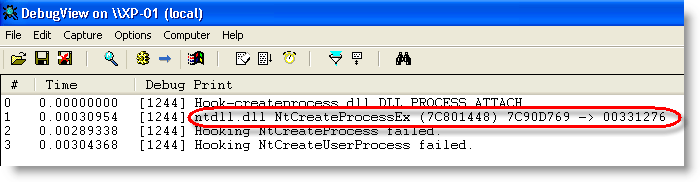
When the DLL is loaded inside a process, it will patch the Create Process API to intercept and block calls to it:
hook-createprocess-010

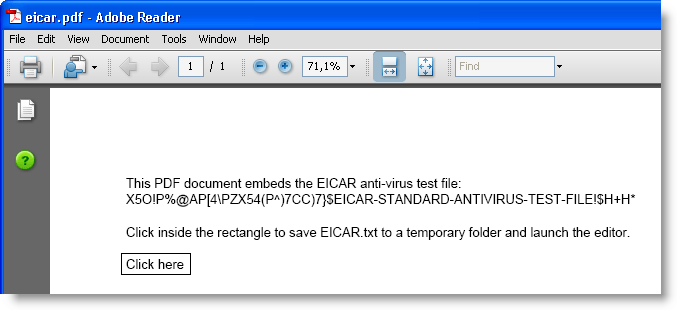
As a first test, we’ll use my eicar.pdf document.
hook-createprocess-009

Clicking the button will save the eicar.txt file to a temporary folder and launch the editor.

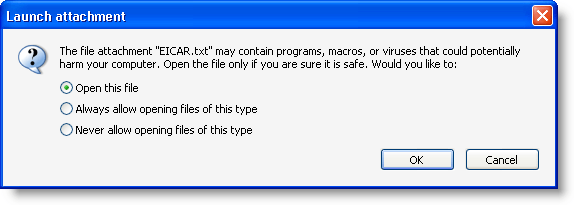
Adobe Acrobat reader will warn you when an application is to be launched:
hook-createprocess-011

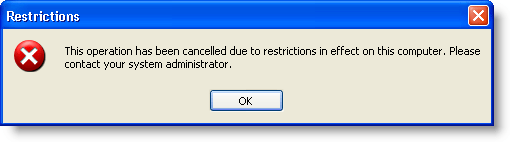
But when you accept, the editor will be prevented to execute:
hook-createprocess-012

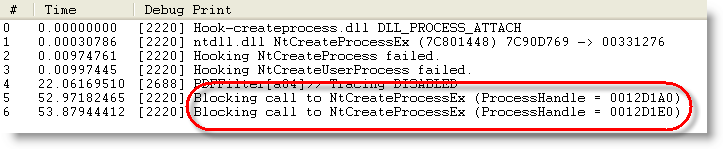
That’s because the DLL intercepted and blocked the Create Process call:

hook-createprocess-013

As a second test, let’s use a real malicious PDF document. The hooks installed by the DLL prevent it from executing the trojan:
hook-createprocess-014

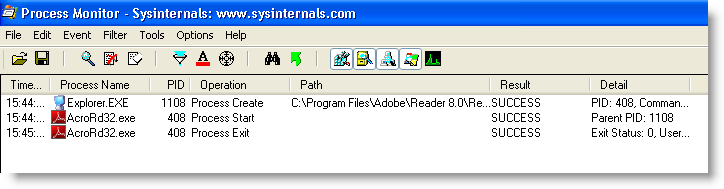
Adobe Reader starts and then just crashes, without spawning another process:
hook-createprocess-017

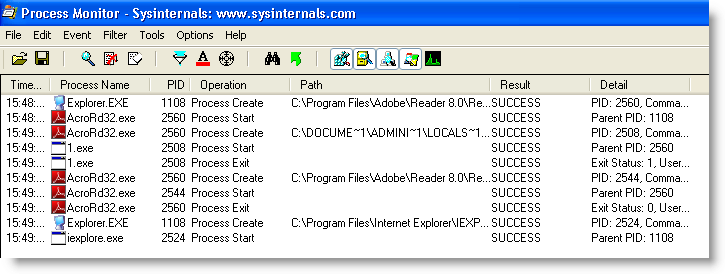
When opening the same malicious PDF, but without the protecting DLL, the machine gets trojaned (execution of 1.exe and Internet Explorer):
hook-createprocess-018

This simple way of preventing applications from launching other applications comes with some drawbacks. For example, the Check Update function in Adobe Reader will not function anymore.

When you have a sandboxing system of HIPS installed on the machines you manage, check if you can use it to prevent vulnerable applications from starting other applications. If it doesn’t provide such a feature, try the new DLL I’ll be posting in the new version of bpmtk.
Wednesday 6 May 2009

A Very Brief History of Foxit Reader and JavaScript

Filed under: PDF,Vulnerabilities — Didier Stevens @ 23:45

As I often read questions about Foxit Reader and JavaScript support, I decided to write down this very brief history.

Foxit Reader is a lightweight PDF reader, it consist of exactly one EXE file.

Up to Foxit Reader version 2.1, there was no built-in support for JavaScript. If you needed JavaScript, you had to install a plugin (this was actually just a DLL).

Version 2.1 came with builtin JavaScript support. No more plugin, the DLL was merged into the EXE. But the Foxit developers made a design decision with important security implications: you couldn’t disable JavaScript support. Uptil version 2.1, it was easy to disable JavaScript: don’t install the plugin. But with version 2.1, JavaScript was embedded.

Version 2.2 and 2.3 didn’t change this, that’s what prompted me to publish a hack to disable JavaScript.

We had to wait for version 3.0 to be able to disable JavaScript:

20090507-010837

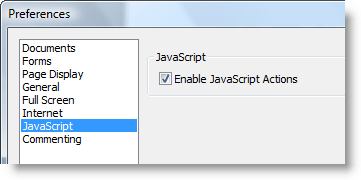
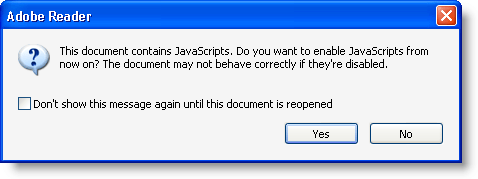
But at least, this preference was implemented as it should. Once you disable JavaScript, you get no warnings you’ve disabled JavaScript. This is unlike Adobe Reader:

20090507-013043

If you disable JavaScript in Adobe Reader, you’ll be proposed to re-enable it each time you open a PDF document with JavaScript. This is extremely confusing for the average user.

Foxit has started to provide an iFilter. I hope Foxit will never integrate this iFilter in their Foxit Reader setup program, because iFilters increase the attack surface.

Monday 9 March 2009

Quickpost: /JBIG2Decode “Look Mommy, No Hands!”

Filed under: Malware,PDF,Quickpost,Vulnerabilities — Didier Stevens @ 7:11

My previous blogpost showed how minimal user interaction can still get a malicious PDF document to infect a machine. Remembering F-Secure’s misadventure with .WMF and Google Desktop Search, I took some time to look at Windows Indexing Service. The news is not good. This time, I can get a PoC PDF document to trigger the /JBIG2Decode bug without any user interaction whatsoever. And the bug happens in a process running with Local System rights!

On a Windows XP SP2 machine with Windows Indexing Services started and Adobe Acrobat Reader 9.0 installed, there is absolutely no user interaction required to trigger the /JBIG2Decode vulnerability. When the PoC PDF file is on the disk, it will be indexed by Windows Indexing Services and the buggy /JBIG2Decode code will be executed.

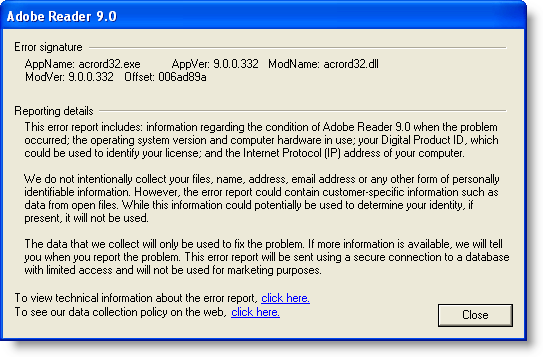
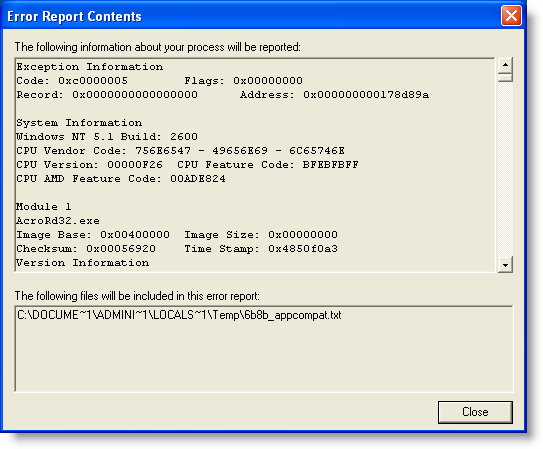
When Adobe Acrobat Reader 9.0 is installed, it also installs an IFilter (AcroRdIF.dll). This COM object extends the Windows Indexing Service with the capability to read and index PDF documents. When the Windows Indexing Service encounters a PDF file, it will index it. The content indexing daemon (cidaemon.exe) calls the Acrobat IFilter (AcroRdIF.dll) which loads the Acrobat PDF parser (AcroRD32.dll). If the PDF document contains a malformed /JBIG2Decode stream object, it will result in an access violation in the instruction at 0x01A7D89A.

In other words, if you’ve a malicious PDF document on a machine with Windows Indexing Services, it can infect your machine. And you don’t need a user to open or select the PDF document.

The good news is that Windows Indexing Services is not started on a default Windows XP SP2 install. Update: Although Windows Indexing Services is not on by default, after you’ve executed a search as local admin, you’ll be asked if you want “to make future searches faster”. If you answer yes, Windows Indexing Services will be automatically started.
The bad news is that Windows Indexing Services runs under the local system account on Windows XP SP2. This results in a privilege escalation.

Consider a Windows machine with Windows Indexing Services running, Adobe Acrobat reader installed and a file sharing service (FTP/IIS/P2P/…). Uploading a specially crafted PDF document to this machine will give you a local system shell.

To disable Windows Indexing Services’ capability to index PDF documents, unregister the IFilter: regsvr32 /u AcroRdIf.dll

But IFilters are also used by other software:

  • Microsoft Search Server 2008
  • Windows Desktop Search
  • SharePoint
  • SQL Server (full-text search)

My PoC PDF file also triggers in /JBIG2Decode in Windows Desktop Search (I tested version 4.0). But Windows Desktop Search has a better security architecture than Windows Indexing Service. Although the service runs under the Local System account, the actual calling of the IFilters is done in a separate process that runs under the Local Service account (this account has less privileges and can’t take full control of the machine).

wds

I’ve not analyzed other applications using IFilters. If you use ScarePoint (that’s how my wife, who has to work with it, calls it) or another IFilter supporting application and you want to be safe, unregister the Acrobat IFilter.

And don’t forget that, depending on  your Windows version and CPU, you’re also protected by technologies like DEP and ASLR.

Google Desktop Search doesn’t use IFilters, unless you’ve installed this plugin to add IFilter support to Google Desktop Search.

Wednesday 4 March 2009

Quickpost: /JBIG2Decode Trigger Trio

Filed under: Malware,PDF,Quickpost,Vulnerabilities — Didier Stevens @ 14:35

Sometimes a piece of malware can execute without even opening the file. As this is the case with the /JBIG2Decode vulnerability in PDF documents, I took the time to produce a short video showing 3 ways the vulnerability can trigger without even opening the PDF document.

The first 2 demos use a “classic” /JBIG2Decode PDF exploit, the third demo uses a new PoC /JBIG2Decode PDF exploit I developed. This PDF document has a malformed /JBIG2Decode stream object in the metadata instead of the page. All PDF documents used have just a malformed /JBIG2Decode stream object, they don’t include a payload (shellcode), neither a JavaScript heap spray.

So how is it possible to exploit this vulnerability in a PDF document without having the user open this document? The answer lies in Windows Explorer Shell Extensions. Have you noticed that when you install a program like WinZip, an entry is added to the right-click menu to help you compress and extract files? This is done with a special program (a shell extension) installed by the WinZIp setup program.

When you install Adobe Acrobat Reader, a Column Handler Shell Extension is installed. A column handler is a special program (a COM object) that will provide Windows Explorer with additional data to display (in extra columns) for the file types the column handler supports. The PDF column handler adds a few extra columns, like the Title. When a PDF document is listed in a Windows Explorer windows, the PDF column handler shell extension will be called by Windows Explorer when it needs the additional column info. The PDF column handler will read the PDF document to extract the necessary info, like the Title, Author, …

This explains how the PDF vulnerability can be exploited without you opening the PDF document. Under the right circumstances, a Windows Explorer Shell Extension will read the PDF document to provide extra information, and in doing so, it will execute the buggy code and trigger the vulnerability. Just like it would when you would explicitly open the document. In fact, we could say that the document is opened implictly, because of your actions with Windows Explorer.

So let me demo 3 circumstances under which a PDF Shell Extension will act and thereby trigger the vulnerability. One important detail before I do this: when the exception occurs in the Adobe Acrobat code, it is trapped by Windows Explorer without any alert. That’s why in the demos, I attached a debugger (ODBG) to Windows Explorer to intercept and visualize this exception. So each time the vulnerability triggers, the view switches to the debugger to display the exception.

In the first demo, I just select the PDF document with one click. This is enough to exploit the vulnerability, because the PDF document is implicitly read to gather extra information.

In the second demo, I change the view to Thumbnails view. In a thumbnail view, the first page of a PDF document is rendered to be displayed in a thumbnail. Rendering the first page implies reading the PDF document, and hence triggering the vulnerability.

In the third demo, I use my special PDF document with the malformed stream object in the metadata. When I hover with the mouse cursor over the document (I don’t click), a tooltip will appear with the file properties and metadata. But with my specially crafted PDF document, the vulnerability is triggered because the metadata is read to display the tooltip…

So be very careful when you handle malicious files. You could execute it inadvertently, even without double-clicking the file. That’s why I always change the extension of malware (trojan.exe becomes trojan.exe.virus) and handle them in an isolated virus lab. Outside of that lab, I encrypt the malware.

YouTube, Vimeo and hires Xvid.


Quickpost info


Monday 2 March 2009

Quickpost: /JBIG2Decode Essentials

Filed under: PDF,Quickpost,Vulnerabilities — Didier Stevens @ 23:11

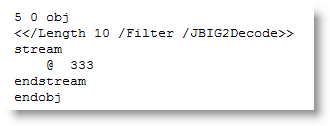
Today I took a closer look at the PDF code of the /JBIG2Decode vulnerability. It doesn’t have to be an XObject, just a stream object with a /JBIG2Decode filter:

20090302-231859

This indirect object is all I have to include in my basic PDF document to get a PoC PDF document to crash Adobe Acrobat Reader 9:

20090302-135943

20090302-140102

On Virustotal, this PoC PDF document is only detected by ClamAV, but it’s no surprise, as most signatures also look for JavaScript and/or a payload. When I use name or stream obfuscation, ClamAV is also bypassed.

You can download my Python program to generate these PoC PDF documents here, it needs the mPDF module of my PDF-tools. Use it to developed better signatures or to test your defenses.


Quickpost info


Sunday 1 March 2009

Quickpost: /JBIG2Decode Signatures

Filed under: PDF,Quickpost,Vulnerabilities — Didier Stevens @ 20:17

You’re most likely aware of the latest PDF vulnerability in JBIG2 image encoding, more specifically /JBIG2Decode.

Signatures have been released to identify PDF documents exploiting this vulnerability, many of which scan for the /JBIG2Decode string. Remember the canonicalization issue with PDF names I mentioned in a previous PDF post. There are alternate ways to write /JBIG2Decode, for example /JBIG#32Decode is also a valid representation. But many signatures will not match this variant, because the matching engine doesn’t reduce the name to a canonical form (e.g. replace the hexadecimal representation #32 by ASCII character 2) before matching the pattern.

I took this JBIG2 PoC exploit from Milw0rm and let Virustotal take a look at it. Now don’t be mislead by the 5/39 ratio, this doesn’t necessarily mean that most AV products will not protect you from this PoC.

The same PDF document, with /JBIG#32Decode (and some updates to adjust for the increased length), gets 2 detections (SecureWeb-Gateway uses the Avira engine on VT, so both detections are actually from the same engine).

But Avira doesn’t use /JBIG2Decode in its signature (when I replace /JBIG2Decode with /AAAAAAAAA, the PoC still gets detected).

So it looks like the AV engines on Virustotal don’t reduce PDF names to a canonical form.


Quickpost info


Tuesday 30 September 2008

Secret Question, Public Answer

Filed under: Vulnerabilities — Didier Stevens @ 9:58

Due to the current media attention, I’m updating and posting this old draft about secret questions.

First, let’s get a pedantic observation out of the way: Secret Question is a misnomer. If you think about it, it’s the answer that is secret, not the question.

The problem with secret questions is that they are often a backdoor to your account. When you use a strong password, the answer to your secret question will be easier to guess than your password. So you are actually using weak credentials.
If the sole purpose of the secret question is to reset your password (or e-mail it to you), then don’t use it, just type some random characters for an answer and forget about it. You won’t be able to get into your account using the secret question backdoor, but so won’t attackers.
If you’re afraid that you might forget your password, write it down and keep it safe (I recommend KeePass if you need a password manager).

Now if you definitely want a backdoor because you don’t want to write anything down and don’t trust your memory, there are a couple of options open to you.
If you’re not able to make up your own secret question, but have to choose one from a predefined list, then provide an answer that you can derive from the question only (think about it, your secret answer doesn’t have to make sense, it just has to be secret). An example:
Q: Name of first pet?
A: Four
Why four? Because the question is a sentence of 4 words. This way you don’t have to remember your secret answer, just the rule to derive the answer from the question. You can reuse the same rule for different accounts, it will generate different secret answers for different secret questions.

If you can provide your own secret question, then I recommend to use math. An example:
Q: How much is 3 + 7?
A: 20
Why 20? Because your secret rule is to double the result to obtain the correct answer. 3 + 7 equals 10, 10 times 2 equels 20.

Secret answer rules can be as hard as you want, but complex rules are more likely to be forgotten…

To summarize: disable secret questions, and store and protect your credentials.

This post comes with a complementary cartoon.

Tuesday 23 September 2008

Dismantling an XML-Bomb

Filed under: Vulnerabilities — Didier Stevens @ 21:49

No breaking news in this post, but I’ve found enough applications vulnerable to XML-bombs and not enough awareness around it, that I feel it justifies another web page documenting the principles behind it, together with suggestions to protect your applications from it.

The XML-bomb is a small XML document designed to expand to a gigantic size when parsed by an (unprotected) XML-parser. The huge amount of resources (memory) consumed when parsing the XML-bomb can cause a DoS or BoF.

Take this simple XML document:

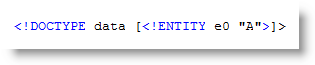
And take this Document Type Declaration defining an entity e0 with value A:

Including this DOCTYPE in our simple XML document enables us to reference entity e0 in our document, for example like this:

When this document is parsed by an XML-parser supporting DTDs, the entity reference is replaced by its value. Here is Internet Explorer rendering our XML document:

Notice that &e0; has been replaced by A.

This entity definition and referral mechanism is one essential ingredient of an XML-bomb.

The second ingredient is an expression that will grow exponentially and consume huge amounts of resources when evaluated.

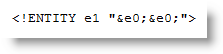
We define a second entity, e1, referring twice to our first entity e0:

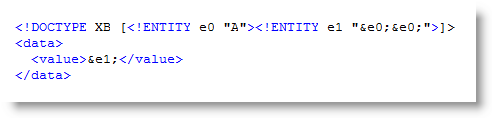
Include this definition in our XML document:

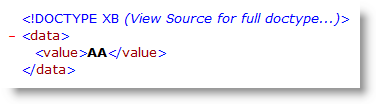
And this is how it is parsed:

e0 evaluates to A

e1 evaluates to AA

Now define e2 referencing e1, e3 referencing e2, …, and then we get

e2 evaluates to AAAA

e3 evaluates to AAAAAAAA

We have achieved exponential growth! An XML-bomb with 31 entities is less than 1K in size, but entity e30 is 1GB  (2^30 bytes) in size when it gets evaluated by the XML-parser!

How do you protect your application from an exploding XML-bomb?

If you don’t need support for DTDs, just disable DTDs or use a parser without DTD support.

If you need support for DTDs, try to prevent XML-bombs from entering your XML-parser by known-pattern scanning (like classic antivirus software does, for example an application firewall) or limit the impact of an expanding XML-bomb by hardening your XML-parser by restricting its consumption of resources.

You’re aware of the limitations of known-pattern scanning. This is a text-book XML-bomb, with exponential growth finding its origin in the binary tree structure. But there are many other data type structures …

Wednesday 28 May 2008

I Still Use Foxit Reader

Filed under: PDF,Vulnerabilities — Didier Stevens @ 8:38

Foxit Reader has been my default PDF reader for more than a year now, as an alternative to the Adobe Acrobat Reader that stalled too often when starting up.

While playing with the PDF file format, I created several PDF files that uncovered potential security issues with Foxit Reader.

A PDF file with an OpenAction triggering an URI action causes Adobe Acrobat to prompt the user for approval, before accessing the URI:

But Foxit Reader opens Internet Explorer and visits the site without confirmation prompt. I submitted a feature request to Foxit Software for this.

Another example is a JavaScript inside a PDF file that switches the reader to full screen mode. Adobe Acrobat Reader will warn you for spoofing attacks and ask for your permission to switch to full screen, while Foxit Reader does this immediately.

Of course, these warnings will only help a user that is aware of the potential risks. But in a corporate environment, you can also set the appropriate registry keys to block all these actions by default.

It was also trivial to assemble some simple malformed PDF files that cause problems for Foxit Reader, but not for Adobe Reader. I submitted these files to Foxit Software.

Adobe Acrobat Reader allows you to disable JavaScript. Until recently, Foxit Reader required a JavaScript plugin for JavaScript support. Omitting the plugin was a simple way to disable JavaScript. But since version 2.2, JavaScript is embedded in the main executable and there is no configuration switch to disable it. Many Foxit Reader users have requested this feature.

If you absolutely want to disable JavaScript in Foxit Reader 2.3, there’s a quick and dirty trick. Search for the ASCII string JavaScript (preceded and terminated by byte 00) in the Foxit Reader executable (you should find only one occurrence), and replace it with javascript, for example. Actually, this patch will not disable the JavaScript interpreter for Foxit Reader, but it will prevent Foxit Reader from recognizing the /JavaScript name in a PDF document, effectively making it to ignore JavaScript instructions (names are case-sensitive).

You can make this patch permanently by editing the Foxit Reader executable with an hex editor, or do it temporarily by patching in memory with my bpmtk utility. The command to achieve this is:

search-and-write module:. hex:004A61766153637269707400 hex:006A

Of course, this is not a serious risk analysis of Foxit Reader. I started to use Foxit Reader as a solution to the Adobe Acrobat Reader performance problems, not for security reasons. And now that I’ve delved into the PDF file format, I did some random tests with Foxit Reader and Adobe Acrobat Reader. This gave me the impression that Adobe has more experience with security risks and vulnerabilities, than Foxit Software, and that this experience is reflected in the design of their products.

I’ll still be using Foxit Reader as my main PDF reader, and I’ll still analyze suspect PDF files in a controlled environment.

Monday 11 June 2007

Some e-voting observations

Filed under: Vulnerabilities — Didier Stevens @ 16:52

Last Sunday, we had federal elections here in Belgium. I’m glad to see that the electronic voting system I used is designed to minimize voter coercion.

The secret ballot prevents coercion (being forced to vote for a certain person or party): if the voter can’t produce evidence of how he voted, he can lie to the coercer about his vote without risk. Some political parties want to change the process of the secret electronic ballot and include a paper trail. This is not a good idea, it will make coercion much more effective, as the voter will have an official paper with his vote.

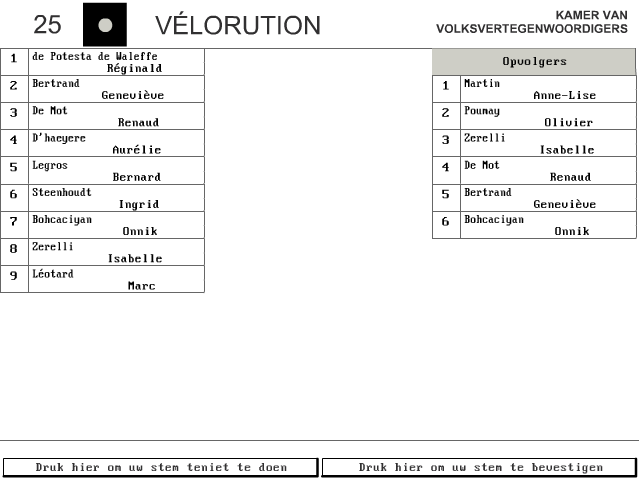
The ubiquitousness of mobile phones equiped with a camera gives coercers a new opportunity to require proof from the persons they are coercing. The coercer just has to instruct his victim to take a picture of his ballot. The Belgian electronic ballot is designed to prevent this. When you’ve casted your vote, you’ll see a screen like this one:

The 2 buttons at the bottom of the screen allow you to:

  • left button: go back a screen and change your vote
  • right button: confirm your vote

Once you have confirmed your vote, the next screen doesn’t display how you voted. So if one is coerced and has to deliver proof, one just has to take a picture of the vote one was coerced into, and then back out from the screen and change ones vote. The only workaround I see is for the coercer to demand a video of the complete voting process, in stead of a picture of the ballot.

I’ve made a video of my voting last Sunday, and it turned out to be rather difficult to do. First of all, I was standing very close to the screen and I clumsily managed to film only the bottom of the screen. Secondly, the brightness of the CRT screen (black letters on a white background) makes it very hard to read my ballot on the video. This could also be an anti-coercion mechanism, taking legible pictures of a white screen is very hard.

This is an advantage that our electronic ballot has over our paper ballot, it is more effective against voter coercion.

You can find a simulation of the Belgian electronic ballot here:

« Previous PageNext Page »

Blog at WordPress.com.