Didier Stevens

Monday 4 October 2010

LowerMyRights

Filed under: Malware,My Software,Vulnerabilities — Didier Stevens @ 0:30

Last year I posted about some techniques and tools to restrict the rights of applications on Windows XP when you run with admin rights. I mentioned a new tool, LowerMyRights, which I forgot to publish. So here it is.

You would use LowerMyRights.dll only if the other tools and techniques are not appropriate for your specific case. LowerMyRights is useful when you can’t create a new process with restricted rights, but when you’ve to restrict the rights of an existing process.

When this DLL is loaded inside an existing process, it will check a whitelist and a blacklist to decide if it has to restrict the process’ rights (it also checks if it’s running on Windows XP). If the application’s name if found in the blacklist and not in the whitelist, LowerMyRights will do its job.

First, it will remove all the privileges of the primary token, except the SEChangeNotifyPrivilege.

Second, it will create a restricted token (with ACLs denying Administrator and Power Users rights) and use this token for impersonation (it uses impersonation because Windows doesn’t allow modifications to the ACLs of a primary token).
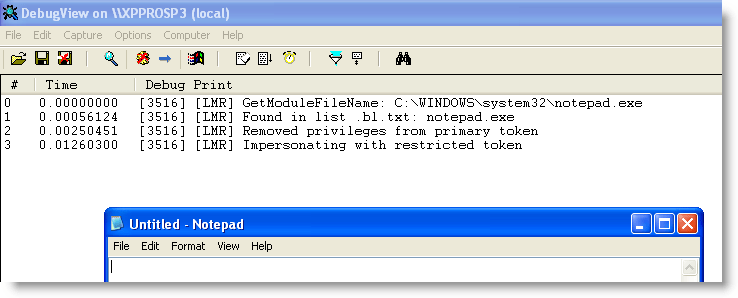
This impersonation is also a weak point of LowerMyRights compared with the other tools: exploit code can switch back to the unrestricted primary token by calling RevertToSelf.

You can load LowerMyRights inside all processes by adding it to the AppInit_DLL registry key, but be careful, this might cripple your system as it is loaded inside every process (even at boot time), so please test first.
Or else you use LoadDLLViaAppInit, or add it to the import table like explained here.

The whitelist (lowermyrights.wl.txt) is just a text file with a list of applications to whitelist (i.e. not lower the rights). You must use full pathnames in the whitelist.
The blacklist (lowermyrights.bl.txt) is just a text file with a list of applications to blacklist (i.e. to lower the rights). You must not use full pathnames in the whitelist, but just the application’s name.
The idea I had with this different operation of the whitelist and blacklist, is that you would be able to whitelist specific applications while blacklisting copies/fakes of these applications.
An example with notepad will make this clear: by adding c:\windows\system32\notepad.exe to the whitelist and notepad.exe to the blacklist, you would be able to use the original notepad.exe with full rights, while copies of notepad (located at other locations) or other programs with the name notepad.exe would be restricted. With hindsight, I don’t think this dual list feature is useful, but I left it in anyways (the program is a year old, I used it for a year and I haven’t modified it).

Download:

LowerMyRights_V0_0_0_3.zip (https)

MD5: FF937173AB1CD2C7A9DF050D7ADF0696

SHA256: 9AA83F24031029F60862CAAE477B02DF0C0887BD6E9078A1E186FEF6DF873253
Thursday 26 August 2010

Quickpost: Ariad & DLL Preloading

Filed under: My Software,Quickpost,Vulnerabilities — Didier Stevens @ 12:11

I’m writing this quickpost just in case you hadn’t figured this out for yourself: the techniques I described to protect machines from the .LNK vulnerability also help you mitigate the DLL preloading issue.

The .LNK vulnerability mitigation examples I gave with Ariad (no file execute) and SRP prevent loading of DLLs from untrusted locations (USB sticks, network drives, …). These will also prevent DLLs from loading from untrusted sources in the case of DLL Preloading exploits.


Quickpost info


Wednesday 18 August 2010

Quickpost: .LNK Template Update

Filed under: My Software,Quickpost,Vulnerabilities — Didier Stevens @ 10:43

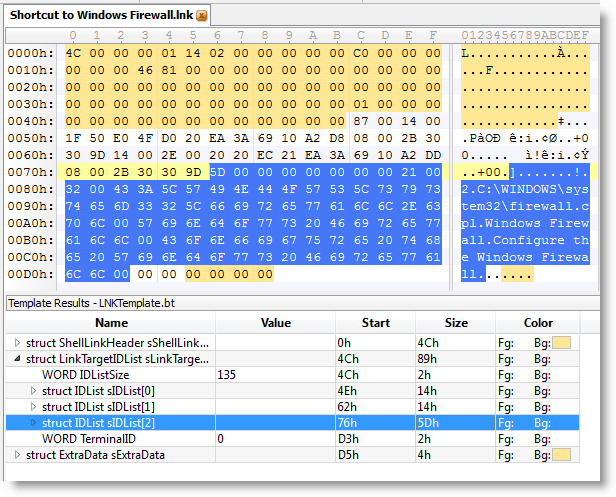
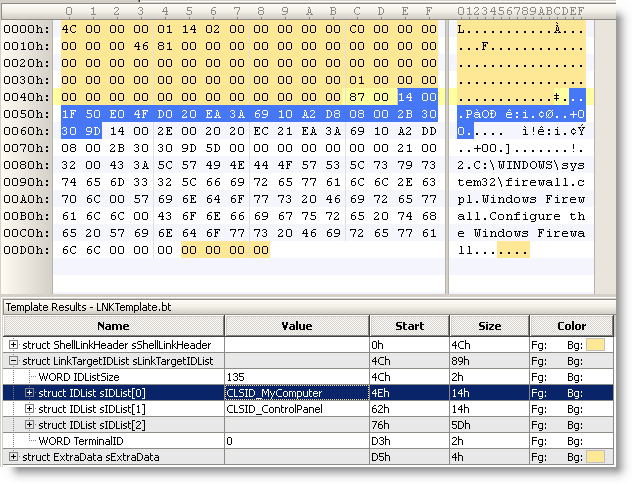
I updated my .LNK template with info I got from comments from WndSks and Forrest Gump. This new version identifies well-known Shell GUIDs:


Quickpost info


Sunday 8 August 2010

Quickpost: 2 .LNK Tools

Filed under: My Software,Quickpost,Vulnerabilities — Didier Stevens @ 10:52

Microsoft has issued an emergency patch (MS10-046) for the .LNK file vulnerability (CVE-2010-2568).

I’m releasing two small tools I developed to help me investigate this vulnerability.

First one is a 010 Editor template file for the .LNK binary file format.


Second one is a ClamAV signature file to find all .LNK shortcuts that load a DLL (malicious or benign).

To scan your drive C, issue command

clamscan.exe -d LNK-CPL-CVE-2010-2568.ndb -l scan.log -r c:\

Quickpost info


Tuesday 20 July 2010

Mitigating .LNK Exploitation With SRP

Filed under: Vulnerabilities — Didier Stevens @ 7:13

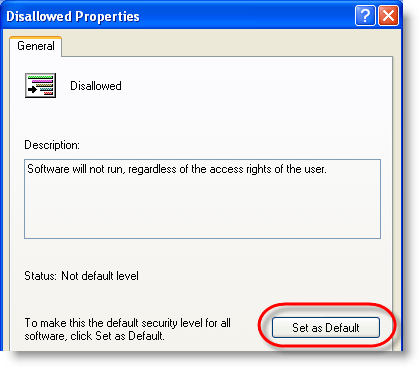
As I’ve used Software Restriction Policies (SRP) on several occasions in my blogposts, and several people have suggested using SRP to protect against .LNK exploitation as an alternative to Ariad, I’ll describe how to configure SRP for the first time on a workstation that is not a member of a domain. For domain members, you have to configure SRP in the GPO on the domain controller.

Start the Local Security Policy manager from Control Panel / Administrative Tools:

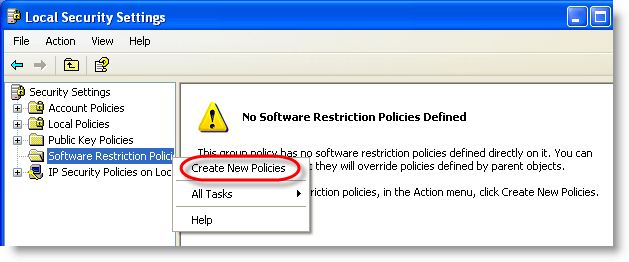
Software Restriction Policies need to be defined the first time:

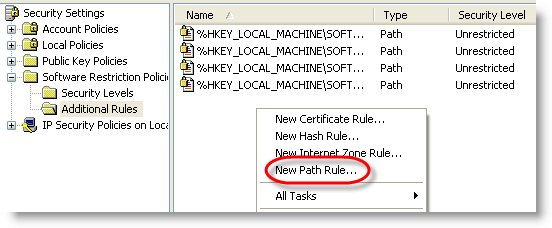
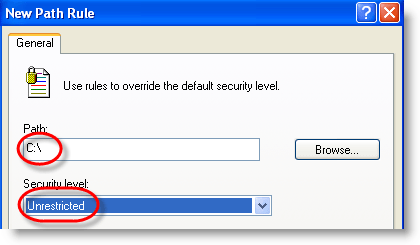
We exclude our system drive (C:) from being restricted (add other drives if you have more):

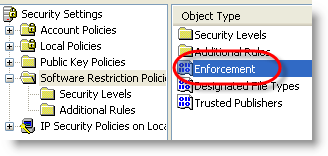
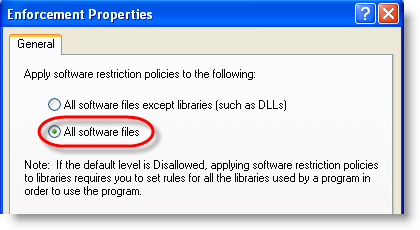
To protect against .LNK exploitation, we need to restrict DLLs too, not only EXEs:

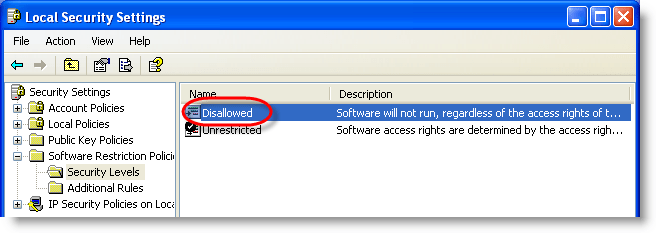
And finally, switch from blacklisting to whitelisting:

After configuring SRP, execute a logoff/logon to apply them immediately.

From now on, only executables on your C: drive will be allowed to run.

.LNK exploitation from removable media is blocked:

Sunday 18 July 2010

Mitigating .LNK Exploitation With Ariad

Filed under: My Software,Vulnerabilities — Didier Stevens @ 13:42

Today I tested @Ivanlef0u ‘s .LNK PoC with my latest Ariad tool.

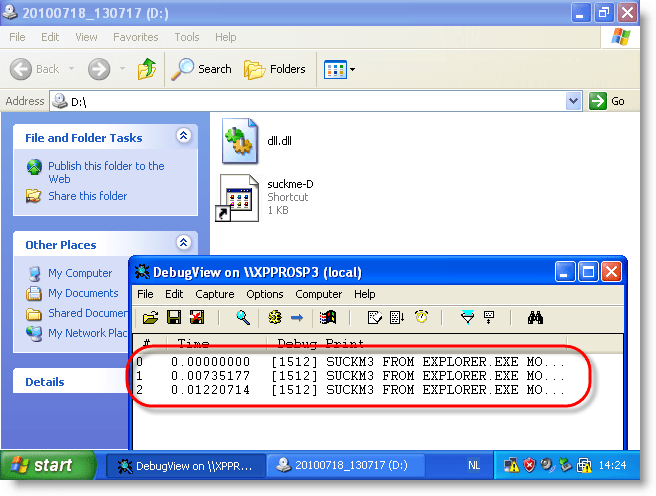
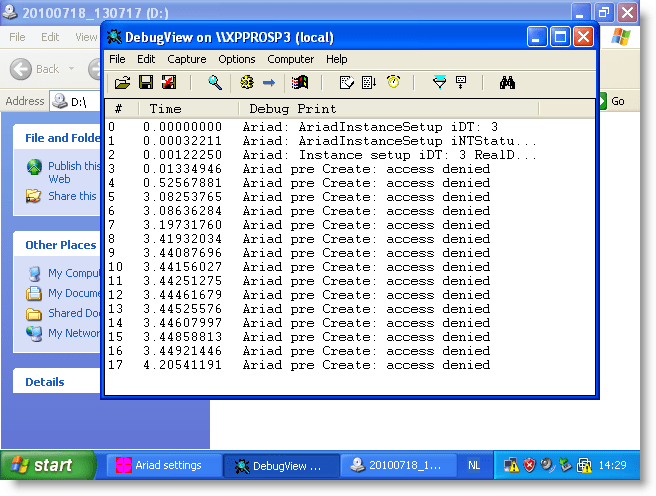
I adapted the PoC to work on a CD-ROM for drive D. When you load the CD-ROM with the PoC (I use an ISO file inside a VM) and take a look at DbgView’s output, you’ll notice that payload gets executed:

With Ariad installed on the machine in its default configuration (just block \autorun.inf), the PoC still works:

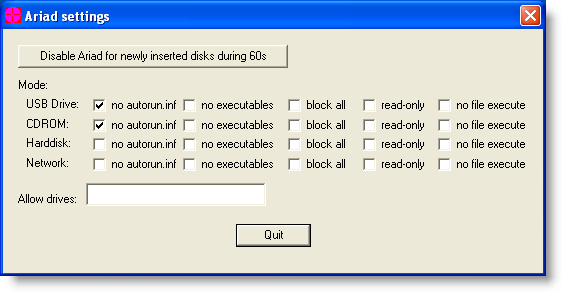
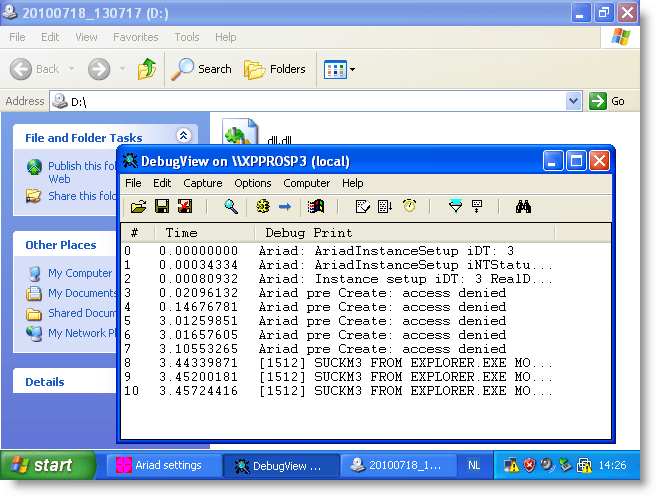
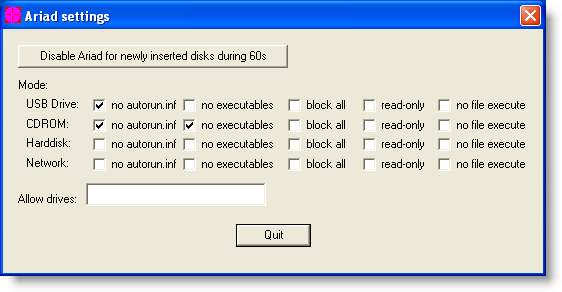
But configuring Ariad to block access to executables (this includes .LNK) prevents the PoC from executing:


Access to the .LNK file is denied, and Windows Explorer can’t start the payload.

And configuring Ariad to prevent files to be mapped in memory (this is something done by Windows with executables) also prevents the PoC from executing:


This time, access to the .LNK file is not denied, but dll.dll is prevented from loading into memory, thus again preventing the payload from executing.

You can use Ariad if you want to mitigate attacks with these shortcut links until Microsoft releases a patch. As it is expected that Microsoft will not release a patch for Windows XP SP2, Ariad can offer permanent mitigation.

Be sure to read Ariad‘s documentation before using it.

Tuesday 29 June 2010

Quickpost: No Escape From PDF

Filed under: PDF,Quickpost,Vulnerabilities — Didier Stevens @ 18:41

Adobe has released a new Adobe Reader version with a fix for my /Launch action PoC PDF.

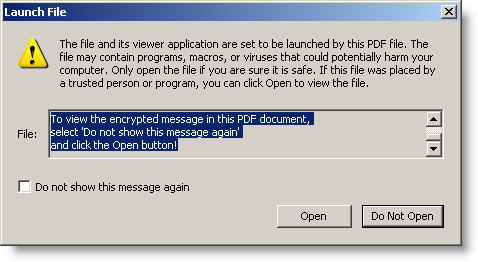
Before version 9.3.3:

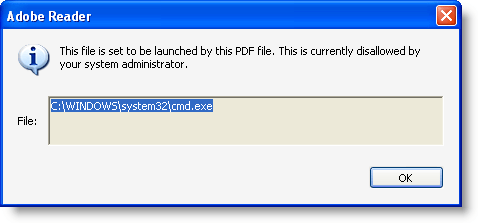
Since version 9.3.3:

Not only is the dialog box fixed, but the /Launch action is also disabled by default.


Quickpost info


Monday 11 January 2010

Adobe Reader JavaScript Blacklist Framework

Filed under: Malware,PDF,Vulnerabilities — Didier Stevens @ 1:51

The JavaScript Blacklist Framework is a security feature Adobe released with Adobe Reader and Acrobat versions 8.1.7 and 9.2.

When you’re in a case where you need to use Adobe Reader and you can’t disable JavaScript, the JavaScript Blacklist Framework can help you mitigate zero-days in JavaScript API functions by disabling the vulnerable functions.

I produced a video where I disable util.printf:

Notice that when I blacklist util.printf, the script still executes until the blacklisted function util.printf is called. At that moment, the script is cancelled and the user is warned.

On Windows, you can blacklist functions by adding them to registry value tBlackList (HKLM\SOFTWARE\Policies\Adobe\product\version\FeatureLockDown\cJavaScriptPerms\tBlackList). To blacklist more than one function, use the same registry value and separate the functions by the pipe-character (e.g. Util.printf|Collab.getIcon). Pay attention to the fact that the framework is case-sensitive (e.g. Util.printf is correct, util.printf is not correct).

The framework is impervious to bypassing with some basic obfuscation techniques found in malicious PDFs (eval(“util.printf… ; x = util.printf; x(“… ).

It’s too bad that blacklisting is limited to the JavaScript API; the functions to blacklist must be in the form <object-name>.<function-name>. Otherwise we would be able to blacklist some global functions of the JavaScript language that are often used in malicious PDF files, like unescape. According to the ECMAScript specification, unescape is a member function of the Global Object. I tried several ways to blacklist it (unescape, .unescape, this.unescape, Doc.unescape, …), but failed.

If you really want to disable unescape, you could do this by patching the JavaScript plugin EScript.api. Maybe I’ll post a method to do this in-memory with my basic process manipulation tool kit.

Adobe Reader JavaScript Blacklist Framework

Monday 2 November 2009

CVE-2009-2979 Or The XML-Bombed PDF

Filed under: PDF,Vulnerabilities — Didier Stevens @ 7:15

The Extensible Metadata Platform is an Adobe standard to represent metadata with XML.

More than a year ago, I added an XML-bomb to XMP-data inside a PDF document:

20091031-194428

As this made Adobe Reader 8 & 9 crash, I reported it to Adobe. It has been fixed with the last patch cycle.

Why do I disclose the details of this vulnerability? Because XMP is not only intended to be used in PDF documents, but many other file formats. So be sure to check your software for this vulnerability.

Tuesday 13 October 2009

Update: PDFiD Version 0.0.9 to Detect Another Adobe 0Day

Filed under: My Software,PDF,Vulnerabilities — Didier Stevens @ 21:23

PDFiD is updated to detect the latest Adobe 0day, CVE-2009-3459.

I’ll provide more details in an upcoming post, just now for know that PDFiD detects a /Colors name followed by a very big number (larger than 2^24 or 16777216).

pdfid009

You can download PDFiD here.

« Previous PageNext Page »

Blog at WordPress.com.