ExtractScripts is another one of my little tools I use to analyze malware.
Tuesday 26 June 2007
Monday 23 April 2007
USBVirusScan V1.5.0
This new version of USBVirusScan adds a switch (-q) to stop a running instance of USBVirusScan.
The program can be found here.
Tuesday 6 March 2007
USBVirusScan v1.4.0
USBVirusScan v1.4.0 has a new “feature”: from this version on, only one instance can be running. This was requested by Alfredo.
I use a mutex to detect if an instance of USBVirusScan is already running, and if it is, I do not launch another instance.
Mutexes are used by programmers to orchestrate exclusive access to a resource. Suppose your program is multi-threaded and that separate threads are reading, checking and updating the same global variable. Thread A could read global variable G, followed by thread B writing global variable G. Thread A will then make decisions on an outdated value of global variable G (it has just been changed by thread B). To avoid this, we must be sure that reading, checking and updating is an atomic operation, i.e., that when thread B is using global variable G, threat A cannot start using it before thread B is done.
This can be done with a mutex. When thread B wants to use global variable G, it first has to create a mutex. Creating a mutex is requested to the OS. The OS guarantees that creating the mutex is also an atomic operation: 2 programs cannot create the same mutex simultaneously. If the mutex doesn’t exist, it is created and the program is informed of the creation. On the other hand, if the mutex already exists, the program is informed that the mutex already exists. So if thread B successfully creates the mutex, it knows that no other thread is using the global variable and that it can use it. If thread A tries to create a mutex, it will fail because it already exists, and therefor it knows it cannot use global variable G. When thread B has done reading, checking and writing global variable G, it releases the mutex, thereby giving other threads the opportunity to create the mutex and access global variable G.
A mutex can also be used to restrict the number of running instances of a program. When the program is started, it first creates a mutex. If it succeeds, it continues and never releases the mutex (the mutex will be released by the operating system when the program terminates). However, if the creation fails, the program knows that another instance is already running and it just stops. This makes that only one instance of the program can be running.
Mutexes can be named, for example “USBVirusScan”, this allows for the creation of many different mutexes.
Mutexes are also used by virus writers to limit the number of running instances of their virus. If a virus is allowed to reproduce uncontrolled on a machine, the huge number of running instances would soon kill the machine, thereby DoSing it.
Do you remember “inoculation” programs? They would prevent the execution of a particular virus strain on your machine. They work with mutexes: the inoculation program creates the same mutex as the virus would, and then stays resident, never releasing the mutex. If the virus wants to run on your inoculated machine, if fails to create the mutex and stops the infection, assuming your machine is already infected.
This tactic is also used in some viruses to disable competing viruses: not only do they create their own mutex, but also the mutex of the competing virus …
Thursday 15 February 2007
UserAssist article published in (IN)SECURE Magazine
My article about my UserAssist forensic tool has been published in the February 2007 issue of (IN)SECURE Magazine .

Monday 12 February 2007
ZIPEncryptFTP
ZIPEncryptFTP is a program I developed to make off-site backups of important data. Like its name suggests, it ZIPs one or more directories, Encrypts the ZIP file with AES and uploads it to a FTP server.
Find the details here.
Tuesday 30 January 2007
XORSearch V1.1.0
I’ve updated XORSearch:
- It will list all occurences of the search string, not only the first occurence
- Added a switch to make the search case insensitive
- Prints only printable characters (unprintable characters are replaced by a dot)
- Limits the output string to 50 characters by default (can be changed)
Monday 15 January 2007
FileGen
Monday 8 January 2007
USBVirusScan v1.3.0
I noticed that USBVirusScan will also trigger when a network drive is mounted (Map Network Drive, or net use …).
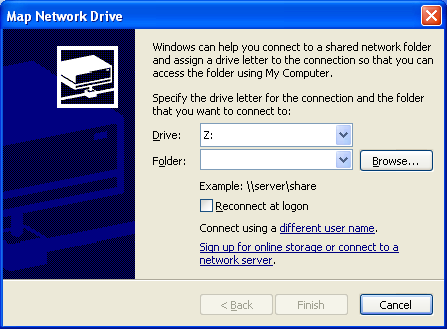
This new version ignores mounting of network drives.
Thursday 28 December 2006
Brute Forcing Enigma
A colleague of mine is getting married and her friends gave her a bunch of puzzles to solve. One puzzle is about the Enigma cipher machine, that’s why she asked me for help.
She has to go to this page (a flash simulation of the Enigma cipher machine) and solve this puzzle: If ANSWER is YRKRHL, then insert ENIGMA into enigma to find the answer…
It was immediately clear to me that we were dealing with a KPA: find the key (Enigma cipher machine configuration) that encrypts ANSWER into YRKRHL, and then we’ll be able to find the encrypt ENIGMA.
I quickly wrote a C# program to brute force all the starting positions (AAA – ZZZ), based on this article. At first my program didn’t find a solution, so I added brute forcing of the rotors and steckers configuration. By then my colleague had received a hint from her friends, which allowed us to set the correct configuration of the rotors, starting positions and steckers.
The funny thing is that my program found several other solutions:
Solution: rotor 243 key JRP steckers ACLX cleartext ANSWER ciphertext YRKRHL
cleartext2 ENIGMA ciphertext2 JRHSCB
Solution: rotor 513 key TJB steckers ADNT cleartext ANSWER ciphertext YRKRHL
cleartext2 ENIGMA ciphertext2 IRLHUN
Solution: rotor 234 key UHH steckers AGJS cleartext ANSWER ciphertext YRKRHL
cleartext2 ENIGMA ciphertext2 XRNBIK
Solution: rotor 234 key UHH steckers AGKU cleartext ANSWER ciphertext YRKRHL
cleartext2 ENIGMA ciphertext2 XRNBIU
Solution: rotor 321 key ESM steckers AHFY cleartext ANSWER ciphertext YRKRHL
cleartext2 ENIGMA ciphertext2 BRDHAQ
Solution: rotor 125 key HMH steckers AHRU cleartext ANSWER ciphertext YRKRHL
cleartext2 ENIGMA ciphertext2 QRYFNZ
…
Download:
MD5: A9FEBBABA207E7C3790D075FD3A3D22B
Tuesday 12 December 2006
USBVirusScan v1.2.0
This new version has a new command line option -e. This will disable the Exit command in the pop-up menu.
Thanks to Earl Yeo for the suggestion.

 Didier Stevens