Didier Stevens

Monday 3 December 2007

Looking for N800 Beta Testers, No Voyeurs Please ;-)

Filed under: My Software,N800 — Didier Stevens @ 9:06

I’ve developed a new application for my N800, psurveil (Photo Surveillance). It automatically takes pictures with the N800’s build-in camera at regular intervals and stores them as jpeg files.
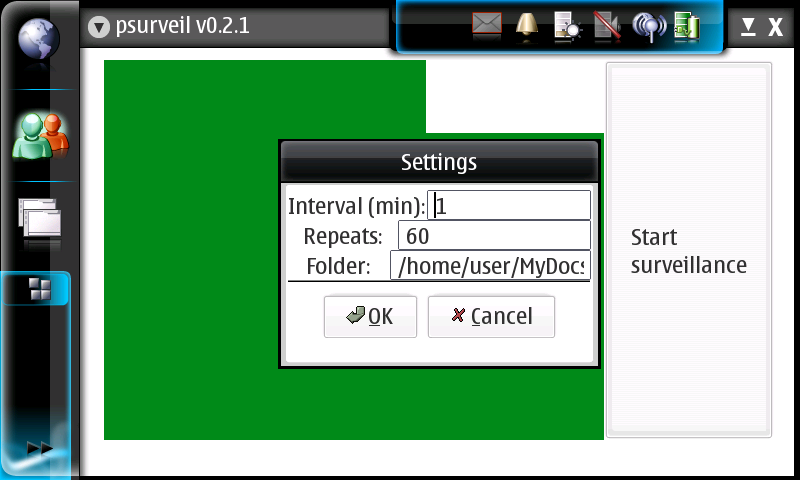
screenshot-2007-12-02-21-02-09.png

You can find the installation package here (unzip and copy the deb package to your N800) and the source code here. And be careful, it’s beta. On my N800, it takes about 30 seconds to start, and it doesn’t run as root.

So if you’ve got a baby and are looking for an excuse to get an N800, this turns your N800 in a baby monitor, kinda.

From the source code:

psurveil (Photo Surveillance) is a program for the Nokia N800.
It automatically takes pictures with the N800’s build-in camera at regular intervals
and stores them as jpeg files.

usage:
– Pop out the camera, and close all programs using the camera.
– Start psurveil. On my N800, it takes very long to start, sometimes a half minute.
– Use the menu to review the settings.
– Interval is the number of minutes between pictures.
– Repeats is the number of pictures to take, minus 1.
– Folder is the directory to store the pictures. The directory must exist.
Settings are stored with GConf, and there is no input validation.
– Click on the “Start surveillance” buttons to start the surveillance. A first picture
is immediately saved, and another picture every Interval minutes, and this Repeats times.
The filename of the jpeg is composed with the date & time when the picture was taken.
There is no monitoring of free diskspace.

Example:
The settings for this example are:
– Interval=1
– Repeats=3
– folder=/home/user/MyDocs/.images
These settings will take 4 pictures over a period of 4 minutes, starting when the button is clicked.
Pictures are stored in the Images folder:
20071127-194647.jpeg
20071127-194747.jpeg
20071127-194847.jpeg
20071127-194947.jpeg

I developed this program by merging the example_camera.c and example_alarm.c Maemo example programs.
There are some quirks in the real-time video display, they originate from the example_camera.c program.
If you know how to fix this, let me know.
I’m not an experienced Maemo developer (neither GTK developer), this is my first program for the N800,
so use this program at your own risk, and respect the privacy of others.

I put my code for this program in the Public Domain. For the code copy-pasted from the examples,
read the copyright below.

Todo (no guarantee that these ever get done):
– Input validation
– Folder creation
– Toggle to flip the picture

History:
22/11/2007 example_camera and example_alarm merged
23/11/2007 jpeg filename is current date & time
25/11/2007 0.1.3 added menu & menu functions
26/11/2007 coded settings dialog
27/11/2007 0.2.0 code review
28/11/2007 0.2.1 input validation for numbers in settings dialog
Monday 26 November 2007

Update: UserAssist V2.4.2

Filed under: Forensics,My Software,Update — Didier Stevens @ 9:29

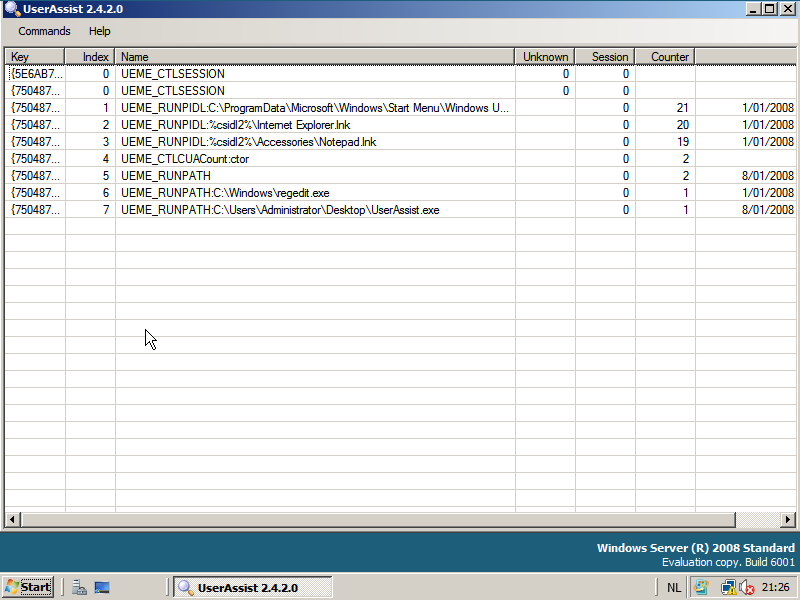
Just a small change in this new version: now you can disable the automatic loading of the local registry data when the UserAssist tool is launched. Use the “Load at Startup” menu command.

The setting is saved in Isolated Storage, in a file called UserAssist.config.

Tuesday 6 November 2007

Update: USBVirusScan 1.6.1

Filed under: My Software,Update — Didier Stevens @ 7:44

This new version of USBVirusScan adds a new placeholder %f and provides debugging support.

%f contains the filesystem of the inserted drive, like NTFS, FAT, CDFS, …

Newer versions of DAEMON Tools (a virtual CD-ROM utility to mount CD images) report to Windows as a removable drive, thereby triggering USBVirusScan. You can use %f in your scripts to detect this and execute the appropriate action. For example, if you want to scan each USB drive with Avira but don’t want to scan images mounted with DAEMON Tools, use this script (avira.vbs):

dim WshShell

Set WshShell = WScript.CreateObject("WScript.Shell")

if Wscript.Arguments.Item(1)  <> "CDFS" then
	WshShell.run """C:\Program Files\Avira\AntiVir PersonalEdition Classic\avscan.exe"" /GUIMODE=2 /PATH= """ & Wscript.Arguments.Item(0) & ":\""", 1, true
end if

Start USBVirusScan with these parameters: USBVirusScan wscript avira.vbs %d %f

The balloon info also contains information about the filesystem of the inserted drive:

usbvirusscan_balloon_cfds.png

A new flag, -d, adds debugging support to USBVirusScan. When this flag is present, USBVirusScan will write debug output when drives are inserted. This debug output can be viewed with DebugView.

A word of caution about DAEMON Tools. I use an older version of more DAEMON Tools, but newer versions contain an adware component, that you should be able to skip when installing.

Tuesday 16 October 2007

UserAssist V2.4.1

Filed under: Forensics,My Software — Didier Stevens @ 6:36

The most important feature of this new UserAssist version is the explain command. Now you can right-click an entry, select explain and get a nice explanation for the selected entry, like this:

userassist_explain_1.png

I’ve spend some time researching all the different types of values the UEME strings can have and how they relate to user actions. The explain function contains everything I discovered. The source code for this feature is a prototype, I’ve been developing it as I discovered the logic behind the UEME strings, hence it is not a clean design and I plan to rewrite it once I get the full picture. Of course, this design is hidden for you as a user and you should not care about it.

The Logging Disabled switch is OS-aware (Windows XP, 2003 and Vista).

And the last new feature of this version is the support of cleartext Userassist entries (i.e. entries that are not ROT13 encoded). BTW, Windows Vista doesn’t support the NoEncrypt setting.

This version was also tested on Windows 2003, I didn’t notice a difference with Windows XP, but I must admit the testing was limited.

And I would like to test it on Windows 2008 while attending Microsoft IT Forum.

Tuesday 9 October 2007

WhoAmI? Firefox Extension

Filed under: My Software — Didier Stevens @ 7:19

Can you help me test my new Firefox extension WhoAmI?

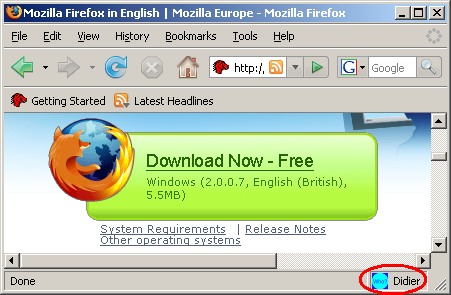
It’s very simple, it displays the name of the current profile on the statusbar:

whoami-preview-01.png

I’ve been using the Firefox Profile Manager for some time now, but recently I learned how to run several instances of Firefox. There have been several posts about this, like this one, to help mitigate Google account vulnerabilities. But sometimes I forget which profile I’m running, until I developed my WhoAmI? extension.

You can download it here. It is also in Mozilla Add-ons site’s sandbox. Please report your test results back to me (OS & FF version), it will help me to get my extension out of the sandbox and into the public part of the Mozilla site.

Tuesday 21 August 2007

Twiddling Bits

Filed under: My Software — Didier Stevens @ 6:12

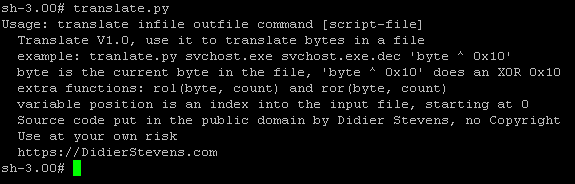
Here is a new little Python script to perform bitwise operations on files (like XOR, ROL/ROR, …). For maximum flexibility, it requires you to provide the operation as a Python expression, like this:

translate.py malware malware.decoded β€˜byte ^ 0x10’

This will read file malware, perform XOR 0x10 on each byte (this is, expressed in Python: byte ^ 0x10), and write the result to malware.decoded.

The script has been added to my software page.

translate-004.png

Tuesday 14 August 2007

XORSearch V1.2.0: XOR & ROL

Filed under: My Software — Didier Stevens @ 6:34

Last week I analyzed a piece of malware that had each byte of its strings ROL 1 (ROtate Left) encoded. I’ll give more details about this trick in an upcoming post.

It prompted me to update my XORSearch tool to deal with ROL encoding. Feeling lazy, I only coded ROL support, not ROR. πŸ˜‰ Or did I, what do you think?

Monday 23 July 2007

CyberSpeak interview

Filed under: My Software,Reverse Engineering — Didier Stevens @ 8:11

My interview on the CyberSpeak podcast about my UserAssist tool is up. I discovered I speak English with a French accent πŸ˜‰ But I’m not French, I’m Flemish!

Tuesday 17 July 2007

UserAssist V2.3.0

Filed under: My Software,Reverse Engineering — Didier Stevens @ 6:05

I’m releasing version 2.3.0 of my UserAssist tool with these new features:

  • saved CSV files have a header.
  • entries are highlighted in red when they match a user-specified search term (which can be a regular expression). This is my answer to the persons asking for a search feature. As I didn’t want to bother with a Find Next function, I decided to implement a highlight feature.
  • the Save command also supports HTML.
  • support for the IE7 UserAssist GUID key {0D6D4F41-2994-4BA0-8FEF-620E43CD2812}
  • registry hive files (usually called NTUSER.DAT files) can be loaded directly with the tool. The tool will load the DAT file temporarily in the registry, read the UserAssistkeys and unload the file. This feature is experimental, because I didn’t write the code yet for all the exceptions (invalid NTUSER.DAT file, no access rights to the file, no rights to load the file, failure to unload the file, …).

Other requests, like a command-line option, will be investigated.I’m also researching special values of the count property, for example when a program is removed from the start menu list.

The software is hosted on my site now, as Microsoft will phase-out the User Samples section of the gotDotNet site.

Thanks to Ovie and Bret of the CyberSpeak podcast for talking about my UserAssist tool on their show. The announced interview is recorded πŸ™‚

Wednesday 11 July 2007

ExtractScripts Update

Filed under: Malware,My Software,Update — Didier Stevens @ 0:06

I’ve updated ExtractScripts to handle comments inside <script> tags.

« Previous PageNext Page »

Blog at WordPress.com.