Didier Stevens

Wednesday 12 March 2008

bpmtk: DisableAMD

Filed under: Hacking,My Software,Reverse Engineering — Didier Stevens @ 0:43

Remember my DisableAMD post? In stead of patching the EXE file, you can also use my Basic Process Manipulation Tool Kit to patch the running process.

There is a small difficulty, however. The check for the DisableCMD key is done when CMD.EXE is started, so to be successful, we have to start the program and change the DisableCMD string in memory before the check is made. Sounds impossible? Not really, the CreateProcess function allows you to create a new process with its main thread in a suspended state (this means that the program is not running). This gives you the opportunity to change the string in memory before it is used.

Use the start statement to start a new process in suspended state:

start cmd.exe

Change the string in memory:

search-and-write module:. unicode:DisableCMD unicode:DisableAMD

The main thread will be resumed after the last statement was executed (search-and-write in our example):

start-cmd-w2k8.png

The cmd.exe window in the background was launched from the start menu (showing you that cmd.exe is disabled), while the cmd.exe window in the foreground was launched with the bpmtk (showing you the bypass of the GPO).

And did you notice that this screenshot is taken on a Windows 2008 server?

Next time, I’ll show some tricks to use the bpmtk in a restricted environment, like a Terminal Server.

Thursday 6 March 2008

bpmtk: Replacing Gpdisable

Filed under: Hacking,My Software,Reverse Engineering — Didier Stevens @ 8:52

Gpdisable is a tool to bypass group policy as a limited user, posted by Marc Russinovich on his blog when he was still the owner of Sysinternals. But now that Sysinternals is owned by Microsoft, the tool is not available anymore.

My Basic Process Manipulation Tool Kit can replace Gpdisable, I’ll show how and give you one more trick.

LikeMarc did, you can inject a DLL that will patch the IAT to subvert NtQueryValueKey, but I’ll leave this technique for an upcoming post.

My example doesn’t require you to program a DLL to inject: since we want to hide the TransparentEnabled registry key, we will just rename the key in the process memory of the programs that impose Software Restriction Policies on us (like explorer.exe). Here is the bpmtk config file to achieve this goal:

dll-name advapi32.dll
#rename TransparentEnabled to AransparentEnabled
search-and-write module:. unicode:TransparentEnabled ascii:A

This will patch each process you’ve rights to and who has loaded advapi32.dll (this DLL enforces SRP).

But as Mark writes in his blog, this will not work for running processes because they have already cached the value of TransparentEnabled and are thus not querying the registry anymore. This is why many people reported that Gpdisable didn’t work for them. Gpupdate /force will force a refresh of the policies, and invalidate the cache.

But if you’re in a restricted environment, there’s a chance you’re prevented from doing a gpupdate. Here’s another way: set the variable _g_bInitializedFirstTime to 0, this will also invalidate the cache. For advapi32.dll version 5.1.2600.2180, this variable is at address 77E463C8. Our script becomes:

dll-name advapi32.dll
#rename TransparentEnabled to AransparentEnabled
search-and-write module:. unicode:TransparentEnabled ascii:A
write version:5.1.2600.2180 hex:77E463C8 hex:00

Thursday 28 February 2008

Introducing the Basic Process Manipulation Tool Kit

Filed under: Forensics,Hacking,My Software,Reverse Engineering — Didier Stevens @ 10:01

For about a month or two now, I’ve been working on a toolkit to manipulate processes (running programs) on Windows. I’ve been using it mainly to research security mechanisms implemented in user processes, like Microsoft .NET Code Access Security.

Here are some of the design goals of the toolkit:

  • the toolkit must support limited accounts (accounts that are not local administrators) as much as possible
  • flexibility: provide a set of commands that can be assembled in a configuration file to execute a given task
  • the toolkit must be able to operate as a single EXE, without requiring the installation of supporting environments like Python
  • it must be a command-line tool

The toolkit has commands to search and replace data inside the memory of processes, dump memory or strings, inject DLLs, patch import address tables, … I’ll be posting examples in the coming weeks, illustrating how these commands can be used.

I’m releasing a beta version of the toolkit now, you can download it here.

This is an example of a configuration file (disable-cas.txt) to disable CAS for a given program (exactly like CASToggle does):

process-name CASToggleDemoTargetApp.exe
write version:2.0.50727.42 hex:7A3822B0 hex:01000000
write version:2.0.50727.832 hex:7A38716C hex:01000000
write version:2.0.50727.1433 hex:7A3AD438 hex:01000000

It looks for processes with the name CASToggleDemoTargetApp.exe, and will then write to the memory of these processes to set a variable to 1 (hex:01000000). The address to write to depends upon the version of the DLL containing the variable. If the DLL has version 2.0.50727.42, we will write to address 7A3822B0. For version 2.0.50727.832, we will write to 7A38716C, … So in this configuration file, at most one write command will be successful and write to memory.

Launch the toolkit with the configuration file like this:

bpmtk disable-cas.txt

You can also use the toolkit to audit programs, for example to check if they protect secrets correctly. Let’s investigate how Firefox keeps passwords (I tested this with Firefox 2.0.0.12 English on Windows XP SP2):

I created a new Firefox profile, defined a master password and stored two passwords: one for Google (BigSecretGoogle) and one for WordPress (BigSecretWordpress).

This is the config file:

process-name firefox.exe
strings address:on memory:writable regex:BigSecret

This config file will search inside the memory (only the writable virtual memory) of Firefox for strings containing the string BigSecret, and dump them to the screen, together with the address where they were found.

Let’s start Firefox and search inside the memory (bpmtk demo-firefox-passwords.txt):

bpmtk-0009.png

No BigSecrets here. Now let’s navigate to Google mail. We are prompted for the master password, so that Firefox can complete our credentials on the login screen:

bpmtk-0010.png

bpmtk-0012.png

Let’s take another peek inside the memory of the Firefox process:

bpmtk-0013.png

It should be no surprise that we find our Google password in memory (at 2 different addresses, the U indicates that we found a Unicode string).

Now let’s go to Firefox’s options and display the passwords:
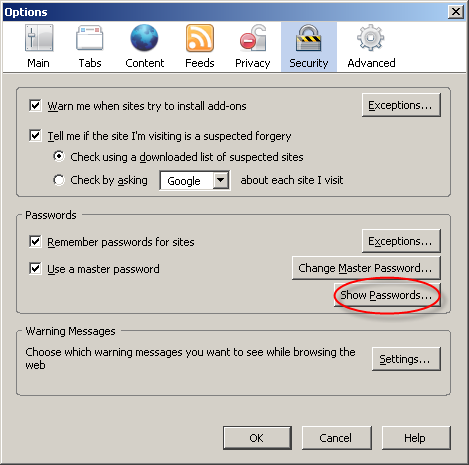
bpmtk-0014.png

bpmtk-0015.png

The password manager displays the stored URLs and the usernames, but not the passwords. Let’s take another peek inside the memory of the Firefox process:

bpmtk-0016.png

This time, Firefox has also decrypted our WordPress password (BigSecretWordpress), although it’s not displayed. It’s only displayed if we provide the master password a second time:

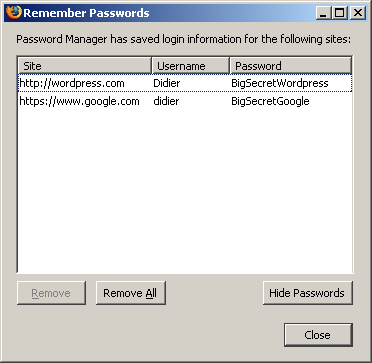
bpmtk-0017.png

bpmtk-0018.png

So although Firefox prompts you a second time for the master password to display all the passwords, the passwords have already been decrypted in memory before you provided the master password a second time.

Now I don’t have issues with this behavior of the password manager of Firefox, I don’t think it’s a security issue (I’ve an idea why it was programmed like this). But if Firefox was a perfect program, all passwords would only be decrypted when a user explicitly asks to display all passwords.

Do you make online payments with your credit card? Now that I’ve showed you how you can look for specific strings inside a running program with my toolkit, you should know how to use it to check how long your browser keeps your credit card number inside its memory. And can you find out how to use bpmtk to erase that number from your browser’s memory?

Let me finish with an appetizer: I’ve also developed a DLL that, once injected inside a process, will instantiate a scripting engine inside said process, and start executing a script inside the process. This allows you to inject a script inside a process, which can be handy for rapid prototyping or when you’re operating in a limited environment where you don’t have a C compiler to develop a custom DLL to inject. Of course, a script is not as powerful as a compiled C program, but I’m adding some objects to provide some missing functionality.

This script injector will be released with an upcoming version of the bpmtk.

Monday 28 January 2008

Update: A Windows Live CD plugin for my UserAssist utility

Filed under: Forensics,My Software — Didier Stevens @ 8:16

I noticed that I forget to update the Windows Live CD plugin for UserAssist.

From now on, I’ll update it each time I release a new version of my UserAssist utility.

You can download the plugin for the latest version here (https).

Wednesday 16 January 2008

XORSearch V1.3.0

Filed under: My Software — Didier Stevens @ 7:57

Maarten Van Horenbeecks’s post gave me the idea for a new feature for my XORSearch tool: searching for a list of strings. This is achieved with the -f option, like this:

XORSearch -f urls malware.exe

urls is a text file containing a list of URLs to search for.

You’ll still have to use a script if you want to search in more than one file.

And there is something new about the XORSearch.exe in the ZIP file. First one to post a comment with the correct answer gets an honorable mention 😉

Tuesday 8 January 2008

Quickpost: Windows Server 2008 UserAssist Keys

Filed under: Forensics,My Software,Quickpost — Didier Stevens @ 21:18

My first post for 2008 has to be about Windows Server 2008.

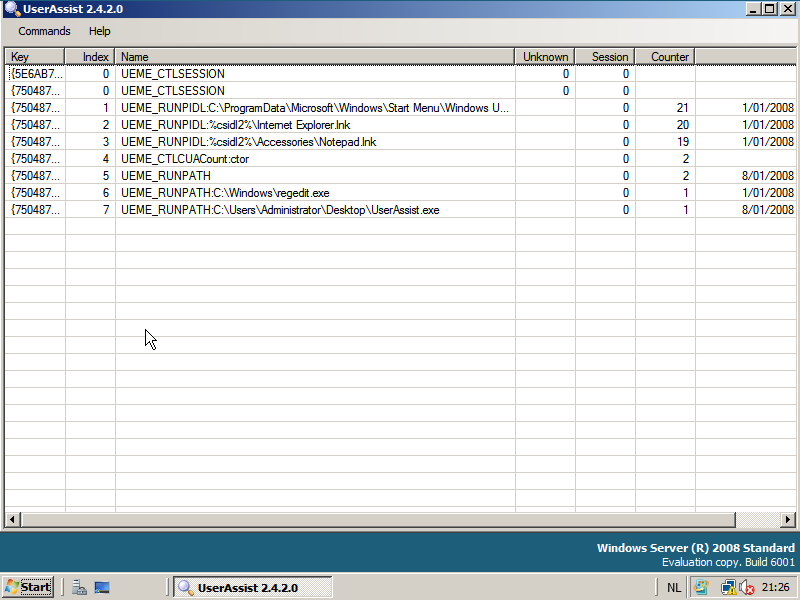
It looks like the UserAssist entries for Windows Server 2008 have the same format as for Windows Vista, my UserAssist tool can also extract the data from Windows Server 2008:

windows-2008-userassist.png

Like Vista, the Windows Server 2008 browserui.dll file (version 6.0.6001.17051) contains only 5 UEME strings:

UEME_RUNPATH
UEME_CTLCUACount:ctor
UEME_CTLSESSION
UEME_RUNPIDL
UEME_RUN


Quickpost info


Monday 3 December 2007

Looking for N800 Beta Testers, No Voyeurs Please ;-)

Filed under: My Software,N800 — Didier Stevens @ 9:06

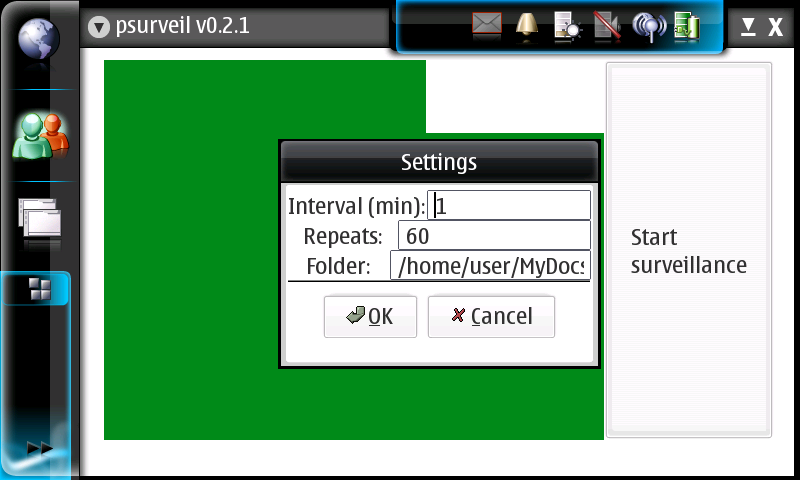
I’ve developed a new application for my N800, psurveil (Photo Surveillance). It automatically takes pictures with the N800’s build-in camera at regular intervals and stores them as jpeg files.

screenshot-2007-12-02-21-02-09.png

You can find the installation package here (unzip and copy the deb package to your N800) and the source code here. And be careful, it’s beta. On my N800, it takes about 30 seconds to start, and it doesn’t run as root.

So if you’ve got a baby and are looking for an excuse to get an N800, this turns your N800 in a baby monitor, kinda.

From the source code:

psurveil (Photo Surveillance) is a program for the Nokia N800.
It automatically takes pictures with the N800’s build-in camera at regular intervals
and stores them as jpeg files.

usage:
– Pop out the camera, and close all programs using the camera.
– Start psurveil. On my N800, it takes very long to start, sometimes a half minute.
– Use the menu to review the settings.
– Interval is the number of minutes between pictures.
– Repeats is the number of pictures to take, minus 1.
– Folder is the directory to store the pictures. The directory must exist.
Settings are stored with GConf, and there is no input validation.
– Click on the “Start surveillance” buttons to start the surveillance. A first picture
is immediately saved, and another picture every Interval minutes, and this Repeats times.
The filename of the jpeg is composed with the date & time when the picture was taken.
There is no monitoring of free diskspace.

Example:
The settings for this example are:
– Interval=1
– Repeats=3
– folder=/home/user/MyDocs/.images
These settings will take 4 pictures over a period of 4 minutes, starting when the button is clicked.
Pictures are stored in the Images folder:
20071127-194647.jpeg
20071127-194747.jpeg
20071127-194847.jpeg
20071127-194947.jpeg

I developed this program by merging the example_camera.c and example_alarm.c Maemo example programs.
There are some quirks in the real-time video display, they originate from the example_camera.c program.
If you know how to fix this, let me know.
I’m not an experienced Maemo developer (neither GTK developer), this is my first program for the N800,
so use this program at your own risk, and respect the privacy of others.

I put my code for this program in the Public Domain. For the code copy-pasted from the examples,
read the copyright below.

Todo (no guarantee that these ever get done):
– Input validation
– Folder creation
– Toggle to flip the picture

History:
22/11/2007 example_camera and example_alarm merged
23/11/2007 jpeg filename is current date & time
25/11/2007 0.1.3 added menu & menu functions
26/11/2007 coded settings dialog
27/11/2007 0.2.0 code review
28/11/2007 0.2.1 input validation for numbers in settings dialog

Monday 26 November 2007

Update: UserAssist V2.4.2

Filed under: Forensics,My Software,Update — Didier Stevens @ 9:29

Just a small change in this new version: now you can disable the automatic loading of the local registry data when the UserAssist tool is launched. Use the “Load at Startup” menu command.

The setting is saved in Isolated Storage, in a file called UserAssist.config.

Tuesday 6 November 2007

Update: USBVirusScan 1.6.1

Filed under: My Software,Update — Didier Stevens @ 7:44

This new version of USBVirusScan adds a new placeholder %f and provides debugging support.

%f contains the filesystem of the inserted drive, like NTFS, FAT, CDFS, …

Newer versions of DAEMON Tools (a virtual CD-ROM utility to mount CD images) report to Windows as a removable drive, thereby triggering USBVirusScan. You can use %f in your scripts to detect this and execute the appropriate action. For example, if you want to scan each USB drive with Avira but don’t want to scan images mounted with DAEMON Tools, use this script (avira.vbs):

dim WshShell

Set WshShell = WScript.CreateObject("WScript.Shell")

if Wscript.Arguments.Item(1)  <> "CDFS" then
	WshShell.run """C:\Program Files\Avira\AntiVir PersonalEdition Classic\avscan.exe"" /GUIMODE=2 /PATH= """ & Wscript.Arguments.Item(0) & ":\""", 1, true
end if

Start USBVirusScan with these parameters: USBVirusScan wscript avira.vbs %d %f

The balloon info also contains information about the filesystem of the inserted drive:

usbvirusscan_balloon_cfds.png

A new flag, -d, adds debugging support to USBVirusScan. When this flag is present, USBVirusScan will write debug output when drives are inserted. This debug output can be viewed with DebugView.

A word of caution about DAEMON Tools. I use an older version of more DAEMON Tools, but newer versions contain an adware component, that you should be able to skip when installing.

Tuesday 16 October 2007

UserAssist V2.4.1

Filed under: Forensics,My Software — Didier Stevens @ 6:36

The most important feature of this new UserAssist version is the explain command. Now you can right-click an entry, select explain and get a nice explanation for the selected entry, like this:

userassist_explain_1.png

I’ve spend some time researching all the different types of values the UEME strings can have and how they relate to user actions. The explain function contains everything I discovered. The source code for this feature is a prototype, I’ve been developing it as I discovered the logic behind the UEME strings, hence it is not a clean design and I plan to rewrite it once I get the full picture. Of course, this design is hidden for you as a user and you should not care about it.

The Logging Disabled switch is OS-aware (Windows XP, 2003 and Vista).

And the last new feature of this version is the support of cleartext Userassist entries (i.e. entries that are not ROT13 encoded). BTW, Windows Vista doesn’t support the NoEncrypt setting.

This version was also tested on Windows 2003, I didn’t notice a difference with Windows XP, but I must admit the testing was limited.

And I would like to test it on Windows 2008 while attending Microsoft IT Forum.

« Previous PageNext Page »

Blog at WordPress.com.