Didier Stevens

Monday 15 January 2018

Update: xmldump.py Version 0.0.2

Filed under: My Software,Update — Didier Stevens @ 0:00

This new version of xmldump introduces 2 new commands to extract information from XML files: elementtext and attributes.

The following video shows how to use these commands:


xmldump_V0_0_2.zip (https)
MD5: 8ABFA4FFE259F61B7C42B2D19EADD8CB
SHA256: 0A8B94EE8C77B404A507F4BEA4C5464146F3745A1FA9017ED3DCE8D7C2D18C15

Monday 1 January 2018

New Tool: What Is New?

Filed under: My Software — Didier Stevens @ 0:00

Isn’t the beginning of a new year a good moment to release a new tool called what-is-new.py? đŸ™‚

It’s actually an old tool, I started this in 2012, because it’s something I have to do often: I have a recurring list, and I need to know what items on that list are new (in a nutshell, that’s the problem I tried to solve).

For example, every week I produce a list of User Agent Strings for the requests to my web servers. With a single what-is-new.py command, I can see what User Agent Strings have never hit my servers before.

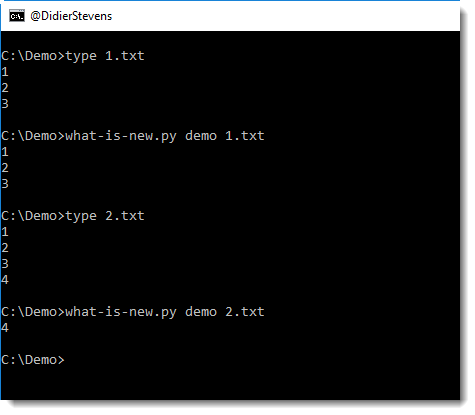
what-is-new.py takes one argument and a bunch of files. The argument is the name of the database (a Python pickle file). The input can be a single file, several files or stdin. Every line in these files that was not seen before (i.e. not in the database) will be listed by what-is-new.py

In the following example, I run 2 files through what-is-new (files 1.txt and 2.txt) with database demo. The database doesn’t exist yet, hence all lines of the first file are considered new. But with the second invocation, you can see that only line 4 is new.
The tool has several options, I invite you to take a look at the help (-h) and manual (-m).


what-is-new_V0_0_1.zip (https)
MD5: 02067A60EA2EBEE29E98CAF31CEDDF37
SHA256: A4499A230D1925C164531A68C0E8F4FE016882A44D6EDBFF9F4D7BFFA29D14A4
Tuesday 19 December 2017

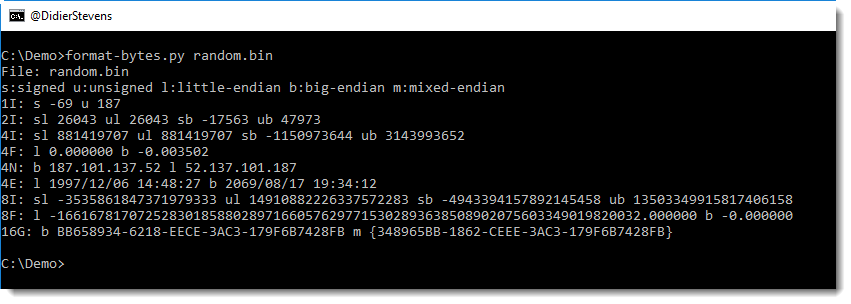
New Tool: format-bytes.py

Filed under: My Software — Didier Stevens @ 0:00

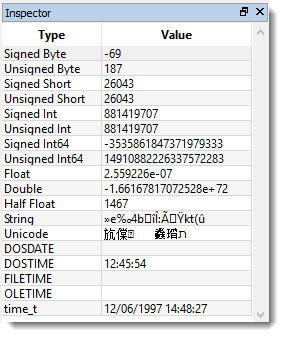
I regularly copy bytes from my command-line tool over to 010 Editor to have this data represented by the Inspector using different formats, like this:

format-bytes.py is a new tool with which I try to achieve a similar result:

Using option -f, it is essentially a wrapper for the struct module. In the following example, we parse the beginning of the PE header of 2 Windows executables:

This shows us that both files have 6 sections and that notepad is from 2016 and regedit from 2017.

-f IHHI uses the struct module’s formatting to specify how to parse the bytes, and “#c#[‘PE’]:” is a cut-expression to carve the PE header out of the executables.

format-bytes_V0_0_3.zip (https)
MD5: CFE426B605DEDA6E388C1F62D2655A31
SHA256: 227C3911A0D2B9D8E524B44D5B4F80EBAABD34810A11A9189B09ADFA5D2FB67A

Monday 18 December 2017

New Tool: xmldump.py

Filed under: My Software — Didier Stevens @ 0:00

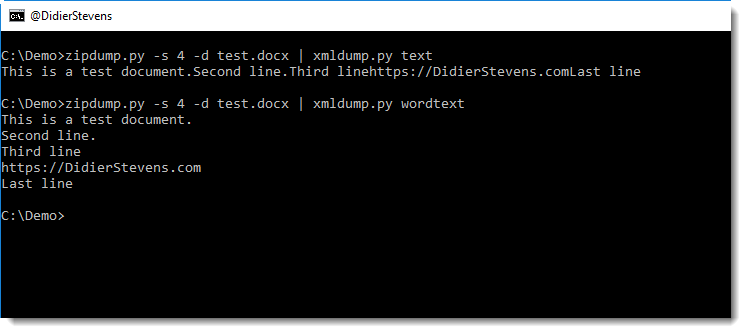
Sometimes I want to see the content of (malicious) .docx files without using MS Office. I will use my zipdump.py tool to extract the XML file with the content, and then use sed or translate.py to strip out XML tags.

But that doesn’t always yield the best results. Here is a small tool, xmldump, that will parse an XML file and output the text.

It supports 2 commands for the moment: text and wordtext.

Command text extracts the text between any XML tags.

Command wordtext extracts the text between Word paragraph XML tags (<w:p>) and prints each paragraph’s text on a separate line.


xmldump_V0_0_1.zip (https)
MD5: 23D5643E45B97D6AE641DF6CAFA79370
SHA256: A999F2297EE44FAABCA5A025DAEC7E84CB30D34C68F181357BA439EBFE38A660

Sunday 17 December 2017

New oledump Plugin: plugin_msg.py / oledump.py Version 0.0.32

Filed under: My Software — Didier Stevens @ 0:00

Outlook MSG files are also ole files.

Here is a new plugin (plugin_msg.py) for oledump that identifies streams in MSG files based on the 8-digit hexadecimal codes in the stream name.

The first 4 hexadecimal digits identify the content of stream, and the next 4 hexadecimal digits identify the type of the stream.

oledump_V0_0_32.zip (https)
MD5: 10D8995B6AF5C783B1F8AAF70B8FDB03
SHA256: 0E38BAF12B066A100F97F3362402E1999F2DE223A09491E3D44C20EA4BDBD8AB

Thursday 14 December 2017

Update: plugin_biff.py Version 0.0.2 / oledump.py Version 0.0.31

Filed under: maldoc,My Software,Update — Didier Stevens @ 0:00

This is an update to plugin_biff, the oledump plugin to parse the BIFF format (used in .xls files).

New options allow to search for opcodes (-o) and strings/bytes (-f) inside BIFF records:


oledump_V0_0_31.zip (https)
MD5: 63B2B5ECE2BC46B937D33A6494F7F6A0
SHA256: D2CF42662897642DF27C863F6C246CE70019EDF03F275354A7A505DCE27632D1

Monday 11 December 2017

New Tool: hash.py

Filed under: My Software — Didier Stevens @ 0:00

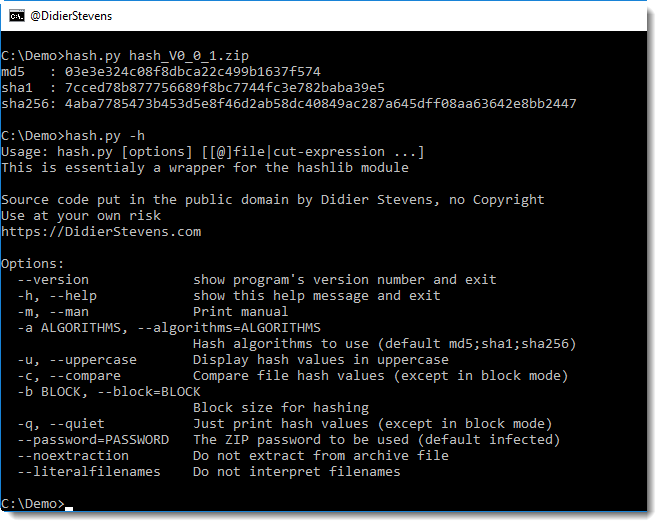
This is a new tool, it’s essentially a wrapper for the Python module hashlib: it calculates cryptographic hashes.

I needed this (block mode) for the analysis of a particular malware sample, to be explained in the next blog post.


hash_V0_0_1.zip (https)
MD5: 8ECC05DEFBD4AB494A37DE02615A8FE1
SHA256: 07A1ED7FD00FB18B616540CB108AA1D2134B07CC509E11257E4E43FFF9A185C2

Sunday 10 December 2017

Update: rtfdump.py Version 0.0.6

Filed under: My Software,Update — Didier Stevens @ 10:31

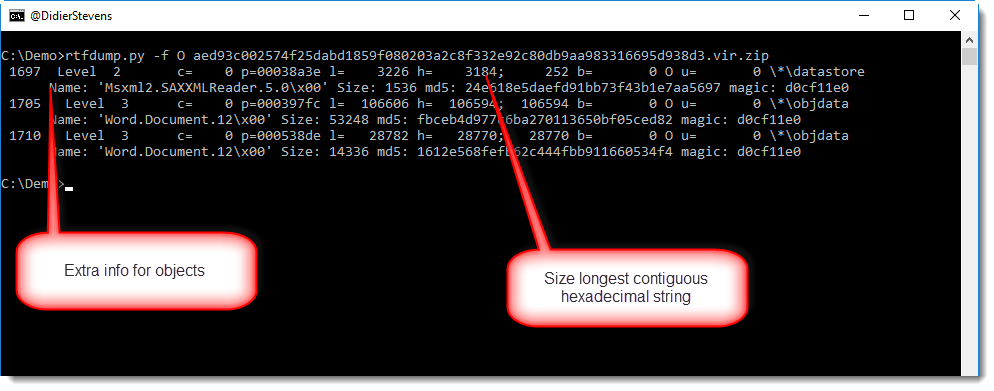
This new version of rtfdump.py adds extra information when analyzing the content of an RTF file:

  • Extra info for objects
  • Size longest contiguous hexadecimal string

rtfdump_V0_0_6.zip (https)
MD5: B4F9264F2431322F52BAAB834A5A144D
SHA256: C15918E89313D03F01BC8A3BCB68376B6E21558567BDFD81889F48196DC80986

Monday 27 November 2017

Update: pdfid.py Version 0.2.3

Filed under: My Software,PDF,Update — Didier Stevens @ 0:00

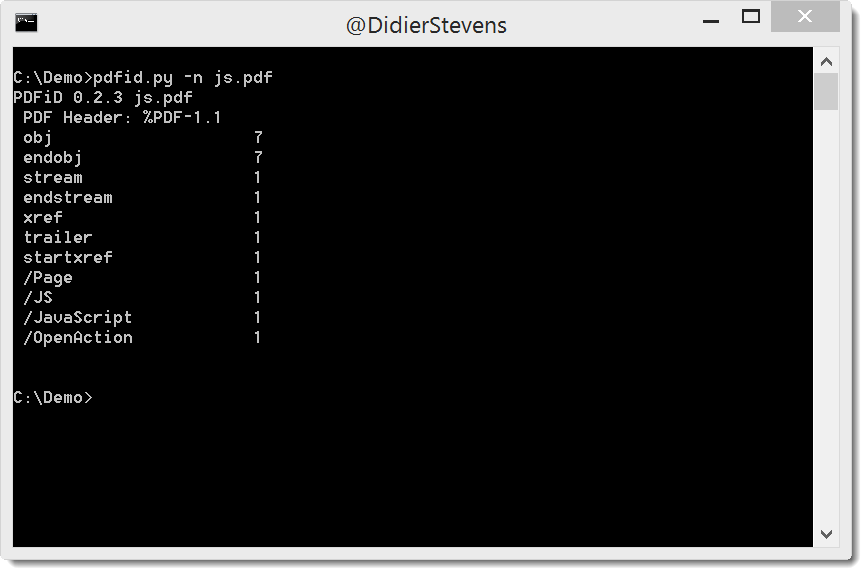
In this new version of pdfid.py, a new option was added: -n.

With this option, you can suppress output for names with a count of zero:

pdfid_v0_2_3.zip (https)
MD5: 65966E8BBF932D3C0830B755FDE094FE
SHA256: 9482176D173EFA6F2F33EE409B091BFA45685FC285B87F7219A4E9418B47F739

Monday 20 November 2017

Update: pcap-rename.py Version 0.0.2

Filed under: My Software,Update — Didier Stevens @ 0:00

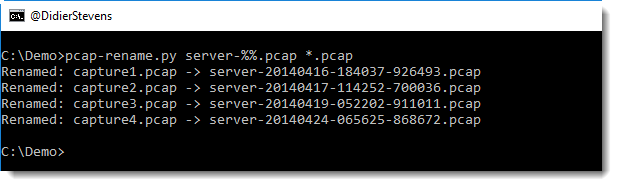
pcap-rename.py is a program to rename pcap files with the timestamp of the first packet in the pcap file.

This new version supports big-endian pcap files.

pcap-rename_V0_0_2.zip (https)
MD5: 6EFFA5313946DEAF3363835B1D3C684E
SHA256: 3BA23CC936B49AF83306E486B0BFC9ABAF5BD0B5E3DEF81D8564BCC3810C06B9

« Previous Page — Next Page »

Blog at WordPress.com.