Didier Stevens

Sunday 3 November 2019

Update: numbers-to-string.py Version 0.0.10

Filed under: My Software,Update — Didier Stevens @ 0:00

numbers-to-string.py is a tool to help with deobfuscation: it transforms numbers found in its input into strings.

This new version adds option -b to produce binary output.

numbers-to-string_v0_0_8.zip (https)
MD5: 69179F5EE01F8E0102F40B768E80A82E
SHA256: 535518780E9F4102320C81EF799CF1AD483C51450690A2E1FA9F2CA61B7A8A88

Saturday 2 November 2019

Update: cut-bytes.py Version 0.0.10

Filed under: My Software,Update — Didier Stevens @ 0:00

This new version of cut-bytes.py, a tool to select a byte sequence from its input, has bug fixes (including Python 3 fixes) and 2 new options: -p –prefix and -s –suffix.

With these options, arbitrary data can be prefixed or appended to the input.

cut-bytes_V0_0_10.zip (https)
MD5: C14F60F9843F4C2A40A05A52CBE16AB8
SHA256: AD3ADBF30B09DB77B17FEF62C40CDC138516FD24B077201D126D259D1953792B

Sunday 27 October 2019

Update: pecheck.py Version 0.7.8

Filed under: My Software,Update — Didier Stevens @ 10:37

This new version of pecheck.py, a tool to analyze PE files, comes with a small update to option -l.

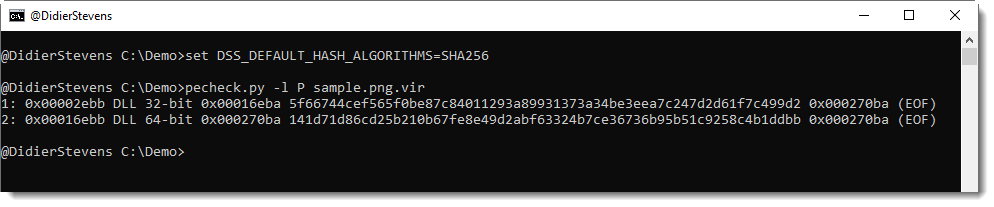
The overview of embedded PE files produced with option -l P now reports the hash of the embedded PE file without overlay:

By default, this is an MD5 hash, but can be changed to your liking using environment variable DSS_DEFAULT_HASH_ALGORITHMS, like this:

I will introduce this environment variable to my other tools with new releases.


pecheck-v0_7_8.zip (https)
MD5: 616CD9159316FC2100BE3E87C5C26B2C
SHA256: F734EFFFA17E4EE6CA64A67D18340B3347B72C4B1C7522BAF1B7D720FABA2389

Sunday 20 October 2019

New Tool: simple_tcp_stats.py

Filed under: My Software,Networking — Didier Stevens @ 10:25

My new tool simple_tcp_stats.py is a Python program that reads pcap files and produces simple statistics for each TCP connection.

For the moment, it calculates the entropy of the data (without packet reassembling) of each TCP connection (both directions) and reports this with a CSV file:

ConnectionID;head;Size;Entropy
192.168.10.10:50236-96.126.103.196:80;’GET ‘;364;5.42858024035
192.168.10.10:50235-96.126.103.196:80;’GET ‘;426;5.46464090792
96.126.103.196:80-192.168.10.10:50235;’HTTP’;3308;6.06151478505
96.126.103.196:80-192.168.10.10:50236;’HTTP’;493;6.73520107812


simple_tcp_stats_V0_0_1.zip (https)
MD5: 606DB4208BBC5908D9F32A68DDF90AC6
SHA256: 68B275C58736AE450D23BEA82CC1592936E541E00726D8ED95F5CA8ACB02B7CE

Monday 30 September 2019

Update Of My PDF Tools

Filed under: maldoc,Malware,My Software,PDF,Update — Didier Stevens @ 19:16

This is an update of my PDF tools.

There are a couple of bug fixes for pdf-parser and pdfid.

And 2 new features in pdf-parser, inspired by a private training on maldoc analysis I gave last week. I often get good ideas from my students, and sometimes, even I get a good idea in class đŸ™‚ .

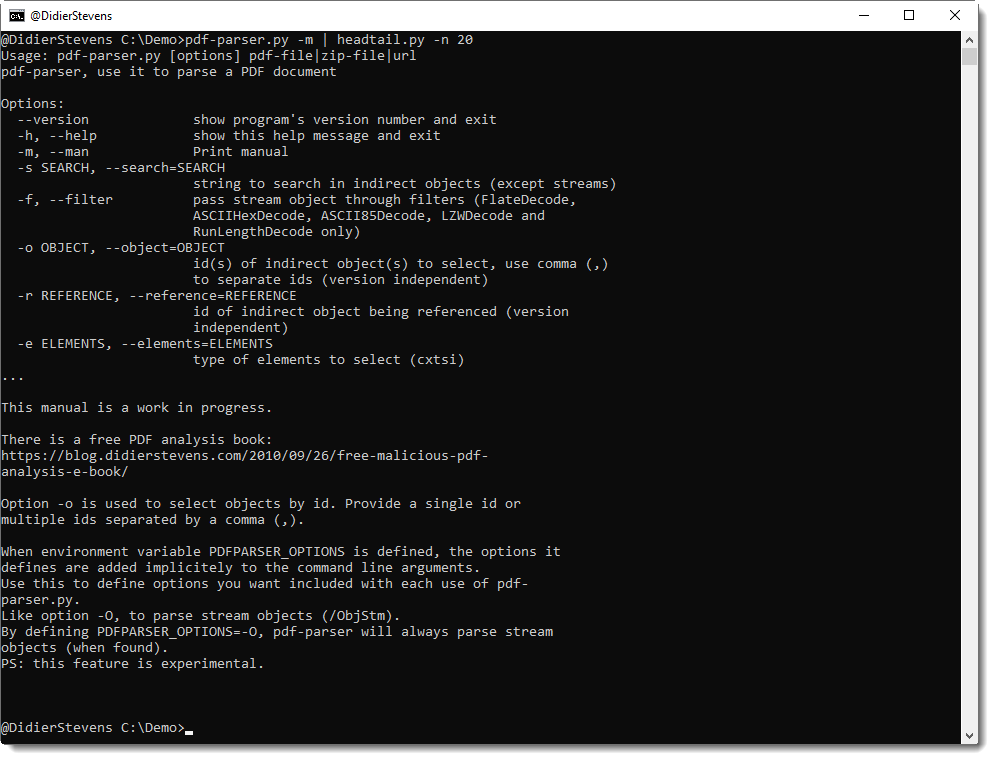
Option -o can now be used to select multiple objects: separate the indices by a comma.

There’s a new environment variable, PDFPARSER_OPTIONS, that can be used to provide extra options you want to include with each execution of pdf-parser.py. This is useful for option -O, an option to parse stream objects.

It’s actually best to always parse stream objects, i.e. always use option -O. But I decided not to make this an option that is on by default, so that the behavior of pdf-parser would remain unchanged. I consider this important for the many people that rely on a predictable behavior of pdf-parser, like teachers and students of infosec trainings where my tools are used/mentioned.

However, always including option -O is tedious and error prone. So now you can have best of both worlds, by defining an environment variable with name PDFPARSER_OPTIONS and value -O.

And finally, I started to add a man page (option -m), like I do with many of my other tools. This is a work in progress: for the moment, it points to my free PDF analysis e-book that explains the use of pdfid and pdf-parser.
pdf-parser_V0_7_3.zip (https)
MD5: 7EB1713631D255B36BC698CD2422C7EB
SHA256: D4D5AC9C26A9D8FEF65CE58A769D3F64A737860DC26606068CCDD3F04FDEA0D7

pdfid_v0_2_6.zip (https)
MD5: 9CCE332914A6C76410F04B7C35DA3155
SHA256: 95F7C91EEFB561F3F3BE9809ED339D85E7109BAA7E128EF056651EE018DBDBA0

Sunday 22 September 2019

Update: strings.py Version 0.0.4

Filed under: My Software,Update — Didier Stevens @ 8:56

This new version of strings.py comes with a new option -T to trim the strings to a given length. And also 2 bug fixes.

strings_V0_0_4.zip (https)
MD5: 8B1F5A6BEBA2BC8BDFF16B99C27050E4
SHA256: 7BBAAB0E83692288BDC35BC0FBDD6B2F8A141280E506131E2818F49BEF31D01A

Saturday 21 September 2019

Update: hex-to-bin.py Version 0.0.3

Filed under: My Software,Update — Didier Stevens @ 11:04

hex-to-bin.py is a program to convert hexadecimal dumps (text) to binary data.

This new version of hex-to-bin.py can handle different hexdump formats, like registry dumps (text files). Use option -x to handle these hexdumps.

And option -t was added if the input is a text file that is non-ASCII, like UTF16. Option -t can be used to convert the text file.

And it supports Python3, but that code is a kludge. Something I’ll have to do better later.


hex-to-bin_V0_0_3.zip (https)
MD5: 0F87942CC9EF566D4C3B5A34073D5399
SHA256: 02447247C59F530CD6559B0FB287E314AC3AB807D843729CA9CE3F16D0930CAB

Wednesday 18 September 2019

Update: pecheck.py Version 0.7.7

Filed under: My Software,Update — Didier Stevens @ 0:00

This new version of pecheck.py adds option -l to carve embedded PE files. This will be explained in detail in an upcoming blog post.

pecheck-v0_7_7.zip (https)
MD5: CEFCCC094EF9E29A539092A6ECB77EEE
SHA256: 91041D17A39C7FA4151830AF8FBD151680A04FC617CB0EADDA32D240E9AB9C03

Tuesday 17 September 2019

Update: hash.py Version 0.0.7

Filed under: My Software,Update — Didier Stevens @ 0:00

This new version supports CRC32 hashing.

hash_V0_0_7.zip (https)
MD5: 9BE8A26F2940FA2FF5C3671B7BB6DC6F
SHA256: CFA2767F0FAA792F9B75344B2F15FF40267F3EDE77D221B0134F07FDB04E515B

Saturday 14 September 2019

Update: msoffcrypto-crack.py Version 0.0.4

Filed under: My Software,Update — Didier Stevens @ 0:00

This new version of msoffcrypto-crack.py, a simple tool to crack passwords of MS Office documents, adds rules via option -r.

In this release, there is only one rule to modify candidate passwords: case toggle.

If you use option -r, all passwords in the provide list will be tested, together with their case toggle variant: Secret -> sECRET.

msoffcrypto-crack_V0_0_4.zip (https)
MD5: D3D7A0475FF1C9AAB7BE773514784465
SHA256: 4A27E0FF50863A925FEE55B8F7D16AD29C2DF5E4611F9493DAEEBA89B5F3DBA9

« Previous Page — Next Page »

Blog at WordPress.com.