Didier Stevens

Saturday 28 December 2019

Update: zipdump.py Version 0.0.16

Filed under: My Software,Update — Didier Stevens @ 0:00

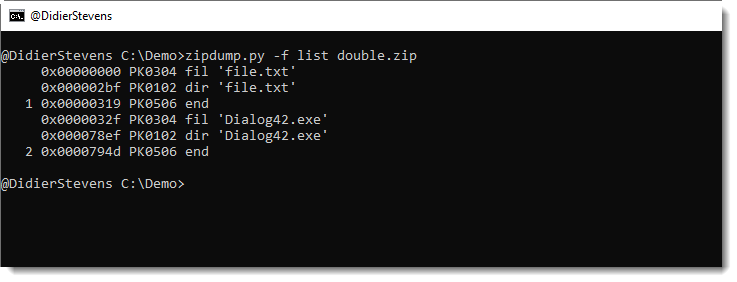
This new version of zipdump.py, a tool to analyze ZIP files, adds option -f to scan for PK records and adds support for Python 3.

More details in an upcoming blog post.

zipdump_v0_0_16.zip (https)
MD5: 616654BDAFFDA1DDE074E6D1A41E8A42
SHA256: F3B6D52BA32D6BA3836D0919F2BBC262F043EF6E26D173DD0965735D4F3B5598

Wednesday 25 December 2019

zoneidentifier.exe

Filed under: My Software — Didier Stevens @ 13:52

I regularly want to test the behavior of applications opening files downloaded from the Internet.

On Windows, files downloaded from the Internet (with Internet Explorer or Edge, for example) have metadata in an Alternate Data Stream to indicate their origin. This is the Zone.Identifier ADS.

To simulate a download, I will add the ADS myself, and I often refer to my own blog post here and here, as I don’t remember the exact syntax and numbers.

Until recently.

Now, I wrote a small Go program that helps me creating (and removing) the appropriate ADS for a mark-of-web (Zone.Identifier).

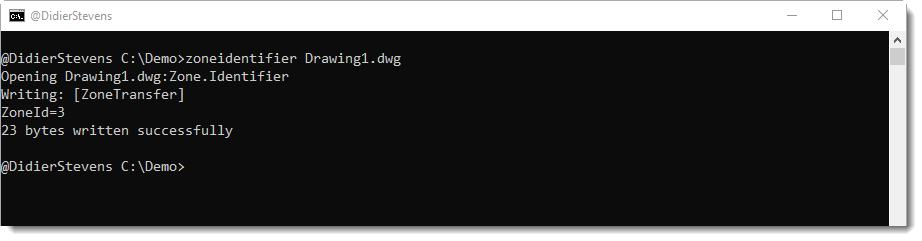
Just running zoneidentifier with a filename, will add a Zone.Identifier ADS for zone 3 (Internet) to the file. Like this:

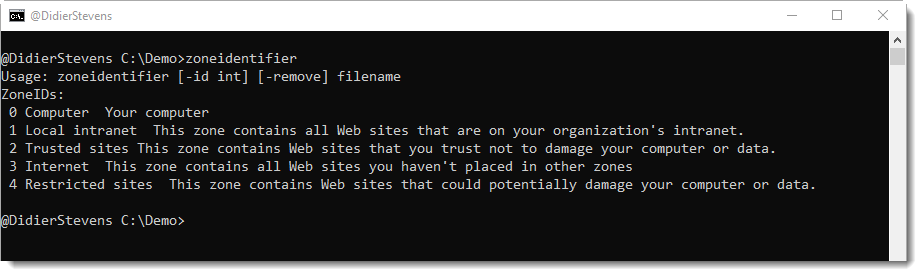
Option -id is used to specify a different zone ID, like this:

And option -remove is used to remove a Zone.Identifier ADS:

zoneidentifier_V0_0_1.zip (https)
MD5: CB1EB21013C6124CB3C1320F6A12207F
SHA256: E867AE693CB5EEA8CF0D252421E347B1309D7F36C9C6A427F7361CD5DD619839

Thursday 19 December 2019

Update: oledump.py Version 0.0.44

Filed under: maldoc,My Software,Update — Didier Stevens @ 0:00

This new version of oledump adds option -f to find embedded ole files, making the analysis of .DWG files with embedded VBA macros (for example) easier.

And there is a new plugin: plugin_version_vba.py. This helps with determining the VBA version.

Here is a video showing the analysis of .DWG files with option -f:

oledump_V0_0_44.zip (https)
MD5: 2BB2CD027327FFD8857CDADC1C988133
SHA256: 1A9C951E95E2FE0FDF3A3DC8E331205BC65C617953F0E30ED3E6AC045F4DD0C0

Monday 9 December 2019

Update: oledump.py Version 0.0.43

Filed under: My Software,Update — Didier Stevens @ 0:00

This new version of oledump.py adds support for Python 3. Several plugins and decoders were also updated for Python 3.

There’s a new option to include storages in the overview: –storages.

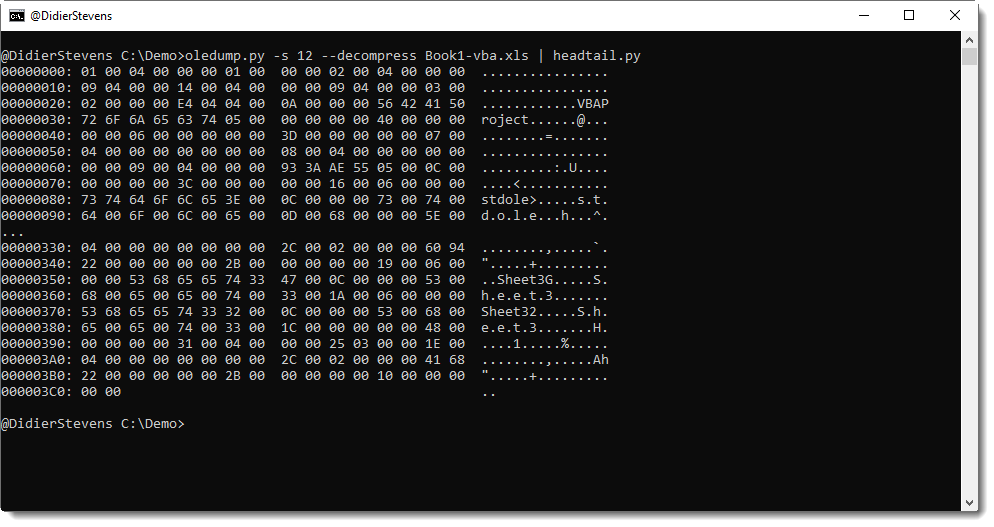
And option –decompress now does also VBA decompression (it was zlib only). This helps to decompress the dir stream of documents with VBA macros:

And I added type 1009 to plugin_msg.py: Compressed RTF.

oledump_V0_0_43.zip (https)
MD5: F98A06CED73C4FC2CA153B7E751746B5
SHA256: 4FE1DBAB822CEC2489328CE3D4D272400F23F1FAD266C9D89B49D9F83F3AA27F

Sunday 8 December 2019

Update: numbers-to-string.py Version 0.0.9

Filed under: My Software,Update — Didier Stevens @ 19:34

This is just a bugfix version (Python 3).

numbers-to-string_v0_0_9.zip (https)
MD5: C5629F102FCF58E5CFF24472D35AFF22
SHA256: 5B1CA43EDFD7BA66CF44FB552BD7882AEB13A8765017F9F865071E187410EE63

Monday 18 November 2019

Update: tcp-honeypot.py Version 0.0.7

Filed under: My Software,Networking,Update — Didier Stevens @ 0:00

This new version of tcp-honeypot.py, a simple TCP honeypot and listener, brings TCP_ECHO and option -f as new features.

TCP_ECHO can be used to send back any incoming data (echo). Like this:

dListeners = {4444: {THP_LOOP: 10,THP_ECHO: None,},}

TCP_ECHO also takes a function, which’s goal is to transform the incoming data and return it. Here is an example with a lambda function that converts all lowercase letters to uppercase:

dListeners = {4444: {THP_LOOP: 10,THP_ECHO: lambda x: x.upper(),},}

If persistence is required across function calls, a custom class can also be provide. This class has to implement a method with name Process (input: incoming data, output: transformed data). Consult the man page (option -m) for more details.

And option -f (format) can be used to change the output format of data.
Possible values are: repr, x, X, a, A, b, B
The default value (repr) output’s data on a single line using Python’s repr function.
a is an ASCII/HEX dump over several lines, A is an ASCII/HEX dump too, but with duplicate lines removed.
x is an HEX dump over several lines, X is an HEX dump without whitespace.
b is a BASE64 dump over several lines, B is a BASE64 without whitespace.


Tuesday 12 November 2019

Steganography and Malware

Filed under: Malware,My Software — Didier Stevens @ 0:00

I was reading about malware using WAV files and steganography to download payloads without triggering detection systems.

For example, here is a WAV file with a hidden, embedded PE file. The PE file is encoded in the least significant bit of 16-bit integers that encode PCM sound.

I was wondering how I could extract this embedded file with my tools. There was no easy solution, because many of my tools operate on byte streams, but here I have to operate on a bit stream. So I made an update to my format-bytes.py tool.

Using my tool file-magic.py, I get confirmation that this is a sound file (.WAV) with 16-bit PCM data.

And here is an ASCII/HEX dump of the beginning of the file made with cut-bytes.py:

The data chunk starts with magic sequence ‘data’ (in yellow), followed by the size of the data chunk (in green), and then the data itself: 16-bit, little-endian signed integers (in red).

To extract the least significant bit of each 16-bit, little-endian signed integer and assemble them into bytes, I use the latest version of format-bytes.py.

This is the command that I use:

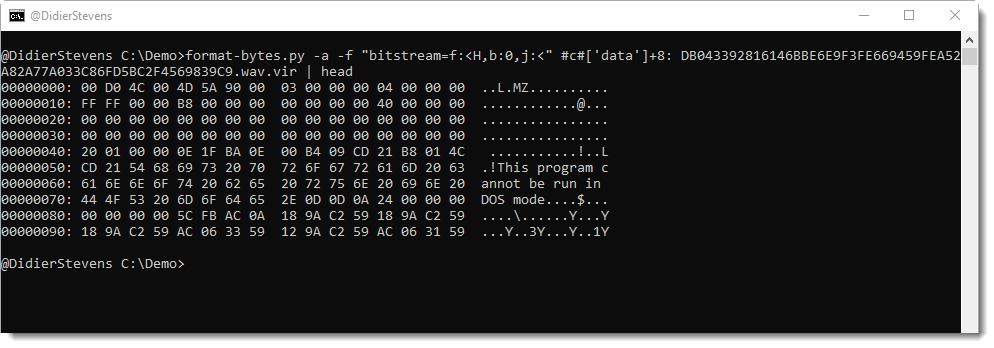
format-bytes.py -a -f “bitstream=f:<H,b:0,j:<” #c#[‘data’]+8: DB043392816146BBE6E9F3FE669459FEA52A82A77A033C86FD5BC2F4569839C9.wav.vir

With option -f, I specify a bitstream format.

f:<H means that the format of the data is little-endian (<), unsigned 16-bit integers (H). I could also specify a signed 16-bit integer (h), but this doesn’t matter here, as I’m not going to use the sign of the integers.

b:0 means that I extract the least-significant bit (position 0) of each 16-bit integer.

j:< means that I assemble (join) these bits into bytes from least significant to most significant (<).

The data starts 8 bytes into the data chunk, e.g. 8 bytes after magic sequence ‘data’. I define this with cut-expression #c#[‘data’]+8:.

When I run this command, and perform an ASCII dump, I get this output for the beginning of the stream:

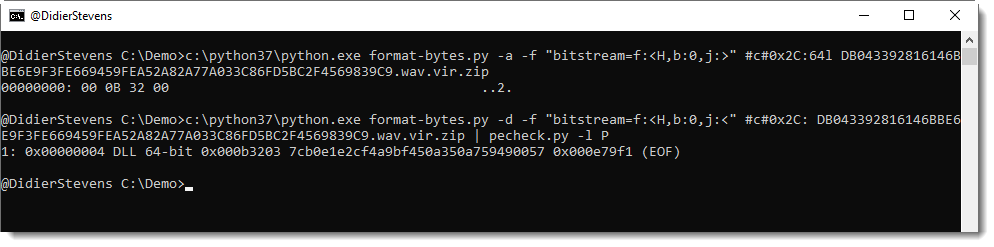
I can indeed see an executable (MZ), but it is preceded by 4 bytes. These 4 bytes are the length of the embedded file. As described in the article, the length is big-endian encoded. Hence I use a similar command to extract the length, but with j:>, as can be seen here:

The length is 733696 bytes, and this matches the IOCs from the article.

Then I use my tool pecheck.py to search for PE files inside the byte stream (-l P), like this:

MD5 7cb0e1e2cf4a9bf450a350a759490057 is indeed the hash of the malicious DLL encoded in this WAV file.


Saturday 9 November 2019

Update: format-bytes.py Version 0.0.10

Filed under: My Software,Update — Didier Stevens @ 0:00

This new version of format-bytes.py, a tool to parse binary data, comes with support for bit streams.

This can help, for example, with decoding steganographic data, like a PE file hidden in a .WAV file.

More about this in an upcoming blog post.


format-bytes_V0_0_10.zip (https)
MD5: 3349E2F8C84AE644C0AEFDA4410297C5
SHA256: F75C3A353E42D847264702B1F316A65657E6375EF979B8EF21B282D4676BE4C3

Sunday 3 November 2019

Update: numbers-to-string.py Version 0.0.10

Filed under: My Software,Update — Didier Stevens @ 0:00

numbers-to-string.py is a tool to help with deobfuscation: it transforms numbers found in its input into strings.

This new version adds option -b to produce binary output.

numbers-to-string_v0_0_8.zip (https)
MD5: 69179F5EE01F8E0102F40B768E80A82E
SHA256: 535518780E9F4102320C81EF799CF1AD483C51450690A2E1FA9F2CA61B7A8A88

Saturday 2 November 2019

Update: cut-bytes.py Version 0.0.10

Filed under: My Software,Update — Didier Stevens @ 0:00

This new version of cut-bytes.py, a tool to select a byte sequence from its input, has bug fixes (including Python 3 fixes) and 2 new options: -p –prefix and -s –suffix.

With these options, arbitrary data can be prefixed or appended to the input.

cut-bytes_V0_0_10.zip (https)
MD5: C14F60F9843F4C2A40A05A52CBE16AB8
SHA256: AD3ADBF30B09DB77B17FEF62C40CDC138516FD24B077201D126D259D1953792B

« Previous PageNext Page »

Blog at WordPress.com.