This is just a bugfix version (Python 3).
numbers-to-string_v0_0_9.zip (https)
MD5: C5629F102FCF58E5CFF24472D35AFF22
SHA256: 5B1CA43EDFD7BA66CF44FB552BD7882AEB13A8765017F9F865071E187410EE63
This is just a bugfix version (Python 3).
numbers-to-string_v0_0_9.zip (https)
MD5: C5629F102FCF58E5CFF24472D35AFF22
SHA256: 5B1CA43EDFD7BA66CF44FB552BD7882AEB13A8765017F9F865071E187410EE63
This new version of tcp-honeypot.py, a simple TCP honeypot and listener, brings TCP_ECHO and option -f as new features.
TCP_ECHO can be used to send back any incoming data (echo). Like this:
dListeners = {4444: {THP_LOOP: 10,THP_ECHO: None,},}
TCP_ECHO also takes a function, which’s goal is to transform the incoming data and return it. Here is an example with a lambda function that converts all lowercase letters to uppercase:
dListeners = {4444: {THP_LOOP: 10,THP_ECHO: lambda x: x.upper(),},}
If persistence is required across function calls, a custom class can also be provide. This class has to implement a method with name Process (input: incoming data, output: transformed data). Consult the man page (option -m) for more details.
And option -f (format) can be used to change the output format of data.
Possible values are: repr, x, X, a, A, b, B
The default value (repr) output’s data on a single line using Python’s repr function.
a is an ASCII/HEX dump over several lines, A is an ASCII/HEX dump too, but with duplicate lines removed.
x is an HEX dump over several lines, X is an HEX dump without whitespace.
b is a BASE64 dump over several lines, B is a BASE64 without whitespace.
I was reading about malware using WAV files and steganography to download payloads without triggering detection systems.
For example, here is a WAV file with a hidden, embedded PE file. The PE file is encoded in the least significant bit of 16-bit integers that encode PCM sound.
I was wondering how I could extract this embedded file with my tools. There was no easy solution, because many of my tools operate on byte streams, but here I have to operate on a bit stream. So I made an update to my format-bytes.py tool.
Using my tool file-magic.py, I get confirmation that this is a sound file (.WAV) with 16-bit PCM data.

And here is an ASCII/HEX dump of the beginning of the file made with cut-bytes.py:

The data chunk starts with magic sequence ‘data’ (in yellow), followed by the size of the data chunk (in green), and then the data itself: 16-bit, little-endian signed integers (in red).
To extract the least significant bit of each 16-bit, little-endian signed integer and assemble them into bytes, I use the latest version of format-bytes.py.
This is the command that I use:
format-bytes.py -a -f “bitstream=f:<H,b:0,j:<” #c#[‘data’]+8: DB043392816146BBE6E9F3FE669459FEA52A82A77A033C86FD5BC2F4569839C9.wav.vir
With option -f, I specify a bitstream format.
f:<H means that the format of the data is little-endian (<), unsigned 16-bit integers (H). I could also specify a signed 16-bit integer (h), but this doesn’t matter here, as I’m not going to use the sign of the integers.
b:0 means that I extract the least-significant bit (position 0) of each 16-bit integer.
j:< means that I assemble (join) these bits into bytes from least significant to most significant (<).
The data starts 8 bytes into the data chunk, e.g. 8 bytes after magic sequence ‘data’. I define this with cut-expression #c#[‘data’]+8:.
When I run this command, and perform an ASCII dump, I get this output for the beginning of the stream:
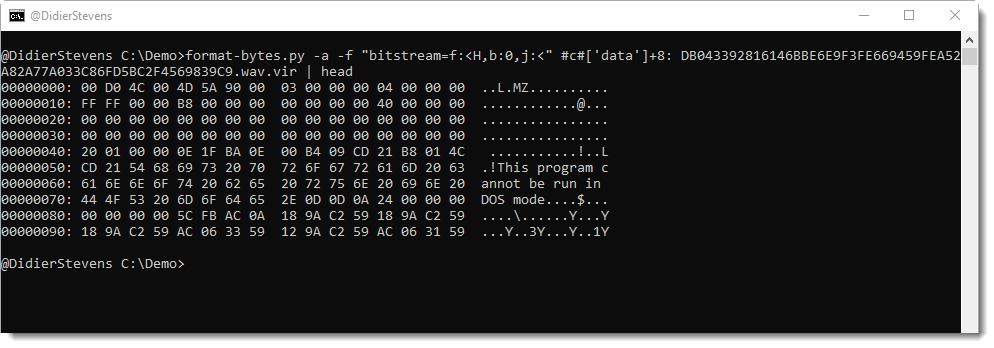
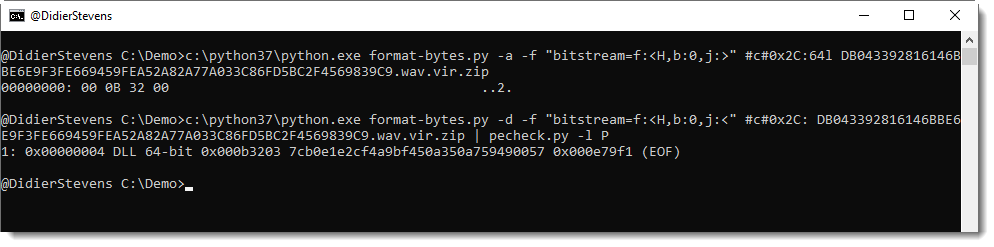
I can indeed see an executable (MZ), but it is preceded by 4 bytes. These 4 bytes are the length of the embedded file. As described in the article, the length is big-endian encoded. Hence I use a similar command to extract the length, but with j:>, as can be seen here:

The length is 733696 bytes, and this matches the IOCs from the article.
Then I use my tool pecheck.py to search for PE files inside the byte stream (-l P), like this:

MD5 7cb0e1e2cf4a9bf450a350a759490057 is indeed the hash of the malicious DLL encoded in this WAV file.
This new version of format-bytes.py, a tool to parse binary data, comes with support for bit streams.
This can help, for example, with decoding steganographic data, like a PE file hidden in a .WAV file.
More about this in an upcoming blog post.
format-bytes_V0_0_10.zip (https)
MD5: 3349E2F8C84AE644C0AEFDA4410297C5
SHA256: F75C3A353E42D847264702B1F316A65657E6375EF979B8EF21B282D4676BE4C3
numbers-to-string.py is a tool to help with deobfuscation: it transforms numbers found in its input into strings.
This new version adds option -b to produce binary output.
numbers-to-string_v0_0_8.zip (https)
MD5: 69179F5EE01F8E0102F40B768E80A82E
SHA256: 535518780E9F4102320C81EF799CF1AD483C51450690A2E1FA9F2CA61B7A8A88
This new version of cut-bytes.py, a tool to select a byte sequence from its input, has bug fixes (including Python 3 fixes) and 2 new options: -p –prefix and -s –suffix.
With these options, arbitrary data can be prefixed or appended to the input.
cut-bytes_V0_0_10.zip (https)
MD5: C14F60F9843F4C2A40A05A52CBE16AB8
SHA256: AD3ADBF30B09DB77B17FEF62C40CDC138516FD24B077201D126D259D1953792B
This new version of pecheck.py, a tool to analyze PE files, comes with a small update to option -l.
The overview of embedded PE files produced with option -l P now reports the hash of the embedded PE file without overlay:

By default, this is an MD5 hash, but can be changed to your liking using environment variable DSS_DEFAULT_HASH_ALGORITHMS, like this:
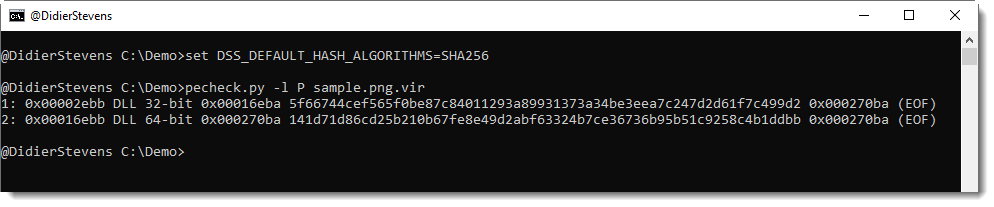
I will introduce this environment variable to my other tools with new releases.
pecheck-v0_7_8.zip (https)
MD5: 616CD9159316FC2100BE3E87C5C26B2C
SHA256: F734EFFFA17E4EE6CA64A67D18340B3347B72C4B1C7522BAF1B7D720FABA2389
My new tool simple_tcp_stats.py is a Python program that reads pcap files and produces simple statistics for each TCP connection.
For the moment, it calculates the entropy of the data (without packet reassembling) of each TCP connection (both directions) and reports this with a CSV file:
ConnectionID;head;Size;Entropy
192.168.10.10:50236-96.126.103.196:80;’GET ‘;364;5.42858024035
192.168.10.10:50235-96.126.103.196:80;’GET ‘;426;5.46464090792
96.126.103.196:80-192.168.10.10:50235;’HTTP’;3308;6.06151478505
96.126.103.196:80-192.168.10.10:50236;’HTTP’;493;6.73520107812
simple_tcp_stats_V0_0_1.zip (https)
MD5: 606DB4208BBC5908D9F32A68DDF90AC6
SHA256: 68B275C58736AE450D23BEA82CC1592936E541E00726D8ED95F5CA8ACB02B7CE
This is an update of my PDF tools.
There are a couple of bug fixes for pdf-parser and pdfid.
And 2 new features in pdf-parser, inspired by a private training on maldoc analysis I gave last week. I often get good ideas from my students, and sometimes, even I get a good idea in class 🙂 .
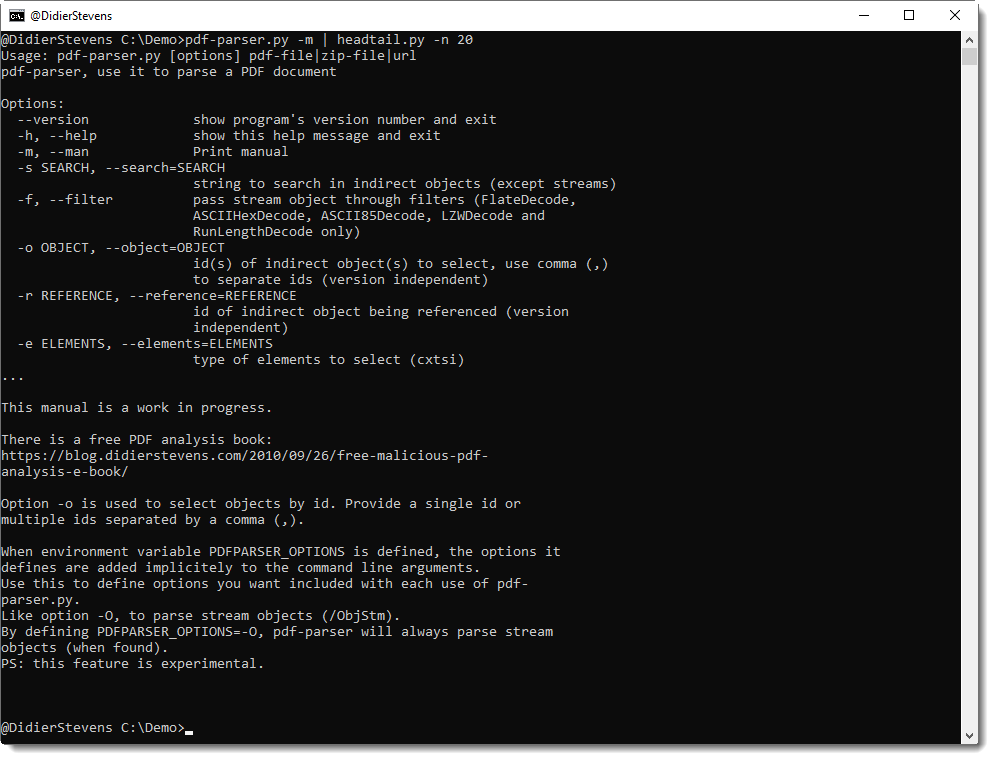
Option -o can now be used to select multiple objects: separate the indices by a comma.
There’s a new environment variable, PDFPARSER_OPTIONS, that can be used to provide extra options you want to include with each execution of pdf-parser.py. This is useful for option -O, an option to parse stream objects.
It’s actually best to always parse stream objects, i.e. always use option -O. But I decided not to make this an option that is on by default, so that the behavior of pdf-parser would remain unchanged. I consider this important for the many people that rely on a predictable behavior of pdf-parser, like teachers and students of infosec trainings where my tools are used/mentioned.
However, always including option -O is tedious and error prone. So now you can have best of both worlds, by defining an environment variable with name PDFPARSER_OPTIONS and value -O.
And finally, I started to add a man page (option -m), like I do with many of my other tools. This is a work in progress: for the moment, it points to my free PDF analysis e-book that explains the use of pdfid and pdf-parser.
pdf-parser_V0_7_3.zip (https)
MD5: 7EB1713631D255B36BC698CD2422C7EB
SHA256: D4D5AC9C26A9D8FEF65CE58A769D3F64A737860DC26606068CCDD3F04FDEA0D7
pdfid_v0_2_6.zip (https)
MD5: 9CCE332914A6C76410F04B7C35DA3155
SHA256: 95F7C91EEFB561F3F3BE9809ED339D85E7109BAA7E128EF056651EE018DBDBA0
This new version of strings.py comes with a new option -T to trim the strings to a given length. And also 2 bug fixes.
strings_V0_0_4.zip (https)
MD5: 8B1F5A6BEBA2BC8BDFF16B99C27050E4
SHA256: 7BBAAB0E83692288BDC35BC0FBDD6B2F8A141280E506131E2818F49BEF31D01A

 Didier Stevens