Didier Stevens

Monday 26 April 2021

Quickpost: Decrypting Cobalt Strike Traffic

Filed under: Encryption,Malware,My Software,Quickpost — Didier Stevens @ 0:00

I have been looking at several samples of Cobalt Strike beacons used in malware attacks. Although work is still ongoing, I already want to share my findings.

Cobalt Strike beacons communicating over HTTP encrypt their data with AES (unless a trial version is used). I found code to decrypt/encrypt such data in the PyBeacon and Geacon Github repositories.

This code works if you know the AES key: which is not a problem in the use cases of the code above, as it is developed to simulate a beacon. Beacons generate their own AES key, and thus these beacon simulations also generate their own AES key.

But what if you’re analyzing real beacons used in malware attacks? How do you obtain the AES key?

I found a way to extract the keys (AES and HMAC) from process memory of a running beacon.

I use the following procdump command to prepare process memory dumps:

procdump -mp -w -s 1 -n 5 malware.exe

Then I start the beacon malware.exe in a malware analysis virtual machine while capturing traffic with Wireshark.

My new tool cs-extract-key.py looks in the dumped process memory for the unencrypted (RSA encryption) metadata that a beacon sends to the C2. This metadata contains the AES en HMAC keys.

Example:

This method does not always work: the metadata is overwritten after some time, so the process dump needs to be taken quickly after the beacon is started. And there are also cases were this metadata can not be found (I suspect this is version bound).

For those cases, my tool has another way of obtaining the keys. I extract the encrypted data of the first post of the beacon to the C2 (this is called a callback in the PyBeacon code):

And then I provide this to my tool, together with the process dump. My tool will then proceed with a dictionary attack: extract all possible AES and HMAC keys from the process dump, and try do authenticate and decrypt the callback. If this works, the keys have been found:

And once I have obtained the keys, I can pass them to my traffic decoding program that I have updated to include decryption (and that I have renamed to cs-parse-http-traffic.py):


Quickpost info


Sunday 25 April 2021

isodump.py

Filed under: My Software,video — Didier Stevens @ 10:13

This is a new tool (beta) to analyze ISO files. I made this for a webinar I presented: a demo on how to use my templates to create your own tools.

isodump.py is in my Github beta repository.

The complete webinar is here, if you want to jump directly to the demo where I explain how to make a tool like isodump.py, go here.

Monday 19 April 2021

Lua CSV Wireshark Dissector

Filed under: My Software,Networking,Wireshark — Didier Stevens @ 0:00

In December 2020 I provided online Wireshark training to one of our NVISO clients. During the second day, when we cover the development of custom dissectors written in Lua, a question about CSV data came up. When the data exchanged over TCP, for example, has the CSV format (fields separated by a separator), how can I write a dissector for that?

While answering the question, I realized that this is a case that could be solved with a generic dissector. And the same night, I developed the first version.

Say you have a packet capture with a TCP connection. And the data exchanged over TCP consists of different fields, separated by a separator character.

Like this example:

Because Wireshark does not recognize the protocol used in this TCP connection, the content is just displayed as data.

With Lua dissector csv-dissector.lua, the data is dissected into different fields:

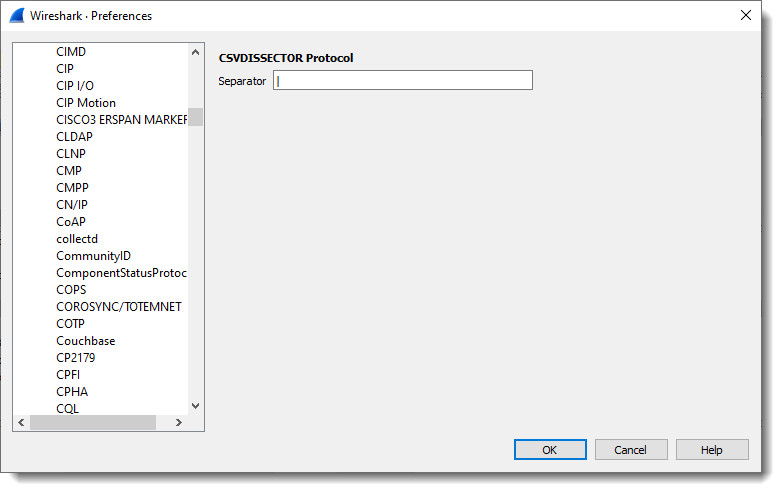
The separator character (pipe character | in this example) is something that can be configured:

Other changes can be made, but these have to be made in the code of the dissector itself:

  • Changing the port
  • Changing the number of fields
  • Change the name of the fields

ย 

Download:

csv_dissector_V0_0_2.zip (https)

MD5: E8CCE089FB0574775AB39DADED3B7AA2

SHA256: 5C8DC0F2BB97AA660E2576B23379B6F12FB88126F0EFC7A2F69E76EBA8E782BD

Sunday 18 April 2021

metatool.py

Filed under: Announcement,My Software — Didier Stevens @ 17:56

metatool.py is a tool to help with the analysis of Metasploit or Cobalt Strike URLs.

More info can be found in my SANS Internet Storm Center diary entry “Finding Metasploit & Cobalt Strike URLs“.

It is still in my Github beta repository here.

Monday 8 March 2021

Update: 1768.py Version 0.0.5

Filed under: My Software,Update — Didier Stevens @ 0:00

I updated the analysis logic in this new version of my tool 1768.py to analyze Cobalt Strike beacons.

There’s a new option -c (–csv) to output the config values in CSV format.

And now with option -r (–raw), identical configs are de-duplicated.

1768_v0_0_5.zip (https)
MD5: 83D7A867B93FAC13BA24F17DDA994A9A
SHA256: CBCB84B9C4D8C1ED05983C2A211E3EA6029E69782FDDD6E15181EE4F47383EB5

Sunday 7 March 2021

Update pecheck.py Version 0.7.13

Filed under: My Software,Update — Didier Stevens @ 0:00

This new version of pecheck.py, my tool to analyze PE files, outputs the hash of the embedded Authenticode signature.

pecheck-v0_7_13.zip (https)
MD5: 5B5179FFBE7530AA60C7182B830B54AB
SHA256: 4CFAF98CC8F3B06E3BBD7D6F37040B47641C38E49BD2975165FB328D50D3F08C

Saturday 6 March 2021

Update: nsrl.py Version 0.0.3

Filed under: My Software,Update — Didier Stevens @ 13:28

I use my tool nsrl.py to match a list of hashes with the Reference Data Set of the National Software Reference Library.

This is a Python 3 update and small change to support a change in RDS ZIP file structure.

nsrl_V0_0_3.zip (https)
MD5: A86E3EB076B467C64A520256556EDADA
SHA256: 8760B20A918CD135B7D79F7567C240AEF4840325BE9656D684BFD119A017E86F

Sunday 28 February 2021

Update: oledump.py Version 0.0.60

Filed under: My Software,Update — Didier Stevens @ 23:08

This new version of oledump.py brings an update to plugin plugin_biff to help with the recovery of protection passwords.

oledump_V0_0_60.zip (https)
MD5: BC7631059077294223BB225D16FB7186
SHA256: D847E499CB84B034E08BCDDC61ADDADA39B90A5FA2E1ABA0756A05039C0D8BA2

Monday 22 February 2021

re-search.py And Custom Validations

Filed under: My Software — Didier Stevens @ 0:00

My tool re-search.py is a tool that uses regular expressions to search through files. You can use regular expressions from a small builtin library, or provide your own regular expressions.

And these regular expressions can be augmented with extra conditions, like validation with a custom Python function.

I’m going to illustrate this here with a regular expression to match credit card numbers. Credit card numbers have a check digit (calculated with the Luhn algorithm) and I’m going to augment the regular expression to validate the check digit.

I’m using the following regular expression to match credit card numbers (I’m limiting myself to credit card numbers of 16 digits): \b(\d{4}( ?)\d{4}\2\d{4}\2\d{4})\b

This regular expression consist of 4 expressions to match 4 digits “\d{4}”. Each block of 4 digits could be separated with a space character ” ?”.

I’m putting this in a capture group “( ?)” so that I can refer back to this matched group with backreference \2 (it’s the second capture group, because the complete credit card number is also put in a capture group, e.g. the first capture group).

The reason I’m using a backreference to match the first optional space character, is because I want to match the next 2 separating space characters if and only if a first space character was matched. So I want to match (1111222233334444 and 1111 2222 3333 4444, but not 11112222 3333 4444 for example). Either all 4 groups are separated, or none are separated.

Finally, I put this expression in a capture group, and enclose it with a boundary check “\b”. This is to avoid matching credit card numbers that are immediately preceded or followed by letters or digits.

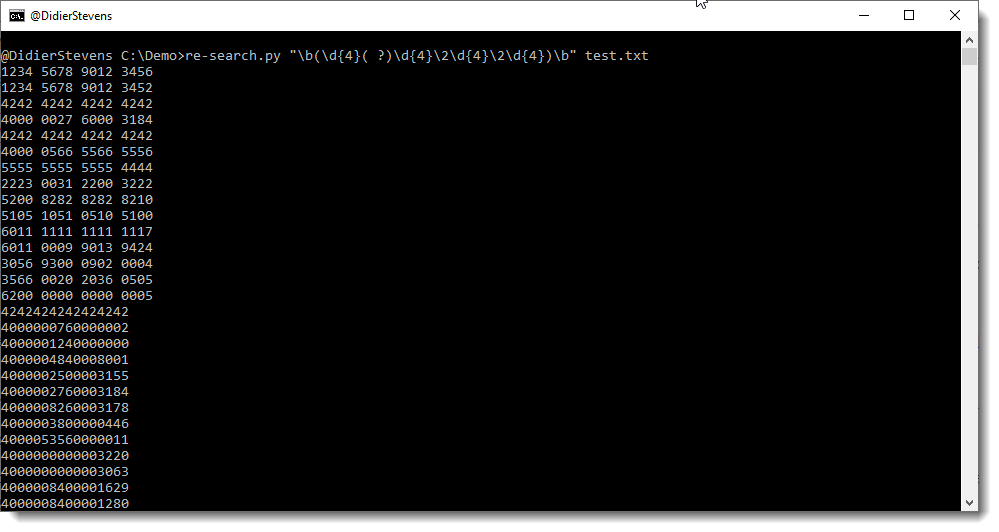
So I can use this regular expression with re-search.py on a test file:

You can see that the first 2 test credit card numbers are identical, except for the last digit: the check digit. So at most one of these 2 can be a valid credit card number.

This can be checked with the Luhn algorithm.

Here is a small Python script to calculate this Luhn check digit:


# 2020/02/06
# https://stackoverflow.com/questions/21079439/implementation-of-luhn-formula

import string

def luhn_checksum(card_number):
    def digits_of(n):
        return [int(d) for d in str(n)]
    digits = digits_of(card_number)
    odd_digits = digits[-1::-2]
    even_digits = digits[-2::-2]
    checksum = 0
    checksum += sum(odd_digits)
    for d in even_digits:
        checksum += sum(digits_of(d*2))
    return checksum % 10

def is_luhn_valid(card_number):
    return luhn_checksum(card_number) == 0

def CCNValidate(ccn):
    return is_luhn_valid(''.join(digit for digit in ccn if digit in string.digits))

Python function luhn_checksum calculates the check digit for an input of digits, and Python function is_luhn_valid return True when the calculate Luhn number matches the check digit.

To use this last function with the regular expression I created, I need another Python function: CCNValidate. This function receives the string matched by the regulator expression, extracts the digits and checks the Luhn check digit.

To let my tool re-search.py call this function CCNValidate when a credit card number is matched by the regular expression, I precede the regular expression with a comment, like this:

(?#extra=P:CCNValidate)\b(\d{4}( ?)\d{4}\2\d{4}\2\d{4})\b

(?#…) is a comment in the regular expression syntax. It is ignored by the parser (i.e. not used for matching). … is the comment itself, which can be anything.

re-search.py interprets this comment: when the comment starts with “extra=”, re-search is dealing with an augmented regular expression. P indicates that a Python function has to be called when the regular expression matches, and CCNValidate is the name of the Python functon to call when the regular expression matches.

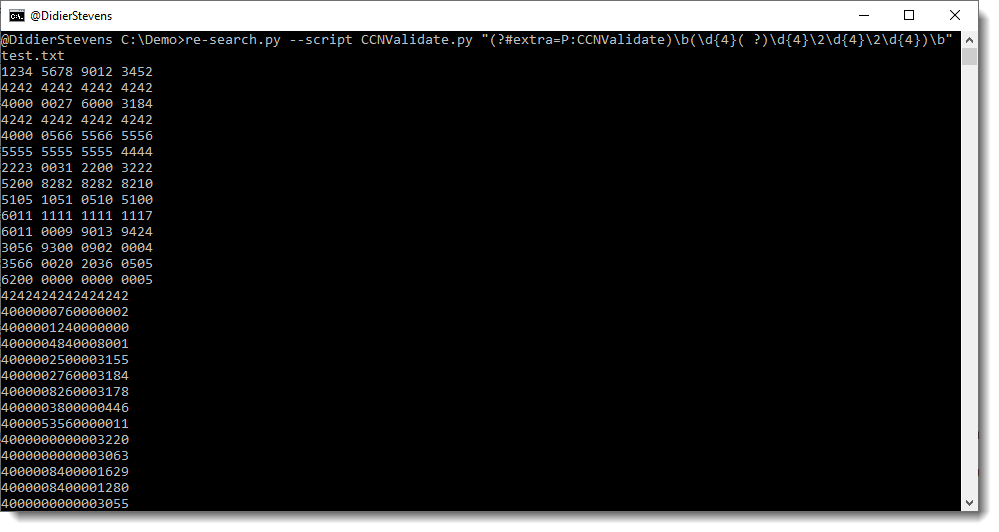
All this combined gives me the following command:

You can see that the first credit card number that was matched in the first example, no longer matches: that’s because 6 is not the correct Luhn number for this credit card number.

Besides providing re-search.py with this augmented regular expression, I also need to provide the Python script containing the validation functions: I do this with option –script CCNValidate.py


Sunday 21 February 2021

Update: re-search.py Version 0.0.16

Filed under: My Software,Update — Didier Stevens @ 12:20

This new version of re-search.py, my tool to search files with a builtin library of regular expressions, brings an update to the url and url-domain regexes to match hostnames with underscores (_) and a Python 3 fix.

re-search_V0_0_16.zip (https)
MD5: 21A7096116F50CCA051A152066B2DB50
SHA256: 4A3AC1B1BED68660316011F14EFC84B344BE3FF7E335CDFA8F1AAA2C0D2D06B0

« Previous Page — Next Page »

Blog at WordPress.com.