There are no code changes to this version of 1768.py, my tool to analyze Cobalt Strike beacons.
What is new, is file 1768.json: this file contains statistical data for license IDs.
Over a period of one month, I collected license ID information from these sources: threatviewio and @cobaltstrikebot.
For each license ID that is found on more than one IP address / hostname, I include simple statistics: the number of unique IP addresses / hostnames and the number of unique public keys.
When analyzing malicious Cobalt Strike beacons, I often see recurring license IDs. That’s why I decided to add logic and a JSON file to my tool, with license IDs I’ve seen before. And now this has evolved to a small repository of often seen license IDs.
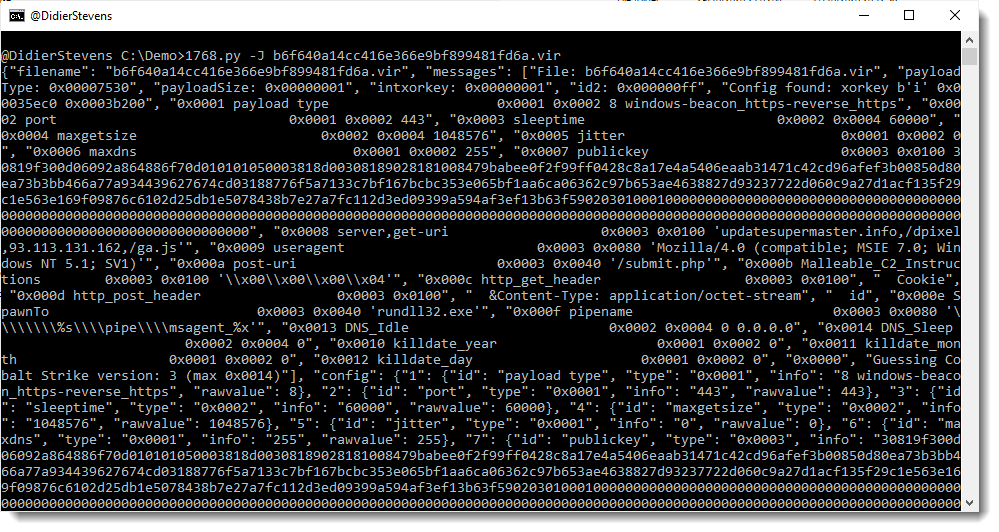
Here is an example with a sample we discussed on the Internet Storm Center diary:
The license ID is 1873433027 and this ID is associated with 18 unique IP addresses / hostnames, and 15 unique public keys. This is a clear indication that this license ID is used by malicious actors. License IDs that have been seen only once, could belong to red teams, that is why they are not included in file 1768.json. The more often a license ID is seen, the higher the chance it is used by malicious actors. Of course, it is not excluded that there are legitimate license IDs from red teams in this list, but I expect they will have low frequencies.
Takeaway: if your sample has a license ID that appears in 1768.json, then it has been seen before (at least twice), and you’re likely not dealing with a pentest.
As I needed a Python implementation of an ssdeep tool, I decided to document the creation of such a tool with a video. I use my Python templates to quickly create this tool.
cs-dns-stager.py is a quick & dirty tool I wrote to retrieve a Cobalt Strike DNS beacon from its server, if you only have the IP address of said server.
If you want to know more about Cobalt Strike and DNS, watch this video I recorded:
This new version of 1768.py, my tool to analyze Cobalt Stike beacons, has fixes, support for more encodings, and an option to output the config in JSON format.
I have been looking at several samples of Cobalt Strike beacons used in malware attacks. Although work is still ongoing, I already want to share my findings.
Cobalt Strike beacons communicating over HTTP encrypt their data with AES (unless a trial version is used). I found code to decrypt/encrypt such data in the PyBeacon and Geacon Github repositories.
This code works if you know the AES key: which is not a problem in the use cases of the code above, as it is developed to simulate a beacon. Beacons generate their own AES key, and thus these beacon simulations also generate their own AES key.
But what if you’re analyzing real beacons used in malware attacks? How do you obtain the AES key?
I found a way to extract the keys (AES and HMAC) from process memory of a running beacon.
I use the following procdump command to prepare process memory dumps:
procdump -mp -w -s 1 -n 5 malware.exe
Then I start the beacon malware.exe in a malware analysis virtual machine while capturing traffic with Wireshark.
My new tool cs-extract-key.py looks in the dumped process memory for the unencrypted (RSA encryption) metadata that a beacon sends to the C2. This metadata contains the AES en HMAC keys.
Example:
This method does not always work: the metadata is overwritten after some time, so the process dump needs to be taken quickly after the beacon is started. And there are also cases were this metadata can not be found (I suspect this is version bound).
For those cases, my tool has another way of obtaining the keys. I extract the encrypted data of the first post of the beacon to the C2 (this is called a callback in the PyBeacon code):
And then I provide this to my tool, together with the process dump. My tool will then proceed with a dictionary attack: extract all possible AES and HMAC keys from the process dump, and try do authenticate and decrypt the callback. If this works, the keys have been found:
And once I have obtained the keys, I can pass them to my traffic decoding program that I have updated to include decryption (and that I have renamed to cs-parse-http-traffic.py):