Thanks to a tip from @riotz, I got my PoC PDF working on Foxit Reader. Remember, Foxit Reader issues no warning when launching a command! So I get to execute an embedded .EXE without any user interaction (except for the opening of the PDF document).
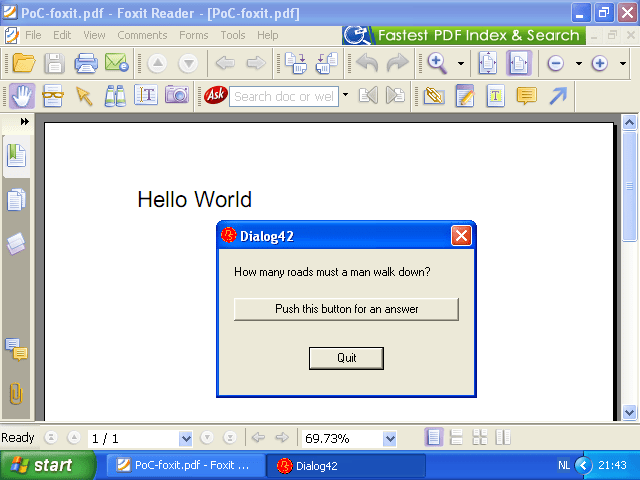
Thanks to a tip from @riotz, I got my PoC PDF working on Foxit Reader. Remember, Foxit Reader issues no warning when launching a command! So I get to execute an embedded .EXE without any user interaction (except for the opening of the PDF document).
This is a special PDF hack: I managed to make a PoC PDF to execute an embedded executable without exploiting any vulnerability!
I use a launch action triggered by the opening of my PoC PDF. With Adobe Reader, the user gets a warning asking for approval to launch the action, but I can (partially) control the message displayed by the dialog. Foxit Reader displays no warning at all, the action gets executed without user interaction.
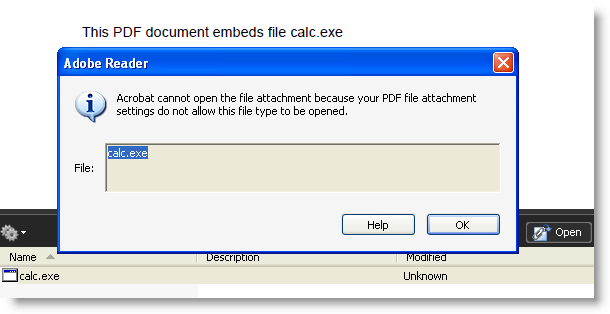
PDF viewers like Adobe Reader and Foxit Reader don’t allow embedded executables (like binaries and scripts) to be extracted and executed:
But I found another way to launch a command (/Launch /Action), and ultimately run an executable I embedded using a special technique. With Adobe Reader, a launch action needs to be approved by the user:
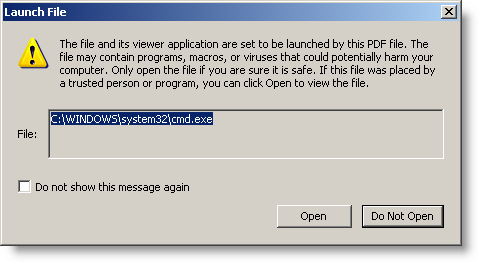
But I can partially control the message displayed by this dialog box:
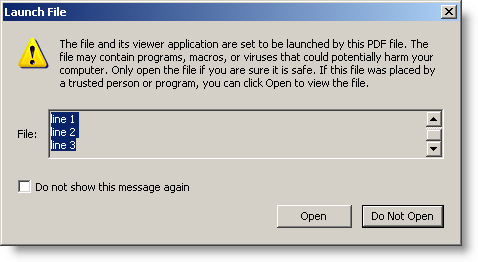
I can use this to social-engineer users to “Open” the file:
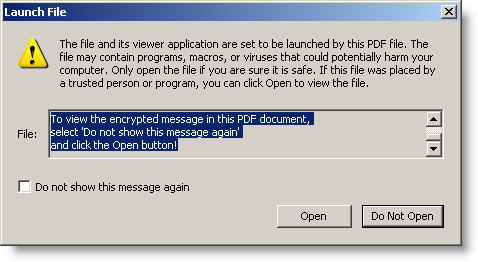
Do you believe this could this mislead some of your users? Or maybe you can come up with a better message to fool your users.
With Foxit Reader, no warning is displayed:
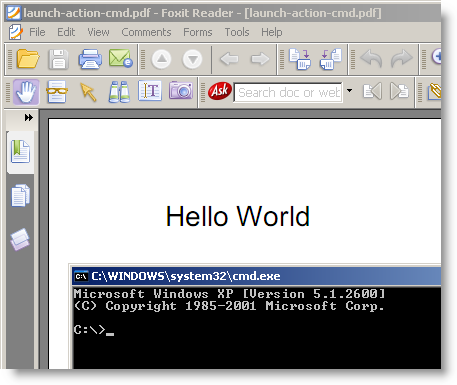
I’m not publishing my PoC PDF yet, but you can download a PDF that will just launch cmd.exe here. Use it to test your PDF reader.
With Adobe Reader, the only thing preventing execution is a warning. Disabling JavaScript will not prevent this (I don’t use JavaScript in my PoC PDF), and patching Adobe Reader isn’t possible (I’m not exploiting a vulnerability, just being creative with the PDF language specs).
I shared my PoC with Adobe’s PSIRT. Maybe they will come up with a solution to prevent this, should they consider that the protection offered by the warning dialog is not sufficient. BTW, preventing Adobe Reader from creating new processes blocks this trick.
In this case, Foxit Reader is probably worse than Adobe Reader, because no warning gets displayed to prevent the launch action. My PoC PDF requires some changes for Foxit Reader, because ultimately, the executable doesn’t run. But that’s probably due to some variation in the PDF language supported by Foxit Reader.
Tested with Adobe Reader 9.3.1 on Windows XP SP3 and Windows 7.
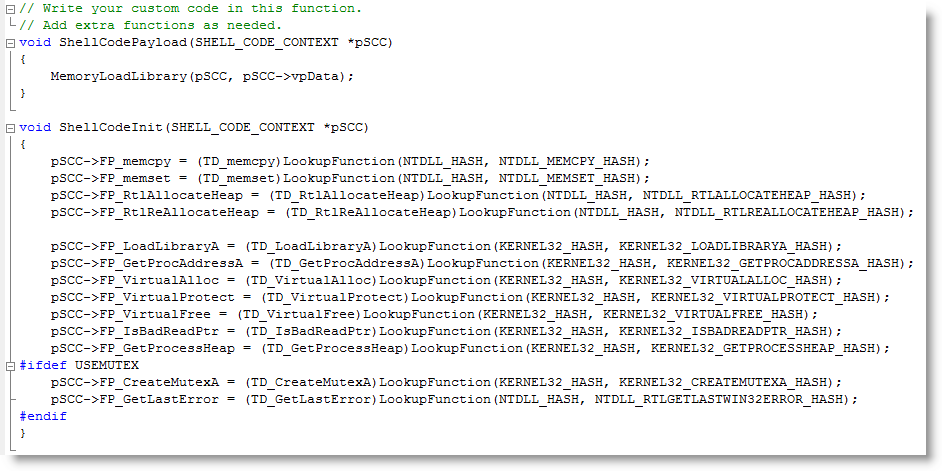
The DLL-loading shellcode I used in my cmd.xls spreadsheet was generated with a method I worked out to generate WIN32 shellcode with a C-compiler. You can find it on my new Shellcode page.
With this release, I provide you with all the tools you need to build your own version of cmd.xls:
I modified the source code of ReactOS‘ cmd and regedit for the following trick:
Let me summarize how I did this, as this is the combined result of several techniques I blogged about before.
You can download regedit.dll here and the new version of cmd.dll with the DLL command here. The DLL command I added allows you to load a DLL with LoadLibrary or directly into memory (/m option). When loaded with LoadLibrary, the library will be unloaded with FreeLibrary unless you use option /k to keep it loaded.
The DLL command assumes that your DLLs execute via the DllMain entry-point when they get loaded.
This is something I’ve wanted to do for some time: take a command interpreter and transform it from an EXE into a DLL.
Why you ask? Well, because it’s a fun challenge 😉
But also because a DLL is loaded into a process. In a restricted environment, it can be injected into a legitimate process and thus bypass the restriction mechanisms.
Metasploit’s Meterpreter is another example of a command interpreter in DLL form.
cmd.exe from Microsoft is closed source, but there is an open-source variant available from the ReactOS project.
Compiling cmd.exe from ReactOS is simple: download the source-code and the ReactOS build environment. Install it, start the build environment and issue command make cmd. That’s all you need to do to compile cmd.exe (I used version 0.3.11).
Transforming the source code to generate a DLL in stead of an EXE is simple. You need to change 3 files.
Edit file cmd.rbuild and make these changes to the module element:
<module name="cmd" type="win32dll" installbase="system32" installname="cmd.dll" unicode="yes" crt="msvcrt">
Because I want to use this DLL in GUI-processes without console, I need to create a console. Edit file cmd.c and add AllocConsole(); to function cmd_main:
SetFileApisToOEM();
InputCodePage= 0;
OutputCodePage = 0;

AllocConsole();

hConsole = CreateFile(_T("CONOUT$"), GENERIC_READ|GENERIC_WRITE,
 FILE_SHARE_READ|FILE_SHARE_WRITE, NULL,
 OPEN_EXISTING, 0, NULL);
And because a DLL has another entry-function than an EXE, edit file main.c and replace function main with function DllMain:
#include <precomp.h>

INT WINAPI
DllMain(
 IN PVOID hInstanceDll,
 IN ULONG dwReason,
 IN PVOID reserved)
{
 switch (dwReason)
 {
 case DLL_PROCESS_ATTACH:
 cmd_main(0, NULL);
 break;

 case DLL_THREAD_ATTACH:
 break;

 case DLL_THREAD_DETACH:
 break;

 case DLL_PROCESS_DETACH:
 break;
 }

 return TRUE;
}
That’s it. Recompile with make cmd to generate cmd.dll
There are still some improvements we can make, but that’s for a later version: error messages are not displayed, exiting the shell terminates the host process, …
You can download the modified source files and compiled cmd.dll here.
This is a screenshot of cmd.dll injected inside Excel with my memory module shellcode:

Last OWASP/ISSA Belgian chapter meeting was the location of an interesting discussion. For a full report of the meeting, read Xavier’s excellent blogpost.
Many SQL-injection techniques rely on tautologies: adding an expression that is always true to the where-clause of a select statement. Like OR 1=1. 1=1 is a tautology, it’s an expression that always yields true.
So if SELECT * FROM USERS WHERE USERNAME = ‘ADMIN’ and PASSWORD = ‘UNKNOWN’ doesn’t select any rows because the password is not correct, injecting ‘ OR 1=1 — gives SQL statement SELECT * FROM USERS WHERE USERNAME = ‘ADMIN’ and PASSWORD = ” OR 1=1 –‘ which will return all rows, because the where-clause is always true (OR 1=1).
There are several security applications (WAFs, SQL firewalls, …) designed to monitor the stream of SQL statements and reject statements with tautologies, i.e. the result of a SQL-injection. Some are very simple and just try to match pattern 1=1. Bypassing them is easy: 1>0 is also a tautology. Others are more sophisticated and try to find constant expressions in the where-clause. Constant expressions are expressions with operators, functions and constants, but without variables. If a constant expression is detected that always evaluates to true, the firewall assumes it’s the result of a SQL-injection and blocks the query.
This is all classic SQL-injection, but now comes the interesting part.
What if I use an expression that is not a tautology in it’s mathematical sense, but is almost one… Say I use expression RAND() > 0.01 ? The RAND function is a random number generator and returns a floating point value in the range [0.0, 1.0[. Expression RAND() > 0.01 is not a tautology, it’s not always true, but it is true about 99% percent of the time. I call this a quasi-tautology.
A firewall looking for tautologies will not detect this, because it is not a tautology. But when you use it in a SQL-injection, you stand a 99% chance of being succesful (provided the application is vulnerable to SQL-injection)!
There are other functions than RAND to create quasi-tautologies. An expression comparing the seconds of the current system time with 59 is also a quasi-tautology.
The GreenSQL firewall will detect SQL statements with quasi-tautologies, not because it looks for them, but because it builds a whitelist in training mode.
I finally took time to develop shellcode to load a DLL, not with LoadLibrary, but directly from memory. Not storing the DLL on disk prevents it from being detected by AV software; not using LoadLibrary bypasses HIPS software that monitors this system call.
My shellcode is based on Joachim’s code.
In previous posts, I showed how to load a DLL or shellcode with VBA in Excel. This is a combination of both techniques: a VBA macro loads and executes shellcode in Excel’s process space, and the shellcode loads a DLL from memory into Excel’s process memory.
With the code of the previous post, the DLL appears in the list of loaded DLLs:
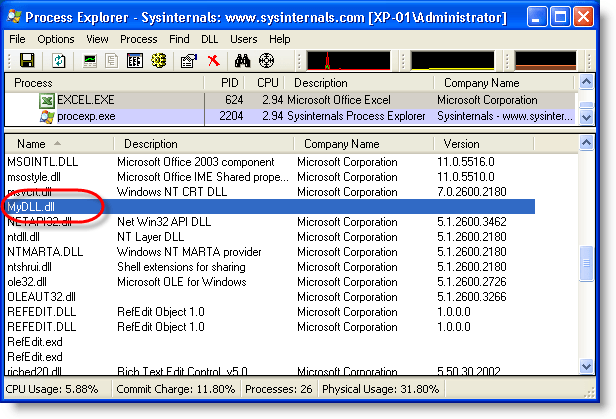
With this shellcode, it doesn’t:

There are no real changes in this new version of bpmtk, only a new DLL (hook-createprocess.dll) was added. You can use this DLL to protect your Windows machine from getting infected by the current malicious documents found in-the-wild.
You can download bpmtk version 0.1.6.0 here.
Hook-createprocess.dll is a DLL that patches the process into which it is loaded to prevent it from creating new processes. It does this by patching the Import Address Table of kernel32.dll for ntdll.dll to hook API functions NtCreateProcessEx, NtCreateProcess and NtCreateUserProcess.
Calls to these functions are intercepted and not passed on to the original functions. Instead, a code is returned indicating that the operation was blocked. The result is that functions in kernel32 used to create new processes fail (like WinExec) and hence that the patched process can’t create new processes.
This is all it takes to block most shellcode found in malicious documents like PDF malware. Shellcode like this does the following:

Of course, since this protective measure is taken by patching the process, shellcode could undo this patching and bypass our protection. Or it could use the ntdll API and not be hindered by our patch. But actual malware found in-the-wild doesn’t do this (not talking about targeted attacks) and is thus prevented from executing the trojan it just downloaded or extracted from the PDF document.
If you want better protection, you’ll have to use something that works at the level of the kernel, like sandboxing software.
However, this patch comes with some drawbacks, because it also blocks bening new processes. For example, the update function of Adobe Acrobat requires the creation of a new process. To reenable the creation of processes, you have to unload hook-createprocess.dll (unloading removes the hooks). bpmtk has a function to unload DLLs from a process (reject).
There are a couple of trick to load this DLL with the program you want to protect. I’ll describe a generic method in an upcoming post, but now I want to explain it for a specific program.
Programs have a list of DLLs they need for their execution. We will use a PE-file editor to add our hook-createprocess.dll to this list. hook-createprocess.dll exports a dummy function (_Dummy) just so you can add to the imports table of an executable. We will use LordPE to add hook-createprocess.dll with _Dummy to Adobe Reader:
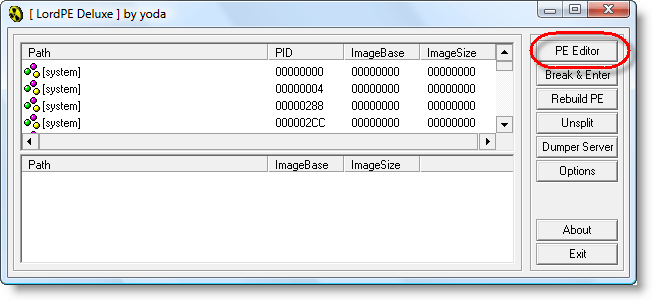


Right-click the Import table:


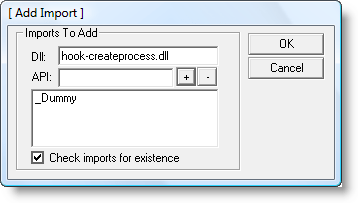

And don’t forget to save…
Today, I’m showing you how you can patch your PDF reader (Foxit or Adobe) to handle PDF documents with hidden embedded files. And for Foxit, there’s a bonus: Foxit Reader can also embed files into existing PDF documents.
In my stego PDF trick, I just replace the name /EmbeddedFiles with /Embeddedfiles in the PDF document. As the PDF language is case-sensitive, your PDF reader doesn’t recognize /Embeddedfiles, and hence doesn’t handle the embedded file. PDF readers are designed to skip features of the PDF language they don’t understand (i.e. new features of the PDF language), so that’s why you don’t get an error message from your PDF reader for /Embeddedfiles.
If you search for the string EmbeddedFiles in the binaries of your PDF reader and replace it with Embeddedfiles, it will handle PDF documents with hidden embedded files (but it will stop supporting PDF documents with visible embedded files).
Doing this for Foxit is easy, as there’s only one binary, Foxit Reader.exe. Open it with a hex editor and search for EmbeddedFiles:

Replace it with Embeddedfiles and save it:

That’s it, now you use your patched Foxit Reader to reveal hidden embedded files:
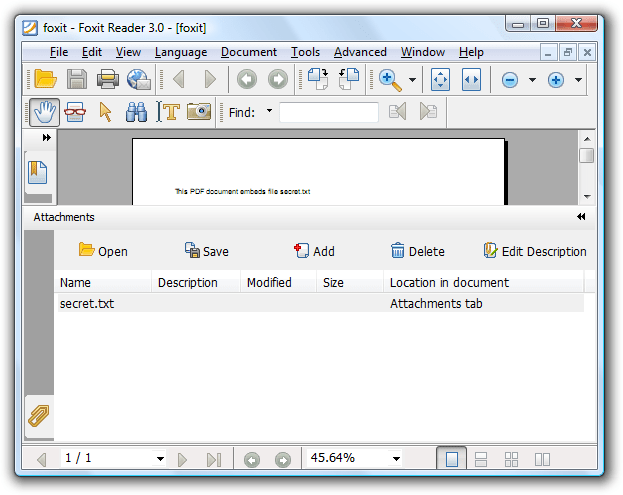
And have you noticed the Add button? Foxit Reader also provides support to add embedded files to existing PDF documents! So you’re not limited to using my Python program to create your own PDF documents.
For Adobe Reader, the trick is the same. Open AcroRd32.dll in a hex editor and do a search and replace (I had to patch 2 instances of of EmbeddedFiles).
Here’s a new trick: injecting VBScript in a process. I’ve developed a DLL that will create a COM instance of the VBScripting engine and let it execute a VBScript. Injecting this DLL in a running program results in execution of the VBScript in the context of the running program. Here’s an example where I wrote a VBScript to search and replace a string in the memory of the notepad process:
Here is part of the VBScript I developed to search and replace inside the memory of a process. It uses custom methods like Peek, Poke and Output that I’ve added to the scripting engine:

I’ll provide more details in an upcoming blogpost on bpmtk version 0.1.5.0, but you can already download it here.
YouTube, Vimeo and hires Xvid.

 Didier Stevens