- Update: oledump.py Version 0.0.68
- Update: python-per-line.py Version 0.0.8
- New Tool: dns-query-async.py
- Discovering A Forensic Artifact
- Update: base64dump.py Version 0.0.22
- New Tool: sortcanon.py
- Another Exercise In Encoding Reversing
- Examples Of Encoding Reversing
- Quickpost: Cracking PDF Owner Passwords
- Update: cut-bytes.py Version 0.0.15
- Update: format-bytes.py Version 0.0.14
Friday 1 July 2022
Overview of Content Published in June
Here is an overview of content I published in June:
Blog posts:
Saturday 18 June 2022
New Tool: sortcanon.py
sortcanon.py is a tool to sort text files according to some canonicalization function. For example, sorting domains or ipv4 addresses.
This is actually an old tool, that I still had to publish. I just updated it to Python 3.
This is the man page:
Usage: sortcanon.py [options] [files]
Sort with canonicalization function

Arguments:
@file: process each file listed in the text file specified
wildcards are supported

Valid Canonicalization function names:
 domain: lambda x: '.'.join(x.split('.')[::-1])
 ipv4: lambda x: [int(n) for n in x.split('.')]
 length: lambda x: len(x)

Source code put in the public domain by Didier Stevens, no Copyright
Use at your own risk
https://DidierStevens.com

Options:
  --version             show program's version number and exit
  -h, --help            show this help message and exit
  -m, --man             Print manual
  -c CANONICALIZE, --canonicalize=CANONICALIZE
                        Canonicalization function
  -r, --reverse         Reverse sort
  -u, --unique          Make unique list
  -o OUTPUT, --output=OUTPUT
                        Output file

Manual:

sortcanon is a tool to sort the content of text files according to some
canonicalization function.
The tool takes input from stdin or one or more text files provided as argument.
All lines from the different input files are put together and sorted.

If no option is used to select a particular type of sorting, then normal
alphabetical sorting is applied.

Use option -o to write the output to the given file, in stead of stdout.

Use option -r to reverse the sort order.

Use option -u to produce a list of unique lines: remove all doubles before
sorting.

Option -c can be used to select a particular type of sorting.
For the moment, 2 options are provided:

domain: interpret the content of the text files as domain names, and sort them
first by TLD, then domain, then subdomain, and so on ...

length: sort the lines by line length. The longest lines will be printed out
last.

ipv4: sort IPv4 addresses.

You can also provide your own Python lambda function to canonicalize each line
for sorting.
Remark that this involves the use of the Python eval function: do only use this
with trusted input.
MD5: CC20EA756E3E0796C617830C8F91AFF4
SHA256: 42EDE51EE70A39FD0933A77B8FE119F1CA8C174336C0DA4C079B1F02C1AB33EC
Wednesday 15 June 2022
New Tool: dns-query-async.py
dns-query-async.py is a tool to perform DNS queries in parallel.
This is the man page:
Usage: dns-query-async.py [options] command file
Program to perform asynchronous DNS queries

accepted commands: gethost,getaddr

Source code put in the public domain by Didier Stevens, no Copyright
Use at your own risk
https://DidierStevens.com

Options:
  --version             show program's version number and exit
  -h, --help            show this help message and exit
  -m, --man             Print manual
  -o OUTPUT, --output=OUTPUT
                        Output to file (# supported)
  -s NAMESERVERS, --nameservers=NAMESERVERS
                        List of nameservers (,-separated)
  -n NUMBER, --number=NUMBER
                        Number of simultaneous requests (default 10000)
  -t TRANSFORM, --transform=TRANSFORM
                        Transform input (%%)

Manual:

This tool performs asynchronous DNS queries. By default, it will perform 10000
queries simultaneously.

The first argument is a command. There are 2 commands for the moment: gethost
and getaddr
The second argument is a filename: a text file containing the items to resolve.

Use command getaddr to lookup the IP address of the hostnames provided in the
input file.
Example:
 dns-query-async.py getaddr names.txt
Result:
 didierstevens.com,1,96.126.103.196
 didierstevenslabs.com,1,96.126.103.196
 Duration: 0.20s

Use command gethost to lookup the hostnames of the IP addresses provided in the
input file.
Example:
 dns-query-async.py gethost ips.txt

Use option -s to provide the name servers to use (comma separated list).

Use option -n to change the number of asyncio workers (10000 default).

Use option -t to transform the input list and perform lookups.
For example, take list of subdomains/hostnames https://github.com/m0nad/DNS-
Discovery/blob/master/wordlist.wl
Issue the following command:
 dns-query-async.py -t %%.example.com getaddr wordlist.wl
Result:
 0.example.com,0,Domain name not found
 009b.example.com,0,Domain name not found
 01.example.com,0,Domain name not found
 02.example.com,0,Domain name not found
 03.example.com,0,Domain name not found
 1.example.com,0,Domain name not found
 10.example.com,0,Domain name not found
 101a.example.com,0,Domain name not found

The %% in %%.example.com is replaced by each hostname/subdomain in wordlist.wl
and then resolved.

Use option -o to write the output to a file.
MD5: 5F4253B06EC0C6F6EC8E1DFDB1886164
SHA256: D06D776F7B0042EFD5BFAB5CE32EAFDF6FFB85F1C85BB227156638060B639D33
Monday 6 June 2022
Overview of Content Published in May
Here is an overview of content I published in May:
Blog posts:
- Update: oledump.py Version 0.0.66
- Update: cs-parse-traffic.py Version 0.0.5
- Update: zipdump.py Version 0.0.22
- Update: oledump.py Version 0.0.67
- Update: base64dump.py Version 0.0.21
- Update: pecheck.py Version 0.7.15
- Update: re-search.py Version 0.0.20
- Update: pdf-parser.py Version 0.7.6
- Update: 1768.py Version 0.0.14
- Update: Python Templates Version 0.0.7
- PoC: Cobalt Strike mitm Attack
Sunday 1 May 2022
Overview of Content Published in April
Here is an overview of content I published in April:
Blog posts:
- Power Consumption Of A Philips Hue lamp In Off State
- .ISO Files With Office Maldocs & Protected View in Office 2019 and 2021
- New Tool: myjson-filter.py
- Update: cut-bytes.py Version 0.0.14
- Update: 1768.py Version 0.0.13
- New Tool: pngdump.py (Beta)
- Update: re-search.py Version 0.0.19
- Update: oledump.py Version 0.0.65
- Quickpost: Machine Code Infinite Loop
- curl 7.82.0 Adds –json Option
- jo
- Method For String Extraction Filtering
- Video: Method For String Extraction Filtering
- Office Protects You From Malicious ISO Files
- Video: Office Protects You From Malicious ISO Files
- Sysmon’s RegistryEvent (Value Set)
- Analyzing a Phishing Word Document
- YARA 4.2.1 Released
Monday 18 April 2022
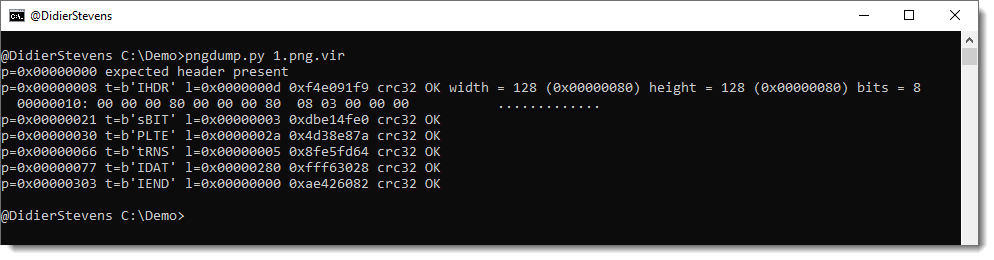
New Tool: pngdump.py (Beta)
Here is a new tool I’m releasing as beta: pngdump.py.
It’s a tool to analyze PNG files. Unlike jpegdump, you can not yet select items for further analysis.
Saturday 9 April 2022
New Tool: myjson-filter.py
A couple of my tools can produce JSON output, using my own format (myjson).
This output can then be piped into another tool, like strings.py or file-magic.py.
I’m now releasing a tool that can be put into a command pipe to filter the JSON data: myjson-filter.py
For example, here I use myjson-filter.py to remove all items that are XML files (based on the content: starting with <?xml) before strings are extracted with strings.py:
More info in this ISC diary entry I wrote: “Method For String Extraction Filtering“.

MD5: 15DDC15DE65F447CE6DA94F8B34C5066
SHA256: EB330FE49421A13A8743F18064788DC2E8189A9B63FD19D517F0B830D1569321
Friday 1 April 2022
Overview of Content Published in March
Here is an overview of content I published in March:
Blog posts:
YouTube videos:
Videoblog posts:
- YARA?s Console Module
- MSBuild & Cobalt Strike
- Quick & Dirty Shellcode Analysis ? CVE-2017-11882
- TShark & Multiple IP Addresses
- Maldoc Cleaned by Anti-Virus
- TShark & Multiple IP Addresses
- oledump’s Extra Option
- Video: TShark & Multiple IP Addresses
- ICMP Messages: Original Datagram Field
- YARA 4.2.0 Released
- Curl on Windows
- SolarWinds Advisory: Unauthenticated Access in Web Help Desk (12.7.5)
- MGLNDD_* Scans
- Maldoc Cleaned by Anti-Virus
- Wireshark 3.6.3 Released
- Video: Maldoc Cleaned by Anti-Virus
- Quickie: Parsing XLSB Documents
Saturday 5 March 2022
Overview of Content Published in February
Here is an overview of content I published in February:
Blog posts:
YouTube videos:
SANS ISC Diary entries:
Wednesday 2 February 2022
Overview of Content Published in January
Here is an overview of content I published in January:
SANS ISC Diary entries:
SANS ISC Diary entries:

 Didier Stevens