Didier Stevens

Monday 31 December 2007

How Can I Trust the BeID Runtime?

Filed under: Encryption — Didier Stevens @ 10:57

As a Belgian citizen, the federal government issued me an electronic ID (eID). It’s essentially a smart card with personal data, my picture (jpeg) and a couple of X.509 certificates for authentication and digital signing.

One of its applications is authentication on web sites. And this is already possible now, provided I’ve a smart card reader and I install the necessary software provided by the federal government.

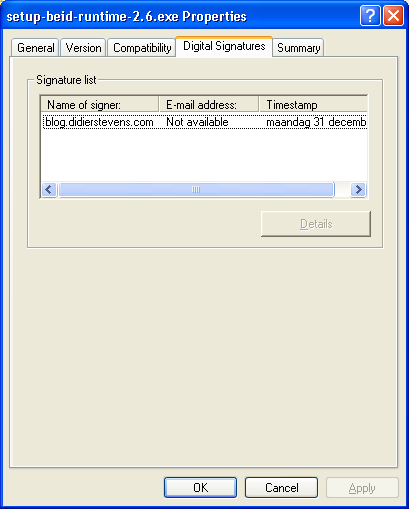
Now take a look at the properties of the Windows setup file for the eID client software:

beid-properties.png

Now I expect to see something here, but it’s missing. Do you miss it too? Here’s a hint:

beid-properties-authenticode.png

That’s right, the installation program is not digitally signed (AuthentiCode). Neither are any of the executables installed by the installation program.

I’m surprised that the government invests in a PKI to issue IDs to all its citizens, yet it doesn’t deem it necessary to invest in a delivery mechanism that certifies the origin and integrity of the client software.

Tuesday 25 December 2007

Building the Pocket EICAR Test File Server

Filed under: Hardware — Didier Stevens @ 9:11

As I promised last week, here are the technical details of the Pocket EICAR Test File Server.

I bought a mini AVR web server from Tuxgraphics, it’s an AVR microcontroller with an Ethernet controller on a small PCB. The goal is to integrate some sensors (like temperature) and actuators (central heating) into my home network, but my first project was to learn to program it and develop a small web server framework.

The board is ready for operation, I just had to solder 2 wires to provide power and a programming connector. You’ll need an AVR In-System Programmer to upload your compiled C program to the microcontroller. Tuxgraphics sells one that plugs in a USB port, and has the big advantage for me that it comes with a Linux Live-CD with all the programming tools on it. This way, I didn’t have to spend time to build my own developing environment. First I tested the web server, programmer and LiveCD on a real computer with an example from Tuxgraphics. After being satisfied that it worked, I created a virtual machine, booted from the LiveCD, configured networking and sshd and now I develop on that VM. But because it’s a LiveCD and settings are not persisted, I have to take a snapshot before shutting down the VM.

The board has an Ethernet controller, this means that you have to implement the IP functions you need in software on the AVR microcontroller. For example, to get a ping reply from the pocket server, you have to write code to identify the ICMP request, build the reply and transmit it, like this:

petfs-ping.png

Likewise, you have to write code to handle ARP requests, which are essential for IP operation.

And for HTTP web serving, you have to implement TCP connections (e.g. SYN SYN-ACK ACK), parse the HTTP requests and send the corresponding replies. Building on Tuxgraphics’ example, I developed a simple framework to serve static and dynamic HTML pages. All is in the website array that is initialized in the InitWebsite function:

petfs-website.png

Use one entry per web page. The first pointer of each entry points to the URL you want to server, like /info.html. The second pointer is the content type, like HTML or plain text. And the third pointer points to the static content you want to serve. Set this pointer to NULL for dynamic content.

So if you just want to serve static pages for HTTP GET requests, modifying the code doesn’t require real programming skills. In the source code, just change the MAC address and IP address, redimension the website array and populate it with your pages.

But for dynamic pages, you’ll have to write a function that generates the dynamic content, and call that function when the dynamic page is requested:

petfs-http-handling.png

In this example, we check if the index of the requested page (iHTTPURL) equals the index of the status.html page (URL_STATUS). If it does, we call the MakeStatusResponse function that will generate the web page displaying a counter.

You have to realize that this is a very basic HTTP server. It doesn’t keep state for the connections and it’s not multithreaded. If you need a more robust embedded web server, there are solutions like the FOX Board, it runs the BOA web server under Linux.

Download:

eicar.tar.gz (https)

MD5: A8D42CA6628A699C4C76A8412639CEDF

SHA256: 20760F7085830C73BBAE4C1D962D625429920079EFD9A5F38372953B1B5C7896

Untar and make. To program the mini AVR web server: make load_eicar

Sunday 23 December 2007

Quickpost: Retrieving an SSL Certificate

Filed under: Encryption,Quickpost — Didier Stevens @ 9:37

I recently had to inspect the SSL certificate of an e-mail provider (secure POP connection) . Here is a quick HOWTO using the Google Mail website as an example.

Issue this command on a box with openssl:

openssl s_client -connect mail.google.com:443 > google

Then cancel the command with CTRL-C.

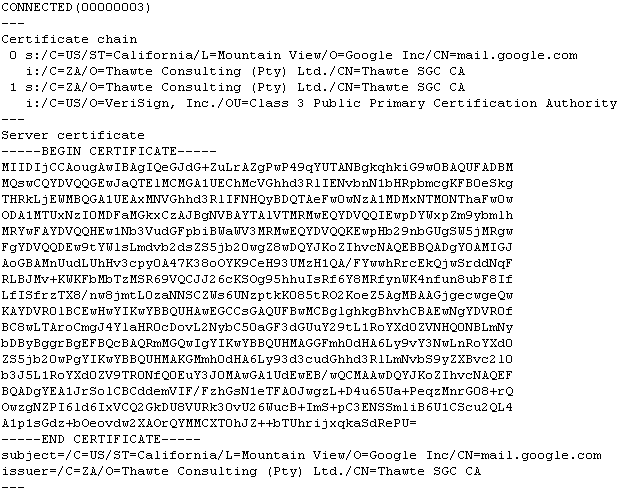
A base64 representation of the web site’s certificate will be included in the output you redirected to the google file:

20071223-openssl-output.png

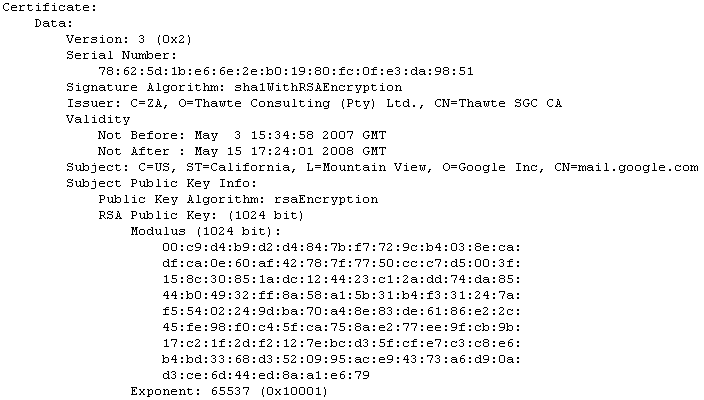
To inspect the certificate with openssl, use this command:

openssl x509 -in google -text

20071223-openssl-text.png

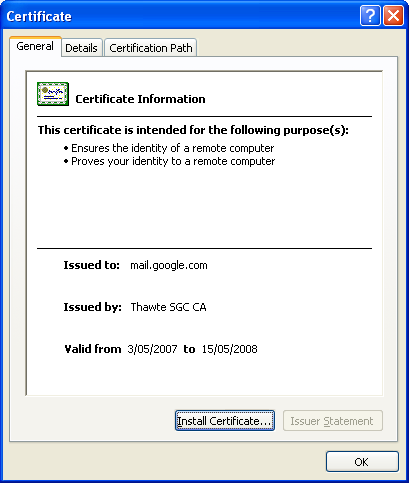
Or convert it to a certificate in DER format and open it on a Windows box:

openssl x509 -in google -outform DER -out google.der

20071223-certificate.png

Tuesday 18 December 2007

Pocket EICAR Test File Server

Filed under: Entertainment,Hardware,Malware — Didier Stevens @ 7:36

Like last year, I produced an anti-virus related Season’s Greetings movie.

The movie is hosted here on YouTube, and you can find a hires version (XviD) here.

Next week, you’ll get the technical details of this pocked web server.

Happy New Year!

Sunday 9 December 2007

Quickpost: Restoring Safe Mode with a .REG File for Windows 2000 SP4 Professional

Filed under: Uncategorized — Didier Stevens @ 11:00

I added the SafeBoot registry keys for Windows 2000 SP4 Professional to the zip file and updated the post.


Quickpost info


Monday 3 December 2007

Looking for N800 Beta Testers, No Voyeurs Please ;-)

Filed under: My Software,N800 — Didier Stevens @ 9:06

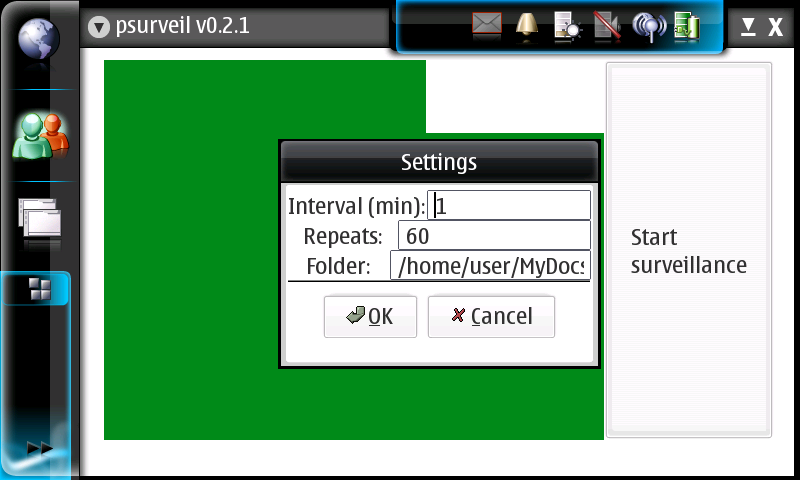
I’ve developed a new application for my N800, psurveil (Photo Surveillance). It automatically takes pictures with the N800’s build-in camera at regular intervals and stores them as jpeg files.

screenshot-2007-12-02-21-02-09.png

You can find the installation package here (unzip and copy the deb package to your N800) and the source code here. And be careful, it’s beta. On my N800, it takes about 30 seconds to start, and it doesn’t run as root.

So if you’ve got a baby and are looking for an excuse to get an N800, this turns your N800 in a baby monitor, kinda.

From the source code:

psurveil (Photo Surveillance) is a program for the Nokia N800.
It automatically takes pictures with the N800’s build-in camera at regular intervals
and stores them as jpeg files.

usage:
– Pop out the camera, and close all programs using the camera.
– Start psurveil. On my N800, it takes very long to start, sometimes a half minute.
– Use the menu to review the settings.
– Interval is the number of minutes between pictures.
– Repeats is the number of pictures to take, minus 1.
– Folder is the directory to store the pictures. The directory must exist.
Settings are stored with GConf, and there is no input validation.
– Click on the “Start surveillance” buttons to start the surveillance. A first picture
is immediately saved, and another picture every Interval minutes, and this Repeats times.
The filename of the jpeg is composed with the date & time when the picture was taken.
There is no monitoring of free diskspace.

Example:
The settings for this example are:
– Interval=1
– Repeats=3
– folder=/home/user/MyDocs/.images
These settings will take 4 pictures over a period of 4 minutes, starting when the button is clicked.
Pictures are stored in the Images folder:
20071127-194647.jpeg
20071127-194747.jpeg
20071127-194847.jpeg
20071127-194947.jpeg

I developed this program by merging the example_camera.c and example_alarm.c Maemo example programs.
There are some quirks in the real-time video display, they originate from the example_camera.c program.
If you know how to fix this, let me know.
I’m not an experienced Maemo developer (neither GTK developer), this is my first program for the N800,
so use this program at your own risk, and respect the privacy of others.

I put my code for this program in the Public Domain. For the code copy-pasted from the examples,
read the copyright below.

Todo (no guarantee that these ever get done):
– Input validation
– Folder creation
– Toggle to flip the picture

History:
22/11/2007 example_camera and example_alarm merged
23/11/2007 jpeg filename is current date & time
25/11/2007 0.1.3 added menu & menu functions
26/11/2007 coded settings dialog
27/11/2007 0.2.0 code review
28/11/2007 0.2.1 input validation for numbers in settings dialog

Wednesday 28 November 2007

Quickpost: DisableAMD & DisableRegistryFools

Filed under: Quickpost — Didier Stevens @ 9:25

Ever started cmd.exe to see this: “The command prompt has been disabled by your administrator”?

It means that a GPO has been set to disable cmd.exe. This is not the same as the Software Restriction Policies. There is a special policy for cmd (and another one for regedit).

When started, cmd.exe checks for the existence of a certain key in the registry and decides to continue execution based on the value of this key. This key is DisableCMD and sits in Software\Policies\Microsoft\Windows\System. For regedit.exe, the key is DisableRegistryTools in Software\Microsoft\Windows\CurrentVersion\Policies\System.

There are many hacks to bypass this technique, depending on what kind of control you have as a user. When you have only control over the content of the programs you execute, use this trick: edit a copy of cmd.exe with a binary editor, search for DisableCMD and change it to something else, like DisableAMD. This copy of cmd.exe will now look for a key that doesn’t exist, and thus continue execution. For regedit, I renamed the key to DisableRegistryFools.

Mark Russinovich has another, elegant hack for this: he starts the program and injects a DLL that intercepts calls to the registry API and filters the return values. Limited users can inject DLLs into their own processes. But since Microsoft bought Sysinternals, his tool (GPdisable) is not available anymore.


Quickpost info


Monday 26 November 2007

Update: UserAssist V2.4.2

Filed under: Forensics,My Software,Update — Didier Stevens @ 9:29

Just a small change in this new version: now you can disable the automatic loading of the local registry data when the UserAssist tool is launched. Use the “Load at Startup” menu command.

The setting is saved in Isolated Storage, in a file called UserAssist.config.

Tuesday 20 November 2007

Quickpost: Another Funny Vista Trick with ASLR

Filed under: Hacking,Quickpost — Didier Stevens @ 8:06

Dave Maynor’s Vista ASLR tricks post got me thinking. And today, after some inspiring presentations at TechEd last week, I took the time to do some testing. Set the appropriate bit (0x4000) in the DLL Characteristics field of the PE header, and you turn on ASLR for your program of choice. So clearing the bit will disable ASLR, but will Windows File Protection prevent you from changing the program? I didn’t think it would, because you’re only touching the PE Header, which is not protected by the Authenticode signature.

Turns out it does work: you can disable ASLR for a given program, like Internet Explorer. And WFP will not restore the file. But for another reason than I thought: with Vista, WFP is actually called Windows Resource Protection. And it works differently: files are protected by Security Descriptors, and are not replaced automatically when deleted or modified. So the neat trick of deleting a system-file in Windows XP (like utilman.exe) only to see it reappear a couple of seconds later, doesn’t work anymore with Vista. Change the Security Descriptor of the file in Vista (taking ownership and giving you delete rights), delete the file, and it’s gone. No more resurrection.

If you want to play with the ASLR toggle, you can use stud_pe to edit the PE Header and Process Explorer to test it.

So why would you disable ASLR? I don’t know, I just think it’s a funny trick 😉 . But maybe you got an idea? Let me know, post a comment.


Quickpost info


Monday 19 November 2007

The Sony Rootkit V2.0

Filed under: Malware — Didier Stevens @ 10:14

Rest assured, this is not another Sony rootkit rant…

Back in August, F-Secure blogged about another Sony Rootkit. And McAfee was quick with posting additional info on their blog (they produced a screencast of the rootkit in action, saving me some analysis time).

I downloaded the software when F-Secure blogged about it, and since then I’ve been scanning the rootkit regularly with VirusTotal, to see how the detection rate evolved in time.

At first, as was to be expected, not a lot of AV products detected this rootkit:virustotal-fsm-20070830.png

I take this opportunity to illustrate once more that you have to pay attention when analysing VirusTotal’s results. Did you notice that F-Secure doesn’t detect the rootkit? How come, they announce this new Sony Rootkit but they don’t detect it? If you read their blogpost carefully, you’ll see that they detected this with their HIPS and anti-rootkit technology. But there are no specific signatures to detect this, hence the F-Secure AV on VirusTotal doesn’t detect it.

The detection rate is higher at the time of writing: 13 out of 32.

Some of the names given to this rootkit might surprise you:

  • Potentially harmful program HackTool.CIB
  • potentially unwanted program HideVault
  • Filesystem Monitor

You’ve to understand that a program exhibiting rootkit-like behavior and published by a company, is more likely to be handled differently by AV companies than a program from a criminal.

There is a higher probability that customers object to the fact that their AV product removes these company-issued programs. Removal could hamper the correct operation of the system (or device in this case). Some AV companies will label this kind of program (e.g. the nice euphemism potentially unwanted program) and even provide an option to exclude them from removal.

There is also a higher probability that companies developing these unwanted fight the detection by AV software, and even go as far as taking legal action against the AV companies.

All this is reflected in the rather low detection rate of this rootkit by the AV products on the VirusTotal site. After all, it’s almost 3 months since F-Secure broke this.

Next Page »

Blog at WordPress.com.