Didier Stevens

Friday 9 November 2007

Quickpost: Checking Gmail on N800 Securely

Filed under: N800,Quickpost — Didier Stevens @ 11:22

Nokia released an application (mnotify) to monitor your Gmail inbox from an N800. Here‘s an installation howto.

Mnotify has a menu command to open your Gmail inbox in the browser (View inbox). It uses HTTP, not HTTPS. So I wondered if the mnotify also used HTTP for mail checking?

It doesn’t. I looked at the traffic with tcpdump, and the mail check is done with HTTPS. So if you’re on a wireless network you don’t trust, it’s safe to let mnotify check your mail, but don’t view your inbox with it. Use HTTPS to view your Gmail inbox.

I’ll use my N800 to connect to an untrusted network next week 😉


Quickpost info


Tuesday 6 November 2007

Update: USBVirusScan 1.6.1

Filed under: My Software,Update — Didier Stevens @ 7:44

This new version of USBVirusScan adds a new placeholder %f and provides debugging support.

%f contains the filesystem of the inserted drive, like NTFS, FAT, CDFS, …

Newer versions of DAEMON Tools (a virtual CD-ROM utility to mount CD images) report to Windows as a removable drive, thereby triggering USBVirusScan. You can use %f in your scripts to detect this and execute the appropriate action. For example, if you want to scan each USB drive with Avira but don’t want to scan images mounted with DAEMON Tools, use this script (avira.vbs):

dim WshShell

Set WshShell = WScript.CreateObject("WScript.Shell")

if Wscript.Arguments.Item(1)  <> "CDFS" then
	WshShell.run """C:\Program Files\Avira\AntiVir PersonalEdition Classic\avscan.exe"" /GUIMODE=2 /PATH= """ & Wscript.Arguments.Item(0) & ":\""", 1, true
end if

Start USBVirusScan with these parameters: USBVirusScan wscript avira.vbs %d %f

The balloon info also contains information about the filesystem of the inserted drive:

usbvirusscan_balloon_cfds.png

A new flag, -d, adds debugging support to USBVirusScan. When this flag is present, USBVirusScan will write debug output when drives are inserted. This debug output can be viewed with DebugView.

A word of caution about DAEMON Tools. I use an older version of more DAEMON Tools, but newer versions contain an adware component, that you should be able to skip when installing.

Saturday 3 November 2007

Quickpost: Scanning Scripts

Filed under: Quickpost — Didier Stevens @ 10:32

After reading my zero byte padding post, someone asked me how McAfee intercepted scripts.

The Microsoft VB script and JS script engines are COM objects. Looking at the CLSID registry data for these COM objects, you’ll find this info (Windows XP SP2):

VB Script Language
HKEY_CLASSES_ROOT\CLSID\{B54F3741-5B07-11cf-A4B0-00AA004A55E8}
InprocServer32 -> C:\WINDOWS\system32\VBScript.dll

JScript Language
HKEY_CLASSES_ROOT\CLSID\{f414c260-6ac0-11cf-b6d1-00aa00bbbb58}
InprocServer32 -> C:\WINDOWS\system32\JScript.dll

When McAfee VirusScan with ScriptScan is installed, the InprocServer32 reference for both COM objects is modified: C:\Program Files\Network Associates\VirusScan\scriptproxy.dll

This is how VirusScan intercepts script execution. They install a “proxy” (scriptproxy.dll) that will scan the scripts before they are passed on to the appropriate scripting engine (VBScript.dll or JScript.dll).

One important implication of this mechanism, is that ScriptScan will only protect script execution when the scripts are executed with the MS COM objects, like IE does. But Firefox doesn’t work with COM, it has its own JS engine (SpiderMonkey), so ScriptScan does not scan scripts executed by Firefox.

There are documented cases where scriptscan causes problems on servers, the proposed solution is to remove the proxy: regsvr32 /u scriptproxy.dll

I wonder if there is malware out there using this trick? And one can also write his own proxy DLL to intercept scripts.

Of course, McAfee VirusScan is not the only AV providing protection against malicious scripts, most modern AV provide this. For example, Kaspersky’s Anti-Virus uses the same technique, but their proxy DLL is scrchpg.dll.

Friday 2 November 2007

Quickpost: Installing Kismet on a N800

Filed under: N800,Quickpost,WiFi — Didier Stevens @ 8:37

Update: Since the Kismet package isn’t available anymore, here is Installing aircrack-ng on a N800.

To run Kismet on a N800, you need to be root. Normally, you don’t have root access on a N800, you do need to apply a hack to get it. There are several hacks (flashing, sshd, …) but I prefer the godmode trick.

Here’s how I did it, use at your own risk:

  1. Install Osso Xterm
  2. Install godmode
  3. Install Kismet

Now I did install some other packages between 2 and 3, that’s probably why I didn’t have to install ncurses-base explicitly.

To start Kismet, start Xterm and type these commands:

  1. sudo gainroot
  2. kismet

Quickpost info


Thursday 1 November 2007

Announcing Quickposts

Filed under: Announcement — Didier Stevens @ 18:55

From now on, I’ll intersperse my blog with Quickposts.

I’ve a need to post short tips and tricks, mainly for my own reference. These Quickposts will document solutions for small problems I encountered during my work or research. I could also use a Quickpost to announce a discovery I don’t plan to research extensively.
The main characteristic of Quickposts will be the limited amount of time and research I spend on them, hence the quality of the content will suffer.

Quickposts have their own Quickpost category, the title will always start with Quickpost:, and if a Quickpost requires updating (to correct errors), I will edit the post instead of publishing a new Quickpost.

The first Quickpost will be about installing Kismet on my N800.

Of course, I stay committed to my weekly posts.

Wednesday 31 October 2007

Warclimbing

Filed under: Entertainment,N800,Nonsense — Didier Stevens @ 7:40

I claim to be the first to practice real warclimbing.

My N800 with Kismet running:

warclimbing1.jpg

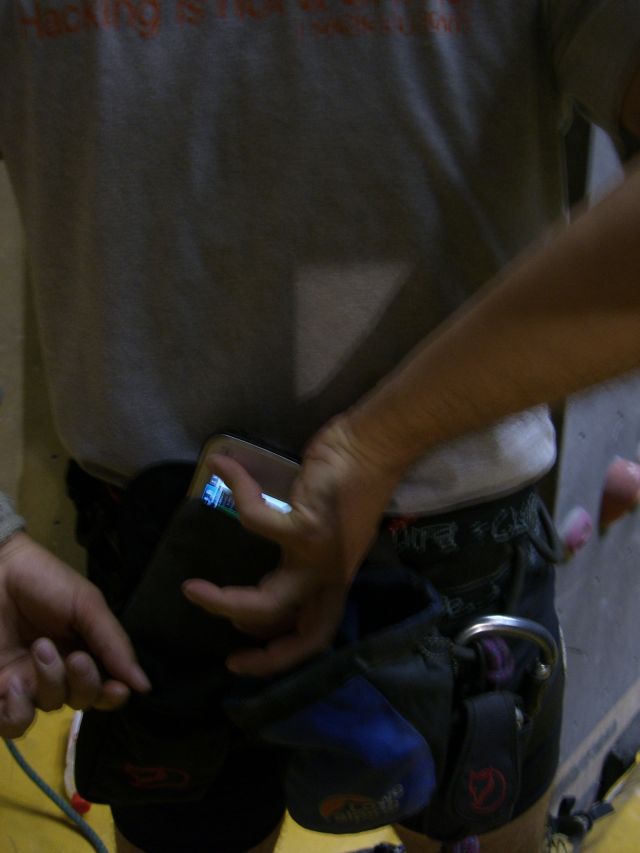
N800 in the pocket:

warclimbing2.jpg

Starting the climb with Kismet attached to my climbing harness:

warclimbing4c.jpg

Capturing frames at the top:

warclimbing5.jpg

Tuesday 23 October 2007

A000n0000 0000O000l00d00 0I000E000 00T0r0000i0000c000k

Filed under: Malware — Didier Stevens @ 7:06

When I found a malicious script riddled with 0x00 bytes, SANS handler Bojan Zdrnja explained to me that this was an old trick. When rendering an HTML page, Internet Explorer will ignore all zero-bytes (bytes with value zero, 0x00). Malware authors use this to obscure their scripts. But this old trick still packs a punch.

This is how the script looks in vi:

html-zeroes-01.png

Maybe this hex dump makes it more clear to you:
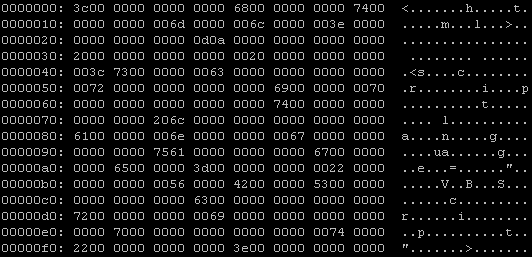
html-zeroes-02.png

Recognize <html> <script…?

Well, a lot of AV programs are still fooled by this trick, VirusTotal reports that only 15 out of 32 AV products detect this malicious script.

html-zeroes-04.png

When I remove all obscuring zero-bytes from this script, things get better: 25 out of 32 AV products detect it.

But what happens when I add more zero-bytes to the script?

Even more AV are fooled! Gradually adding more zero-bytes makes the detection ratio go down.

And at 254 zero-bytes between the individual characters of the script, McAfee VirusScan is the only AV to still detect this obscured script. One byte more (255 zero-bytes), and VirusScan doesn’t detect the script anymore. No AV on VirusTotal detects this malware obscured with 255 zero-bytes (or more). But for IE, this obscured HTML poses no problem, it still renders the page and executes the script.

But you cannot rely on VirusTotal results alone. Modern AV products do not solely rely on file scanning to identify malware, they come with many techniques. For example, VirusScan has a feature called ScriptScan, a utility that intercepts all script execution requests to the MS scripting engines (VBS & JS). Since IE sends the malicious script stripped of its zero-bytes to the VBS scripting engine, ScriptScan has no problem detecting the malware and prevents its execution.

As it is the first time I get such a clear example of ScriptScan in action, I’ve made a screencast (YouTube) of it, XviD hires here.

Friday 19 October 2007

Pwned @ hack.lu?

Filed under: Entertainment,N800 — Didier Stevens @ 23:22

While using the WiFi today at hack.lu I got this pop-up on my N800:

hacklu2007-mtm.png

Care to guess what happened? Post a comment!

EDITED TO ADD (21/10): Thomas Roessler managed to capture a lot more than a screenshot while witnessing the attack, read his excellent blog post here.

And be sure to read the comments for my post, several are from hack.lu attendees who lived through the attack.

Tuesday 16 October 2007

UserAssist V2.4.1

Filed under: Forensics,My Software — Didier Stevens @ 6:36

The most important feature of this new UserAssist version is the explain command. Now you can right-click an entry, select explain and get a nice explanation for the selected entry, like this:

userassist_explain_1.png

I’ve spend some time researching all the different types of values the UEME strings can have and how they relate to user actions. The explain function contains everything I discovered. The source code for this feature is a prototype, I’ve been developing it as I discovered the logic behind the UEME strings, hence it is not a clean design and I plan to rewrite it once I get the full picture. Of course, this design is hidden for you as a user and you should not care about it.

The Logging Disabled switch is OS-aware (Windows XP, 2003 and Vista).

And the last new feature of this version is the support of cleartext Userassist entries (i.e. entries that are not ROT13 encoded). BTW, Windows Vista doesn’t support the NoEncrypt setting.

This version was also tested on Windows 2003, I didn’t notice a difference with Windows XP, but I must admit the testing was limited.

And I would like to test it on Windows 2008 while attending Microsoft IT Forum.

Tuesday 9 October 2007

WhoAmI? Firefox Extension

Filed under: My Software — Didier Stevens @ 7:19

Can you help me test my new Firefox extension WhoAmI?

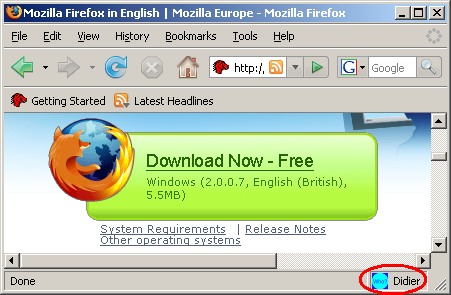
It’s very simple, it displays the name of the current profile on the statusbar:

whoami-preview-01.png

I’ve been using the Firefox Profile Manager for some time now, but recently I learned how to run several instances of Firefox. There have been several posts about this, like this one, to help mitigate Google account vulnerabilities. But sometimes I forget which profile I’m running, until I developed my WhoAmI? extension.

You can download it here. It is also in Mozilla Add-ons site’s sandbox. Please report your test results back to me (OS & FF version), it will help me to get my extension out of the sandbox and into the public part of the Mozilla site.

« Previous PageNext Page »

Blog at WordPress.com.