Here is a set of free YouTube videos showing how to use my tools: Malicious PDF Analysis Workshop.
pdf-parser.py
This tool will parse a PDF document to identify the fundamental elements used in the analyzed file. It will not render a PDF document. The code of the parser is quick-and-dirty, I’m not recommending this as text book case for PDF parsers, but it gets the job done.
You can see the parser in action in this screencast.

The stats option display statistics of the objects found in the PDF document. Use this to identify PDF documents with unusual/unexpected objects, or to classify PDF documents. For example, I generated statistics for 2 malicious PDF files, and although they were very different in content and size, the statistics were identical, proving that they used the same attack vector and shared the same origin.
The search option searches for a string in indirect objects (not inside the stream of indirect objects). The search is not case-sensitive, and is susceptible to the obfuscation techniques I documented (as I’ve yet to encounter these obfuscation techniques in the wild, I decided no to resort to canonicalization).
filter option applies the filter(s) to the stream. For the moment, only FlateDecode is supported (e.g. zlib decompression).
The raw option makes pdf-parser output raw data (e.g. not the printable Python representation).
objects outputs the data of the indirect object which ID was specified. This ID is not version dependent. If more than one object have the same ID (disregarding the version), all these objects will be outputted.
reference allows you to select all objects referencing the specified indirect object. This ID is not version dependent.
type allows you to select all objects of a given type. The type is a Name and as such is case-sensitive and must start with a slash-character (/).
pdf-parser_V0_7_14.zip (http)
MD5: EB3808ACE5497B428138594AFDC5205F
SHA256: 6A60223D52B75F8AFF8C8CF19A58699A20829AC758C251B405B08EC734EF6A4A
make-pdf tools
make-pdf-javascript.py allows one to create a simple PDF document with embedded JavaScript that will execute upon opening of the PDF document. It’s essentially glue-code for the mPDF.py module which contains a class with methods to create headers, indirect objects, stream objects, trailers and XREFs.

If you execute it without options, it will generate a PDF document with JavaScript to display a message box (calling app.alert).
To provide your own JavaScript, use option –javascript for a script on the command line, or –javascriptfile for a script contained in a file.
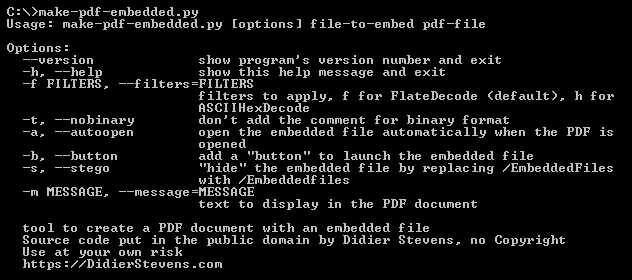
make-pdf-embedded.py creates a PDF file with an embedded file.
Download:
make-pdf_V0_1_8.zip (https)
MD5: 4BEB862F383465C524717BD9BE57C512
SHA256: B9DEF588F2B7577D0AE055E5E1DD4BA2927C1972F0BA1B5C58484295FE821231
pdfid.py
This tool is not a PDF parser, but it will scan a file to look for certain PDF keywords, allowing you to identify PDF documents that contain (for example) JavaScript or execute an action when opened. PDFiD will also handle name obfuscation.
The idea is to use this tool first to triage PDF documents, and then analyze the suspicious ones with my pdf-parser.
An important design criterium for this program is simplicity. Parsing a PDF document completely requires a very complex program, and hence it is bound to contain many (security) bugs. To avoid the risk of getting exploited, I decided to keep this program very simple (it is even simpler than pdf-parser.py).

PDFiD will scan a PDF document for a given list of strings and count the occurrences (total and obfuscated) of each word:
- obj
- endobj
- stream
- endstream
- xref
- trailer
- startxref
- /Page
- /Encrypt
- /ObjStm
- /JS
- /JavaScript
- /AA
- /OpenAction
- /JBIG2Decode
- /RichMedia
- /Launch
- /XFA
Almost every PDF documents will contain the first 7 words (obj through startxref), and to a lesser extent stream and endstream. I’ve found a couple of PDF documents without xref or trailer, but these are rare (BTW, this is not an indication of a malicious PDF document).
/Page gives an indication of the number of pages in the PDF document. Most malicious PDF document have only one page.
/Encrypt indicates that the PDF document has DRM or needs a password to be read.
/ObjStm counts the number of object streams. An object stream is a stream object that can contain other objects, and can therefor be used to obfuscate objects (by using different filters).
/JS and /JavaScript indicate that the PDF document contains JavaScript. Almost all malicious PDF documents that I’ve found in the wild contain JavaScript (to exploit a JavaScript vulnerability and/or to execute a heap spray). Of course, you can also find JavaScript in PDF documents without malicious intend.
/AA and /OpenAction indicate an automatic action to be performed when the page/document is viewed. All malicious PDF documents with JavaScript I’ve seen in the wild had an automatic action to launch the JavaScript without user interaction.
The combination of automatic action and JavaScript makes a PDF document very suspicious.
/JBIG2Decode indicates if the PDF document uses JBIG2 compression. This is not necessarily and indication of a malicious PDF document, but requires further investigation.
/RichMedia is for embedded Flash.
/Launch counts launch actions.
/XFA is for XML Forms Architecture.
A number that appears between parentheses after the counter represents the number of obfuscated occurrences. For example, /JBIG2Decode 1(1) tells you that the PDF document contains the name /JBIG2Decode and that it was obfuscated (using hexcodes, e.g. /JBIG#32Decode).
BTW, all the counters can be skewed if the PDF document is saved with incremental updates.
Because PDFiD is just a string scanner (supporting name obfuscation), it will also generate false positives. For example, a simple text file starting with %PDF-1.1 and containing words from the list will also be identified as a PDF document.
Download:
pdfid_v0_2_10.zip (http)
MD5: E2F369B34D7148BE4D5C4C02430E7983
SHA256: A677336B1CF51386E35DBDED8FDB79F27368FD5D5ECC3FC5C8DA020A029CB6B6
pdftool.py
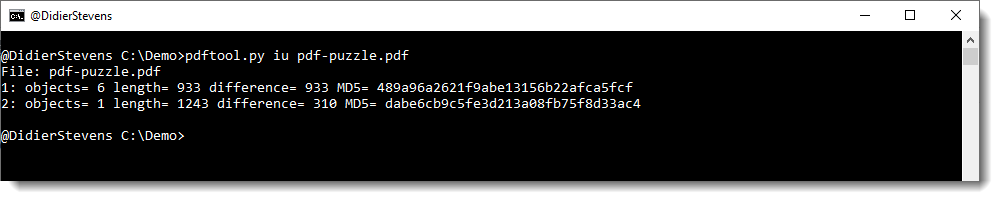
pdftool.py is a tool that takes commands. This first version has only one command: iu (incremental updates).
With command iu, you can check if a PDF contains incremental updates, and select the versions you want.
pdftool_V0_0_1.zip (https)
MD5: ED2BBE886008C737CC06E22F4F0FE8A1
SHA256: 401E88FBFAEC4382A50FE59430D04FE6111F9911958AB09BA7530C26043FDA87
PDFTemplate.bt
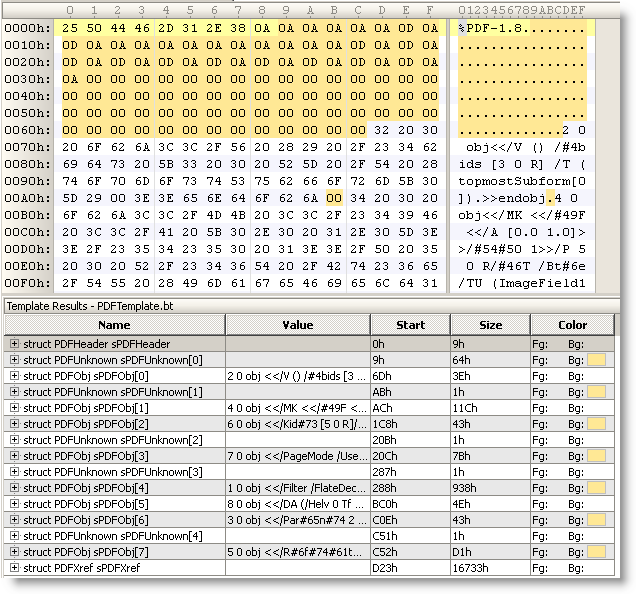
This is a 010 Editor template for the PDF file format.
It’s particularly useful for malformed PDF files, like this example with PDFUnknown structures:
Download:
MD5: C124200C3317ACA9C17C2AE2579FCFEB
SHA256: 24C4FEAD2CABAD82EC336DDCFD404915E164D7B48FBA7BA1295E12BBAF8EB15D

 Didier Stevens
[…] PDF, Quickpost — Didier Stevens @ 11:57 Per request, a more detailed post on how I use my pdf-parser stats […]
Pingback by Quickpost: Fingerprinting PDF Files « Didier Stevens — Saturday 1 November 2008 @ 11:57
I’d like to be able to view a scanned pdf file (with handwriting in some fields) and black
out boxes on the form whose fields contain info I don’t want published.
Can that kind of thing be automated in a batch so that I don’t even have to open the files ?
That would be cool …
Can you point me in the right direction ? I’m not looking for you to code, but sending me in the right direction for this would be useful, and it looks like you’re cognizant of this kind of information.
Comment by james — Friday 21 November 2008 @ 15:03
@james
I’ve no experience with such tools, but you can start to look in the forum of PDF Planet.
Comment by Didier Stevens — Saturday 22 November 2008 @ 8:46
[…] download my Python program to generate these PoC PDF documents here, it needs the mPDF module of my PDF-tools. Quickpost info Possibly related posts: (automatically generated)PDF Stream ObjectsUsing DLE In An […]
Pingback by Quickpost: /JBIG2Decode Essentials « Didier Stevens — Monday 2 March 2009 @ 23:12
[…] PDF — Didier Stevens @ 7:08 I’ve developed a new tool to triage PDF documents, PDFiD. It helps you differentiate between PDF documents that could be malicious and those that are most […]
Pingback by PDFiD « Didier Stevens — Tuesday 31 March 2009 @ 7:08
Thanks Didier for sharing _yet_again_ I appreciate it very much!
Comment by Mitch Impey — Wednesday 1 April 2009 @ 20:17
[…] developed a new tool to triage PDF documents, PDFiD. It helps you differentiate between PDF documents that could be malicious and those that are most […]
Pingback by Didier Stevens posted PDFid « Betterworldforus — Friday 3 April 2009 @ 18:34
[…] will give you statistics of some very basic elements of the PDF language. This helps you decide if a PDF could be malicious or […]
Pingback by PDFiD On VirusTotal « Didier Stevens — Tuesday 21 April 2009 @ 16:59
[…] We can go a number of ways with this now, but since the point of all this is the fun we can have with obfuscated scripts in Adobe PDFs we’ll run it through PDFiD from Didier Stevens. […]
Pingback by L1pht Offensive Labs » From Bloodhound to Acrobat JS — Saturday 25 April 2009 @ 2:59
Hello — I am using pdf-parser and python for the first time so please excuse my ignorance.
I’m using Python 3.0.1 on Windows XP. I’ve copied the pdf-parser.py file into the C:\Python30 directory which contains the python executable. Below is the error I get when attempting to execute your utility:
C:\Python30>python.exe pdf-parser.py
File “pdf-parser.py”, line 180
print ‘todo 1: %s’ % (self.token[1] + self.token2[1])
^
SyntaxError: invalid syntax
————
Any ideas? Thanks for your time.
Comment by Mike — Tuesday 5 May 2009 @ 19:02
@rMike No problem.
I’ve not tested my Python tools on Python 3
You should remove Python 3.0.1 and install Python 2.6. This will probably fix your problems.
I’ve still to decide when I upgrade my tools to Python 3
Comment by Didier Stevens — Tuesday 5 May 2009 @ 20:59
Hello — I’m now using Python 2.6.2. It appears to be working, however I am getting so much output from every pdf I examine, I wonder if I am doing something wrong.
My syntax is
pdf-parser.py –search javascript malware.pdf
The utility spits out hundreds maybe thousands of lines of returned information. At the very top there appears to be useful data, however there are hundreds of lines that look like:
todo 10: 3 ‘X1\x1e\x1b\x03\x12\x05X60B
Am I doing something incorrectly here or is there a way to filter the rest of this data out?
Thanks for your help.
PS, I watched your video on pdf-parser and it doesn’t have any audio.
Comment by Mike — Thursday 7 May 2009 @ 20:40
Also, just a note I am do have two hyphens in front of search (–search)
Comment by Mike — Thursday 7 May 2009 @ 20:41
No, what you’re doing is correct. These todo 10 messages indicate that your PDF document is possibly corrupt. I’ve seen one such corrupt document before, the malware authors had inserted their payload in the PDF without respecting the PDF syntax.
I’m sending you an e-mail to see if you can share your sample with me.
About the video: most of my videos have no sound, it takes me much more time to produce one with audio, and I’m never satisfied with the result.
Comment by Didier Stevens — Thursday 7 May 2009 @ 21:07
[…] updated my PDF-tools to support […]
Pingback by PDF Filter Abbreviations « Didier Stevens — Monday 11 May 2009 @ 0:01
Didier,
Any idea whether/when Filiol, Blonce, & Frayssignes might release their ‘PDF StructAzer’ tool? My Google research doesn’t show anything from them since their presentation at Blackhat Europe last year. According to that paper, they planned to release the tool “very soon”, but maybe they’ve run into some red tape with their employer over it.
John
Comment by John McCash — Tuesday 12 May 2009 @ 13:03
Hi John,
No, still no news about a release, but I’ll ask him again.
Comment by Didier Stevens — Tuesday 12 May 2009 @ 13:51
[…] added some new features to my PDF tools to handle malformed PDF […]
Pingback by Malformed PDF Documents « Didier Stevens — Thursday 14 May 2009 @ 7:55
PDF Structazer is available here:
http://www.esiea-recherche.eu/
The tool: http://www.esiea-recherche.eu/data/PDF%20Structazer.exe
The document (PDF): http://www.esiea-recherche.eu/data/PDF%20Structazer%20Short%20User%20Manual.pdf
Comment by Didier Stevens — Tuesday 26 May 2009 @ 13:01
[…] PDFiD – https://blog.didierstevens.com/2009/03/31/pdfid/ PDF Tools – https://blog.didierstevens.com/programs/pdf-tools/ Security Justice – http://securityjustice.com/ Exotic Liability – http://exoticliability.ning.com/ […]
Pingback by SecuraBit Episode 32 PDF Love! | SecuraBit — Wednesday 27 May 2009 @ 14:33
[…] Finding and detecting Malicious PDF’s. Tyler’s Snort signature. Didier Steven’s fantastic PDF analysis tools. […]
Pingback by Security Justice » Blog Archive » Security Justice - Episode 13 — Saturday 6 June 2009 @ 2:30
Didier,
Does your script pdf-parser.py works on Encrypted PDF streams ?
Comment by NeoIsOffline — Tuesday 14 July 2009 @ 12:28
No, I didn’t add code to decrypt PDF streams. And I’m not sure if I ever will, because then it could also be considered as a copyright infringement tool, and I don’t want to deal with that.
Comment by Didier Stevens — Tuesday 14 July 2009 @ 19:13
Im getting errors when running the python script:
C:\Documents and Settings\yo\Desktop\Tools\pdf>pdf-parser.py
File “C:\Documents and Settings\yo\Desktop\Tools\pdf\pdf-parser.py”, line 198
print ‘todo 1: %s’ % (self.token[1] + self.token2[1])
^
SyntaxError: invalid syntax
Im getting errors when trying to run the script. Im using activepyton 3.1 on windows xp. Launching it from the commandline. Was there any recent modifications which broke the script?
Thanks
Comment by Dave — Friday 17 July 2009 @ 16:48
@Dave
That looks the same error as in comment 10. Read comments 10 to 12 for a solution.
Comment by Didier Stevens — Friday 17 July 2009 @ 17:12
wow I feel ignorant, i just breezed through the comments fast. Thanks!
Comment by Dave — Friday 17 July 2009 @ 18:55
@Dave
No problem.
Comment by Didier Stevens — Friday 17 July 2009 @ 18:58
Hello Didier,
This tool is very cool, I am wondering how to integrate this to the ironport (mail filter) so that all attachments like pdf will be scanned and if found that there are openaction or javascript then probably we can filter that. Also, maybe this can be integrated in the Proxy or firewall. Do you have any link to see a topic on integrating this tool.
Thank you very much, indeed this is very helpful
Comment by Yaggi — Tuesday 28 July 2009 @ 0:12
What interface options does ironport offer? Does it support ICAP? http://en.wikipedia.org/wiki/Internet_Content_Adaptation_Protocol
Comment by Didier Stevens — Tuesday 28 July 2009 @ 18:55
Hello Didier,
I talked to our notes admin and this can somehow be integrated in the sendmail. He ask me some technicalities on the integration. maybe you can also provide some link. HE told me ironport will not be used.
Where can we possibly put this script for internet filter, is it in the proxy server or possibly to content filter boxes like from 8e6 technologies? Im hoping to finish this integration so we can maximize your script.
Comment by Yaggi — Wednesday 29 July 2009 @ 1:30
@Yaggi
How do you interface with other scanner, like AV software?
Comment by Didier Stevens — Friday 31 July 2009 @ 12:48
[…] Taking a quick look at the rest of the file it was clear that it is just a “simple” exploit using obfuscated javascript. So I extracted the scripts with the pdf-tools from Didier Stevens. […]
Pingback by hong10.net » Blog Archive » Analyzing malicious PDF Documents — Monday 3 August 2009 @ 21:28
I was looking over your code in the pdf parser, and trying very very hard to get it to extract something from a pdf. I have tried using pdfs I’ve been given, as well as going directly into the files to try to mess things up, and I have yet to see the code go into the cPDFElementMalformed method. What kinds of data (objects?) do you expect to fall into this category?
Thank you -ld
Comment by Delucci — Tuesday 4 August 2009 @ 14:16
@Delucci
It’s for sometinh like this:
%PDF-1.4
1 0 obj
<>
endobj
unexpected
2 0 obj
<>
endobj
Comment by Didier Stevens — Tuesday 4 August 2009 @ 15:33
[…] the PDF analysis, I used the excellent PDF-Tools from Didier Stevens that can be located here. The main python script that was used was pdf-parser seen […]
Pingback by PDF Malware Analysis – Part 1 | isolated-threat — Tuesday 18 August 2009 @ 21:02
[…] can download PDFiD here. Leave a […]
Pingback by Update: PDFiD Version 0.0.9 to Detect Another Adobe 0Day « Didier Stevens — Tuesday 13 October 2009 @ 21:24
[…] Here is a set of tools that can embed Javascript into a PDF. […]
Pingback by Adobe Reader 0-day exploit FINALLY fixed. | Invariable Truth — Sunday 18 October 2009 @ 9:35
Hi,
Great set of tools, I have noticed while checking PDF files for embedded links (i.e. URI tags), some PDFs contain hyperlinks but do not contain the URI tag, is there an alternative method of embedding hyperlinks, should I be searching for some other keyword?
Comment by Tye — Monday 19 October 2009 @ 15:41
Check if the URLs you see are in the metadata.
Comment by Didier Stevens — Tuesday 20 October 2009 @ 16:48
Hi,
I’ve been using your tool to decode the malicious PDF file that I have. It’s using /Filter /ASCIIHexDecode /FlateDecode.
I used the following command:
pdf-parser.py -f -w malpdf.1 > mal.1
The resulting file didn’t show any JavaScript code, instead it showed “ASCIIHexDecode decompress failed”.
Wepawet is able to decode it though (http://wepawet.cs.ucsb.edu/view.php?hash=c9aad1ecee10ddcf1985ae4961e18fbf&type=js).
Are my parameters for the tool incorrect? Or doesn’t the tool support this?
Thanks in advance.
Comment by anima — Friday 30 October 2009 @ 5:40
@anima
I’ve e-mailed you a request for the sample.
Comment by Didier Stevens — Thursday 5 November 2009 @ 17:45
[…] my method: Use the tools from here. First of all pdfid can tell you if a pdf has Javascript included as well as autorun functionality […]
Pingback by PDF file check question - Remote Exploit Forums — Sunday 6 December 2009 @ 22:25
[…] first tool we’ll be using is pdf-parser.py from the PDF Tools suite. This script will search through a PDF file’s sections, display raw data in the sections, […]
Pingback by Reversing the Adobe 0-day APSA09-07 Exploit – Part 1 | Missouri S&T ACM SIG-SEC|Reversing — Wednesday 16 December 2009 @ 3:55
[…] Countermeasures __________________ Either you're part of the problem or you're part of the solution or you're just part of the landscape. […]
Pingback by Using-an-adobe-exploit-in-a-email-attack - Remote Exploit Forums — Tuesday 22 December 2009 @ 15:46
[…] pdf-parser.py https://blog.didierstevens.com/programs/pdf-tools/ Lets decompression some of the zlib compressed code inside of the PDF and send the raw output to a […]
Pingback by Reversing MerryChristmas.pdf - Sp8sCorp — Thursday 31 December 2009 @ 5:01
[…] pdf-parser.py or PDF Structazer to analyze PDF files […]
Pingback by Can You Trust That File? « Aggressive Virus Defense — Thursday 31 December 2009 @ 22:40
[…] […]
Pingback by How to encode a PDF payload in metasploit? - Remote Exploit Forums — Tuesday 5 January 2010 @ 14:10
[…] thanks to Didier Stevens for his free PDF tools and for providing some […]
Pingback by PDF file loader to extract and analyse shellcode « c0llateral Blog — Wednesday 6 January 2010 @ 23:19
Hey Didier,
Thanks for excellent tool and great PDF analysis blog. I enjoyed every minute and in addition I have become much more paranoid when it comes to carelessly downloading tons of PDF material. Now I run all my PDFs through your “pdfid” tool, if I have downloaded anything from a suspicious site…
But I can’t help thinking that this should be implemented as an automatic plug-in/add-on to Firefox? You know, when you click on PDFs, they usually automatically open in the browser, which is nice if it was safe. But in the cyber-war era of today it is simply very bad, at it’s best!
Comment by E:V:A — Saturday 16 January 2010 @ 18:40
I’m looking into this, but the problem is to prevent the download PDF from being opened after it’s downloaded and before it’s scanned. I talked to the developer of the Fireclam add-on and he has the same issue.
Comment by Didier Stevens — Tuesday 19 January 2010 @ 9:29
Only thing i get are syntax error!
C:\pdfid_v0_0_10>pdfid.py
File “C:\pdfid_v0_0_10\pdfid.py”, line 271
print ‘/%s -> /%s’ % (HexcodeName2String(wordExact), wordExactSwapped)
Comment by sheldor — Sunday 31 January 2010 @ 22:18
Are you using Python 3? Haven’t tested PDFiD on Python 3. Use Python 2.
Comment by Didier Stevens — Sunday 31 January 2010 @ 22:20
got it!! just read the comments!
Comment by sheldor — Sunday 31 January 2010 @ 22:35
whow just noticed your quick response! thank you didier! great tool!
Comment by sheldor — Sunday 31 January 2010 @ 22:36
Is the File Size limited? Everytime i scan larger PDF files i get exceptions like this:
***Error occured***
Traceback (most recent call last):
File “C:\PDFtools\pdfid.py”, line 363, in PDFiD
(bytesHeader, pdfHeader) = FindPDFHeaderRelaxed(oBinaryFile)
File “C:\PDFtools\pdfid.py”, line 218, in FindPDFHeaderRelaxed
bytes = oBinaryFile.bytes(1024)
File “C:\PDFtools\pdfid.py”, line 70, in bytes
inbytes = self.infile.read(size – len(self.ungetted))
IOError: [Errno 9] Bad file descriptor
Comment by sheldor — Monday 8 February 2010 @ 13:50
@sheldor: No, I didn’t code an explicit file size limit. I tried on PDF files up to 41MB without problems. How large is your PDF file?
Comment by Didier Stevens — Monday 8 February 2010 @ 14:55
I have this issue with PDFs 20MB and up! Well,.. then there must be another reason! Still can’t figure it out!
Anyhow, thank you!
Comment by sheldor — Monday 8 February 2010 @ 17:27
@sheldor: If you can point me to an online PDF document that causes the problem you experience, I’ll take a look at it.
Comment by Didier Stevens — Monday 8 February 2010 @ 20:24
[…] Didier Stevens has provided a fantastic resource and tools for analyzing PDF files. Some of these resources have been incorporated into VirusTotal. Didier Stevens: https://blog.didierstevens.com/programs/pdf-tools/ […]
Pingback by PDF Exploitation & Forensic Resources « MadMark's Blog — Tuesday 16 February 2010 @ 19:00
[…] we see in Pyew? The output of PDFId (a great tool by Didier Stevens) is shown as well as the hexadecimal output of the first block (512 […]
Pingback by Unintended Results » Blog Archive » Analyzing PDF exploits with Pyew — Sunday 21 February 2010 @ 14:50
Very cool man, I tried to use PDF tools to unwind a drive-by ZeuS pdf infection. Unfortunately, it gave me some problems because I was using a newer version of Python (and it looks like the El Fiesta Exploit kit might use some kind of different zLib encoding to compress its payloads). Good stuff though!
http://www.mdl4.com/2010/02/28/reverse-engineering-zeus/
Comment by mdl4 — Tuesday 2 March 2010 @ 11:15
[…] https://blog.didierstevens.com/programs/pdf-tools/ […]
Pingback by PDF Malware Analysis Tools | Tahir's Security Blog — Wednesday 31 March 2010 @ 18:11
[…] For the PDF analysis, I used the excellent PDF-Tools from Didier Stevens that can be located here. The main python script that was used was pdf-parser and pdfid seen […]
Pingback by PDF Launch Command without javascript - isolated-threat — Thursday 1 April 2010 @ 10:47
[…] the PDF with Didier Steven’s pdfid.py showed that there was an OpenAction in the PDF, but no JavaScript. Interesting. Using […]
Pingback by /Launch Malicious PDF | Portable Digital Video Recorder — Tuesday 27 April 2010 @ 22:48
[…] @ 10:11 Now that malicious PDFs using the /Launch action become more prevalent, I release a new PDFiD version to detect (and disarm) the /Launch […]
Pingback by Update: PDFiD Version 0.0.11 to Detect /Launch « Didier Stevens — Thursday 29 April 2010 @ 10:11
[…] الباحث ديدر ستفينز أداة جديدة (pdfid.py)، تساعد الكشف عمّا إذا كان ملف pdf يحتوي […]
Pingback by اطلاق أداة جديدة تقوم بالكشف على ملفات pdf قبل تشغيلها | مجتمع الحماية العربي — Thursday 29 April 2010 @ 18:48
[…] PDFiD v0.0.11 – didierstevens.com I release a new PDFiD version to detect (and disarm) the /Launch action. […]
Pingback by Week 17 in Review – 2010 | Portable Digital Video Recorder — Monday 3 May 2010 @ 6:41
[…] PDFiD v0.0.11 – didierstevens.com I release a new PDFiD version to detect (and disarm) the /Launch action. […]
Pingback by Week 17 in Review – 2010 | Infosec Events — Tuesday 4 May 2010 @ 9:40
I have a large volume of pdfs coming soon from a vendor, does pdfid.py handle compressed (gzip, bzip2, zip) files? If so, how. If not is it something that can be worked around or accomplished with another program?
BTW
really appreciate your work, your blog and website have been a treasure trove of information.
Comment by Johnny — Tuesday 4 May 2010 @ 16:34
@Johnny No, but it has an option to scan all files in a folder. Unzip all PDFs to a folder and use that option.
Comment by Didier Stevens — Tuesday 4 May 2010 @ 20:57
[…] non fidate può essere utile eseguire un’analisi automatizzata ricorrendo al tool pdfid.py di Didier Stevens. Si tratta di uno script, funzionante su Windows, Linux e qualsiasi sistema che […]
Pingback by Analizzare e “disinfettare” file PDF con pdfid — Tuesday 4 May 2010 @ 21:13
[…] fonctions suspectes cachées dans le PDF (à savoir exécution de Javascript et d'exécutables) : pdfid et pdf-parser. Avant de découvrir les fonctionnalités de ces deux outils, il est important de connaitre la […]
Pingback by Les outils d’analyse de PDF « Elevenses blog — Monday 10 May 2010 @ 14:45
[…] Il n'a pas fallu longtemps pour que ce PoC (Proof Of Concept) ne soit utilisé par dans des PDF malicieux, permettant ainsi d'installer un trojan sur la machine cible. Didier Stevens a développé deux scripts Python permettant d'analyser les PDF pour y découvrir d'éventuelles fonctions suspectes cachées dans le PDF (entre autres exécution de Javascript et d'exécutables) : pdfid et pdf-parser. […]
Pingback by Les outils d’analyse de PDF « ELEVENSES BLOG — Thursday 27 May 2010 @ 15:41
[…] }; "> — Classificat com a: Eines — Comentari (0) — Lectures: 2130 abril 2010PDFID.py és una eina que analitza un fitxer PDF i mostra les característiques de les que fa ús. Per […]
Pingback by Eina: PDFID.py | L’home dibuixat — Saturday 5 June 2010 @ 20:01
[…] you used my pdf-parser, you’ve also encountered a problem. The objects lack the endobj keyword. A simple solution: […]
Pingback by Solving the Win7 Puzzle « Didier Stevens — Friday 25 June 2010 @ 9:39
With PDFiD, I’ve noticed I get a lot of false positives on the /JS and /AA tags, since in most cases (that I’ve looked at) they seem to be simply text in a compressed image or something similar. I haven’t seen a /JS used on it’s own for Javascript, but it does seem that if there is a /JS then there is also a /S/JavaScript to go with it.
Is this always the case, or just in the samples I’ve looked at so far (same applies for AA)? Finding the text JavaScript is much less likely to lead to a false positive than JS.
Comment by Russell — Monday 28 June 2010 @ 23:28
@Russell Good observation, I almost always see /JavaScript together with /JS. I’ve seen some cases without /JavaScript, but it looks like these were non-functional.
Comment by Didier Stevens — Tuesday 29 June 2010 @ 9:01
This is a complementing post. Work you have done is adorable I liked it how do you get this all in mind??? 🙂 but anyways I found this great and keep going. keep making us explore each security aspect.
thanks
Sushant
Comment by Sushant — Friday 9 July 2010 @ 10:50
[…] plików PDF: Didier’s PDF tools, Origami framework, Jsunpack-n, […]
Pingback by » REMnux — programy do analizy złośliwego oprogramowania -- Niebezpiecznik.pl -- — Monday 12 July 2010 @ 9:15
[…] any known viruses, when run through a total of 32 anti-virus programs. Processing the file with PDFiD reveals that the file contains no JavaScript objects, but it does contain a single JS object. […]
Pingback by Al-Qaeda Magazine is Cupcake Recipe Book | Public Intelligence — Monday 12 July 2010 @ 21:18
Possible bug: PDFiD fails sometime in cPDFEOF when using –extra option for entropy, stating cntCharsAfterLastEOF doesn’t exist. Defining it in init seems to fix the issue.
Other Notes: Is it possible to use pdf-parser to parse pdf-parser output? For example, I can see a use of this when using pdf-parser to obtain contents of object streams, but then it would be nice if it were possible to use pdf-parser on THAT output to display all Launch commands, for example (similar to piping into PDFiD, but actually seeing the contents instead of just the count). Then again, object stream structure is a bit different so perhaps that’s why it doesn’t play nice. I haven’t figured it out yet…
Comment by Russell — Thursday 15 July 2010 @ 23:21
[…] PDF analysis: Didier’s PDF tools, Origami framework, Jsunpack-n, […]
Pingback by Malware Analysis Tools Set Up for Linux « Wikihead's Blog — Saturday 17 July 2010 @ 9:31
@Russell Thanks for the feedback. I’ve had similar reports, and defining it in the init fixes the issue, but I also would like to understand the bug. Can you share a sample?
Comment by Didier Stevens — Monday 19 July 2010 @ 11:30
[…] and Flare. Furthermore, it contains several applications for analyzing malicious PDFs, such as the Didier Steven’s analysis tools. The OS also provides a lot of tools for de-obfucating JavaScript, including Rhino […]
Pingback by New Linux OS REMnux Designed For Reverse Engineering Malware « The FORWARD project blog — Tuesday 20 July 2010 @ 10:36
[…] Il n'a pas fallu longtemps pour que ce PoC (Proof Of Concept) ne soit utilisé par dans des PDF malicieux, permettant ainsi d'installer un trojan sur la machine cible. Didier Stevens a développé deux scripts Python permettant d'analyser les PDF pour y découvrir d'éventuelles fonctions suspectes cachées dans le PDF (entre autres exécution de Javascript et d'exécutables) : pdfid et pdf-parser. […]
Pingback by Les outils d’analyse de « ELEVENSES BLOG — Monday 2 August 2010 @ 8:29
[…] I highly recommend any security conscious sysadmins add this tool to their toolkit, as the number of PDF exploits are likely to continue rising for the forseeable future. PDFiD can be downloaded from Didier Stevens website at https://blog.didierstevens.com/programs/pdf-tools. […]
Pingback by PDFiD: Analyzing suspicious PDFs « Life as a cmddot — Tuesday 3 August 2010 @ 7:03
[…] Font Format) stream that looked suspicious enough for us to decode it (thanks to the excellent pdf-parser tool from Didier Stevens). In the now clear-text stream, we could identify at least one manifest […]
Pingback by iPhone 4 / iPad: The Keys Out Of Prison | Fortinet Security Blog — Thursday 5 August 2010 @ 8:27
[…] – Didier Stevens’ PDF tools: analyse, identify and create PDF files (includes PDFiD: pdf-parser and […]
Pingback by Security tools « Eikonal Blog — Monday 9 August 2010 @ 14:29
[…] i PDF-tools di Didier Stevens si riesce ad analizzare la struttura dei file PDF, anche se tutti risultano […]
Pingback by Honeynet Project: Challenge 3/2010 (II parte) « Il non-blog di Mario Pascucci — Thursday 19 August 2010 @ 3:04
Is there a licensing agreement with using pdfid or pdf-parser? Can it be used as part of software that will be sold?
Comment by Jon — Thursday 2 September 2010 @ 14:59
[…] Here is a PDF template for the 010 Editor. It’s particularly useful for malformed PDF files, like this example with PDFUnknown structures: […]
Pingback by PDFTemplate « Didier Stevens — Friday 3 September 2010 @ 10:36
[…] Didier Stevens’ PDF tools: analyse, identify and create PDF files (includes PDFiD, pdf-parser and make-pdf and mPDF) […]
Pingback by Python tools for penetration testers | Secondary Logic – There is always a theory !!! — Saturday 4 September 2010 @ 8:08
@Jon Can’t contact you, you didn’t provide an e-mail address.
Comment by Didier Stevens — Sunday 5 September 2010 @ 21:31
[…] & pdftools – Two frameworks for analysing malicious PDF […]
Pingback by Mercury – Live Honeypot DVD « Infosanity's Blog — Wednesday 22 September 2010 @ 14:26
[…] https://blog.didierstevens.com/programs/pdf-tools/ […]
Pingback by BruCON 2010 : Day 0×2 | Peter Van Eeckhoutte's Blog — Saturday 25 September 2010 @ 20:54
[…] Font Format) stream that looked suspicious enough for us to decode it (thanks to the excellent pdf-parser tool from Didier Stevens). In the now clear-text stream, we could identify at least one manifest […]
Pingback by » iPhone 4 / iPad: The Keys Out Of Prison — Saturday 25 September 2010 @ 22:53
[…] Analyse verdächtiger Dateien hält Stevens verschiedene selbstentwickelte Tools auf seiner Website vorrätig, deren Nutzung für technisch unversierte Lesefreunde allerdings wenig praktikabel ist. Weil schon […]
Pingback by Schadhafte pdf-Dateien identifizieren » Software » lesen.net — Monday 27 September 2010 @ 17:55
[…] Didier Stevens’ PDF tools Over the weekend, I was reading Didier Stevens’ chapter on malicious PDF analysis and I have to give credit to him to break down the technical part of a PDF into something simple and easy to understand (er … maybe I am the only one who is coming to term with PDF for the first time). Reading the article brought me to his PDF-tools. pdfid and pdf-parser is definitely a must try if you really want to get your hands-on on PDF analysis. […]
Pingback by Hunger 4 Knowledge #10 « David Koepi — Sunday 3 October 2010 @ 1:28
[…] and wonder where to start. Get a Linux distro, install Python, and use Didier Stevens PDF parser [Didier Stevens]. This is a script that will structure all the objects for you, making them more readable. This is […]
Pingback by Analyzing malicious PDFs — Monday 11 October 2010 @ 19:03
[…] and dump the zipped sections of a PDF file. In my opinion, the best are Didier Steven’s PDF Tools. Unfortunately, in this case, none of them worked for me, so I had to do it manually. I selected […]
Pingback by Reverse engineering a Facebook ZeuS infection — Monday 25 October 2010 @ 2:24
[…] was about malicious PDF analysis, given by “Mr PDF” himself, Didier Stevens. Using his toolbox, several malicious PDF files were analyzed with a growing complexity. Very interesting and this […]
Pingback by Hack.lu Day #1 Wrap-up « /dev/random — Wednesday 27 October 2010 @ 21:51
[…] pdfid.py and pdf-parser.py. Get them from from Didier Stevens PDF Tools page. […]
Pingback by Analysing a Malicious PDF Document — Saturday 6 November 2010 @ 12:08
[…] Download: click here […]
Pingback by Malware Analysis: Handy tools for analysing PDF files « Brainfold's blog — Tuesday 16 November 2010 @ 3:00
[…] I ran pdf-parser.py against the pdf file. The output indicated that there were 2 “interesting” objects […]
Pingback by Malicious pdf analysis : from price.zip to flashplayer.exe | Peter Van Eeckhoutte's Blog — Thursday 18 November 2010 @ 13:50
Didier,
Is there a way to embed a .exe in a pdf and have it automatically execute when the pdf is opened? I have tried to use your .py tool but it does not run the .exe after being opened.
Thanks,
Willie
Comment by Willie — Saturday 20 November 2010 @ 6:37
@Willie That’s normal, Adobe Reader doesn’t allow you to extract executable files. I found one way to deliver executable files: https://blog.didierstevens.com/2010/03/29/escape-from-pdf/
But Adobe has updated their reader to prevent this /Launch action.
Comment by Didier Stevens — Saturday 20 November 2010 @ 8:49
[…] obvious choice were the pdftools from Didier Stevens. What […]
Pingback by Malware PDF. Analysis of a very simple sample. | Brundle Lab — Tuesday 23 November 2010 @ 18:35
[…] Didier’s own pdf-parser.py, the PDF’s meta information for the creation date is as […]
Pingback by Praetorian Prefect | The Anonymous PR Guy and a Greece Connection — Sunday 12 December 2010 @ 0:57
[…] Il n’a pas fallu longtemps pour que ce PoC (Proof Of Concept) ne soit utilisé par dans des PDF malicieux, permettant ainsi d’installer un trojan sur la machine cible. Didier Stevens a développé deux scripts Python permettant d’analyser les PDF pour y découvrir d’éventuelles fonctions suspectes cachées dans le PDF (entre autres exécution de Javascript et d’exécutables) : pdfid et pdf-parser. […]
Pingback by Secur-IT — Thursday 6 January 2011 @ 13:28
[…] second Didier Steven’s PDF Tools. PDF Tools includes pdf-parser.py, make-pdf-javascript.py, and pdfid.py. Pdf-parser and pdfid are […]
Pingback by Tools — Saturday 29 January 2011 @ 18:34
[…] PDF-Parser (https://blog.didierstevens.com/programs/pdf-tools/) […]
Pingback by Attributes of a Zero Dollar Malware Analysis Environment « SecAnalysis — Tuesday 8 February 2011 @ 3:07
hi!
i tried using your make-pdf-javascript.py. i gave it a javascript file which executes notepad, but though it got embedded( i checked it with pdf-parser.py), it did not run.
wen i run the js file directly it executes, but when i embed it , it does not run.
Comment by pret — Tuesday 15 February 2011 @ 11:41
@pret And how do you start Notepad?
Comment by Didier Stevens — Tuesday 15 February 2011 @ 17:08
i ran notepad directly from js file using ws.run command , but wen i run the script outside pdf, it runs, wen i embed it in pdf and run, it gets embedded but does not run. pls tell how can i make it run.
Comment by pret — Thursday 17 February 2011 @ 5:28
@pret You are using a Windows JavaScript feature, that’s not supported by Adobe’s JavaScript. There is no feature to run arbitrary programs.
Comment by Didier Stevens — Thursday 17 February 2011 @ 7:06
I am new to Python. I have installed Python 27 and have tried running pdfid.py with no success.
The syntax >>>pdfid.py MidtermChazaraQuestions.pdf returns Invalid Syntax error in the input.
What am I doing wrong? It is extremely important I analyze this file. It may be the key to the identity theft that is destroying me. Please, help!
Comment by Joseph Ainbinder — Friday 18 February 2011 @ 19:33
@joseph You need to use 2.6, a module in 2.7 was deprecated.
Comment by Didier Stevens — Friday 18 February 2011 @ 20:07
[…] pdf-parser.py – https://blog.didierstevens.com/programs/pdf-tools/ (éditer le source pour modifier la version maximale de python acceptée)- pdfid.py – […]
Pingback by escape from PDF | Linux-backtrack.com — Saturday 19 February 2011 @ 21:20
[…] – Didier Stevens’ PDF tools: analyse, identify and create PDF files (includes PDFiD: pdf-parser and […]
Pingback by Malware analysis « Eikonal Blog — Monday 28 February 2011 @ 16:33
[…] pdf-parser.py […]
Pingback by PDF Analysis for Humans « P4r4n0id Reversing Lab — Friday 18 March 2011 @ 15:28
i had a problem with “make-pdf-javascript”
first use with the original package:
C:\Documents and Settings\abdelmoumen bacetti\mpdf1>python make-pdf-javascript.py test.pdf
File “make-pdf-javascript.py”, line 29
print ”
^
SyntaxError: invalid syntax
###############################################################################################
so i changed the lines 29,30,31,32,33,55,61 in “make-pdf-javascript.py” and line 110 in “mPDF.py” because the “prints” are without parenthesis
###############################################################################################
after fixing the prints problem:
C:\Documents and Settings\abdelmoumen bacetti\mpdf>python make-pdf-javascript.py down.pdf
Traceback (most recent call last):
File “make-pdf-javascript.py”, line 71, in
Main()
File “make-pdf-javascript.py”, line 44, in Main
oPDF.stream(5, 0, ‘BT /F1 12 Tf 100 700 Td 15 TL (JavaScript example) Tj ET’)
File “C:\Documents and Settings\abdelmoumen bacetti\mpdf\mPDF.py”, line 69, in stream
self.appendBinary(streamdata)
File “C:\Documents and Settings\abdelmoumen bacetti\mpdf\mPDF.py”, line 39, in appendBinary
fPDF.write(str)
TypeError: ‘str’ does not support the buffer interface
###############################################################################################
config:
Windows XP SP2
Python 3.2
Comment by bmoumen — Sunday 10 April 2011 @ 13:37
@bmoumen Yes, my Python programs are not designed for Python 3. Neither do most of my programs work on 2.7, because of a deprecated module I use to parse command lines. It’s something I hope to solve in a near future (i.e. make my Python programs compatible with Python 2.5, 2.6, 2.7 and 3.x).
Comment by Didier Stevens — Monday 11 April 2011 @ 7:05
[…] of python tools which can be used for analysing PDFs. I downloaded two of his tools from this page https://blog.didierstevens.com/programs/pdf-tools/, pdf-parser.py and […]
Pingback by Solving the Security BSides London Challenge – Number 2 | 4armed — Thursday 21 April 2011 @ 14:39
[…] a look at my Analyzing Malicious Documents Cheat Sheet. From the tools perspective, Didier Steven’s pdf-parser is an all-time favorite. Another excellent tool, which sports a user-friendly GUI, is PDF Stream […]
Pingback by How to Extract Flash Objects from Malicious PDF Files — Wednesday 4 May 2011 @ 15:18
[…] PDF Tools by Didier Stevens is the classic toolkit that established the foundation for our understanding of the PDF analysis process. It includes pdfid.py to quickly scan the PDF for risky objects and, most usefully, pdf-parser.py to examine their contents. […]
Pingback by 6 Free Tools for Analyzing Malicious PDF Files « AfterShell.com — Wednesday 11 May 2011 @ 17:46
[…] Signatures work with a few open source tools. The first one is pdf-parser.py which is part of the PDF Tools by Didier […]
Pingback by The Anatomy of a PDF Signature < experiment nr.: 1598 — Wednesday 11 May 2011 @ 19:39
[…] But did you notice the inclusion of my PDFiD and pdf-parser tools? […]
Pingback by BackTrack 5 Includes PDFiD and pdf-parser « Didier Stevens — Thursday 12 May 2011 @ 21:13
[…] my PDF tools […]
Pingback by Malicious PDF Analysis Workshop Screencasts « Didier Stevens — Wednesday 25 May 2011 @ 15:59
[…] Stevens’ PDF tools: analyse, identify and create PDF files (includes PDFiD, pdf-parser and make-pdf and […]
Pingback by 基于python渗透测试工具 — Sunday 29 May 2011 @ 3:00
[…] here. In the past I have also used […]
Pingback by Checking a PDF for exploits Drija — Thursday 9 June 2011 @ 4:14
[…] encodings to name like JBIG2Decode and DCTDecode. FlateDecode usually can be decoded by using pdf-parser […]
Pingback by Analyzing malicious PDF « lab69 — Thursday 23 June 2011 @ 17:08
[…] suo interno l’exploit vero e proprio. Sinceramente non sono riuscito a decomprimerlo né con pdf-parser di Didier Stevens, né con PDF Stream Dumper, né con Ghostscript come spiegato qui. Diciamo che […]
Pingback by Jailbreakme: ecco come funziona il jailbreak per iPad 2 — Wednesday 6 July 2011 @ 21:28
Hi Didier,
May I ask you which tools are you using for Python (debuggers,..)
Thanks
Comment by zudqg — Wednesday 20 July 2011 @ 13:59
[…] primero que nos interesa es determinar el contenido del PDF y para ello utilizamos las PDFtools que nos permiten analizar PDF. Ejecutamos la herramienta pdfid para ver el contenido del fichero y […]
Pingback by Reconstructing JavaScript Exploit « Simon Roses Femerling – Blog — Wednesday 20 July 2011 @ 20:32
@zudqg I’m going to disappoint you, for Python, I just use a text editor.
Comment by Didier Stevens — Thursday 21 July 2011 @ 6:31
[…] Didier Stevens’ PDF tools: analyse, identify and create PDF files (includes PDFiD, pdf-parser and make-pdf and mPDF) […]
Pingback by Repost:Lista de ferramentas de segurança feitas em Python. « VSLA – Virtual Security Labs Anywhere — Monday 1 August 2011 @ 15:51
[…] Didier Stevens’ PDF tools: analyse, identify and create PDF files (includes PDFiD, pdf-parser and make-pdf and mPDF) […]
Pingback by Attack Attack » Python tools for penetration testers — Monday 8 August 2011 @ 4:17
[…] javascript heap overflow in PDF. More info to come. I used Didier Steven’s pdfid and pdf-parser to extract the javascript. The Javascript which is called when the document is opened creates a […]
Pingback by The Spy Hunter, Part II – Solution « wirewatcher — Sunday 14 August 2011 @ 20:55
Just a “wowie” comment – thanks for sharing these tools, they’re fantastic.
Comment by B. Oceander — Monday 26 September 2011 @ 14:55
Hi Didier,
Do you have a tool, or know of a tool, that can take an existing PDF and add JS to it? I would like the ability to add javascript to multiple existing files. It would basically have the same functionality as your current make-pdf.py script, but you’d provide it an existing PDF, as well as a JS file that it would be merged with.
Thx for your help!
Comment by Sagui — Thursday 13 October 2011 @ 12:35
@Sagui Look for phptk, it can merge 2 PDF files.
Comment by Didier Stevens — Friday 14 October 2011 @ 20:51
Hi Didier, thanks for providing these tools, would you have any objection to me adding them to a public github repo so people can contribute any fixes/extensions they have?
Comment by Tom — Sunday 16 October 2011 @ 13:03
@Tom No problem, let me know where.
Comment by Didier Stevens — Sunday 16 October 2011 @ 13:23
All done https://github.com/thomcarver/pdf-tools
Comment by Tom — Sunday 16 October 2011 @ 15:21
Hello,
Can some one help me to figure out how to use this pdfid tool. I have python inerpretor installed but would like to know how I can specify which file or directory I want this tool to parse.
I am new to Python.
Comment by Ishwar — Tuesday 18 October 2011 @ 12:20
@Ishwar: I assume you’re running Windows? Then you install Python 2.X (not version 3), open a command line (cmd.exe) and type pdfid.py test.pdf where test.pdf is the file you want to check.
Comment by Didier Stevens — Wednesday 19 October 2011 @ 16:52
[…] purpose, or write a custom tool ourselves. For the sake of this tutorial, I’ll stick with Didier Steven’s excellent “make-pdf” python script (which uses the mPDF […]
Pingback by Exploit writing tutorial part 11 : Heap Spraying Demystified | Corelan Team — Saturday 31 December 2011 @ 23:32
Hello Didier,
Thank you for providing these tools.
I have scanned a PDF I suspect may be malicious with your pdfid script, and it returned 0 for everything but ” /AcroForm 1″. I see above that acroform is not described in the pdfid summary. Could you please tell the meaning of this, and how to tell whether it is harmful?
Comment by Inkblots — Wednesday 11 January 2012 @ 19:40
@InkBlots Take a look at my PDF workshop, I’ve an exercise for AcroForm. AcroForm can contain JavaScript that is executed when a document is opened.
Comment by Didier Stevens — Wednesday 11 January 2012 @ 20:15
[…] PDF-Parser (https://blog.didierstevens.com/programs/pdf-tools/) […]
Pingback by Attributes of a Zero Dollar Malware Analysis System « secanalysis.com — Monday 16 January 2012 @ 17:21
[…] Related great tools: https://blog.didierstevens.com/programs/pdf-tools/ […]
Pingback by Re: pdf attacks vectors | Net Cleaner — Saturday 21 January 2012 @ 18:29
[…] First we use a new version of my PDF tools to create a PDF file with embedded file: […]
Pingback by Teensy PDF Dropper Part 2 « Didier Stevens — Monday 27 February 2012 @ 0:00
[…] https://blog.didierstevens.com/programs/pdf-tools/ http://www.mozilla.org/js/spidermonkey/ https://code.google.com/p/jsunpack-n/ http://malzilla.sourceforge.net/ […]
Pingback by | web güvenlik , SKaracan.com , Web Güvenlik , Sistem Güvenliği ve Kişisel Güvenliğe Dair Herşey | — Friday 9 March 2012 @ 17:19
[…] PDF Tools – https://blog.didierstevens.com/programs/pdf-tools/ […]
Pingback by SecuraBit Episode 32: PDF Love! « SecuraBit — Tuesday 13 March 2012 @ 15:31
[…] can find these tools on the PDF Tools page. Like this:LikeBe the first to like this post. Leave a […]
Pingback by Update: PDFid And pdf-parser « Didier Stevens — Wednesday 14 March 2012 @ 9:15
[…] PDF-parser Wieloplatformowy, konsolowy program do przetwarzania i analizy dokumentów PDF. Potrafi wyodrębnić surowe dane z dokumentu takie jak skompresowane obrazy. Dobrze radzi sobie z uszkodzonymi oraz zaciemnionymi plikami. […]
Pingback by Edytory PDF 2 | Linuxiarze.pl — Saturday 24 March 2012 @ 0:16
[…] тематику анализа PDF файлов. Getting Owned By Malicious PDF – Analysis PDF Tools от Didier […]
Pingback by Информация по анализу PDF файлов. « clickf1 web log. — Monday 2 April 2012 @ 8:39
[…] – look forcat_open_xml.pl; other tools available, as well Skype Extractor – PDF Tools – from Didier Stevens; some of Didier’s tools have been incorporated into the VirusTotal […]
Pingback by Herouxapps (Home of Freeware) — Wednesday 18 April 2012 @ 23:06
Fantastic tools! Many thanks, Didier. I had a pdf send to me by would-be fraudsters. It was a great relief to find that the document itself was not malicious.
Comment by John — Wednesday 9 May 2012 @ 19:02
[…] Dider Stevens的PDFiD.pf和pdf-parser.py (https://blog.didierstevens.com/programs/pdf-tools/)写的界面。PDFiD.py和pdf- […]
Pingback by PDF恶意文档分析-PDFScope- FreebuF.COM — Tuesday 5 June 2012 @ 2:19
[…] PDF Tools “Didier Stevens” – Didier tiene una gran colección de herramientas locales. […]
Pingback by Securización de lectores PDF « marian1105 — Wednesday 6 June 2012 @ 16:16
I receive this message when trying to use pdf-parser, can you help?
C:\Program Files\IronPython 2.6>ipy pdf-parser.py -help
Traceback (most recent call last):
File “pdf-parser.py”, line 50, in
ImportError: No module named zlib
C:\Program Files\IronPython 2.6>
same with any file i try to scan
Comment by dannybpcr — Tuesday 3 July 2012 @ 22:41
@dannybpcr My tools are not developed for IronPython. You must use Python.
Comment by Didier Stevens — Tuesday 3 July 2012 @ 22:51
thnx for sharing
Comment by raef — Tuesday 28 August 2012 @ 11:43
[…] can be learned from this data. Didier has published a pdf parsing tool written in python called pdf-parser.py, which looks to be very promising in analyzing pdf files. I just started playing with the tool […]
Pingback by sudosecure.net » Blog Archive » Analyzing PDF files and Shellcode — Thursday 18 October 2012 @ 16:38
[…] PDF ise bu defa amaç, zararlı kod içerebilecek Javascript kodunu tespit etmektir. Bunun için de pdf-parser.py, peepdf ve Origami gibi araçlardan […]
Pingback by Zararlı PDF Analizi | Hack 4 Career — Thursday 6 December 2012 @ 20:01
A couple of observations about pdf-parser.py.
First, it is very slow on files which have large images embedded in them. I think this comes from the tokenizer code which contains lines such as
self.token = self.token + chr(self.byte)
There is a good analysis of the speed of this compared to other methods at http://www.skymind.com/~ocrow/python_string/. When I changed it so that self.token is a StringIO buffer, I got an huge increase in speed. In particular, one file which has not completed parsing after 30 minutes was now processed in a few seconds.
Secondly, I noticed that Decompress was not called on some stream data. This turned out to be because the stream was ASCII85 encoded and ended like this:
T.5*QV#Ts4I~>endstream
Note that there is no end of line character between the ASCII85 end marker (~>) and the endstream keyword. According to the PDF 1.7 specification, this is not approved of but is allowed:
“It is recommended that there be an end-of-line marker after the data and before endstream; this marker is not included in the stream length.” on page 61 of http://wwwimages.adobe.com/www.adobe.com/content/dam/Adobe/en/devnet/pdf/pdfs/pdf_reference_1-7.pdf. The file in question was generated by reportlab.
My first thought for fixing this was to change
if self.content[i][0] == CHAR_REGULAR and self.content[i][1] == ‘endstream’:
to
if self.content[i][0] == CHAR_REGULAR and self.content[i][1].endswith(‘endstream’)
and then trimming the keyword off the data. However, this does not work, as self.content[i][1] actually ends with a newline character, and self.content[i][0] has the value CHAR_DELIMITER. Something like
if self.content[i][1].strip().endswith(‘endstream’):
end = self.content[i][1].rindex(‘endstream’)
data += self.content[i][1][:end]
might do the job, though it’s ugly. The ideal solution would really be to use the length attribute from the dictionary, though this seems to be a bigger change.
Otherwise, the code looks great, and is really helping me with a project I am working on.
Comment by David Elworthy — Tuesday 1 January 2013 @ 19:21
@David Interesting, thanks for the observations. Will do some profiling.
What I’m curious about: how come you are parsing PDF files that require so much time? Are these malicious?
Comment by Didier Stevens — Tuesday 1 January 2013 @ 22:54
My end goal is writing a scanner application which will build archive versions of documents from photographs of pages. I’m a long way off this, and so was using a PDF build from some photos of landscapes, but even so the files were only a few megabytes. Eventually I want to generate my own PDFs, as I don’t much like reportlab and pyPDF, but for now reportlab is what I am using. I was looking at your code as a way of understanding the file format. As a shorter term project, I also want to write something which willtake files with 600 dpi images from a flatbed scanner and either downsample them to a lower dpi or increase the JPEG compression, as I sometimes find the 600 dpi scans (which are meant to be archive quality) are a bit large for emailing when there’s a lot of pages. Of course there are plenty of applications which allow you to manipulate PDFs interactively, but I’m a command line kind of guy, so a python script would be ideal.
Comment by David Elworthy — Tuesday 1 January 2013 @ 23:10
Hi there, thanks for the amazing script, it makes the life easier. I have a PDF with a postscript-type image embedded (an eps actually). I am reading the PDF reference and I think for that kind of image, it will be stored as postscript command in the stream so I am wondering if it is possible to extract the postscript in the stream directly. Thanks
Comment by Anonymous — Sunday 6 January 2013 @ 6:39
@Anonymous Yes, you can extract it.
Comment by Didier Stevens — Tuesday 8 January 2013 @ 9:16
@David pdf-parser is designed to parse malicious PDF documents, so I assume that the PDF document contains wrong information. For example, that’s why I don’t rely on the /Length value to parse a stream.
Comment by Didier Stevens — Tuesday 8 January 2013 @ 9:17
[…] A month before my PDF training at HITB, it’s time to release new versions of my pdf tools. […]
Pingback by Update: PDFiD Version 0.1.0 | Didier Stevens — Thursday 7 March 2013 @ 5:01
Hi Didier
Great work you are doing with the PDF format. One quick question about the browsers supporting pdf documents. Is it a good idea to think of browsers as better pdf readers because they are supposed to have sealed most javascript vulnerablities ?? would love to hear your opinion on that
Thanks
Jiss
Comment by Jiss — Tuesday 12 March 2013 @ 17:37
@Jiss The idea of PDF readers in beowers like Firefox’s pdf.js, is that they are written in a higher language than standard readers (hence not in C), and thus that bugs can’t be exploited like in C.
pdf.js is written in JavaScript. Say you find a bug in pdf.js and that you try to develop an exploit for it. The best you’ll be able to do, is execute arbitrary JavaScript.
Comment by Didier Stevens — Tuesday 12 March 2013 @ 23:23
Using Reader 10.1.6 on MacOSX 10.7, get the following error when embedding an EXE:
Acrobat EScript Built-in Functions Version 10.0
Acrobat SOAP 10.0
TypeError: Invalid argument type.
Doc.exportDataObject:1:Doc undefined:Open
===> Parameter cName.
TypeError: Invalid argument type.
Doc.exportDataObject:1:Doc undefined:Open
===> Parameter cName.
Comment by Phil — Wednesday 13 March 2013 @ 15:30
@Phil What options did you use to create this document?
Comment by Didier Stevens — Wednesday 13 March 2013 @ 21:08
Didier, this was my third attempt. This one used -a -m.
Comment by Phil — Wednesday 13 March 2013 @ 21:26
@Phil OK, I was sure you used option -a. You have to know that PDF readers like Adobe Reader do not allow you to extract executable files. To determine if a file is executable or not, Adobe Reader looks at the extension. So you can’t extract .exe files (unless you change the extension to something that is not executable, like .txt).
Option -a instructs my tool to add JavaScript to the PDF document to extract the embedded file automatically. But since this is not allowed for an .exe file, the script fails, and that is what you see in the error messages.
FYI because you are doing this on OSX: Python (.py) is allowed as executable file type.
Comment by Didier Stevens — Wednesday 13 March 2013 @ 21:33
Thanks. Suspected that much. Was able to unpackage Acrobat to determine the list of disallowed extensions. For everyone else, that list is: .ade:3|.adp:3|.app:3|.arc:3|.arj:3|.asp:3|.bas:3|.bat:3|.bz:3|.bz2:3|.cab:3|.chm:3|.class:3|.cmd:3|.com:3|.command:3|.cpl:3|.crt:3|.csh:3|.desktop:3|.dll:3|.dylib:3|.exe:3|.fxp:3|.gz:3|.hex:3|.hlp:3|.hqx:3|.hta:3|.inf:3|.ini:3|.ins:3|.isp:3|.its:3|.jar:3|.job:3|.js:3|.jse:3|.ksh:3|.lnk:3|.lzh:3|.mad:3|.maf:3|.mag:3|.mam:3|.maq:3|.mar:3|.mas:3|.mat:3|.mau:3|.mav:3|.maw:3|.mda:3|.mdb:3|.mde:3|.mdt:3|.mdw:3|.mdz:3|.msc:3|.msi:3|.msp:3|.mst:3|.o:3|.ocx:3|.out:3|.ops:3|.pcd:3|.pi:3|.pif:3|.pkg:3|.prf:3|.prg:3|.pst:3|.rar:3|.reg:3|.scf:3|.scr:3|.sct:3|.sea:3|.sh:3|.shb:3|.shs:3|.sit:3|.tar:3|.taz:3|.tgz:3|.tmp:3|.url:3|.vb:3|.vbe:3|.vbs:3|.vsmacros:3|.vss:3|.vst:3|.vsw:3|.webloc:3|.ws:3|.wsc:3|.wsf:3|.wsh:3|.z:3|.zip:3|.zlo:3|.zoo:3|.term:3|.tool:3|.pdf:2|.fdf:2
Comment by Phil — Wednesday 13 March 2013 @ 21:48
@Phil IIRC, the number following the extension indicates what is allowed or not. Look at the end of the list: .pdf and .fdf have number 2.
Comment by Didier Stevens — Wednesday 13 March 2013 @ 21:53
Hello. Sir
When we look for tags like /JS, I think they should be seen when an object starts.
Consider this file: http://www.mcafee.com/in/resources/white…/wp-new-era-of-botnets.pdf
pdfid.py shows /JS in this file but this /js is actually written as part of text.
can you please help me on this. is this really a javascript into this document or not. I try this pdf file with pdfextract and this also could not extract any javascript.
please help
i will be very grateful to you on this.
Comment by himanshu — Wednesday 20 March 2013 @ 9:52
@Himanshu
analyze the file with pdf-parser and search for /JS.
If pdf-parser can’t find it, then it is not a name in a dictionary but most likely a string in a stream.
Comment by Didier Stevens — Wednesday 20 March 2013 @ 10:15
hello mr stevens.
i closely follow your post and i am facing a problem when i m trying to run .exe embedded in a pdf through make-pdf-embedded.py . it is not running on the windows 7 machine. also it is not supported by adobe x and above. is there a way out for this prob
yours sao zumin
Comment by sao zumin — Friday 22 March 2013 @ 5:50
@sao That doesn’t work. Please take a look at comments 105 and 106.
Comment by Didier Stevens — Friday 22 March 2013 @ 7:45
Hi Didier, Great info and tools.
I noticed that extension .py was missing from the list of disallowed extensions. Is it possible to use python to assist in launching an executable?
Thanks
Matahachi
Comment by Matahachi — Friday 12 April 2013 @ 8:40
@Matahachi Yes, Python is allowed, I used it as an example in my training class.
Comment by Didier Stevens — Friday 12 April 2013 @ 19:56
[…] Didier Stevens PDF tool kit to the rescue! Didier has created some great forensic tools for working with PDF […]
Pingback by BSides 2013 – Challenge 4 – CSCUK Challenge | TabChalk - Beware the devil inside! — Saturday 27 April 2013 @ 12:34
[…] the PDF using Didier Stevens’ PDFiD tool shows that the two PDFs are very similar. They may not be identical, but the similarities […]
Pingback by Malicious PDFs On The Rise | Security Intelligence Blog | Trend Micro — Tuesday 30 April 2013 @ 9:54
[…] Ok, we have our PDF now and we are ready to begin our analysis. We need a tool for inspection, in our case we’ll use Didier Steven’s pdf-parser.py […]
Pingback by Analysis of CVE-2010-0188 PDF from RedKit ExploitKit — Friday 10 May 2013 @ 20:11
[…] PDFiD will give you false positives for /JS and /AA. This happens with files of a couple of MBs or […]
Pingback by PDFiD: False Positives | Didier Stevens — Monday 10 June 2013 @ 8:49
Can I Decompress file in Mac-OS(Macintosh)??
Comment by Sandeep Vasoya — Monday 8 July 2013 @ 7:31
@Sandeep My Python programs work on OSX too.
Comment by Didier Stevens — Monday 8 July 2013 @ 18:07
Thanks Didier…
Comment by Sandeep — Tuesday 9 July 2013 @ 4:59
[…] PDF Parser […]
Pingback by Tools » Damul's Blog — Thursday 29 August 2013 @ 2:11
Hi,
I have a PDF that only has about 500 pages, but your pdfid shows /Page to be around 1100. Any ideas what’s going on?
PS. Thanks again for keeping these tools up to date. I’ve been following your work since early versions.
Comment by CurlyBird — Wednesday 4 September 2013 @ 16:14
@CurlyBird This counter counts the number of instances of the /Page name found in the document. There could be several reasons why pdfid finds more /Page instances than there are pages.
Without having the document, it’s hard to tell. But one reason can be that your document is made with incremental updates (e.g. that the document contains
previous versions of the PDF document, and thus that pdfid counts these too).
Comment by Didier Stevens — Wednesday 4 September 2013 @ 17:23
@Didier: Great! Very quick answer. That would make sense. I noticed some discrepancies in the document regarding file size vs content and suspected missing information, which is why I decided to inspect it closer in the first place. Is there any way to retrieve this previous version? (Or revert these incremental updates?)
Comment by CurlyBird — Wednesday 4 September 2013 @ 19:44
@CurlyBird Yes, it’s something I teach in my training. Search for %%EOF not at the end of the file.
Comment by Didier Stevens — Wednesday 4 September 2013 @ 22:08
@Didier: Great! Sure enough there were some missing stuff in there, but there were
6 counts of “EOF%%” but I can only tell any obvious difference between the
1st and 2nd versions. The later ones “look” the same. I wish there were
some kind of more visual PDF diffing utility…
BTW. I got the offsets by:
strings -n 4 -t x -e s weird.pdf |grep -i -E “%%EOF”
Then extracted the versions with:
dd if=weird.pdf of=weird_a.pdf bs= count=1
Thanks again.
PS. Sorry, I can’t attend your training as I live very far away.
Comment by CurlyBird — Thursday 5 September 2013 @ 12:47
Web Magic above: “bs=” should be “bs=offset+6”
Comment by CurlyBird — Thursday 5 September 2013 @ 12:53
Hello Didier
.I don’t know anything in Python and in pdf security…
Today i downloaded a pdf file. When i opened it, “cmd” appeared and many lines displayed quickly inside…
Soi have to check this strange pdf file…
So i installed Python 3.3.2 (my pc’s OS is Windows 7) but i have a problem when i test:
C:\Python33>python.exe pdf-parser.py
File “pdf-parser.py”, line 486
except zlib.error, e:
^
SyntaxError: invalid syntax
Thanks for your help. It’s very importan and urgent for me to check this file and to know if my pc has a problem.
Mathias
Comment by Mathias Rollet — Saturday 7 September 2013 @ 22:21
@Mathias Try with Python 2.7 But if you don’t know anything about PDF, my tools will not help you. In your case it’s better to upload the PDF file to VirusTotal and see if it is detected by AV.
Comment by Didier Stevens — Sunday 8 September 2013 @ 8:45
[…] utilizada: https://blog.didierstevens.com/programs/pdf-tools (script […]
Pingback by Uso de PDF para Exploração de Vulnerabilidades | Yuri Diogenes — Wednesday 9 October 2013 @ 18:20
Hi Didier,
I find the PFDiD.py interesting but I am having a difficult time trying to get it to work. I have a VM with Windows XP installed and python 2.6.6 installed and appears to be working fine. If I enter PDFiD MyFile.pdf I get a syntax error. although your example shows PDFiD 0.0.2 test.pdf I just don’t understand what significance the number has and what the correct syntax is to get my example to work. Another example I’m having difficulties with is pdf-parser.py that should work by implementing pdf-parser.py MyFile.pdf –search=javascript. Any help would be greatly appreciated
Thanks,
Michael
Comment by Michael — Sunday 26 January 2014 @ 3:36
@Michael Can you report the syntax error?
Comment by Didier Stevens — Sunday 26 January 2014 @ 16:58
Didier,
Thanks for getting back to me so soon! Below will be the syntax errors:
Example 1: PDFiD
Python 2.6.6 (r266:84297, Aug 24 2010, 18:46:32) [MSC v.1500 32 bit (Intel)] on
win32
Type “help”, “copyright”, “credits” or “license” for more information.
>>> PDFiD TheFlyv3_EN4Rdr.pdf
File “”, line 1
PDFiD TheFlyv3_EN4Rdr.pdf
^
SyntaxError: invalid syntax
>>>
Example 2: pdf-parser.py
>>> pdf-parser.py TheFlyv3_EN4Rdr.pdf –search=javascript
File “”, line 1
pdf-parser.py TheFlyv3_EN4Rdr.pdf –search=javascript
^
SyntaxError: invalid syntax
>>>
Thanks,
Michael
Comment by Michael — Sunday 26 January 2014 @ 19:43
OK, I see what’s wrong. You start Python and then launch pdfid or pdf-parser.
That’s not how you should do it, you should launch these tools from the command line (cmd.exe).
Start cmd.exe and type pdfid.py test.pdf, where test.pdf is one of your PDFs, and make sure pdfid is in the working folder c:\test:
C:\Test\>pdfid.py test.pdf
Comment by Didier Stevens — Sunday 26 January 2014 @ 22:25
Didier,
I think another problem with this is that I don’t have pdfid install properly where do I get that?
Thanks,
Michael
Comment by Michael — Monday 27 January 2014 @ 3:48
@Michael. There is no install program, it’s just a Python program.
Maybe you’re not familiar with the command-line in Windows. I suggest you save pdfid.py and your pdf in the same directory, and then open a command-line in that directory.
Comment by Didier Stevens — Monday 27 January 2014 @ 19:34
Didier,
Awesome! Thank you for all your support it worked perfectly.
Michael
Comment by Anonymous — Tuesday 28 January 2014 @ 3:32
Quick question – I am trying to use PDFid to detect malicious flash inside a PDF. When I run PDFid it shows zeros for RichMedia, EmbeddedFile, OpenAction, and AA. What output from PDFid should indicate the flash?
A sample PDF with the flash can be found here: http://contagiodump.blogspot.com/2011/04/apr-22-cve-2011-0611-pdf-swf-marshall.html
Thanks.
Comment by Todd — Monday 10 February 2014 @ 0:45
@Todd Can you post the pdfid analysis?
Comment by Didier Stevens — Wednesday 12 February 2014 @ 23:39
Sure can..
C:\malwaresandbox>pdfid.py “Marshall Plan for the North Africa.pdf”
PDFiD 0.1.2 Marshall Plan for the North Africa.pdf
PDF Header: %PDF-1.7
obj 35
endobj 35
stream 24
endstream 24
xref 1
trailer 1
startxref 5
/Page 3
/Encrypt 0
/ObjStm 8
/JS 0
/JavaScript 0
/AA 0
/OpenAction 0
/AcroForm 0
/JBIG2Decode 0
/RichMedia 0
/Launch 0
/EmbeddedFile 0
/XFA 0
/Colors > 2^24 0
Comment by Todd — Thursday 13 February 2014 @ 0:38
@Todd OK, I see, you have 8 object streams (/ObjStm). These are streams that contain object, that’s where the Flash code is hiding. You need to inflate these streams and pipe that to pdfid. That is something I explain in my PDF Analysis workshop: http://DidierStevensLabs.com
Comment by Didier Stevens — Thursday 13 February 2014 @ 23:20
[…] The shellcode contains the URL that the exploit will contact to download the malicious payload. We can extract it using pdf-parser: […]
Pingback by Email-borne exploits: the not-so innocuous killers targeting small business | Malwarebytes Unpacked — Monday 12 May 2014 @ 18:24
I ran make-pdf-javascript.py on my windows platform but nothing happened … C:\Users\Suleiman JK\Desktop>Python make-pdf-javascript.py “C:\Users\Suleiman JK\Desktop\suleiman.pdf” … I suppose a pdf file with a name “suleiman” to be created on desktop but nothing happened. do I ran the tool correctly ?//
Comment by Suleiman Kheetan — Tuesday 1 July 2014 @ 21:31
Yes. But make sure you use Python 2 for the make tools.
Comment by Didier Stevens — Thursday 3 July 2014 @ 15:11
do you mean to use any version of python 2 till 2.77 ?
Comment by Suleiman Kheetan — Friday 4 July 2014 @ 16:07
Yes, Python 2 is 2.x.x. I recommend the latest.
Comment by Didier Stevens — Friday 4 July 2014 @ 16:31
I knew where was my mistake that I’m using windows 8. I tried it in windows xp and worked fine. but how could we make it works on windows 8 ?
Comment by Suleiman Kheetan — Friday 4 July 2014 @ 22:21
[…] PDF Tools de Didier Stevens. PDFStreamDumper – Esta es una herramienta gratuita para el análisis PDFs maliciosos. SWF Mastah – Programa en Python que extrae stream SWF de ficheros PDF. […]
Pingback by Listado de Herramientas Forenses | ROOTAGAINSTTHEMACHINE — Monday 7 July 2014 @ 12:14
[…] PDFiD […]
Pingback by بررسی پروندههای آلوده - ایمن وب — Wednesday 9 July 2014 @ 18:49
[…] embedf Create a blank PDF document with an embedded file. This is for research purposes to show how files can be embedded in PDFs. This command imports Didier Stevens Make-pdf-embedded.py script as a module. (https://blog.didierstevens.com/programs/pdf-tools/) […]
Pingback by ParanoiDF - PDF Analysis Tool — Sunday 17 August 2014 @ 5:01
Didier, I need some help. I have recently upgraded to Adobe XI and some of my previously OK adobe pdf files now cannot be read. Adobe indicate that they have increased “security” and enforced some compliance in their document headers. I have gone back though my useful bits of software that may be able to help me and come across your 010 editor. I have compared a couple of files that are ok and still working but I am not able to spot any significant differences (other than length, width height etc.).
Have you com across this problem before ? Any ideas as to how to resolve the problem. BTW the file is quite large 25MB and my programming skills are now quite poor – used to be an assembler / c programmer about 20 years ago!!!
Comment by Paul Kirikal — Sunday 24 August 2014 @ 15:19
@Paul Can you read the files with Sumatra PDF?
Comment by Didier Stevens — Sunday 24 August 2014 @ 20:36
[…] Didier Stevens’ PDF tools: analyse, identify and create PDF files (includes PDFiD, pdf-parserand make-pdf and mPDF) […]
Pingback by Python:渗透测试开源项目 – Arschloch — Friday 5 September 2014 @ 19:55
[…] Didier Stevens’ PDF tools: analyse, identify and create PDF files (includes PDFiD, pdf-parser and make-pdf and mPDF) […]
Pingback by Lufsec – Python tools for penetration testers — Saturday 6 September 2014 @ 4:39
[…] technique is using Didier Stevens suite of tools to analyze the content of the PDF and look for suspicious elements. One of those tools is Pdfid […]
Pingback by Malicious Documents – PDF Analysis in 5 steps | Count Upon Security — Monday 22 September 2014 @ 10:02
[…] this PDF was another red herring considering the image in the PDF, but I persisted and fired up pdf-parser and got into the internals of the PDF file (Figure 8). Admittedly I am still learning PDF […]
Pingback by CSAW 2014 walkthrough – Fluffy No More | Overflow Security — Thursday 25 September 2014 @ 1:24
[…] PDF ise bu defa amaç, zararlı kod içerebilecek Javascript kodunu tespit etmektir. Bunun için de pdf-parser.py, peepdf ve Origami gibi araçlardan […]
Pingback by Zararlı PDF Dosyalarının Adım Adım Analizi | caglar's space — Tuesday 30 September 2014 @ 13:45
Dear mr. steven
I’m trying to use pdfid in windows 8 with python 2.7.8 when I ran it by cmd.exe I have this error :
C:\Users\Test\Desktop>pdfid.py MultiplePages.pdf
Traceback (most recent call last):
File “C:\Users\Test\Desktop\pdfid.py”, line 25, in
import urllib.request
File “C:\Python27\lib\urllib.py”, line 33, in
from urlparse import urljoin as basejoin
File “C:\Python27\lib\urlparse.py”, line 119, in
from collections import namedtuple
File “C:\Python27\lib\collections.py”, line 12, in
import heapq as _heapq
ImportError: No module named heapq
could you help me please
Comment by Suleiman Khitan — Friday 3 October 2014 @ 21:21
regarding to the 232 question i have this error
C:\Users\Test\Desktop>pdfid.py MultiplePages.pdf
Traceback (most recent call last):
File “C:\Users\Test\Desktop\pdfid.py”, line 20, in
import zipfile
File “C:\Python27\lib\zipfile.py”, line 4, in
import struct, os, time, sys, shutil
File “C:\Python27\lib\shutil.py”, line 12, in
import collections
File “C:\Python27\lib\collections.py”, line 12, in
import heapq as _heapq
ImportError: No module named heapq
Comment by Suleiman Khitan — Friday 3 October 2014 @ 21:26
@Suleiman I can not reproduce your problem, it works fine with 2.7.8. Check pdfid.py, because the reported line numbers (20 and 25) are not normal.
The first 50 lines are pdfid are comment, so they can not create an import error.
Comment by Didier Stevens — Saturday 4 October 2014 @ 8:08
[…] DE MALWARE PDF Tools de Didier Stevens. PDFStreamDumper – Esta es una herramienta gratuita para el análisis PDFs […]
Pingback by HERRAMIENTAS USADAS EN LA COMPUTACIÓN FORENSE | RECOLECCIÓN DE EVIDENCIA DIGITAL — Wednesday 19 November 2014 @ 14:07
Hi Planning to build a PDF tester application, my job involved testing Pdf for formats issues and check values in each cell of the report for format and length.
Is there a tool to check all the objects in an present it in tree view.
I have plans to build a tool which has the meta data on how the object should look like in the resultant PDF. The tool will evaluate and check with the meta data for discrepancies.
Comment by udhay — Thursday 20 November 2014 @ 11:39
@udhay I know tools like PDF Dissector and PDF Structazer do this, but these tools are discontinued. You could take a look at the PDF template I developed for 010 Editor.
Comment by Didier Stevens — Saturday 22 November 2014 @ 17:31
[…] nombrar algunas herramientas específicas comenzaremos por pdfid, una aplicación sencilla para explorar “de un vistazo” la estructura del documento (cabecera, […]
Pingback by Herramientas para el análisis de documentos PDF maliciosos « DabacodLAB — Friday 28 November 2014 @ 14:28
In your pdf-parser.py you have:
def CharacterClass(byte):
if byte == 0 or byte == 9 or byte == 10 or byte == 12 or byte == 13 or byte == 32:
return CHAR_WHITESPACE
…
Might be faster if you wrote:
def CharacterClass(byte):
if byte in b”\x00\x09\x0A\x0C\x0D\x20″:
return CHAR_WHITESPACE
…
Or
def CharacterClass(byte):
if byte in frozenset((0, 9, 10, 12, 13, 32)):
return CHAR_WHITESPACE
Comment by Mark Summerfield — Monday 5 January 2015 @ 11:58
I’m sure your last example is not faster. Each time you want to test a byte, you create a frozenset. For performance, you should create this frozenset only once (for example global variable).
I believe more speed can be gained by not using a function., e.g. do the test inline.
But then you loose readability and maintainability. That’s why performance is less important as design requirement to me.
Comment by Didier Stevens — Monday 5 January 2015 @ 21:05
[…] In that case one of the best tool available is oledump.py from Didier Stevens (also known for his PDF tools…but we will talk about that in an upcoming […]
Pingback by Word document analysis with oledump.py | SimonGaniere.ch — Monday 12 January 2015 @ 13:58
[…] PDFs using “pdfcop”, “pdf-parser”, “pdfid”, “pdfdecompress” and […]
Pingback by REMnux Usage Tips for Malware Analysis on Linux — Thursday 15 January 2015 @ 3:09
[…] The course now teaches steps for analyzing malicious Adobe PDF documents, making use of utilities such as Origami and Didier Stevens’ PDF Tools. […]
Pingback by Expansion of the SANS Reverse-Engineering Malware (REM) Course FOR610 in 2010 — Tuesday 27 January 2015 @ 18:00
[…] PDFiD identifies PDFs that contain strings associated with scripts and actions. […]
Pingback by Analyzing Malicious Documents Cheat Sheet — Tuesday 27 January 2015 @ 18:11
[…] PDFs using “pdfcop”, “pdf-parser”, “pdfid”, “pdfdecompress” and […]
Pingback by REMnux Usage Tips for Malware Analysis on Linux — Tuesday 27 January 2015 @ 19:56
[…] PDFiD identifies PDFs that contain strings associated with scripts and actions. […]
Pingback by Analyzing Malicious Documents Cheat Sheet | iTeam Developers — Monday 2 February 2015 @ 7:33
May anyone help me get all of objects in a PDF file extracted or viewed?
Comment by udhay — Wednesday 18 March 2015 @ 9:12
@udhay just run pdf-parser
Comment by Didier Stevens — Wednesday 18 March 2015 @ 9:14
Got an error:
C:\Users\root\Downloads>python pdf-parser.py -w pagrindinis_brezinys.pdf
PDF Comment %PDF-1.5
Traceback (most recent call last):
File “pdf-parser.py”, line 1201, in
Main()
File “pdf-parser.py”, line 1094, in Main
print(‘PDF Comment %s’ % FormatOutput(object.comment, options.raw))
File “C:\Python33\lib\encodings\cp775.py”, line 19, in encode
return codecs.charmap_encode(input,self.errors,encoding_map)[0]
UnicodeEncodeError: ‘charmap’ codec can’t encode characters in position 13-15: c
haracter maps to
Comment by Donatas — Thursday 19 March 2015 @ 6:31
@Donatas Can you share the PDF?
Comment by Didier Stevens — Thursday 19 March 2015 @ 8:30
[…] 1℃ 0评论 While attack vectors based on Malicious PDF are a well known topic (SANS, Didier’s tools), understanding how those vectors are spread up nowadays is an interesting “research” […]
Pingback by PDF Versions Malicious Content Distribution – ThinfoSec.COM关注通化信息安全 — Tuesday 24 March 2015 @ 7:21
[…] For about half a year now, I’ve been adding YARA support to several of my analysis tools. Like pdf-parser. […]
Pingback by pdf-parser And YARA | Didier Stevens — Tuesday 31 March 2015 @ 21:13
[…] Stevens' PDF tools: analyse, identify and create PDF files (includes PDFiD, pdf-parserand make-pdf and […]
Pingback by Python:渗透测试开源项目【源码值得精读】 - 有Bug — Saturday 11 April 2015 @ 5:53
[…] updated and references updated/removed. To automate this process as much as possible, I updated my pdf-parser program to generate a Python program that in turn, generates the original […]
Pingback by pdf-parser: A Method To Manipulate PDFs Part 1 | Didier Stevens — Thursday 16 April 2015 @ 0:01
Hi!
Any chance to support utf-8 in files names? They are attached, but displayed with gibberish in Adobe Reader.
Thanks.
Comment by Anonymous — Friday 17 April 2015 @ 19:05
@Anonymous Can you provide more details? What did you do exactly and what is the problem?
Comment by Didier Stevens — Friday 17 April 2015 @ 19:07
——-@Anonymous Can you provide more details?
It’s me, thanks for quick answer )
Cent OS 7 64, Python 2.7.5
I have file with non-english characters in name and embed it with make-make-pdf-embedded.
Try following (it’s Cyrillic letters)
————————————————————–
echo > йцукенг.txt
make-pdf-embedded.py -b йцукенг.txt embed.pdf
————————————————————-
Open embed.pdf and see what happen to embedded name.
Comment by vovodroid — Saturday 18 April 2015 @ 5:19
@vovodroid I tried to reproduce your problem, but I’m not making progress. I can create a file called йцукенг.txt, but I can’t issue a command with that name in cmd.exe. I changed the codepage to Cyrillic (855 if I remember correctly), but that did not help.
I see that you used CentOS. I’ll try that when I have time to install it in a VM.
Comment by Didier Stevens — Saturday 18 April 2015 @ 20:05
Hi!
——-I can’t issue a command with that name in cmd.exe
If you use Windows you can just open notepad.exe and paste йцукенг.txt to Save dialog.
——I see that you used CentOS
I guess problem persists in any Linux distribution. It happens in Windows as well, but name is corrupted in other way, due to different file system encoding (UTF16 in Windows and UTF8 in Linux).
Right name: йцукенг.txt
LInux: –¹—Ü—É–º–μ–½–³.txt
Windows: ȈÛÍÂÌ„.txt
You see, in Linux name is twice in Length because of utf8.
Thanks.
Comment by vovodroid — Sunday 19 April 2015 @ 3:42
[…] some searching, I found Didier’s Steven’s work, realizing I should have looked there first. Didier has PDFid.py for summary analysis and mPDF.py […]
Pingback by PowerShell | computer security and system designs — Friday 24 April 2015 @ 0:22
[…] and decompressing a stream (for example containing a JavaScript script) is easy with pdf-parser. You select the object that contains the stream (example object 5: -o 5) and you “filter” the […]
Pingback by pdf-parser: A Method To Manipulate PDFs Part 2 | Didier Stevens — Wednesday 29 April 2015 @ 0:01
Thanks for the great tool.
I recently tested a 38 pages PDF that after all is not malicious and has been created with PDF-XChange 4.0.194.0
pdf-parser quits with an error message:
obj 214 0
Type: /Annot
Referencing:
Traceback (most recent call last):
File “C:\workdir\PY\PDF\pdf-parser.py”, line 1359, in
Main()
File “C:\workdir\PY\PDF\pdf-parser.py”, line 1307, in Main
PrintObject(object, options)
File “C:\workdir\PY\PDF\pdf-parser.py”, line 999, in PrintObject
PrintOutputObject(object, options)
File “C:\workdir\PY\PDF\pdf-parser.py”, line 773, in PrintOutputObject
oPDFParseDictionary = cPDFParseDictionary(object.content, options.nocanonicalizedoutput)
File “C:\workdir\PY\PDF\pdf-parser.py”, line 635, in __init__
self.parsed = self.ParseDictionary(dataTrimmed)[0]
TypeError: ‘NoneType’ object has no attribute ‘__getitem__’
pdfid states:
PDF Header: %PDF-1.4
obj 216
endobj 216
stream 114
endstream 114
xref 1
trailer 1
startxref 1
/Page 38
/Encrypt 0
/ObjStm 0
/JS 0
/JavaScript 0
/AA 0
/OpenAction 0
/AcroForm 0
/JBIG2Decode 0
/RichMedia 0
/Launch 0
/EmbeddedFile 0
/XFA 0
/Colors > 2^24 0
Thanks
Comment by Michael O — Wednesday 27 May 2015 @ 6:44
Can you share this document so that I can check the error?
Comment by Didier Stevens — Wednesday 27 May 2015 @ 19:02
Thanks for your reply. Sorry, no I can’t. But I’ll try to find the problem or generate a PDF that produces the same error.
Comment by Michael O — Thursday 28 May 2015 @ 7:12
[…] PDF tools — поиск и выявление подозрительных объектов в PDF документах, анализ элементов PDF. […]
Pingback by Хакерский дистрибутив на базе Windows. - Cryptoworld — Thursday 25 June 2015 @ 15:48
[…] this new version of pdf-parser, option -H will now also calculate the MD5 hashes of the unfiltered and filtered stream of selected […]
Pingback by Update: pdf-parser Version 0.6.4 | Didier Stevens — Thursday 13 August 2015 @ 0:00
[…] AnalyzePDF, Pdfobjflow, pdfid, pdf-parser, peepdf, Origami, PDF X-RAY Lite, PDFtk, […]
Pingback by REMnux: Distribución de Linux especializada en en el análisis de malware | Skydeep — Thursday 20 August 2015 @ 1:49
I’m using pdf-parser.py parsing a pdf-file and it works great, but in some cases I get the error message “FlateDecode decompress failed, unexpected compression method: fd. zlib.error Error -3 while decompressing data: incorrect header check”. Sometimes instead of “fd.” it says “0e.”.
As an example: http://pastebin.com/uNpMMDBP
And I can’t really understand how to get around this. Can you help me? Thanks!
Comment by miggedy — Thursday 24 September 2015 @ 19:00
This happens when the Python compression module does not support thet compression method that was used, or when the compressed data is actually not compressed data, or when it is corrupt.
I recently wrote a SANS Internet Storm Center diary entry showing how to deal with this problem:
https://isc.sans.edu/forums/diary/Handling+Special+PDF+Compression+Methods/19597/
Comment by Didier Stevens — Thursday 24 September 2015 @ 19:08
Thanks for the quick reply!
Comment by miggedy — Thursday 24 September 2015 @ 20:56
Hi friend, thank you so much for share. It is wonderful tool.
Comment by eliasbernier — Friday 9 October 2015 @ 21:15
Hi,
All Fedora users can now install ‘pdfid’ and ‘pdf-parser’ from my Copr repos: fszymanski/pdfid, fszymanski/pdf-parser.
Comment by Filip — Tuesday 3 November 2015 @ 9:47
[…] useful programs were exiftool and peepdf and Didier Steven’s pdf-tools. I also used pdfgrep, but I had to download the latest source, and then compile it with the perl […]
Pingback by Scanning for confidential information on external web servers | The Grymoire — Saturday 6 February 2016 @ 16:51
[…] Herramientas PDF Didier Stevens : analizar, identificar y crear archivos PDF (incluye PDFiD , pdf-parser y maquillaje pdf y MPDF) […]
Pingback by Herramientas Python para pruebas de penetración | Blog IhackLabs - Hacking — Wednesday 2 March 2016 @ 10:50
[…] firmware-mod-kit 固件拆包/组包工具forensics pdf-parser PDF文件挖掘工具forensics scrdec […]
Pingback by CTF工具集合安装脚本操作姿势 | 安全渗透军火库|SHENTOU.ORG — Saturday 12 March 2016 @ 2:09
[…] Didier Stevens’ PDF tools: analyse, identify and create PDF files (includes PDFiD, pdf-parser and make-pdf and mPDF) […]
Pingback by 渗透测试之Python工具箱 | 安全小飞侠的窝 — Sunday 13 March 2016 @ 16:49
[…] Python 编写的PDF文件分析工具,可以帮助检测恶意的PDF文件 Didier Stevens’ PDF tools: 分析,识别和创建 PDF 文件(包含PDFiD,pdf-parser,make-pdf 和 mPDF) Opaf: 开放 […]
Pingback by Python渗透测试工具合集 - 征服者785号征服者785号 — Sunday 27 March 2016 @ 10:30
[…] Stevens’ PDF tools: analiza, identifica y crea ficheros PDF (incluye PDFiD, pdf-parser, make-pdf y […]
Pingback by Coleccion de herramientas de hacking hechas en Python – Underc0de Blog — Thursday 21 April 2016 @ 12:59
[…] Didier Stevens’ PDF tools: analiza, identifica y crea ficheros PDF (incluye PDFiD, pdf-parser, make-pdf y mPDF) […]
Pingback by Coleccion de herramientas de hacking hechas en Python – Underc0de Blog — Wednesday 27 April 2016 @ 12:32
[…] Stevens’ PDF tools: analiza, identifica y crea ficheros PDF (incluye PDFiD, pdf-parser, make-pdf y […]
Pingback by Coleccion De Herramientas De Hacking Hechas En Python – A Security Breach — Saturday 7 May 2016 @ 9:35
hey, I love the tools I used them quite a bit.
I wonder though if it would be difficult to add a feature to add the java script to an existing PDF
Comment by Anonymous — Thursday 2 June 2016 @ 0:51
This is something I teach in my training.
Comment by Didier Stevens — Sunday 5 June 2016 @ 16:25
[…] Stevens’ PDF tools: analiza, identifica y crea ficheros PDF (incluye PDFiD, pdf-parser,make-pdf y […]
Pingback by Coleccion De Herramientas De Hacking Hechas En Python - TecnologosRD — Friday 8 July 2016 @ 12:21
[…] Didier Stevens’ PDF tools: analyse, identify and create PDF files (includes PDFiD, pdf-parser and make-pdf and mPDF) […]
Pingback by Python tools for Penetration Testers | Think outside the Box — Tuesday 12 July 2016 @ 16:47
[…] PDF Tools – pdfid, pdf-parser, and more from Didier Stevens. […]
Pingback by Awesome Malware Analysis Lists – vulnerablelife — Wednesday 3 August 2016 @ 18:26
[…] Didier Stevens’ PDF tools: analiza, identifica y crea ficheros PDF (incluye PDFiD, pdf-parser, make-pdf y mPDF) […]
Pingback by Computo Forense y Hacking » Coleccion de herramientas de hacking hechas en Python — Wednesday 28 September 2016 @ 2:38
[…] Didier Stevens’ PDF tools: 分析,识别和创建 PDF 文件(包含PDFiD,pdf-parser,make-pdf 和 mPDF) Opaf: 开放 PDF 分析框架,可以将 PDF 转化为 XML […]
Pingback by Python渗透测试工具合集-技术客 — Monday 24 October 2016 @ 2:46
[…] Python 编写的PDF文件分析工具,可以帮助检测恶意的PDF文件 Didier Stevens’ PDF tools: 分析,识别和创建 PDF 文件(包含PDFiD,pdf-parser,make-pdf 和 mPDF) Opaf: 开放 […]
Pingback by Python渗透测试工具合集 | 技术客 — Monday 7 November 2016 @ 10:23
[…] new version of pdf-parser is a bugfix for […]
Pingback by Update: pdf-parser Version 0.6.6 | Didier Stevens — Monday 28 November 2016 @ 0:00
[…] Stevens’ PDF tools: analyse, identify and create PDF files (includes PDFiD, pdf-parserand make-pdf and […]
Pingback by Python:渗透测试开源项目 | 歪布IT笔记 — Tuesday 29 November 2016 @ 16:45
[…] https://blog.didierstevens.com/programs/pdf-tools/ […]
Pingback by Introduction to PDF Analysis – RIT Computing Security Blog — Monday 12 December 2016 @ 2:08
Didier Great Tool. I have incorporated this tool into our EnCase Integrated Threat Toolkit (EITT) and our customers absolutely love this tool. I have a need for a tool that can parse all office docs looking for embedded objects just like your PDF tools do. Do you currently have a tool that would do this or is there a way to customize this tool to include all office docs. thanks.
Comment by Mark Morgan — Tuesday 20 December 2016 @ 22:16
Yes, my oledump.py tool.
Comment by Didier Stevens — Wednesday 21 December 2016 @ 19:41
[…] When you receive a suspicious PDF these days, it could be just a scam without malicious code. Let’s see how to analyze such samples with PDF Tools. […]
Pingback by PDF Analysis: Back To Basics | NVISO LABS – blog — Wednesday 28 December 2016 @ 11:28
Hi Didier,
I recently received a PDF document that I have attempted to analyze using your tools. When opened, it was obvious that the document has a link to a credential harvesting site that it tempts users to click on. However, using pdf-parser, I am unable to locate the URI object. I attempted to decompress the 4 object streams but received errors relating to unexpected compression method. I then attempted to follow the method you posted regarding the handling of special PDF compression methods but also to no avail. Is this a new technique or is there something I have missed? Of note, there appears to be some form of DRM/encryption also applied as there are also 2 /Encrypt objects. I have uploaded the file to VT (SHA 256: 7d2b615630efd2fa3713d97e57afb9972f43e7d4a67cc706af7c789dd1dbe47f) if you are interested in taking a look.
Tom
Comment by Tom — Thursday 5 January 2017 @ 18:54
You need to decrypt the PDF with a tool like qpdf.
Comment by Didier Stevens — Monday 9 January 2017 @ 20:03
[…] Didier Stevens’ın PDF Araçları – PDF dosyalarını analiz, tanıma ve yaratma (PDFiD, pdf-parser, mPDF ve make-pdf dahil) […]
Pingback by Python ve Güvelik Modülleri - Python Türkiye — Monday 23 January 2017 @ 21:19
[…] Didier Stevens’ PDF tools: analyse, identify and create PDF files (includes PDFiD, pdf-parser andmake-pdf and mPDF) […]
Pingback by Python Tools – Toor — Sunday 26 February 2017 @ 8:52
[…] of the name /JavaScript. However it is easy to write a program that normalizes obfuscated names (pdfid does this for […]
Pingback by Developing complex Suricata rules with Lua – part 1 | NVISO LABS – blog — Friday 10 March 2017 @ 7:46
[…] Files: PDF pdfid pdfid Locate common suspicious artifacts in a PDF file remnux-didier (APT) https://blog.didierstevens.com/programs/pdf-tools/ Examine Document Files: PDF Pdfobjflow pdf-parser.py | pdfobjflow.py Visualizes the output from […]
Pingback by Remnux-A tool for reverse engineering Malware – Infohub — Saturday 8 April 2017 @ 22:40
[…] and reading I came accross Didier Stevens’s blog, which contained information on a bunch PDF tools he had written and how to use them. After some fiddling and searching, I found some JavaScript […]
Pingback by ZonkSec - DakotaCon 2017 CTF Write Ups — Wednesday 12 April 2017 @ 17:53
[…] document 123-148752488-reg-invoice.pdf is a PDF with an embedded file and JavaScript. Here is pdfid’s […]
Pingback by Malicious Documents: The Matryoshka Edition | Didier Stevens — Thursday 20 April 2017 @ 0:02
[…] Tools: make-pdf tools […]
Pingback by Bash Bunny Dropping PDF Via HID | Didier Stevens Videos — Saturday 22 April 2017 @ 22:32
[…] pdf tools, oledump.py, […]
Pingback by Malicious Documents: The Matryoshka Edition | Didier Stevens Videos — Sunday 23 April 2017 @ 19:36
[…] I create a pure ASCII PDF file with an embedded executable using my make-pdf-embedded.py […]
Pingback by Bash Bunny PDF Dropper | Didier Stevens — Monday 24 April 2017 @ 0:00
[…] make-pdf 0.1.5 This tool will embed javascript inside a PDF document. https://blog.didierstevens.com/programs/pdf-tools/ […]
Pingback by List of some Penetration Testing Tools – Doxsec — Wednesday 26 April 2017 @ 20:40
[…] https://blog.didierstevens.com/programs/pdf-tools/ […]
Pingback by CH Magazine | Content-Type Attack: Dark Hole in a Secure Environment — Friday 12 May 2017 @ 4:13
[…] Didier Stevens’ PDF tools: analyse, identify and create PDF files (includes PDFiD, pdf-parser and make-pdf and mPDF) […]
Pingback by Python for penetration testers – vulnerablelife — Saturday 13 May 2017 @ 5:03
[…] pdf-parser.py from https://blog.didierstevens.com/programs/pdf-tools/ location to be set in first line of […]
Pingback by DATA - Credential Phish Analysis and Automation - Sapsi Security Services — Wednesday 7 June 2017 @ 17:16
Hi and thanks for sharing such tools.
Unfortunately when I try pdf_parser I always get the following error even when calling it with just -h argument :
pdf-parser.py”, line 561
except zlib.error as e:
^
SyntaxError: invalid syntax
OS : Windows10
Python 2.6.6
Do I have to install something else ?
Cheers.
Comment by AdV — Tuesday 25 July 2017 @ 16:12
Can you try with the latest version of Python 2.7? I.e. 2.7.13
Comment by Didier Stevens — Tuesday 25 July 2017 @ 16:15
Thanks for fast reply !
Sorry Didier I probably didn’t type in the correct syntax.
I tried again with full path to Python.exe and it worked (at least with -h).
I’m gonna try on my pdf now.
Sorry for that unuseful comment and you might want to delete it. No problem.
Cheers.
Comment by AdV — Tuesday 25 July 2017 @ 16:23
Hi Didier,
I’m wondering if you’ve released any new versions of pdfid.py and pdf-parser.py? Kali folks just released, for free, “Kali linux revealed” and I wanted to take a look, however, pdfid.py hangs while trying to analyze this file. After ctrl-c this is the output I get:
$ python pdfid.py Kali_Revealed_1st_edition (1).pdf
^CTraceback (most recent call last):
File “pdfid.py”, line 930, in
Main()
File “pdfid.py”, line 927, in Main
PDFiDMain(filenames, options)
File “pdfid.py”, line 885, in PDFiDMain
ProcessFile(filename, options, plugins)
File “pdfid.py”, line 704, in ProcessFile
xmlDoc = PDFiD(filename, options.all, options.extra, options.disarm, options.force)
File “pdfid.py”, line 513, in PDFiD
attErrorOccured.nodeValue = ‘True’
AttributeError: ‘NoneType’ object has no attribute ‘nodeValue’
I re-downloaded the file, so I don’t think it’s corrupt… Maybe some new features pdf format added that aren’t accounted for in pdfid.py?
Comment by Gene — Thursday 27 July 2017 @ 0:34
Can you rename the file (delete ” (1)” from the filename) and try again?
Comment by Didier Stevens — Friday 28 July 2017 @ 17:26
Didier,
I edited the path out of the name, when I posted, and forgot to get rid of the (1). I downloaded this twice, just to make sure, so that’s why one name was changed by the browser. I ran the utility against both filenames, the original name without the (1) and the one with (1), same result. The file name was in quotes when I ran this in the shell, just to re-iterate. It is failing because of some pdf format, not because of a file name.
Comment by Gene — Wednesday 2 August 2017 @ 7:26
Sorry, but I can not reproduce your problem:
PDFiD 0.2.1 Kali_Revealed_1st_edition.pdf
PDF Header: %PDF-1.4
obj 3304
endobj 3304
stream 486
endstream 486
xref 1
trailer 1
startxref 1
/Page 344
/Encrypt 0
/ObjStm 0
/JS 0
/JavaScript 0
/AA 0
/OpenAction 0
/AcroForm 0
/JBIG2Decode 0
/RichMedia 0
/Launch 0
/EmbeddedFile 0
/XFA 0
/Colors > 2^24 0
The MD5 of the file is 40CD00C451F9037A32352031CBED84E5, check if you have the same file.
Comment by Didier Stevens — Wednesday 2 August 2017 @ 17:32
Hey Didier,
Great work, BTW. I had a suggestion for what I think would be a useful feature for pdfid. In addition to the strings you’re currently counting, also count “/URI (http”. I think that all of the malicious PDF files I’ve seen for the last couple of years have just been vehicles to get malicious links past email filtering. It would be useful as well, to actually parse out the links, as pdf-parser does, but that’s probably beyond your intended scope for this tool. Another possible alternate way to do this would be to count only ‘suspicious’ http URI values, such as those using bare IP addresses, shortened URLs, or other criteria.
Thanks
John McCash
Comment by John McCash — Thursday 21 September 2017 @ 15:21
[…] a tool such as pdfid.py or peepdf.py to perform some reckon on the documents (e.g. suspicious tags, potential JavaScript […]
Pingback by (Not) All She Wrote: Rigged PDFs | Security Over Simplicity — Thursday 28 September 2017 @ 17:18
[…] Didier Stevens’ PDF tools: analyse, identify and create PDF files (includes PDFiD, pdf-parser and make-pdf and mPDF) […]
Pingback by Python for penetration testers – CISO Tunisia — Sunday 22 October 2017 @ 11:23
Didier – I’m tying to use pdf-parser.py to extract images from some small pdf documents. So far I’ve been able to use –stats to find the /XObjects, and -o to save those as files. The images in the documents I am playing with are very small, and are embedded withing the text. Is there a way to expose/extract the location of the bounding box (or otherwise locate the text surrounding the images)?
Comment by Joey Quinn — Tuesday 14 November 2017 @ 23:37
[…] PDF Tools by Didier Stevens […]
Pingback by Checking for maliciousness in Acroform objects on PDF files – Furoner.CAT — Wednesday 15 November 2017 @ 15:22
Yes, you have to look into the stream of the objects that put the images on the page.
Comment by Didier Stevens — Thursday 16 November 2017 @ 9:27
[…] this new version of pdfid.py, a new option was added: […]
Pingback by Update: pdfid.py Version 0.2.3 | Didier Stevens — Monday 27 November 2017 @ 0:00
[…] PDF Tools de Didier Stevens. PDFStreamDumper – Esta es una herramienta gratuita para el análisis PDFs maliciosos. SWF Mastah – Programa en Python que extrae stream SWF de ficheros PDF. […]
Pingback by Forensics PowerTools (Listado de herramientas forenses) – Securiza Neuquen — Wednesday 13 December 2017 @ 0:33
[…] pdfid.py confirms the PDF is encrypted (name /Encrypt): […]
Pingback by Cracking Encrypted PDFs – Part 1 | Didier Stevens — Tuesday 26 December 2017 @ 17:15
[…] keys, you can always check the /Encrypt dictionary of the PDF you created, for example with my pdf-parser (in this example /Length 128 tells us a 128-bit key is […]
Pingback by Cracking Encrypted PDFs – Conclusion | Didier Stevens — Friday 29 December 2017 @ 0:00
[…] Tools: pdfid.py, pdf-parser.py […]
Pingback by PDF’s /URI – Didier Stevens Videos — Sunday 31 December 2017 @ 17:00
Getting these errors. I have tried doing some stuff suggested here with no luck
C:\Python26>python pdfid.py sampls/pdf-thisCreator.file
‘module’ object has no attribute ‘OrderedDict’
C:\Python26>python pdfid.py samples/pdf-thisCreator.file
‘module’ object has no attribute ‘OrderedDict’
C:\Python26>pdfid.py BouncingButton.pdf
‘module’ object has no attribute ‘OrderedDict’
Comment by Mick — Sunday 4 February 2018 @ 18:46
Try Python 2.7
Comment by Didier Stevens — Sunday 4 February 2018 @ 19:46
That worked,
C:\Python27>python pdfid.py samples/pdf-thisCreator.file
C:\Python27>
I have pdf files in the folder that have malicious files in them
Comment by morrim03 — Sunday 4 February 2018 @ 23:37
[…] Didier’s PDF Tools […]
Pingback by Most Important Tools and Resources For Security Researcher, Malware Analyst, Reverse Engineer – My (Yet Another) Cybersecurity Blog — Wednesday 28 February 2018 @ 8:13
Using latest version of pdfid.py (0.2.4) and noticed that it’s looking for /AA and /JS inside of images within the XMP packet (). If –disarm is used, it will replace those occurrences and break the images.
Comment by Kerri — Saturday 7 April 2018 @ 7:46
Please read this: https://blog.didierstevens.com/2013/06/10/pdfid-false-positives/
Comment by Didier Stevens — Saturday 7 April 2018 @ 7:55
[…] tool pdfid.py can now be extended to report /GoToE and /GoToR usage in a PDF file, without having to change the […]
Pingback by PDFiD: GoToE and GoToR Detection (“NTLM Credential Theft”) | Didier Stevens — Thursday 31 May 2018 @ 0:00
I downloaded the pdfid and the MD5 of it is 27552a07710951bdcf992f8691153920 which doesn’t match the one you provided.
Comment by Alina — Thursday 14 June 2018 @ 20:37
Please pay attention to the information I publish: I provide the hash (MD5/SHA256) of the
ZIP
file.
Comment by Didier Stevens — Thursday 14 June 2018 @ 23:20
[…] pdfid.py, we start the analysis […]
Pingback by Extracting a Windows Zero-Day from an Adobe Reader Zero-Day PDF | NVISO LABS – blog — Tuesday 3 July 2018 @ 20:48
[…] of this variant is not difficult. First with pdfid.py, the presence of /EmbeddedFile, /JavaScript and /AutoOpen are a strong indicator for such malicious […]
Pingback by Shortcomings of blacklisting in Adobe Reader and what you can do about it | NVISO LABS – blog — Thursday 26 July 2018 @ 14:10
[…] when performing PDF document analysis, PDFiD is the starting place: it gives us an idea what we can expect to find inside the document. We take […]
Pingback by Differential Malware Analysis: An Example – NVISO Labs — Friday 31 August 2018 @ 6:01
[…] the compressed OLE file, but then I remembered I had fixed a problem with zlib extraction in pdf-parser.py. Taking this code into plugin_ppt.py fixed the decompression […]
Pingback by Analyzing PowerPoint Maldocs with oledump Plugin plugin_ppt | Didier Stevens — Thursday 25 October 2018 @ 0:00
[…] new version of pdf-parser brings support for analysis of stream objects (/ObjStm). Use new option -O to enable this […]
Pingback by Update: pdf-parser.py Version 0.7.0 | Didier Stevens — Thursday 28 February 2019 @ 0:00
[…] Tools: pdfid.py, pdf-parser.py […]
Pingback by PDF: Stream Objects (/ObjStm) – Didier Stevens Videos — Thursday 28 February 2019 @ 0:24
[…] First I start the analysis with pdfid.py: […]
Pingback by Analyzing a Phishing PDF with /ObjStm | Didier Stevens — Thursday 7 March 2019 @ 0:00
[…] Tools: pdfid.py, pdf-parser.py […]
Pingback by Analyzing a Phishing PDF with /ObjStm – Didier Stevens Videos — Monday 11 March 2019 @ 9:02
[…] Didier Stevens’ PDF tools: analyse, identify and create PDF files (includes PDFiD, pdf-parser and make-pdf and mPDF) […]
Pingback by Python Cyber Security Testing Tool Collection - Cyber Security Memo — Wednesday 13 March 2019 @ 15:59
[…] perform a quick check of an online PDF document, that I expect to be benign, I will just point my PDF tools to the online document. When you provide a URL argument to pdf-parser, it will download the […]
Pingback by Quickpost: PDF Tools Download Feature | Didier Stevens — Saturday 23 March 2019 @ 9:34
File “./pdf-parser.py”, line 1329
dKeywords = {keyword: [] for keyword in keywords}
^
SyntaxError: invalid syntax
My Python version is 2.6.6
Comment by Hoop — Thursday 11 April 2019 @ 17:14
Indeed, that syntax is not supported by Python 2.6.6.
You can replace that line with the following three lines, and it will work for you:
dKeywords = {}
for keyword in keywords:
dKeywords[keyword] = []
Update: it’s not appearing in the comment, but that last line needs 4 extra space characters for indentation.
Comment by Didier Stevens — Thursday 11 April 2019 @ 17:24
Thanks. That worked. I’m surprised, since 2.6.6 is newer than the minimum version 2.5.1.
Comment by Hoop — Thursday 11 April 2019 @ 18:05
I no longer test these old versions. I only do when an issue is reported.
Comment by Didier Stevens — Thursday 11 April 2019 @ 18:23
[…] Tools: pdfid.py, pdf-parser.py […]
Pingback by Analysis of PDFs Created with OpenOffice/LibreOffice – Didier Stevens Videos — Sunday 19 May 2019 @ 8:02
@Didier, on 5 May 2009 you wrote “I’ve still to decide when I upgrade my tools to Python 3”
According to https://www.python.org/dev/peps/pep-0373/
maintenance for Python 2.7 ends January 2020
Comment by Joe — Thursday 23 May 2019 @ 6:39
@Joe And I decided in 2009 to support Python 3. pdf-parser.py and pdfid.py run on Python 2 and Python 3 for 10 years now.
Comment by Didier Stevens — Friday 24 May 2019 @ 17:02
Hello, is it possible to make some suggestions/fixes or pull requests for for tool “pdfid.py”? We are using this as one tool in our open source malware analysis platform (CinCan), but I noticed that tool does not provide option to produce output in json/xml format even though methods are implemented in source code. This would be handful.
Comment by Niklas Saari — Friday 31 May 2019 @ 12:43
Is your tool written in Python?
Comment by Didier Stevens — Friday 31 May 2019 @ 14:41
We are using your tool as standalone tool among many other tools to make analysis for sample file(s), and produce output data from them. This is implemented by building CI/CD pipeline which finally generates results combining result data of different tools. In practice, we are using your tool from command line, and we can’t import it as Python library. It would be nice to be able to produce json/xml output with command line arguments from the official version of the pdfid.
If you are interested to see pdfid’s role, more can be seen here https://gitlab.com/CinCan/pipelines/tree/master/document-pipeline
We are using triage plugin.
Comment by Niklas Saari — Friday 31 May 2019 @ 17:35
What is a CI/CD pipeline?
Comment by Didier Stevens — Sunday 2 June 2019 @ 19:21
Continuous Integration/Delivery. Here is typical pipeline explained: https://www.michielrook.nl/2018/01/typical-ci-cd-pipeline-explained/
However, our use case is bit a different. We are pushing malware samples into the git repository, which triggers CI pipeline, as in this case the analysis process for samples. Different kind of standalone tools have been executed, sometimes based on output of previous tool. Output of different tools have been finally gathered and pushed in to “results” git repository/branch.
Comment by Niklas Saari — Monday 3 June 2019 @ 12:26
I’ll add it to my todo list.
Comment by Didier Stevens — Tuesday 11 June 2019 @ 16:04
[…] pdfid.py and pdf-parser.py, QPDF and […]
Pingback by Encrypted Sextortion PDFs – Didier Stevens Videos — Sunday 22 September 2019 @ 17:56
[…] PDF Tools de Didier Stevens.PDFStreamDumper – Esta es una herramienta gratuita para el análisis PDFs maliciosos.SWF Mastah – Programa en Python que extrae stream SWF de ficheros PDF.Proccess explorer – Muestra información de los procesos.Captura BAT – Permite la monitorización de la actividad del sistema o de un ejecutable.Regshot – Crea snapshots del registro pudiendo comparar los cambios entre ellosBintext – Extrae el formato ASCII de un ejecutable o fichero.LordPE – Herramienta para editar ciertas partes de los ejecutables y volcado de memoria de los procesos ejecutados.Firebug – Analisis de aplicaciones web.IDA Pro – Depurador de aplicaciones.OllyDbg – Desemsamblador y depurador de aplicaciones o procesos.Jsunpack-n – Emula la funcionalidad del navegador al visitar una URL. Su propósito es la detección de exploitsOfficeMalScanner – Es una herramienta forense cuyo objeto es buscar programas o ficheros maliciosos en Office.Radare – Framework para el uso de ingeniería inversa.FileInsight – Framework para el uso de ingeniería inversa.Volatility Framework con los plugins malfind2 y apihooks.shellcode2exe – Conversor de shellcodes en binarios. […]
Pingback by Herramientas análisis de malware | WhiteSuit Hacking — Monday 23 September 2019 @ 0:21
[…] 00. Vor allem führte ich eine Analyse durch pdfid.py von Didier Stevens durch (https://blog.didierstevens.com/programs/pdf-tools/). […]
Pingback by The nAbAt a ICC soApboX » Trojaner im Dienst an NATO — Friday 18 October 2019 @ 14:35
[…] A quick search will point us in the right direction which is the code author’s website […]
Pingback by How to remove malicious code from PDF files – Ernst Renner — Sunday 20 October 2019 @ 21:20
Excellent tools – still useful 11+ Years after release! Thank you for creating these. Any plans on updating mPDF.py / make-pdf-javascript.py / etc.. for Python 3? Fedora no longer ships with v2. I’m trying to create some sample PDF’s for lab use.
Comment by Anthony — Sunday 17 November 2019 @ 0:53
I’ll try to do this by the end of the month, I forgot that the “make tools” were not Python 3 ready. I’m busy with oledump and plugins right now.
Comment by Didier Stevens — Sunday 17 November 2019 @ 7:16
Hello I have a PDF with a CIDFont CID TrueType composite font embedded as a stream object in the PDF. I’d like to be able to see the character glyphs in this CID composite font. With your parser tool can I extract this object for processing by something like FontForge? Also will your parser run in Windows? Thanks
Comment by Justin Latus — Saturday 18 April 2020 @ 19:16
I don’t know, you will have to try. I analyze malicious PDFs, your’s is not malicious I assume. Yes, my tools work on Windows.
Comment by Didier Stevens — Sunday 19 April 2020 @ 8:49
Hello, a new file is generated and an error is reported. Do you know the solution?
“Traceback (most recent call last):
File “replace_ascii.py”, line 34, in
Main()
File “replace_ascii.py”, line 24, in Main
oPDF.comment(‘¸©Ñ¦’)
File “E:\Debug\PythonDbg\replace_ascii\mPDF.py”, line 163, in comment
self.appendString(‘%’ + comment + ‘\n’)
File “E:\Debug\PythonDbg\replace_ascii\mPDF.py”, line 108, in appendString
fPDF.write(str)
UnicodeEncodeError: ‘gbk’ codec can’t encode character ‘\xb8’ in position 1: illegal multibyte sequence”
Comment by Anonymous — Thursday 21 May 2020 @ 5:49
I need more context: I did not write that replace ascii program. If you wrote it, then you should at least post a code snippet where the error occurs.
Comment by Didier Stevens — Thursday 21 May 2020 @ 11:36
The above error is “pdf- parser.py -g “generated, I want to remove the confusion of PDF, and then generate a PDF file ,
Comment by Anonymous — Friday 22 May 2020 @ 2:22
What version of Python are you using?
Comment by Didier Stevens — Monday 25 May 2020 @ 22:16
version python 3.8.2 ,Can the code generated by “pdf-parser.py -g” remove confusion? I still use it “oPDF.indirectobject(2, 0, ‘<>’)
oPDF.indirectobject(3, 0, ‘<>’)”
Comment by Anonymous — Wednesday 27 May 2020 @ 2:25
I don’t think I’ve updated mpdf to Python 3. What is confusion?
Comment by Didier Stevens — Wednesday 27 May 2020 @ 22:02
Hey ya, just wanted to say really thank you for this awesome tool.
Comment by Anonymous — Thursday 15 October 2020 @ 13:25
Hey man, awesome tool, thank you!
Comment by Anonymous — Friday 6 November 2020 @ 8:57
Thank you for these tools and the helpful videos on your website and YouTube! However, since I am a complete layman, I still have some difficulties. I’ve tried to reproduce/apply what you did in your exercise videos on YouTube. I have a PDF file which contains 1 /JS keyword and 1 /OpenAction keyword. However I can’t find the object from which this /JS keyword stems. Using -s javascript or -s js doesn’t yield any results. Any ideas how I can find out the “location” of this /JS keyword?
Comment by Anonymous — Saturday 21 November 2020 @ 4:23
This will probably help you: https://blog.didierstevens.com/2013/06/10/pdfid-false-positives/
Comment by Didier Stevens — Saturday 21 November 2020 @ 9:41
[…] Tool: pdftool.py […]
Pingback by pdftool.py: Incremental Updates – Didier Stevens Videos — Saturday 30 January 2021 @ 22:21
I’m having a few issues with pdftool.py. I run it with the input “iu” and I get…
C:\Users\jocaw\OneDrive\Documents\Python>pdftool.py iu snn.pdf
File: snn.pdf
Traceback (most recent call last):
File “C:\Users\jocaw\OneDrive\Documents\Python\pdftool.py”, line 1727, in
Main()
File “C:\Users\jocaw\OneDrive\Documents\Python\pdftool.py”, line 1720, in Main
ProcessBinaryFiles(command, oExpandFilenameArguments.Filenames(), oLogfile, options, oParserFlag)
File “C:\Users\jocaw\OneDrive\Documents\Python\pdftool.py”, line 1655, in ProcessBinaryFiles
ProcessBinaryFile(command, filename, None, cutexpression, flag, oOutput, oLogfile, options, oParserFlag)
File “C:\Users\jocaw\OneDrive\Documents\Python\pdftool.py”, line 1631, in ProcessBinaryFile
PDFIncrementalUpdates(data, oOutput, options)
File “C:\Users\jocaw\OneDrive\Documents\Python\pdftool.py”, line 1585, in PDFIncrementalUpdates
newVersions = PDFIncrementalUpdatesSub(data, oOutput, options)
File “C:\Users\jocaw\OneDrive\Documents\Python\pdftool.py”, line 1549, in PDFIncrementalUpdatesSub
accumulate.write(token)
AttributeError: ‘cStringIO.StringI’ object has no attribute ‘write’
It doesn’t think the “accumulate” has the “write” attribute. Help, any advice?
Many thanks James.
Comment by James C — Friday 6 August 2021 @ 22:51
Link to the pdf I’m using: https://drive.google.com/file/d/1OFXRCw2U1mo7BjHUSGs_1fVjDsQLRo0V/view?usp=drivesdk
Comment by James C — Friday 6 August 2021 @ 23:37
The pdftool.py is throwing an error for me:
C:\Users\jocaw\Desktop\Python1>pdftool.py iu snn.pdf
File: snn.pdf
Traceback (most recent call last):
File “C:\Users\jocaw\Desktop\Python1\pdftool.py”, line 1727, in
Main()
File “C:\Users\jocaw\Desktop\Python1\pdftool.py”, line 1720, in Main
ProcessBinaryFiles(command, oExpandFilenameArguments.Filenames(), oLogfile, options, oParserFlag)
File “C:\Users\jocaw\Desktop\Python1\pdftool.py”, line 1655, in ProcessBinaryFiles
ProcessBinaryFile(command, filename, None, cutexpression, flag, oOutput, oLogfile, options, oParserFlag)
File “C:\Users\jocaw\Desktop\Python1\pdftool.py”, line 1631, in ProcessBinaryFile
PDFIncrementalUpdates(data, oOutput, options)
File “C:\Users\jocaw\Desktop\Python1\pdftool.py”, line 1585, in PDFIncrementalUpdates
newVersions = PDFIncrementalUpdatesSub(data, oOutput, options)
File “C:\Users\jocaw\Desktop\Python1\pdftool.py”, line 1549, in PDFIncrementalUpdatesSub
accumulate.write(token)
AttributeError: ‘cStringIO.StringI’ object has no attribute ‘write’
I believe it thinks the “accumalate” variable doesn’t have the “write” attribute. Help, any advice to get the script to work for me? Thank you.
Link to the pdf I’m using: https://drive.google.com/file/d/1OFXRCw2U1mo7BjHUSGs_1fVjDsQLRo0V/view?usp=drivesdk
Comment by James C — Friday 6 August 2021 @ 23:42
I was hoping someone could help. When I try and run the pdftool.py script it throws the below error:
C:\Users\jocaw\Desktop\Python1>pdftool.py iu snn.pdf
File: snn.pdf
Traceback (most recent call last):
File “C:\Users\jocaw\Desktop\Python1\pdftool.py”, line 1727, in
Main()
File “C:\Users\jocaw\Desktop\Python1\pdftool.py”, line 1720, in Main
ProcessBinaryFiles(command, oExpandFilenameArguments.Filenames(), oLogfile, options, oParserFlag)
File “C:\Users\jocaw\Desktop\Python1\pdftool.py”, line 1655, in ProcessBinaryFiles
ProcessBinaryFile(command, filename, None, cutexpression, flag, oOutput, oLogfile, options, oParserFlag)
File “C:\Users\jocaw\Desktop\Python1\pdftool.py”, line 1631, in ProcessBinaryFile
PDFIncrementalUpdates(data, oOutput, options)
File “C:\Users\jocaw\Desktop\Python1\pdftool.py”, line 1585, in PDFIncrementalUpdates
newVersions = PDFIncrementalUpdatesSub(data, oOutput, options)
File “C:\Users\jocaw\Desktop\Python1\pdftool.py”, line 1549, in PDFIncrementalUpdatesSub
accumulate.write(token)
AttributeError: ‘cStringIO.StringI’ object has no attribute ‘write’
It doesn’t believe “accumulate” has the attribute “write”. But I don’t belive this is correct.
I’ve uploaded the pdf I’m using it on if that helps: https://drive.google.com/file/d/1OFXRCw2U1mo7BjHUSGs_1fVjDsQLRo0V/view?usp=drivesdk
Does anyone have a solution to the above error? Thank you
Comment by James C — Saturday 7 August 2021 @ 21:29
Please don’t spam my blog reiterating the same question!
You get this error because you are using Python 2.
Comment by Didier Stevens — Saturday 7 August 2021 @ 21:37
Apologies, I thought the earlier ones didn’t go through as they didn’t show (until now). I thought I was doing something wrong so tried again. Feel free to delete the iterations, sorry.
Comment by James C — Sunday 8 August 2021 @ 9:10
Hello, I have been getting this error when trying to extract an object from a pdf: https://cdn.discordapp.com/attachments/457348570157416448/875727564109402122/unknown.png
I’m aware that my python version is ‘too new’ or something (not much of a coding person), but when i omit the keyword -f, it works fine (though is not in a useful state). I tried using the solution you posted here https://isc.sans.edu/forums/diary/Handling+Special+PDF+Compression+Methods/19597/ , but that yields a different set of errors: https://cdn.discordapp.com/attachments/457348570157416448/875729299846615070/unknown.png
I’m nearly at my wit’s end; could someone help me 😦
Comment by manny — Friday 13 August 2021 @ 13:16
For such a case, we can not help unless you tell us were we can find that PDF document.
Comment by Didier Stevens — Friday 13 August 2021 @ 16:19
the pdf was downloaded online from here https://unicode.org/charts/PDF/U10530.pdf
Comment by manny — Friday 13 August 2021 @ 21:23
That PDF is encrypted. You have to decrypt it first.
Comment by Didier Stevens — Wednesday 18 August 2021 @ 19:04
I used this command in the attempt to read the URI content
pdf-parser.py -k /URI -w ‘aaaaaaa.pdf’
and I received this output.
/URI “(r´’\x8e\x99Òn\x1c®}H¡Ø\x86\x18\x8a}z\x92H)”
How can I decode / interpret the output?
Comment by Anonymous — Saturday 23 October 2021 @ 13:54
Looks like your pdf is encrypted. I have blog posts on encrypted pdfs, take a look.
Comment by Didier Stevens — Saturday 23 October 2021 @ 14:00
Thank you for your quick response and all the work you put into your tools. Great work there!
I ran the tool pdfid.py and it returns that the same pdf has no encryption. Within the obj there is no /Lenght indication either. There is instead a “/Subtype /Link”, which indicate a link of some sort. The aim would be to decode that link.
Comment by Anonymous — Saturday 23 October 2021 @ 15:09
I’ll have a look if you can share the file.
Comment by Didier Stevens — Saturday 23 October 2021 @ 15:46
[…] I collected some hundreds of PDFs and converted the PDFs to Python script using Didier Stevens’s pdf-parser -g flag. The fuzzer uses cPDF that I modified to mutate the stream using Charlie’s 10liner, every […]
Pingback by Fuzzing PDFs like its 1990s – News Priviw — Sunday 31 October 2021 @ 4:36
Hello,
it says that the license tyo is a “public domain”. I just want to know if its a what kind of license it is (example: GNU GPL, Apache etc.)?
Thanks for the answer
Comment by Marc — Wednesday 27 April 2022 @ 8:12
Sorry?
Comment by Didier Stevens — Wednesday 4 May 2022 @ 7:31
Hi Dst67, Can you please give a code / demonstrate the how-to:.
1. Insert text which is hyperlinked (to a website) in PDF as content (using javascript)
2. Insert Image which is hyperlinked (to a website) in PDF as content (using javascript)
3. Insert a URL directly which is hyperlinked (to a website).
Comment by Jasim Abdulsalam — Monday 15 August 2022 @ 17:38
Hi Didier Stevens, Can you please give a code / demonstrate the how-to:.
1. Insert text which is hyperlinked (to a website) in PDF as content (using javascript)
2. Insert Image which is hyperlinked (to a website) in PDF as content (using javascript)
3. Insert a URL directly which is hyperlinked (to a website).
Which will open the site in the browser with a click (Image/ Text/ URL).
Comment by Jasim Abdulsalam — Monday 15 August 2022 @ 17:47
Hi Didier Stevens,
Can you please give a code / demonstrate the how-to:.
1. Insert text which is hyperlinked (to a website) in PDF as content (using javascript)
2. Insert Image which is hyperlinked (to a website) in PDF as content (using javascript)
3. Insert a URL directly which is hyperlinked (to a website).
Which will open the site in the browser on click (Image/ Text/ URL
Comment by Jasim Abdulsalam — Monday 15 August 2022 @ 19:54
Hi Didier Stevens
i want to extract the pdf 23 keywords and their values displayed by the pdfid.py and tips on how i can go about it
Comment by Aliyu Musa — Tuesday 1 November 2022 @ 14:39
Can you be more specific? What is the problem are you encountering?
Comment by Didier Stevens — Sunday 6 November 2022 @ 10:36
I’m getting an error with the -O option:
dan@localhost:~/Downloads/malsamples$ pdf-parser.py –version
pdf-parser.py 0.7.8
dan@localhost:~/Downloads/malsamples$ python3 –version
Python 3.8.10
dan@localhost:~/Downloads/malsamples$ pdf-parser.py -a -O ComplaintApril_836056093.pdf
Traceback (most recent call last):
File “/usr/local/bin/pdf-parser.py”, line 644, in Decompress
data = FlateDecode(data)
File “/usr/local/bin/pdf-parser.py”, line 1021, in FlateDecode
return zlib.decompress(C2BIP3(data))
zlib.error: Error -3 while decompressing data: incorrect header check
During handling of the above exception, another exception occurred:
Traceback (most recent call last):
File “/usr/local/bin/pdf-parser.py”, line 1760, in
Main()
File “/usr/local/bin/pdf-parser.py”, line 1559, in Main
indexes = list(map(int, C2SIP3(object.Stream())[:offsetFirstObject].strip().split(‘ ‘)))
File “/usr/local/bin/pdf-parser.py”, line 627, in Stream
return self.Decompress(data, filters)
File “/usr/local/bin/pdf-parser.py”, line 649, in Decompress
return message + ‘. zlib.error %s’ % e.message
AttributeError: ‘error’ object has no attribute ‘message’
Comment by Dan Nelson — Friday 14 April 2023 @ 15:19
Can you share the sample?
Comment by Didier Stevens — Monday 1 May 2023 @ 20:41
When pdfid is showing /JS /JavaScript with value 1, does that mean that there is one JavaScript object in the PDF or are there scenarios possible, where /JS and /Javascript show different values?
Comment by Anonymous — Tuesday 9 January 2024 @ 14:58
Since pdfid doesn’t parse objects, just keywords, there’s no way to tell wih pdfid only. You should check with pdf-parser too.
Comment by Didier Stevens — Monday 15 January 2024 @ 16:56
do you have example on how it works opening in android os (like mobile, tablet)?
Comment by Anonymous — Monday 30 December 2024 @ 1:34
No, I don’t.
Comment by Didier Stevens — Tuesday 31 December 2024 @ 16:21
Didier,
I am using your nice mPDF.py module to assemble digital monochrome images (all same size) and generating a PDF with spot colors (separations).
There is a point in my program I would like to improve and that is the compression of the images.
I am compressing the images with zlib, given the contents of the image:
However, I know that most of the PDFs generated by Adobe use a /Predictor 2 field to improve compression.
zlib uses a lower level function, ‘compressobj’, but I can’t figure out how to set it up (a dict, the documentation says) to obtain the compressed data.
Could you throw some light how to do it, please?
Comment by Anonymous — Monday 3 February 2025 @ 2:15
Unfortunately, I can’t help you with that, I’m not a PDF expert (I’m a malicious PDF expert).
Comment by Didier Stevens — Monday 3 February 2025 @ 15:23
wow from 2008 to 2025 people are still active its great to see the community
Comment by Anonymous — Friday 18 April 2025 @ 12:25
@Didier Stevens – Any interest in having PDFid.py inspect or warn of potential evasion-like embedded activity? Recently came across an eicar+JS embedded PDF example that passed with no flagging of embedded objects such as JS, JavaScript, OpenAction and etc. Since obfuscation seems to be something an attacker would use, have you ever considered having some sort of logic or attribute that shows obfuscation may be at play?
Comment by Anonymous — Wednesday 3 September 2025 @ 20:53
pdfid handles name obfuscation.
Can you share your sample? Or just the hash if it’s on VT.
Comment by Didier Stevens — Thursday 4 September 2025 @ 17:29