Didier Stevens

Tuesday 22 December 2015

MIME File With “Header”

Filed under: maldoc,My Software — Didier Stevens @ 0:00

I’m providing a 2-day training at Brucon Spring Training 2016: “Analysing Malicious Documents“.

Malicious MS Office documents are also distributed as MIME files. A blog reader asked for help with a MIME file that gave him problems: f67aa5a3ede3d31c5a68494c0678e2ee.

Accoring to emldump.py, the file is just text (not a multipart file):

20151221-175808

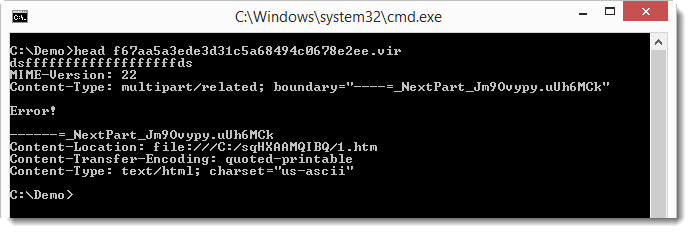
But if you look at the file, you’ll notice a line preceding the MIME-Version line:

20151221-180149

You can instruct emldump to skip this line with option -H:

20151221-180326

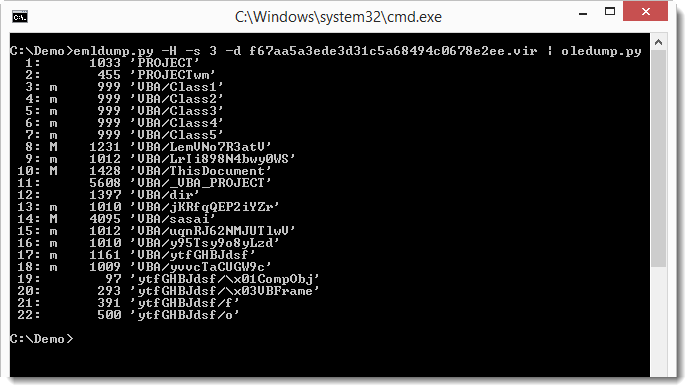
Now emldump is able to analyze the multipart MIME file, and detect the MSO file (part 3). oledump can analyze MSO files:

20151221-180513

Monday 21 December 2015

Update: oledump.py Version 0.0.22

Filed under: maldoc,My Software,Update — Didier Stevens @ 16:27

Some changes when you use the –raw option. Now plugins can also be used when the VBA code is corrupted.

oledump_V0_0_22.zip (https)
MD5: CA91850BBC92E82D705F707704000F82
SHA256: 16763BCF15BFB3301FFAE0BDA26F18EE2946EDD7478994B798127DBBEF5FF9E7

Monday 14 December 2015

BruCON Spring Training 2016: Analysing Malicious Documents

Filed under: Announcement — Didier Stevens @ 0:00

I teach a class on analyzing malicious documents at BruCON Spring Training 2016.

First day covers PDF, second day covers MS Office documents. When you attend, you also get my PDF and MS Office workshop videos.

Early bird registration till the end of the year.

Sunday 13 December 2015

Windows Backup Privilege: CMD.EXE

Filed under: Forensics,My Software — Didier Stevens @ 0:00

You probably encountered the situation where you could not access a file, even as an administrator. For example hiberfil.sys.

There is a way in Windows to read any file regardless of DACLs: the backup privilege.

I updated ReactOS’ cmd.exe shell to use the backup privilege.

I added a new command: privilege. This command enables the backup privilege. To be able to enable a privilege, you need to have the privilege: you have the backup privilege if you’re an administrator and elevate the process (cmd.exe).

And I updated the copy and type command to make use of the enabled backup privilege.

Finally, there’s yet another new command: info. This command gives the MAC timestamps, file attributes and SDDL of the given file/folder.

cmd-dll_v0_0_4.zip (https)
MD5: D9D75A10F2C328B708303F9BD24B9AD3
SHA256: 952CFB833D4F22093D7DF837372239A1199C1738FFFFED76124AF8668F4D3877

Friday 11 December 2015

Overview of Content Published In November

Filed under: Announcement — Didier Stevens @ 0:00

Here is an overview of content I published in November:

Blog posts:

YouTube videos:

Videoblog posts:

SANS ISC Diary entries:

Monday 30 November 2015

Update: Authenticode Tools

Filed under: Uncategorized — Didier Stevens @ 0:00

I released new versions of my AnalyzePESig and ListModules authenticode tools.

Extra fields with information were added to the output of the tools, and the tools were adapted to use the SE_BACKUP_NAME privilege, giving the tools the privilege to read files even when the permissions do not allow it (running as administrator and elevated).

A new field that might require some extra explanation is the DEROIDHash field. The DEROIDHash is a sha-256 hash of the DER structure and OID numbers of a PKCS7 signature: it’s the sha-256 hash of the bytes that make up the PKCS7 signature, except for the data. In other words, it’s the sha-256 hash of the DER bytes that specify the tags and the OID numbers. Signatures with the same structure and OID numbers share the same DEROIDhash.

For example, if a new version of a signed executable is released and the DEROIDHash value is different from the previous version, then the author has changed his/her signing process or is using a certificate with a different structure; or the executable was signed by another party using another signing process.

Sunday 29 November 2015

Update: oledump.py Version 0.0.21

Filed under: My Software,Update — Didier Stevens @ 11:15

A small change in this new version: the second term of the cut-expression can also be a negative number now. A negative number allows you to cut bytes from the end of the file. Example: cut-expression :-0x100 select the whole stream except the last 256 bytes.

oledump_V0_0_21.zip (https)
MD5: F72CBB797CE8FB810ACE5E54DC832129
SHA256: 016C772575DF381C274F6408B242945DE35679904B7C8B1B693ABFB2B3C023FB

Saturday 28 November 2015

Update: virustotal-search.py Version 0.1.3

Filed under: My Software,Update — Didier Stevens @ 9:29

A small update: I added option -s (separator) so that you can choose your CSV separator.

virustotal-search_V0_1_3.zip (https)
MD5: 6D93F6CCE56AA74C830D66F9AE2E88C0
SHA256: 09D3BA6BCE1A69E8292AD0D44FB216FBCBF5686EA3C64DCD5FC877E91D4141F4

Tuesday 24 November 2015

Authenticode And Timestamping And sha256

Filed under: Encryption — Didier Stevens @ 0:00

I have a couple of how-to posts on digital signatures, like this code signing post. Let me revisit this topic now that Microsoft announced some upcoming changes to code signing.

I use signtool.exe that came with Visual Studio 2013 in my examples. Here is how to use signtool.exe from the command-line to sign an executable:

20151123-204917

FYI: in my case, I use option /a because I have more than one code signing certificate and I let signtool decide which one to use (option /a). But if you have only one code signing cert, you don’t need to use option /a.

As you can see, the version of signtool.exe I use (6.3.9600.16384) still uses sha1 by default.

20151123-204945

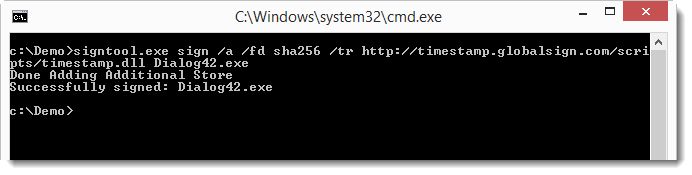
To use sha256 as digest algorithm (since Microsoft will deprecate sha1), use option /fd sha256, like this:

20151123-205150

20151123-205230

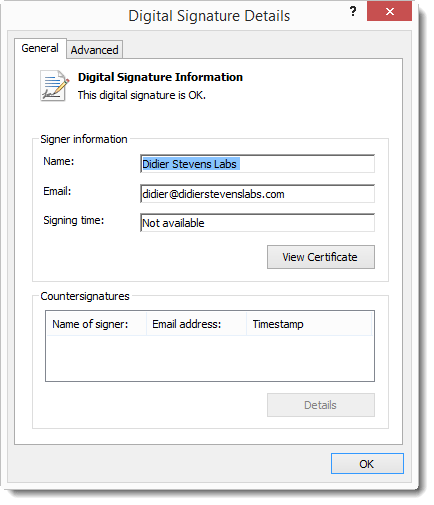
When we look at the details of the signature, we see that there is no Signing time or Countersignatures:
20151123-205310

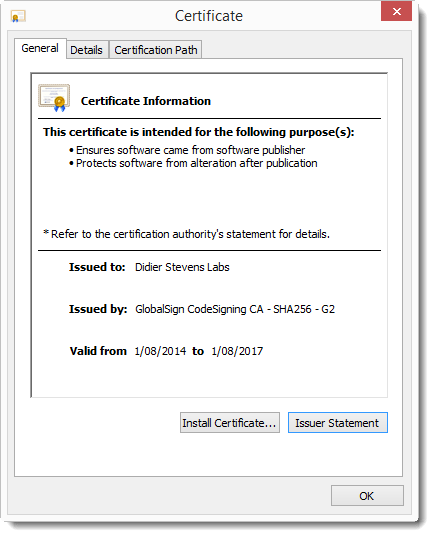
The signature is valid, because we are still in the certificate validity period:
20151123-205524

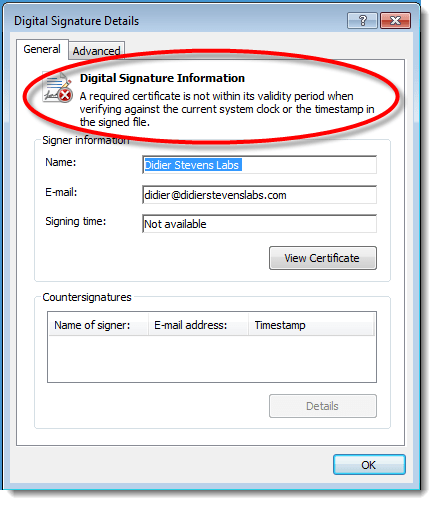
But once we are outside the certificate validity period, the signature is no longer valid:
20151123-205921

And this is because a countersignature from a timestamping service is missing. A countersignature can be added with option /tr and the URL of a timestamping service, like this one:

20151123-210005

Correction: use this URL for sha256 timestamping: http://timestamp.globalsign.com/?signature=sha2

Option /tr URL specifies a timestamping service that supports the RFC 3161 protocol.

And now the signature remains valid, even after the code signing certificate has expired:

20151123-210052

To be sure that the timestamping service uses sha256, we can request this with option /td sha256:

20151123-210426

Conclusion: always use a timestamping service when signing code, this way your signature will not expire.

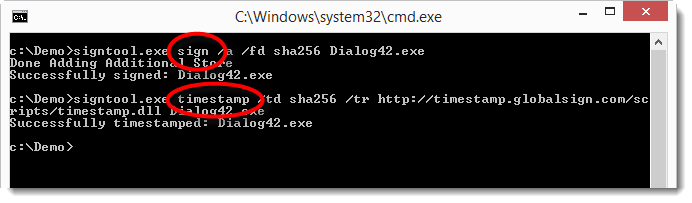
Remark: code signing and timestamping are 2 different operations. There is no requirement to execute these operation with a single command. You can also timestamp a signed executable like this:
20151123-211435

First command: sign

Second command: timestamp

And you don’t need a code signing certificate to timestamp a signed executable. You can take any executable with an embedded signature, and add a new timestamping signature with this signtool.exe timestamp command. Why do I mention this? This will become clear in a next post, where we take a closer look at Microsoft’s sha256 code signing announcement.

A last remark: as mentioned, option /a lets signtool.exe decide which certificate (from the certificate store) to use for the code signing (in case you have more than one code signing certificate). But if you want to explicitly select the code signing certificate to use, you can use option /sha1 with the sha1 fingerprint of the certificate you want to use. Important: /sha1 is a method to select a certificate, it does NOT instruct signtool to use the sha1 algorithm for the signature.

Sunday 22 November 2015

Update: emldump.py Version 0.0.5

Filed under: My Software,Update — Didier Stevens @ 0:00

A small change in this new version: the second term of the cut-expression can also be a negative number now. A negative number allows you to cut bytes from the end of the file. Example: cut-expression :-5 select the whole file except the last 5 bytes.

emldump_V0_0_5.zip (https)
MD5: 5FAEDF1459114306D57FEABEF3CDDEFD
SHA256: B3D08E1768E1211C44680DD502AC096A324FF209330657F4ABC0CD09B888254C

« Previous PageNext Page »

Blog at WordPress.com.