In blog post “Decrypting TLS Streams With Wireshark: Part 1“, I explain how to decrypt TLS streams with a specific type of encryption (pre-master secret exchanged via RSA) using the web server’s private key.
In this blog post, we will use the client to get the necessary information to decrypt TLS streams.
We do this by setting environment variable SSLKEYLOGFILE and subsequently launching our client (Chrome, Firefox, curl, …, but not Internet Explorer).
When this environment variable is set, a compatible TLS client will write data in the text file pointed to by SSLKEYLOGFILE. This data can be used to decrypt the TLS stream.
In a first test, I set SSLKEYLOGFILE=secrets-1.txt and issue exactly the same curl command as in part 1:
curl.exe –verbose –insecure –tls-max 1.2 –ciphers AES256-SHA –dump-header 01.headers –output 01.data –trace 01.trace –trace-time https://192.168.190.130
To force a cipher suite that is based on RSA for the exchange of the pre-master secret, I use options –tls-max 1.2 and –ciphers AES256-SHA.
Here is the content of secrets-1.txt:
RSA b73e7985e324abc0 030330f29c3ac42f28d91c967ad9c4b484f625ac95f6ad1dfe4474eecb6395f8a6b607f80594ebe97b45f24cae774800
CLIENT_RANDOM 53a7bcdb320d3cc85dbb21956403da8801617a2980fb79f7b50fd6d1189d0472 cce8feba2219194646201279f1bbc551035ce3d1f8a34d3514df8297078fa80f0e5b19e5aa965adf285e93e41c93c210
This file can be used in Wireshark to decrypt the TLS stream. Just like in part 1, we go to preferences for the TLS protocol:
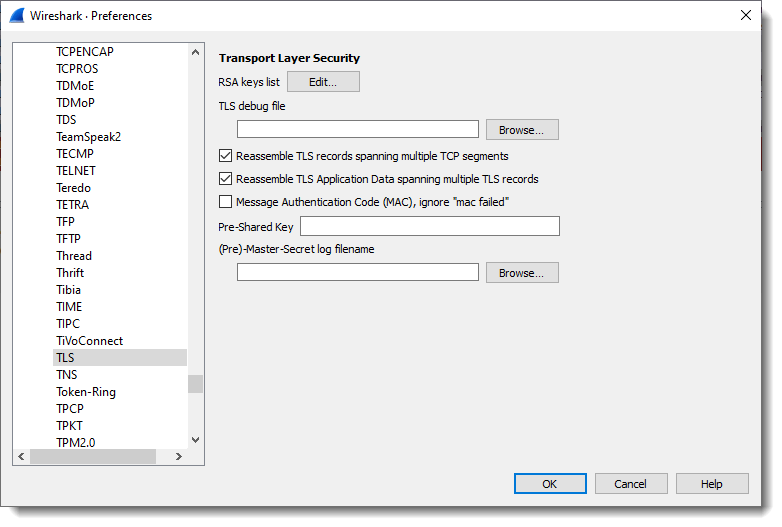
I already removed the RSA private key that was set in part 1 (so that it will not influence my part 2 tests):

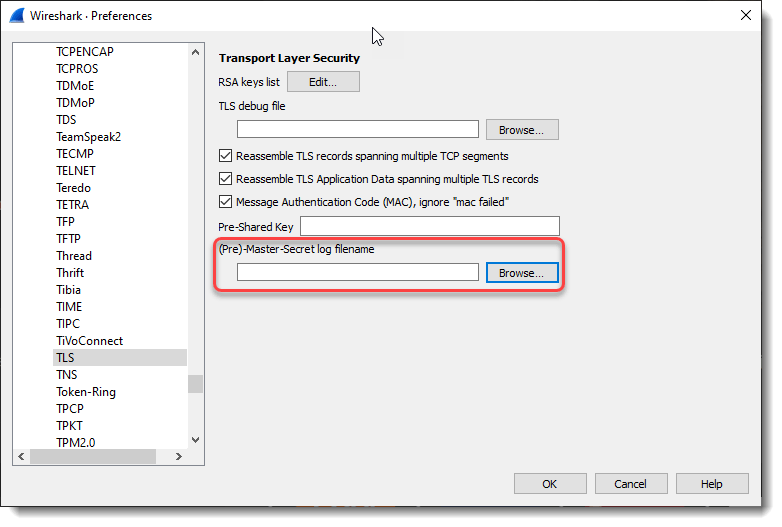
And then I set the “(Pre)-Master-Secret log filename” to secrets-1.txt, the file that was written by curl because environment variable SSLKEYLOGFILE is set to secrets-1.txt.
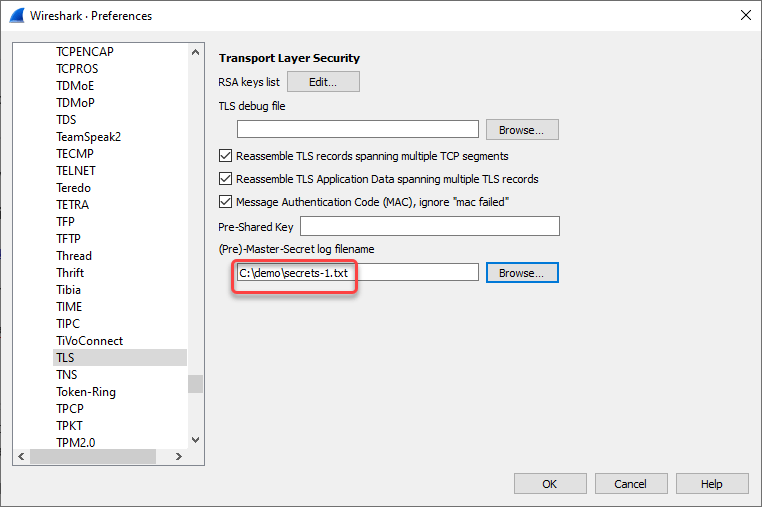
When this is done, the TLS data is decrypted, as can be witnessed by the appearance of (green) HTTP protocol packets:

Wireshark is able to decrypt this TLS stream because of the secrets in file secrets-1.txt. There are 2 secrets in file secrets-1.txt, and each one, by itself, contains enough information for Wireshark to do the decryption.
The first secret in secrets-1.txt is: RSA b73e7985e324abc0 030330f29c3ac42f28d91c967ad9c4b484f625ac95f6ad1dfe4474eecb6395f8a6b607f80594ebe97b45f24cae774800
This is the pre-master secret.
b73e7985e324abc0 is the start (first 8 bytes) of the encrypted pre-master secret:

And 030330f29c3ac42f28d91c967ad9c4b484f625ac95f6ad1dfe4474eecb6395f8a6b607f80594ebe97b45f24cae774800 is the unencrypted pre-master secret.
Wireshark can use this pre-master secret, together with cleartext data found inside the TLS stream (client and server random), to calculate the master secret and session keys.
This RSA entry in itself is enough for Wireshark to decrypt this TLS stream (if we only keep the RSA entry in secrets-1.txt, Wireshark can still decrypt).
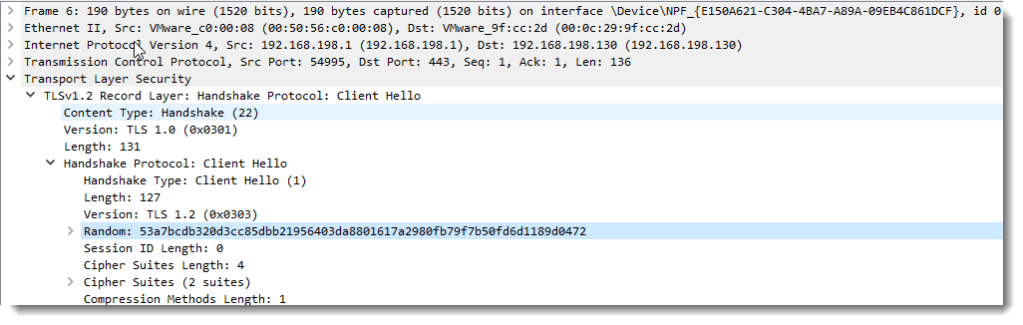
The second secret in secrets-1.txt is: CLIENT_RANDOM 53a7bcdb320d3cc85dbb21956403da8801617a2980fb79f7b50fd6d1189d0472 cce8feba2219194646201279f1bbc551035ce3d1f8a34d3514df8297078fa80f0e5b19e5aa965adf285e93e41c93c210
This is the master secret.
53a7bcdb320d3cc85dbb21956403da8801617a2980fb79f7b50fd6d1189d0472 is the client random:
And cce8feba2219194646201279f1bbc551035ce3d1f8a34d3514df8297078fa80f0e5b19e5aa965adf285e93e41c93c210 is the unencrypted master secret.
Wireshark can use this master secret to calculate the session keys.
This CLIENT_RANDOM entry in itself is enough for Wireshark to decrypt this TLS stream (if we only keep the CLIENT_RANDOM entry in secrets-1.txt, Wireshark can still decrypt).
SSLKEYLOGFILE can also be used to capture the secrets necessary to decrypt TLS streams encrypted with perfect forward secrecy (e.g. not relying on the server’s private key).
In a second test, I set SSLKEYLOGFILE=secrets-2.txt and issue this curl command:
curl.exe –verbose –insecure –dump-header 01.headers –output 01.data –trace 01.trace –trace-time https://192.168.190.130
In this test, curl uses TLS 1.3 with perfect forward secrecy:
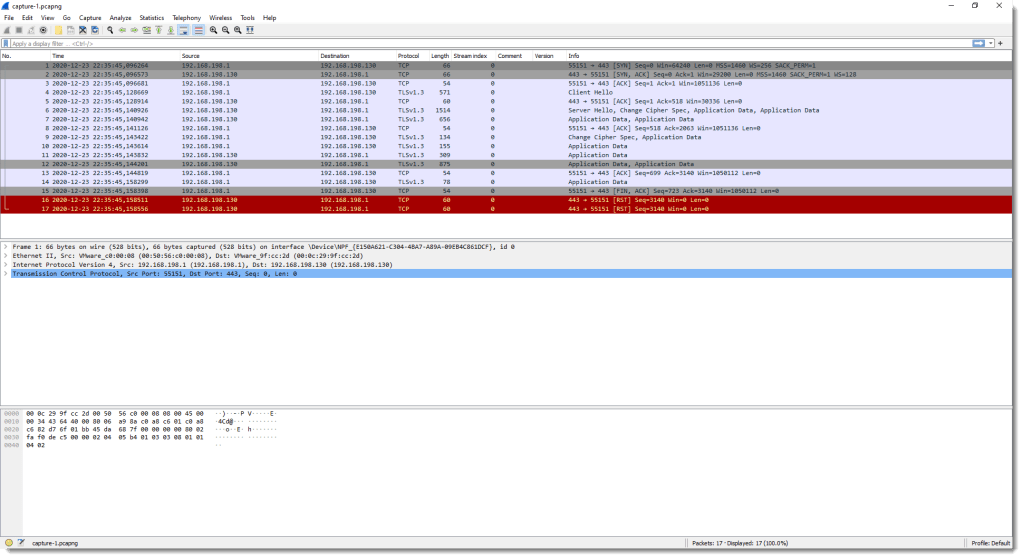

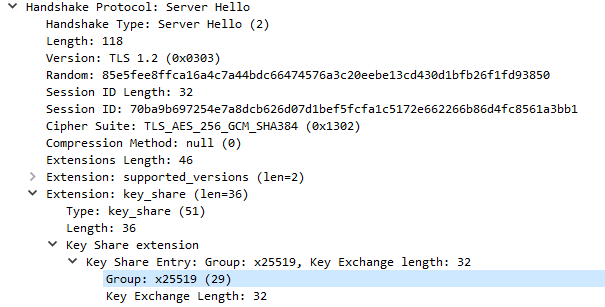
x25519 is Diffie-Helman based on elliptic curve Curve25519: we have perfect forward secrecy here that uses ephemeral Diffie-Hellman key exchange. Hence the private key of the server can not help us decrypt this TLS stream. We need the secrets saved in SSLKEYLOGFILE secrets-2.txt:
SERVER_HANDSHAKE_TRAFFIC_SECRET 3928c6ded8c2e9c251dc4c57f2a81935a3f0e5a61f3d40b25fd87d5f05db3e47 b8c81cee570a35f077664f16780017d7037adb1efacc448d05de9c806868290c32f587a1c29e577abcc7e5d1609f070b
EXPORTER_SECRET 3928c6ded8c2e9c251dc4c57f2a81935a3f0e5a61f3d40b25fd87d5f05db3e47 bc8a82770f43dc9b326cd8565b93ebfd3c6f9d9be53693510685b265980d98be7f8a7de613895b76454ec19d06e12825
SERVER_TRAFFIC_SECRET_0 3928c6ded8c2e9c251dc4c57f2a81935a3f0e5a61f3d40b25fd87d5f05db3e47 7e40bb08f33bfc281878450c08e21e1d2e92ca1214436aa8353925fee2fe39d69175710e90bd6c76940af5596862525e
CLIENT_HANDSHAKE_TRAFFIC_SECRET 3928c6ded8c2e9c251dc4c57f2a81935a3f0e5a61f3d40b25fd87d5f05db3e47 7aec5af0565c8fa05431534daf6a98da645ccf9eb791626008ebe5d9053e2e5046986e577e09b5a9f3355d4aff685111
CLIENT_TRAFFIC_SECRET_0 3928c6ded8c2e9c251dc4c57f2a81935a3f0e5a61f3d40b25fd87d5f05db3e47 7a31364a743eee1ba3ed10fc082099c1fb09ad9175fd5ec81101521a3f34e3f3ab6e83f0bd77529ce9ff3eb9f4beedad
And when I use this secrets-2.txt file with Wireshark, the TLS stream is decrypted:
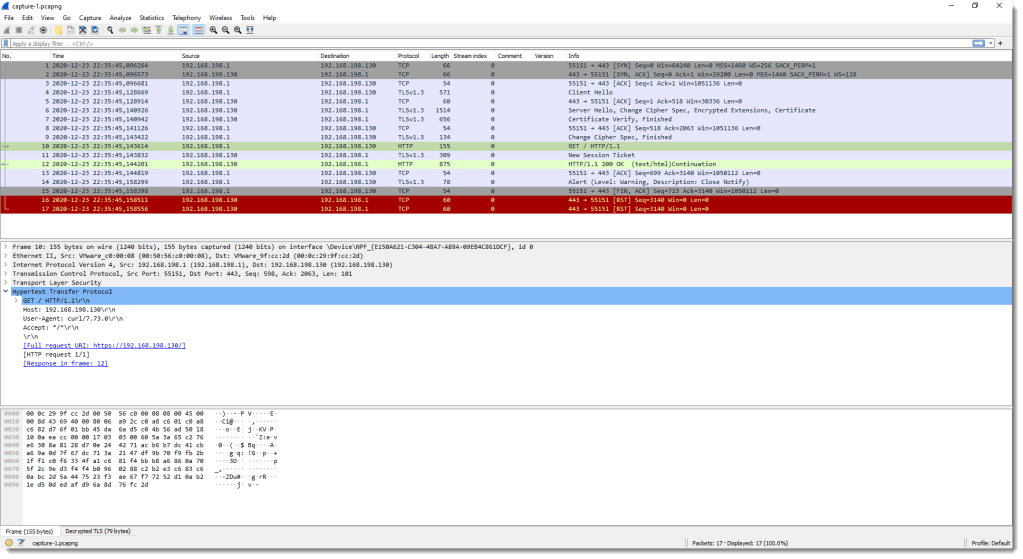
If I comment-out all SSLKEYLOGFILE secrets-2.txt entries except the client secret entries, Wireshark can only decrypt data coming from the client (# is a line-comment):


And vice versa when I comment-out everything except the server secret entries:


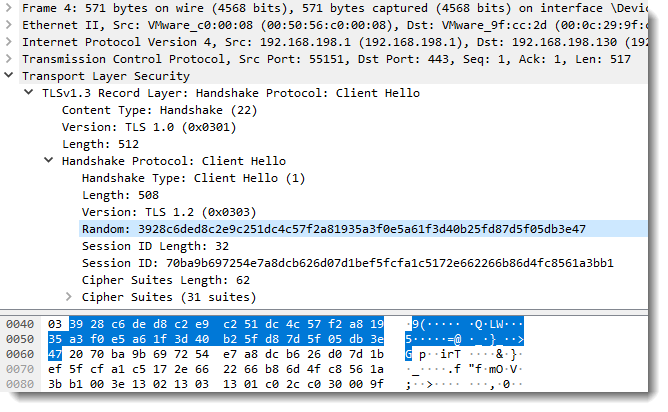
Value 3928c6ded8c2e9c251dc4c57f2a81935a3f0e5a61f3d40b25fd87d5f05db3e47 found in each secrets-2.txt entry is the client random:
Remark that in these 2 tests, I set SSLKEYLOGFILE=secrets.txt. This makes that curl will create a file secrets.txt in its working directory. You can also use an absolute path, for example:
set SSLKEYLOGFILE=c:\demo\secrets.txt
In part 3, I’ll give some practical tips.
Previous blog post:
Decrypting TLS Streams With Wireshark: Part 1
Next blog post:
Decrypting TLS Streams With Wireshark: Part 3
The capture file, secrets, and other data used in this blog post can be downloaded here:
tls-decryption-part-2.zip (https)
MD5: 562F169A57557737D3E4B1F9CDF3B252
SHA256: 8DD27510B2F6CD58A55F42515EF756572658D2ADFE7CEA6151DD45EE5F7DB171

 Didier Stevens