Didier Stevens

Monday 20 October 2008

Analyzing a Malicious PDF File

Filed under: Malware,PDF — Didier Stevens @ 21:43

This starts a series of post leading up to my PDF talk at the next Belgian ISSA and OWASP chapter event. I’ll be publishing a couple of my PDF tools.

Next video shows how I use my PDF parser to analyze a malicious PDF file, and extract the shell code.

Searching for keyword javascript yields 2 indirect objects referencing /JavaScript objects. The JavaScript is executed through an automatic annotation (/AA) when the page is rendered (e.g. when the PDF document is opened, as it contains only one page). Decompressing the second /JavaScript object (34) displays the code.

collectEmailInfo is an undocument Adobe Acrobat JavaScript method with a vulnerability (fixed in Adobe Acrobat Reader 8.1.2). My Spidermonkey helps me to extract the shell code.

YouTube, Vimeo and hires Xvid.

Thursday 9 October 2008

Quickpost: Another E-card Malware Spam Campaign

Filed under: Malware,Quickpost — Didier Stevens @ 8:12

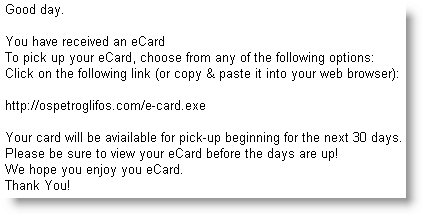
Another e-card e-mail is being spammed right now

Subject: You have received an eCard

Spoofed sender: 123Greetings.com

MD5 51c2c1e82bc8c89dd831494689341147

VirusTotal

Monday 6 October 2008

Forensic Time Dilatation

Filed under: Forensics,smart card — Didier Stevens @ 6:42

When you compile a forensic report, it’s crucial to report facts objectively and avoid potential misinterpretation.

Although this statement shouldn’t be a surprise to you, sometimes, the devil is in the details.

Take the electronic purse (EP) in use in many European countries (Proton, Chipknip, …). These EP systems are based on ATM smart cards and are used to pay small amounts. A main advantage of these cards is that terminals performing EP debit transactions don’t require a network connection to check the purse owner’s credit or credentials. The debit transactions are self-contained and protected by cryptographic protocols.

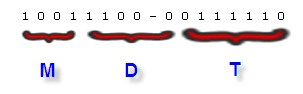
The EP also supports a couple of simple unencrypted commands to read the balance of the EP and list the last transactions. When you send the EP an APDU to get the last transaction (0xE1, 0xB6, 0x00, 0x01, 0x24), it will reply with a binary record of 36 bytes. 2 bytes in this record are used to encode the timestamp of the transaction using the following format:

4 bits I called M are used to encode the month (0-15).
5 bits D are used to encode the day (0-32).
The year the transaction took place is not documented.
7 bits T are used to encode the time the transaction occurred (0-127). 128 possible values is by no means enough to encode the time with a precision of 1 second (86400 possible values). The resolution of the EP timestamp is 675 seconds long (that’s 11 minutes and 15 seconds).

And herein lies the difficulty to print timestamps in a forensic report. I came across a forensic tool (TULP2G) that gets it wrong. TULP2G will print the above timestamp in its forensic report like this:

24/09 11:37:30

Can you spot the error? If the time is encoded with units covering a period of 675 seconds (i.e. an error margin of 675 seconds), you cannot print the time in a forensic report in HH:MM:SS format without any indication that the represented value is not precise up to the second! Because there will always be people reading your report that have no notion of the (in)accuracy of the EP timestamp, and they will interpret the timestamp like you wrote it: 11 hours, 37 minutes and 30 seconds precisely. According to the cash register ticket, I bought my lunch at 11:44, not at 11:37:30.

If you print timestamps in a forensic report, think about the resolution of the values you’re representing. If you use the HH:MM:SS time-format to represent a value that is measured in units longer than 1 second, add a qualification to each printed timestamp to indicate this.

You can add a footnote explaining the error margin, use the scientific error notation, …

For example, write 24/09 11:37:30 ± 675s.

Personally, I would write 24/09 11:37:30 + 675s – 1s (1), because I’ve observed only terminals that seem to perform an integer division: current time expressed in seconds / 675. (1) refers to a footnote explaining the resolution of the timestamp. But this is in all likelihood too confusing.

Your takeaway: if you compile or interpret forensic reports, take particular care to avoid the pitfalls of timestamps. Take into account desynchronized clocks, clock drift, time-zones and time unit resolution.

I contacted the author of the TULP2G software, but got no reply. If you’ve contacts inside the NFI, please inform them of my opinion.

Tuesday 30 September 2008

Secret Question, Public Answer

Filed under: Vulnerabilities — Didier Stevens @ 9:58

Due to the current media attention, I’m updating and posting this old draft about secret questions.

First, let’s get a pedantic observation out of the way: Secret Question is a misnomer. If you think about it, it’s the answer that is secret, not the question.

The problem with secret questions is that they are often a backdoor to your account. When you use a strong password, the answer to your secret question will be easier to guess than your password. So you are actually using weak credentials.
If the sole purpose of the secret question is to reset your password (or e-mail it to you), then don’t use it, just type some random characters for an answer and forget about it. You won’t be able to get into your account using the secret question backdoor, but so won’t attackers.
If you’re afraid that you might forget your password, write it down and keep it safe (I recommend KeePass if you need a password manager).

Now if you definitely want a backdoor because you don’t want to write anything down and don’t trust your memory, there are a couple of options open to you.
If you’re not able to make up your own secret question, but have to choose one from a predefined list, then provide an answer that you can derive from the question only (think about it, your secret answer doesn’t have to make sense, it just has to be secret). An example:
Q: Name of first pet?
A: Four
Why four? Because the question is a sentence of 4 words. This way you don’t have to remember your secret answer, just the rule to derive the answer from the question. You can reuse the same rule for different accounts, it will generate different secret answers for different secret questions.

If you can provide your own secret question, then I recommend to use math. An example:
Q: How much is 3 + 7?
A: 20
Why 20? Because your secret rule is to double the result to obtain the correct answer. 3 + 7 equals 10, 10 times 2 equels 20.

Secret answer rules can be as hard as you want, but complex rules are more likely to be forgotten…

To summarize: disable secret questions, and store and protect your credentials.

This post comes with a complementary cartoon.

Monday 29 September 2008

Quickpost: SQL Server 2005 Management Studio and Password Management

Filed under: Encryption,Quickpost,Reverse Engineering — Didier Stevens @ 16:06

Another stored password question I was asked: where does SQL Server 2005 Management Studio store the passwords, and are they encrypted?

When you set the Remember Password toggle:

the password is saved in this file (default install, Administrator account):
C:\Documents and Settings\Administrator\Application Data\Microsoft\Microsoft SQL Server\90\Tools\Shell\mru.dat

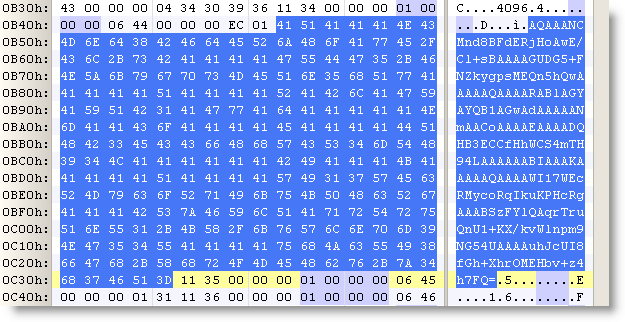
The password is not stored in cleartext. The file contains a BASE64 blob, strongly resembling a DPAPI protected data blob.

Convert it to hex:

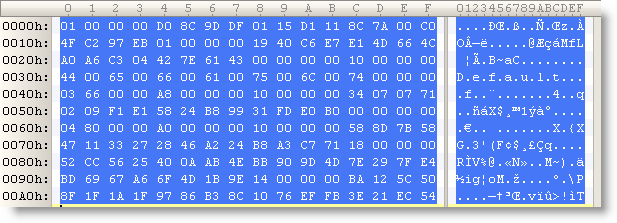
(all the protected DPAPI data blobs I’ve seen start with byte sequence 01 00 00 00 D0 8C 9D…)

Let’s decode this with CryptUnprotectData (all optional parameters set to NULL):

We get no error, proving that it’s indeed data protected by DPAPI on this machine for this user. The content is just the password in UNICODE.

The nice thing for a software developer, is that DPAPI allows him to encrypt/decrypt data without having to worry about encryption keys. For details on all the keys used by DPAPI, read this MSDN article.


Quickpost info


Friday 26 September 2008

Quickpost: Stored User Names and Passwords

Filed under: Encryption,Quickpost — Didier Stevens @ 19:05

“Where does Windows store this password?” “Is it safe there?”

I regularly get asked these questions, and they frequently appear on forums.

Microsoft has developed several technologies to store and protect credentials, and to add to the confusion, Microsoft has renamed some of these technologies over the years…

A list: LSA, Protected Storage, Windows Data Protection (DPAPI), Stored User Names and Passwords, …

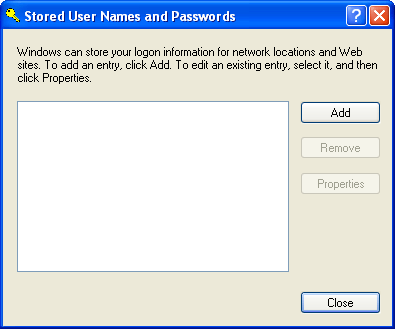
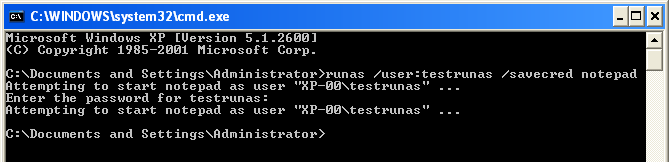
Last question I read was: where does runas /savecred store the password? It gets stored in Stored User Names and Passwords. Before storing the password:

And after:

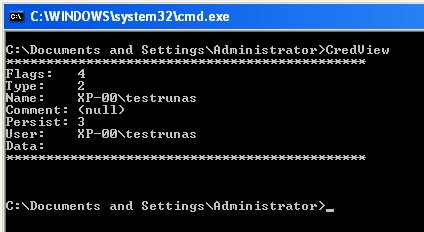
Nirsoft has a tool (CredView) to dump passwords stored in Stored User Names and Passwords:

The CredRead function (used by CredView) will not retrieve Windows passwords (domain and local) unless it is called from the LSA process. That’s why CredView doesn’t display the testrunas password (data).

If you convert CredView to a DLL and inject it in the LSA process, you’ll be able to retrieve the passwords. This is exactly what Cain & Abel does, and why you need admin rights (SeDebugPrivilege to be precise).


Quickpost info


Tuesday 23 September 2008

Dismantling an XML-Bomb

Filed under: Vulnerabilities — Didier Stevens @ 21:49

No breaking news in this post, but I’ve found enough applications vulnerable to XML-bombs and not enough awareness around it, that I feel it justifies another web page documenting the principles behind it, together with suggestions to protect your applications from it.

The XML-bomb is a small XML document designed to expand to a gigantic size when parsed by an (unprotected) XML-parser. The huge amount of resources (memory) consumed when parsing the XML-bomb can cause a DoS or BoF.

Take this simple XML document:

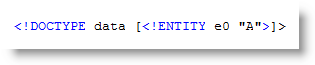
And take this Document Type Declaration defining an entity e0 with value A:

Including this DOCTYPE in our simple XML document enables us to reference entity e0 in our document, for example like this:

When this document is parsed by an XML-parser supporting DTDs, the entity reference is replaced by its value. Here is Internet Explorer rendering our XML document:

Notice that &e0; has been replaced by A.

This entity definition and referral mechanism is one essential ingredient of an XML-bomb.

The second ingredient is an expression that will grow exponentially and consume huge amounts of resources when evaluated.

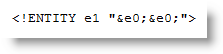
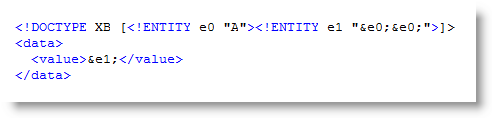
We define a second entity, e1, referring twice to our first entity e0:

Include this definition in our XML document:

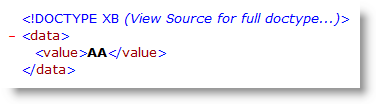
And this is how it is parsed:

e0 evaluates to A

e1 evaluates to AA

Now define e2 referencing e1, e3 referencing e2, …, and then we get

e2 evaluates to AAAA

e3 evaluates to AAAAAAAA

We have achieved exponential growth! An XML-bomb with 31 entities is less than 1K in size, but entity e30 is 1GB  (2^30 bytes) in size when it gets evaluated by the XML-parser!

How do you protect your application from an exploding XML-bomb?

If you don’t need support for DTDs, just disable DTDs or use a parser without DTD support.

If you need support for DTDs, try to prevent XML-bombs from entering your XML-parser by known-pattern scanning (like classic antivirus software does, for example an application firewall) or limit the impact of an expanding XML-bomb by hardening your XML-parser by restricting its consumption of resources.

You’re aware of the limitations of known-pattern scanning. This is a text-book XML-bomb, with exponential growth finding its origin in the binary tree structure. But there are many other data type structures …

CALL -151

Filed under: Entertainment,Nonsense,Puzzle — Didier Stevens @ 10:22

A quiz question for today: what is CALL -151?

Shout-outs to everyone who ever used CALL -151!

Update:

The answer:

Monday 22 September 2008

Quickpost: WiFi Antenna With 360° Servo

Filed under: Hardware,Quickpost,WiFi — Didier Stevens @ 10:17

Last weekend, I’ve been playing with a RC servo to automate the recording of wsrradial plots. Metlstorm has presented a solution to do this with Lego Mindstorms, but I present a solution if you don’t want to use Lego components.

RC servos are easy to find, and you can find many servo controllers for PCs (a typical RC servo is controlled with a PWM signal). Though most RC servos though are limited to 180° rotations, there are 360° servos on the market.

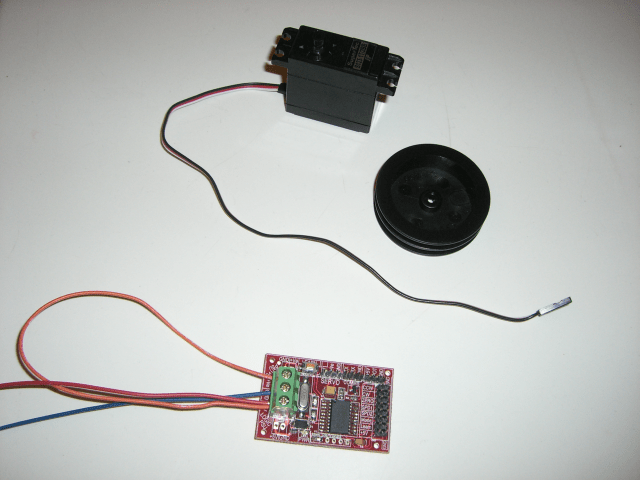
Here is a picture of my 360° RC servo, togheter with a servo controller.

The servo in action:


Quickpost info


Wednesday 17 September 2008

Authenticode Challenge – Solution Part 1

Filed under: Encryption,Puzzle — Didier Stevens @ 23:07

I’m starting a couple of posts with detailed explanations and solutions for my Authenticode Challenge. Let’s start with a solution using standard tools.

If you’re a bit into cryptography, you know that the textbook attack on RSA public-key cryptography is integer factorization. Long keys are used to thwart this attack, because no efficient method has been found to factor large integers within an acceptable time and cost. While researching Authenticode, I asked myself this question: assume you’ve solved the factorization problem, how exactly would you forge a new digital signature for a patched executable?

I worked out a method, and then got the idea to turn this into a difficult puzzle for you, i.e. a real challenge. But to do that, I had to find a way to make the integer factorization a non-issue for the puzzle. My first solution, using a very small key, was a dead-end. First the key had to be large enough to allow me to generate a certificate (about 360 bits long), but then the signcode procedure didn’t work. I figured out that the key had to be at least 512 bits for Authenticode to work. But a 512 bits key would take too long to factorize… Read on to find out how I solved this.

Solution 1

This solution takes mostly place on a Linux box. The first thing we have to do is recover the private key…

1) Get the authenticode challenge file ac.exe

2) Extract the PKCS7 Authenticode signature with my digital signature tool:

disitool.py extract ac.exe ac.exe.pkcs7

3) Dump the information in the pkcs7 file with openssl:

openssl pkcs7 -in ac.exe.pkcs7 -inform DER -text -print_certs > ac.exe.pkcs7.text


The public key is composed of the Modulus and the Exponent.

4) Lets extract the modulus from the certificate with this command:

openssl x509 -modulus -in ac.exe.pkcs7.text

Modulus=D0EA1ABA978DF0065B2009F75C846F28B04ED5143B237B3FC24272245ADE837EFE0271E1A2854E0C81BA9F70A83AD86D47B0EACD062BC15BC61A99DC83124EC9

The modulus N is an integer that is the product of 2 prime numbers, P and Q (P and Q are kept secret). Integer factorization will allow you to recover P and Q, and hence produce the private key. There are several algorithms and tools to factorize integers, I’ll just point you to a didactic cryptography tool I mentioned before: Cryptool. But because I’m using a 512 bit modulus, factorization will take a long time, and I wanted to avoid this. So lets do something else.

5) Convert the modulus from a hexadecimal representation to a decimal representation, for example with Python:

python -c 'print 0xD0EA1ABA978DF0065B2009F75C846F28B04ED5143B237B3FC24272245ADE837EFE0271E1A2854E0C81BA9F70A83AD86D47B0EACD062BC15BC61A99DC83124EC9'

The modulus N in decimal representation is:
10941738641570527421809707322040357612003732945449205990913842131476349984288934784717997257891267332497625752899781833797076537244027146743531593354333897

6) Search for this number with Live Search (Google will not accept such a large search term):

To spare you the long factorization time, I used a 512 bit key that has already been factorized: RSA-155 (this is the first 512 bit key to be factorized and was a landmark result in integer factorization).

Thus we have:

P = 102639592829741105772054196573991675900716567808038066803341933521790711307779

Q = 106603488380168454820927220360012878679207958575989291522270608237193062808643

Next post will explain in detail how to use P and Q to generate a new Authenticode signature…
« Previous PageNext Page »

Blog at WordPress.com.