Didier Stevens

Thursday 28 January 2010

Quickpost: Shellcode to Load a DLL From Memory

Filed under: Hacking,My Software,Quickpost — Didier Stevens @ 3:08

I finally took time to develop shellcode to load a DLL, not with LoadLibrary, but directly from memory. Not storing the DLL on disk prevents it from being detected by AV software; not using LoadLibrary bypasses HIPS software that monitors this system call.

My shellcode is based on Joachim’s code.

In previous posts, I showed how to load a DLL or shellcode with VBA in Excel. This is a combination of both techniques: a VBA macro loads and executes shellcode in Excel’s process space, and the shellcode loads a DLL from memory into Excel’s process memory.

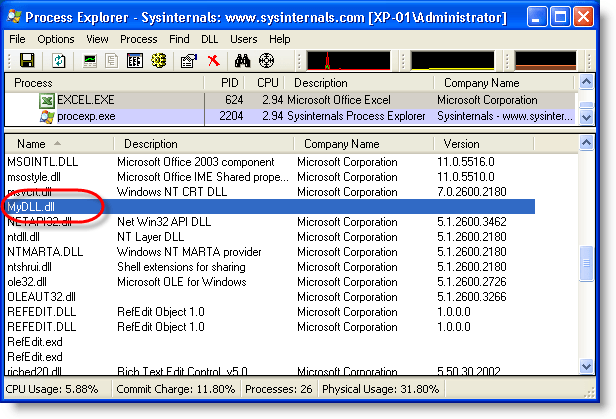
With the code of the previous post, the DLL appears in the list of loaded DLLs:

With this shellcode, it doesn’t:


Quickpost info


Thursday 21 January 2010

Quickpost: PDF Header %!PS-Adobe-N.n PDF-M.m

Filed under: My Software,PDF,Quickpost — Didier Stevens @ 11:21

@Feliam has an interesting PDF library to create PDF files with an unconventional header (the generated document doesn’t start with %PDF-…, but %PDF appears somewhere in the first 1024 bytes of the document). As this trick is likely to be taken over by malware authors, I updated PDFiD to support this.

The PDF reference document also mentions %!PS-Adobe-N.n PDF-M.m as a valid header, however, the PDF documents I and @Feliam generated with this header are not rendered by Adobe Reader (neither Foxit or Sumatra PDF).

I was told Adobe did support this header in older versions. My tests show Adobe Reader version 3, 4, 5 and 6 will render PDF documents with header %!PS-Adobe-N.n PDF-M.m. Versions 7, 8 and 9 will not. Therefor I decided not to include support for this header to PDFiD.

pdf-parser doesn’t test the header, it analyzes PDF documents regardless of the header.

Monday 18 January 2010

Update: XORSearch Version 1.6.0

Filed under: My Software,Update — Didier Stevens @ 1:26

A couple of new features:

  • searching for Unicode
  • searching for Hex code
  • printing of neighbouring bytes

Unicode support is rather simple: I consider Unicode as ASCII with 2 bytes per character, last byte always equals 0.

Usage case of hexcode search: search for embedded and encoded PE-file by searching for the PE-magic bytes MZ:

XORSearch -h malware.exe 50450000

Remember that XORSearch is not limited to win32, you can compile it on *nix too: cc -o XORSearch XORSearch.c

Download here.

Wednesday 13 January 2010

Quickpost: New Versions of PDFiD and pdf-parser

Filed under: My Software,PDF,Quickpost — Didier Stevens @ 21:54

A new version of PDFiD (V0.0.10): to deal with PDF samples trying to evade detection by preceding the header with some random bytes, I use less stringent conditions to identify a PDF file. If PDFiD finds keyword %PDF in the first 1024 bytes of a file, it assumes it’s a PDF file and starts analyzing it.

A new version of pdf-parser (v0.3.7):

  • added support for filters /LZWDecode and /RunLengthDecode
  • added a –dump option to extract the unfiltered data of a stream object (useful when the data is not actually compressed, but a payload)
  • testing the Python version before execution

Both can be downloaded on the PDF Tools page.


Quickpost info


Monday 11 January 2010

Adobe Reader JavaScript Blacklist Framework

Filed under: Malware,PDF,Vulnerabilities — Didier Stevens @ 1:51

The JavaScript Blacklist Framework is a security feature Adobe released with Adobe Reader and Acrobat versions 8.1.7 and 9.2.

When you’re in a case where you need to use Adobe Reader and you can’t disable JavaScript, the JavaScript Blacklist Framework can help you mitigate zero-days in JavaScript API functions by disabling the vulnerable functions.

I produced a video where I disable util.printf:

Notice that when I blacklist util.printf, the script still executes until the blacklisted function util.printf is called. At that moment, the script is cancelled and the user is warned.

On Windows, you can blacklist functions by adding them to registry value tBlackList (HKLM\SOFTWARE\Policies\Adobe\product\version\FeatureLockDown\cJavaScriptPerms\tBlackList). To blacklist more than one function, use the same registry value and separate the functions by the pipe-character (e.g. Util.printf|Collab.getIcon). Pay attention to the fact that the framework is case-sensitive (e.g. Util.printf is correct, util.printf is not correct).

The framework is impervious to bypassing with some basic obfuscation techniques found in malicious PDFs (eval(“util.printf… ; x = util.printf; x(“… ).

It’s too bad that blacklisting is limited to the JavaScript API; the functions to blacklist must be in the form <object-name>.<function-name>. Otherwise we would be able to blacklist some global functions of the JavaScript language that are often used in malicious PDF files, like unescape. According to the ECMAScript specification, unescape is a member function of the Global Object. I tried several ways to blacklist it (unescape, .unescape, this.unescape, Doc.unescape, …), but failed.

If you really want to disable unescape, you could do this by patching the JavaScript plugin EScript.api. Maybe I’ll post a method to do this in-memory with my basic process manipulation tool kit.

Adobe Reader JavaScript Blacklist Framework

Monday 4 January 2010

New Format for UserAssist Registry Keys

Filed under: Forensics,My Software,Windows 7 — Didier Stevens @ 15:29

With Windows 7 and Windows Server 2008 R2, the binary data format of the values stored in the UserAssist registry keys has changed.

Here’s a partial description of the new format:

  • the counter is 32-bits long, starting at byte 4 (first byte is byte 0)
  • the timestamp (64-bits) starts at byte 60
  • there is a 32-bit value that appears to be the total time an application has focus, expressed in milli-seconds (starts at byte 8 )

For more details, read my article in the new forensic magazine Into The Boxes.

Don’t forget to use the special version of my UserAssist tool on Windows 7 and Windows Server 2008 R2.

Friday 1 January 2010

The Undeletable SafeBoot Key

Filed under: Malware,My Software — Didier Stevens @ 12:53

I present you a new program to create the SafeBoot registry key with special permissions protecting it from deletion. After using this new program, you’ll be able to restore the SafeBoot registry keys with my .REG files.

Many malware deletes the SafeBoot registry key to prevent you from booting into Safe Mode. I provide a registry fix to restore these keys.

But there exists malware that goes even further and actively monitors the registry to thwart every attempt to restore the keys by deleting them as soon as they are restored. Untill now, I recommended to use a Live CD to restore the keys in such a case (this is a complex procedure). This way, the malware is not running while you restore the SafeBoot keys.

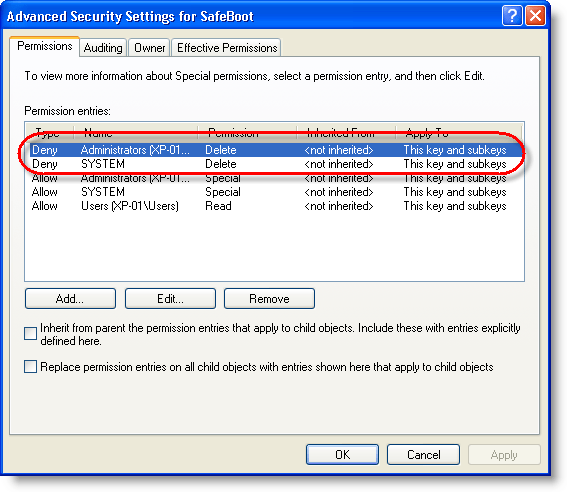
Now I developed another solution: a program to create the SafeBoot registry key with permissions to deny Administrators and System accounts to delete the key. This way, the malware can’t delete the keys because it lacks the permissions to do so.

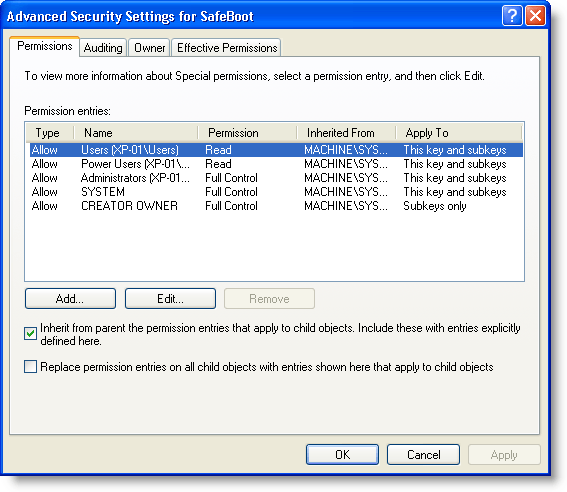
Here are the SafeBoot permissions on a default Windows XP install:

And here are the permissions of the SafeBoot key created with my new program:

I designed my program to create the SafeBoot key only when it is missing, and to set the special permissions while it is created:

My program will not set the special permissions when the key exists. If the SafeBoot keys exists and you can’t boot into Safe Mode, you’re dealing with another issue than a Safe Mode disabling malware (probably a buggy driver).

The program is a console program, but it will pause at the end so you can read its output, even when you launch it from Windows Explorer (i.e. double-click it). If you want to use it in a script and prevent the prompt from appearing, use option -n.

If the SafeBoot key exists, my program will tell this (SYSTEM\CurrentControlSet\Control\SafeBoot exists.) and it will leave the permissions unchanged. If your system is clean but you want to protect the SafeBoot keys, I recommend you change the permissions manually using RegEdit.

My program creates only registry key SYSTEM\CurrentControlSet\Control\SafeBoot, and not the subkeys. To restore the subkeys, you just need to use the appropriate .REG file.

Having read this, you might have thought that malware authors could bypass this protection by changing the permissions before deleting the keys. You’re right. I don’t deny Administrator and System accounts the permission to change the permissions, because I don’t expect there is malware in the wild that changes permissions of the SafeBoot key. I’ll deal with it when it eventually appears.

Download:

UndeletableSafebootKey_V0_0_0_1.zip (https)

MD5: 2FAC291AD547657E31B157B8581D4601

SHA256: 7A1E42A57BBF8E804491318671AE992947C82DCC9C2001E3033B45E4AEAB2DDE

Wednesday 30 December 2009

Detecting EICAR With a .NET Micro-controller

Filed under: .NET,Entertainment,Hardware — Didier Stevens @ 22:07

I’ve been playing with a .NET Micro Framework micro-controller: the USBizi. A few of its interesting characteristics are that you program it in C# with Visual Studio and that in-circuit debugging (including single-stepping) is supported.

The .NET Micro Framework has no assemblies to support USB in host mode (only guest mode), but the USBizi comes with assemblies for host mode providing support for removable drives like USB sticks. To illustrate this feature, I wrote a program to scan the files on a USB stick for the EICAR test file and replace the content with a message appropriate for the time of the year.

Some ideas I’ve for this device: program it as a hardware keylogger, a hardware password vault, …

using System.Threading;
using System;
using System.IO;
using Microsoft.SPOT.Hardware;
using Microsoft.SPOT;
using Microsoft.SPOT.IO;
using GHIElectronics.System.SystemDevices;
using GHIElectronics.System;
using GHIElectronics.System.IO;
using GHIElectronics.Hardware;

namespace USBiziEICARDetector
{
    public class Program
    {
        static string sEICAR = @"X5O!P%@AP[4\PZX54(P^)7CC)7}$EICAR-STANDARD-ANTIVIRUS-TEST-FILE!$H+H*";

        static void Main()
        {
            Boolean bFoundEicar;
            Debug.Print("Starting...");
            while (true)
            {
                // must start system first, no event is associated
                SystemManager.Start(null);
                // wait till we have a device
                while (SystemManager.GetDevices().Length == 0)
                    Thread.Sleep(500);
                // get a list of devices
                Device[] devices = SystemManager.GetDevices();
                // look for a device
                foreach (Device device in devices)
                {
                    // this loop will run once for every device
                    if (device.deviceType == DeviceType.Drive)
                    {
                        try
                        {
                            // USB drive is inserted
                            // Create a new storage device
                            PersistentStorage PS = new PersistentStorage(device.deviceID);
                            // now everything works just like on SD cards....
                            // Mount the file system
                            PS.MountFileSystem();
                            // Assume one storage device is available, access it through NETMF
                            string rootDirectory = VolumeInfo.GetVolumes()[0].RootDirectory;
                            bFoundEicar = false;
                            string[] files = Directory.GetFiles(rootDirectory);
                            Debug.Print("Files on root of USB drive...");
                            foreach (string file in files)
                            {
                                Debug.Print(file);
                                Boolean bFileIsEICAR = false;
                                FileStream fs = File.OpenRead(file);
                                Debug.Print(fs.Length.ToString());
                                if (fs.Length == sEICAR.Length)
                                {
                                    char[] acEICAR = sEICAR.ToCharArray();
                                    for (int iIter = 0; iIter < sEICAR.Length; iIter++)
                                    {
                                        int iByte = fs.ReadByte();
                                        if (acEICAR[iIter] != iByte)
                                            break;
                                        if (iIter == sEICAR.Length - 1)
                                        {
                                            bFoundEicar = true;
                                            bFileIsEICAR = true;
                                        }
                                    }
                                }
                                fs.Close();
                                if (bFileIsEICAR)
                                {
                                    byte[] abHappyNewYear2010 = {
                                        0x0D, 0x0A, 0x0D, 0x0A, 0x0D, 0x0A, 0x20, 0x58, 0x58, 0x58, 0x20, 0x58, 0x58, 0x58, 0x20, 0x20, 0x20, 0x20, 0x20, 0x20, 0x20, 0x20, 0x20, 0x20,
                                        0x20, 0x20, 0x20, 0x20, 0x20, 0x20, 0x20, 0x20, 0x20, 0x20, 0x20, 0x20, 0x20, 0x20, 0x20, 0x20, 0x20, 0x20, 0x20, 0x20, 0x20, 0x20, 0x20, 0x20,
                                        0x20, 0x20, 0x20, 0x20, 0x20, 0x20, 0x20, 0x20, 0x20, 0x58, 0x58, 0x58, 0x20, 0x20, 0x20, 0x20, 0x20, 0x58, 0x58, 0x58, 0x20, 0x20, 0x20, 0x20,
                                        0x20, 0x20, 0x58, 0x20, 0x20, 0x20, 0x20, 0x20, 0x20, 0x58, 0x58, 0x58, 0x0D, 0x0A, 0x20, 0x20, 0x58, 0x20, 0x20, 0x20, 0x58, 0x20, 0x20, 0x20,
                                        0x20, 0x20, 0x20, 0x20, 0x20, 0x20, 0x20, 0x20, 0x20, 0x20, 0x20, 0x20, 0x20, 0x20, 0x20, 0x20, 0x20, 0x20, 0x20, 0x20, 0x20, 0x20, 0x20, 0x20,
                                        0x20, 0x20, 0x20, 0x20, 0x20, 0x20, 0x20, 0x20, 0x20, 0x20, 0x20, 0x20, 0x20, 0x20, 0x20, 0x20, 0x58, 0x20, 0x20, 0x20, 0x58, 0x20, 0x20, 0x20,
                                        0x58, 0x20, 0x20, 0x20, 0x58, 0x20, 0x20, 0x20, 0x58, 0x58, 0x58, 0x20, 0x20, 0x20, 0x20, 0x20, 0x58, 0x20, 0x20, 0x20, 0x58, 0x0D, 0x0A, 0x20,
                                        0x20, 0x58, 0x20, 0x20, 0x20, 0x58, 0x20, 0x20, 0x20, 0x20, 0x20, 0x20, 0x20, 0x20, 0x20, 0x20, 0x20, 0x20, 0x20, 0x20, 0x20, 0x20, 0x20, 0x20,
                                        0x20, 0x20, 0x20, 0x20, 0x20, 0x20, 0x20, 0x20, 0x20, 0x20, 0x20, 0x20, 0x20, 0x20, 0x20, 0x20, 0x20, 0x20, 0x20, 0x20, 0x20, 0x20, 0x20, 0x20,
                                        0x20, 0x20, 0x20, 0x20, 0x20, 0x58, 0x20, 0x20, 0x20, 0x58, 0x20, 0x20, 0x20, 0x58, 0x20, 0x20, 0x20, 0x20, 0x20, 0x58, 0x20, 0x20, 0x20, 0x20,
                                        0x20, 0x58, 0x20, 0x20, 0x20, 0x58, 0x0D, 0x0A, 0x20, 0x20, 0x58, 0x20, 0x20, 0x20, 0x58, 0x20, 0x20, 0x20, 0x58, 0x58, 0x58, 0x58, 0x20, 0x20,
                                        0x20, 0x58, 0x58, 0x58, 0x58, 0x58, 0x58, 0x20, 0x20, 0x58, 0x58, 0x58, 0x58, 0x58, 0x58, 0x20, 0x20, 0x58, 0x58, 0x58, 0x20, 0x58, 0x58, 0x58,
                                        0x20, 0x20, 0x20, 0x20, 0x20, 0x20, 0x20, 0x20, 0x20, 0x20, 0x20, 0x20, 0x20, 0x20, 0x58, 0x20, 0x20, 0x20, 0x58, 0x20, 0x20, 0x20, 0x58, 0x20,
                                        0x20, 0x20, 0x20, 0x20, 0x58, 0x20, 0x20, 0x20, 0x20, 0x20, 0x58, 0x20, 0x20, 0x20, 0x58, 0x0D, 0x0A, 0x20, 0x20, 0x58, 0x58, 0x58, 0x58, 0x58,
                                        0x20, 0x20, 0x20, 0x20, 0x20, 0x20, 0x20, 0x58, 0x20, 0x20, 0x20, 0x58, 0x20, 0x20, 0x20, 0x20, 0x58, 0x20, 0x20, 0x58, 0x20, 0x20, 0x20, 0x20,
                                        0x58, 0x20, 0x20, 0x58, 0x20, 0x20, 0x20, 0x58, 0x20, 0x20, 0x20, 0x20, 0x20, 0x20, 0x20, 0x20, 0x20, 0x20, 0x20, 0x20, 0x20, 0x20, 0x58, 0x20,
                                        0x20, 0x20, 0x20, 0x58, 0x20, 0x20, 0x20, 0x58, 0x20, 0x20, 0x20, 0x20, 0x20, 0x58, 0x20, 0x20, 0x20, 0x20, 0x20, 0x58, 0x20, 0x20, 0x20, 0x58,
                                        0x0D, 0x0A, 0x20, 0x20, 0x58, 0x20, 0x20, 0x20, 0x58, 0x20, 0x20, 0x20, 0x58, 0x58, 0x58, 0x58, 0x58, 0x20, 0x20, 0x20, 0x58, 0x20, 0x20, 0x20,
                                        0x20, 0x58, 0x20, 0x20, 0x58, 0x20, 0x20, 0x20, 0x20, 0x58, 0x20, 0x20, 0x58, 0x20, 0x20, 0x20, 0x58, 0x20, 0x20, 0x20, 0x20, 0x20, 0x20, 0x20,
                                        0x20, 0x20, 0x20, 0x20, 0x20, 0x20, 0x58, 0x20, 0x20, 0x20, 0x20, 0x20, 0x58, 0x20, 0x20, 0x20, 0x58, 0x20, 0x20, 0x20, 0x20, 0x20, 0x58, 0x20,
                                        0x20, 0x20, 0x20, 0x20, 0x58, 0x20, 0x20, 0x20, 0x58, 0x0D, 0x0A, 0x20, 0x20, 0x58, 0x20, 0x20, 0x20, 0x58, 0x20, 0x20, 0x58, 0x20, 0x20, 0x20,
                                        0x20, 0x58, 0x20, 0x20, 0x20, 0x58, 0x20, 0x20, 0x20, 0x20, 0x58, 0x20, 0x20, 0x58, 0x20, 0x20, 0x20, 0x20, 0x58, 0x20, 0x20, 0x20, 0x58, 0x20,
                                        0x58, 0x20, 0x20, 0x20, 0x20, 0x20, 0x20, 0x20, 0x20, 0x20, 0x20, 0x20, 0x20, 0x20, 0x58, 0x20, 0x20, 0x20, 0x20, 0x20, 0x20, 0x58, 0x20, 0x20,
                                        0x20, 0x58, 0x20, 0x20, 0x20, 0x20, 0x20, 0x58, 0x20, 0x20, 0x20, 0x20, 0x20, 0x58, 0x20, 0x20, 0x20, 0x58, 0x0D, 0x0A, 0x20, 0x20, 0x58, 0x20,
                                        0x20, 0x20, 0x58, 0x20, 0x20, 0x58, 0x20, 0x20, 0x20, 0x20, 0x58, 0x20, 0x20, 0x20, 0x58, 0x20, 0x20, 0x20, 0x20, 0x58, 0x20, 0x20, 0x58, 0x20,
                                        0x20, 0x20, 0x20, 0x58, 0x20, 0x20, 0x20, 0x58, 0x20, 0x58, 0x20, 0x20, 0x20, 0x20, 0x20, 0x20, 0x20, 0x20, 0x20, 0x20, 0x20, 0x20, 0x58, 0x20,
                                        0x20, 0x20, 0x20, 0x20, 0x20, 0x20, 0x58, 0x20, 0x20, 0x20, 0x58, 0x20, 0x20, 0x20, 0x20, 0x20, 0x58, 0x20, 0x20, 0x20, 0x20, 0x20, 0x58, 0x20,
                                        0x20, 0x20, 0x58, 0x0D, 0x0A, 0x20, 0x58, 0x58, 0x58, 0x20, 0x58, 0x58, 0x58, 0x20, 0x20, 0x58, 0x58, 0x58, 0x58, 0x20, 0x58, 0x20, 0x20, 0x58,
                                        0x58, 0x58, 0x58, 0x58, 0x20, 0x20, 0x20, 0x58, 0x58, 0x58, 0x58, 0x58, 0x20, 0x20, 0x20, 0x20, 0x20, 0x58, 0x20, 0x20, 0x20, 0x20, 0x20, 0x20,
                                        0x20, 0x20, 0x20, 0x20, 0x20, 0x20, 0x20, 0x58, 0x58, 0x58, 0x58, 0x58, 0x20, 0x20, 0x20, 0x20, 0x58, 0x58, 0x58, 0x20, 0x20, 0x20, 0x20, 0x58,
                                        0x58, 0x58, 0x58, 0x58, 0x20, 0x20, 0x20, 0x20, 0x58, 0x58, 0x58, 0x0D, 0x0A, 0x20, 0x20, 0x20, 0x20, 0x20, 0x20, 0x20, 0x20, 0x20, 0x20, 0x20,
                                        0x20, 0x20, 0x20, 0x20, 0x20, 0x20, 0x20, 0x58, 0x20, 0x20, 0x20, 0x20, 0x20, 0x20, 0x20, 0x58, 0x20, 0x20, 0x20, 0x20, 0x20, 0x20, 0x20, 0x20,
                                        0x20, 0x58, 0x0D, 0x0A, 0x20, 0x20, 0x20, 0x20, 0x20, 0x20, 0x20, 0x20, 0x20, 0x20, 0x20, 0x20, 0x20, 0x20, 0x20, 0x20, 0x20, 0x58, 0x58, 0x58,
                                        0x20, 0x20, 0x20, 0x20, 0x20, 0x58, 0x58, 0x58, 0x20, 0x20, 0x20, 0x20, 0x20, 0x20, 0x58, 0x58, 0x0D, 0x0A, 0x0D, 0x0A};

                                    File.WriteAllBytes(file, abHappyNewYear2010);
                                    Debug.Print("EICAR found!");
                                }
                            }
                            Debug.Print("... end of list!");
                            // if we need to unmount
                            Thread.Sleep(500);
                            PS.UnmountFileSystem();
                            Thread.Sleep(500);
                            PS.Remove();
                            OutputPort LED = new OutputPort(USBizi.Pins.E2x, false);
                            if (bFoundEicar)
                            {
                                Debug.Print("bFoundEicar = true");
                                BlinkXTimes(LED, 4, 300);
                            }
                            else
                            {
                                Debug.Print("bFoundEicar = false");
                                BlinkXTimes(LED, 2, 300);
                            }
                        }
                        catch (Exception e)
                        {
                            Debug.Print("Exception:");
                            Debug.Print(e.Message);
                        }
                    }
                }
                Thread.Sleep(500);
                SystemManager.Reboot(SystemManager.RebootMode.Normal);
            }
        }

        public static void BlinkXTimes(OutputPort LED, int times, int milliseconds)
        {
            for (int i = 0; i < times; i++)
            {
                LED.Write(true);
                Thread.Sleep(milliseconds);
                LED.Write(false);
                Thread.Sleep(milliseconds);
            }
        }
    }
}

Wednesday 23 December 2009

LoadDLLViaAppInit

Filed under: My Software — Didier Stevens @ 12:20

How do you load a DLL in every new process on a Windows machine? One way to do this is the AppInit_DLLs registry key (this key is frequently abused by malware). Every new process loading user32.dll, also loads the DLLs listed in AppInit_DLLs on startup.

But you can’t use this key to load hook-createprocess.dll, because it will load it in every process, and your Windows machine will stop working.

To selectively load DLLs, I developed a new DLL: LoadDLLViaAppInit.dll. Copy LoadDLLViaAppInit.dll to system32 and add it to the AppInit_DLLs registry key (HKEY_LOCAL_MACHINE\SOFTWARE\Microsoft\Windows NT\CurrentVersion\Windows). This way it gets loaded in every new process. LoadDLLViaAppInit.dll will consult config file LoadDLLViaAppInit.bl.txt in system32, this config file contains the list of processes we want to load a particular DLL into. Here’s an example:

acrord32.exe    hook-createprocess.dll
winword.exe    hook-createprocess.dll
excel.exe    hook-createprocess.dll
powerpnt.exe    hook-createprocess.dll

This config file instructs LoadDLLViaAppInit.dll to load hook-createprocess.dll into Adobe Acrobat (acrord32.exe) and Microsoft Office (Word, Excel and PowerPoint). Important remark: the separator between the executable name and the dll name must be a TAB character. For debugging purposes, LoadDLLViaAppInit.dll logs the DLLs it loads to the debug console.

If you want to prevent a DLL from being loaded (for example to allow Adobe Reader to update itself), you’ll just have to temporarily modify the config file. And be careful with this tool, a wrong configuration can render your machine unusable (for example, if you load hook-createprocess.dll into every process, Windows won’t be able to create new processes).

Be sure to allow only administrators to write to the config file, otherwise you’re opening your machine to elevation attacks.

Starting with Windows Vista, AppInit_DLLs is not enabled by default for security reasons (it’s used a lot by malware). To enable it, you’ve to set the value of LoadAppInit_DLLs to 1. But be aware that this makes your Windows Vista (and later) machine less secure, as from then on, malware will also be able to use AppInit_DLLs to autorun.

Download:

LoadDLLViaAppInit_V0_0_0_1.zip (https)

MD5: 60B93BAF4B0F973C3EC920F2F4A180E8

SHA256: 3B528A3BAF593A2740D5655CF18BC0932801D4DF1750DE8F9C8229C0FF51E8BE

Sunday 20 December 2009

Quickpost: Read-Only USB Stick

Filed under: Forensics,Hardware,Quickpost — Didier Stevens @ 20:52

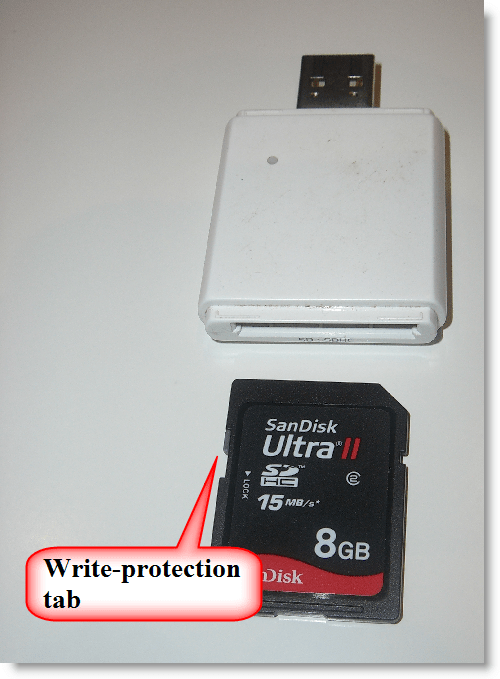
When someone asks me for a read-only USB stick, I recommend to use an SD card with a SD-to-USB adapter, because these are easier to find than USB sticks with write-protection. Most SD cards have a write-protection tab.

But last time I got a surprise: when testing a new SD card reader, I was able to write to the write-protected SD card. Turns out that this particular SD card reader doesn’t support the write-protection tab and always allows the OS to write to the SD card.

Quickpost info


« Previous PageNext Page »

Blog at WordPress.com.