Didier Stevens

Thursday 30 June 2011

Integrating My CCTV DVR And Alarm System

Filed under: Hacking,Hardware — Didier Stevens @ 20:49

I’ve designed and installed my own home automation system: it allows me to control lights and appliances, and monitor activity and environmental parameters at home.

I also have a CCTV DVR with a couple of cameras around the house.

Until now, these 2 systems were not linked. If a PIR sensor detected movement in the garden and later I wanted to see what caused the movement, I had to write down the timestamp and then rewind the DVR around the time the movement was detected. Not anymore. My CCTV DVR has an external IO connector, and now events detected by my alarm system are logged on my DVR. I just have to click on an event on my DVR and the video starts to play.

The problem I faced to achieve this integration, was the lack of documentation. There was no pinout of the external IO connector, not in the manual and not online. So I had to reverse engineer it.

My CCTV DVR is a DVR4L5 sold by Velleman, and is actually produced by AVTECH in Taiwan. The external IO connector is a 9 pin DSUB connector. I can use it to send 4 different alarms to the DVR. But for this to work, the alarm has first to be configured on the DVR:

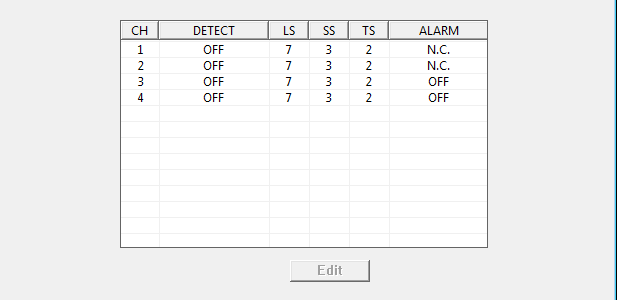
Set the channel for which you want the alarm to register to N.C. This means Normally Closed, which is counter-intuitive, because I’m using a Normally Open alarm. When I now close the circuit between pin 1 and pin 5 of the external IO connector, an alarm event gets logged and the DVR’s buzzer alerts me. Since I don’t need that buzzer to alert me, I disable it:

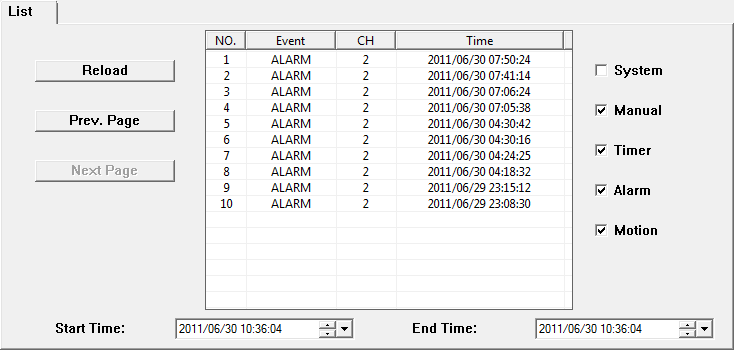
Here is an example of alarm events logged by the CCTV DVR:

The DVR can also send alerts to the alarm system. It does this by closing the circuit between pins 6 and 7. For example when it detects movement filmed by one of the cameras. But from experience I know you get a lot of false positives from this motion detection. For example when a cloud moves in front of the sun, the sudden shadow can trigger the simple motion detection algorithm of the DVR. A more useful alert to send to the alarm system is the loss of video signal. The DVR can be configured to sound the alarm when it loses a video signal from one of the cameras. For example when someone tampers with your camera.

Some weeks after I reversed the pinout, I received a reply from AVTECH that confirmed my findings. I’m including it here:

PIN

FUNCTION

DESCRIPTION

1~4

ALARM INPUT

Connect ALARM INPUT (PIN1 – 4) and GND (PIN5) connector with wires. Once an alarm is triggered, the DVR will start recording and the buzzer will be on.

PIN Alarm Corresponding video channel
PIN 1 1 CH1
PIN 2 2 CH2
PIN 3 3 CH3
PIN 4 4 CH4

*

5

GND GROUND

6

EXTERNAL ALARM COM Under the normal operation, COM disconnects with NO. But when any alarm is triggered, COM connects with NO.
Attention: The voltage restriction is under DC24V 1A.

7

EXTERNAL ALARM NO Under the normal operation, COM disconnects with NO. But when any alarm is triggered, COM connects with NO.
Attention: The voltage restriction is under DC24V 1A.

8

RS485-A  

9

RS485-B  

10~11

GND GROUND

Wednesday 22 June 2011

Quickpost: Need a PoC to Test Your Security Setup? Not Necessarily…

Filed under: Quickpost,Vulnerabilities — Didier Stevens @ 13:30

People regularly ask me for a PoC (PDF or other type) to test their security setup. For example, they sandboxed Adobe Reader and now they want to test that Adobe Reader can’t write to sensitive Windows directories like system32.

Well, you don’t need a PoC to test your setup in this way. Just develop and compile a DLL that writes to system32, and inject it in the target process.

The problem however, is that not everybody has the skills to develop and compile such a DLL. But almost everybody can write a VBScript that accomplishes the same. Here’s a one-liner that creates test.txt in system32:

CreateObject("Scripting.FileSystemObject").CreateTextFile("c:\windows\system32\test.txt")

But how do you get the target process to execute this script? That is something I worked out 2 years ago: bpmtk: Injecting VBScript. In a nutshell: I developed a DLL that once injected into a process, instantiates a VBScript engine and executes the provided script.

Monday 13 June 2011

EMET Article

Filed under: Vulnerabilities — Didier Stevens @ 0:00

(IN)SECURE Magazine published my article on Microsoft’s Enhanced Mitigation Experience Toolkit.

It contains many details I’ve yet to discuss on this blog.


Monday 6 June 2011

Update: vs.py

Filed under: Hardware,My Software — Didier Stevens @ 18:46

I’ve updated my Python program to take surveillance pictures from IP-cameras. This updated version is multi-threaded. For each picture to retrieve, you can specify a thread.

Each line in vs.config requires a 4th parameter now, the name of the thread:

Hall.jpg    http://192.168.1.1/IMAGE.JPG    -    Thread1

This name can be anything. If you use the same name for different pictures, then these pictures will be retrieved sequentially by this thread.

vs_v0_4.zip (https)

MD5: A2AFAD9E581798F1D986A0AE9DF64577

SHA256: C3AC4892A71DF79E3BA87714CB6323D157C7E74C838EDE81013C96DD4EAD0238

Wednesday 25 May 2011

Malicious PDF Analysis Workshop Screencasts

Filed under: Forensics,PDF — Didier Stevens @ 15:58

After giving my Malicious PDF Analysis workshop at Hack In The Box Amsterdam, I decided to produce a screencast for each exercise (there are 20 exercises). You can find the first screencasts here. More will be produced soon.

Materials you’ll need for the exercises:

Tuesday 17 May 2011

Another PDF Puzzle

Filed under: Forensics,PDF,Puzzle — Didier Stevens @ 8:23

As I’m going to give my workshop on analysis of malicious PDFs at HiTB Amsterdam this Thursday, I thought I would share a PDF puzzle/challenge I made for BSidesLondon.

You can download it here.

And as there is write-up for the solution to this puzzle on a blog, I’ll link to this in the comments next week. Since you can just Google the solution, there is no prize this time.

Thursday 12 May 2011

BackTrack 5 Includes PDFiD and pdf-parser

Filed under: Forensics,PDF — Didier Stevens @ 21:13

You probably noticed the release of BackTrack 5.

But did you notice the inclusion of my PDFiD and pdf-parser tools?

You can find them under /pentest/forensics/pdfid and /pentest/forensics/pdf-parser.

Wednesday 27 April 2011

Suspender.dll

Filed under: My Software — Didier Stevens @ 16:12

When the suspender DLL is loaded inside a process, it will wait for 60 seconds and then suspend all the threads of the host process. If you want another delay, just change the name of the file by appending the number of seconds to sleep. For example, suspender10.dll will wait for 10 seconds before suspending the process.

To resume the process, you can use Process Explorer.

I’ve used this DLL to analyze malware and to disable some unwanted programs without killing them.

And from now on, I’ll try to release 32-bit and 64-bit versions of my tools.

Download:

Suspender_V0_0_0_3.zip (https)

MD5: C87FCAB2586C6154B58FB0F95FBB1FBE

SHA256: 56D0C641569E99AC31C7590DE513025E21166747565B73C5EBE34346616FFB2F

Tuesday 19 April 2011

Signed Spreadsheet with cmd.dll & regedit.dll

Filed under: Hacking,My Software — Didier Stevens @ 14:05

Remember my Excel with cmd.dll & regedit.dll?

Paul Craig has a signed version of my spreadsheet on his iKAT site. Download ikat3.zip and look for officekat.xls.

These signed macros are handy when you’re working in a restricted environment that requires Office macros to be signed.

Wednesday 6 April 2011

LockIfNotHot

Filed under: Hardware — Didier Stevens @ 8:34

When Phidget came out with this new IR temperature sensor, a lightbulb went off. This sensor measures temperature without contact. Point it to the chair in front of your computer, and it will measure your body temperature. Or the temperature of your chair, if you’re not sitting in front of your computer.

And that’s the idea: I wrote a program that locks your Windows workstation when you leave your chair (e.g. when the temperature drops).

In this screenshot, LockIfNotHot is configured to lock the workstation when the temperature drops below 25°C during 3 seconds and there is no user input during 2 seconds.

Once the workstation is locked, you need to provide your Windows account password to unlock it.

Download:

LockIfNotHot_V0_0_1.zip (https)

MD5: 188BE76E0A5BCCA26A8736F8F0C4061C

SHA256: CA915265D3B224DF3AA95E5C59B7C0E7EDF239DF50FC1C03F2C991A8B1800AD2

« Previous PageNext Page »

Blog at WordPress.com.