Didier Stevens

Friday 21 February 2014

The Credentials Listener

Filed under: Forensics,My Software,Networking,Wireshark — Didier Stevens @ 0:04

I’m taking SANS’ “SEC503 Intrusion Detection In-Depth” class here in Brussels.

One of the exercises consisted of extracting the passwords from a capture file of a FTP password dictionary attack.

I was at an advantage for this exercise 😉 I have a Lua script for Wireshark that extracts credentials (HTTP and FTP in this release).

20140221-005255

Notice that some entries have no username. A closer look at the capture file with Wireshark revealed missing segments (with the USER admin FTP command).

wireshark-tools-v0_0_1.zip (https)
MD5: 30232A81CBD0DEE275C2A3CDAF7E333C
SHA256: E45CE8AF5417A8A1C857FDF84F2FD92860738CF2E723A64A730F606D2C495064

Monday 6 January 2014

Video: Checking the Digital Signature of Windows Executables

Filed under: Encryption,My Software — Didier Stevens @ 4:09

I produced a new video: a simple howto for users who don’t know how to use Windows explorer’s properties dialog to check a digital signature.

Later in the video, it gets a bit more technical by using tools (AnalyzePESig and sigcheck) to check signatures.

Monday 30 December 2013

UltraEdit Scripts

Filed under: My Software,UltraEdit — Didier Stevens @ 20:10

UltraEdit is my text editor on Windows. I developed a couple of simple scripts that I’m going to release.

The first one is SubstituteEachLine.js.

I run this script when I need to transform each line into another form. Take this example where I want to create a Python dictionary with these words:

20131230-200759

I start my script and type this template (%% is the placeholder for each original line in the document):

20131230-200853

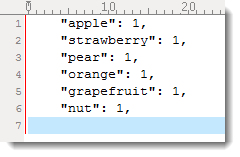
The script replaces each line in the document like this:

20131230-200941

I also often use this in a command-line environment with a limited shell. For example, to rename a bunch of files in “DOS”, I put the list of filenames in a text document and then run my script: “ren %% %%.old”. As shown in this example, you can use the placeholder (%%) more than once in the template. But you can’t escape the placeholder string.

PS: you can also use regex search and replace to do this, but there are cases were I prefer my script.

ultraedit_scripts_v0_0_1.zip (https)
MD5: C218BF518291499600B7B769AD3D14EE
SHA256: CE8FAFF9F7708B6CF596EE455735656F902C5DC99A47EB8AA35F217E6E03656C

Monday 23 December 2013

Update: Prefetch File 010 Template

Filed under: Forensics,My Software,Update — Didier Stevens @ 22:01

This update to my Prefetch File 010 Template adds Sections A through D.

20131223-225916
PFTemplate_V0_0_2.zip (https)
MD5: 56A98A78BD4E8D1AED88385AF1DD8446
SHA256: E15D721E46FFB8158C6D14C9A38DE4E3DD5DCD0972896441DF17590C540DBCC3

Saturday 14 December 2013

Update: virustotal-submit.py V0.0.3

Filed under: Malware,My Software,Update — Didier Stevens @ 0:21

There is extra error handling in this new version.

virustotal-search and virustotal-submit have their own page now: VirusTotal Tools.

virustotal-submit_V0_0_3.zip (https)
MD5: 3F9F5421F711E2930AB6F80D87DF9E2B
SHA256: 37CCE3E8469DE097912CB23BAC6B909C9C7F5A5CEE09C9279D32BDB9D6E23BCC

Wednesday 11 December 2013

MS13-098: Fixing Authenticode

Filed under: Encryption,Hacking — Didier Stevens @ 23:17

In 2009 I added a command to my Disitool to inject data “into” an Authenticode signature without invalidating it.

This year I reported on some installer programs using this padding trick.

With MS13-098, Microsoft releases a patch to prevent this signature padding trick. This change in behavior will become active June 10th 2014.

But you can already activate it now by setting reg_sz key HKEY_LOCAL_MACHINE\SOFTWARE\Microsoft\Cryptography\Wintrust\Config\EnableCertPaddingCheck to “1”.

Here is the effect illustrated with my AnalyzePESig tool:

20131211-230933

But beware of a potential issue with this regkey. Setting it to “0” will not revert to the old behavior (tested in VM with Windows XP SP3).

I had to deleted the key (actually, I renamed it) and reboot to revert to the old behavior. I informed Microsoft.

Monday 2 December 2013

4 Times Faster virustotal-search.py

Filed under: Malware,My Software,Update — Didier Stevens @ 0:26

This is an important update to virustotal-search.py.

Rereading the VT API, I noticed I missed the fact that the search query accepts up to 4 search terms.

This new version submits 4 hashes at a time, making it up to 4 times faster than previous versions.

virustotal-search_V0_1_0.zip (https)
MD5: 0141D3677F759317034C416EBF9FF30D
SHA256: FE07859C3FA09DA120D3104FF982AF0D78ADFCF099A10E46E254823502DF4EE4

Monday 25 November 2013

Quickpost: nmap & xml

Filed under: Networking,Quickpost — Didier Stevens @ 20:46

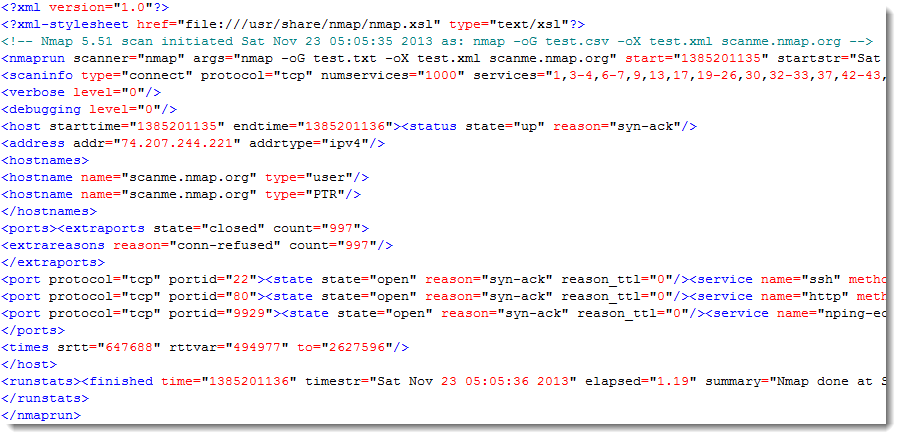
A quick tip: since more than a year now I’ve been including xml output with each nmap scan I perform. I discovered that the xml output contains more (explicit) data than the other forms of output.

Example:

nmap -oG test.csv -oX test.xml scanme.nmap.org

Starting Nmap 5.51 ( http://nmap.org ) at 2013-11-23 05:05 EST
Nmap scan report for scanme.nmap.org (74.207.244.221)
Host is up (0.65s latency).
Not shown: 997 closed ports
PORT     STATE SERVICE
22/tcp   open  ssh
80/tcp   open  http
9929/tcp open  nping-echo

Nmap done: 1 IP address (1 host up) scanned in 1.19 seconds

The grepable output:

20131125-214105

The xml output:

20131125-214254


Quickpost info


Friday 15 November 2013

Update: find-file-in-file.py Version 0.0.3

Filed under: Forensics,My Software,Update — Didier Stevens @ 12:55

shinnai made an interesting comment when I released my tool to find contained files: he wanted to know if I could add a batch mode.

I guess this batch mode is interesting when you want to check if a large set of files contains a particular file. So I added this features and release it here.

Now you can provide more than one containing-file to find-file-in-file.py: you can just type several files, use wildcards and/or use at-files (@file). When you specify @filename, find-file-in-file.py will search in all the files listed in textfile filename (each file on a separate line).

When you provide only one file to search, then this new version will just work like the previous version.

But if you provide more than one file, then batch mode is enabled. In batch mode, the contained file is searched for in each containing file. If a (partial) match is found, it will be included in the report. If no match is found, no output is produced. If you want output even when no match is found, then use option verbose (-v).

Example for a bunch of MSI files:

find-file-in-file.py msi49.tmp *.msi

File: c8400.msi
003a7200 00005600 (100%)
Finished
File: Cisco_Jabber.msi
00295600 00001000 (18%)
00294a00 00000c00 (13%)
00296600 00003a00 (67%)
Finished

File msi49.tmp was found in only 2 MSI files.
find-file-in-file_v0_0_3.zip (https)
MD5: 8691158700079C786F6905F0CA0F32BC
SHA256: 84506CED140F309503E723831A9EFB99A8CC213532BEB56E00BC4BA5FE235797

Monday 4 November 2013

Update: naft-gfe.py

Filed under: Forensics,My Software,Networking,Update — Didier Stevens @ 20:49

This new version of the generic frame extraction tool (naft-gfe) can handle files (RAM dumps) that are too large to fit into memory.

20131028-211806

Use option -b for buffered reads. By default, the file will be read and analyzed in blocks of 101MB (100MB buffer + 1MB overlap buffer).

Since the file is not read completely in memory, there is a possibility that some frames/packets are not completely read in memory. For example, a frame starts in the first block of 100MB, and ends in the second block of 100MB. The analysis routines would miss this frame.

To avoid this, the program reads the first block of 100MB (block A) plus an extra block of 1MB (block B). This block of 101MB (A + B) is analyzed. Then, the second block of 100MB (block C) is read, and the extra block B is prepended to block C for analysis (B + C). Hence the overlap buffer is analyzed twice, but packets are only extracted once from this buffer. This procedure is repeated for the complete file.

It is important that the overlap buffer is large enough to accommodate the largest possible frame or packet. That’s why by default, it is 1MB.

Use options -S and -O to choose your own size for buffer and overlap buffer.

« Previous PageNext Page »

Blog at WordPress.com.